
abxylute C6 Wireless PC Controller
4.3Editor score
Hall Effect joysticks prevent drift
1000Hz polling rate for speed
Wireless and wired connectivity options
Discover the top Mac game joysticks for 2026. This guide compares flight sticks, arcade fighters, and controllers for seamless Mac gaming performance.
Finding the right Mac game joystick can transform your gaming experience on macOS. Whether you prefer flight simulators, arcade fighters, or standard controllers, compatibility and precision matter most for smooth gameplay.
We evaluated ten top-rated options based on build quality, connection types, and software support. Each product was assessed for its ability to work reliably with macOS systems and popular gaming platforms without driver issues.
This guide highlights key features and real-world performance for every pick. Note that prices and availability change frequently, so check current listings before purchasing to ensure you get the best deal today.
4.3Editor score
4.6Editor score

4.0Editor score
This side-by-side comparison shows how each joystick performs across key categories. We highlight connectivity, build quality, and specific use cases to help you match the right controller to your gaming needs.


The Hyperkin Trooper 2 Premium is a budget-friendly USB controller designed for retro gaming. It holds a 4.1 rating and stands out for its authentic Atari feel combined with modern durability.
We may earn a commission when you buy through this link, at no additional cost to you.
Its chamfered corners and soft rubber grommet provide comfort during long sessions. The joystick movement is quiet, making it suitable for shared spaces. The 10-foot USB cable ensures reach without compromising quality.
While it lacks advanced features like vibration or wireless connectivity, its simplicity is a strength. The 6 mappable buttons allow basic customization. It is best suited for classic arcade titles rather than modern simulators.
This controller is ideal for casual gamers who want a plug-and-play retro experience on Mac. It balances cost and quality well. Check current pricing to confirm value before purchase.
The 4-way joystick offers precise input for classic platformers and fighting games.
Ergonomic design reduces hand strain during extended gaming marathons.
We may earn a commission when you buy through this link, at no additional cost to you.
The Thrustmaster T-Flight Stick X is a dedicated flight simulator joystick with a 4.2 rating. It focuses on ease of use with instant plug-and-play functionality for quick immersion in flight games.
We may earn a commission when you buy through this link, at no additional cost to you.
Its adjustable resistance control lets you fine-tune stick tension for different flying styles. The weighted base prevents sliding during aggressive maneuvers. The built-in throttle and rudder twist provide complete flight control in one device.
Twelve reprogrammable buttons allow customization for various aircraft types. However, macOS compatibility is often limited compared to Windows. You may need to check specific driver support before buying for Mac systems.
This stick is perfect for new flight sim enthusiasts wanting hardware integration without complex setup. It offers great value for the price. Verify Mac compatibility via the manufacturer site before purchasing.
Integrated throttle and rudder twist replace separate pedals for a compact setup.
Memory storage lets you save profiles for different aircraft configurations.
We may earn a commission when you buy through this link, at no additional cost to you.
The abxylute C6 is a versatile wireless controller with a 4.3 rating. It features Hall Effect joysticks to prevent drift and supports macOS seamlessly via Bluetooth or wired connection for competitive gaming.
We may earn a commission when you buy through this link, at no additional cost to you.
Its 1000Hz polling rate in wired or dongle mode ensures ultra-responsive inputs. The controller includes a rechargeable 600mAh battery lasting up to 18 hours. Turbo modes allow rapid-fire customization for competitive advantages.
Four-level vibration provides immersive feedback. While Bluetooth works well, the USB dongle offers lower latency. The lightweight design reduces fatigue during long sessions. It is a strong budget option for Mac gamers.
This controller is best for casual and competitive players wanting wireless freedom without high costs. It supports a wide range of devices including Mac and Switch. Check current prices to confirm value before buying.
Hall Effect sensors ensure precise control without stick drift over time.
Up to 18 hours of playtime on a single charge.
We may earn a commission when you buy through this link, at no additional cost to you.
The MAYFLASH F300 Arcade is a fighting game stick with a 4.5 rating. It supports macOS and many consoles. It is designed for players seeking reliable arcade inputs without complex setup or high costs.
We may earn a commission when you buy through this link, at no additional cost to you.
It allows compatibility with Sanwa Denshi buttons for upgrades. The XINPUT and DINPUT support makes it versatile on PC. Turbo functions with speed settings help execute combos efficiently. It is lightweight and portable.
The stick feels solid but may require modding for premium performance. It is a great starting point for fighting enthusiasts. Ensure your Mac OS version is supported before purchasing for best results.
This stick is ideal for beginners entering the fighting game community on Mac. It offers excellent value and compatibility. Check current listings to confirm availability and pricing before buying.
Compatible with Sanwa parts for customization and upgrades.
Supports XINPUT and DINPUT modes for PC gaming.
We may earn a commission when you buy through this link, at no additional cost to you.
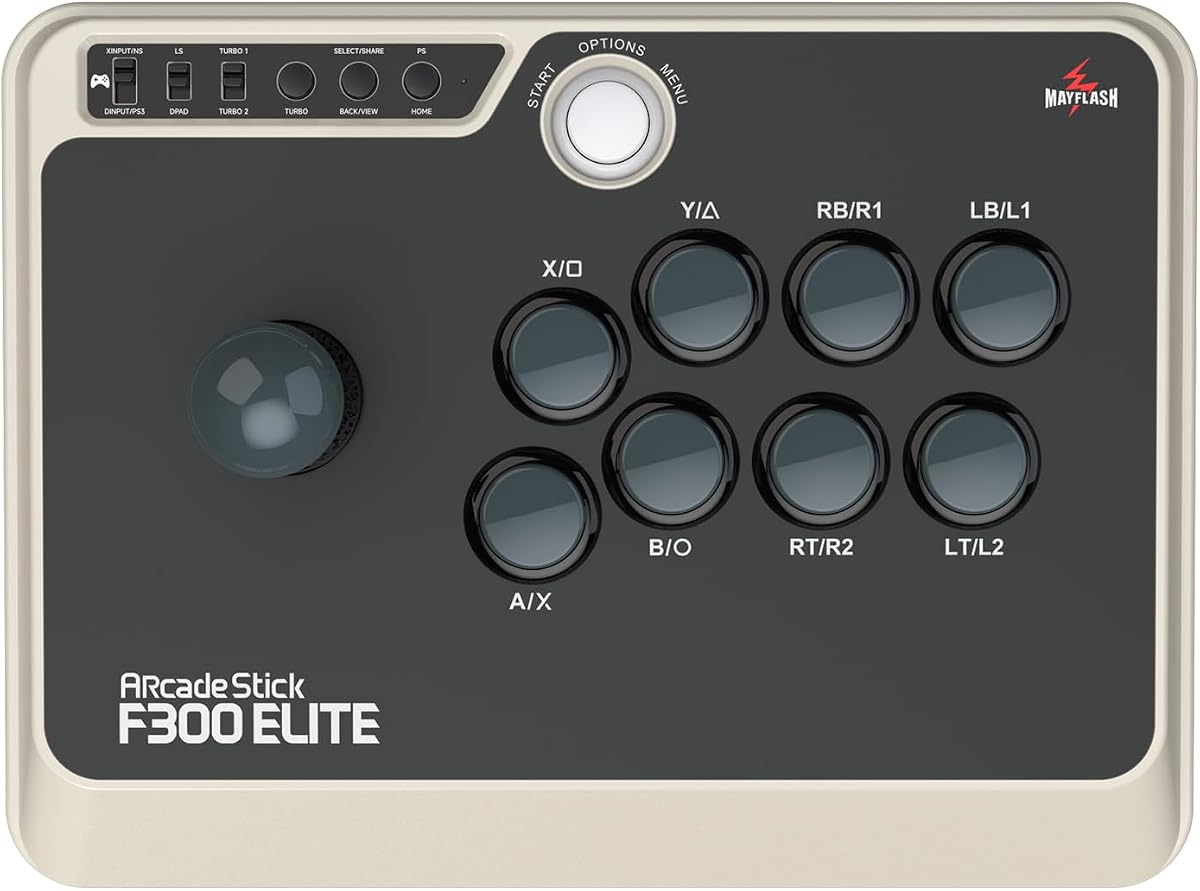
The MAYFLASH F300 Elite features premium Sanwa components and holds a 4.6 rating. It is designed for serious fighting game enthusiasts on macOS who demand precision and durability. The build quality exceeds standard arcade sticks.
We may earn a commission when you buy through this link, at no additional cost to you.
Nine responsive buttons and a 4-way joystick provide peak performance out of the box. The internal platform is accessible for further customization. Turbo support enhances combo execution. It works seamlessly with macOS systems.
Although more expensive, the cost is justified by the premium parts included. It saves time on upgrades for serious players. Ensure your Mac OS version is supported for optimal performance. Warranty support is available.
This stick is best for competitive players seeking top-tier hardware on Mac. It offers reliability and performance. Check current pricing to confirm value before purchase.
Sanwa components ensure reliable and instant input registration.
Accessible internal design allows for easy modding and part swaps.
We may earn a commission when you buy through this link, at no additional cost to you.
The Thrustmaster SimTask FarmStick is a specialized controller with a 3.7 rating. It is designed for Farming Simulator 25 on PC. macOS users may check compatibility carefully. It offers realistic control for heavy machinery.
We may earn a commission when you buy through this link, at no additional cost to you.
Hall Effect magnetic sensors ensure ultra-accurate performance without drift. The 33 programmable inputs manage complex functions without a keyboard. The ambidextrous design supports flexible setups with racing wheels. It provides an immersive farming setup.
This joystick is niche but unmatched for its specific purpose. It eliminates the need for pedals on a PC rig. Ensure macOS compatibility before purchasing. It is expensive but worth it for serious farming sim fans.
This stick is best for farming simulation enthusiasts on PC or Mac. It offers specialized control for realistic gameplay. Check current pricing to confirm value before buying.
3-axis joystick offers smooth control for tractors and construction equipment.
Thumbwheels and triggers allow full control without keyboard dependency.
We may earn a commission when you buy through this link, at no additional cost to you.
The 8Bitdo Ultimate 2 Wireless features TMR joysticks and a 4.5 rating. It offers stable wireless connections with low latency for Mac gaming. The trigger mode switch allows adaptation between linear and tactile feedback.
We may earn a commission when you buy through this link, at no additional cost to you.
A charging dock and USB-C adapter ensure seamless connectivity. The 1000Hz polling rate in wired mode supports competitive gaming. It includes extra bumpers and a D-pad for enhanced control. Battery life is strong.
The anti-interference design ensures rock-solid reliability. While the dock adds value, it requires desk space. It is excellent for general gaming across platforms. Verify Mac OS version support for best results.
This controller is best for Mac users wanting a reliable wireless option for various games. It balances features and performance. Check current listings to confirm availability and pricing before buying.
TMR joysticks provide higher sensitivity and durability than Hall Effect.
Switch between linear and tactile triggers for different gaming needs.
We may earn a commission when you buy through this link, at no additional cost to you.
The Moonag Wireless PC Controller uses Hall Effect joysticks and holds a 4.3 rating. It supports macOS via Bluetooth or 2.4G wireless. Dynamic RGB lighting creates an immersive gaming atmosphere on your desk.
We may earn a commission when you buy through this link, at no additional cost to you.
Its 1000Hz polling rate provides ultra-fast response times for competitive play. The 800mAh battery ensures long playtime. Turbo and macro buttons allow customization. The ergonomic design reduces fatigue during long sessions.
While it offers great value, it does not support Xbox consoles. Turning off RGB can extend battery life. It is a strong choice for general PC and Mac gaming. Ensure Mac version support before purchasing.
This controller is best for gamers wanting style and performance on a budget. It offers wireless freedom and customization. Check current pricing to confirm value before buying.
Dynamic RGB lighting around sticks enhances the visual gaming environment.
Hall Effect sensors prevent drift for consistent long-term performance.
We may earn a commission when you buy through this link, at no additional cost to you.
The Logitech G X56 is a premium flight system with a 4.0 rating. It is designed for combat pilots demanding exact performance. It supports PC primarily; check macOS compatibility carefully. It offers total control customization.
We may earn a commission when you buy through this link, at no additional cost to you.
It features 189 programmable controls for complex missions. The 4-spring system allows adjustable stick force. RGB backlighting matches your gaming rig. It is ideal for VR where controls are positioned under fingers. Twin throttles offer friction adjustment.
This is a high-end system for serious flight simulators. The complexity requires setup time. It requires two USB ports. Verify Mac OS version support before buying due to limited native software support.
This system is best for serious simulation enthusiasts with a budget. It offers unparalleled customization. Check current pricing to confirm value before purchase.
Adjustable force and friction ensure comfort during long flights.
189 controls cover every function for a true cockpit setup.
We may earn a commission when you buy through this link, at no additional cost to you.
The SPEEDLINK Competition PRO EXTRA is a retro joystick with a 3.9 rating. It captures nostalgia with its classic design and includes 20 retro games. It works on PC and Android devices via USB.
We may earn a commission when you buy through this link, at no additional cost to you.
The digital USB joystick offers simplicity for arcade titles. The grip is comfortable for extended play. It is best for old school arcade games rather than modern flight sims. Setup is straightforward.
While the digital joystick lacks analog precision, it fits the retro theme. It is a collectible piece for fans of classic gaming. Ensure compatibility with your Mac OS version for best results.
This stick is best for retro enthusiasts wanting a nostalgic look. It offers fun out of the box. Check current pricing to confirm value before buying.
The anniversary edition design pays homage to the original Competition Pro.
Includes 20 retro games for download to start playing immediately.
We may earn a commission when you buy through this link, at no additional cost to you.
Choosing a joystick for Mac requires careful consideration of compatibility, features, and use case. We break down essential factors to help you select the right controller.
Many controllers are optimized for Windows. Before buying, verify that the device supports macOS or offers Mac-specific drivers. Check manufacturer support pages for details.
Look for products that explicitly state Mac support to avoid setup headaches.
Wireless offers freedom but may have latency. Wired ensures zero lag. Some models allow both. Consider your desk setup and whether you prioritize mobility or precision.
For competitive play, wired or low-latency wireless is essential.
Hall Effect sensors prevent stick drift. Traditional sensors may wear out. High-end models use TMR or magnetic sensors for precision. This impacts long-term reliability.
Prioritize Hall Effect sensors for durable, drift-free performance.
Polling rate measures response speed. Higher values like 1000Hz reduce input lag. This is critical for competitive games where every millisecond counts. Standard rates are around 125Hz.
Choose a higher polling rate for faster, more responsive gameplay.
Materials determine durability. Look for solid bases, quality plastics, and rubber grips. Weighted bases prevent sliding during intense gaming. Modding friendly designs allow future upgrades.
Invest in solid construction to ensure longevity.
Programmable buttons and turbo features enhance gameplay. Some offer RGB lighting and macro support. Ensure software supports macOS for full customization. Check for firmware updates.
More customization options allow better tailoring to your style.
Comfort matters during long sessions. Look for ergonomic shapes and textured grips. Proper weight distribution reduces fatigue. Consider hand size when choosing a controller.
Choose a design that fits your hands comfortably.
Flight sticks differ from arcade sticks. Choose based on your primary game genre. Flight simulators need throttles; fighting games need precision inputs. Avoid general purpose models if you need specifics.
Match the controller type to your preferred gaming style.
Start by connecting the joystick via USB or Bluetooth. For wireless, pair it in system settings. Ensure drivers are installed if required by your macOS version.
Calibrate the joystick before gaming to ensure accurate inputs. This is especially important for flight sticks where precision is key.
Keep the device clean from dust. Avoid placing liquids nearby to protect the electronics. Store in a dry place when not in use to prolong battery life.
Many flight sticks are optimized for Windows. Some support macOS but may require specific drivers or third-party software. Always check manufacturer compatibility lists before buying to avoid issues on Mac systems.
A Hall Effect joystick uses magnetic sensors instead of physical contacts. This prevents stick drift and increases durability. It is ideal for long gaming sessions as it wears out slower than traditional sensors.
Some plug-and-play controllers work immediately on macOS. Others require drivers. Check product details. If drivers are needed, ensure a Mac version exists to avoid compatibility problems.
Polling rate affects response speed. Higher rates reduce input lag for faster reactions. This is vital in competitive games. Choose a controller with a high polling rate like 1000Hz for better performance.
Some Xbox controllers work with Mac via Bluetooth but may not support all games fully. Third-party tools often help. Check specific game compatibility before relying on Xbox hardware for Mac.
Drift is often caused by worn sensors. Hall Effect controllers avoid this. If you have drift, recalibrate the device. If that fails, check for firmware updates or consider replacing the unit.
We highlighted ten options ranging from budget arcade sticks to premium flight systems. Each picks specific strengths for different gaming needs on Mac.
Prioritize sensor type and compatibility. Ensure your chosen joystick matches your game genre for the best experience.
Prices and availability change often. Check current listings for accurate information before finalizing your purchase.