
VSDISPLAY H/D VGA DVI LVDs Controller Board 40Pin
4.4Editor score
Supports 15.6 inch panels
VGA and DVI inputs
40 pin LVDs interface
Finding the right LCD Controller Board for Laptop Screen can transform a broken display into a functional monitor. These boards act as the brain of your screen, translating signals from your computer into images you can see clearly.
We analyzed ten top-rated options based on compatibility, interface type, and user feedback. Each product was evaluated for its ability to support specific resolutions and connect seamlessly with common laptop panel models.
Every pick highlights key features and common use cases to simplify your decision. Note that prices and availability change frequently, so check the links for current stock and shipping details before purchasing.
4.4Editor score

4.1Editor score
5.0Editor score
As an Amazon Associate we earn from qualifying purchases.
This table provides a side-by-side look at the key specifications for each controller board. It helps you quickly identify which model matches your screen size, resolution, and interface pin count.


This H/D LCD Controller Board is designed for users needing a reliable solution for 1366×768 resolution screens. It features a 30-pin eDP interface and supports sizes from 11.6 to 15.6 inches. The board includes an LED indicator to confirm signal status.
We may earn a commission when you buy through this link, at no additional cost to you.
The precision tuning for HD resolution ensures stable output without the glitches common in generic boards. Pre-connected cables simplify installation, and the red circle marking helps align Pin 1 correctly. Low power consumption is also a plus.
The main trade-off is that it cannot support 1920×1080 resolutions, so verification is essential before purchase. This limitation keeps costs low and performance high for its target range. Ensure your panel model matches the list to avoid returns.
Ideal for DIY monitor builders or laptop screen repairs on a budget. It delivers consistent performance when the correct power adapter is used. Check the compatible model list carefully to ensure your screen works.
The board is optimized strictly for 1366×768 resolution to prevent display errors.
Pre-connected cables and clear pin markings make installation straightforward for most users.
We may earn a commission when you buy through this link, at no additional cost to you.
This VSDISPLAY board targets 15.6 inch screens with a 40-pin LVDs interface. It offers both VGA and DVI inputs and includes a speaker connector for audio. The design focuses on simplicity and reliability for specific laptop panels.
We may earn a commission when you buy through this link, at no additional cost to you.
Compatibility with models like LP156WH2 and B156XW02 is a key strength. The LED self-check feature helps users diagnose issues quickly, whether it is a signal problem or a power issue. It supports 1366×768 resolution natively.
While it lacks HDMI, the VGA and DVI inputs cover most legacy devices well. Power requirements can be strict, and using the correct adapter prevents restart loops. Always verify your screen model number against the list.
Best for users repairing specific 15.6 inch panels where LVDs is the standard. It provides a cost-effective path to restore display functionality without needing expensive parts. Check power specs carefully before ordering.
A dedicated speaker connector allows for audio output directly from the controller board.
Green and red lights help identify if the board is working or if signals are missing.
We may earn a commission when you buy through this link, at no additional cost to you.
This board handles 1920×1080 resolution across sizes from 11.6 to 17.3 inches. It uses a 30-pin eDP interface and requires no drivers for operation. The focus is on delivering high-definition visuals for modern laptop panels.
We may earn a commission when you buy through this link, at no additional cost to you.
It supports numerous models including B156HAN01.1 and LP156WF4. The LED turns green when power is correct, making troubleshooting easier. It supports VGA input and includes audio capabilities for speakers.
Users report that power stability is key, as low current causes flickering or restarts. The price point is higher than HD-only boards but justified by Full HD capability. Verification of panel type is critical.
Recommended for upgrades to higher resolution screens on a budget. It bridges the gap between old hardware and sharp displays. Ensure your power supply meets the 12V 2A minimum to avoid issues.
Supports 1080p resolution for clearer text and sharper images on larger panels.
Direct cable connection ensures immediate use without software setup or driver files.
We may earn a commission when you buy through this link, at no additional cost to you.
This controller targets larger 17 to 19 inch screens with 1280×1024 resolution. It connects via a 30-pin LVDs interface and includes VGA and DVI inputs. Audio output is supported, making it suitable for gaming monitors.
We may earn a commission when you buy through this link, at no additional cost to you.
It lists models like M170EG01 and M170EN01 for easy matching. The board checks itself on power-on, using green or red LEDs to indicate status. It needs a 12V 3A power supply to run correctly.
While resolution is lower than Full HD, the board excels in stability for its class. It is a strong choice for repairing older gaming panels. The higher power requirement must be met to prevent instability.
Best for users reviving 17 or 19 inch LCD panels from laptops. It offers reliable performance with standard inputs. Ensure your power adapter can handle the 3A draw for smooth operation.
Built-in speaker connector adds sound capabilities to your DIY monitor setup.
Requires 12V DC with more than 3A current to function without restarts.
We may earn a commission when you buy through this link, at no additional cost to you.
This board supports large 21.5 and 23.8 inch screens with 1920×1080 resolution. It works with models like T215HVN01.0 and LM238WF1 SLE3. The package includes a USB cable for touch screens and an inverter board.
We may earn a commission when you buy through this link, at no additional cost to you.
It features VGA and DVI inputs and supports audio via a speaker connector. A recommended power adapter spec of 12V 3A ensures reliable performance. The board is new version 68676.3.
Not compatible with LM215WF3-SLA1 displays, so model checks are vital. The inclusion of touch support makes it versatile for interactive projects. You must provide your own power adapter though.
Great for creating large monitors from spare laptop panels. It provides clear Full HD visuals on big screens. Ensure you buy a compatible power supply separately for best results.
Includes a USB cable to enable touch functionality for compatible panels.
An inverter board is packed to help manage power distribution for the display.
We may earn a commission when you buy through this link, at no additional cost to you.
This board is designed for 1920×1080 panels from 11.6 to 17.3 inches. It uses a universal 30-pin eDP interface and is field-tested for models like B156HAN01.1. The signal cable is pre-connected for convenience.
We may earn a commission when you buy through this link, at no additional cost to you.
Installation is simplified by a red circle marking for Pin 1 alignment. It supports high-definition color reproduction and requires 12V 2A power. Technical guidance is available for unlisted models via support.
Using the wrong resolution or interface will cause issues, so checks are mandatory. The design ensures stable power handling to prevent flickering or restarts. It is a robust choice for Full HD screens.
Best for DIY monitors or laptop repairs needing sharp visuals. It balances compatibility and ease of setup. Check your interface type carefully before ordering to match the 30-pin requirement.
Cables arrive attached to save time and reduce connection errors during setup.
A red circle marks Pin 1 to ensure the cable connects correctly to the panel.
We may earn a commission when you buy through this link, at no additional cost to you.
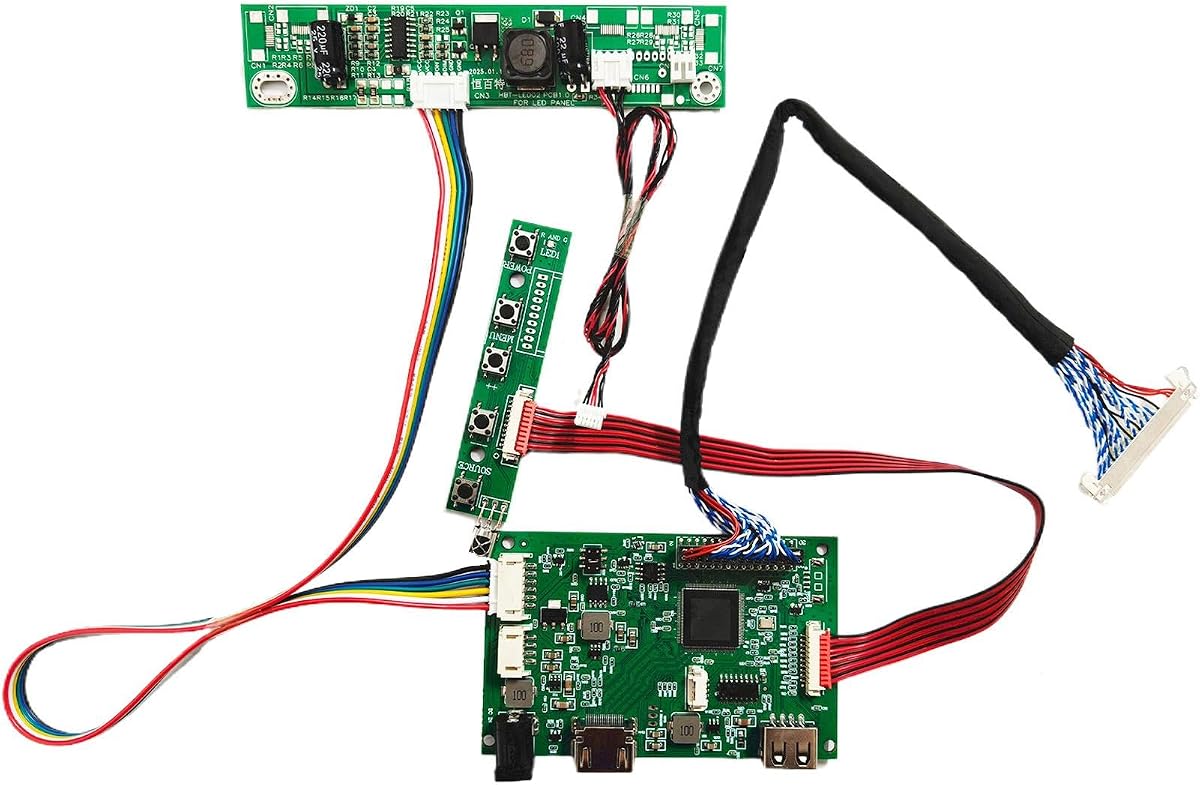
This board supports screens from 10 to 65 inches with HDMI DVI and VGA inputs. It uses the NT68676 chipset and offers OSD in several languages including English and French. It is a single drive board for DIY kits.
We may earn a commission when you buy through this link, at no additional cost to you.
Market area is Asia-Pacific but works globally. It features standard controls like power menu volume and adjust. The universal nature makes it adaptable for various LVDS panels.
Complex setups may require manual adjustments compared to plug-and-play boards. OSD language options help international users navigate settings. It is a flexible tool for enthusiasts.
Best for advanced users building custom monitors of varying sizes. It offers broad compatibility at a lower cost. Check interface match before purchasing as it targets LVDS inputs primarily.
Supports several languages like English German and Spanish for easier navigation.
Designed to work with screens from 10 to 65 inches for flexible DIY projects.
We may earn a commission when you buy through this link, at no additional cost to you.
This board receives top ratings for 21.5 and 23.8 inch 1920×1080 screens. It supports HDMI and USB inputs for video text and picture playback. The unique feature is 180 degree image rotation for flexibility.
We may earn a commission when you buy through this link, at no additional cost to you.
Compatible with models like T215HVN01.0 and LM238WF5-SSA1. It uses 12V 2A power and includes an inverter board. The USB interface allows for media playback without a computer source.
Users appreciate the clear functionality and high compatibility. The power adapter is missing so you must source it separately. LM215WF3-SLA1 is not supported so check models carefully.
Perfect for media centers or digital signage projects. It offers unique playback options not found elsewhere. Verify model number and power needs before ordering for success.
Supports 180 degree rotation for portrait or landscape viewing modes.
USB inputs allow direct playback of videos and images without a PC.
We may earn a commission when you buy through this link, at no additional cost to you.
This board focuses on stable signal transmission for 15.6 inch screens. It supports HDMI and VGA inputs with a 40-pin LVDS interface. It includes adjustable brightness and contrast for optimized image quality.
We may earn a commission when you buy through this link, at no additional cost to you.
The design emphasizes rapid response to commands and stable operation via monitoring. It connects to external devices easily for multi-device switching. This reduces lag and ensures smooth viewing experiences.
Specific model compatibility means checks are necessary before buying. The adjustable parameters allow fine-tuning to match content needs. It is a solid choice for specific panel types.
Best for users prioritizing image stability on 15.6 inch panels. It offers good control over display settings. Verify panel model and power requirements to ensure a successful installation.
Controls for brightness contrast and color adapt to content for vivid images.
Monitors working status to prevent overload and extend screen lifespan.
We may earn a commission when you buy through this link, at no additional cost to you.
This kit targets 17.3 inch panels with 1920×1080 resolution and a 40-pin LVDS interface. It is designed to match specific models like B173HW01 V0. It converts signals into screen-recognizable formats effectively.
We may earn a commission when you buy through this link, at no additional cost to you.
The input and output interfaces must match host and screen exactly. It offers power management features for laptop systems. It differs from external boards by relying on notebook power supply.
Strict adaptability ensures consistent display performance. You must ensure the panel type TN or IPS matches the kit. It is a specialized solution for high-quality Full HD repairs.
Best for restoring original functionality to 17.3 inch laptop displays. It provides stable voltage and low power modes. Check all parameters including interface and power source before installing.
Converts host video signals into formats the screen can recognize clearly.
Supports low-power mode to extend battery life in laptop systems.
We may earn a commission when you buy through this link, at no additional cost to you.
Selecting the right board requires checking screen size resolution and interface. These factors ensure your board matches your panel and prevents compatibility issues.
Ensure the board supports your screen resolution such as 1366×768 or 1920×1080. Mismatched resolution can lead to no signal or distorted images.
Check the product specs for supported resolutions before buying to match your panel.
Verify the interface pin count like 30-pin or 40-pin. The connector must match the screen exactly for signal transmission.
Count the pins on your screen port to choose the right board type.
Match the board to your specific panel model number found on the back of the screen. This ensures all technical specs align for proper function.
Compare your panel model with the compatible list in the product description.
Choose a board with inputs you need such as HDMI VGA or USB. Ensure your host device supports these output types.
Confirm available input ports on the board match your device connection requirements.
Check the power needs like 12V 2A or 3A. Use an adapter that meets these specs to avoid restart loops.
Verify the adapter wattage matches the board requirements for stable operation.
If you need sound look for a board with a speaker connector. This allows you to connect external speakers easily.
Ensure the board includes an audio output if sound is required for your project.
Confirm the signal cable length fits your project layout. Short cables may restrict placement options.
Check cable length in the product details to ensure it reaches your screen port.
Read customer reviews for insights on real-world performance and reliability. High ratings often indicate fewer issues.
Look for feedback on ease of use and support before making your choice.
First align the signal cable with the pin 1 marker on the board. Ensure the red circle matches the pin on your screen for correct connection.
Second connect the power adapter securely before powering on. Use an adapter that meets the 12V 2A minimum to prevent flickering.
Third avoid bending cables or moving the board while powered on to protect the circuit. Keep the board in an insulated environment during operation.
Check that your resolution settings match the board capability. Verify the cable is connected to the correct pins and that your power adapter meets the required specs.
No you must match the interface pin count and panel model. Check the compatible list in the product description for your specific screen number.
Most models do not include a power adapter. You will need to purchase a 12V DC adapter separately that meets the current requirements.
Look for a red circle or white triangle marking on the board edge. This indicates where Pin 1 is located for proper cable alignment.
Common interfaces include 30-pin eDP and 40-pin LVDS. Check your screen port to see which connector type you have before ordering.
Many boards include a speaker connector for audio output. Check the product specs to confirm if it has this feature before purchasing.
This often means your power supply current is too low. Use an adapter with at least 3A to ensure stable operation without restarts.
Most sellers offer technical support via Amazon messages. Reach out with your screen model number to verify compatibility before buying.
The top picks cover different needs from budget HD boards to premium Full HD options. Each offers reliable performance for its target screen size and resolution.
Prioritize matching your panel model and interface to avoid returns. Ensure your power adapter meets the specs for stable operation.
Prices vary by model and availability so check the links for current deals. Verify compatibility before purchasing to save time and money.