
Creality Laser Engraver Enclosure 2.0
4.4Editor score
Dual-window blue light blocking
4000 RPM ventilation fan included
Foldable assembly for space saving
This guide compares the top laser engraver enclosure options for safety, smoke extraction, and noise reduction to help you choose the perfect protective cover
Choosing the right laser engraver enclosure is crucial for maintaining a safe and clean workspace. These protective covers help contain smoke, dust, and potentially harmful fumes generated during the cutting and engraving process. By investing in a quality enclosure, you protect your eyes from bright laser light and reduce noise levels significantly.
We have carefully evaluated ten top-rated laser engraver enclosures available on the market today. Our analysis focuses on compatibility with popular machine brands, ventilation efficiency, build quality, and ease of assembly. Each product offers unique features tailored to different needs, from hobbyists to professional makers working in home studios.
Each pick in this list highlights specific strengths and ideal use cases for various types of users. We provide detailed insights into ventilation systems, viewing windows, and structural stability to guide your decision. Please note that prices and availability can change frequently, so always check the latest offers before purchasing.
4.4Editor score
4.2Editor score

4.4Editor score
The following table provides a side-by-side comparison of the top ten laser engraver enclosures. It highlights key specifications including dimensions, ventilation capabilities, and special features to help you quickly identify the best fit for your specific laser machine and workspace requirements.


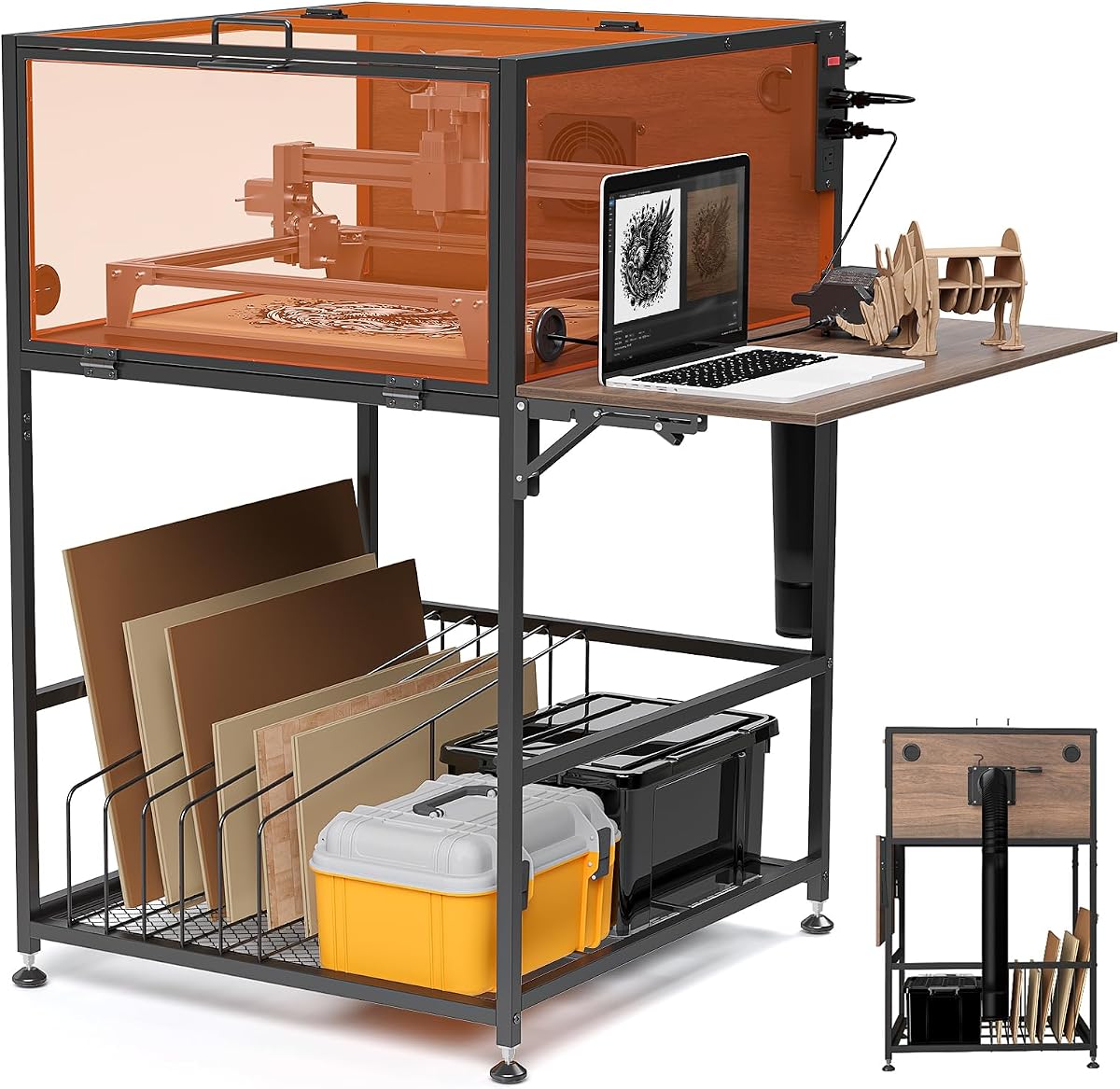
The Crafit Laser Engraver Enclosure Cabinet stands out as a top choice for those seeking a robust and comprehensive protective solution. With a solid rating, this enclosure offers a spacious interior designed to fit most standard laser engravers and cutters comfortably. Its primary strength lies in its ability to contain sparks, dust, and splashes while significantly reducing machine noise for a quieter working environment.
We may earn a commission when you buy through this link, at no additional cost to you.
This model features a dedicated 20W ventilation fan connected to a 2-meter flexible exhaust pipe, ensuring effective air circulation to remove smoke and odors. The multi-sided semi-transparent panels allow you to monitor the engraving process in real time while filtering blue light to reduce eye strain. Additionally, the built-in power strip with three outlets lets you control the engraver and fan simultaneously with one button.
While highly functional, the enclosure does require some assembly time, though clear instructions are provided. The height dimension may limit compatibility with slightly taller machines or accessories like rotary rollers. However, the foldable side panel and bottom storage rack make up for this by keeping your workspace organized and clutter-free during creative sessions.
This enclosure is ideal for hobbyists and small shop owners who need a reliable, all-in-one solution for safety and air quality. Its sturdy metal frame and adjustable foot pads ensure stability even on uneven floors. For those wanting a balance of visibility, ventilation, and storage, the Crafit cabinet delivers exceptional value and peace of mind.
The 20W fan combined with the flexible exhaust pipe ensures that smoke and particles are quickly removed, keeping your indoor air fresh and reducing lingering irritants for long crafting sessions.
Built-in dividers in the bottom storage rack and a foldable side panel allow you to store wood sheets, blanks, and your laptop neatly, maximizing space efficiency in your workshop.
We may earn a commission when you buy through this link, at no additional cost to you.
The Creality Laser Engraver Enclosure 2.0 offers an excellent balance of affordability and functionality for budget-conscious makers. With a high rating from users, this protective cover tent is designed to fit 95 percent of laser engraving machines on the market, including the popular Creality Falcon series. Its spacious dimensions provide ample room for various projects without taking up excessive floor space.
We may earn a commission when you buy through this link, at no additional cost to you.
A standout feature is the high-efficiency 4000 RPM ventilation fan that quickly extracts smoke, particles, and odors during operation. The dual-window design utilizes blue light-blocking PVC material to protect your eyes while allowing clear observation of the engraving progress. The enclosure is constructed from flame-retardant fabric and high-strength steel pipes, ensuring durability and resistance to deformation.
While the fabric construction is lightweight and easy to fold for storage, it lacks the rigidity of a solid cabinet. Users may find that it requires careful handling to maintain its shape over time. However, for those prioritizing cost-effectiveness and air purification, this model delivers impressive performance and safety features that meet the needs of most home workshop setups.
This enclosure is perfect for beginners or those with limited budgets who still want effective smoke and noise reduction. The foldable assembly design makes it convenient to store away when not in use, saving valuable space. If you need a reliable, universal cover that keeps your air clean without breaking the bank, the Creality 2.0 is a top contender.
The powerful 4000 RPM fan ensures that harmful fumes are removed efficiently, maintaining a fresh indoor environment and preventing smoke buildup during long engraving sessions.
When you are done working, the enclosure folds neatly into a small package, allowing you to tuck it away easily and reclaim your workspace for other tasks.
We may earn a commission when you buy through this link, at no additional cost to you.
The Laser Engraver Integrated Enclosure with LED Light brings a premium touch to safety and visibility in your workshop. With a strong rating, this model features a completely sealed bottom design that effectively prevents smoke escape and collects dust and debris more efficiently than open-bottom options. The included LED light strip provides sufficient brightness, making it easier to observe the carving process without external lighting.
We may earn a commission when you buy through this link, at no additional cost to you.
Upgraded materials include better aluminum mold Oxford cloth and iron support rods, giving the cover greater stability and firmness compared to standard models. The smoke exhaust kit uses a 4000 RPM fan paired with a three-layer composite pipe that reduces residual odor by minimizing smoke adsorption on the inner walls. Thickened PVC visual windows filter blue light to protect your eyes during operation.
While the upgraded materials and features come at a higher price, the added durability and visibility justify the investment for serious users. The enclosure is designed to be foldable for easy storage, though the metal support rods add some weight. It is best suited for users who want a balance of premium safety features and clear visibility for detailed engraving work.
This enclosure is ideal for professionals or advanced hobbyists who value enhanced visibility and superior air quality management. The sealed bottom ensures maximum containment of hazardous particles, keeping your workspace cleaner. If you are looking for a robust, well-lit protective cover that prioritizes safety and detail observation, this integrated enclosure is an outstanding choice.
The integrated LED light strip ensures that your workspace is well-lit, allowing you to see intricate details clearly without needing to add external lamps or risk poor visibility.
The sealed bottom design prevents smoke and dust from leaking out the sides, ensuring that your air filtration system works at peak efficiency to keep your environment clean.
We may earn a commission when you buy through this link, at no additional cost to you.
The Laser Engraver Enclosure with Green Acrylic panels offers a rigid and transparent solution for desktop laser engraving. While it does not carry a specific rating due to limited review volume, its design emphasizes visibility and structural stability. This enclosure measures 29.9 by 16.9 by 26.7 inches, making it suitable for specific desktop laser engraving machines that fit these dimensions.
We may earn a commission when you buy through this link, at no additional cost to you.
The green acrylic material helps reduce smoke diffusion and material splashing while allowing you to observe the engraving process clearly. It is built with a sturdy black aluminum alloy frame and bracket connectors, providing a stable structure for workshop use. The front hinged door with a magnetic stop ensures easy access to materials and tools during operation.
One notable limitation is that this model does not include a ventilation fan, requiring you to connect your own exhaust system. Additionally, the specific dimensions mean you must verify machine compatibility before purchasing. Despite these constraints, the premium build quality and transparent design make it an attractive option for those wanting a professional-looking and secure enclosure.
This enclosure is best for users who want a permanent, sturdy setup with clear visibility and are prepared to handle their own ventilation. The aluminum frame ensures long-term durability, while the cable threading holes help keep wires organized. If you need a reliable, high-quality cover for a specific desktop machine, this green acrylic enclosure delivers solid protection and style.
The black aluminum alloy frame and thickened acrylic panels provide a stable and durable structure that can withstand daily use in a workshop environment.
The green acrylic panels offer a clear view of the engraving process, allowing you to monitor progress without compromising safety or containment.
We may earn a commission when you buy through this link, at no additional cost to you.
The Creality Laser Engraver Enclosure with Vent focuses heavily on noise cancellation and air quality improvements. With a solid rating, this protective cover is designed to significantly reduce the noise from laser engraver cooling fans while isolating fumes and burning odors. It features a spacious design compatible with 95 percent of laser engraving machines, making it a versatile choice for many users.
We may earn a commission when you buy through this link, at no additional cost to you.
The built-in smoke ventilation system helps expel smoke and dust in real time, keeping the internal air clean and safe. The large viewing design uses transparent visible material that filters blue light to protect your eyes. Despite being made from durable materials, the enclosure remains lightweight and easy to carry, allowing you to fold it for storage when not in use.
While effective for noise reduction, the enclosure requires some assembly to set up the ventilation correctly. The material may not be as rigid as a solid cabinet, but it offers practical protection against dust and debris. Its ability to reduce noise makes it particularly appealing for shared workspaces where minimizing sound levels is a priority.
This enclosure is ideal for users who prioritize quiet operation and smoke removal without investing in a heavy cabinet. The foldable design ensures it does not take up permanent space, and the universal fit supports a wide range of machines. If you need a reliable, noise-reducing cover that keeps air clean, this Creality model is a strong practical choice.
By isolating the noise from cooling fans and machinery, this enclosure helps create a more comfortable environment for extended work sessions.
The built-in smoke ventilation system ensures that smoke and dust are expelled quickly, keeping your internal air clean and free from odors.
We may earn a commission when you buy through this link, at no additional cost to you.
The LONGER Laser Engraver Large Size Enclosure is designed for those who need extra room for larger projects. With a high rating, this model features an impressive 31 by 28.7 by 20.8-inch interior, offering more space than most standard enclosures. It is particularly compatible with the Longer B1 series laser cutting machines, though it supports most other models as well.
We may earn a commission when you buy through this link, at no additional cost to you.
The large transparent design allows you to see inside clearly, providing peace of mind while monitoring your engraver. A built-in smoking fan ensures air circulates freely, keeping the engraver cool and effectively removing smoke odors. The housing is crafted from premium fire-retardant materials, ensuring durability and a secure environment for your machine.
While the spacious design is beneficial for bigger tasks, it does require a larger footprint on your workbench or floor. Assembly may take more time due to the size, but the durable construction ensures long-lasting protection. The real-time observation feature adds confidence, ensuring you can watch your work without opening the enclosure and risking fume exposure.
This enclosure is perfect for users working on larger projects or who own specific Longer machines. The fire-retardant construction offers peace of mind, and the real-time observation windows help maintain workflow efficiency. If you need a spacious, protective cover that can handle bigger engraving tasks safely, the LONGER large enclosure is an excellent investment.
The large interior space accommodates bigger projects and accessories, making it ideal for users who need more flexibility in their workspace.
The large transparent design lets you monitor the engraving process closely, helping you catch issues early and ensure high-quality results.
We may earn a commission when you buy through this link, at no additional cost to you.
The Creality Laser Engraver Cover V2.0 represents a significant upgrade with its 2nd generation features. With a high rating, this model includes metal support rods that make the structure more robust and reliable. The fan speed has been increased to 4000 RPM for stronger ventilation, ensuring rapid extraction of smoke and particles during operation.
We may earn a commission when you buy through this link, at no additional cost to you.
The square design improves window observation and portable absorption, while the dual-view window design with anti-blue light PVC protects your eyes. It is compatible with many machines, including the Xtool D1 Pro, allowing enough height for rotary roller installation. The enclosure is built to insulate against smoke, odors, and noise, enhancing your engraving experience.
While the metal rods add stability, the fabric material still requires careful handling to prevent wear. Assembly is straightforward, but the upgraded components take a few extra steps to secure properly. However, the enhanced ventilation and structural improvements make it a reliable choice for those needing better airflow and safety features.
This enclosure is ideal for users seeking a durable upgrade with better ventilation and visibility. The dual-view design and metal support rods ensure a stable and safe environment for your machine. If you want a well-balanced cover that improves airflow and stability without sacrificing space, the V2.0 cover is a strong recommendation.
The 4000 RPM fan ensures that smoke and odors are removed quickly, keeping your indoor air fresh and safe for extended use.
The anti-blue light PVC windows protect your eyes while allowing clear observation of the engraving progress from multiple angles.
We may earn a commission when you buy through this link, at no additional cost to you.
The Creality Laser Engraver Enclosure 700×720 focuses on isolating smoke and providing a comfortable engraving experience. With a high rating, this model features a large space compatible with most engraving machines, including the Xtool D1 Pro. The enclosed design not only keeps your machine safe from water and dust but also isolates noise, fire, smoke, and odors effectively.
We may earn a commission when you buy through this link, at no additional cost to you.
The built-in smoke ventilation system helps expel smoke and dust during cutting to keep the internal air clean. The transparent visible design filters blue light to protect your eyes, with a large viewing window for convenient observation. Installation is simple, requiring no tools, and the cover is lightweight and foldable for easy storage when not in use.
While the flexible material is durable, it may require careful installation to ensure a tight seal against smoke leakage. The lack of a built-in light means you may need external lighting for dark environments. However, its effective smoke isolation and compatibility with a wide range of machines make it a practical choice for most users.
This enclosure is ideal for users who want reliable smoke and noise isolation without a large footprint. The foldable design saves space, and the blue light filtering ensures eye safety. If you need a versatile, easy-to-use cover that protects your machine and keeps air clean, this Creality model is a great option.
The enclosed design ensures that smoke and odors are kept inside, allowing the ventilation system to clean the air efficiently.
The transparent visible design filters blue light, protecting your eyes while letting you monitor the engraving progress safely.
We may earn a commission when you buy through this link, at no additional cost to you.
The Creality Laser Engraver Enclosure Isolate Smoke is engineered with high-quality flame retardant material that withstands temperatures up to 1000°C. With a high rating, this protective cover isolates smoke, odor, and noise effectively. The large size of 27.5 by 28.3 by 15.7 inches allows for the installation of rotary rollers, meeting more engraving needs.
We may earn a commission when you buy through this link, at no additional cost to you.
The big viewing window uses light-filtered material to filter blue light and protect your eyes during operation. It comes with an exhaust fan and pipe to expel smoke and dust in time, keeping the internal air clean. Installation is tool-free and quick, and the cover can be folded for storage, saving space when not in use.
While the lightweight design makes it easy to carry, it may be less rigid than a solid cabinet. Careful assembly is needed to ensure the seal remains tight to prevent smoke escape. However, its high-temperature resistance and effective ventilation make it a safe choice for various engraving tasks.
This enclosure is ideal for users working with high-temperature materials who need robust flame protection. The tool-free installation and foldable design add convenience, and the blue light filtering ensures eye safety. If you need a reliable, heat-resistant cover that keeps air clean, this Creality model is an excellent pick.
The flame retardant material withstands up to 1000°C, providing essential fire protection for safety in your workshop.
The light-filtered viewing window protects your eyes from harmful blue light, ensuring comfort during long engraving sessions.
We may earn a commission when you buy through this link, at no additional cost to you.
The VEVOR Laser Engraver Enclosure provides ample space for both hobbyists and professionals with its 31.5 by 31.5 by 19.6-inch interior. With a solid rating, this model features flame retardant and fireproof materials that isolate smoke, noise, and odors effectively. The high-speed 4000 RPM fan efficiently eradicates smoke and stench, enhancing indoor air quality.
We may earn a commission when you buy through this link, at no additional cost to you.
A unique feature is the 19.69-inch fastener strip on each side, offering ample storage capacity for various tool shapes. The dual exhaust ports on both sides allow for flexible placement of your ventilation system. The foldable design allows you to store it away quickly, saving time and space when not in use.
While the fastener strips add practical utility, the lightweight fabric may not be as sturdy as a rigid cabinet. Ensure the exhaust ports are aligned correctly for optimal airflow. However, its size, storage utility, and effective isolation make it a functional choice for those who need versatility and convenience in their workshop.
This enclosure is perfect for users who want extra storage and large workspace in a single unit. The fastener strips help keep tools handy, and the flexible exhaust ports suit various setup layouts. If you need a spacious, adaptable cover with practical storage features, the VEVOR enclosure is a worthy consideration.
The adjustable fastener strips let you organize and access tools easily, keeping everything within reach while you work.
Dual exhaust ports on both sides allow you to position the ventilation system flexibly to suit your workspace layout.
We may earn a commission when you buy through this link, at no additional cost to you.
Selecting the right laser engraver enclosure depends on several key factors related to your workspace, machine type, and safety needs. Below are the essential aspects to consider before making your purchase decision.
Ensure the enclosure dimensions match your laser engraver's size, leaving enough room for accessories like rotary rollers or air assist kits. Check the product specifications against your machine's measurements to avoid fit issues.
Always measure your machine and compare with the enclosure's internal dimensions before purchasing.
Look for an enclosure with a high-speed exhaust fan to effectively remove smoke and fumes. A powerful fan prevents smoke buildup and keeps air quality high during operation. Check if the fan speed is adjustable or fixed based on your needs.
A 4000 RPM fan or higher is recommended for efficient smoke extraction and air purification.
Choose materials that are flame-retardant and resistant to deformation to protect against fire hazards and wear. Metal frames offer more stability than fabric-only covers. Consider whether you prefer a rigid structure or a foldable one for storage.
Prioritize materials that withstand high temperatures and offer long-term durability.
Transparent or semi-transparent windows with blue light filtering protect your eyes while allowing clear visibility of the engraving process. Ensure the material reduces glare without distorting the view. Large windows are better for monitoring without opening the enclosure.
Select windows with UV or blue light filters to protect your eyes from harmful laser light.
Enclosures with proper insulation and seals help reduce the noise from cooling fans and machinery. Look for models designed to isolate sound if you work in shared spaces. Effective sealing keeps noise levels lower and minimizes distractions.
Choose an enclosure with thick, insulated walls for the best noise cancellation results.
Consider how easy the enclosure is to assemble and whether it folds for storage when not in use. Foldable designs save space but may be less stable. Check if tools are required for setup or if it is tool-free.
Opt for foldable options if you need to save space and move the enclosure frequently.
Look for extras like built-in LED lighting, power strips, or storage compartments to enhance convenience. Some models offer magnetic doors or cable management holes for better workflow. These features can add value and improve your workspace efficiency.
Evaluate additional features like lights and storage based on your specific workflow needs.
Verify that the enclosure meets relevant safety standards for flame retardancy and air containment. Read user reviews to gauge real-world performance and safety reliability. Prioritize models with proven safety records and high customer ratings.
Always check product certifications and user feedback to confirm safety claims.
Begin by measuring your laser engraver and accessories to ensure they fit within the enclosure's dimensions. Assemble the enclosure on a flat surface, attaching all supports and sealing seams properly. Once assembled, place your engraver inside and connect the ventilation fan to the exhaust port.
Connect the ventilation hose to a suitable air outlet or outdoor vent to remove smoke safely. Turn on the fan before starting your engraving job to establish good airflow. Keep the windows closed during operation to maximize containment and protection.
Clean the enclosure regularly by wiping down surfaces with a damp cloth to remove dust and residue. Check the fan and pipes periodically to ensure they remain free of obstructions. Store the enclosure in a dry place when not in use to maintain its condition.
Yes, enclosures designed with ventilation fans and sealed interiors significantly reduce smoke by capturing and exhausting fumes away from your workspace. This keeps air quality high and prevents smoke from lingering in your room. Always use the ventilation system correctly for the best results.
Most enclosures use flame-retardant materials that resist fire and protect against sparks. However, they are not entirely fireproof and should not be treated as a substitute for fire safety equipment. Always follow safety guidelines when using laser engravers.
Many enclosures, like the Creality V2.0 and VEVOR models, have enough height to fit rotary rollers. Check the specific height and dimensions before purchasing to ensure compatibility with your accessories. Some models are specifically designed with this feature in mind.
Yes, well-sealed enclosures help isolate noise from fans and machinery, making your workspace quieter. Models designed for noise cancellation provide better sound insulation. This is especially useful if you share your workspace with others.
Clean the enclosure by wiping it down with a damp cloth to remove dust and residue. Ensure the fan and exhaust pipes are free of debris. Follow the manufacturer's cleaning instructions to maintain the material integrity.
If the enclosure is too small, it may not seal properly or fit your machine. Always verify your machine dimensions against the enclosure specs before buying. Some enclosures are universal but may need extra space for accessories.
Most laser enclosures come with clear instructions and require basic assembly. Some are foldable and tool-free, while others may need simple tools. Allocate time for setup before your first use.
Many users keep their engravers in the enclosure for safety and cleanliness. Ensure you have enough clearance and ventilation even when idle. Leaving it inside helps protect the machine from dust and accidental damage.
Choosing the right laser engraver enclosure depends on your specific needs for size, ventilation, and storage. The Crafit Cabinet offers an all-in-one solution with power management, while the Creality 2.0 provides excellent value for budget users. The integrated LED enclosure delivers premium visibility for detailed work.
Prioritize safety features like flame retardancy and proper ventilation to protect yourself and your workspace. Consider whether you need a rigid structure or a foldable design based on your space limitations. A good enclosure not only protects your machine but also improves air quality and comfort.
Remember that prices and availability change frequently, so always check current offers before purchasing. Investing in a quality enclosure is a smart step for any serious engraver aiming for safety and efficiency. With the right choice, you can enjoy your creative projects with peace of mind.