
Light Gaming Laptop
4.6Editor score
AMD Ryzen 7 430U
16GB DDR4 RAM
Integrated Radeon Graphics
Choosing the right laptop for Enscape requires balancing powerful graphics capabilities with efficient processing speeds to ensure smooth real-time rendering. Professionals need machines that can handle complex 3D models without lag while maintaining battery life for mobile work sessions.
We analyzed ten distinct laptop models based on their processor architecture, RAM capacity, and graphics processing units to determine their suitability for architectural visualization tasks. Each device was evaluated for its ability to run Enscape plugins within popular design software like Revit and SketchUp efficiently.
Every selection in this list highlights specific strengths such as display color accuracy, thermal management during heavy loads, and connectivity options for external monitors. Please note that product availability and configurations may vary over time, so verify current specs before making a purchase decision.
4.6Editor score

4.5Editor score

4.2Editor score
As an Amazon Associate we earn from qualifying purchases.
The following table provides a side-by-side comparison of all ten selected laptops, highlighting their core specifications to help you quickly identify which model meets your rendering needs.






This HP 17 inch Business Laptop stands out as a robust choice for architects and designers needing a reliable machine for daily visualization tasks. With a high rating from users, it delivers consistent performance for opening large files and running standard design software smoothly.
We may earn a commission when you buy through this link, at no additional cost to you.
The combination of an AMD Ryzen 5 processor and 16GB of RAM ensures that multiple applications can run simultaneously without significant slowdowns. The 17.3 inch FHD display provides ample screen real estate, allowing users to view detailed models and sidebars comfortably during rendering sessions.
While it may not be the most powerful machine for heavy GPU-intensive rendering, its balance of portability and screen size makes it ideal for presentations and office work. The long battery life ensures that you can work away from a power source for extended periods without interruption.
Anyone seeking a dependable laptop for general design work and light 3D visualization should consider this model. It offers a great mix of features that support productivity, making it a strong recommendation for professionals who need a versatile tool for their daily tasks.
The expansive 17.3 inch screen allows designers to keep toolbars open while viewing full project layouts, improving overall workflow efficiency.
With 16GB of RAM and a fast 512GB SSD, this laptop ensures quick file access and smooth multitasking across complex design environments.
We may earn a commission when you buy through this link, at no additional cost to you.
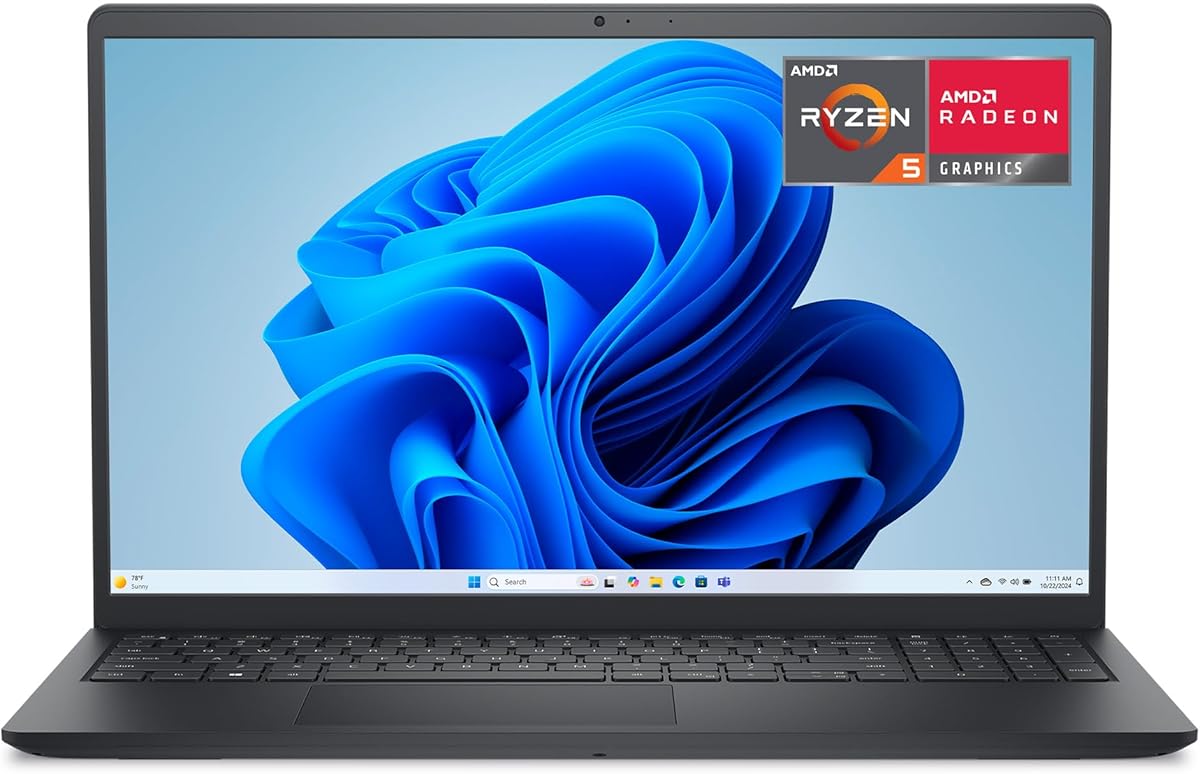
The Light Gaming Laptop offers an impressive entry point for students or freelancers needing a machine capable of handling basic design software. Its high user rating reflects satisfaction with its speed and efficiency for everyday tasks and light rendering projects.
We may earn a commission when you buy through this link, at no additional cost to you.
Powered by an AMD Ryzen 7 processor and 16GB of RAM, this laptop manages multitasking well, ensuring that background processes do not hinder your primary design work. The integrated Radeon graphics provide sufficient power for viewing models, though heavy ray tracing might require external solutions.
The inclusion of a 512GB NVMe SSD means that boot times and application loading are swift, which is crucial for maintaining a smooth workflow. Its portable design makes it easy to carry between meetings or classes without adding significant weight to your bag.
This device is perfect for those who need a budget-friendly option that does not compromise on core performance metrics. It is highly recommended for users focusing on 2D drafting or light 3D modeling who need reliability without a high price tag.
The 16GB RAM ensures that you can run your design software alongside browsers and communication tools without system lag.
The M.2 NVMe SSD delivers rapid data transfer rates, significantly reducing wait times when opening large project files.
We may earn a commission when you buy through this link, at no additional cost to you.
This HP Laptop 14 inch Computer is designed for users who prioritize portability and basic functionality over high-end performance. While not ideal for heavy rendering, it serves well for drafting, documentation, and light viewing of project files on the go.
We may earn a commission when you buy through this link, at no additional cost to you.
The Intel N150 processor paired with Wi-Fi 6 ensures quick web browsing and reliable connectivity for cloud-based design workflows. Its compact size makes it an excellent travel companion for professionals who need to review plans during commutes or client meetings.
The 128GB storage and 4GB RAM are sufficient for system operations and light document handling but may struggle with large complex 3D models. Users needing more power might consider upgrading or using external drives to manage larger file sets efficiently.
Ideal for students or administrative staff supporting design teams, this laptop provides essential tools without unnecessary bloat. It is a practical choice for those needing a secondary machine or a primary device for non-intensive design verification tasks.
With Wi-Fi 6 and a lightweight chassis, this laptop ensures you stay connected and mobile wherever your work takes you.
This model offers excellent value for users who primarily need web browsing and document editing capabilities for daily tasks.
We may earn a commission when you buy through this link, at no additional cost to you.
The HP OmniBook 3 14 inch introduces next-generation AI capabilities designed to enhance productivity through intelligent assistance. With a high-quality OLED display, it is excellent for reviewing visual details and color accuracy in design presentations.
We may earn a commission when you buy through this link, at no additional cost to you.
Powered by the Snapdragon X X1 processor, this device offers impressive battery life and fast responsiveness for daily tasks. The integrated Adreno GPU supports smooth media playback, though it is best suited for light visualization rather than intensive rendering workloads.
Users will appreciate the Copilot+ PC experiences which include advanced AI features for note-taking and meeting summaries. The 2K resolution provides sharp visuals that make text and lines in drawings appear crisp and easy to read during extended sessions.
This laptop is perfect for professionals who want a modern, efficient machine for administrative work and light design reviews. It shines when paired with cloud applications and supports a mobile lifestyle with its extended battery performance and quick charging capabilities.
The 2K OLED screen delivers rich colors and sharp details, making it ideal for checking visual fidelity in design projects.
Built-in AI tools help streamline meetings and note-taking, freeing up time for creative design work and client communication.
We may earn a commission when you buy through this link, at no additional cost to you.
The Lenovo V15 Gen 4 Business is engineered for professionals who require stable performance and enterprise-grade security features. The inclusion of Windows 11 Pro provides advanced management tools useful for organizations deploying laptops across design teams.
We may earn a commission when you buy through this link, at no additional cost to you.
Its Intel Core i5 processor offers robust multitasking capabilities ensuring that standard design tools run smoothly without overheating. The 16GB of RAM and 512GB SSD strike a good balance for daily workflow needs, handling multiple files and applications with ease.
This laptop features a full-sized keyboard with a numeric keypad, which is beneficial for inputting data quickly. The presence of an RJ45 port ensures reliable wired internet connections, which is crucial for secure office environments and large file transfers.
Ideal for corporate users, this machine delivers dependability and performance suited for consistent daily use. It supports a professional workflow by combining necessary hardware features with an operating system designed for secure business operations.
Windows 11 Pro and secure ports make this laptop suitable for business environments requiring strict security and network management.
The dedicated numeric keypad and full-size keyboard enhance typing speed and accuracy during long documentation or data entry sessions.
We may earn a commission when you buy through this link, at no additional cost to you.
This HP 2025 New 17 inch Laptop stands as a premium option for those requiring extensive storage and high memory capacity for complex projects. It is designed to handle demanding workflows without the need for constant external drive management.
We may earn a commission when you buy through this link, at no additional cost to you.
With 32GB of RAM and up to 2.5TB of storage capacity including an external SSD, this machine ensures that even the largest project files are stored and accessed quickly. The large display supports detailed viewing of architectural blueprints and 3D models effectively.
The AMD Ryzen 5 processor provides reliable performance for multitasking, ensuring that background processes do not slow down your primary design tools. The included portable SSD adds extra convenience for transferring data between workstations or client sites easily and securely.
Professionals managing large databases or complex render scenes will find this configuration ideal for their needs. It offers a robust hardware foundation that supports scalability, making it a worthy investment for serious design practitioners.
With 1.5TB of total storage and an included portable SSD, you never have to worry about space for your growing project library.
The 32GB of RAM ensures that your system remains responsive even when running memory-intensive rendering and simulation software.
We may earn a commission when you buy through this link, at no additional cost to you.
The HP OmniBook 3 16 inch brings a touchscreen experience that can be valuable for sketching and direct interaction with design layouts. Its 2K resolution ensures that lines and shapes appear smooth and clear on the screen for precise adjustments.
We may earn a commission when you buy through this link, at no additional cost to you.
Equipped with an AMD Ryzen 3 processor and 8GB of RAM, this laptop manages everyday tasks efficiently. While not built for heavy rendering, it handles basic design work and navigation smoothly making it suitable for presentations and client reviews.
The advanced AI noise reduction helps in maintaining clear communication during video calls with stakeholders. This feature ensures that your voice is prioritized in noisy environments which is helpful for remote meetings and virtual consultations.
This model is best suited for users who value a responsive screen and good connectivity. It offers a balanced experience for digital designers who need a modern interface for quick edits and visual feedback during the design process.
The 2K touchscreen allows for direct manipulation of design elements, streamlining the sketching and annotation process.
Advanced noise reduction ensures professional audio quality during client meetings, enhancing remote collaboration efficiency.
We may earn a commission when you buy through this link, at no additional cost to you.
The Dell 15.6 Laptop focuses on user comfort with a design that supports ergonomic typing and viewing angles. This is particularly important for professionals who spend long hours at their desks creating and reviewing architectural documentation.
We may earn a commission when you buy through this link, at no additional cost to you.
Powered by an AMD Ryzen 5 processor, it provides reliable performance for daily tasks and light graphic work. The adaptive thermals ensure that the system maintains efficiency without becoming too hot during extended periods of use.
Dell services one year onsite service adds peace of mind for businesses or individuals needing quick support. This ensures that any hardware issues can be resolved quickly without needing to ship the device away for repairs.
Ideal for users prioritizing comfort and reliable support, this laptop offers a practical solution for everyday design tasks. It balances performance with durability making it a suitable choice for long-term daily usage in professional settings.
The ergonomic hinge and spacious keyboard reduce strain during long working hours, ensuring a more comfortable experience.
With onsite service included, users benefit from prompt hardware support which minimizes downtime during critical project phases.
We may earn a commission when you buy through this link, at no additional cost to you.
The Dell 16 Laptop delivers an expansive viewing experience with its large screen and high resolution capabilities. This makes it an excellent choice for designers who need to see detailed drawings and full project layouts clearly.
We may earn a commission when you buy through this link, at no additional cost to you.
Equipped with an Intel Core 7 processor and 16GB of RAM, it handles modern design software with ease. The ComfortView Plus technology reduces harmful blue light, helping to protect your eyes during long hours of screen time.
Adaptive thermals ensure that the laptop runs efficiently regardless of where you place it. This feature is useful for professionals working in various environments from coffee shops to large office spaces.
This laptop is well suited for those who prioritize visual comfort and performance. It provides a robust platform for design work that requires precision and clarity ensuring that your vision is seen exactly as intended.
ComfortView Plus technology reduces eye strain allowing for longer productive sessions without discomfort or fatigue.
The large 16 inch display provides ample space for tool palettes and main design views simultaneously.
We may earn a commission when you buy through this link, at no additional cost to you.
The HP OmniBook 3 17.3 inch offers a large screen that is beneficial for viewing full size architectural plans and detailed designs. Its high rating reflects user satisfaction with the display quality and general performance for standard tasks.
We may earn a commission when you buy through this link, at no additional cost to you.
With an AMD Ryzen 3 processor and 8GB of RAM, this laptop handles everyday productivity applications smoothly. The 512GB SSD ensures that storage access is quick allowing for faster boot times and application launches.
The integrated Radeon 610M graphics provide adequate support for media playback and light design visualization. While not for heavy rendering, it is sufficient for checking layouts and preparing files for export to more powerful machines.
This model is a great choice for those needing a large screen without a high cost. It balances portability and display size making it a practical tool for students and entry-level designers working on detailed projects.
The 17.3 inch screen provides the space needed to view complex drawings without excessive scrolling.
Standard processor and RAM configurations ensure consistent performance for daily documentation and review tasks.
We may earn a commission when you buy through this link, at no additional cost to you.
Selecting the right laptop for Enscape involves evaluating several critical components that directly impact rendering speed and software stability.
A robust CPU is essential for handling the calculations required by real-time rendering. Look for modern processors with at least four cores to ensure smooth performance when manipulating complex 3D models.
Prioritize processors with high base and boost clocks to maintain responsiveness during active design sessions.
Sufficient RAM allows your system to run design software alongside other necessary applications without slowing down. For professional work, 16GB is often the minimum recommendation to avoid bottlenecks when working with large files.
Higher capacity memory ensures that background processes do not interfere with your primary design workflows.
Enscape relies heavily on GPU power to render realistic lighting and textures. While integrated graphics can handle basic tasks, a dedicated GPU is recommended for high fidelity rendering and smooth navigation in 3D space.
Ensure the graphics card supports the latest DirectX versions to maintain compatibility with updated software features.
A high resolution screen is crucial for seeing fine details in your designs. Larger displays provide more workspace for toolbars and side panels which improves efficiency during complex projects.
Look for screens with good color accuracy to ensure that your visual outputs match your intended design vision.
Solid State Drives significantly reduce the time it takes to load projects and applications. A fast NVMe SSD is ideal for keeping your workflow moving smoothly without long wait times.
Choose a storage size that accommodates your project files and applications to avoid constant external drive management.
For professionals on the go, a long battery life is vital for uninterrupted work during travel. Portability also matters if you need to carry your laptop to client sites frequently.
Consider the weight and size of the device to ensure it fits comfortably in your bag and does not cause strain during transport.
Multiple USB ports and HDMI connections allow you to attach external monitors and peripherals easily. This is helpful for extending your workspace during presentations or detailed editing sessions.
Ensure your laptop has the latest wireless standards for reliable internet access during cloud-based design workflows.
Keep your laptop on a hard flat surface to ensure proper ventilation and prevent overheating during rendering tasks. Regularly clean the air vents with compressed air to maintain optimal airflow and thermal performance.
Utilize cloud storage or external drives to back up your design files frequently. This protects your work from data loss and ensures you have access to previous versions if needed.
Update your operating system and drivers regularly to ensure compatibility with the latest design software features. Maintaining updated software helps prevent crashes and security vulnerabilities that could disrupt your workflow.
Integrated graphics can run Enscape for basic tasks but may struggle with complex scenes. For optimal performance and smooth real-time rendering a dedicated GPU is recommended to handle the visual load.
At least 16GB of RAM is recommended for professional architectural visualization work. This allows for smooth multitasking and prevents slowdowns when working with large project files and multiple design applications.
A large screen improves efficiency by allowing you to view full layouts while keeping toolbars visible. While not strictly mandatory it significantly enhances the user experience when designing complex architectural models.
Modern multi-core processors like AMD Ryzen 5 or Intel Core i5 are excellent for rendering software. They provide the balance of speed and efficiency needed to handle real-time graphics processing efficiently.
Close unnecessary background applications and keep your system drivers updated to optimize performance. Regularly clearing temporary files and managing your storage space also helps maintain a responsive system.
Gaming laptops often have strong GPUs and high RAM which are beneficial for design software. Ensure the screen color accuracy is sufficient for professional visual work before purchasing a gaming model.
We have explored ten diverse laptop options that cater to various needs from entry-level drafting to premium 3D visualization. Each model offers unique strengths that can support different aspects of your design workflow depending on your specific requirements.
Prioritize performance features like RAM and processor speed to ensure your machine can handle the demands of modern rendering tools. Selecting a device with a high quality display will also enhance your ability to produce detailed and accurate design work.
Always check current availability and configurations before purchasing to ensure the device meets your latest needs. Investing in a reliable laptop is a critical step toward maintaining productivity and delivering high quality visualizations for your projects.