
HUANUO Laptop Desk Mount
4.5Editor score
2 in 1 laptop monitor stand
Ventilated cooling tray
Simple installation process
Finding the right laptop tray desk mount can transform your workspace into an ergonomic haven. These mounts elevate your screen to eye level, reducing strain on your neck and shoulders during long work sessions. Whether you work from home or in an office, a solid mount keeps your desk organized and your posture healthy.
We have evaluated ten top-rated laptop tray desk mount solutions based on stability, adjustability, build quality, and user feedback. Our analysis focuses on features like ventilation, cable management, and compatibility with various laptop and monitor sizes. This list helps you choose a mount that fits your specific desk and device needs perfectly.
Each pick in this guide highlights key strengths and potential limitations to help you make an informed decision. You will find options ranging from budget-friendly clamps to versatile dual-function arms. Please note that product availability and pricing can change frequently, so verify details before purchasing to ensure you get the best value.
4.5Editor score

4.6Editor score

4.6Editor score
As an Amazon Associate we earn from qualifying purchases.
Here is a side by side comparison of all ten laptop tray desk mount options to help you quickly identify the best fit for your workspace setup and device requirements.

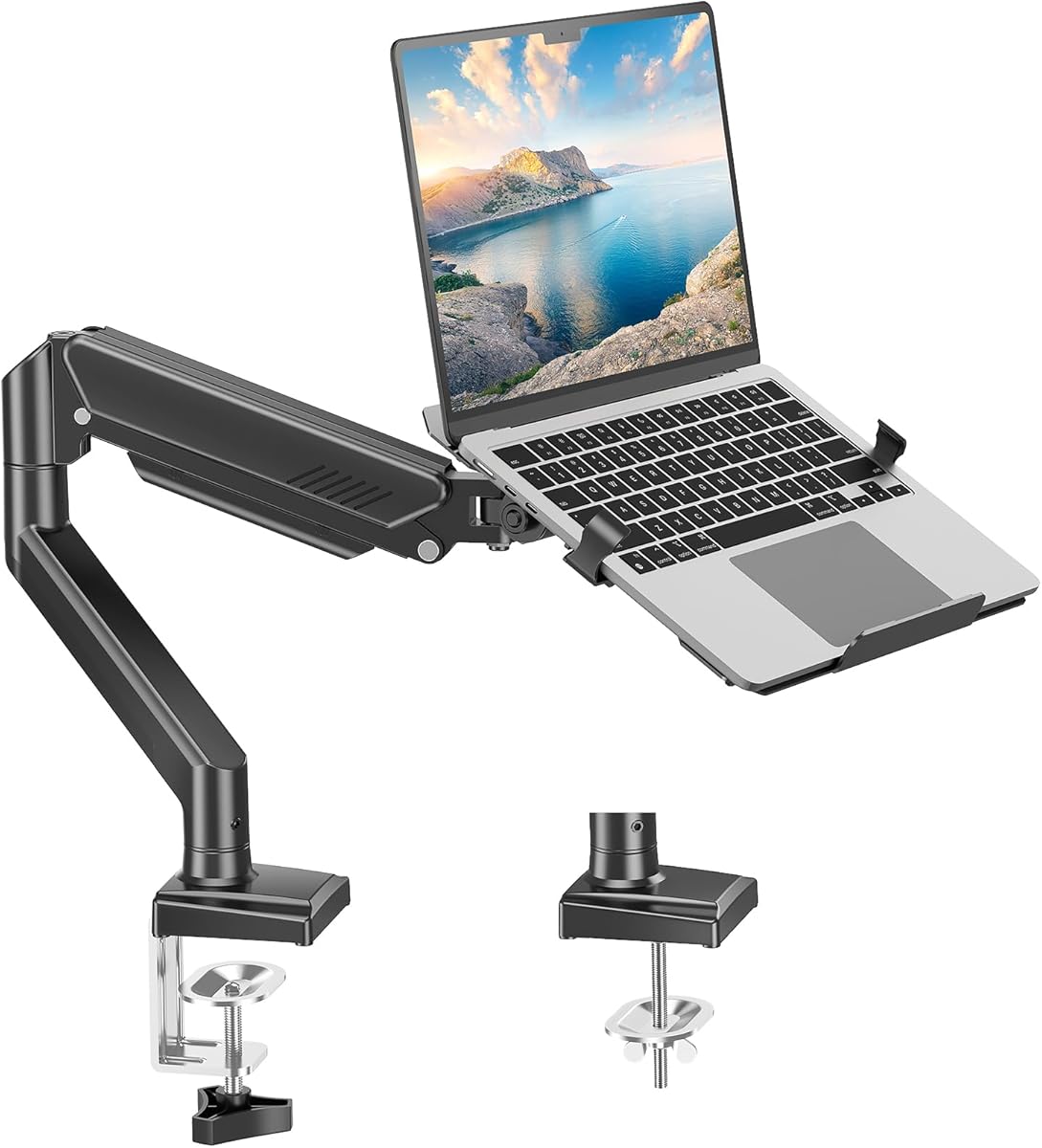


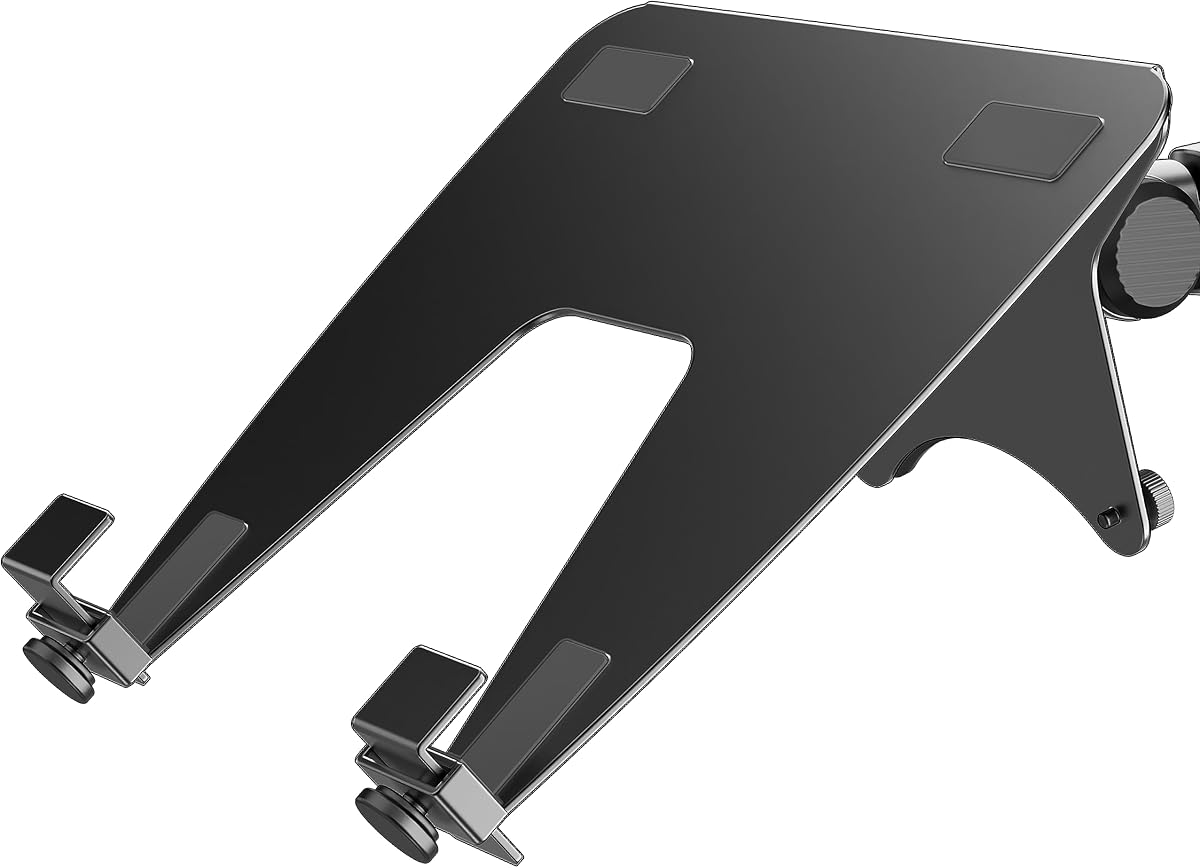
The VIVO Single Laptop Notebook Desk Mount Stand is a top choice for users seeking reliability and versatility. With a strong 4.6 rating from users, this mount offers excellent stability for laptops up to 17 inches. It is designed to elevate your screen to a comfortable viewing height, reducing strain during long work sessions.
We may earn a commission when you buy through this link, at no additional cost to you.
This mount features a ventilated tray that promotes airflow to keep your laptop cool. The arm allows for a full 360 degree rotation, along with tilt and swivel adjustments to suit your viewing preferences. It supports weights up to 22 lbs, making it suitable for most standard laptops and notebooks without sagging.
While highly rated, some users note that assembly might take longer than expected due to the number of parts. Additionally, the design is optimized for flat laptops and is not compatible with curved monitors if you plan to switch devices. These are minor trade-offs for the overall performance and value.
This mount is ideal for professionals and students who need a dedicated ergonomic setup. It works well on wooden desks using the included C-clamp or grommet option. If you want a reliable solution that combines durability with flexibility, this VIVO stand is a strong recommendation for your workspace.
Elevating your laptop to eye level helps maintain a neutral spine posture, reducing neck and back pain over time.
The ventilated tray prevents overheating by allowing heat to escape, which is crucial for high-performance laptops.
We may earn a commission when you buy through this link, at no additional cost to you.
The HUANUO Laptop Desk Mount is an excellent entry point for those seeking a budget-friendly solution without sacrificing essential features. It is highly rated for its ability to switch between laptop and monitor use. The ventilated tray is designed to keep your laptop cool while allowing you to save valuable desk space.
We may earn a commission when you buy through this link, at no additional cost to you.
This mount supports laptops up to 17 inches and monitors from 15 to 32 inches. It includes a sturdy arm that extends up to 15 inches, providing flexibility in positioning. The design includes 240 ventilation holes, ensuring that airflow is maximized to prevent overheating during heavy use.
While it offers great value, some users find that the materials feel lighter compared to premium options. Additionally, the instruction manual might require careful reading to ensure proper assembly. However, once set up, the mount remains stable and functional for daily tasks.
This product is perfect for students or remote workers on a budget. It fits desks ranging from 0.39 to 3.07 inches thick with the C-clamp. If you need a cost-effective way to elevate your workspace ergonomics, this HUANUO mount delivers solid performance for the price.
You can easily remove the tray to use the mount for a monitor, giving you flexibility to adapt your workspace as needed.
Despite the lower price, it still includes essential features like cable management and height adjustment for a complete experience.
We may earn a commission when you buy through this link, at no additional cost to you.
The monTEK 2-in-1 Laptop & Monitor Desk Mount is a premium choice for users who demand high build quality and versatility. It supports a wide range of devices, including curved monitors up to 32 inches. This flexibility makes it ideal for professionals who need both a laptop setup and a secondary display.
We may earn a commission when you buy through this link, at no additional cost to you.
Constructed from durable steel and aluminum, this mount is built to last. It features a fully adjustable arm that allows for tilt, swivel, and rotation to suit your ergonomic needs. The detachable tray ensures your laptop stays cool and secure during extended work hours.
While it is pricier than many competitors, the robust construction and feature set justify the cost for many users. The installation process is straightforward, but the weight of the materials can make it slightly heavier to handle. However, this ensures stability once mounted.
This mount is best for power users or creative professionals who need reliable support for heavier devices. It fits desks between 0.39 and 3.1 inches thick. If you value premium materials and comprehensive support for both laptops and curved screens, this is a top-tier option.
The use of steel and aluminum ensures that the mount does not flex or sag, maintaining the position of your device over time.
Unlike many mounts, this one supports curved screens, expanding your options for larger displays without needing a separate arm.
We may earn a commission when you buy through this link, at no additional cost to you.
The MOUNT PRO Laptop Arm Mount for Desk is designed to offer stability and ease of use for both laptops and monitors. It supports notebooks up to 17 inches and monitors up to 32 inches. The aluminum arm ensures durability while maintaining a sleek look on your desk.
We may earn a commission when you buy through this link, at no additional cost to you.
One of the standout features is the built-in cable management that keeps wires organized and out of sight. The ventilated tray helps to dissipate heat effectively. Additionally, the arm allows for full-motion adjustments to help you find the perfect ergonomic position.
Some users note that the mount is not compatible with specific curved screen radii. Also, assembly may require basic tools which might not be included in all kits. Despite this, the setup is generally straightforward and results in a secure installation.
This mount is great for office workers or gamers who need a tidy workspace. It fits desks with thicknesses between 0.39 and 2.76 inches. If you need a reliable dual-purpose mount with good cable management, this MOUNT PRO option is a solid choice.
The integrated guides keep your power and video cables neat, reducing clutter and the risk of accidental disconnections.
By simply removing the tray, you can switch to monitor mode, offering flexibility for different daily tasks and setups.
We may earn a commission when you buy through this link, at no additional cost to you.
The WALI Adjustable Laptop Desk Mount is a robust option known for its strong support and flexible mounting. It fits laptops up to 17 inches and supports weight up to 22 lbs. The dual mounting options allow you to choose between a C-clamp or a grommet fit based on your desk type.
We may earn a commission when you buy through this link, at no additional cost to you.
Its ventilated tray design ensures that your laptop gets adequate airflow to prevent overheating. The arm is height adjustable and allows for tilt and swivel. This makes it easy to position your screen at a comfortable angle for long periods of use.
While stable, some users suggest securing the mount tightly to avoid wobbling during typing. The rotation is not full 360 degrees like some competitors, but it provides enough range for most ergonomic needs. Overall, it is a durable option for daily office work.
This mount is well-suited for home offices and professional environments. It works on desks ranging from 0.4 to 4 inches thick. If you need a reliable mount with solid construction and flexible mounting options, the WALI model is a dependable choice.
Having both C-clamp and grommet options means this mount can work on a wide variety of desk styles without issue.
The construction is designed to hold heavier laptops without sagging, ensuring your device remains stable over time.
We may earn a commission when you buy through this link, at no additional cost to you.
The HUANUO 2 in 1 Function Laptop Mount with Tray is designed to support both notebooks and larger monitors up to 34 inches. It features a full range of motion with tilt, swivel, and rotation. The tray includes anti-slip pads to keep your laptop secure during use.
We may earn a commission when you buy through this link, at no additional cost to you.
This mount supports up to 17 inch laptops and allows you to extend your desk space. The tray is ventilated to keep heat down. Assembly is simple with pre-assembled parts, making it easy to get started quickly without needing complex tools.
One limitation is the desk thickness limit for the clamps, which is up to 2.56 inches for C-clamp. For very thick desks, you might need to explore other options. However, for standard desks, the fit is stable and secure.
This product is ideal for users who need a large monitor setup with the flexibility to use a laptop. It fits standard desks with C-clamp or grommet. If you need a versatile mount that handles larger screens and offers great adjustability, this HUANUO model is a good fit.
The ability to support 34 inch monitors makes this a strong option for users who want a big display alongside their laptop.
The anti-slip pads and widened bottom guard ensure that your laptop does not slide, adding to the safety of your device.
We may earn a commission when you buy through this link, at no additional cost to you.
The HUANUO Adjustable Monitor Arm with Laptop Tray is a great choice for users who switch between laptops and monitors often. It supports VESA monitors from 13 to 32 inches. The ventilated laptop tray is designed to prevent overheating while you work or game.
We may earn a commission when you buy through this link, at no additional cost to you.
This arm supports up to 22 lbs, ensuring stability for both laptops and monitors. It includes integrated cable management to keep your workspace tidy. The height range is adjustable up to 17 inches, allowing for flexible positioning to suit your needs.
Some users find that the setup requires careful tightening to ensure stability during use. While the instructions are provided, following them step by step is essential. Once installed correctly, it offers a secure and reliable platform.
This mount is perfect for home offices and gaming setups. It fits wooden desks with C-clamp or grommet. If you want a balance of monitor support and laptop tray convenience with good cable management, this HUANUO model is worth considering.
The integrated clips help route your power and HDMI cables neatly along the arm to reduce clutter on your desk.
The tray features a breathable design that promotes airflow, keeping your laptop cool during long sessions.
We may earn a commission when you buy through this link, at no additional cost to you.
The Suptek Single Laptop Notebook Desk Mount with Tray is a value option designed for ergonomic comfort. It supports laptops up to 17 inches and monitors from 13 to 27 inches. The fully adjustable arm allows you to position your screen at the perfect height and angle.
We may earn a commission when you buy through this link, at no additional cost to you.
This mount includes a detachable tray to prevent overheating. The arm can be swiveled 180 degrees and rotated 360 degrees. It supports up to 15.6 lbs, which covers most standard laptops. Installation is quick, usually completed within ten minutes.
Some users note that the weight limit is lower than some competitors. Also, the materials feel more plastic than metal. However, for light to moderate use, it holds up well and provides the benefits of a raised screen.
This mount is great for students or light office users. It fits desks between 10 and 80mm thick with C-clamp or grommet. If you are looking for a budget-friendly ergonomic solution that gets the job done, this Suptek model is a practical choice.
With all necessary accessories and a clear manual, you can have your workspace upgraded in just ten minutes.
The detachable tray means you can use this as a monitor arm when you switch to a larger screen.
We may earn a commission when you buy through this link, at no additional cost to you.
The VIVO Black Clamp-on 12 x 9 in Rotating Laptop Tray offers a unique under desk mounting solution. It is designed to hold your laptop below the desk to save space. The tray rotates a full 360 degrees, allowing you to adjust the angle for ergonomic typing.
We may earn a commission when you buy through this link, at no additional cost to you.
This mount supports laptops up to 17 inches and weighs up to 11 lbs. It uses a C-clamp that fits desks up to 2 inches thick. The platform is sturdy and holds the laptop securely. However, it does not lock in place to maintain fluid adjustability.
One consideration is the need for 31 inches of clearance for rotation. If your space is tight, this might not work. Also, it is not compatible with lipped or beveled edges. But for open desks, it is a great space saver.
This product is best for users with limited desk space or standing desks. It fits standard wooden desks with C-clamp. If you want to keep your laptop off the main desk surface and have room for rotation, this VIVO tray is a creative option.
By mounting under the desk, you free up valuable space for keyboards and mice, creating a cleaner workspace.
The 360 degree rotation allows you to tilt the tray as needed to reduce wrist strain during typing.
We may earn a commission when you buy through this link, at no additional cost to you.
The ergounion Laptop Tray for Monitor Arm is a specialized accessory for users who already own a VESA mount. It transforms a standard monitor arm into a dual-purpose workstation. It supports laptops up to 17.3 inches and weighs up to 28.6 lbs.
We may earn a commission when you buy through this link, at no additional cost to you.
This tray features a hollow design to dissipate heat and a unique clip system that avoids blocking ports like USB or HDMI. The build is industrial-grade steel, ensuring stability. It also works as a standalone desk tray with a 30 degree slant.
Since it is an add-on, you need to have a compatible VESA mount to use it. If you do not have one, you will need to buy that separately. This might increase the total cost. However, it is perfect for upgrading existing setups.
This product is best for users with a current VESA mount who want to add a laptop tray. It fits desks with standard arm mounts. If you need a heavy-duty tray that supports large gaming laptops without blocking ports, this ergounion model is a smart upgrade.
If you already have a monitor arm, this tray is a cost-effective way to add laptop support without buying a new system.
The clip design ensures that all your side ports remain accessible, keeping your cables organized and functional.
We may earn a commission when you buy through this link, at no additional cost to you.
When selecting a laptop tray desk mount, there are several key factors to consider to ensure you get the best ergonomics and durability for your needs.
Check the maximum laptop and monitor size supported by the mount. Some models fit up to 17 inches while others may support larger screens. Ensure the mount is compatible with your device weight to avoid sagging.
Always verify the size and weight limits before buying to match your specific device.
Most mounts offer either a C-clamp or a grommet base. The C-clamp attaches to the edge of your desk while the grommet fits through a hole. Consider your desk thickness and structure when choosing.
Make sure your desk thickness falls within the supported range for the clamp or grommet.
Look for mounts that allow for tilt, swivel, and rotation. Full motion arms let you position your screen at the best angle for your posture. Height adjustment is also crucial for proper ergonomics.
Choose a model with enough movement options to suit your daily tasks.
Materials like steel and aluminum provide better durability than plastic. A sturdy build ensures that the mount does not wobble when you type. Check reviews for stability feedback before purchasing.
Prioritize metal construction for long-term reliability and stability.
Ventilated trays help prevent your laptop from overheating. Some trays have anti-slip pads or clips to keep the laptop secure. Ensure the tray is easy to remove if you want to use the mount as a monitor arm.
A ventilated and secure tray keeps your device safe and cool during use.
Good mounts include clips or channels to route cables neatly. This reduces clutter and keeps your workspace organized. It also prevents cables from getting in the way of your adjustments.
Look for integrated cable management to maintain a clean desk.
Some models come with pre-assembled parts while others require more work. Check if tools are included. Clear instructions are essential to avoid damage to your desk or device.
Select a mount with clear instructions and all necessary hardware included.
Balance the price with the features offered. A slightly higher price might be worth it for better build quality. Also, check if the product comes with a warranty for peace of mind.
Consider the overall value and warranty coverage when comparing options.
Start by securing the mount to your desk using the C-clamp or grommet. Tighten the bolts firmly to ensure stability. Once mounted, attach the laptop tray and test it for any wobble. Adjust the arm to your preferred height and angle.
Regularly check the bolts and screws to make sure they stay tight. Dust can accumulate in the joints, so wipe them down occasionally. This keeps the arm moving smoothly without resistance. Use a dry cloth for best results.
Avoid placing heavy items on the tray beyond the weight limit. Do not slam the laptop onto the tray as it can damage the mounting clips. By following these simple steps, your mount will serve you well for years.
Some models support curved screens while others do not. It depends on the specific mount design and VESA pattern. Check the product details for compatibility with curved displays before buying. Most standard mounts are designed for flat screens only.
Yes, elevating your laptop to eye level reduces strain on your neck and back. It encourages a more neutral posture while you work. This can help prevent pain during long work hours. Proper adjustment is key to getting these benefits.
No, most mounts have a specific range for desk thickness. For example, some fit desks from 0.4 inches to 3 inches thick. Check the specifications to ensure your desk fits the clamp or grommet. Using it on a desk outside the range can lead to instability.
Use a soft, dry cloth to wipe the tray surface. Avoid using water or cleaners directly on the tray to prevent damage. Dust and debris can be removed with a brush. Regular cleaning keeps the surface clean and functional.
Yes, many models allow you to remove the tray to use the mount for a monitor. This provides flexibility for different devices. Just ensure you follow the instructions for removal to avoid damage. This feature makes the mount more versatile.
If your laptop exceeds the weight limit, the mount may sag or become unstable. It is not recommended to use it with heavier devices. You may need to find a mount with a higher weight capacity. Safety and stability should always come first.
Choosing the right laptop tray desk mount can make a big difference in your workspace comfort. Our top picks like the VIVO Single Laptop Notebook Desk Mount Stand offer excellent value and reliability. The HUANUO Laptop Desk Mount provides great affordability for budget-conscious buyers.
When making your decision, focus on the features that matter most to you. Consider desk thickness, adjustability, and build quality. A good mount will support your laptop securely while improving your posture. Take time to read reviews to find the best match.
Product availability and prices can change over time. We recommend checking current offers before purchasing. This guide aims to simplify your choice among the best options. A proper setup leads to a more productive and healthy work environment.