
AULA WIN68 HE
4.5Editor score
8000Hz polling rate
Adjustable actuation points
Web-based driver support
Compare the best keyboard for Valorant in October 2026 featuring magnetic switches rapid trigger technology and high polling rates for competitive FPS gaming
Finding the right keyboard for Valorant is essential for competitive players who need speed and precision. A good gaming keyboard should offer rapid trigger functionality, low latency, and durable switches that withstand intense gaming sessions without fail.
We compared ten top models based on their switch technology, polling rates, and overall build quality. Each product was evaluated for its ability to support fast movement, accurate aiming, and reliable input registration during high-pressure gameplay scenarios.
Each pick shows key strengths and weaknesses to help you choose wisely. Keep in mind that prices and availability can change over time, so verify the latest details before making your final purchase decision for your gaming setup.
4.5Editor score
5.0Editor score

4.4Editor score
This side-by-side comparison highlights the key specifications and unique features of each keyboard. Use this table to quickly identify which model aligns best with your specific needs for performance, design, and budget considerations.






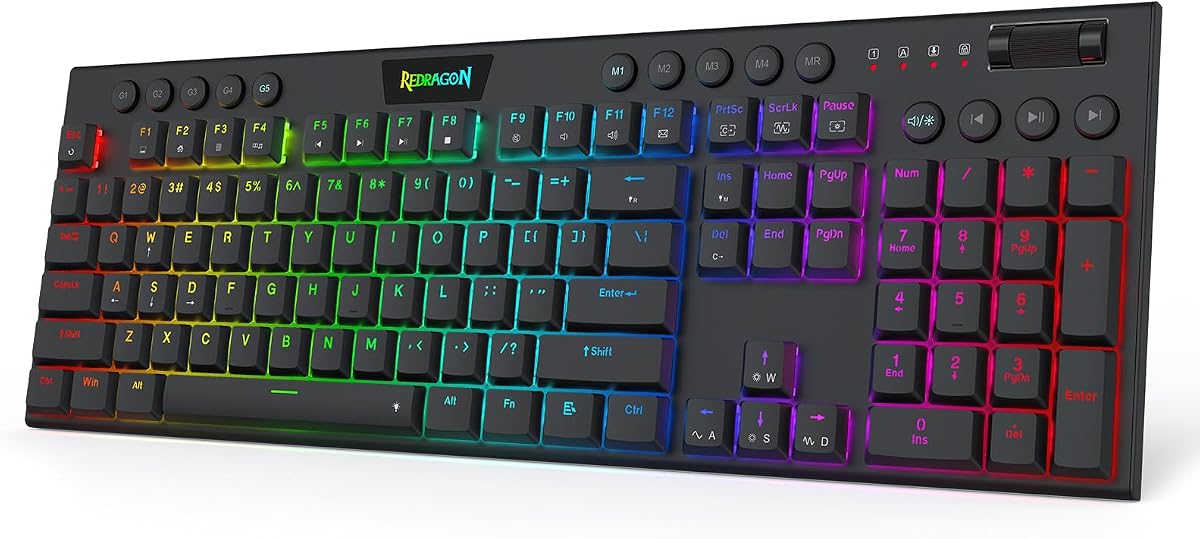
The Redragon K618 HE stands out as a top contender for players seeking speed and efficiency. Its low-profile magnetic switches offer rapid trigger capabilities that ensure every keystroke registers instantly. This performance level makes it an ideal choice for competitive FPS games like Valorant.
We may earn a commission when you buy through this link, at no additional cost to you.
The keyboard features a sleek, 30% slimmer design that reduces travel distance significantly. This means your fingers move less to actuate keys, allowing for quicker reactions during intense matches. The dedicated macro zone lets you bind complex commands without needing extra software.
While the lack of wireless connectivity might be a downside for some, the wired connection ensures consistent performance. The low-profile keys are comfortable but may require an adjustment period for users accustomed to taller switches. Overall, the value and performance justify the trade-offs.
If you want a keyboard that delivers high-speed performance without breaking the bank, this is the one to consider. It offers the precision needed for sharp counter-strafing and rapid fire engagements. We recommend it for gamers prioritizing speed above all else.
The reduced travel distance means faster actuation and less finger fatigue during long gaming sessions.
20 on-the-fly macro keys allow you to set up complex abilities without installing any software.
We may earn a commission when you buy through this link, at no additional cost to you.
The Redragon K673 HE introduces next-gen UltraMag magnetic switches designed for speed. By eliminating physical contact, it prevents wear and allows for rapid trigger functionality. This ensures your movements translate directly to in-game actions without delay.
We may earn a commission when you buy through this link, at no additional cost to you.
Its dual-module floating structure paired with noise dampening layers provides a soft, silent typing experience. The 8000Hz hyper-polling rate ensures inputs are processed faster than standard keyboards. These features combined make it a robust tool for competitive play.
Users must use software to tune actuation points, which adds a step before gaming. While this allows for precision, it might be a hurdle for those who prefer plug-and-play simplicity. Additionally, the price reflects its premium features but may exceed some budgets.
For gamers who want to fine-tune their setup for optimal performance, this keyboard is a great investment. It balances high-speed inputs with a comfortable typing feel. We recommend it for enthusiasts willing to spend time on configuration.
UltraMag switches sense keypresses without contact, reducing latency and increasing durability.
Sound layers provide a Hi-Fi bounce instead of a harsh clack, making it ideal for quiet environments.
We may earn a commission when you buy through this link, at no additional cost to you.
The Redragon K686 HE offers advanced magnetic technology at a competitive price point. It shares many features with the K673 but focuses on delivering reliable performance for competitive shooters. Its rapid trigger function is key for quick peek-and-fire mechanics.
We may earn a commission when you buy through this link, at no additional cost to you.
Like its sibling, it uses magnetic switches to reduce latency and increase durability. The anti-wobble design ensures stability during intense use. The media knob allows easy adjustments for volume and lighting without leaving the game.
While the performance is strong, you need to install software to unlock the full range of features. This might be inconvenient for users who prefer hardware-only settings. However, the value for money makes it a compelling choice for budget-conscious gamers.
If you need the speed of magnetic switches without a premium price tag, this model delivers. It provides the necessary tools to improve reaction times and gameplay efficiency. We recommend it for those looking to upgrade their input speed affordably.
Delivers high-end magnetic switch features at a lower cost compared to other brands.
Independent switch-plate design ensures keypresses remain stable and consistent.
We may earn a commission when you buy through this link, at no additional cost to you.
The Corsair Clipper PRO MINI is built for those who need durability and speed in equal measure. Its IP57 rating means it can withstand dust and water spills, making it resilient during long gaming sessions. The MGX switches offer rapid trigger for instant resets.
We may earn a commission when you buy through this link, at no additional cost to you.
This keyboard uses AXON hyper-processing to achieve near-instant input registration. The 60% layout frees up desk space for mouse movement, which is critical for aiming. While it lacks a number pad, it keeps the footprint small and efficient.
The premium price reflects the high-quality materials and advanced features. Some users might find the compact layout restrictive if they rely on arrow keys frequently. However, its build quality and performance make it a top-tier choice for serious gamers.
If you want a keyboard that will last and perform flawlessly, this is a strong option. The durability and precision make it worth the investment. We recommend it for players who value longevity and high-end performance.
IP57 rating ensures protection against spills and dust, extending the keyboard's lifespan.
Linear, fast-actuating switches with zero drift ensure consistent competitive performance.
We may earn a commission when you buy through this link, at no additional cost to you.
The Razer Huntsman Mini uses optical switches that register keypresses at the speed of light. This technology significantly reduces latency compared to traditional mechanical switches. The 1.0mm actuation distance ensures rapid input during high-speed movements.
We may earn a commission when you buy through this link, at no additional cost to you.
Snap Tap functionality allows for prioritizing input between key pairs, which is useful for quick direction changes. The sturdy aluminum frame adds structural integrity, while the PBT keycaps resist wear over time. RGB lighting offers deep customization options.
You need to install Razer Synapse to access features like Snap Tap, which might be a hassle for some users. The compact size is great for space-saving but might require an adapter for arrow keys. It is a powerful tool for speed-focused players.
If you prefer optical tech and RGB customization, this keyboard delivers. Its durability and performance are top-notch. We recommend it for gamers who want a fast, reliable, and stylish setup.
Beam-based actuation cuts down latency and improves response times significantly.
Matte aluminum top frame increases durability and provides a premium feel.
We may earn a commission when you buy through this link, at no additional cost to you.
The Aula WIN60 HE brings magnetic switches to a hot-swappable platform. This means you can experiment with different switch types without soldering. The 8000Hz polling rate ensures ultra-fast response times for competitive scenarios.
We may earn a commission when you buy through this link, at no additional cost to you.
A web-based driver simplifies customization by avoiding heavy downloads. This makes it easier to remap keys and adjust RGB lighting across devices. The compact design saves space while maintaining all essential functions for FPS gaming.
While the web driver is convenient, it might not be as robust as desktop software for some users. The layout is strictly 60%, which might not suit everyone. However, the customization options and speed make it a strong contender.
If you enjoy tinkering with your hardware, this keyboard offers great flexibility. It balances performance with a modern web-driven approach. We recommend it for tech-savvy gamers looking for customization.
Replace switches easily to tune sound and feel without soldering tools.
No bulky downloads required to customize your keyboard settings.
We may earn a commission when you buy through this link, at no additional cost to you.
The AULA WIN68 HE delivers high-end magnetic performance at a budget-friendly price. It supports rapid trigger and 8000Hz polling, which are essential for fast-paced FPS games. The adjustable actuation point lets you fine-tune sensitivity per key.
We may earn a commission when you buy through this link, at no additional cost to you.
A web-based driver allows you to manage settings without installing software. This is convenient for quick adjustments. The 60% layout keeps things compact, and the RGB lighting adds a nice visual touch to your setup.
The web driver is Windows-only, which may limit cross-platform users. The build is good but lacks the premium feel of higher-end models. For the price, however, the features and performance are hard to beat.
If you need magnetic switches without a high cost, this is the best choice. It offers the speed you need for Valorant without breaking the bank. We recommend it for budget-conscious gamers.
Ultra-low reset step distance allows for lightning-fast response times.
Set different trigger points for different keys to optimize gameplay.
We may earn a commission when you buy through this link, at no additional cost to you.
The AULA F75 Pro offers wireless flexibility without sacrificing too much performance. It connects via Bluetooth, 2.4GHz, or USB-C, giving you versatility. The hot-swappable design allows you to customize the sound and feel of your typing.
We may earn a commission when you buy through this link, at no additional cost to you.
A multi-function knob makes media control easy, while the side-printed keycaps offer a unique aesthetic. The pre-lubed switches provide a smooth typing experience. It has a long battery life, making it suitable for extended use.
While 2.4GHz is fast, wireless connections may still have slight latency compared to wired. You need to manage battery life, which can be a hassle during long sessions. Still, the convenience is a major plus for many users.
If you prefer wireless freedom and customizability, this model is ideal. It blends gaming features with daily usability. We recommend it for players who want a flexible keyboard.
Tri-mode connectivity allows you to switch between devices easily.
Hot-swappable switches and a control knob let you personalize your setup.
We may earn a commission when you buy through this link, at no additional cost to you.
The ATTACK SHARK X68 HE focuses on speed with its rapid trigger technology. It allows you to bind multiple functions to a single key based on press depth. This flexibility helps with complex inputs in games like Valorant.
We may earn a commission when you buy through this link, at no additional cost to you.
The web driver lets you remap keys and adjust RGB lighting without heavy downloads. The top mount structure ensures stability during intense gaming. It uses durable PBT keycaps that resist wear over time.
While the web driver is convenient, it may lack features compared to desktop apps. The compact layout saves space but requires getting used to. It is a solid choice for gamers focused on speed.
If you want affordable rapid trigger tech, this keyboard is a great option. It delivers the speed needed for competitive play. We recommend it for budget gamers seeking performance.
Bind multiple actions to one key for complex gameplay combos.
Top mount structure ensures a stable typing experience without wobbling.
We may earn a commission when you buy through this link, at no additional cost to you.
The ASUS ROG Strix Scope II 96 is a full-sized keyboard that keeps a compact footprint. It includes a number pad while saving space. Its tri-mode connectivity offers versatility for different devices and connection types.
We may earn a commission when you buy through this link, at no additional cost to you.
Pre-lubed ROG NX Snow switches provide a smooth typing experience. Sound-dampening foam reduces noise, which is great for shared environments. The PBT keycaps ensure durability and a high-quality feel.
The price is high, reflecting its premium features. Wireless use might introduce latency, which some competitive players may find undesirable. However, its build quality and comfort are top-tier.
If you need a full-size layout with wireless convenience, this is a strong pick. It balances functionality with quality. We recommend it for users who value space and performance.
Get all full-size functionality in a design that only 1 cm wider than 80%.
Integrated dampening foam absorbs echoes for quieter typing and gaming.
We may earn a commission when you buy through this link, at no additional cost to you.
Selecting the right keyboard for Valorant requires considering several key factors that impact your performance. This guide breaks down the essential elements to help you find a model that fits your playstyle and budget.
The type of switch you choose dictates your keyboard's speed and feel. Magnetic switches offer rapid trigger technology, allowing keys to reset instantly without physical contact. This is crucial for counter-strafing in Valorant. Optical switches use light beams for actuation, which is also very fast. Traditional mechanical switches are durable but may lack the instant reset capability of newer technologies.
Look for keyboards with rapid trigger or optical switches if you prioritize speed and low latency.
Polling rate determines how often your keyboard communicates with your computer. Higher rates like 8000Hz ensure that inputs are processed faster, reducing delay. Standard keyboards often use 1000Hz, but gaming models often go higher for competitive play. A higher rate means your actions register more quickly on screen.
Choose a keyboard with a high polling rate for the fastest possible response times.
Layout size affects desk space and mouse movement area. Compact layouts like 60% or 65% save space, allowing more room for your mouse. This is beneficial for low-sensitivity aiming in FPS games. Full-size keyboards offer number pads but take up more room. Consider your desk size and whether you use arrow keys or numpads regularly.
Opt for a compact layout if you need more space for mouse movement and aiming.
Wired connections generally provide the lowest latency and most reliable performance. Wireless connections offer flexibility but may introduce slight delays. For competitive Valorant, a wired connection is often preferred to ensure every input is registered instantly. If you need wireless, look for models with low-latency 2.4GHz technology.
Prioritize wired connections for the most reliable and lowest latency experience in competitive play.
Build quality ensures your keyboard withstands intense gaming sessions. Materials like aluminum frames or PBT keycaps increase durability. Durable switches are essential since rapid typing and gaming can wear down keys quickly. Look for features like dust and water resistance if you want a long-lasting device.
Invest in a keyboard with high-quality materials to ensure it lasts through years of use.
Software allows you to customize key bindings, actuation points, and lighting. Some keyboards offer web-based drivers that are easier to use than desktop apps. Others let you adjust actuation depth for individual keys. This customization can give you a competitive edge. Ensure the software is compatible with your system.
Check if the keyboard offers software that lets you customize actuation points and macros.
Price varies widely across keyboards with magnetic and optical technologies. Budget models may lack some premium features but still offer great performance. Premium keyboards often include better build quality and advanced customization. Determine how much you want to spend based on your needs.
Set a budget that balances the features you need with the price you are willing to pay.
Comfort is crucial during long gaming sessions to avoid fatigue. Features like wrist rests or ergonomic keycaps can help. Low-profile keyboards may reduce wrist strain. Noise dampening is also important if you play in shared spaces. Consider how comfortable the keyboard feels when you type for hours.
Choose a keyboard that feels comfortable to type on to prevent strain during long sessions.
Proper setup is key to getting the most out of your gaming keyboard. Connect your keyboard to your PC using a stable USB port. Install any required drivers or software to unlock features like rapid trigger. Adjust the actuation points to suit your finger strength and playstyle.
Maintain your keyboard by keeping it clean and free of debris. Use a soft brush or air blower to remove dust between the keys. Clean the keycaps with a slightly damp cloth to remove oils and dirt. Avoid using harsh chemicals that could damage the surface or LEDs.
Store your keyboard properly when not in use to prevent wear. If it is portable, keep it in a padded case during transport. Regularly check the connection to ensure it remains secure. These simple steps will help your keyboard last longer and perform consistently.
Rapid trigger technology allows a key to reset instantly once it is released. This means you do not need to lift your finger all the way to the top before pressing again. It significantly speeds up movements like counter-strafing in FPS games like Valorant.
Magnetic switches are generally faster and more durable because they lack physical contact. They allow for adjustable actuation and rapid trigger features. While mechanical switches are reliable, magnetic switches offer more customization and speed for competitive gaming.
Yes, a higher polling rate reduces input delay. Standard keyboards use 1000Hz, but gaming models can reach 8000Hz. This ensures your actions register faster, giving you a split-second advantage in matches. It is particularly useful for competitive players.
You can use a wireless keyboard, but a wired one is usually recommended. Wireless connections may have slight latency, which can impact performance in fast-paced games. If you choose wireless, look for models with low-latency 2.4GHz technology.
To customize actuation points, you need to use the software or driver provided by the manufacturer. Look for settings that allow you to adjust key depth or reset points. Some web-based drivers make this process easy without installing heavy apps.
A compact layout like 60% or 65% is often best for Valorant. It saves desk space for mouse movement, which helps with low-sensitivity aiming. If you rely on function keys, a 75% or TKL layout might be a better compromise.
We have explored ten excellent keyboards designed to enhance your performance in Valorant. Each model offers unique features like rapid trigger, high polling rates, and durable switches. Choosing the right one depends on your specific needs and gaming style.
Consider factors like layout size, connection type, and build quality when making your decision. If speed is your priority, look for magnetic or optical switches with rapid trigger. For durability and versatility, consider models with IP ratings or tri-mode connectivity.
Remember that prices and availability can change frequently. Check the latest details before finalizing your purchase to ensure you get the best value. With the right keyboard, you can improve your reaction times and enjoy a more competitive edge in Valorant.