
Logitech K120
4.6Editor score
Spill-resistant design
Full-size standard layout
Plug-and-play USB setup
Selecting the right input device is crucial for efficient point of sale operations. A dedicated POS keyboard ensures quick data entry, reliable connectivity, and resistance to daily wear and tear in busy environments.
We have evaluated ten top models based on build quality, key layout, and specific features like touchpads or magnetic stripe readers. This analysis helps you match hardware needs with operational demands effectively.
Each pick highlights unique strengths suitable for retail, hospitality, or industrial use. Prices and availability change frequently, so verify current details before purchasing to ensure you get the best value.
4.6Editor score
4.5Editor score

4.2Editor score
As an Amazon Associate we earn from qualifying purchases.
This side-by-side comparison highlights the key specifications and features of each model to help you make an informed decision based on your specific operational requirements.


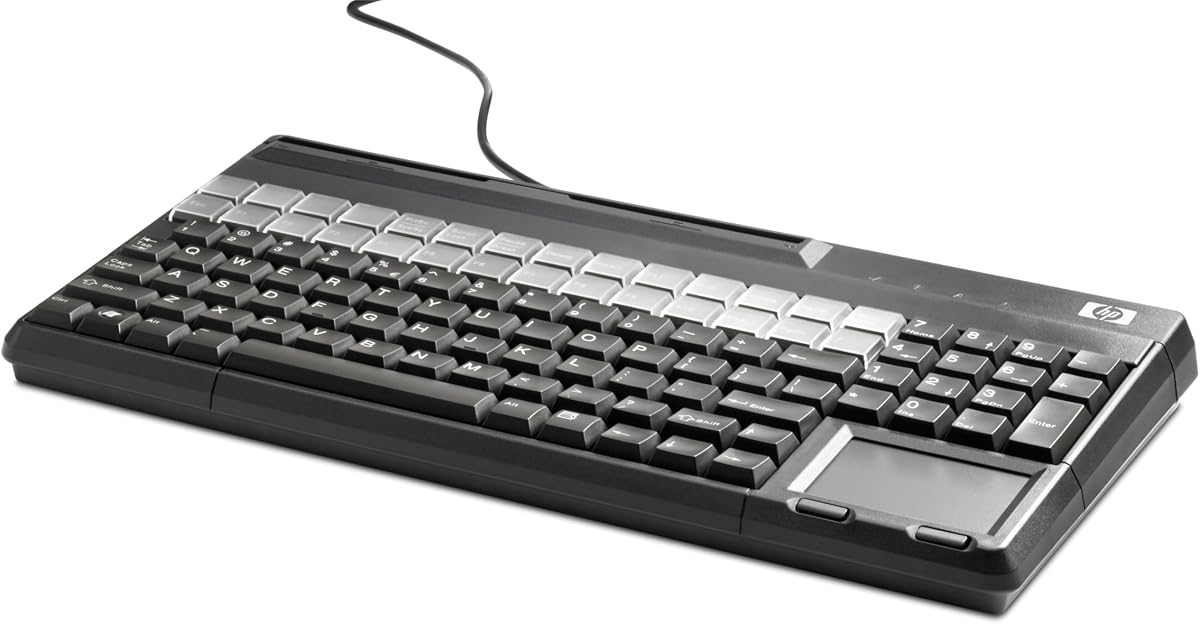
The HP POS Keyboard stands out as a comprehensive solution for point of sale environments. It combines a standard layout with specialized features like a magnetic stripe reader, making it a versatile choice for retail transactions without extra peripherals.
We may earn a commission when you buy through this link, at no additional cost to you.
Its design includes 28 relegendable keys that allow businesses to map frequently used commands directly to the keyboard. The integrated touchpad eliminates the need for a separate mouse, saving valuable counter space in crowded work areas.
While the initial investment is higher than basic models, the all-in-one functionality reduces clutter and potential points of failure. The USB connection ensures reliable data transfer without the latency issues sometimes seen with wireless alternatives.
This keyboard is ideal for businesses needing quick transaction processing with card swiping capabilities. If your workflow benefits from a touchpad and custom key labels, this model offers the right balance of utility and durability.
Integrated magnetic stripe reader allows for immediate card processing without external hardware.
Built-in touchpad reduces the need for a separate mouse, freeing up counter space.
We may earn a commission when you buy through this link, at no additional cost to you.
The Cherry G86-62401 is a compact option designed for efficiency. It features an integrated touchpad and spill-resistant construction, making it suitable for environments where space is limited and liquids may be present.
We may earn a commission when you buy through this link, at no additional cost to you.
This keyboard uses a 106 key layout which maintains standard functionality while keeping the footprint small. The USB interface ensures straightforward connectivity with most POS systems without requiring additional drivers.
While it does not include specialized features like card readers, its durability and compact size make it a solid choice for retail counters. The spill resistance adds peace of mind in busy service areas.
Choose this model if you need a reliable, space-saving input device with touchpad navigation. Its build quality supports continuous use in professional settings where reliability is paramount.
Small footprint maximizes counter space while retaining full functional key layout.
Spill resistant design protects internal components from accidental liquid exposure.
We may earn a commission when you buy through this link, at no additional cost to you.
The Logitech K120 offers exceptional value for businesses needing a simple, reliable input device. Its full-size layout includes a number pad for efficient data entry, while the spill-resistant design handles minor accidents effectively.
We may earn a commission when you buy through this link, at no additional cost to you.
Setup is effortless with the USB plug-and-play connection requiring no software installation. The deep-profile keys provide a comfortable typing experience for employees who work long shifts at the register.
While it lacks advanced features like touchpads or programmable keys, the K120 excels as a workhorse. Its durability and low cost make it a practical choice for high-volume environments.
This keyboard is perfect for basic POS tasks where budget is a concern. If you need a durable, standard keyboard that just works, this model delivers consistent performance.
Affordable pricing makes it accessible for businesses with multiple workstations.
Deep profile keys and standard layout reduce fatigue during extended use.
We may earn a commission when you buy through this link, at no additional cost to you.
The Cherry Lpos G86-71411 provides an expansive layout with 169 keys and 42 relegendable keys for advanced customization. The included magnetic stripe reader supports card transactions directly from the keyboard interface.
We may earn a commission when you buy through this link, at no additional cost to you.
This model is designed for complex retail environments requiring extensive shortcuts or specific function keys. The USB connection ensures stable data flow to the POS system without compatibility issues.
While the larger size requires more counter space, the utility it provides is significant. Businesses needing quick access to many functions will benefit from the customizable key options.
Choose this keyboard if you need robust customization and card reading in one unit. It is a strong candidate for sophisticated point of sale setups.
42 relegendable keys allow mapping of complex commands for faster workflow.
Magnetic stripe reader streamlines payment entry without extra hardware.
We may earn a commission when you buy through this link, at no additional cost to you.
The Perixx PERIBOARD-513III offers a full-size layout with an integrated touchpad and quiet scissor keys for a smooth typing experience. Multimedia hotkeys provide quick access to audio and system controls.
We may earn a commission when you buy through this link, at no additional cost to you.
It uses a standard USB connection for immediate usability without driver installation. The low-profile keys mimic a laptop feel, reducing finger fatigue over long shifts at the register.
While it does not have a magnetic reader, its design focuses on ergonomic efficiency. The space-saving combined keyboard and touchpad is ideal for compact workstations.
This model is recommended for users prioritizing comfort and noise reduction. It balances essential POS functionality with modern convenience features.
Scissor-switch mechanism minimizes noise for quieter work environments.
Combined keyboard and touchpad save space on crowded desks.
We may earn a commission when you buy through this link, at no additional cost to you.
The Adesso Easy Touch 630Ub is engineered for harsh environments with an IP67 waterproof rating. This allows it to withstand water exposure and makes cleaning significantly easier in industrial or food service settings.
We may earn a commission when you buy through this link, at no additional cost to you.
Its large keys offer high contrast and readability which is useful for quick data entry. The membrane switches are designed for durability and long-lasting performance under daily use.
While it lacks a touchpad, the focus is on resilience. This keyboard is a strong choice for areas where spills and rough handling are common.
Pick this model if you need extreme durability and easy cleaning. It protects your investment in challenging conditions.
IP67 rating ensures protection against submersion and heavy spills.
Large print keys improve readability in busy or low-light conditions.
We may earn a commission when you buy through this link, at no additional cost to you.
The Cherry Electronics G86-71401 combines a touchpad with 127 programmable keys for flexible input control. It supports standard US layouts and offers 42 relegendable keys for customized operations.
We may earn a commission when you buy through this link, at no additional cost to you.
USB connectivity provides seamless integration with desktop systems. The design is compact enough for standard counters while providing full navigation capabilities.
This model is suited for businesses needing basic customization without complex hardware. It offers a balance between standard typing and point of sale functionality.
Choose this keyboard for general use where some programming flexibility is needed. It is a reliable workhorse for daily transactions.
127 programmable keys allow for specific task automation.
Built-in touchpad removes the need for an external mouse.
We may earn a commission when you buy through this link, at no additional cost to you.
The Cherry KC 1000 is designed for secure transactions with an integrated smartcard reader and secure PIN entry. It meets FIPS 201 standards for high security in regulated environments.
We may earn a commission when you buy through this link, at no additional cost to you.
This keyboard supports various protocols for smartcard interactions. The thin design keeps it unobtrusive while providing necessary security features for authentication.
While not a general-purpose keyboard, it excels in security-heavy tasks. It is ideal for systems requiring strict access control and card verification.
Select this model if security compliance is your priority. It provides robust protection for sensitive data entry.
FIPS 201 approval meets high security standards for sensitive environments.
Smartcard reader supports secure login and transaction verification.
We may earn a commission when you buy through this link, at no additional cost to you.
The Cherry G80-1800 brings mechanical reliability to POS tasks with MX Black switches rated for over 100 million actuations. Its compact design includes a number pad, making it suitable for tight spaces.
We may earn a commission when you buy through this link, at no additional cost to you.
It supports both USB and PS/2 connections for flexibility across different systems. The durable construction ensures long-term performance in industrial environments.
While the mechanical switches provide tactile feedback, they may be louder than membrane alternatives. This trade-off offers enhanced durability for heavy-duty use.
This keyboard is best for industrial applications requiring robustness. Choose it if you value mechanical switch reliability.
MX Black switches provide over 100 million actuations for durability.
Compact design fits easily into limited desk spaces.
We may earn a commission when you buy through this link, at no additional cost to you.
The Logitech K270 offers wireless convenience with a full-size layout and spill-proof design. A strong wireless connection ensures reliable performance without the clutter of cables.
We may earn a commission when you buy through this link, at no additional cost to you.
It features a 24-month battery life reducing maintenance frequency. Setup is simple with the included USB receiver for plug-and-play connectivity.
While not specialized for POS, it works well in low-spill environments. The wireless nature allows for flexible placement of input devices.
Choose this model if you prioritize cable-free operation. It delivers comfortable typing with minimal setup.
2.4 GHz wireless connection provides reliable performance without cables.
24-month battery life minimizes downtime and maintenance.
We may earn a commission when you buy through this link, at no additional cost to you.
Selecting the right keyboard involves considering durability, layout, and specific features needed for your workflow.
POS keyboards face constant use and potential spills. Look for models with spill-resistant or waterproof ratings to ensure longevity in busy environments.
Prioritize keyboards with sturdy construction to withstand daily wear and tear.
Standard layouts are essential, but relegendable keys allow you to map frequent commands. This customization can significantly speed up transactions and data entry.
Check the number of programmable keys to match your operational needs.
Most systems use USB for stable connections. Wireless models offer flexibility but require battery management. Ensure compatibility with your existing POS hardware.
Choose wired for stability or wireless for mobility based on your setup.
Integrated touchpads save counter space and simplify navigation. They are especially useful in tight workstations where extra peripherals are impractical.
Opt for models with a touchpad if space is at a premium.
Some keyboards include magnetic stripe readers for card transactions. This feature reduces the need for external payment terminals and streamlines the checkout process.
Verify reader compatibility with your payment processing system before buying.
Prices vary based on features like touchpads or magnetic readers. Basic durable models are affordable, while specialized units cost more but offer integrated functionality.
Balance upfront cost against long-term durability and feature needs.
Mechanical switches offer durability but may be louder. Membrane or scissor switches provide quiet operation suitable for customer-facing areas.
Select a switch type that fits the noise tolerance of your environment.
Always place the keyboard on a flat stable surface to prevent accidental tipping during use. Avoid placing liquids directly near the unit to minimize spill risks.
Clean the keys regularly using a soft, dry cloth to remove dust and debris. For tougher grime, lightly dampen the cloth but never spray liquids directly onto the keys.
For wireless models, replace batteries promptly when performance drops to maintain connectivity. For wired units, ensure cables are not bent sharply to prevent internal damage over time.
No, not all models feature a built-in touchpad. Some standard keyboards require a separate mouse for cursor navigation. Check the product specs to ensure a touchpad is included if space is a concern.
Yes, you can use a regular keyboard. However, dedicated POS keyboards often include specialized features like relegendable keys or magnetic readers that improve efficiency. Standard keyboards may lack these specific optimizations.
Unplug the keyboard and let it dry completely if a spill occurs. Wipe the surface with a slightly damp cloth. Avoid submerging the unit unless it has a waterproof rating like IP67.
Wireless keyboards can be reliable with strong 2.4 GHz connections. However, wired options offer stable connectivity without battery concerns. Choose based on your setup requirements and tolerance for maintenance.
A relegendable key allows you to change the label printed on the keycap. This is useful for mapping custom commands or specific POS functions. It helps streamline operations by reducing the number of clicks needed.
Most modern USB keyboards are plug-and-play and do not need drivers. Some advanced models with custom keys may require specific software. Check the compatibility details for your operating system.
Many models work with Windows and Mac systems via USB. However, key layouts may differ slightly. Verify compatibility in the product description before purchasing for Mac integration.
Lifespan depends on usage frequency, key switch quality, and environmental conditions. Mechanical switches often last longer than membrane ones. Regular cleaning and avoiding spills also extend the device's life.
We have reviewed ten models ranging from budget-friendly options to specialized units with magnetic readers. The HP POS Keyboard and Logitech K120 stand out for their balance of features and affordability.
When choosing, prioritize durability and layout features that match your daily tasks. A keyboard with relegendable keys or a touchpad can significantly improve operational efficiency.
Always verify current stock and details before purchasing as specifications may vary. Investing in the right input device ensures smoother transactions and a more reliable workflow.