
Redragon K617 HE Wired Hall-Effect Rapid Trigger Magnetic Gaming Keyboard
4.3Editor score
Hall Effect magnetic switches
Rapid Trigger support
8000Hz polling rate
This guide compares the top 10 keyboards for CS2 featuring Hall Effect switches rapid trigger and fast polling to help you choose the right gear.
Finding the right keyboard for CS2 is crucial for competitive players who need speed precision and reliability. The right device can improve your reaction time and help you land those critical shots consistently.
We have evaluated ten top models based on their switch technology polling rates and build quality. Our analysis focuses on features like Rapid Trigger and Hall Effect switches that define modern esports hardware performance.
Each pick includes detailed specs pros and cons to help you decide quickly. Prices and availability change frequently so check current listings before making your final purchase decision for your setup.
4.3Editor score
4.4Editor score
4.5Editor score
This side-by-side comparison highlights the key differences between the top ten options for CS2. We look at switch type polling rate layout and build materials to show you exactly what sets each apart.



The Redragon K617 HE is a solid entry point for competitive players looking for Hall Effect technology. It offers a 4.3 rating from users who appreciate its speed and responsiveness at a low cost.
We may earn a commission when you buy through this link, at no additional cost to you.
Its standout feature is the Rapid Trigger support combined with 8000Hz polling. This ensures your inputs register instantly which is vital for CS2 movement mechanics. You can adjust actuation points to fit your specific playstyle.
The keyboard does have tradeoffs including basic software and simpler build materials compared to high end models. However these are acceptable given its price and performance ratio for budget conscious buyers.
If you need reliable performance without breaking the bank this model is an excellent choice. It delivers the core features required for CS2 including precision and speed.
The 8000Hz polling rate ensures inputs are processed with minimal latency for faster gameplay.
Fine tune each key's trigger point to match your aiming or typing preferences easily.
We may earn a commission when you buy through this link, at no additional cost to you.
The Redragon K686 HE improves on the K617 with better noise dampening and media controls. Its 4.4 rating reflects strong user satisfaction with its typing feel and performance.
We may earn a commission when you buy through this link, at no additional cost to you.
Features like the one knob simplicity and dual module floating structure make it unique. You can manage volume without leaving your game and enjoy a softer tactile experience.
The main downsides are a slightly higher price and a driver learning curve for advanced settings. These are acceptable tradeoffs for players who value comfort and convenience.
Choose this model if you want a balanced setup with good performance and user friendly controls.
Dampening layers reduce harsh clacks for a softer and more comfortable typing experience.
Adjust backlight brightness and media playback with a single control knob.
We may earn a commission when you buy through this link, at no additional cost to you.
The Redragon K673 HE focuses on quiet operation and consistent performance for long gaming sessions. It carries a 4.1 rating which shows reliable performance for players who value silence.
We may earn a commission when you buy through this link, at no additional cost to you.
Its noise dampening and rapid trigger support ensure you can focus on the game without distractions. The floating structure adds stability and improves the overall typing feel significantly.
The main tradeoffs are the higher price and complex software required for full customization. These are acceptable for serious players prioritizing audio quality during matches.
Select this option if you want a quiet reliable keyboard that supports high level gameplay.
Noise dampening reduces distractions so you stay focused on the match.
Independent switch plate design provides consistent and stable key presses.
We may earn a commission when you buy through this link, at no additional cost to you.
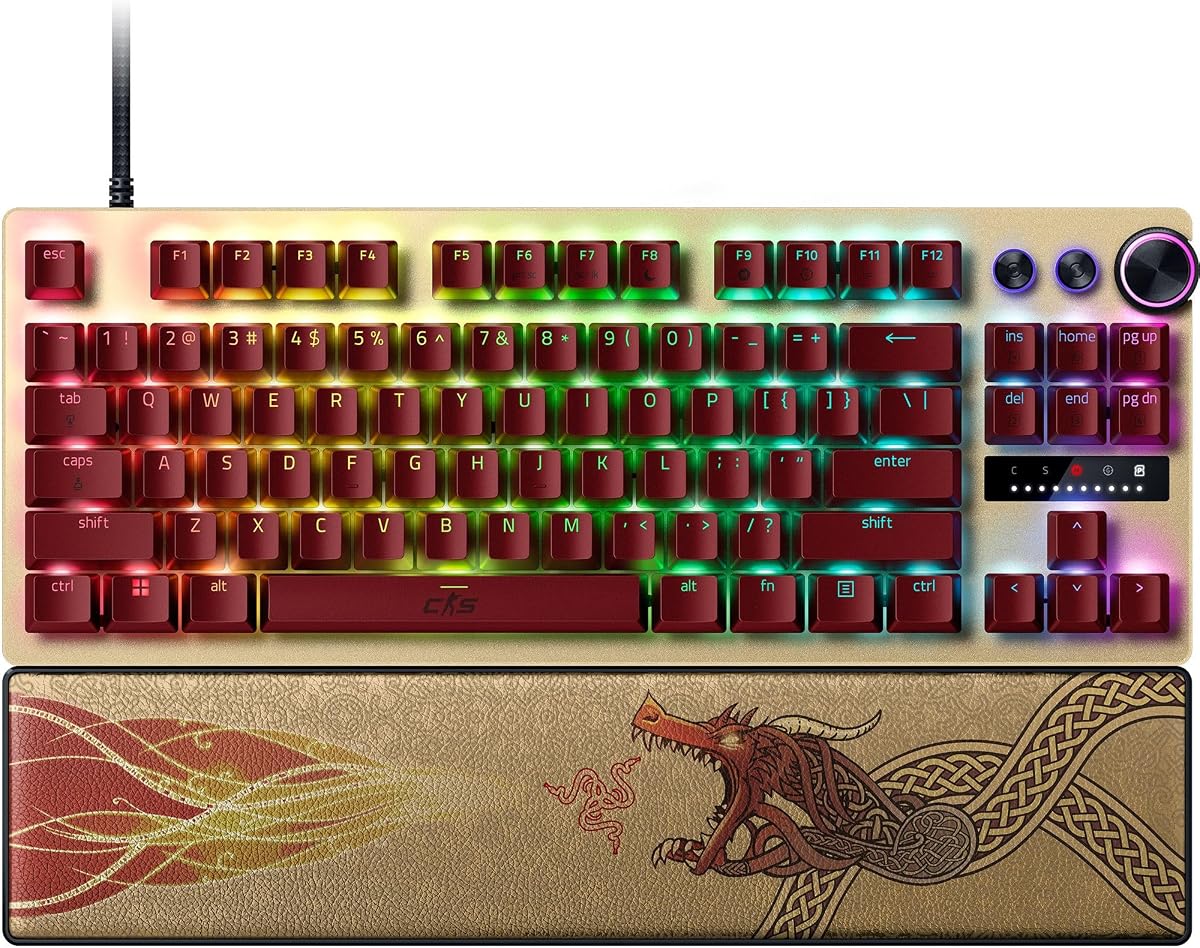
The Razer Huntsman V3 Pro TKL CS2 Edition is a top tier choice for competitive players. With a 4.4 rating it stands out for its premium features and dedicated esports design.
We may earn a commission when you buy through this link, at no additional cost to you.
Key strengths include Analog optical switches and Snap Tap mode for faster directional changes. You can adjust actuation on the fly and enjoy onboard adjustments without needing software.
The main cons are the expensive price and occasional need for firmware updates. These are worth it for the performance boost you gain in high level CS2 matches.
For serious competitors who demand the best this keyboard delivers unmatched precision and reliability.
Prioritize latest inputs between two keys for faster directional changes.
Adjust settings instantly without installing software or leaving the game.
We may earn a commission when you buy through this link, at no additional cost to you.
The Corsair Clipper PRO MINI is an excellent compact option for players with limited desk space. It holds a 4.4 rating thanks to its durable build and precise performance.
We may earn a commission when you buy through this link, at no additional cost to you.
Features like Rapid Trigger and 8000Hz polling enable quick taps and counter strafing. The IP57 water resistance adds peace of mind during intense gaming sessions.
Tradeoffs include no dedicated numpad and limited media controls compared to full size boards. These are acceptable for players who prioritize space and raw performance.
Choose this model if you need a small reliable keyboard that supports fast competitive play.
Maximize mouse movement space for low sensitivity aiming setups.
Built to handle spills so your setup stays safe during long sessions.
We may earn a commission when you buy through this link, at no additional cost to you.
The Redragon K745 HE offers vibrant RGB lighting and rapid trigger support for an immersive gaming experience. It has a 3.9 rating indicating decent performance with some minor drawbacks.
We may earn a commission when you buy through this link, at no additional cost to you.
Its 8000Hz polling rate ensures fast inputs and consistent performance during high speed gameplay. The dual module floating structure helps reduce noise and improve typing stability.
The lower rating and basic build quality are tradeoffs compared to more expensive models. However they are acceptable for players on a budget who prioritize lighting and speed.
Select this option if you want a colorful reliable keyboard without spending too much money.
Adjust brightness and lighting modes to match your gaming vibe.
Wired connection transmits inputs faster for smoother gameplay.
We may earn a commission when you buy through this link, at no additional cost to you.
The Keychron C0 HE 8K is a specialized keypad for players who want extra control on one hand. It carries a 4.2 rating for its precise performance and easy customization.
We may earn a commission when you buy through this link, at no additional cost to you.
Its Rapid Trigger Hall Effect switches provide instant key reset and ultra low latency. You can map specific commands or macros directly to the keypad for efficient gameplay.
The downside is that it is not a main keyboard and has a learning curve for setup. These are acceptable for players looking to enhance their existing setup with extra functionality.
Choose this if you want to add advanced command access without moving your main keyboard.
Keep essential commands within reach to minimize hand movement.
Customize key mappings through a browser without installing extra software.
We may earn a commission when you buy through this link, at no additional cost to you.
This Renewed model of the Razer Huntsman V3 Pro TKL offers premium features at a lower cost. It has a 3.5 rating which reflects caution among users about renewed products.
We may earn a commission when you buy through this link, at no additional cost to you.
You still get Analog optical switches and Snap Tap mode for high performance gaming. The aluminum top plate adds durability and reduces unwanted vibration during intense matches.
The tradeoffs are potential condition risk and limited warranty compared to new items. These are acceptable if you are comfortable with refurbished electronics and saving money.
Opt for this if you want high end specs and are willing to take a small risk.
Enjoy high end switch technology without paying full retail price.
Solid top plate resists warping and keeps the keyboard stable.
We may earn a commission when you buy through this link, at no additional cost to you.
The Corsair K55 RGB PRO is a budget friendly option for casual players or beginners. It has a 4.4 rating for comfort and reliability despite being a membrane keyboard.
We may earn a commission when you buy through this link, at no additional cost to you.
Features like six dedicated macro keys and customizable RGB make it versatile for gaming. The detachable palm rest adds comfort for long sessions and reduces hand strain.
Tradeoffs include no rapid trigger support and slower switch response than Hall Effect models. These are acceptable if you are not chasing competitive performance.
Choose this if you want a reliable comfortable keyboard without spending much money.
Activate complex commands with a single press for easier gameplay.
Reduce hand strain with a soft and textured palm rest.
We may earn a commission when you buy through this link, at no additional cost to you.
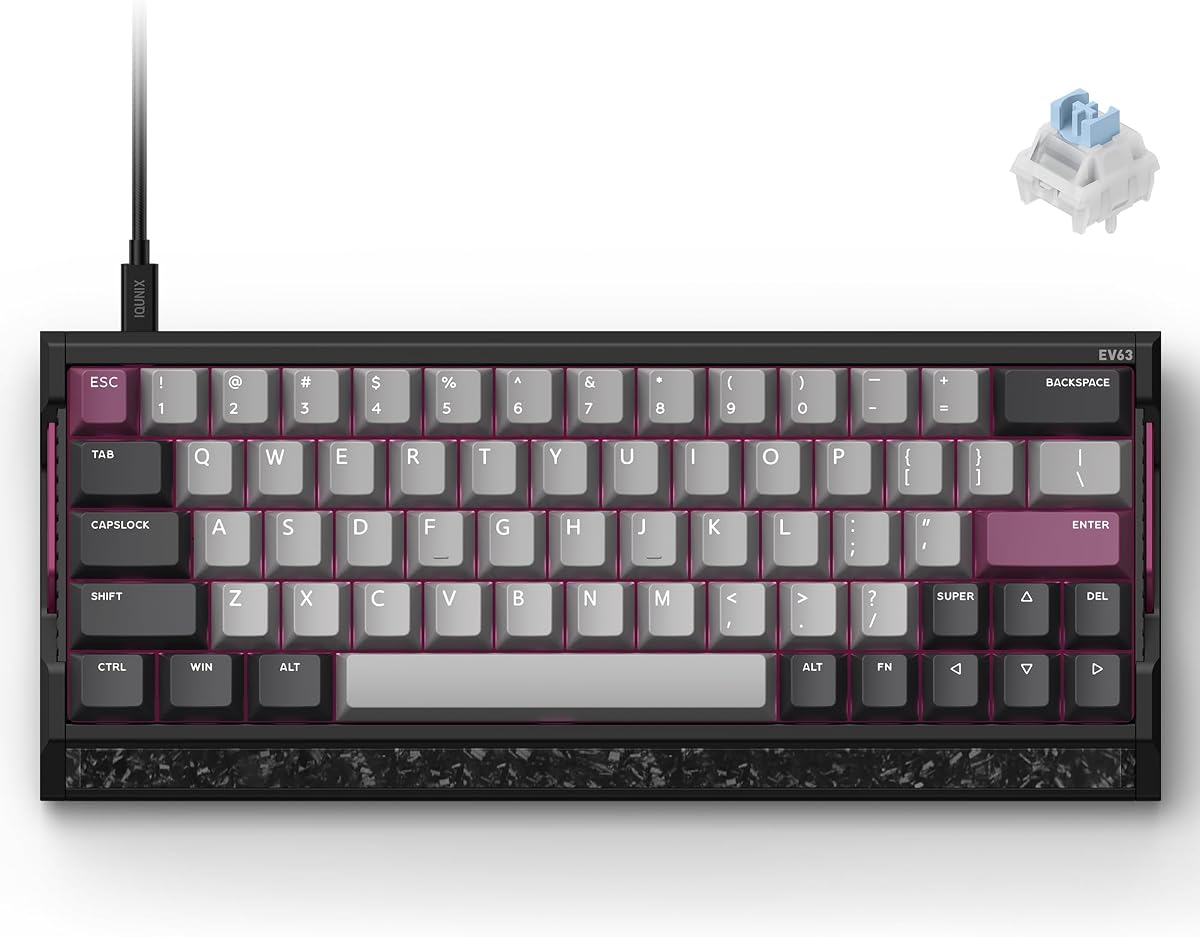
The IQUNIX EV63 Hall Effect is a premium choice for serious FPS players. It has a 4.5 rating for its high build quality and advanced tuning features.
We may earn a commission when you buy through this link, at no additional cost to you.
Key features include an aluminum forged carbon case and M.A.T. 2.0 algorithm for stable input. You can enjoy zero dead zone control and rapid trigger for cleaner movement.
The tradeoffs are the very high price and small layout adjustment for full-size users. These are acceptable for players seeking a custom like build quality and performance.
Select this if you want the best build quality and advanced control for FPS.
Premium materials reduce vibration and add stability to your desk.
Real time checks reduce missed inputs for cleaner movement.
We may earn a commission when you buy through this link, at no additional cost to you.
Choosing the right keyboard for CS2 requires understanding what features affect your gameplay. This guide covers key factors like switch type polling rate and build quality to help you pick.
Switch type is one of the most important factors for CS2 performance. Hall Effect magnetic switches are currently preferred because they allow for rapid trigger and adjustable actuation. This gives you more control over how fast keys reset and how deep they need to be pressed.
Choose switches that support adjustable actuation and rapid trigger to get the fastest response.
Polling rate determines how often the keyboard sends input data to your computer. Modern gaming keyboards offer 8000Hz polling which means inputs are processed almost instantly. Higher polling reduces latency and helps with precise movements.
Prioritize keyboards with at least 1000Hz polling but look for 8000Hz for top competitive play.
Adjustable actuation points let you customize how much pressure is needed to register a key. Some keys can be set to 0.1mm for rapid inputs while others can be set deeper for typing. This flexibility helps reduce fatigue during long sessions.
Look for keyboards that allow you to set different actuation points per key for maximum customization.
Keyboard size affects mouse space and how many keys you have access to. 60% layouts free up desk space for wide mouse swipes but remove number keys. Full size layouts provide more options but limit your mouse movement area.
Select a layout that matches your desk space and how much room you need for mouse movement.
Build quality ensures your keyboard stays stable and durable during intense matches. Aluminum cases reduce unwanted vibration while plastic may flex over time. PBT keycaps resist wear better than ABS caps.
Opt for solid materials like aluminum or reinforced plastic to prevent desk movement during play.
Noise dampening layers reduce the sound of keystrokes which can be distracting. If you play in a quiet environment or with a mic consider keyboards with foam or silicone dampening. This can improve comfort during long sessions.
Choose keyboards with dampening layers if you value a quieter and more comfortable experience.
Software controls allow you to map keys and adjust settings for your playstyle. Some keyboards offer onboard memory so you can save profiles without installing software. Others rely on cloud settings which require constant connection.
Select software that allows easy profile saving either through onboard memory or a reliable driver.
Budget plays a role in what features you can access. Entry level models offer basic rapid trigger while high end ones add aluminum frames and premium switches. Decide how much you are willing to spend for the best balance.
Set a realistic budget and focus on getting the best switches and polling rate within that range.
To get the most out of your keyboard connect it to a USB port that supports high speed data transfer. This ensures the 8000Hz polling rate functions correctly without interference. Avoid using USB hubs which may limit input speed.
Use the driver software to map your keys to common CS2 actions like crouch or reload. Customize actuation points so you can tap keys quickly without accidental presses. This helps you react faster during critical moments.
Keep your keyboard clean by brushing off debris from between keys regularly. If it has spill resistance wipe it with a dry cloth but avoid using liquids directly. Proper care will extend the life of your switches and maintain performance.
Rapid Trigger resets a key the moment you lift your finger. This is vital for CS2 because it allows faster counter strafing and movement control. Without it you may miss inputs due to mechanical delays.
While 1000Hz is standard 8000Hz reduces input latency further. It is not strictly necessary but helps competitive players who need every millisecond. It ensures your movements are processed faster than with lower rates.
A 60% keyboard gives more mouse space which is helpful for low sensitivity players. However full size layouts offer more macro keys. Choose based on your preferred mouse movement and desk space.
Hall Effect switches are generally better for CS2 because they support rapid trigger and adjustable actuation. Mechanical switches are reliable but lack these features. If you want precision Hall Effect is the way to go.
Yes many gaming keyboards support both gaming and typing well. Some offer typing profiles to make the feel softer. This dual use reduces the need to buy separate keyboards for work and play.
Use a brush or compressed air to remove debris between keys. Avoid liquids unless the keyboard is water resistant. For stubborn dirt wipe the surface with a damp cloth and let it dry.
Good FPS keyboards have low latency switches adjustable actuation and stable build. They also support features like rapid trigger and high polling rates. These ensure fast and consistent input registration.
Some models have onboard memory so you do not need software to save profiles. Others require a driver for full customization. Check product specs to see if software is needed before you buy.
You now have a clear list of top keyboards for CS2 ranging from budget to premium. Options like the Redragon K617 HE and Razer Huntsman V3 Pro TKL offer reliable performance for most players.
Prioritize features like rapid trigger and adjustable actuation for the best competitive edge. These settings directly impact how fast you can move and react in high level games.
Remember that prices and availability change regularly so check current listings before buying. Select the model that fits your budget and offers the performance you need for success.