
Hamile for iPad 9/8/7th Generation Case with Keyboard
4.5Editor score
400mAh rechargeable battery
7 color backlit keys
Detachable magnetic keyboard
Finding the right keyboard case for 8th Generation iPad transforms your tablet into a productive workstation. These accessories combine protection with typing functionality making them essential for students and professionals alike.
We compared ten top rated models based on compatibility build quality battery life and typing comfort. Each option offers unique features like trackpads backlit keys and detachable designs to suit different needs.
Every pick highlights key strengths and potential trade-offs so you can choose confidently. Prices and availability may change over time so verify details before purchasing to ensure the best value for your setup.
4.5Editor score

4.4Editor score

4.4Editor score
As an Amazon Associate we earn from qualifying purchases.
This side by side comparison reviews all ten keyboard cases for the 8th Generation iPad focusing on key specifications features and overall value to help you make an informed decision.



The TUNKARMOR Keyboard Case offers a complete package for iPad users seeking productivity features. With a solid 4.4 rating it stands out for including a Bluetooth mouse alongside the keyboard.
We may earn a commission when you buy through this link, at no additional cost to you.
Its adjustable 7 color backlight ensures visibility in any lighting condition while the magnetic detachable keyboard transforms your tablet into a mini laptop instantly. The built-in pencil holder adds convenience for stylus users.
While the design is slightly bulkier than ultra-slim options the protection and versatility it provides make up for it. The honeycomb grid pattern helps prevent overheating during extended use.
This case is ideal for students or professionals who need a full workstation setup without buying separate accessories. It balances functionality and protection effectively for daily tasks.
The included Bluetooth mouse eliminates the need for a separate purchase allowing you to navigate and type seamlessly.
The honeycomb grid pattern on the inner layer helps dissipate heat protecting your tablet from overheating during long sessions.
We may earn a commission when you buy through this link, at no additional cost to you.
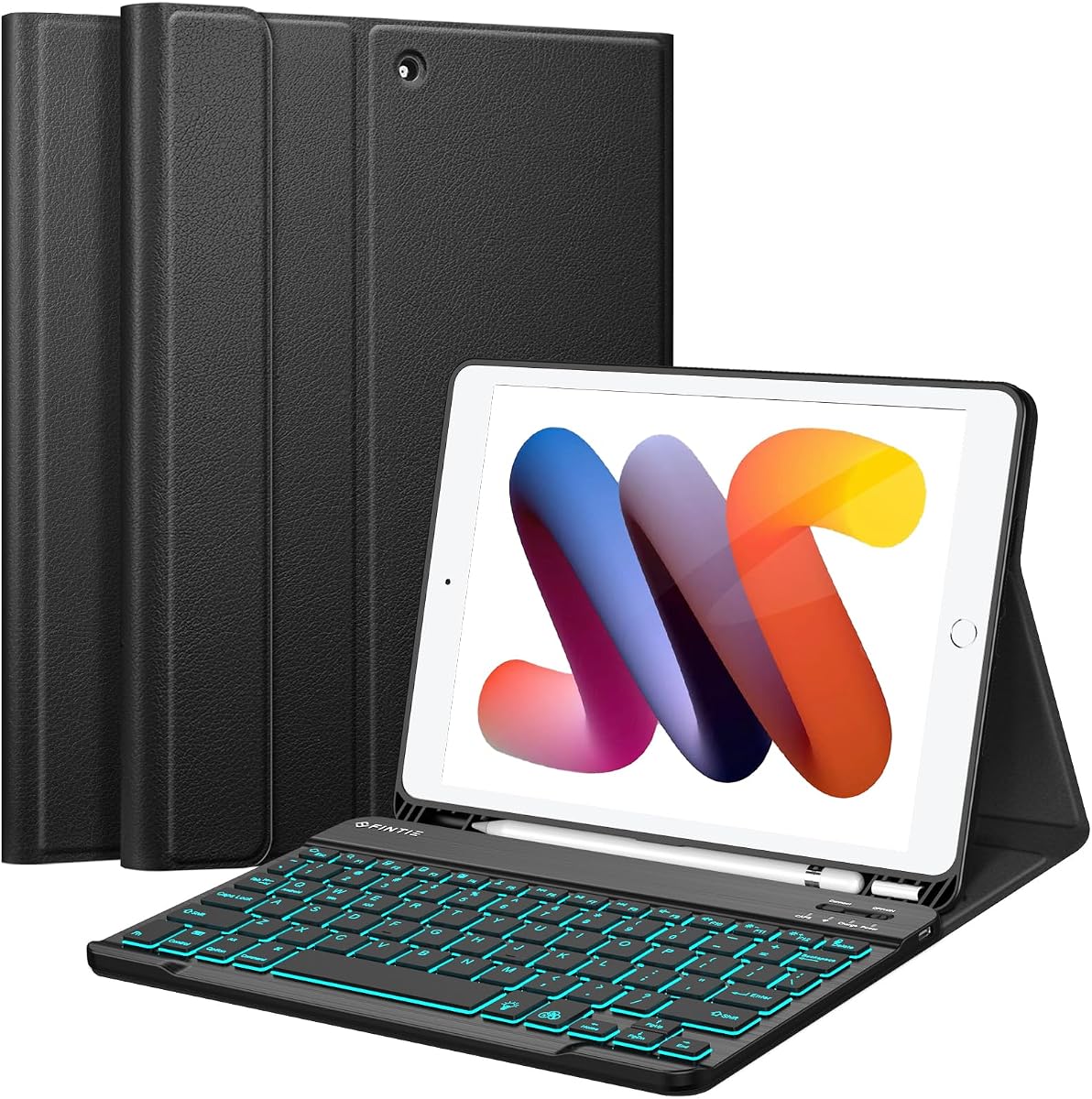
FINTIE delivers exceptional value with its backlit keyboard case designed specifically for 8th Generation iPad models. A 4.5 rating highlights user satisfaction with its battery performance and typing comfort.
We may earn a commission when you buy through this link, at no additional cost to you.
The 420mAh battery supports up to 230 hours of continuous use and charges fully in just 2 to 3 hours. Its 7 color backlight options provide visual customization for different environments.
Ergonomic scissor keys reduce noise while typing making it suitable for quiet libraries or offices. The detachable keyboard allows flexibility when you want to use the tablet as a standalone device.
Budget conscious buyers will appreciate the balance of features and affordability. It covers essential needs without unnecessary add-ons making it a practical choice for everyday use.
With up to 230 hours of use the battery rarely needs recharging ensuring your keyboard is ready whenever you need it.
Mechanical scissor keys offer a satisfying rebound and reduce noise allowing for comfortable long hour typing sessions.
We may earn a commission when you buy through this link, at no additional cost to you.
The typecase Touch Keyboard Case elevates the 8th Generation iPad experience with premium features like a precision trackpad and 360 degree rotating hinge. Its 4.4 rating reflects strong performance across diverse use cases.
We may earn a commission when you buy through this link, at no additional cost to you.
Navigation becomes intuitive with multi-gesture trackpad controls ideal for editing documents or browsing the web. The 10 color RGB LED backlight adds a touch of style while ensuring clear visibility in dark settings.
The patented hinge allows seven distinct use modes from typing to watching videos transforming the iPad into a versatile workstation. Full row iOS shortcuts streamline workflow by providing quick access to common functions.
While pricier than basic options the added productivity tools justify the investment for power users. If you want laptop-like control and flexibility this case delivers a premium experience.
The precision trackpad supports multi-gesture controls reducing the need to tap the screen constantly and improving efficiency.
Seven use modes enabled by the rotating hinge let you adjust the iPad for typing viewing or drawing with ease.
We may earn a commission when you buy through this link, at no additional cost to you.
Hamile offers a sleek detachable keyboard case that prioritizes portability and comfort. With a 4.5 rating users appreciate its responsive typing and easy to use design for daily productivity.
We may earn a commission when you buy through this link, at no additional cost to you.
The 400mAh battery ensures at least 180 hours of use and charges fully in just two hours. Laser-etched backlit keys with seven vibrant colors make typing in the dark both fun and functional.
Its detachable magnetic keyboard can be repositioned or removed giving you flexibility to use the tablet as a standalone device. Three grooves let you adjust viewing angles for comfortable hands-free viewing.
For those who value a lightweight setup this case is a strong contender. It provides essential features without adding unnecessary bulk making it great for travel and study.
The slim and lightweight design makes it easy to slip into a bag while the detachable keyboard offers versatile usage options.
A honeycomb heat dissipation design inside the case helps keep your iPad cool during extended usage sessions.
We may earn a commission when you buy through this link, at no additional cost to you.
Divufus provides a versatile keyboard case that works seamlessly across iOS Android and Windows systems. Its 4.4 rating shows reliability for users who switch between devices frequently.
We may earn a commission when you buy through this link, at no additional cost to you.
You can switch systems by pressing Fn and corresponding keys giving you adaptability without needing multiple keyboards. The full shortcut keys enhance efficiency by providing quick access to common commands.
With an 80 hour work time and 130 day standby the battery remains reliable for regular tasks. The honeycomb grid design helps prevent overheating extending the service life of your device.
This case is perfect for multi device users who need a unified typing solution. Its practical features and system compatibility make it a smart choice for flexible workflows.
Support for iOS Android and Windows systems means you can use this case across different platforms without hassle.
Non-slip rubber lining inside the case keeps your iPad secure and prevents it from sliding during use.
We may earn a commission when you buy through this link, at no additional cost to you.
Logitech Slim Folio is a classic choice known for durability and comfortable typing. Its 4.4 rating underscores its reputation for quality and long-term reliability among iPad users.
We may earn a commission when you buy through this link, at no additional cost to you.
The keyboard supports up to four years of use on two replaceable coin cell batteries reducing maintenance needs. Well-spaced keys prevent crowding making typing enjoyable even during long sessions.
iOS shortcut keys provide one-tap access to media and volume controls enhancing productivity without extra effort. Bluetooth Low Energy connectivity ensures a stable connection while conserving power.
If you prefer simplicity and longevity over fancy features this case is an excellent investment. It delivers consistent performance and protection without unnecessary complexity.
With up to four years of battery life you won't need to recharge or replace batteries frequently.
Built-in iOS shortcut keys streamline your workflow by giving quick access to essential functions and media controls.
We may earn a commission when you buy through this link, at no additional cost to you.
KBCASE offers a slim wireless keyboard case that combines portability with solid protection. A 4.5 rating highlights its balance of functionality and style for everyday iPad users.
We may earn a commission when you buy through this link, at no additional cost to you.
Its ultra-thin design fits easily into bags while scissor-structure keys provide a spacious and tactile typing experience. The built-in pencil holder ensures your stylus is always within reach when you need it.
Multiple viewing angles allow you to adjust the iPad for work or entertainment comfortably. The wave shock absorption design helps protect your device from scratches and minor impacts.
Ideal for users who prioritize portability and clean design this case delivers reliable performance. It avoids bulky features keeping your setup light and efficient.
The ultra-thin design makes it easy to carry in a briefcase or backpack without adding extra weight.
A built-in pencil holder keeps your Apple Pencil secure and ready for use whenever you need to sketch or take notes.
We may earn a commission when you buy through this link, at no additional cost to you.
Dexnor introduces a modern floating keyboard case with a durable aluminum alloy hinge and precision trackpad. A 4.3 rating reflects its innovative design and solid functionality for power users.
We may earn a commission when you buy through this link, at no additional cost to you.
The floating cantilever stand offers customizable angles for typing and viewing making it comfortable for extended sessions. A 650mAh battery provides up to 200 hours of working time on a single charge.
A full row of practical shortcut keys enhances productivity by giving quick access to media and volume controls. The scissor-switch key structure allows quiet typing without sacrificing performance.
While it carries a higher price its advanced features justify the cost for those seeking a premium setup. It blends style and utility effectively for work and creative tasks.
The floating design lets you adjust angles to fit your comfort needs for typing reading or watching videos.
A durable aluminum alloy hinge guarantees a sturdy magnetic connection ensuring your keyboard stays secure during use.
We may earn a commission when you buy through this link, at no additional cost to you.
INFILAND delivers a polished keyboard case with responsive typing and smooth trackpad navigation. A 4.5 rating highlights user satisfaction with its lag-free performance and thoughtful design.
We may earn a commission when you buy through this link, at no additional cost to you.
The magnetic keyboard locks firmly into place ensuring a stable typing experience without delays. A built-in precision trackpad lets you control the cursor smoothly making multitasking more efficient.
Seven backlight colors and three brightness levels adapt the keyboard to any environment. The multi-mode design lets you fold it into a stand or detach the keyboard for a lighter experience.
This case suits users who want a laptop-like feel with modern convenience features. Its responsive controls and sleek design make it a strong choice for daily productivity.
Zero-lag magnetic connection ensures every keystroke registers instantly making it ideal for fast typing tasks.
A precision trackpad allows smooth cursor control reducing the need to constantly tap the screen while working.
We may earn a commission when you buy through this link, at no additional cost to you.
KBCASE offers a touchpad keyboard case with a rotating design that adapts to various viewing needs. A 4.4 rating reflects its reliable performance and flexibility for multitasking users.
We may earn a commission when you buy through this link, at no additional cost to you.
The 360 degree swivel and 180 degree flip provide multiple comfortable viewing angles for typing or watching content. A precision trackpad allows you to control the cursor without touching the screen.
Hardshell protection keeps your device safe from scratches and wear while precise cutouts ensure full access to all ports. A pencil holder keeps your stylus secure and ready for use.
This case is great for users who value flexibility and comprehensive protection. Its rotating design and trackpad features make it a versatile choice for different tasks.
A 360 degree swivel and 180 degree flip let you adjust the iPad to any angle you prefer for work or play.
A hardshell design protects all sides of your tablet keeping it safe from scratches and everyday wear.
We may earn a commission when you buy through this link, at no additional cost to you.
Choosing the right keyboard case involves balancing compatibility features budget and usage needs. Here are key factors to consider.
Always verify your iPad model number before purchasing. Most cases support the 8th Generation iPad 10.2 inch but some include Air 3rd and Pro 10.5 inch models. Check the device A-number on the back to ensure a perfect fit.
Confirming model compatibility prevents returns and ensures all cutouts align with ports and buttons.
Look for keyboards with at least 80 hours of use time. Lithium-ion batteries with Type-C charging offer convenience and longevity. Some models support energy-saving modes to extend standby time.
A long battery life ensures your keyboard stays operational throughout work or study sessions without interruption.
Backlit keyboards with multiple color options improve visibility in dim environments. Seven or more colors plus brightness levels let you match your preference or surroundings. Adjustable backlights also save power when not needed.
Prioritize adjustable backlighting if you often work in low light conditions or value visual customization.
Cases with built-in trackpads enhance cursor control making navigation smoother without tapping the screen. Keyboard-only models are lighter and often more affordable. Decide based on how much mouse-like control you need.
Choose a trackpad if you frequently navigate complex interfaces or prefer laptop-style control.
Detachable keyboards offer flexibility to use your tablet as a standalone device. Fixed keyboards provide better stability and alignment for typing. Magnetic connections make detachment seamless when needed.
Opt for detachable designs if you value versatility and plan to switch between tablet and laptop modes often.
Full edge coverage and scratch-resistant materials protect your iPad from daily wear. Honeycomb grids or shock-absorbing layers add thermal management and drop protection. Reinforced hinges ensure long-term use.
Prioritize robust materials and full coverage if your device travels frequently or faces rough handling.
Built-in pencil holders keep your stylus secure and easily accessible during creative tasks. Cutouts or slots allow quick access without removing the case. Some models include magnetic holders for better retention.
Ensure your case has a pencil holder if you use Apple Pencil regularly for drawing or note-taking.
Full-size layouts with shortcut keys improve typing efficiency. Scissor keys offer quieter and more responsive keystrokes than membrane keys. Consider key spacing to avoid fatigue during long typing sessions.
Test or read reviews on key comfort to ensure the keyboard suits your typing style and needs.
Begin by pairing the Bluetooth keyboard with your iPad through Settings. Follow on-screen prompts to establish a stable connection. Most cases wake the iPad automatically when opened and sleep it when closed.
Keep the keyboard and case clean using a dry cloth. Avoid exposure to liquids or extreme heat which can damage electronics. Store your iPad in the case when not in use to protect ports and screen.
For detachable models remove the keyboard gently to avoid stressing magnetic contacts. Charge the keyboard periodically using the included cable to maintain battery health. Reset Bluetooth if connection issues occur by removing the device from settings.
Most quality keyboard cases are designed specifically for the 8th Generation iPad 10.2 inch. Always check the product compatibility list against your model number A2270 A2428 A2429 or A2430 before buying. Precise cutouts ensure full access to ports cameras and buttons without removing the case.
Most rechargeable keyboards last between 80 to 230 hours on a single charge. Energy-saving modes automatically activate after inactivity to extend battery life. Type-C charging allows quick top-ups and some models support fast charging in under three hours.
No trackpads are not standard in every keyboard case. Some premium models include precision trackpads for cursor control while others are keyboard-only. If you want mouse-like navigation look for cases explicitly mentioning trackpad functionality.
Many cases include built-in pencil holders to keep your Apple Pencil secure and accessible. Ensure the model specifies compatibility with your Pencil generation. The pencil is not usually included but the holder allows convenient storage and transport.
Some models support iOS Android and Windows systems via a function key toggle. This multi-system compatibility allows switching between devices easily. Always confirm the product specifications list all intended operating systems before purchase.
Use a soft dry cloth or compressed air to remove dust and debris. Avoid using liquids directly on the keys as moisture can damage internal circuits. Regular gentle cleaning maintains key responsiveness and keeps the keyboard looking new.
Re-pair the keyboard in iPad Bluetooth settings by removing the device and connecting again. Ensure the keyboard battery is charged and within ten meters of the iPad. Resetting Bluetooth on both devices often resolves connection instability issues.
Quality cases offer full edge coverage with scratch-resistant materials to shield your iPad from daily wear. Shock-absorbing layers or honeycomb grids add extra protection against minor drops. For heavy travel consider cases with reinforced corners and sturdy hinges.
The top picks like the typecase Touch Keyboard Case and Hamile Keyboard Case offer outstanding value with trackpads and backlighting. Each option brings unique strengths so match your needs carefully.
Prioritize battery life and keyboard comfort since you will use these features daily. Consider whether a trackpad or pencil holder matters most for your workflow before buying.
Prices and availability may change over time so verify current details before purchasing. Choosing the right case transforms your iPad into a powerful portable workstation.