
GMKtec M3 Mini PC
4.4Editor score
Core i5-12450H processor
16GB DDR4 and 1TB SSD
Triple 4K display support
This comprehensive guide compares the top Intel Core i5 Mini PC models available in October 2026, evaluating performance, connectivity, and value for business
The modern computing landscape demands powerful yet space-efficient solutions for both professional and personal use. Intel Core i5 Mini PCs have emerged as the ideal compromise, offering robust performance in a compact form factor that fits anywhere. These systems handle everything from office productivity to media streaming with ease.
We have carefully evaluated ten leading models based on processor performance, memory capacity, storage options, and connectivity features. Our analysis focuses on real-world usability, build quality, and value proposition to help you find the perfect match for your specific workflow requirements and budget constraints today.
Each selection in this list highlights unique strengths tailored to different user needs ranging from budget-conscious buyers to enterprise professionals. Please note that product specifications and availability can change frequently so always verify current details before making your final purchase decision online.
4.4Editor score

4.5Editor score

4.2Editor score
This side-by-side comparison highlights the key specifications and features of all ten selected models to help you quickly identify which system best aligns with your specific performance needs and connectivity requirements.



The ASUS NUC 13 pro stands out as a top-tier option for business users needing reliable performance in a tiny chassis. With a 13th Gen Intel Core i5-1340P processor and robust connectivity options like Thunderbolt 4, it handles demanding workloads with ease. This model offers a balanced combination of speed, efficiency, and enterprise-grade features.
We may earn a commission when you buy through this link, at no additional cost to you.
Its performance is driven by the 13th Gen i5-1340P CPU which delivers up to 12 cores and 16 threads for smooth multitasking. The system comes with 16GB DDR4 RAM and a fast 512GB PCIe Gen4 NVMe SSD ensuring quick boot times and responsive application loading. Dual channel memory support allows future upgrades up to 64GB for heavier tasks.
Connectivity is a major strength here with two Thunderbolt 4 ports supporting display output and fast data transfer. The rear panel includes Ethernet, USB 3.2 Gen 2 Type A ports and HDMI 2.1 outputs for multi-monitor setups. Wi-Fi 6E and Bluetooth 5.3 ensure stable wireless connections for peripherals and network access.
This mini PC is ideal for professionals who need a compact desktop replacement that supports business workflows and digital signage applications. The preinstalled Windows 11 Pro adds security and management features suitable for enterprise environments. If you value reliability and expandability in a small form factor this system is a strong investment.
However potential buyers should note the premium price compared to similar models from other brands. Additionally the warranty requires removing memory and SSD for aftermarket service which can be inconvenient for some users. Despite these minor drawbacks the overall performance and feature set justify the cost for business applications.
The Intel NUC Pro Software Suite enables remote management and unattended system control for IT administrators managing multiple devices.
ASUS emphasizes sustainability with a design that allows for easy repairs and upgrades reducing electronic waste over the product lifecycle.
We may earn a commission when you buy through this link, at no additional cost to you.
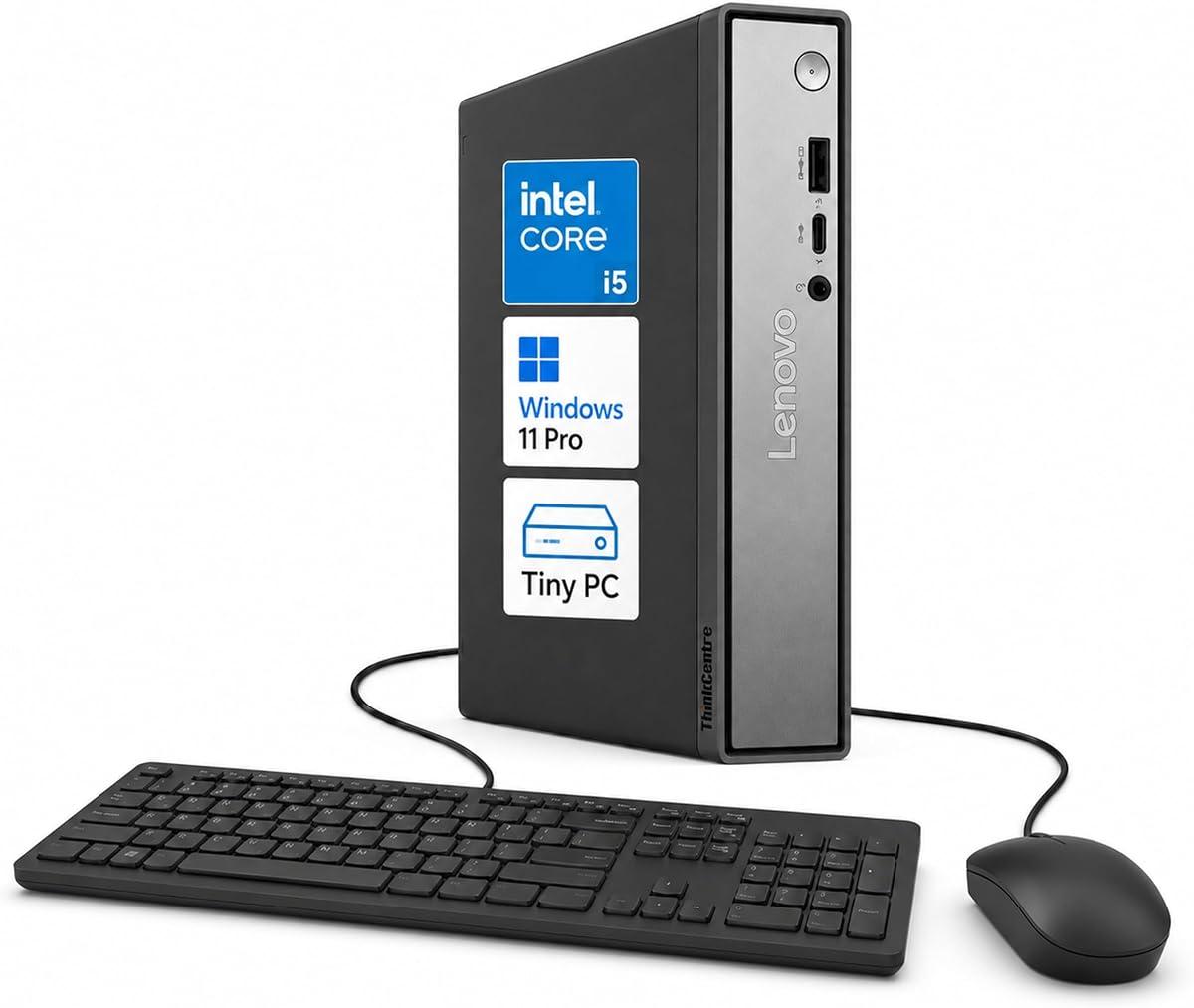
The Lenovo ThinkCentre Neo 50q Gen 5 offers exceptional versatility for users needing multiple display outputs and a small footprint. Powered by the 13th Gen Core i5-13420H processor it delivers responsive performance for office tasks and media consumption. Its design allows flexible positioning upright or flat to suit various desk configurations.
We may earn a commission when you buy through this link, at no additional cost to you.
Performance is enhanced by the 13th Gen Core i5-13420H CPU which provides 8 cores and 12 threads for efficient multitasking. The system supports DDR5 memory which offers faster data speeds compared to DDR4 generations for improved overall responsiveness. Storage is handled by a fast PCIe NVMe solid-state drive ensuring quick access to files and applications.
A key advantage is the support for up to three independent displays through two DisplayPort outputs and one HDMI port. This capability makes it ideal for trading financial monitoring or content creation requiring large screen real estate. Front and rear USB ports provide convenient access for connecting peripherals without moving the unit.
Ideal for home offices or retail counters this mini PC balances power with space efficiency. The inclusion of Windows 11 Pro ensures business security with TPM 2.0 support. Users who need a reliable system for video meetings and daily productivity will find this model well-suited to their needs.
On the downside the port selection is somewhat limited compared to models offering Thunderbolt or dual Ethernet. The single M.2 slot restricts storage expansion options unless external drives are used. Despite these limitations the multi-display support and DDR5 memory make it a compelling choice for visual workflows.
The compact 1L chassis can be positioned upright or laid flat and supports mounting setups for various office and retail environments.
Compatible AI tools help with writing research and task organization enhancing efficiency for professionals using this system daily.
We may earn a commission when you buy through this link, at no additional cost to you.
The MINISFORUM NAB5R is a powerhouse designed for users needing robust networking and display options in a compact unit. Powered by the 13th Gen i5-13500H processor with 12 cores it excels at multitasking and industrial applications. Preinstalled with Windows 11 IoT Enterprise it offers long-term stability for specialized workloads.
We may earn a commission when you buy through this link, at no additional cost to you.
Its performance comes from the i5-13500H CPU offering 12 cores and 16 threads with turbo speeds up to 4.7GHz. The system includes 16GB DDR4 RAM and a 512GB PCIe 4.0 NVMe SSD for fast data access. Storage can be expanded significantly with support for up to 4TB across two M.2 slots.
Networking is a standout feature with dual 2.5Gb Ethernet ports enabling link aggregation or firewall setups. The device supports quad 4K displays via two HDMI and two USB-C ports allowing extensive multi-monitor configurations. Intel Iris Xe Graphics ensure smooth video playback and visual performance across connected screens.
This model is perfect for network admins or creative professionals needing multiple high-resolution screens. The Windows 11 IoT version provides enhanced lifecycle support suitable for kiosks or industrial machines. Users requiring stable and reliable performance in complex network environments will appreciate its connectivity options.
However it uses DDR4 RAM which is slower than DDR5 found in some competitors. The power consumption is also higher than ultra-efficient models which might affect energy bills over time. Nevertheless the dual LAN ports and quad display support make it unique for its specific use cases.
Windows 11 IoT Enterprise ensures long-term stability and lifecycle support for industrial applications requiring minimal downtime.
Dual 2.5Gb Ethernet ports allow for firewall configurations or link aggregation to optimize network traffic flow.
We may earn a commission when you buy through this link, at no additional cost to you.
The HP Mini PC delivers professional-grade performance in an ultra-compact design suitable for various office environments. Featuring an Intel Core i5 6-core processor and the reliable Q370 chipset it ensures stable multitasking for daily business tasks. Its space-saving form factor allows it to fit behind monitors or on tight desks.
We may earn a commission when you buy through this link, at no additional cost to you.
Performance is supported by 16GB DDR4 RAM and a 256GB PCIe NVMe SSD delivering fast boot times under 10 seconds. The Intel UHD Graphics 630 handles crisp visuals for presentations and spreadsheets effectively. The chassis measures just 6.97 by 6.89 by 1.35 inches making it extremely portable and discreet.
Connectivity includes dual DisplayPort 1.2 outputs for multi-monitor setups to enhance productivity. Front and rear USB ports provide easy access for peripherals while Gigabit Ethernet ensures stable networking. Windows 11 Pro comes preinstalled with enhanced security features and remote desktop capabilities for business users.
This system is ideal for businesses needing reliable performance in a tiny footprint without excessive complexity. The build quality and chipset stability make it suitable for mission-critical workflows. Users looking for a no-frills professional desktop replacement will find it meets their core requirements effectively.
Storage is limited to 256GB which may require external drives for large files. The processor is an older generation which might struggle with very heavy workloads compared to newer models. Despite this the compact design and dual DisplayPort support make it a strong contender for basic business use.
The professional-grade Intel Q370 chipset ensures reliable performance for mission-critical workflows and productivity tasks.
Measuring just 6.97 by 6.89 by 1.35 inches this mini PC fits anywhere from desks to behind monitors.
We may earn a commission when you buy through this link, at no additional cost to you.
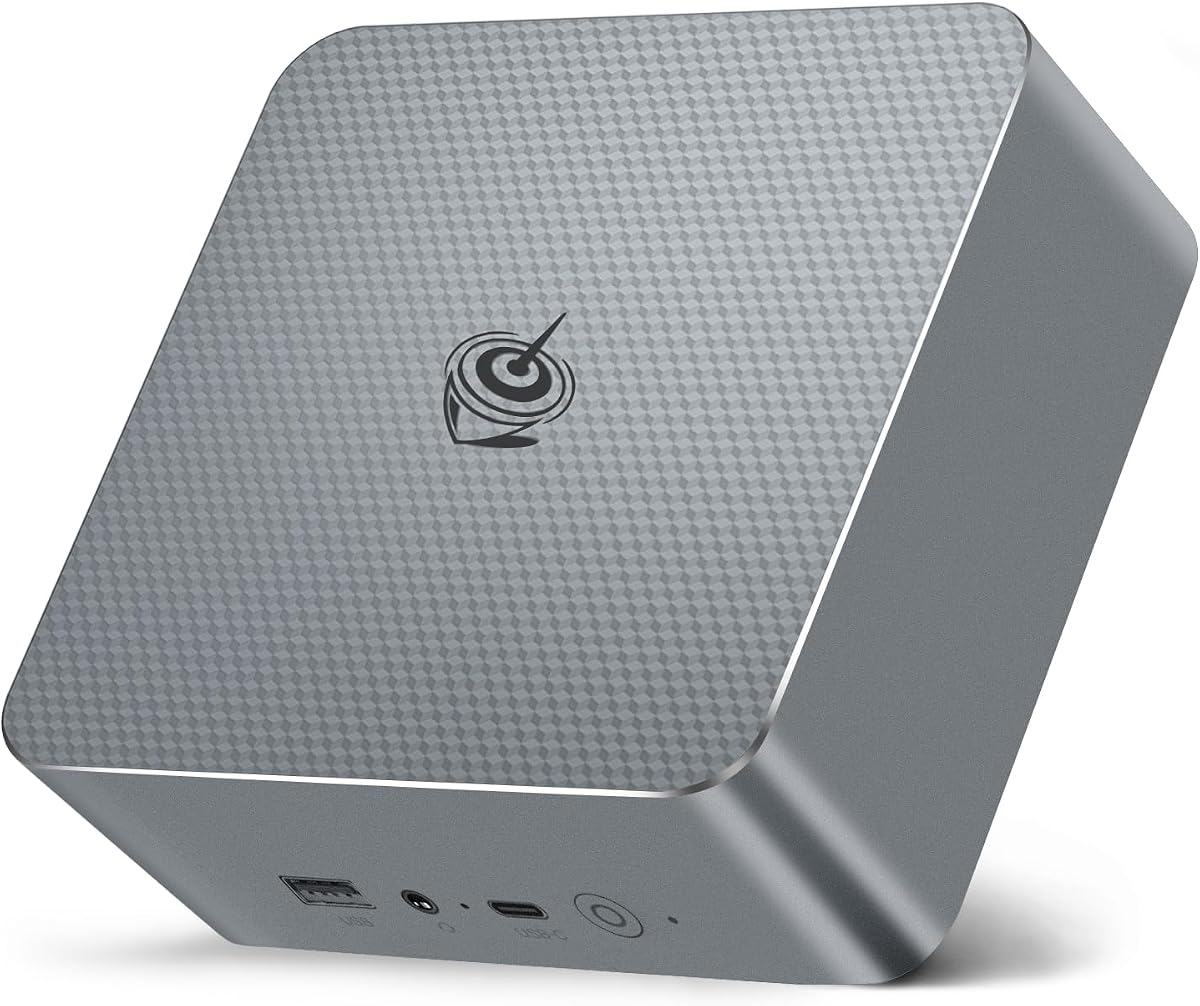
The GMKtec M3 Mini PC offers exceptional value for users needing solid performance without a high price tag. Powered by the Intel Core i5-12450H processor it handles daily tasks and light rendering tasks smoothly. With 16GB DDR4 and a full 1TB SSD this system provides ample storage for media and documents.
We may earn a commission when you buy through this link, at no additional cost to you.
Performance is delivered by the Core i5-12450H CPU with 8 cores and 12 threads. Turbo speeds reach up to 4.4GHz ensuring responsive application loading and multitasking. Intel Iris Xe Graphics G7 96EU deliver high-quality visuals supporting triple 4K display setups simultaneously for expanded workspace.
Connectivity includes HDMI and USB-C outputs for multiple monitors along with dual-band WiFi 6 for stable wireless access. The unit supports 2.5Gbps LAN for faster network transfers when connected via Ethernet. A VESA mount is included allowing you to mount the PC behind a monitor for a clean setup.
Ideal for students or home offices this mini PC balances affordability with robust features. The 1TB SSD means you won't need to expand storage immediately. Users seeking a budget-friendly solution that still supports high-resolution displays will appreciate its versatility.
The secondary M.2 slot supports 2242 SATA drives which are slower than NVMe options. Bluetooth 5.2 is standard but slightly older than the latest versions found elsewhere. Despite these minor points the large storage and price point make it a top choice for value-conscious buyers.
Support for triple 4K screens allows for complex multitasking and efficient content creation without additional hardware.
Running on just 45W this mini PC consumes less power than traditional desktops for eco-friendly daily use.
We may earn a commission when you buy through this link, at no additional cost to you.
The Lenovo ThinkCentre Tiny M70q represents a premium option with the latest 14th Gen Intel Core i5-14400T processor. This model combines high efficiency with powerful performance in a tiny desktop chassis. With DDR5 memory and a 3-year warranty it offers a robust solution for professionals and businesses alike.
We may earn a commission when you buy through this link, at no additional cost to you.
Performance is driven by the Core i5-14400T featuring 10 cores and 16 threads up to 4.5GHz. DDR5 memory provides faster responsiveness and data access compared to DDR4 standards. The 512GB NVMe SSD ensures rapid boot times and swift file handling for demanding workloads.
Graphics are handled by Intel UHD 770 delivering immersive visuals for streaming and presentations. Connectivity includes WiFi 6 RJ-45 Ethernet and Bluetooth 5.1 for seamless peripheral syncing. Windows 11 Pro is optimized for business tasks enhancing security and productivity tools for remote learning or conferencing.
Ideal for enterprise users this mini PC ensures reliability with its warranty and optimized OS. The AI capabilities help with business tasks and data crunching effectively. Those needing top-tier performance and durability in a small form factor will find it worth the investment.
The price is higher than budget options but justified by the DDR5 memory and warranty coverage. Base storage is 512GB which might be small for large data archives without external drives. Overall it remains a top choice for those prioritizing longevity and modern specs.
Enhanced AI tools assist with productivity and data management for professionals requiring efficient daily workflows.
A full 3-year warranty provides peace of mind and ensures long-term reliability for mission-critical systems.
We may earn a commission when you buy through this link, at no additional cost to you.
The KAMRUI Hyper H2 delivers desktop-class performance in a palm-sized unit suitable for intensive tasks. Powered by the Core i5-14500HX processor it boasts 14 cores and 20 threads which outperform previous generations significantly. With 16GB RAM and a 512GB PCIe 4.0 SSD it offers rapid data access and smooth multitasking.
We may earn a commission when you buy through this link, at no additional cost to you.
Performance is exceptional with the i5-14500HX CPU handling resource-heavy software without lag. The system supports up to 64GB RAM and 4TB total storage via dual M.2 slots. Triple 4K display support via HDMI DP and USB-C allows for extensive multi-monitor productivity setups.
Connectivity is comprehensive with 7 USB ports including two high-speed Gen 2 Type A ports. Dual-fan cooling prevents thermal throttling ensuring sustained performance during heavy loads. Integrated Gigabit Ethernet and Wi-Fi 6 provide stable connections for both wired and wireless peripherals.
This mini PC is perfect for users needing desktop power without the bulk of a tower. Ideal for code compilation financial trading or media editing it handles demanding workloads effectively. Those who want a plug-and-play hub with extensive ports will appreciate its design.
Power consumption is higher than ultra-low watt models due to the desktop processor. The chassis is slightly larger than compact 1L options which might impact tight desk spaces. Despite this the raw power and cooling make it a strong option for performance seekers.
Premium dual-fan cooling prevents throttling ensuring the PC stays cool and quiet even under heavy load.
With 7 USB ports and multiple video outputs you can connect peripherals without needing extra adapters.
We may earn a commission when you buy through this link, at no additional cost to you.
The Intel NUC 13 Pro offers a powerful blend of visual fidelity and connectivity in a tiny 4×4 inch chassis. Powered by the 13th Gen Core i5-1340P it handles browsing editing and professional tasks with ease. The Intel Iris Xe Graphics support up to four 4K displays for expanded workspace capabilities.
We may earn a commission when you buy through this link, at no additional cost to you.
Performance comes from the 13th Gen i5-1340P with hybrid architecture for smooth multitasking. The system includes 16GB DDR4 RAM and a 512GB M.2 SSD for responsive performance. It supports 8K and 4K high refresh rate displays for crisp visuals across connected screens.
Connectivity features Thunderbolt 4 HDMI 2.1 and Intel 226 Ethernet for speeds up to 2.5Gbps. Wi-Fi 6E and Bluetooth 5.3 ensure stable wireless connections. The small size allows it to be mounted behind a monitor for a clean pseudo-all-in-one setup.
Ideal for creative professionals this model excels at visual tasks and home theater applications. The multi-display support helps productivity for trading or content creation. Users prioritizing compact size and high-resolution output will find it a top choice.
The warranty policy requires removing components for service which can be inconvenient. The price is also on the higher end compared to similar mini PCs. Nevertheless the Thunderbolt 4 support and 4K display options make it a standout for visual workflows.
Support for 4K@120Hz and 8K@60Hz allows for smooth video playback and detailed visual work.
Mounting behind a monitor turns your setup into a clean pseudo-all-in-one system without clutter.
We may earn a commission when you buy through this link, at no additional cost to you.
The Beelink EQI13 stands out with a built-in power supply that eliminates the need for an external brick. Powered by the 13th Gen Core i5-13420H it delivers smooth performance for office and home tasks. Its compact design and low noise level make it ideal for quiet environments.
We may earn a commission when you buy through this link, at no additional cost to you.
Performance is driven by the i5-13420H CPU with 8 cores and turbo speeds up to 4.6GHz. The system includes 16GB DDR4 RAM and a 500GB PCIe 4.0 NVMe SSD for fast boot times. Intel UHD Graphics supports 4K dual screen displays for visual clarity.
A unique feature is the built-in 85W power supply reducing cable clutter. Connectivity includes USB-C USB 3.2 dual LAN and WiFi 6 for versatile networking. The cooling system keeps noise as low as 32dB making it virtually inaudible during daily use.
Ideal for home theaters or offices needing quiet operation this model balances portability and power. Wake-on-LAN support makes it suitable for server tasks when configured correctly. Users wanting a clean setup without extra power bricks will appreciate this design.
Storage is 500GB which is slightly smaller than the 512GB standard found elsewhere. The system uses DDR4 RAM which is less future-proof than DDR5. Despite these points the noise level and internal power make it a practical choice for many.
The advanced MSC2.0 cooling system and silent fan keep noise levels as low as 32dB for quiet use.
A built-in 85W power supply means only a single cable is needed for power keeping your desk tidy.
We may earn a commission when you buy through this link, at no additional cost to you.
The HP EliteDesk 800 G4 offers an affordable entry point into mini PC computing with reliable business performance. Featuring an Intel Core i5 Hexa-Core processor it handles daily multitasking and basic workloads effectively. With 16GB RAM and 256GB SSD this renewed model provides value for budget-conscious users.
We may earn a commission when you buy through this link, at no additional cost to you.
Performance comes from the i5-8500T CPU which ensures smooth computing for web browsing and productivity apps. The system includes 16GB DDR4 RAM for decent multitasking and a 256GB SSD for quick boot times. Dual monitor support allows for extended workspace flexibility when needed.
Connectivity includes HDMI and DisplayPort along with WiFi and Bluetooth for versatile peripheral support. The renewed quality ensures it performs like new with professional testing and minor cosmetic wear. Windows 11 Pro provides enhanced security and tools suitable for professional environments.
Ideal for students or light office work this mini PC offers reliability at a low price point. The compact design fits neatly under desks saving valuable workspace. Users needing a basic system without high-end graphics needs will find it adequate.
The processor is older which limits heavy multitasking or modern gaming. Storage is restricted to 256GB which may require external drives for large files. Despite this its affordability and build quality make it a solid starting choice.
Professionally tested and renewed to perform like new with only minor cosmetic wear visible.
Compact design fits neatly on or under your desk maximizing room for other essentials.
We may earn a commission when you buy through this link, at no additional cost to you.
Selecting the right Intel Core i5 Mini PC requires evaluating specific factors that align with your workflow needs and budget constraints. This guide outlines the key aspects to consider.
When choosing a mini PC prioritize models with 12th 13th or 14th Gen Intel Core i5 processors. Newer generations offer better multi-core efficiency higher clock speeds and improved power management. Avoid models with very old processors like the 8th Gen if you need longevity or performance.
Look for hybrid architectures with performance and efficiency cores for optimal task distribution.
Memory affects how many apps you can run simultaneously without slowing down. Aim for at least 16GB of RAM for comfortable multitasking. DDR5 RAM is preferred in newer models for faster speeds compared to DDR4.
Ensure the slots are upgradeable to future-proof your device for heavier future workloads.
SSD type and capacity define boot times and file transfer speeds. PCIe NVMe SSDs are essential for quick system response and support Gen4 or Gen5 standards in newer devices. Aim for 512GB or more if you store local media or projects.
Dual M.2 slots allow you to expand storage without replacing the primary drive.
Check for sufficient USB ports and video outputs to match your peripherals. Thunderbolt 4 support enables fast data transfers and external drive connectivity. HDMI and DisplayPort options determine how many external screens you can connect.
Ethernet ports especially 2.5Gb variants are vital for stable network connections.
Consider how many screens you need for your workflow. Some models support dual 4K setups while others offer quad displays. Ensure the GPU matches your visual requirements like media editing or financial data tracking.
Higher refresh rates like 4K@120Hz provide smoother visuals for advanced workflows.
Mini PCs often pack powerful hardware into small cases which can lead to heat buildup. Models with dual fans or heatsinks ensure sustained performance during long tasks. Noise levels below 35dB are ideal for quiet office environments.
Look for thermal designs that prevent throttling under heavy load.
Reliable warranty terms are crucial for business or personal investment protection. Three-year warranties are common for business-class devices. Check if you need to remove components like SSD for service to avoid voiding coverage.
Authorized agents often provide direct service channels for easier support.
Windows 11 Pro includes enterprise security features like TPM and Remote Desktop. It is preferred over Home for business use. IoT versions offer stability for specialized industrial tasks.
Ensure the OS is properly licensed to avoid compliance issues.
To maximize the lifespan of your mini PC ensure it is placed in a well-ventilated area with clear air vents. Dust accumulation can reduce cooling efficiency so use compressed air periodically to clean the fan vents. Avoid placing it on soft surfaces like carpets where air intake might get blocked.
Keep your operating system updated to the latest patches for security and performance. Use the sleep or hibernation modes when not in use to save energy. Do not shut it down forcibly unless necessary as this can corrupt file systems.
Use surge protectors to safeguard against power fluctuations and ensure stable operation. Regular backups of important data to an external drive or cloud service are essential since internal storage can fail.
Yes many modern models with 12th to 14th Gen i5 processors handle 1080p and light 4K editing well. Look for models with 16GB RAM and fast SSDs. Integrated Intel Iris Xe graphics assist with acceleration for light creative work.
Most models allow upgrades if they use SODIMM slots or accessible M.2 slots. Check the product details for max supported RAM. Some business models allow expansion to 64GB RAM.
Many models support dual to quad monitors via HDMI and DisplayPort or USB-C outputs. Ensure the graphics card matches your display resolution needs. Check connectivity specs before buying.
13th and 14th Gen processors offer the best longevity with modern features and support. Avoid older generations unless buying a renewed budget unit. Hybrid architecture helps future-proof performance.
They work well for light gaming and e-sports titles. Heavy AAA games may require external GPUs. Models with higher clock speeds handle gaming better than standard office ones.
Pro includes features like Group Policy Management and Remote Desktop suitable for businesses. Home is sufficient for general home use. Choose Pro if security and manageability are priorities.
Most run quietly around 30 to 40 decibels during normal use. Heavy loads increase fan noise. Look for models with dual-fan cooling for better noise control.
Yes models with multiple Ethernet ports and support for Wake-on-LAN work well as servers. Ensure the OS supports network shares. Low power models reduce electricity costs.
We have explored ten top Intel Core i5 Mini PC models ranging from powerful business desktops to budget-friendly units. The ASUS NUC 13 pro leads with professional features while GMKtec offers value for home users. Each selection delivers reliability for different use cases.
Prioritize processor generation memory type and connectivity features when comparing options. DDR5 models with Thunderbolt 4 ports provide better longevity for future needs. Consider noise levels and warranty terms before finalizing your purchase.
Prices and availability can change so always verify details at the retailer. Select the model that aligns best with your current requirements and budget constraints.