
VOYEE Switch Controllers
4.4Editor score
RGB Lightning Bolt Design
10 to 15 Hour Battery
One-Key Pairing Wake Up
Discover the top gaming controller for Apple TV options compared by experts for compatibility performance and features to enhance your streaming console
Finding the right gaming controller for Apple TV can transform your living room into a premium console experience. With the growing library of Apple Arcade and cloud gaming services, having precise input devices is essential for immersive gameplay across various titles.
We compared ten leading models based on Bluetooth connectivity battery life ergonomic design and platform support. Each entry was evaluated for its ability to pair seamlessly with tvOS while delivering responsive inputs and durable construction for extended gaming sessions.
Each pick highlights unique strengths such as Hall Effect joysticks or extended battery capacity. Note that availability and specifications may vary by region or updated firmware versions so always verify current details before making your final selection decision.
4.4Editor score

4.0Editor score

4.7Editor score
This side-by-side comparison reviews all ten selected models to help you identify the best fit for your specific gaming needs and existing Apple ecosystem setup.



This Bluetooth controller delivers solid performance for Apple TV gaming with a versatile feature set that supports multiple devices. Rated at 4.0 stars it stands out for its ability to handle complex inputs and macros effectively.
We may earn a commission when you buy through this link, at no additional cost to you.
Its standout quality lies in the customizable turbo and macro programming which lets users automate repetitive tasks up to thirty seconds long. The controller also includes interchangeable buttons and a reliable wake-up function for convenient console access.
While the textured grip and low-friction thumbsticks provide comfort the added weight from the battery might be noticeable during long sessions. Some users find the macro configuration steps require careful attention to the user manual to optimize settings.
It is best suited for gamers who want advanced features at an accessible price point without sacrificing basic responsiveness. If you value flexibility across platforms this model offers significant value for casual and intermediate Apple TV players.
The macro feature allows you to record button sequences up to thirty seconds long which is useful for grinding tasks or repetitive actions in compatible games.
You can swap left joystick and D-PAD functions or A&B and X&Y based on your personal preference to improve ergonomics and control layout.
We may earn a commission when you buy through this link, at no additional cost to you.
The SteelSeries Nimbus+ is officially licensed for Apple products making it one of the most reliable controllers for Apple TV gaming. With a 50 plus hour battery life it ensures minimal interruptions during extended play sessions.
We may earn a commission when you buy through this link, at no additional cost to you.
Its tactile D-Pad buttons provide fast responsive feedback while the clickable L3 and R3 buttons expand input options across various titles. The design aligns with Apple ecosystem standards ensuring consistent performance across iOS iPadOS and tvOS.
To achieve full compatibility users should update the controller using the SteelSeries Engine application which may require initial setup effort. Additionally the included iPhone mount focuses more on mobile use than television setups but does not hinder TV performance.
This model is ideal for users deeply invested in the Apple ecosystem who prioritize long battery life and seamless integration over extra customization features. It remains a top choice for consistent wireless performance on Apple TV.
Being Apple licensed means the controller is designed to meet quality standards for Apple devices reducing compatibility issues across tvOS and other Apple platforms.
With over 50 hours of playtime on a single charge the controller supports marathon gaming sessions without frequent recharging requirements.
We may earn a commission when you buy through this link, at no additional cost to you.
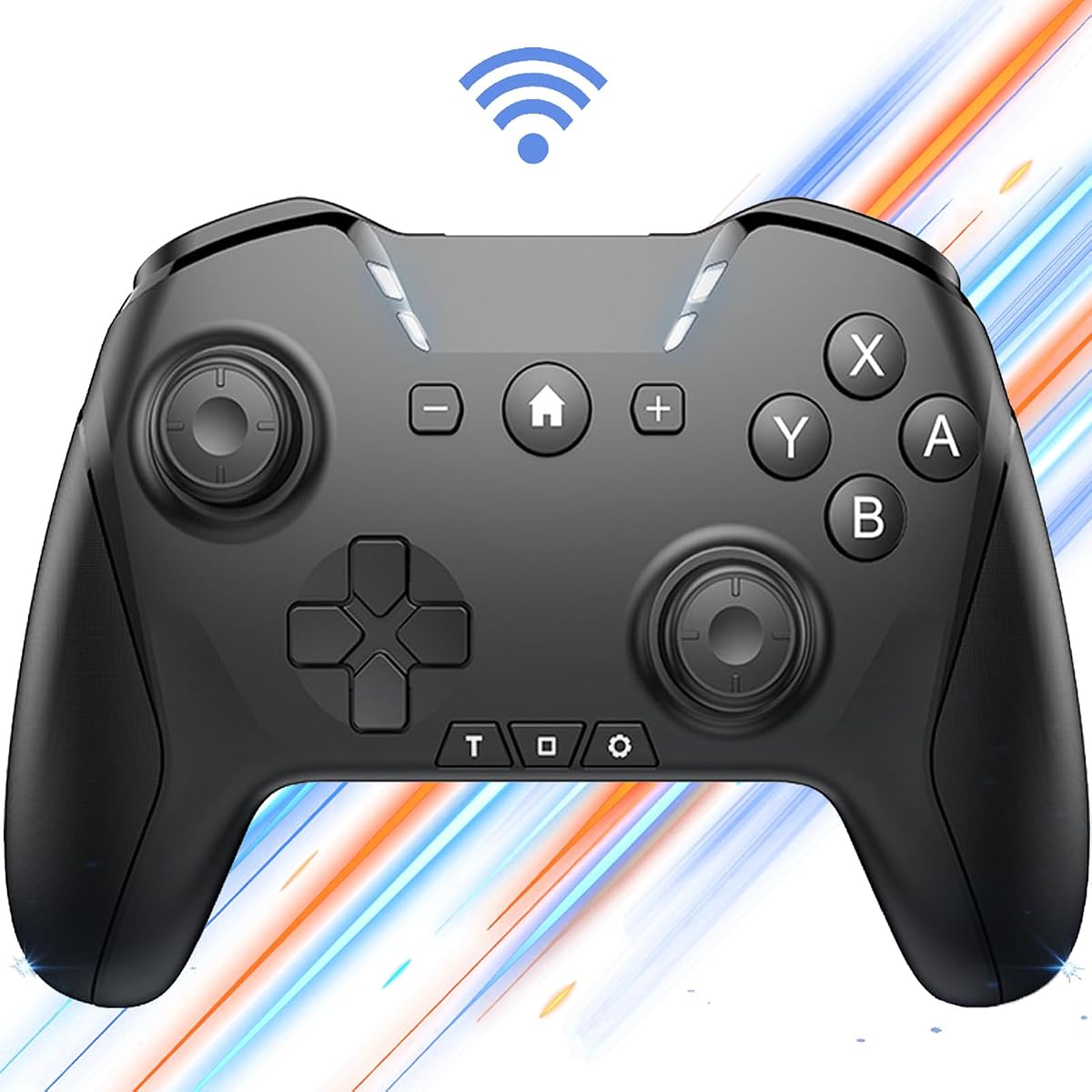
VOYEE Switch Controllers offer impressive features at an accessible price making them an excellent budget option for Apple TV gaming. Rated at 4.4 stars it combines responsive inputs with customizable lighting and macro support.
We may earn a commission when you buy through this link, at no additional cost to you.
The RGB lighting effects with four modes provide a cool aesthetic appeal while the M1 and M2 keys simplify complex operations. It also supports one-key wake up for Nintendo Switch consoles and delivers ten to fifteen hours of battery life.
While its wireless connectivity works well on Apple TV and mobile devices PC support is limited to wired connections only which reduces versatility for computer gaming. The lightweight construction may feel less premium but remains comfortable for most users.
For gamers seeking affordability without sacrificing turbo or programmable features this controller provides strong value. It is particularly suited for casual players or families who need a reliable budget-friendly device for Apple TV.
Four lighting modes including solid breathing and RGB strobe allow users to personalize the controller appearance based on their mood or setup.
Three adjustable turbo speeds let you customize burst rates from five to twenty shots per second enhancing performance in fast-paced games.
We may earn a commission when you buy through this link, at no additional cost to you.
The 8BitDo SN30 Pro stands out with upgraded Hall Effect joysticks and official Apple TV support for precise durable gameplay. It combines retro aesthetics with modern features like motion controls and a proper D-pad.
We may earn a commission when you buy through this link, at no additional cost to you.
Hall Effect technology enhances precision and longevity by using magnetic sensors instead of physical contacts for joystick movement. This controller also includes clickable joysticks rumble vibration and an 18-hour battery life for extended wireless sessions.
The compact design makes it portable but may feel too small for larger hands during prolonged use. While it costs more than budget options the build quality and official Apple support justify the investment for enthusiasts.
Ideal for retro gaming fans and casual players the SN30 Pro delivers a high-quality experience across Apple TV and multiple platforms. Its official support ensures seamless pairing and reliable performance within the Apple ecosystem.
Hall Effect joysticks use magnetic sensors to prevent drift and increase durability offering higher precision and sensitivity than traditional pots.
Certified compatibility ensures the controller pairs easily and functions reliably with tvOS reducing setup time and connection errors.
We may earn a commission when you buy through this link, at no additional cost to you.
The SteelSeries Nimbus+ Renewed offers a cost-effective way to access premium Apple-compatible controllers. Professionally inspected and tested it meets quality standards while providing the same feature set as new units.
We may earn a commission when you buy through this link, at no additional cost to you.
Users receive a stable wireless connection responsive buttons and a rechargeable battery ensuring seamless gameplay on Apple TV. The renewed model is ideal for budget-conscious buyers who trust Amazon Renewed quality checks for used electronics.
The lower rating suggests some units may have minor cosmetic imperfections or reduced battery longevity compared to new products. While this does not affect gameplay functionality it might impact the perceived value or physical condition over time.
This option suits players who want Apple ecosystem compatibility without paying full retail price. It is a practical choice for those who prioritize function over flawless aesthetics and trust renewed product standards.
Amazon Renewed items undergo professional inspection testing and cleaning to ensure they meet high-quality standards before reaching customers.
Choosing renewed products helps reduce electronic waste by giving functional devices a second life while saving money on new hardware.
We may earn a commission when you buy through this link, at no additional cost to you.
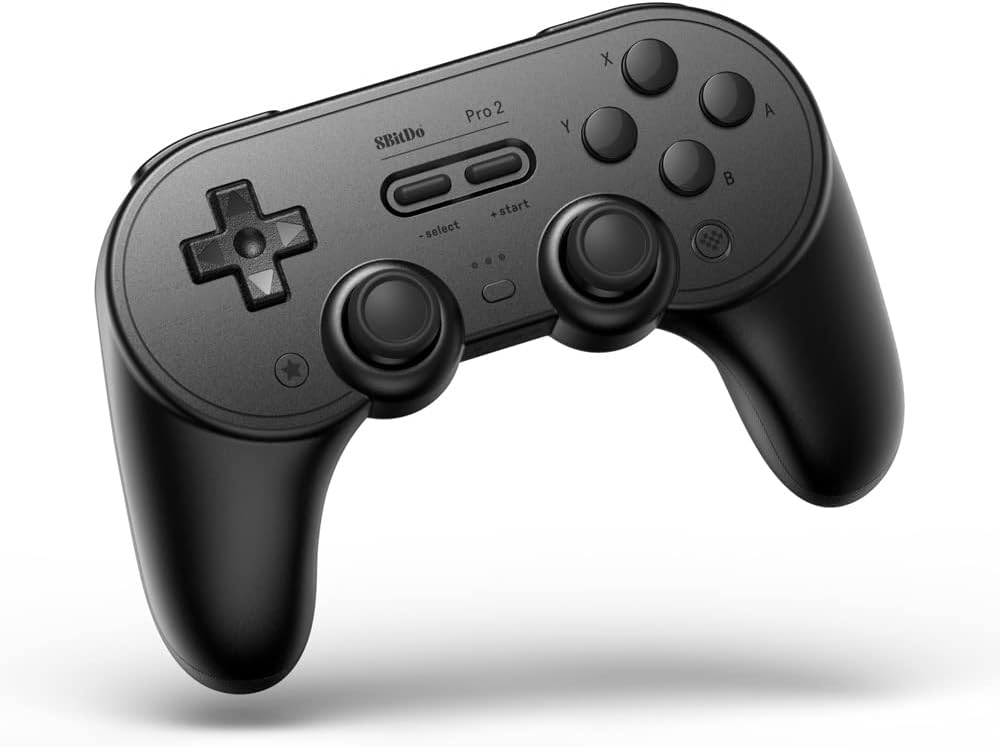
The 8BitDo Pro 2 features pro-level back buttons and custom profile switching for enhanced gameplay flexibility. Officially supporting Apple TV it delivers strong performance across iOS macOS and other supported platforms.
We may earn a commission when you buy through this link, at no additional cost to you.
Its ultimate software app on PC Android and iOS allows deep customization of button mappings and profile switching. The enhanced grip provides ergonomic comfort during long sessions while the 20-hour battery ensures extended wireless play.
Some users note the charging process takes longer than expected compared to modern Type-C fast charging standards. Additionally wired PC functionality is not available which limits options for those who prefer wired connections on computers.
Best for gamers who value customization and back buttons this controller balances features and comfort effectively. It is an excellent choice for Apple TV users seeking advanced control options without sacrificing wireless reliability.
Switching between different button mapping profiles quickly allows players to adapt to various game genres or preferences seamlessly.
The companion app enables detailed customization of button mappings triggers and sensitivity for a tailored gaming experience.
We may earn a commission when you buy through this link, at no additional cost to you.
The SteelSeries Nimbus+ Wireless offers a classic ergonomic design optimized for Apple devices. Its responsive triggers and analog sticks provide precise control for a wide range of games on Apple TV.
We may earn a commission when you buy through this link, at no additional cost to you.
Features include a stable wireless connection and a rechargeable battery that supports extended play sessions. The controller is built to work seamlessly with iPhone iPad and Apple TV without requiring complex setup procedures.
This version shares similar features with model two but may lack some modern updates like tactile D-Pad upgrades. It remains reliable but offers fewer advanced customization options compared to newer models in the lineup.
Ideal for users seeking a straightforward no-frills controller this model delivers solid performance for Apple TV gaming. It suits casual players who value comfort and ease of use over advanced programmable features.
The classic ergonomic shape fits naturally in the hand reducing strain during extended gaming sessions on the couch.
Wireless connectivity pairs easily with Apple devices ensuring minimal latency for smooth responsive gameplay.
We may earn a commission when you buy through this link, at no additional cost to you.
AceGamer Aurora II features upgraded Hall Effect joysticks that reduce drift and improve accuracy. It supports both Bluetooth and 2.4G wireless modes for flexible connectivity across Apple TV and other platforms.
We may earn a commission when you buy through this link, at no additional cost to you.
The controller includes customizable back keys and a large 1000mAh battery for extended play sessions without interruptions. Enhanced encryption and upgraded receiver ensure stable signal transmission and anti-interference performance.
Using 2.4G requires pairing with a dongle which adds an extra step compared to pure Bluetooth. Additionally the setup process for both modes requires following specific button combinations that may confuse first-time users.
Best for players who value precision and battery life this model offers robust features at a competitive price. Its Hall Effect sensors provide reliable performance that makes it a strong contender for serious Apple TV gaming.
Hall Effect sensors use magnetic fields to detect joystick movement reducing physical wear and preventing common drift issues.
Choose between Bluetooth for convenience or 2.4G for lower latency depending on your device and gaming needs.
We may earn a commission when you buy through this link, at no additional cost to you.
The Official Luna Wireless Controller is designed for Amazon Luna cloud gaming but works across Apple TV and other devices. It supports seamless screen switching and offers low-latency connectivity via Wi-Fi or Bluetooth.
We may earn a commission when you buy through this link, at no additional cost to you.
Features include offset thumbsticks for comfort and a 4-way directional pad. While optimized for Luna it functions as a Bluetooth-compatible controller for Apple TV games supporting cloud gaming services and apps.
To benefit fully from Cloud Direct technology users need stable internet which may not be ideal for offline Bluetooth games. Some features like seamless screen switching only work when playing on Luna itself not standard tvOS apps.
For cloud gamers or those using Luna on Apple TV this controller provides excellent integration. It is a strong alternative for players who prioritize seamless transitions and low latency in supported streaming games.
Pause a game on one device and pick up right where you left off on another for flexible multi-screen gameplay.
Wi-Fi connection to custom game servers ensures lower latency for streaming games on supported devices like Apple TV.
We may earn a commission when you buy through this link, at no additional cost to you.
GMBACK Wireless Switch 2 supports loop macros for automating button sequences up to thirty seconds long. It also includes home wake up and six-axis gyro motion controls for enhanced gameplay flexibility on Apple TV.
We may earn a commission when you buy through this link, at no additional cost to you.
The controller offers customizable vibration levels and RGB lighting for personalized comfort and style. With an 800mAh battery it provides fifteen to twenty hours of playtime supporting extended gaming sessions.
Programming macros requires initial setup using the turbo and macro buttons which may take time to master for casual users. The battery capacity is good but not class-leading compared to some newer models with larger mAh.
Ideal for players who enjoy repetitive tasks or grinding in games the macro feature provides unique utility. It is a solid choice for Apple TV users seeking automation capabilities and reliable motion controls.
Record button sequences and loop them automatically to simplify grinding farming or repetitive actions in games.
Adjust vibration intensity to four levels to match your preference for feedback immersion without discomfort.
We may earn a commission when you buy through this link, at no additional cost to you.
Selecting the right controller requires balancing compatibility battery life and features. Here are key factors to consider before making your decision for Apple TV gameplay.
Ensure the controller officially supports Apple TV and tvOS for seamless pairing and latency. Check if the product data confirms Apple compatibility to avoid connection issues with your device.
Look for models that mention official Apple support or tvOS compatibility for best performance across games.
Longer battery life reduces interruptions during extended sessions. Models with larger mAh ratings typically provide more playtime before needing recharge.
Prioritize controllers offering at least fifteen hours of continuous use for uninterrupted gaming.
Hall Effect joysticks use magnetic sensors to prevent drift and increase longevity. Traditional potentiometers may wear faster and suffer from drift over time.
Choose Hall Effect technology for precise accurate movement and reduced maintenance needs.
Bluetooth offers universal connectivity without extra hardware. Some controllers also include 2.4G wireless for lower latency with compatible devices.
Verify which modes are available and if they work with Apple TV to ensure reliable wireless performance.
Comfortable grips and balanced weight prevent hand fatigue during long play. Textured surfaces and adjustable components enhance physical control.
Select controllers with ergonomic shaping and lightweight or balanced design for extended comfort.
Back buttons and turbo settings allow customized input schemes for specific games. Macros automate repetitive sequences which can streamline certain gameplay styles.
Look for remappable buttons and adjustable turbo speeds to match your playstyle needs.
Modern controllers use USB-C for charging and some support playwhile charging. Faster charging times minimize downtime between gaming sessions.
Choose models with Type-C charging and quick charge cycles for convenience.
6-axis gyro sensors enable motion-based gameplay for sports and adventure titles. Adjustable vibration intensity adds immersion without discomfort.
Ensure the controller supports motion controls and vibration if these features are important to your gaming experience.
Pair your controller with Apple TV via Bluetooth settings by holding the pairing button until the LED flashes. Ensure the controller is charged before first use to avoid pairing interruptions during setup.
Regularly clean the joysticks and buttons with a soft dry cloth to prevent dust buildup. Avoid exposing the controller to moisture or extreme temperatures to maintain battery health and durability.
Update controller firmware or install companion apps if supported by the manufacturer. Proper maintenance and storage in a cool dry place will extend the lifespan and performance of your device.
Not all Bluetooth controllers work with tvOS. Only those supporting MFi or confirmed Apple compatibility will pair seamlessly. Check product details for explicit tvOS or Apple TV support to ensure proper functionality.
Most controllers require Bluetooth pairing or physical connection to work with Apple TV. Without pairing inputs will not transmit to the console unless using wired USB connection for supported models.
Battery life varies by model but typically ranges from ten to fifty hours. Larger capacity batteries provide longer playtime between charges which is important for extended gaming sessions.
Many models support multiple platforms such as Switch PC and mobile devices. This multi-platform capability adds versatility and allows using the same controller across different ecosystems.
Hall Effect joysticks use magnetic sensors instead of physical contacts to detect movement. They prevent stick drift and extend longevity making them a premium feature in modern controllers.
Some controllers support play-while-charging via USB-C. Check product specifications to confirm this feature since most Bluetooth models do not allow simultaneous charging and wireless use.
Frequent disconnections may result from low battery or interference. Ensure the controller is fully charged and close to the device for stable Bluetooth signal performance.
Wired controllers eliminate latency but reduce convenience. Wireless models with stable Bluetooth or 2.4G provide flexibility without sacrificing performance for most gaming scenarios.
Our top picks highlight the SteelSeries Nimbus+ for Apple integration the VOYEE for budget value and the 8BitDo SN30 Pro for premium features. Each model offers distinct strengths suited to different gaming preferences and budgets.
Prioritize battery life Hall Effect joysticks and official tvOS support when comparing options. These factors directly impact gameplay experience and comfort during long sessions on your Apple TV setup.
Remember to check current product availability and specifications before purchasing. Prices and features may vary so verify the latest details to ensure you select the best controller for your needs.