
Wireless Caregiver Pager 1 Call Button
4.7Editor score
1500 feet range
58 ringtones included
18 month warranty
Choosing the right gadgets for elderly parents can significantly improve their safety and quality of life at home. From emergency alert systems to memory aids, these tools provide peace of mind for caregivers and independence for seniors.
We have evaluated ten top-rated products based on ease of use, reliability, and user feedback. Each item was selected for its ability to address common challenges faced by older adults and their families in daily living situations.
Every pick includes detailed features, pros, cons, and real-world application tips. Please note that product availability and pricing may change over time so check current listings before making a final purchase decision today.
4.7Editor score

4.8Editor score

4.4Editor score
As an Amazon Associate we earn from qualifying purchases.
The following table provides a side-by-side comparison of all ten selected products highlighting their key specifications and core functionalities for quick reference.


This WiFi-enabled caregiver pager stands out as the top choice for modern families seeking reliable emergency alerts. With a high rating and instant app notifications it ensures help is never far away for seniors living independently.
We may earn a commission when you buy through this link, at no additional cost to you.
The system sends alerts to mobile phones instantly when the panic button is pressed. Family members anywhere in the world can receive notifications ensuring timely assistance. The waterproof button allows placement in bathrooms without worry.
While it requires a 2.4GHz Wi-Fi network which may be a limitation for some older routers the signal penetration through walls is strong. Phone and SMS alerts do require a subscription which adds ongoing cost beyond the initial purchase.
Anyone needing immediate peace of mind without monthly service fees should consider this device. Its combination of app control and physical alarms makes it an essential tool for aging in place safely and effectively.
Get notified on your phone instantly when your loved one presses the button allowing for rapid response even when you are away.
Unlike traditional medical alert services this system works without monthly subscription costs making it affordable for long-term home care.
We may earn a commission when you buy through this link, at no additional cost to you.
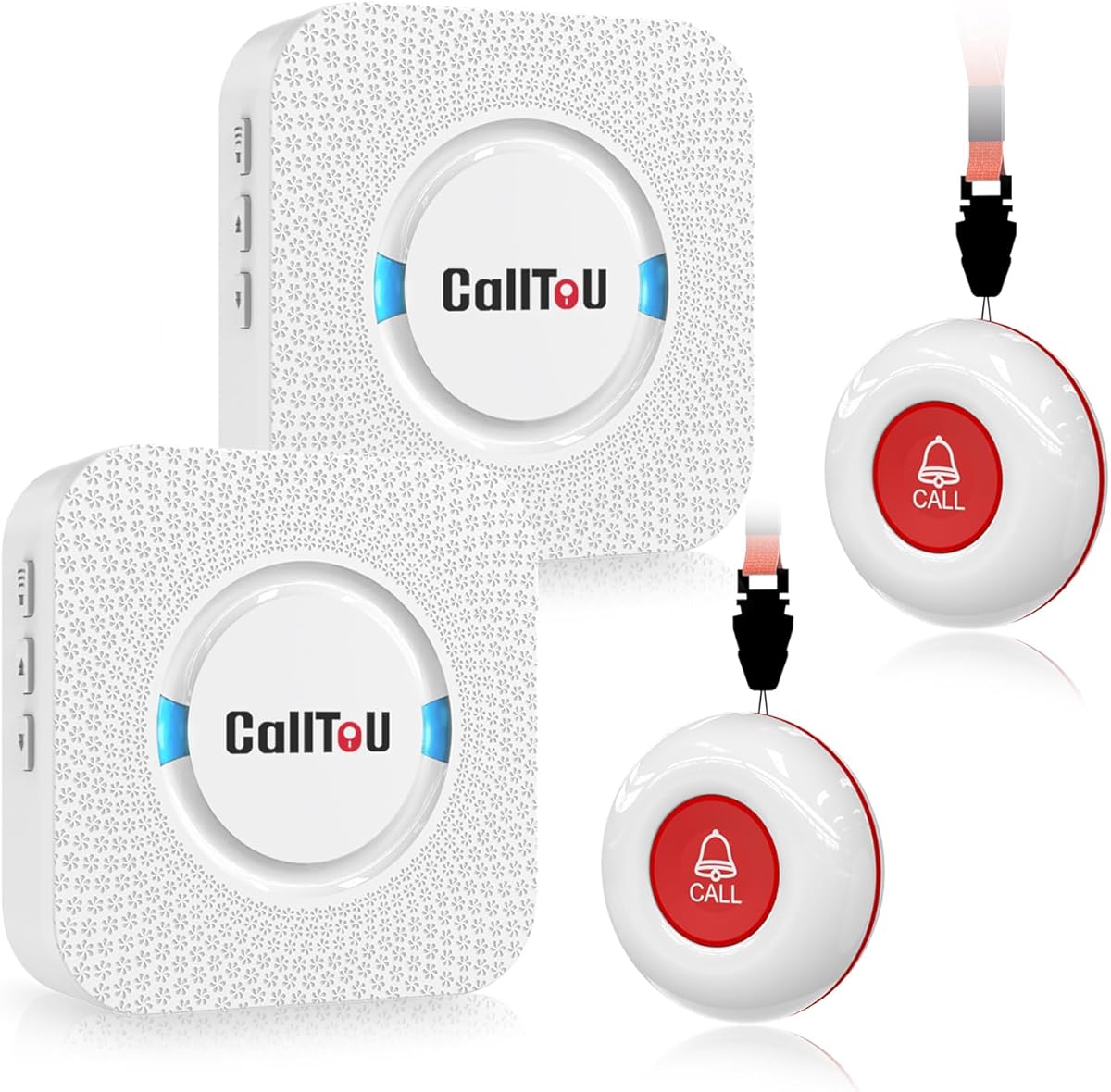
This wireless pager offers exceptional value with an impressive transmission range and robust build quality. Users praise its reliability and ease of use making it a top pick for budget-conscious families.
We may earn a commission when you buy through this link, at no additional cost to you.
The receiver supports up to fifteen hundred feet of open space transmission which covers large homes easily. You can expand the system with additional buttons and receivers for multiple family members or care zones.
While it lacks smart app connectivity its physical reliability is unmatched in this price range. The waterproof rating ensures it works in humid environments like bathrooms without risking damage from moisture exposure.
For those who need a simple dependable alert system without complex setup this pager is ideal. Its long warranty and expandable design make it a practical choice for growing caregiving needs.
Add up to thirty call buttons and multiple receivers to cover every room in a large house or care facility with ease.
The waterproof and dustproof design ensures the device works reliably in various environments including wet areas like bathrooms.
We may earn a commission when you buy through this link, at no additional cost to you.
This monitoring camera bridges the gap between security and family connection. With one-touch video calling and fall detection it provides both visual reassurance and safety alerts for parents living alone.
We may earn a commission when you buy through this link, at no additional cost to you.
Seniors can initiate calls with a single button press without needing a smartphone or apps. Family members receive alerts that ring on phones ensuring no urgent calls are missed during the day.
The privacy mode rotates the lens mechanically to physically block the view which respects dignity while maintaining safety. Local recording options avoid cloud fees but require inserting a memory card separately.
Families wanting visual connection combined with safety features should choose this premium device. Its combination of video and motion tracking offers a comprehensive solution for remote caregiving and peace of mind.
Parents can see family faces clearly on a built-in screen without struggling with apps or smartphones during a call.
Rotate the lens mechanically via the app to ensure complete visual privacy when needed without relying on software blocking.
We may earn a commission when you buy through this link, at no additional cost to you.
This dual-receiver system allows caregivers to move freely while maintaining constant communication with the senior. The waterproof buttons and strong ring tones make it suitable for various rooms including bathrooms.
We may earn a commission when you buy through this link, at no additional cost to you.
The receiver can be carried to different rooms while the call buttons stay stationary or wearable. Volume levels adjust from zero to one hundred ten decibels ensuring alerts are heard even by those with hearing aids.
The need to plug the receiver into an outlet limits mobility slightly but ensures constant power without battery changes. Waterproof housing protects against accidental spills or humidity in washrooms during daily use.
For families needing a simple reliable system with two receiver points this pager works well. Its durable build and flexible call options make it a strong choice for daily care routines.
Move one receiver between rooms while keeping another in a fixed location to ensure alerts are never missed.
Adjust the volume up to one hundred ten decibels so alerts are always heard clearly even in noisy environments.
We may earn a commission when you buy through this link, at no additional cost to you.
The inclusion of a wristband makes this pager highly portable for seniors who move around frequently. It offers a reliable connection with a thousand feet range and flexible mounting options for call buttons.
We may earn a commission when you buy through this link, at no additional cost to you.
You can choose a silent LED flash mode when noise might disturb others while still ensuring you see the alert visually. The system supports multiple mounting styles including neck straps wall brackets or pockets.
Waterproof splash proof buttons are available but they should be removed before bathing to prevent water immersion damage. The receiver requires an electrical outlet which limits placement options compared to battery models.
For seniors who need a wearable panic button this system provides a strong balance of portability and reliability. Its silent flash mode and multiple ring options make it adaptable to various household routines.
The included wristband allows the senior to carry the alert button comfortably without holding it in their hand.
Use the LED flash instead of a loud ringtone to alert caregivers quietly without disturbing sleep or rest times.
We may earn a commission when you buy through this link, at no additional cost to you.
This clock is designed specifically for seniors with memory loss featuring clear labels like Morning and Night instead of confusing numbers. Its large screen makes it easy to read from across the room without straining eyes.
We may earn a commission when you buy through this link, at no additional cost to you.
The auto dimming feature adjusts brightness automatically at specific times to reduce glare during sleep hours. Multiple language options ensure the clock can be used in diverse households with different cultural backgrounds.
While it lacks voice output the visual clarity is excellent for cognitive support. Power loss resets the time to correct settings automatically ensuring accuracy without manual reconfiguration after outages.
Caregivers looking for a simple visual aid to reduce confusion should choose this clock. Its straightforward design and large text make daily life more structured and less stressful for seniors.
Labels like Morning and Afternoon replace confusing am/pm formats to help seniors orient themselves easily throughout the day.
The screen dims automatically at night to prevent eye strain and reduce light pollution during sleep hours.
We may earn a commission when you buy through this link, at no additional cost to you.
This clock combines a large display with voice announcements so seniors can hear the time without reading. It supports multiple alarms for daily routines and medication reminders which helps maintain structure.
We may earn a commission when you buy through this link, at no additional cost to you.
The light dimming adjusts softly to eye-friendly levels at night preventing sleep disruption while still showing time if needed. Voice timing works with a simple button press on the back or via remote control.
Automatic daylight saving time adjustments save users from manual changes twice a year. However the setup requires initial programming of alarms which might need caregiver assistance for older users.
For visually impaired seniors needing both visual and audio cues this clock is highly effective. Its alarm flexibility and voice features make it a practical daily companion for independent living.
Press a button to hear the current time announced aloud in your chosen language without needing to look at the screen.
Set multiple alarms with specific tags to remind seniors when to take pills or follow daily health schedules.
We may earn a commission when you buy through this link, at no additional cost to you.
This system focuses on app connectivity allowing multiple family members to receive alerts simultaneously. It is ideal for households where several people share caregiving responsibilities and need to be notified.
We may earn a commission when you buy through this link, at no additional cost to you.
The app allows custom ringtones and volume levels per button so you know exactly where the call comes from instantly. Shared user settings ensure that if one family member is busy another receives the alert.
While it offers great flexibility it relies on stable Wi-Fi which might drop in large homes with weak signals. Physical receiver setup is simple but requires an electrical outlet to operate continuously.
Families who want centralized control and remote monitoring should find this system useful. Its app-based sharing and customizable sounds provide a modern solution for distributed caregiving teams.
Invite multiple family members to the app so everyone receives notifications when a senior needs help.
Set unique ringtone sounds for each button to instantly identify which room or person is calling for assistance.
We may earn a commission when you buy through this link, at no additional cost to you.
This clock doubles as a photo frame allowing families to display family photos on screen to reduce loneliness. Its large display and colorful themes make it visually engaging for seniors with color blindness.
We may earn a commission when you buy through this link, at no additional cost to you.
Twenty alarms and reminders help manage daily schedules while customizable themes allow visual personalization to match home decor. The sleep mode button instantly turns off the screen for undisturbed rest at night.
SD card playback works for local media files which avoids subscription fees but requires manual insertion. Battery backup ensures settings are saved during power cuts though time resets after reconnection.
For seniors who benefit from visual reminders and family photos this clock offers a dual-purpose solution. Its customization options and large display make daily routines more enjoyable and less stressful.
Upload photos via SD card to show family moments on the clock screen reducing feelings of isolation.
Choose from twelve display themes and color options to reduce eye strain and improve readability for all vision levels.
We may earn a commission when you buy through this link, at no additional cost to you.
This pager prioritizes portability with a receiver that clips to a belt for caregivers on the move. Two call buttons allow different users to request help from different rooms without confusion.
We may earn a commission when you buy through this link, at no additional cost to you.
A siren mode offers continuous alerts for urgent situations while a chime mode suits casual requests. Battery life on both buttons and pager is noted for lasting long between charges to reduce maintenance.
The range covers up to five hundred feet in open areas which fits most single-story homes. Wall mounts and neck straps provide flexible installation options to suit different mobility needs.
For households needing a portable alert system for active caregivers this pager is a solid choice. Its battery efficiency and dual-button setup ensure reliable communication throughout the day.
Clip the receiver to a belt so caregivers can stay alert while performing other tasks around the house.
Two buttons allow multiple family members to call for help independently from different rooms without needing to carry a phone.
We may earn a commission when you buy through this link, at no additional cost to you.
Selecting the right gadgets for elderly parents requires understanding their specific needs and living environment. This guide outlines key factors to consider to ensure you choose the most effective tool.
The range of wireless devices determines how far caregivers can move while remaining connected. Systems with Wi-Fi or Bluetooth offer wider coverage but may require stable internet. Physical pagers often rely on proprietary signals that work well inside buildings.
Choose a device with a range that covers your home's full footprint including all floors and outdoor areas.
Senior-friendly gadgets should have simple interfaces with large buttons and minimal steps to call for help. Voice output or large displays are critical for those with vision or cognitive impairments.
Prioritize devices that require no complex setup and offer clear visual or audio feedback when activated.
Long battery life reduces the frequency of charging which is vital for elderly users who may forget tasks. Look for devices that offer weeks of use on a single charge or use standard batteries.
Opt for models with battery indicators or alerts to ensure the device remains operational at all times.
Since seniors may fall in bathrooms the waterproof rating of call buttons is essential. Look for IPX5 or higher ratings to ensure protection against splashes and humidity.
Ensure the device can withstand exposure to water without losing functionality or requiring frequent replacement.
Adjustable volume allows the system to be loud enough to be heard over noise or quiet enough not to disturb sleep. Visual alerts like LED flashes support those with hearing impairments.
Select systems offering multiple alert modes including sound, light, and vibration to suit different preferences.
Some medical alert systems require monthly fees for cellular monitoring which can add up over time. Compare upfront costs against ongoing service fees to find a sustainable solution.
Choose devices that offer full functionality without hidden costs to avoid unexpected financial burdens later.
A strong warranty and accessible customer support are crucial for resolving technical issues quickly. Check if the manufacturer offers training or setup assistance for caregivers.
Look for products with at least one year of warranty and reliable support channels for peace of mind.
Buttons should be wearable or mountable to ensure seniors can press them quickly if they fall. Wristbands or necklaces are more effective than stationary buttons for high-risk individuals.
Ensure the device offers flexible mounting or wearable options that match the senior's daily habits.
Start by testing the device in every room where it will be used to ensure reliable signal strength. Place call buttons in accessible areas such as bedrooms bathrooms and living spaces where seniors spend most of their time.
Regularly check battery levels and charge devices before they deplete completely to avoid failures during emergencies. Replace batteries according to the manufacturer's recommendations to maintain consistent performance.
Update any connected apps to ensure compatibility with mobile devices and to benefit from the latest security features. Clean the device with a dry cloth to prevent dust buildup that could interfere with buttons or sensors.
Many of these gadgets operate without monthly fees by using local Wi-Fi or proprietary wireless signals. However some systems with cellular connectivity or app sharing may offer premium features via subscription. Check product details to confirm if ongoing fees are required.
Yes most devices are designed for independent use with simple one-touch buttons or voice commands. Large displays and clear instructions help seniors operate them without assistance. Ensure the interface matches their cognitive and physical abilities.
Devices using local wireless signals often function independently of Wi-Fi. Some Wi-Fi systems may revert to local alarms or fail if internet is needed for alerts. Choose a backup power or local alarm system for reliability during outages.
Most buttons come with wall brackets adhesive pads or lanyards for flexible placement. Install them near beds, chairs, and in bathrooms where seniors are most likely to fall. Test the button after mounting to ensure it activates correctly.
Many call buttons have waterproof or splash-proof designs suitable for bathrooms. However always check the IP rating and avoid submerging devices unless specifically rated for immersion. Keep receivers dry to maintain functionality.
Choose models with long battery life or replaceable batteries to reduce charging frequency. Some devices offer low-battery alerts to prompt timely charging. Consider setting reminders for yourself to check the device weekly.
Yes modern systems allow shared notifications through apps or multiple receivers. Set up shared accounts or add multiple numbers to ensure someone is always available to respond when help is requested.
Most devices are intended for indoor use but some have extended range for patios or yards. Check the specific range and signal type to ensure reliability outside. Waterproof ratings also help with outdoor exposure.
We reviewed ten gadgets ranging from emergency pagers to memory aids designed to support seniors at home. Each option offers distinct features for communication safety and daily organization.
Prioritize reliability and ease of use when selecting a device. Consider your specific needs such as mobility challenges or memory issues to narrow down the list.
Prices and availability change frequently so check current listings before purchasing. These tools can significantly enhance quality of life and safety for your loved ones.