
Motherboard USB 2.0 to Type C Front Panel Cable
4.8Editor score
Compatible with 9pin USB2.0
Compact 6.6 inch length
No driver installation needed
Modern PC cases often lack convenient front panel USB-C ports, leaving users with only rear motherboard connections. Front Panel USB C Headers solve this by allowing internal headers to be routed to the case front, enabling fast charging and data transfer without reaching behind the tower.
We evaluated ten leading adapters and hubs based on speed capabilities, connector types, build materials, and compatibility with standard motherboard headers. Our analysis focuses on real-world performance, ease of installation, and value to ensure you find a solution that matches your specific hardware configuration.
Each pick below highlights key features and potential limitations to help you decide quickly. Note that pricing fluctuates frequently due to supply and demand, so verify current costs before purchasing. We prioritize products with proven reliability and clear documentation for hassle-free setup.
4.8Editor score

4.6Editor score

4.6Editor score
As an Amazon Associate we earn from qualifying purchases.
The following table provides a side-by-side comparison of all ten products analyzed in this guide. Each entry lists core specifications to help you quickly identify which adapter or hub best fits your motherboard headers and performance needs.




This GRAUGEAR extension cable stands out as the top choice for users needing high-speed front panel access. It supports USB 3.2 Gen 2×2 speeds up to 20Gbps, making it ideal for fast external drives and devices. The build quality is robust with double-shielded wires to ensure signal integrity.
We may earn a commission when you buy through this link, at no additional cost to you.
The inclusion of a metal PCIe bracket simplifies mounting and protects the port from physical damage. It connects directly to the motherboard Type-E header, providing a clean installation without needing extra adapters. Compatibility is broad for modern devices requiring USB-C connectivity.
While it requires a specific Type-E header which older boards may lack, this is a minor trade-off for the performance gain. The cable length is sufficient for most standard cases. Users report reliable performance without dropped connections during heavy data transfers.
If your motherboard supports Type-E headers, this is the most future-proof option available. It balances speed, durability, and ease of use perfectly. We recommend this for builders prioritizing maximum USB-C performance at the front of their PC.
The cable supports up to 20Gbps allowing near instant file transfers with compatible SSDs and drives.
Sturdy construction ensures longevity and the included bracket provides secure mounting stability.
We may earn a commission when you buy through this link, at no additional cost to you.
This adapter offers similar performance to our top pick with a focus on direct motherboard connectivity. It delivers up to 20Gbps speeds making it suitable for high bandwidth tasks like video editing backups. The 60cm length provides ample slack for routing inside larger cases.
We may earn a commission when you buy through this link, at no additional cost to you.
The design includes a panel-mounted USB-C female connector that is easy to access. It utilizes a Type-E 20-pin connector which is standard on many mid to high range motherboards. The metal bracket ensures the port stays fixed during device insertion and removal.
One consideration is that older motherboards with 19-pin headers will need an adapter converter. However for modern builds this cable integrates seamlessly. Users appreciate the clean look and reliable connection without signal degradation over time.
We recommend this for anyone with a compatible header who wants maximum speed. It is slightly less versatile than hubs but excellent for single port needs. The build quality justifies the price point for performance enthusiasts.
Designed specifically for Type-E headers ensuring stable high speed connections.
The 60cm cable allows flexible routing in mid tower and full tower cases.
We may earn a commission when you buy through this link, at no additional cost to you.
This adapter provides dual outputs allowing you to connect both USB-C and USB-A devices simultaneously. It supports 20Gbps for the Type-C port and 5Gbps for the Type-A port. This versatility makes it a strong contender for users needing multiple front ports.
We may earn a commission when you buy through this link, at no additional cost to you.
To function it requires both a Type-E 20-pin header and a USB3.0 19-pin header on your motherboard. If your board has these the setup is straightforward. The PCIe bracket helps mount the ports securely to the case chassis.
The main trade off is the need for two headers which may not exist on all boards. However for those who have it the convenience is significant. It eliminates the need for separate cables and keeps the front panel organized.
We suggest this for users with compatible motherboards who want extra ports. The speed is excellent and the build quality is durable. Verify your motherboard specs before purchasing to ensure compatibility.
Connects both Type-C and Type-A devices at high speeds simultaneously.
Requires both Type-E and USB3.0 headers to operate fully.
We may earn a commission when you buy through this link, at no additional cost to you.
This hub converts a floppy drive bay into four useful ports. It includes two USB-C and two USB-A ports supporting up to 10Gbps speeds. The metal housing is robust and fits perfectly into standard 3.5 inch openings.
We may earn a commission when you buy through this link, at no additional cost to you.
It requires a SATA power connection which ensures stable power for high draw devices. The hub includes safety features like over current and voltage protection. This makes it reliable for continuous use with multiple peripherals.
Installation might be tricky if your case lacks a SATA power cable nearby. However the extra ports make it worthwhile for power users. The design is compact and doesn't block internal components.
We recommend this for users needing maximum front connectivity. The speed is sufficient for most tasks and the build quality is excellent. Ensure you have the power connection available before buying.
Four ports allow multiple devices to be connected without hubs.
Built in protection prevents damage to connected devices.
We may earn a commission when you buy through this link, at no additional cost to you.
This expansion card is perfect for motherboards lacking front USB headers. It connects via a PCIe x1 slot to provide both USB-C and Type-A front ports. The card supports 5Gbps speeds which is sufficient for standard data transfer tasks.
We may earn a commission when you buy through this link, at no additional cost to you.
Installation involves placing the card in a PCIe slot and routing the cable to the case front. It includes voltage regulating capacitors for stable power delivery. This makes it a stable solution for older desktop systems.
The main limitation is speed since it is limited to Gen 1 rates. However for general use this is usually adequate. The ease of installation makes it a top choice for older cases needing an upgrade.
We suggest this for users with available PCIe slots. It is a cost effective way to modernize your front panel connectivity. Verify your case has room for the bracket before purchasing.
Bypasses motherboard headers using standard expansion slots.
Includes capacitors to ensure consistent power for devices.
We may earn a commission when you buy through this link, at no additional cost to you.
This hub offers 20Gbps on the USB-C port making it faster than the previous model. It includes two additional USB 3.0 ports for mixed device support. The design is robust with a metal body that fits 3.5 inch bays perfectly.
We may earn a commission when you buy through this link, at no additional cost to you.
It requires a SATA power connection and specific motherboard headers. The speed benefits justify the complexity for power users. Over current protection ensures safe operation even with high draw peripherals.
Users report excellent performance with high-speed SSDs and external drives. The hub is stable and doesn't heat up excessively during use. It is a premium option that delivers on its performance claims.
We recommend this for those needing high speed multiport access. Ensure you have the required headers and power before installation. It is one of the most capable hubs available.
Supports up to 20Gbps for ultra-fast data transfers.
Three ports allow flexible connection of multiple devices.
We may earn a commission when you buy through this link, at no additional cost to you.
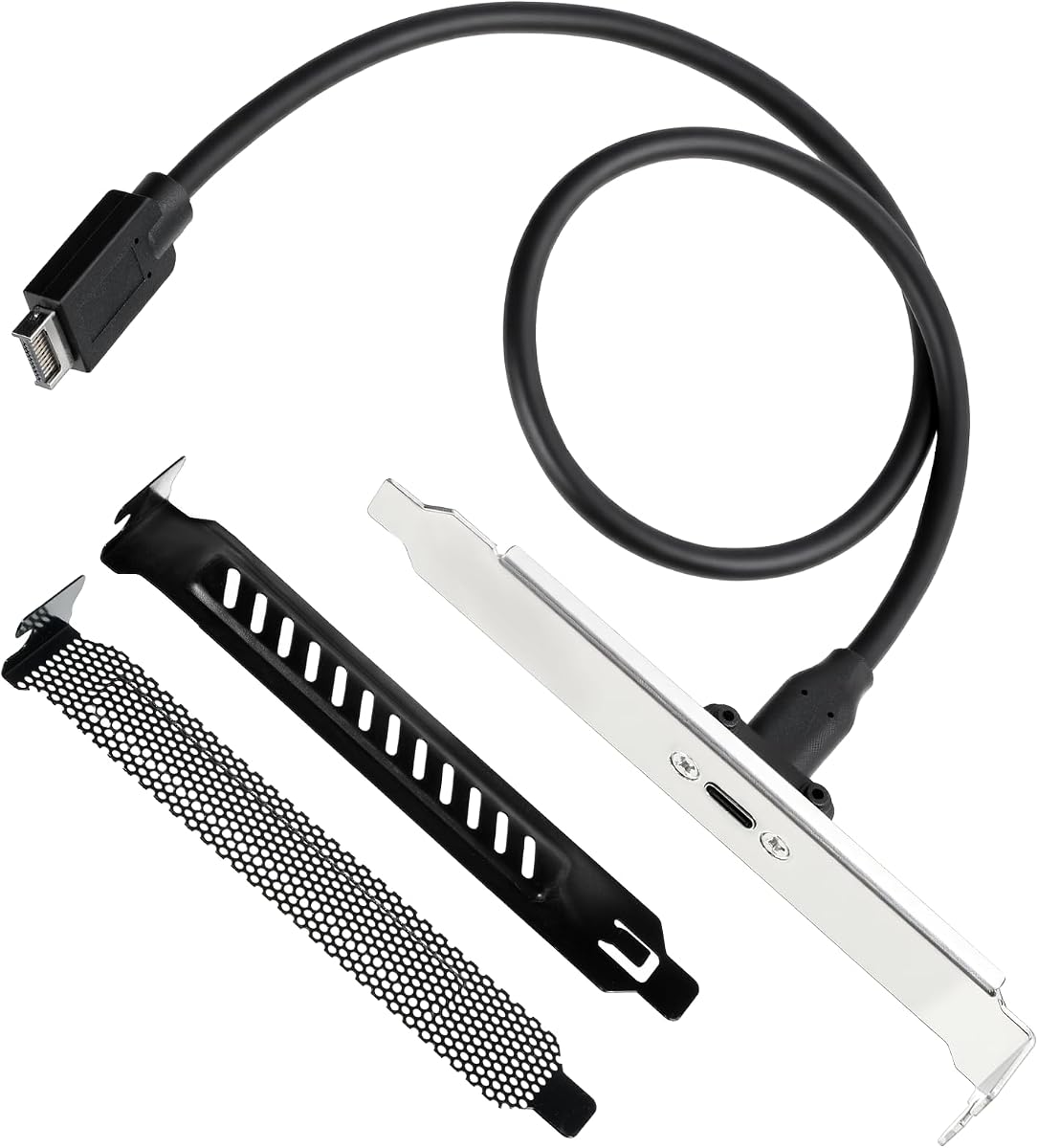
This cable is the most affordable way to add a Type-C port to your front panel. It connects to a 9pin USB 2.0 header which is common on older motherboards. The speed is limited to 480Mbps but it works well for basic charging and mice.
We may earn a commission when you buy through this link, at no additional cost to you.
The short length makes it easy to manage inside the case. It requires no drivers making it truly plug and play. For users on a tight budget this is an excellent entry point.
Do not expect high-speed data transfer with this model. It is ideal for keyboards and mice rather than fast SSDs. The build is functional and gets the job done reliably.
We suggest this for budget builds or older PCs. It is a simple solution that works without issues. Verify your motherboard has the correct header before buying.
Provides basic USB-C access at a very low cost.
No drivers or complex setup required.
We may earn a commission when you buy through this link, at no additional cost to you.
This adapter delivers 20Gbps speeds at a competitive price point. It includes PCI slot covers which helps with airflow and aesthetics. The labeling is clear to help you avoid connection errors during setup.
We may earn a commission when you buy through this link, at no additional cost to you.
The cable length is standard for most tower cases. It uses a durable PVC material that is flexible enough to route easily. It is a solid choice for builders who want speed without premium pricing.
Some users have reported minor quality variations but performance is generally stable. The inclusion of extra covers is a nice bonus for custom builds. Overall it is a good value product.
We recommend this for standard builds needing fast access. Verify your motherboard header type before ordering. It is a practical solution for many PC enthusiasts.
PCI slot covers add professional aesthetics to the build.
Labeling ensures correct orientation during installation.
We may earn a commission when you buy through this link, at no additional cost to you.
This cable uses high-quality TPE material that resists damage from bending. It supports 10Gbps which is sufficient for most high-speed peripherals. The platinum coating reduces impedance for stable signal transmission.
We may earn a commission when you buy through this link, at no additional cost to you.
It includes screws to mount the panel securely which saves time. The 30cm length is good for small to medium cases. It is a reliable choice for users wanting a balance of speed and flexibility.
Note that the panel screw spacing is specific so measure before installing. The build quality is consistent and the connectors are solid. It performs well even with multiple connections.
We suggest this for users who need flexibility. The durability is good and the price is fair. Ensure your case has the necessary clearance for the bracket.
TPE material allows repeated bending without damage.
Screws simplify the panel installation process.
We may earn a commission when you buy through this link, at no additional cost to you.
This adapter offers a mix of high speed and versatility. It supports 20Gbps for the Type-C port along with USB-A outputs. The build quality is solid with a durable metal construction.
We may earn a commission when you buy through this link, at no additional cost to you.
Like other multiport models it requires two motherboard headers. The included bracket helps secure the panel to the case. Users appreciate the performance and the quality of the connectors.
The wiring can be complex but the result is worth it for multi-device setups. It handles data transfer well and is reliable. The speed matches premium competitors.
We recommend this for users needing extra ports. Verify your headers and power before purchase. It is a strong contender for advanced setups.
Consistently receives high feedback for reliability.
Metal casing ensures long-term durability.
We may earn a commission when you buy through this link, at no additional cost to you.
Choosing the right adapter depends on your motherboard capabilities and performance needs. This guide outlines the key factors to consider before making a purchase.
Check if your board has Type-E (20-pin) or USB 3.0 (19-pin) headers. Some models require both for multiport options.
Always verify your motherboard manual to avoid buying incompatible cables.
USB 3.2 Gen 2×2 offers 20Gbps which is ideal for fast SSDs. Gen 1 offers 5Gbps which is enough for peripherals.
Ensure your device supports the speed to avoid bottlenecks.
Longer cables help in full towers while shorter ones suit mini cases. Ensure the cable fits without blocking airflow.
Choose lengths that match your case size.
Metal brackets provide better durability than plastic. Ensure it fits your case's rear opening.
Sturdy brackets prevent port damage over time.
Hubs often need SATA power for stability. Single cables usually draw power from the header.
Confirm power sources are available before installation.
Double-shielded cables reduce EMI/EMI noise. This ensures stable data transfer.
Prioritize shielded cables for high-speed connections.
Hubs offer multiple ports for flexibility. Single cables are simpler and cheaper.
Decide based on how many devices you need.
Some cables work with USB 2.0 headers. Others need newer Type-E headers.
Check your system specs to ensure compatibility.
Turn off your PC and unplug the power cable before starting. Open the case and locate your motherboard headers. Connect the adapter cable carefully ensuring the correct orientation.
Secure the bracket to the case using the provided screws. This prevents the cable from loosening during use. Close the case and reconnect power.
Insert USB-C devices to test functionality. Ensure the connection is stable. Avoid bending the cable excessively to maintain signal integrity.
Yes, most high-speed cables require a Type-E 20-pin header. Some models also need a 19-pin USB 3.0 header. Check your manual to confirm.
Basic adapters work with 9pin USB 2.0 headers but are limited to 480Mbps speeds. High-speed adapters will not function with 2.0 headers.
Hubs with multiple ports draw more power than a motherboard header can supply. SATA power ensures stable performance.
No, most adapters are plug and play. They work without driver installation on Windows 10 and 11.
The fastest adapters support 20Gbps. Ensure your device supports this speed to achieve maximum performance.
Yes, some budget adapters work with USB 2.0 headers. This makes them suitable for older builds.
Measure the distance from your motherboard to the case front. Ensure the cable reaches without tight bends.
The GRAUGEAR 20Gbps Type E Key A adapter is our top choice for its speed and build quality. The Sinefine expansion card is ideal for older systems needing quick upgrades.
Prioritize compatibility with your motherboard headers to avoid issues. Ensure you have the right power sources if using hubs for stability.
Prices change frequently so verify current costs before buying. We hope this guide helps you find the perfect solution for your PC build.