
BENFEI USB C to HDMI Adapter
4.4Editor score
4K@60Hz resolution support
Compact and portable design
Broad device compatibility
This guide compares the top ten flash drive to HDMI adapter models to help you choose the best USB video converter for your specific laptop or desktop setup
Finding a reliable flash drive to HDMI adapter can transform how you connect your laptop to larger screens for presentations or entertainment. These compact devices bridge the gap between standard USB ports and modern displays, offering flexibility when built-in video outputs are limited or unavailable.
We evaluated ten leading models based on compatibility, resolution support, driver requirements, and overall build quality. Our analysis focuses on real-world performance metrics such as refresh rates, audio pass-through capabilities, and ease of installation across different operating systems like Windows and macOS.
Each selection in this list highlights unique strengths ranging from budget-friendly options to premium multi-monitor solutions. Keep in mind that availability and pricing fluctuate regularly, so verifying current stock and deal status before purchasing ensures you get the best value for your specific needs.
4.4Editor score

4.5Editor score

4.5Editor score
The following comparison table outlines key specifications for each model including resolution limits, compatibility details, and physical design traits to help you quickly identify the right fit.


The StarTech USB-A 3.0 to HDMI Converter stands out as a top performer for users needing a stable video output connection. With a 4.5 rating it delivers consistent 1080p60 playback suitable for work or media consumption.
We may earn a commission when you buy through this link, at no additional cost to you.
Its lightweight and compact design makes it ideal for professionals who travel frequently. The bus-powered feature ensures you do not need extra adapters or cables to get started. The TAA compliance adds value for government contractors.
While it only supports Windows systems this limitation ensures optimized performance within that environment. The driver requirement is straightforward and ensures the hardware communicates correctly with your OS. Short cable length keeps setups tidy.
This adapter is best for office workers or students needing an extra display on Windows machines. It offers a balance of reliability and portability that few competitors match. We recommend it for anyone prioritizing stability.
The compact design fits easily in laptop bags making it perfect for daily commutes to work or school.
The 60Hz refresh rate ensures fluid motion which is essential for video calls and presentations.
We may earn a commission when you buy through this link, at no additional cost to you.
The BENFEI USB C to HDMI Adapter offers exceptional value for users needing high-resolution video output from modern devices. It supports 4K at 60Hz and works with a wide range of laptops and phones. Its rating reflects strong user satisfaction.
We may earn a commission when you buy through this link, at no additional cost to you.
Its compact design allows it to fit into pockets easily making it highly portable for travel. The premium aluminum casing helps dissipate heat during extended use. This ensures longevity even with frequent connections and disconnections.
The main constraint is the requirement for DP Alt Mode which not all USB-C ports support. Users should verify their device compatibility before purchasing to avoid disappointment. Otherwise the performance is excellent for the price point.
This adapter is perfect for travelers or students using modern USB-C laptops. It provides a cost-effective way to connect to projectors or TVs. We highly recommend it for budget-conscious buyers seeking quality.
Getting 4K support at this price point makes it accessible for everyday users wanting crisp visuals.
It works with Macs phones and Windows laptops offering versatility for mixed device households.
We may earn a commission when you buy through this link, at no additional cost to you.
The StarTech USB-A 3.0 to Dual HDMI Adapter is built for professionals who need multiple displays. It allows two HDMI monitors to be driven from one USB port supporting both 4K and 1080p resolutions. This makes it a powerful tool for multitasking.
We may earn a commission when you buy through this link, at no additional cost to you.
Designed with IT professionals in mind it includes a three-year warranty and free technical assistance. This level of support is rare in the consumer market and adds significant value. The build quality reflects this focus on reliability.
The Windows-only limitation means Mac users cannot utilize this hardware. However for Windows environments it offers robust performance and stability. The driver installation is standard but ensures proper functionality across supported platforms.
This adapter is best for workstation setups where screen real estate is critical. It is ideal for stock traders or designers needing multiple views. We recommend it for power users requiring dual display capabilities.
Managing two external monitors significantly boosts productivity for complex workflows and data analysis.
The three-year warranty and technical support provide peace of mind for business deployments.
We may earn a commission when you buy through this link, at no additional cost to you.
The Reborn USB to HDMI Adapter is a powerful device for connecting laptops to HDMI displays. It supports 1080P at 60Hz and works with both Mac and Windows systems. Its compact design makes it convenient for carrying in a bag.
We may earn a commission when you buy through this link, at no additional cost to you.
It is vital for laptop screen output and multimedia presentations. The adapter uses high-quality materials ensuring stability during use. Support includes mirror and extended modes to enhance workflow efficiency significantly.
Drivers must be installed before use which can be tricky if other drivers exist. The adapter cannot be used in BIOS mode which limits some use cases. However for standard desktop use it performs reliably.
This adapter is good for general office use or travel presentations. It offers a good balance of compatibility and performance. We suggest it for users needing a simple plug-and-play experience.
Working with both Mac and Windows allows flexibility for users with multiple device types.
The materials used ensure durability even with frequent plugging and unplugging at events.
We may earn a commission when you buy through this link, at no additional cost to you.
This USB to HDMI Adapter can connect PC images to TVs and projectors easily. It supports both synchronization and expansion of monitors to improve work efficiency. It works with both USB 3.0 and 2.0 ports for broad compatibility.
We may earn a commission when you buy through this link, at no additional cost to you.
The warranty period is notably long offering thirty-six months of protection. It also comes with twelve months unconditional return policy for peace of mind. This indicates the manufacturer is confident in the product quality.
Hot-plugging is supported so you can connect or disconnect without restarting. This saves time during busy workdays when quick changes are needed. Drivers are required for setup but are straightforward to install.
It is suitable for users needing a secondary display without complex setups. The warranty offers significant value for a budget-friendly option. We recommend it for those prioritizing protection and returns.
The long warranty gives buyers confidence that the company supports their purchase fully.
Hot-plugging support allows for quick changes during meetings without restarting the computer.
We may earn a commission when you buy through this link, at no additional cost to you.
The WAVLINK USB 3.0/USB C to HDMI adapter supports up to six monitors when using multiple units. It features DisplayLink certification ensuring compatibility with many systems. You can mirror or extend your display for better multitasking.
We may earn a commission when you buy through this link, at no additional cost to you.
It includes an external 2.1CH Microphone input and Earphone output for convenience. This is useful for video calls without needing separate audio devices. The LED display status helps users quickly check connection health.
Setup requires DisplayLink driver installation but is simple to complete. It supports Windows and MacOS including M1 to M5 chips making it versatile. Compact design makes it easy to manage on a crowded desk.
This adapter is best for users needing many screens for complex workflows. The audio features add value for remote work needs. We recommend it for power users managing multiple displays.
Supporting up to six monitors allows for extensive multitasking and workflow management.
Built-in audio ports simplify connections for calls and presentations without extra gear.
We may earn a commission when you buy through this link, at no additional cost to you.
This StarTech.com adapter lets you connect laptops to HDMI monitors via a single USB port. It is DisplayLink certified ensuring compatibility with many systems. It features automatic driver installation for Windows and Chrome setups.
We may earn a commission when you buy through this link, at no additional cost to you.
The design is compact and bus-powered so no extra supply is needed. You can add multiple screens if you have available USB ports. The cable length is short but sufficient for desk use.
It is easy to set up and works reliably with various systems. The brand is known for quality IT products. This makes it a trustworthy choice for business environments needing stability.
This adapter suits users needing an extra display without internal cards. The auto-install drivers save time during setup. We recommend it for office workers and Chrome users.
Automatic driver installation reduces configuration time and technical effort significantly.
StarTech is known for reliable hardware making this a safe choice for businesses.
We may earn a commission when you buy through this link, at no additional cost to you.
The Kinhaly USB C to HDMI adapter helps iPhone and iPad users expand to HDMI ports. It supports 4K at 60Hz for crystal-clear video. It also has a charging port to power your device while streaming content.
We may earn a commission when you buy through this link, at no additional cost to you.
It requires no driver installation and works immediately when connected. The aluminum alloy casing helps dissipate heat during long sessions. It is compact and fits easily into pockets for carrying around.
Be aware it does not work with apps like Netflix due to copyright protection. It supports YouTube and local videos well. This is a limitation for mainstream streaming services on some devices.
This adapter is perfect for Apple users needing a portable solution. The charging port adds value for long presentations or viewing. We recommend it for iPhone and iPad users wanting flexibility.
The integrated charging port ensures your phone stays powered during extended presentations or movies.
Supporting 4K resolution ensures visuals look sharp on modern TVs and projectors.
We may earn a commission when you buy through this link, at no additional cost to you.
This USB 3.0 to HDMI adapter transforms a USB port into high-definition output. It delivers 1080P at 60Hz ensuring lag-free video. It is suitable for movies gaming and presentations on larger screens.
We may earn a commission when you buy through this link, at no additional cost to you.
It supports dual display modes allowing extended or mirrored setups easily. A step-by-step guide makes driver installation straightforward for non-technical users. The driver runs locally for privacy without internet access.
It is designed for Windows and macOS systems offering broad compatibility. However it is not supported for older Windows versions or Linux. Checking system requirements before purchase is advised.
This adapter is good for users needing simple display extension. The guide simplifies setup making it accessible. We recommend it for those needing a reliable display converter.
Local driver operation ensures privacy without accessing internet data during use.
Clear step-by-step instructions help users install drivers without technical assistance.
We may earn a commission when you buy through this link, at no additional cost to you.
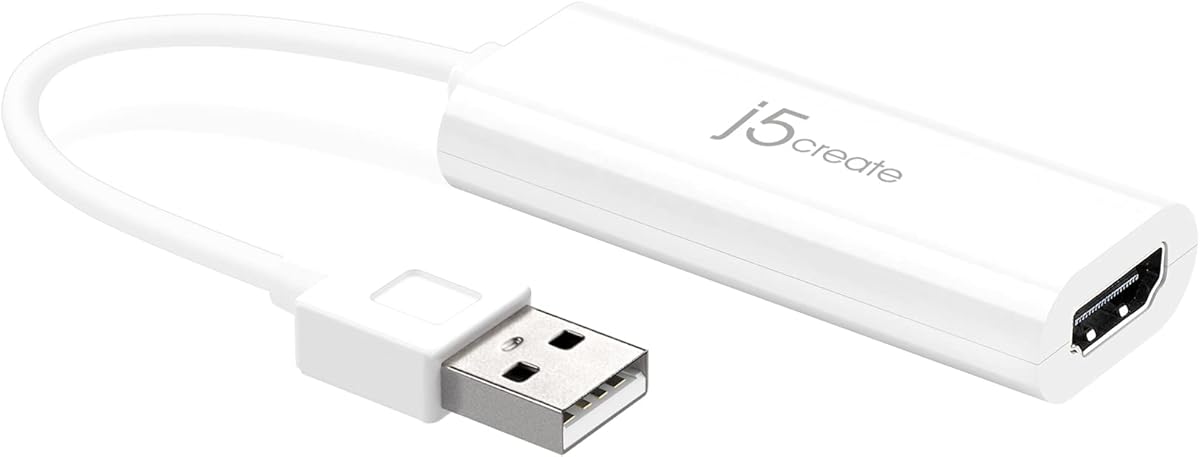
The j5create USB to HDMI adapter adds a monitor without internal cards. It allows you to move spreadsheets across screens without overlapping windows. Hot-swappable USB enables adding or removing monitors without rebooting.
We may earn a commission when you buy through this link, at no additional cost to you.
It is great for multitasking fields like phone centers or accounting. You can surf the web and work on email simultaneously across screens. This boosts productivity for wide variety of professional fields.
You must install the driver before use for proper functionality. Once installed the system recognizes the extra display automatically. The setup is standard for this type of USB converter.
This adapter suits users needing quick multitasking capabilities. The hot-swap feature saves time when rearranging setups. We recommend it for office workers needing extra screen space.
Hot-swappable USB saves time by allowing changes without restarting your system.
Spreading work across screens helps organize tasks and increase daily efficiency.
We may earn a commission when you buy through this link, at no additional cost to you.
Selecting the right adapter involves considering compatibility, resolution, and design. Use this guide to understand key factors before purchasing.
Ensure the adapter supports your specific OS. Some models work only on Windows while others support both macOS and Windows. Always check system requirements before purchase to avoid driver issues.
Verify that the manufacturer lists your OS version explicitly for guaranteed support.
Resolution determines how sharp your image appears on screen. Look for 1080p or higher depending on your monitor needs. Refresh rates like 60Hz ensure smooth video playback without stuttering.
Higher resolution requires more bandwidth so ensure your USB port supports necessary data rates.
Most USB video adapters require software installation. Some offer automatic driver downloads which simplify setup. Others may require manual installation which can complicate initial use.
Choose models with easy driver installation to save time and technical effort.
Adapters are available in USB-A and USB-C versions. Check your laptop port type to ensure physical compatibility. Newer laptops may only have USB-C ports limiting USB-A options.
Match the adapter port to your computer to ensure proper connection.
Bus-powered adapters draw power from your computer and need no external supply. This keeps the setup portable and simple. Some high-performance models might require additional power for stability.
Opt for bus-powered models for travel ease and desk cleanliness.
Durability affects how well the adapter holds up to frequent use. Look for metal casings and braided cables to resist wear. High-quality connectors ensure stable signal transfer over time.
Solid build quality helps prevent connection failures during critical moments.
A warranty protects your investment against defects. Brands like StarTech offer longer terms than generic options. Check warranty duration to ensure peace of mind after purchase.
Prioritize products with at least one year of coverage for reliability.
If you need multiple monitors consider adapters supporting dual output. Some models require specific drivers to handle multiple screens simultaneously. Ensure your computer has enough USB ports for multiple adapters.
Plan for your workflow needs to select the right number of monitors.
Start by downloading any required drivers from the manufacturer website. Install the software while connected to internet for updates. Restart your computer to apply changes.
Once setup is done plug the adapter into a USB 3.0 port if possible. Connect an HDMI cable from the adapter to your display. Your system should detect the new display automatically.
Avoid bending the cable sharply near the connector to prevent breakage. Keep the device dry and clean to ensure longevity. Store it in a protective case when traveling.
Most models require drivers to function correctly on your computer. Some provide automatic installation but manual steps may be needed. Without drivers the adapter will not display video correctly.
It is suitable for casual gaming but may have slight latency. High refresh rates are not always supported across all models. For competitive gaming dedicated graphics output is better.
Yes most adapters support audio pass-through via HDMI. Ensure your speakers are connected to the display or adapter. Audio settings may need adjustment to route sound correctly.
It depends on the model. Newer Macs need USB-C adapters while older ones use USB-A. Check specific compatibility with your MacBook version before buying.
Standard adapters support one external display. Some models allow dual outputs for more screen space. Check product specs to confirm how many screens it supports.
Some adapters work but performance may be limited. Resolution might drop to 800×600 instead of 1080p. Using USB 3.0 is recommended for full performance.
The StarTech, BENFEI, and WAVLINK adapters offer distinct advantages for different users. Choose based on whether you prioritize budget, resolution, or multi-monitor capabilities.
Always check your device compatibility and driver needs before buying. Ensuring your system supports the adapter prevents setup headaches later.
Current pricing and availability change frequently so verify stock before committing. This helps ensure you get the best deal on the right model.