
Replacement TV Remote Control for All Fire Series
4.3Editor score
Works with Fire TV Stick 4K Max
Voice control included
Easy pairing process
This guide compares the top Fire Stick Replacement Remote options for 2026, evaluating compatibility, voice features, build quality, and value to help you
Finding a reliable Fire Stick Replacement Remote can transform your streaming experience. The right remote offers seamless navigation, voice control, and durability. With many options available, selecting the best fit requires careful consideration of your specific device model and usage needs.
We analyzed ten top-rated replacements based on compatibility, user feedback, and feature sets. Each product was evaluated for ease of pairing, button responsiveness, and voice assistant integration. Our goal is to provide clear insights to help you make an informed purchase decision today.
Each pick highlights key strengths and potential limitations found in user reviews. We focus on real-world performance and device support to ensure you get what you need. Please note that prices and availability may change, so check current listings before buying.
4.3Editor score
4.5Editor score

4.5Editor score
This table provides a side-by-side overview of all ten remotes, highlighting key specifications like compatibility, voice features, and button layouts to help you compare options quickly.
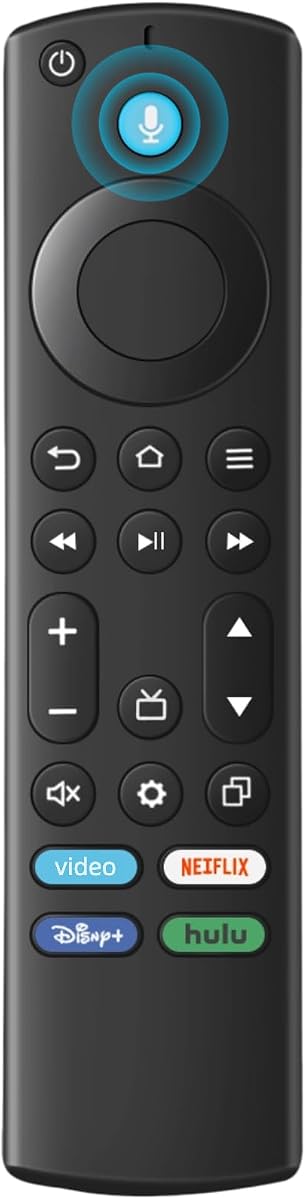


This remote offers robust voice control and broad compatibility for modern Fire TV devices. It supports Fire TV Stick 3rd Gen, 4K models, and compatible smart TVs. Users praise its responsive buttons and reliable voice search capabilities.
We may earn a commission when you buy through this link, at no additional cost to you.
The integration with Alexa allows you to find content and control smart home devices efficiently. Its design mimics the original remote closely, ensuring a familiar experience. The package includes a manual to guide you through pairing.
While it works well with newer devices, older models are not supported. The battery inclusion is a minor drawback. However, the convenience of voice commands and the affordable price balance these cons effectively.
Ideal for users upgrading from older remotes or replacing lost ones on supported models. It balances cost and features effectively. We recommend checking your device model before purchasing to ensure compatibility.
The built-in microphone allows hands-free searches and commands for a smoother streaming experience.
Works with most Fire TV Stick 4K models and various smart TVs like Insignia and Toshiba.
We may earn a commission when you buy through this link, at no additional cost to you.
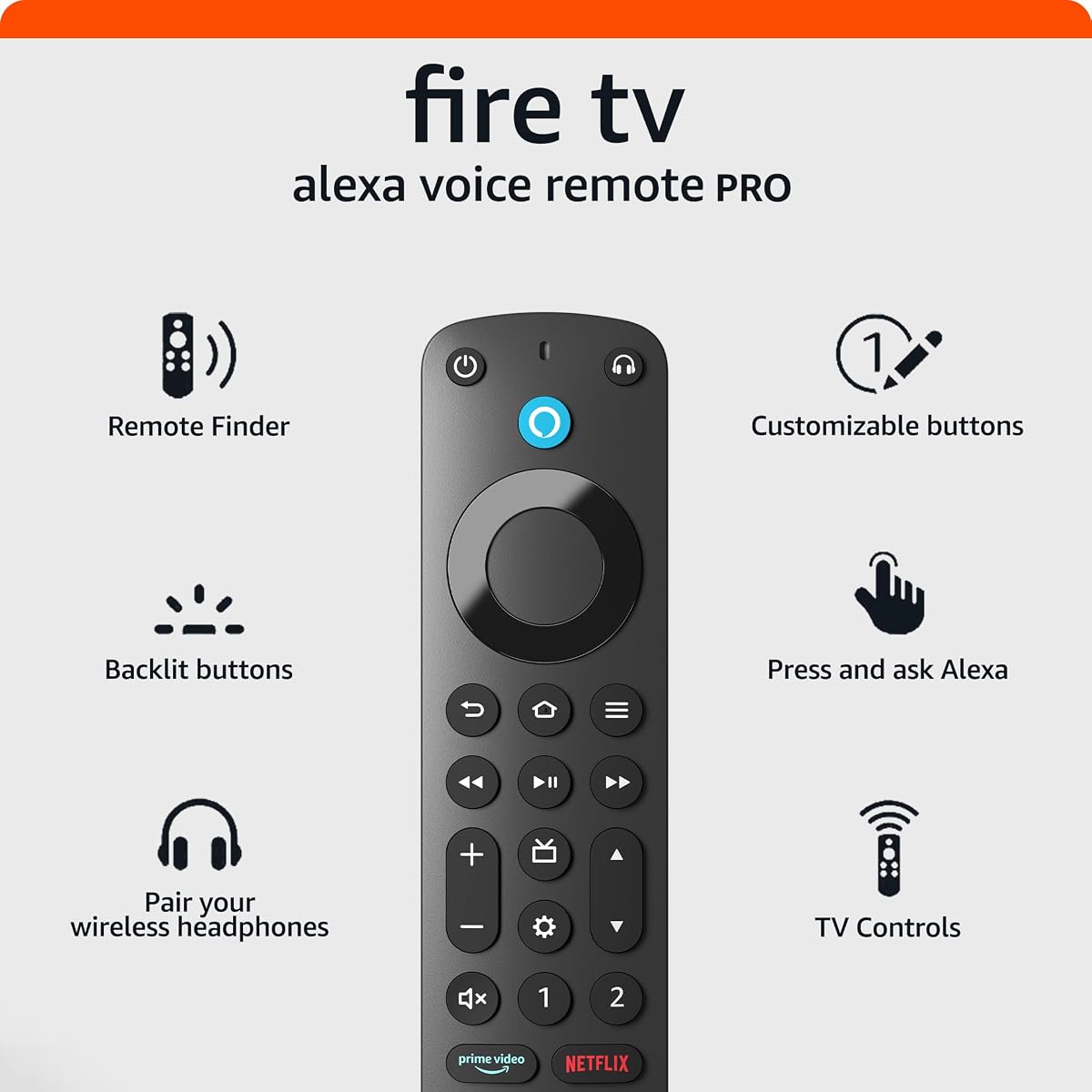
This premium remote stands out with features like a remote finder and backlit buttons. It is designed for users who value convenience and advanced functionality. The voice control is highly responsive and integrates well with Alexa.
We may earn a commission when you buy through this link, at no additional cost to you.
The backlight automatically activates in low light, making navigation easier at night. Customizable buttons let you create shortcuts for favorite apps. The headphone button quickly pairs wireless headphones for private listening.
The higher cost might deter budget-conscious buyers. It also does not work with older Fire TV generations. However, the added features justify the price for those wanting an enhanced experience.
Best for users with newer Fire TV devices who want extra convenience. The remote finder alone saves time. If you want premium features, this is a top choice.
Use Alexa to make the remote ring if you cannot find it quickly.
Motion-activated backlight ensures buttons are visible in dark viewing environments.
We may earn a commission when you buy through this link, at no additional cost to you.
This remote offers excellent value with strong compatibility and useful customization features. It supports Fire TV Stick 4K Max and various Insignia models. Users appreciate the dedicated app buttons and responsive voice search.
We may earn a commission when you buy through this link, at no additional cost to you.
The customization buttons allow quick access to frequently used services. Voice activation is easy to set up following the manual. It works with Fire TV Cube 1st Gen through 3rd Gen, covering many users.
Pairing can be slightly complex for some. It does not work with Roku devices. However, the price and feature set make it a strong contender for budget shoppers.
Perfect for those needing a reliable replacement without extra cost. The customization and shortcuts enhance usability. Check your device model to ensure support.
Program buttons to access favorite apps instantly with one press.
Supports multiple Fire TV models and compatible Insignia smart TVs.
We may earn a commission when you buy through this link, at no additional cost to you.
This remote is a solid choice for Fire TV Stick Select, Plus, and Max users. It includes shortcut buttons for quick app access and voice control. The 60-day satisfaction guarantee adds peace of mind.
We may earn a commission when you buy through this link, at no additional cost to you.
Voice commands work well for finding content and controlling smart home devices. The range extends to 12 meters for flexibility. The buttons withstand over 20,000 clicks based on testing.
It does not support older Fire TV generations. Batteries are not included in the package. Overall, the price and support make it a reliable pick for many users.
Recommended for those with compatible Fire TV Stick models. The short cut and guarantee stand out. Ensure your device is supported before buying.
Controls work reliably from up to 12 meters away.
Tested to withstand over 20,000 clicks for long-term use.
We may earn a commission when you buy through this link, at no additional cost to you.
This remote is designed for easy setup with automatic syncing for compatible devices. It features four pre-programmed shortcut buttons and voice control. Users appreciate the seamless integration with Fire TV Smart TVs.
We may earn a commission when you buy through this link, at no additional cost to you.
The auto sync reduces configuration steps significantly. Voice commands help launch apps and search content quickly. It works with Fire TV Stick 3rd Gen and later, as well as Insignia models.
Compatibility is limited to newer devices. Batteries are not included, which adds to initial setup time. Despite this, the ease of use makes it a practical choice.
Great for users wanting quick setup without complex steps. The auto sync is a key benefit. Verify your device is supported before purchasing.
Remotes connect automatically with compatible devices without manual pairing steps.
Four buttons provide one-tap access to popular streaming services.
We may earn a commission when you buy through this link, at no additional cost to you.
This remote provides broad support across Fire TV Series and models. It includes voice control for easy content finding and standard navigation. Users report good reliability and easy pairing processes.
We may earn a commission when you buy through this link, at no additional cost to you.
The remote works with Fire TV Stick Lite, 4K Max, and Cube models. Voice commands allow control of smart home devices and weather checks. Setup involves holding the Home button as instructed.
Older smart TVs may not work. Batteries are not included. However, the price and support make it a solid option for most users.
Recommended for Fire TV users needing a simple replacement. The voice control adds convenience. Ensure your device model is listed before buying.
Voice commands let you manage compatible smart home devices easily.
Simple pairing process involves holding the Home button for a few seconds.
We may earn a commission when you buy through this link, at no additional cost to you.
As an official Amazon remote, this model offers dependable performance and quality. It includes TV control buttons for power and volume. The guide button helps access live TV apps efficiently.
We may earn a commission when you buy through this link, at no additional cost to you.
The remote comes with batteries, saving immediate purchase. It supports Fire TV Stick 3rd Gen and newer. App buttons provide quick access to popular services.
It is more expensive than third-party options. Compatibility excludes older generations. For those prioritizing reliability, it is a strong choice.
Ideal for users seeking official support and quality. The included batteries are a plus. Check your device model for support.
Direct from Amazon ensuring consistent build quality and performance.
Comes with 2 AAA batteries included for immediate use.
We may earn a commission when you buy through this link, at no additional cost to you.
This remote is a practical choice for users needing a budget-friendly replacement. It supports voice function and works with multiple Fire TV models. The pairing LED indicator helps confirm connection status.
We may earn a commission when you buy through this link, at no additional cost to you.
The remote allows voice commands like volume control and channel switching. It supports Fire TV Stick Lite and Cube 2nd Gen. Pairing involves holding the Home button for ten seconds.
Manual pairing might confuse some users. Older models are not supported. Despite this, the price and voice features make it useful.
Good for those needing a quick replacement on supported devices. The LED indicator aids setup. Confirm your device is listed before buying.
The LED indicator flashes rapidly to show pairing mode status clearly.
Voice control handles standard commands like volume and app launching.
We may earn a commission when you buy through this link, at no additional cost to you.
This remote offers good value with broad compatibility across Fire TV and various TV brands. It includes voice functions and four app shortcuts for quick access. The pairing process is straightforward for most users.
We may earn a commission when you buy through this link, at no additional cost to you.
Voice commands allow easy content searching and navigation. The remote works with Hisense, Insignia, and Pioneer models. LED indicators help confirm pairing success clearly.
Not compatible with Samsung or older Fire TV models. Battery inclusion is not guaranteed. However, the price and versatility make it a good option.
Recommended for budget buyers needing broad compatibility. The voice feature and app shortcuts are beneficial. Check model fit before purchasing.
Compatible with several smart TV brands beyond just Fire TV.
Four buttons provide quick access to your most-used streaming apps.
We may earn a commission when you buy through this link, at no additional cost to you.
This remote is a practical option for users needing a reliable replacement. It includes voice control and four shortcut buttons for easy navigation. Support is available for any setup issues.
We may earn a commission when you buy through this link, at no additional cost to you.
Voice commands work for finding shows and adjusting settings. The remote supports Fire TV Stick HD, Lite, and 4K models. Pairing involves holding the Home button as instructed.
Batteries are not included. It does not support older Fire TV generations. However, the support and features make it a solid choice.
Great for users needing support and value. The shortcuts and voice control add convenience. Ensure your device is supported before buying.
Dedicated support helps with setup and troubleshooting any issues.
Hands-free voice control simplifies searching and content access.
We may earn a commission when you buy through this link, at no additional cost to you.
Selecting the right Fire Stick Replacement Remote requires attention to compatibility and features. This guide outlines key factors to ensure you buy a device that fits your needs.
Ensure the remote works with your specific Fire TV model. Older generations may not support newer remotes. Always check the product description for a list of supported devices.
Match your device model exactly to avoid pairing issues.
Look for remotes with built-in microphones for Alexa integration. This feature allows hands-free searches and smart home control. Some remotes may have limited voice functionality.
Prioritize remotes with full voice support for the best experience.
Check if the remote includes customizable buttons for your favorite apps. Standard remotes may only have preset buttons. Customization adds convenience for quick navigation.
Choose remotes with shortcuts that fit your usage habits.
Some remotes come with batteries while others do not. This affects immediate usability after purchase. Always check what is included in the package before buying.
Factor in the cost of batteries if they are not included.
Backlit buttons are useful for nighttime viewing. Some premium remotes offer automatic backlight activation. Standard remotes may lack this feature entirely.
Consider backlighting if you often watch TV in the dark.
Premium remotes may include a remote finder to ring when lost. This feature saves time and frustration. Most budget options will not have this.
This is worth considering if you misplace remotes often.
Check for warranty coverage and customer support availability. Reputable brands offer guarantees for defects. Third-party sellers may vary in support quality.
Adequate support ensures peace of mind for your purchase.
Compare prices against features and build quality. Budget remotes save money but may lack advanced features. Premium options offer more convenience at higher costs.
Balance your budget with the features you truly need.
Start by inserting two AAA batteries into the remote. Ensure correct polarity for proper function. The LED indicator will show pairing status.
Hold the Home button for ten to fifteen seconds to enter pairing mode. Wait for the remote to automatically connect to your Fire TV. Follow on-screen instructions if needed.
Keep the remote clean with a dry cloth. Avoid moisture exposure to prevent damage. Store it in a safe place to avoid loss.
To pair the remote, insert fresh batteries and hold the Home button for ten to fifteen seconds until the LED flashes. Wait for the Fire TV to recognize the remote automatically. Check the instructions if it fails to connect.
First check if the batteries are installed correctly and not dead. Try resetting the remote by removing batteries for thirty seconds. Ensure there are no obstructions between the remote and the Fire TV.
No, remotes are model specific and vary by generation. Older remotes may not work with newer devices. Always verify compatibility with your Fire TV model before buying.
Batteries typically last several months depending on usage frequency. Using batteries with longer life can extend duration. Replace them when response times decrease significantly.
No, these remotes are not designed to be waterproof. Avoid exposing them to moisture or liquids. If they get wet, remove batteries and let them dry completely before using.
Many remotes include TV control buttons for power and volume. Check the product specs to confirm these features. Not all remotes support this for your TV brand.
Try unplugging your Fire TV and reconnecting it to restart. Re-insert the batteries in the remote and pair again. Contact customer support if the issue persists.
Some models include batteries while others do not. Check the product details carefully before purchasing. Factor in battery cost if they are not provided.
We reviewed ten Fire Stick Replacement Remote options covering various budgets and features. Our top picks include affordable third-party options and premium choices with advanced features like remote finders.
When choosing, prioritize compatibility with your specific device model. Also consider features like voice control and customizable buttons based on your daily needs to ensure satisfaction.
Remember that prices and availability change often. Always verify the latest details on Amazon before purchasing. We hope this guide helps you find the perfect remote today.