
8Bitdo M30 Wired Controller
4.2Editor score
USB-C wired connection
6-Button Layout
3 profiles switch button
Discover the top fightpads for PC in this expert guide comparing layout ten controllers for fighting game enthusiasts seeking precision and durability.
Fighting games require precise inputs and reliable hardware to execute combos effectively. A dedicated fightpad offers the tactile response and layout needed for competitive play on your personal computer setup.
We evaluated ten top-rated controllers based on build quality, button responsiveness, and platform compatibility. Each product was analyzed for its suitability in various fighting genres and tournament environments.
Each pick highlights key features and potential trade-offs to help you decide. Keep in mind that availability and pricing may fluctuate over time as new models enter the market.
4.2Editor score

4.1Editor score

4.2Editor score
This table provides a side-by-side overview of the ten selected controllers highlighting their unique strengths and compatibility options for PC gamers.
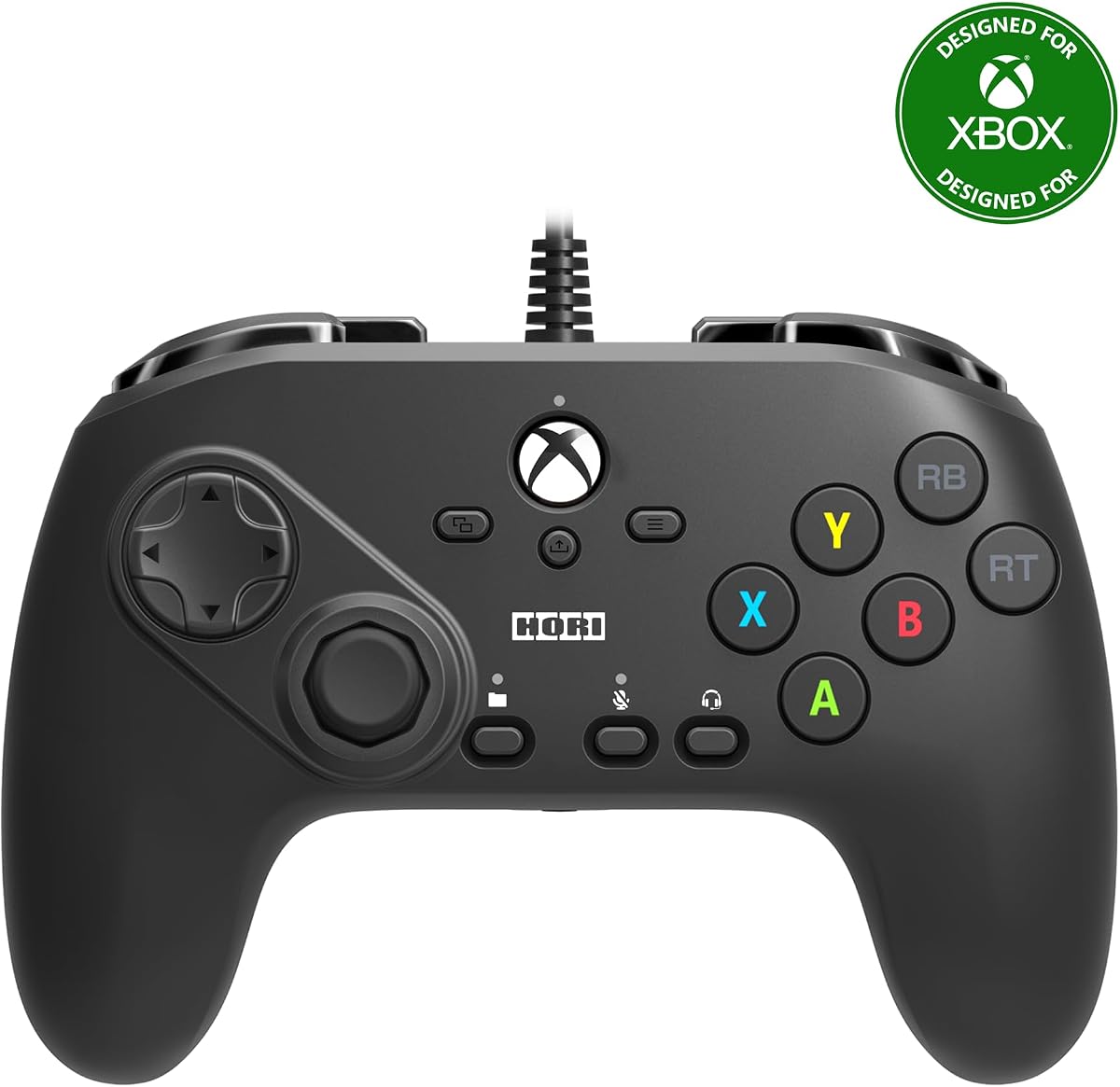


The HORI Fighting Commander OCTA stands out as a top contender for PC fighters seeking reliability. With a 4.1 rating it delivers precise inputs and comfort during extended sessions.
We may earn a commission when you buy through this link, at no additional cost to you.
Its Micro Switch buttons ensure rapid actuation crucial for tight combos. The Short Throw Analog Stick with 8-way gate enhances accuracy significantly.
While it lacks wireless capability the included headset input adds value. The companion app allows deep customization for personal playstyles.
This fightpad is ideal for serious gamers prioritizing performance over portability. We recommend it for those who value precision in competitive environments.
The Short Throw Analog Stick reduces input lag allowing faster execution of complex moves.
The companion app lets users adjust D-Pad sensitivity and save multiple profiles.
We may earn a commission when you buy through this link, at no additional cost to you.
Designed for Xbox series this controller bridges console and PC play effectively. It holds a 3.5 rating indicating mixed but generally positive feedback from users.
We may earn a commission when you buy through this link, at no additional cost to you.
Key features include Micro Switch Buttons and an adjustable d-pad for accuracy. The Short Throw Analog Stick supports quick directional changes needed in fighting titles.
Users can save up to four profiles via the companion app offering flexibility. However the lower rating suggests potential issues with long-term durability or comfort.
Best suited for Xbox owners expanding to PC. Consider it if you need a certified controller for specific game titles.
Easily switch between saved profiles using the dedicated profile button during gameplay.
Works seamlessly with Xbox Series X|S One and Windows 10 systems.
We may earn a commission when you buy through this link, at no additional cost to you.
The 8Bitdo M30 offers excellent value with a 4.2 rating making it a favorite for budget-conscious gamers. It supports Xbox Series X|S and Windows systems reliably.
We may earn a commission when you buy through this link, at no additional cost to you.
With a 6-Button Layout and USB-C connection it minimizes lag for responsive play. The 3 profiles switch button allows quick changes between setups.
While it lacks advanced customization found in premium models it covers core needs well. The audio jack adds utility for headset users without extra adapters.
We recommend this for casual players or those new to fighting games. It provides a solid foundation without breaking the bank.
The USB-C wired connection ensures virtually lag-free performance for competitive matches.
Features a familiar layout that appeals to fans of retro and modern fighters.
We may earn a commission when you buy through this link, at no additional cost to you.
This leverless controller brings arcade-level customization to the desktop with a 4.4 rating. Its hot-swappable switches allow users to tailor tactile feel easily.
We may earn a commission when you buy through this link, at no additional cost to you.
An OLED display shows SOCD settings and Turbo status instantly. The reinforced USB-C port ensures durability during intense play sessions.
Multiple platform support makes it versatile for various consoles and PC. The hot-swap feature is rare at this price point adding significant value.
Ideal for enthusiasts who want deep customization without building from scratch. The layout may take time to adjust to for new users.
Swap mechanical switches in seconds without soldering using the included puller tool.
Built-in OLED screen displays current input mode at a glance for convenience.
We may earn a commission when you buy through this link, at no additional cost to you.
The Akko FUNBOX sets a new standard with Hall Effect switches and a 4.2 rating. It is built for competitive play with rapid trigger capabilities.
We may earn a commission when you buy through this link, at no additional cost to you.
Kailh Star Mini switches eliminate friction ensuring longevity. The Full-Color LCD serves as a hub for adjustments without software installation.
Rapid Trigger and high polling rates provide an edge in fast-paced games. Tournament Lock mode ensures compliance with official competition rules.
This controller is for serious competitors willing to invest in top-tier gear. Its features justify the premium for those needing absolute precision.
Contactless design eliminates physical friction so switches never wear out over time.
Full-color LCD allows personal standby animations via browser-based driver easily.
We may earn a commission when you buy through this link, at no additional cost to you.
Tailored for Tekken fans this controller brings official licensing to PC play with a 3.8 rating. It retains the core strengths of the standard OCTA model.
We may earn a commission when you buy through this link, at no additional cost to you.
Microswitch buttons and an accurate D-Pad ensure precise inputs. The analog slide pad helps with in-game navigation for menus.
The design aligns with the game visual identity appealing to fans. While specific it remains a viable option for any fighting game on PC.
Recommended for dedicated Tekken players seeking branded hardware. Performance remains consistent with other wired fightpads in its class.
Licensed by Bandai Namco ensuring compatibility and design integrity for Tekken 8.
Analog slide pad simplifies movement within game menus and lobbies efficiently.
We may earn a commission when you buy through this link, at no additional cost to you.
This wireless model offers mobility without sacrificing much performance rated 3.6 by users. It supports PS5 and Windows 11/10 with official Sony licensing.
We may earn a commission when you buy through this link, at no additional cost to you.
Programable rear buttons add extra inputs for complex moves. The 8-gate analog stick maintains the precision found in wired versions.
Charging cable with lock prevents disconnects during play. However firmware installation is mandatory before first use which may inconvenience some.
Ideal for users who prefer untethered setups. The rear buttons offer competitive advantages if configured correctly for your games.
Play without cables maintaining full tournament grade performance standards on PC.
Rear buttons provide additional control options for complex combos effectively.
We may earn a commission when you buy through this link, at no additional cost to you.
Available as a renewed unit this OCTA provides access to tournament features at a potentially lower cost. It supports PS5 PS4 and PC platforms seamlessly.
We may earn a commission when you buy through this link, at no additional cost to you.
The eight-button layout and programmable macros cater to advanced users. Official licensing ensures it meets quality standards expected by Sony.
While ratings are unavailable renewed items may have limited warranty coverage. Buyers should inspect functionality upon arrival carefully.
Consider this if budget is a primary concern. It offers the core features of the standard model in refurbished condition.
Programmable macros allow quick execution of complex moves and combos easily.
Supports PS5 PS4 and PC ensuring broad usability across different systems.
We may earn a commission when you buy through this link, at no additional cost to you.
Rated 4.4 the F310 remains a reliable choice for general gaming and PC fighting titles. Its familiar layout reduces the learning curve significantly.
We may earn a commission when you buy through this link, at no additional cost to you.
The floating D-pad rests on four switches for responsive direction changes. Profiler software allows extensive customization for games lacking native support.
While not specifically designed for fighters it works well for many titles. The simple USB connection makes it easy to set up and use.
Best for casual players or those needing a generic controller. It provides great value for a broad range of PC gaming needs.
Floating D-pad design allows quick directional changes during gameplay.
Profiler software enables programming keyboard commands for better flexibility.
We may earn a commission when you buy through this link, at no additional cost to you.
This mini fight stick offers portability without sacrificing the classic arcade feel. It holds a 4.2 rating reflecting strong user satisfaction with its build.
We may earn a commission when you buy through this link, at no additional cost to you.
Its V-cut housing joystick provides accuracy and durability. The compact design makes it easy to transport for local tournaments.
Eight-button layout covers standard fighting game needs perfectly. While smaller than full sticks it retains high precision capabilities.
Recommended for gamers wanting a stick feel on the go. It balances portability and performance effectively in one unit.
Compact lightweight design makes it perfect for transporting to events easily.
Original joystick with V-cut housing delivers traditional arcade accuracy.
We may earn a commission when you buy through this link, at no additional cost to you.
Choosing the right controller depends on your play style budget and hardware needs. Consider these factors to find the perfect match.
Standard pads use four face buttons while tournament pads often use six. More buttons can reduce finger stretching during complex combos.
Choose a layout that minimizes hand strain and matches your game requirements.
Micro switches provide tactile clicks that confirm inputs. Hall Effect switches use magnets to prevent wear over time.
Select based on whether you prioritize tactile feedback or long-term durability.
Wired controllers offer consistent input with zero latency. Wireless models provide mobility but may suffer from battery concerns.
Prioritize wired for competitive play unless mobility is essential.
Ensure the controller supports your OS and games natively. Some require drivers while others plug-and-play seamlessly.
Check the product specs for Windows support before purchasing.
Advanced users may want software to remap keys or adjust sensitivity. Hardware options like swappable D-pads also add value.
Look for companion apps if you need to tailor controls.
The size and grip of the controller impact comfort during long sessions. Flat pads are great for lap play.
Test weight and dimensions to ensure it fits your desk setup.
High-end models use reinforced ports and durable buttons to withstand intense use. Cheaper models may wear faster.
Invest in a robust build if you play frequently or competitively.
Basic models are affordable but lack advanced features. Premium options cost more but offer customization and tournament readiness.
Balance your budget with the features you actually need for gameplay.
Plug your controller into a USB port on your computer and wait for driver installation to complete automatically. Ensure your system recognizes the device before launching games.
Use companion software to map buttons if necessary. Adjust stick sensitivity and D-pad settings to match your personal play preferences.
Store your controller in a cool dry place to avoid dust buildup. Clean surfaces regularly with a soft cloth to maintain responsiveness.
Yes, fightpads offer more buttons and adjustable inputs that simplify complex combos. Standard controllers may require stretching fingers too much for optimal play.
Most listed models plug-and-play automatically. However, using companion apps unlocks advanced customization features like sensitivity adjustments.
Yes, many options like HORI and 8Bitdo support Windows natively. Check product specs to confirm official licensing for PC use.
Wired models provide lower latency essential for competitive play. Wireless models offer convenience but may introduce slight input lag depending on battery.
Use a dry microfiber cloth to wipe down buttons and sticks. Avoid liquids that could damage internal electronics during cleaning.
Yes, several models listed include tournament lock modes to prevent accidental input. Check specifications for official competition compliance.
The 8Bitdo M30 offers affordability and reliability for new players. It provides essential features without overwhelming complexity.
Wired models do not require charging. Wireless versions typically last 10 to 15 hours per full charge depending on usage.
We reviewed ten top-tier fightpads suitable for various skill levels and budgets. From budget models to premium tournament sticks there is something for everyone.
Prioritize precision, durability, and platform compatibility when making your choice. A reliable controller improves performance and reduces frustration during matches.
Prices and availability are subject to change. Always verify current listings and reviews before finalizing your purchase online.