
SSK Portable SSD 1TB External Solid State Hard Drive
4.5Editor score
Affordable price for high capacity
Slim aluminum alloy casing
Includes USB-C and USB-A cables
Discover the top external SSDs for Linux systems, comparing speed, compatibility, and durability to help you choose the best storage solution for your needs.
Selecting the right external storage for Linux involves careful consideration of file systems, interface support, and durability. Linux users need drives that mount reliably without proprietary software or complex configuration steps. This guide evaluates ten leading portable SSDs to ensure seamless integration with your distribution.
We compared these products based on read write speeds, physical build quality, encryption features, and cross platform compatibility. Each drive was analyzed for its ability to handle large file transfers and sustained workloads common in professional Linux environments. Our goal is to highlight models that perform consistently across various hardware setups.
Each pick includes detailed specifications, real world performance notes, and expert recommendations for specific use cases. Prices and availability change frequently, so verify current details before purchasing. This curated list helps you find a reliable drive that meets your specific workflow requirements without unnecessary overhead.
4.5Editor score

4.7Editor score

4.6Editor score
This side-by-side comparison highlights the key specifications of the top ten external SSDs compatible with Linux systems. Evaluate speed, capacity, and durability to find the perfect match for your workflow.





The Samsung T7 Portable SSD stands out as a top choice for Linux users seeking reliable performance and ease of use. With a strong user rating and proven compatibility across major distributions, it handles daily workflows seamlessly. Its NVMe technology ensures rapid access to files without requiring complex setup steps or additional software.
We may earn a commission when you buy through this link, at no additional cost to you.
Performance is a key strength, delivering read speeds up to 1050MB/s that significantly outpace traditional external hard drives. The aluminum unibody construction provides durability while effectively dissipating heat during extended transfers. Linux systems recognize it instantly as a standard mass storage device, making it ideal for backups and media management.
While the drive performs exceptionally well, users may notice slight warming during sustained large file operations. This is typical for high-speed portable SSDs and does not impact performance or data integrity. The trade-off is acceptable given the speed and reliability offered in such a compact form factor.
This drive is perfect for professionals and students who need a fast, plug-and-play solution for Linux. Its balance of speed, durability, and ease of use makes it our top recommendation for most users. Whether you are editing videos or managing code repositories, the T7 delivers consistent results.
The T7 mounts automatically on Linux systems without requiring proprietary drivers or configuration tools.
Shock resistance up to 6 feet ensures your data stays safe during travel or accidental drops.
We may earn a commission when you buy through this link, at no additional cost to you.
The SSK Portable SSD offers exceptional value for Linux users needing reliable storage without breaking the bank. It delivers competitive speeds and capacities that rival more expensive models. The inclusion of both USB-C and USB-A cables ensures compatibility with older and newer Linux machines alike.
We may earn a commission when you buy through this link, at no additional cost to you.
Its compact design makes it easy to carry in a laptop bag, while the aluminum alloy case helps keep temperatures manageable. Users benefit from S.M.A.R.T health diagnostics that provide insights into drive status. This transparency is valuable for maintaining data integrity on Linux systems where manual checks are common.
Some users note that the plastic connector cover feels less robust than the metal body. While this does not affect performance, it may be a consideration for users handling the drive frequently. The overall build quality remains solid for the price point and usage expectations.
For budget-conscious professionals or students, this drive provides the best balance of cost and performance. It handles large file transfers efficiently and integrates smoothly with Linux file managers. If you need affordable, reliable storage for backups or project files, the SSK is a strong contender.
At this price point, you get a full terabyte of fast storage for minimal investment.
Both USB-C to C and USB-C to A cables are included for maximum compatibility.
We may earn a commission when you buy through this link, at no additional cost to you.
The Samsung T9 Portable SSD represents the pinnacle of portable storage performance for demanding Linux workflows. With read speeds up to 2000MB/s, it drastically reduces wait times for large data sets. Its advanced thermal guard ensures consistent performance even during prolonged file transfers or content creation tasks.
We may earn a commission when you buy through this link, at no additional cost to you.
Linux professionals working with 4K video or large codebases will appreciate the sheer throughput. The drive remains cool to the touch thanks to its innovative cooling design. Samsung Magician software adds extra utility for monitoring drive health and optimizing settings, though native Linux tools often suffice.
To achieve maximum speeds, your Linux system must support USB 3.2 Gen 2×2. Older ports will still work but at reduced rates, which is still impressive. The higher price is justified by the performance ceiling and durability features designed for heavy professional use.
Choose this drive if speed is your primary requirement and your hardware supports the latest USB standards. It excels at handling massive data migrations and time-sensitive projects. For users who need the fastest possible external storage compatible with Linux, the T9 is unmatched.
Double the speed of standard Gen 2 drives means faster backups and quicker access to files.
Dynamic Thermal Guard prevents throttling during sustained heavy workloads.
We may earn a commission when you buy through this link, at no additional cost to you.
The SanDisk Extreme Portable SSD is built for users who demand rugged reliability alongside high performance. Its IP65 rating ensures it can withstand dust and water exposure, making it ideal for fieldwork or harsh environments. Linux users can store sensitive data securely with built-in hardware encryption features.
We may earn a commission when you buy through this link, at no additional cost to you.
With a massive 2TB capacity, it offers ample space for large archives or project files. The included carabiner loop allows for easy attachment to backpacks or belts, ensuring you never lose it. Performance remains consistent even after exposure to challenging conditions thanks to its reinforced internal design.
The added durability does increase weight slightly compared to ultra-slim alternatives. However, the trade-off provides peace of mind for users traveling frequently or working outdoors. It is a robust solution that prioritizes physical safety of data without sacrificing speed.
This drive is perfect for photographers, engineers, or researchers working in demanding environments. Its combination of capacity, speed, and tough construction makes it a standout for Linux systems needing a reliable external drive. If your work environment is unpredictable, this drive offers the protection you need.
IP65 rating protects against accidental splashes and dusty environments.
Keep your Linux files secure with 256-bit AES encryption on the hardware level.
We may earn a commission when you buy through this link, at no additional cost to you.
The Lexar ES3 1TB Portable SSD is designed for users who prioritize portability and style without compromising speed. Its ultra-slim profile fits easily into pockets or thin laptop sleeves. Linux compatibility is seamless, allowing instant mounting and file access for daily tasks.
We may earn a commission when you buy through this link, at no additional cost to you.
At only 42 grams, it is one of the lightest options available, reducing load when traveling. The included encryption software adds a layer of security for sensitive documents. Its stylish silver finish makes it a modern accessory for professionals carrying laptops in public spaces.
The drive does not exceed 1TB, which might limit users needing large archives. However, for most individuals and professionals, this capacity is sufficient. Performance remains consistent across supported file systems, ensuring reliable data access.
Ideal for executives or students who value design and light weight, the Lexar ES3 meets those needs well. It handles general storage tasks efficiently and integrates effortlessly with Linux systems. If you want a compact, reliable, and stylish drive, this is a solid choice.
At just 10.5mm thick, this drive slips into any pocket without adding bulk.
Included encryption software helps secure files against unauthorized access.
We may earn a commission when you buy through this link, at no additional cost to you.
The Samsung T7 Shield is a ruggedized version of the popular T7, built to withstand harsh conditions. Its IP65 rating and rubberized exterior protect against water, dust, and drops up to nearly 10 feet. Linux users working in variable environments will find this durability invaluable for protecting critical data.
We may earn a commission when you buy through this link, at no additional cost to you.
Performance matches the standard T7 with read speeds up to 1050MB/s, ensuring efficient file transfers. The drive includes robust software tools for monitoring health and optimizing performance. It supports a wide range of devices, ensuring seamless connectivity across modern Linux setups.
The textured grip increases bulk slightly compared to the standard model but improves handling. This extra protection justifies the size difference for users prioritizing durability. It remains a reliable choice for everyday use and tough conditions alike.
This drive is perfect for field technicians or travelers who need reliable storage in any weather. It balances speed, capacity, and tough construction effectively. If you need a drive that can take a beating while performing well on Linux, the T7 Shield is an excellent pick.
IP65 rating and drop resistance ensure data safety in demanding environments.
Samsung Magician software provides drive health monitoring and firmware updates.
We may earn a commission when you buy through this link, at no additional cost to you.
The Western Digital My Passport SSD is designed for users prioritizing data security alongside performance. Its hardware encryption ensures files remain protected even if the drive is lost. Linux users benefit from straightforward mounting and consistent read speeds for daily tasks.
We may earn a commission when you buy through this link, at no additional cost to you.
The drive is shock resistant and supports USB 3.2 Gen 2 standards for rapid transfers. Password protection adds an extra layer of control over access to your data. Its durable construction ensures longevity, making it suitable for frequent travel or heavy use.
While slightly thicker than some slim alternatives, the added protection and security features justify the size. Performance remains consistent with other 1TB drives in this category. It is a reliable option for protecting sensitive information.
Ideal for professionals handling confidential data, this drive offers peace of mind with robust security. It integrates seamlessly with Linux systems without requiring complex setup. If security and reliability are your top priorities, the WD My Passport is a strong recommendation.
256-bit AES hardware encryption secures your files without slowing performance.
Western Digital is a trusted name known for high-quality storage solutions.
We may earn a commission when you buy through this link, at no additional cost to you.
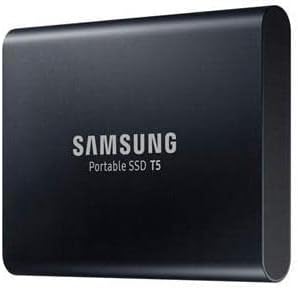
The Samsung T5 Portable SSD offers an exceptional balance of capacity and cost for Linux users needing large storage. At 2TB, it provides ample space for backups or media libraries. Its durable metal design ensures longevity and a premium feel that matches high-end Linux laptops.
We may earn a commission when you buy through this link, at no additional cost to you.
Performance is solid with read speeds up to 540MB/s, which is sufficient for most data storage tasks. The inclusion of both USB-C and USB-A cables enhances compatibility across different devices. It is widely praised by users for reliability and consistent performance.
While slower than the newer T7 or T9 models, it remains competitive for users prioritizing capacity. The USB 3.1 interface is universally supported, avoiding any connectivity issues on older systems. It is a great choice for cold storage or bulk archives.
Choose this drive if you need large capacity and are less concerned with top-tier speeds. It remains highly rated by users for good reason and is reliable for daily Linux workflows. If you need a cost-effective 2TB solution, the T5 is a strong contender.
Get a full 2TB of storage without paying premium prices found in newer models.
Comes with both Type-C to C and Type-C to A cables for versatile connections.
We may earn a commission when you buy through this link, at no additional cost to you.
The Samsung T7 500GB is perfect for users who prioritize portability and high speed over massive capacity. Its compact design makes it easy to carry everywhere. Linux users benefit from fast read speeds and automatic mounting for efficient daily use.
We may earn a commission when you buy through this link, at no additional cost to you.
The included Dynamic Thermal Guard prevents overheating, ensuring consistent performance. It supports high-resolution video recording and fast file transfers for students or professionals. The vibrant color options allow for easy identification among multiple devices.
With half the capacity of 1TB models, it suits users with lighter storage needs. However, it remains highly reliable and compatible with all modern Linux systems. The price point offers excellent value for those who do not need 1TB.
Ideal for students or casual users, this drive offers top-tier speed in a tiny package. It is a reliable choice for transferring data and managing files on Linux. If you want a small, fast, and reliable drive, the T7 500GB is a great option.
Fits easily in pockets and laptop sleeves without adding bulk to your gear.
Dynamic Thermal Guard automatically manages heat to maintain performance.
We may earn a commission when you buy through this link, at no additional cost to you.
The Samsung T5 500GB offers an excellent entry point for Linux users seeking fast storage. Its compact metal design provides durability and a sleek look. With 500GB capacity, it suits students or users needing a reliable backup drive without breaking the bank.
We may earn a commission when you buy through this link, at no additional cost to you.
Performance is consistent with USB 3.1 standards, delivering good speed for general data transfers. The inclusion of dual cables ensures you can connect to both older and newer systems. It is known for reliability and seamless integration with Linux file managers.
While not as fast as Gen 2 models, it remains efficient for most daily tasks. The lower price makes it accessible for users on a budget. Its build quality ensures it will last through years of regular use.
Perfect for entry-level users or as a secondary drive, this model offers great value. It handles backups and file transfers efficiently on Linux systems. If you want a reliable and affordable drive, the T5 500GB is a smart choice.
Great price point for those needing a reliable 500GB drive without high costs.
Comes with both USB-C and USB-A cables for broad device support.
We may earn a commission when you buy through this link, at no additional cost to you.
Choosing the right external SSD requires evaluating compatibility, speed, and durability to ensure it fits your specific Linux environment and usage needs.
Ensure the drive supports USB 3.2 Gen 2 or newer for maximum speed. Linux systems typically support USB mass storage natively, so verify if proprietary software is required for access. NVMe protocol drives offer the best performance but check host port support to avoid bottlenecks.
Look for drives using standard USB protocols to guarantee seamless mounting without extra tools.
Many drives ship formatted in exFAT or NTFS, which work well on Linux but may require mounting options. If you prefer Linux-native file systems like ext4 or Btrfs, be prepared to reformat the drive before use. This step wipes data, so back up first if you plan to reformat.
Verify that the drive works with your preferred file system to avoid compatibility issues.
Speed ratings vary widely, with NVMe drives reaching 1050MB/s or more. Higher speeds reduce transfer times for large files like video or code repositories. Consider your workload; basic storage needs may not require top-tier speeds.
Choose speeds that match your usage to balance cost and performance effectively.
Ruggedized drives with IP ratings offer protection against dust and water, ideal for outdoor use. Metal casing helps dissipate heat and adds physical durability. For travel, shock resistance is crucial to prevent data loss from accidental drops.
Invest in a durable build if you carry the drive frequently or work in tough environments.
Select capacity based on the size of your files and how often you back up. 500GB is fine for documents and small projects, while 2TB suits video editing or large archives. Consider future needs to avoid replacing the drive soon.
Balance capacity with budget to ensure you have enough space without overspending.
Some drives include hardware encryption and password protection to safeguard sensitive data. Linux users should check if these features integrate with standard tools or require proprietary software. Hardware encryption provides better performance and security than software-based solutions.
Prioritize encryption if you store confidential files or work with sensitive data.
High-speed drives generate heat, so thermal protection features like thermal guards prevent throttling. Metal cases naturally dissipate heat better than plastic. If you perform long transfers, thermal management ensures consistent performance over time.
Look for drives with effective cooling to maintain speed during prolonged use.
Reputable brands offer warranties ranging from three to five years, covering defects and failures. Check if support is available locally and if the company honors claims globally. A solid warranty protects your investment and ensures access to replacements.
Choose brands with strong warranty terms and responsive support for peace of mind.
When connecting your drive, use high-quality cables to ensure stable power and data transfer. Most Linux systems will automatically mount the drive, but you may need to install tools like ntfs-3g for NTFS volumes. Always eject the drive safely via the file manager or command line before disconnecting to prevent data corruption.
Keep firmware updated to ensure compatibility and performance. Use manufacturer tools when available or check for updates through your distribution's repositories. Monitor drive health using S.M.A.R.T diagnostics to detect potential issues early. Regular backups to another drive or cloud service protect against drive failure.
Avoid exposing the drive to extreme temperatures or physical shocks to prolong its life. Store it in a protective case when not in use. Periodically check file system integrity using fsck or equivalent tools. Following these care practices ensures your drive remains reliable for years of daily use.
Most modern external SSDs use standard USB mass storage protocols that Linux recognizes natively without requiring additional drivers. You may need to format the drive to a Linux-compatible file system like ext4. For specific features like hardware encryption, check if the manufacturer provides open-source tools or if standard Linux utilities suffice.
For dedicated Linux systems, ext4 is the most common choice due to its reliability and performance. If you need cross-platform compatibility with Windows or macOS, exFAT is a better option. NTFS works with Linux but may require the ntfs-3g driver for full write support and can be less efficient.
Yes, NVMe SSDs typically offer significantly higher speeds and lower latency compared to SATA-based USB 3.1 drives. However, real-world performance depends on the host port. Ensure your Linux system supports USB 3.2 Gen 2 to fully utilize NVMe speeds.
You can install Linux on an external SSD and boot from it if your system supports USB booting. This is useful for portable installations or testing different distributions. Performance may be slightly slower than internal drives due to USB protocol limitations.
Use S.M.A.R.T monitoring tools like smartmontools to check drive health. Run the command 'sudo smartctl -a /dev/sdX' to see detailed information about temperature, error rates, and wear. Many file managers also show estimated drive life or error counts if supported.
High-speed drives can generate heat during sustained transfers. Most include thermal guards to prevent throttling. Ensure your drive has good ventilation and avoid using it in hot environments. Metal casings help dissipate heat better than plastic ones.
Use the cable included with the drive or a high-quality USB-C to USB-C cable for best performance. Avoid cheap third-party cables that may not support the full speed of your SSD. Ensure your port matches the drive's requirements to prevent bottlenecks.
Some SSDs include hardware encryption that works across platforms. Linux may recognize this via standard encryption tools, but proprietary software may be needed for setup. Verify if the drive supports open-source utilities to ensure full functionality on your system.
Our top recommendations highlight the Samsung T7 as the best overall for its balanced performance and reliability. The SSK SSD offers excellent value for budget-conscious users while the Samsung T9 leads in premium speed. Each model brings distinct strengths depending on your capacity and budget needs.
Prioritize speed and durability based on your workflow. Professionals handling large files should lean toward faster NVMe models, while casual users may prefer reliable standard options. Consider future needs like capacity and connectivity to ensure long-term satisfaction.
Remember that prices fluctuate regularly so check current listings before purchasing. Always verify compatibility with your specific Linux distribution and hardware. With the right external SSD, you can enhance your system's storage and productivity significantly.