
Nelko P21 Label Maker Machine
4.4Editor score
Ultra portable design
Bluetooth app connectivity
No ink required
This guide compares the top easy to use label maker options for home and office organization, highlighting features, portability, and printing quality to help
Finding the right labeling solution can transform how you organize your space. An easy to use label maker ensures quick setup and clear results without technical hassle.
We evaluated ten top-rated devices based on usability, print quality, and versatility. Our comparison covers handheld models, Bluetooth options, and bundle deals for various needs.
Each pick highlights key strengths and real-world applications. Keep in mind that prices and availability may fluctuate over time, so check current listings before buying.
4.4Editor score

4.5Editor score

4.6Editor score
The following table provides a side-by-side look at the key specifications and capabilities of each model to help you compare options quickly and make an informed decision.




The SUPVAN E11 stands out as a top choice for users who want flexibility in how they create labels. It offers both a physical keyboard and a Bluetooth app, making it versatile for different workflows.
We may earn a commission when you buy through this link, at no additional cost to you.
Its rechargeable battery delivers up to a month of use, which is impressive for a portable device. The minimal margin printing saves tape material, and the app provides extensive font and icon options.
While the app is powerful, it may require a bit of learning compared to standalone devices. The need to update the app on iOS users can be a minor hurdle for some.
This model is ideal for home organization, offices, and schools where frequent labeling happens. The dual input methods and cost-efficient tape usage make it a strong recommendation.
You can print directly via keyboard for speed or use the app for design creativity, giving you control over every label.
Minimal margin printing reduces waste, meaning your tape rolls last longer and your budget goes further over time.
We may earn a commission when you buy through this link, at no additional cost to you.
The Nelko P21 is an excellent entry-level device for anyone needing a simple, affordable labeling solution. Its small size allows it to slip into a pocket, making it highly portable for on-the-go tasks.
We may earn a commission when you buy through this link, at no additional cost to you.
It uses direct thermal technology which eliminates the need for ink, keeping long-term costs low. The accompanying app offers thousands of icons and templates, providing creative freedom without complex hardware.
Its main limitations are the fixed label lengths and incompatibility with computers. This restricts use cases to mobile printing only and might not suit all labeling needs.
For students, teachers, or light home organization, this device offers incredible value. Its portability and ease of use make it a standout budget option.
Its compact design means you can carry it anywhere, ensuring you can label items whenever and wherever you need to.
The app provides thousands of assets for customization, allowing you to design professional-looking labels with minimal effort.
We may earn a commission when you buy through this link, at no additional cost to you.
The Brother PTD210 is a robust device designed for those who need reliable, professional-grade labeling. Its ability to print on laminated tapes ensures labels withstand harsh environments like kitchens and freezers.
We may earn a commission when you buy through this link, at no additional cost to you.
Features like one-touch keys and a preview display streamline the workflow, reducing errors and saving time. The bundle includes four tape rolls, offering immediate value upon purchase.
While it costs more than entry-level devices, the durability and tape options justify the investment. The requirement to buy batteries separately is a minor drawback for new users.
This model is perfect for anyone looking for a dedicated labeling machine that delivers consistent, high-quality results. Its ease of use makes it accessible for all skill levels.
Laminated tapes resist water and fading, ensuring your labels stay legible and intact even in challenging conditions.
One-touch access to fonts and symbols simplifies the design process, allowing you to focus on organization rather than complexity.
We may earn a commission when you buy through this link, at no additional cost to you.
The Brother PTD220 is designed for everyday organization in home and office settings. It focuses on simplicity, allowing users to create clean, readable labels quickly without complex features.
We may earn a commission when you buy through this link, at no additional cost to you.
Its built-in memory saves up to thirty labels for quick reprinting, which is efficient for recurring tasks. The range of fonts and symbols supports basic personalization needs effectively.
Lack of Bluetooth limits modern connectivity options, and the tape width is restricted to half-inch rolls. This makes it less versatile than Bluetooth-enabled models for diverse uses.
This device suits users who prefer a straightforward, standalone printer for basic labeling. Its reliability and ease of use make it a solid choice for general organization.
Saving frequent labels to memory allows for quick access and reprinting, reducing the time spent on repetitive labeling tasks.
Focused on essential features, this model removes unnecessary complexity, making it perfect for those who just want a reliable label printer.
We may earn a commission when you buy through this link, at no additional cost to you.
The Brother PT-N10 offers a unique approach to labeling with its focus on colorful Btag tapes. It is perfect for personalization, allowing users to express themselves with vibrant labels for dorm rooms or personal items.
We may earn a commission when you buy through this link, at no additional cost to you.
Features like a built-in cutter ensure clean edges every time, and the preview screen helps avoid mistakes. The compact design makes it easy to carry around for quick tasks.
Its reliance on specific Btag tapes limits versatility compared to other models, and the font options are fewer. This might be a constraint for users needing a wide variety of styles.
For students or travelers who want fun, expressive labels, this model is ideal. Its portability and user-friendly features make it a great addition to a personal toolkit.
Bright color tapes and frames allow you to create unique labels that stand out, making organization more engaging and personal.
The built-in cutter and preview screen streamline the process, ensuring your labels look professional and fit perfectly.
We may earn a commission when you buy through this link, at no additional cost to you.
The DYMO LabelManager 160 is built for users who value efficiency and clarity in their labeling process. Its QWERTY keyboard makes typing intuitive, while the large display ensures you can see your work clearly.
We may earn a commission when you buy through this link, at no additional cost to you.
It comes with three tape cassettes, providing immediate value and allowing you to start labeling right away. The smart keys simplify formatting, making it easy to create clean, professional-looking labels.
The requirement for specific D1 cassettes may increase long-term costs, and its size is larger than pocket-sized options. However, the trade-off is a more robust and reliable printing experience.
This model is excellent for home offices or small businesses needing consistent labeling. Its ease of use and bundle inclusion make it a practical choice for daily organization.
Smart keys and QWERTY layout speed up text input, allowing you to focus on organization rather than struggling with complex menus.
Including multiple tape cassettes means you can tackle various labeling tasks immediately without needing extra purchases right after setup.
We may earn a commission when you buy through this link, at no additional cost to you.
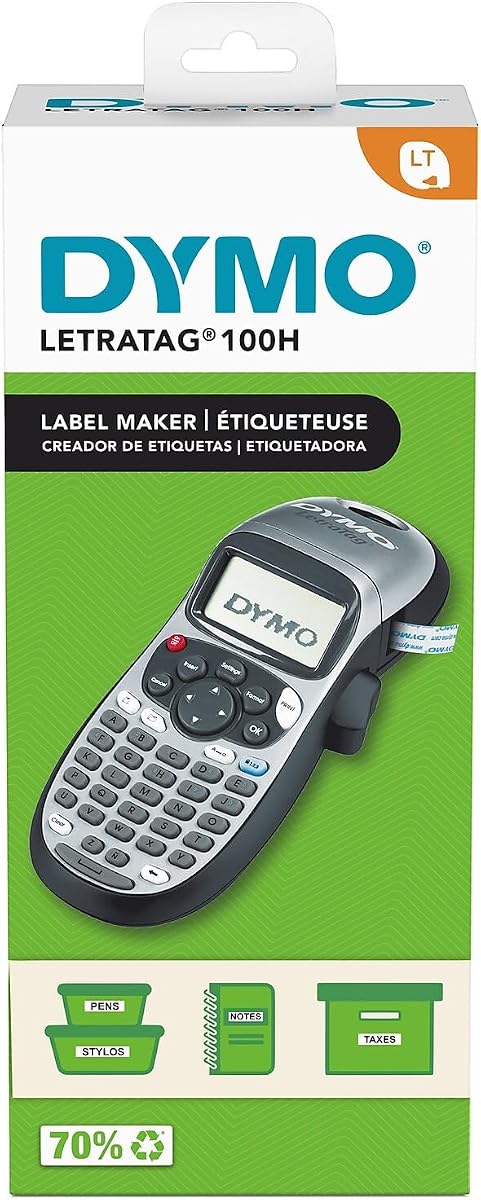
The DYMO LetraTag 100H is a straightforward device designed for users who want simplicity without sacrificing quality. Its thermal printing method ensures fast results, and the compact size makes it easy to store and carry.
We may earn a commission when you buy through this link, at no additional cost to you.
The graphical display allows you to preview text effects before printing, reducing waste and ensuring satisfaction. Its auto-off feature helps save power, extending battery life for longer use periods.
While it lacks advanced customization options, it covers the basics well. The limited font styles may not appeal to those seeking extensive design flexibility, but it works well for standard needs.
This model is ideal for quick home and office tasks where ease of use is paramount. Its reliability and lightweight design make it a practical tool for everyday organization.
Intuitive controls and a simple interface mean you can create labels quickly without needing to navigate complex settings or menus.
Automatic power-off features help conserve battery life, ensuring your device is ready when you need it for quick labeling tasks.
We may earn a commission when you buy through this link, at no additional cost to you.
The Brother PT-M95 focuses on delivering reliable monochrome labels at an accessible price point. It includes four tape rolls, making it a cost-effective choice for standard labeling tasks in homes or offices.
We may earn a commission when you buy through this link, at no additional cost to you.
Features like Deco Mode add a touch of visual variety, while the QWERTY keyboard ensures typing is quick and familiar. The lightweight design makes it easy to move around as needed.
Lack of color output limits creativity, and design options are more basic compared to premium models. However, for simple identification, it performs well and offers good value.
This device is best suited for users who prioritize function over form. Its simplicity and bundle value make it a practical option for efficient organization.
Focusing on core features like typing and printing ensures the device remains reliable and easy to use for routine tasks.
Including four tapes means you can start organizing immediately without needing to buy additional supplies right away.
We may earn a commission when you buy through this link, at no additional cost to you.
The SUPVAN E10 is a budget-friendly device that combines Bluetooth convenience with essential labeling features. It comes with three tape rolls, making it an attractive option for those looking for value in a bundle.
We may earn a commission when you buy through this link, at no additional cost to you.
Laminated tapes ensure durability, and the app allows for customization without fees. The rechargeable battery offers extended use, reducing the need for frequent replacements or recharges.
Its app features are somewhat basic compared to competitors, and tape selection is limited. However, it covers the essentials well for home and school needs.
This model is suitable for users who want a simple, effective label maker without high costs. Its portability and bundle inclusion make it a smart choice for basic organization.
Offering a bundle with multiple tapes at a low price point ensures you can start organizing immediately without extra expenses.
Focused on core labeling tasks, this device avoids unnecessary complexity, providing a straightforward experience for everyday users.
We may earn a commission when you buy through this link, at no additional cost to you.
The DYMO LabelManager 160 remains a trusted choice for those seeking reliable labeling solutions. Its QWERTY keyboard and large display provide a familiar, efficient typing experience that reduces errors.
We may earn a commission when you buy through this link, at no additional cost to you.
Smart keys allow for quick formatting, and extended battery life ensures you can label for longer periods without interruptions. Its compatibility with various authentic DYMO tapes adds flexibility to your projects.
The lack of USB connectivity limits data transfer, and specific cassettes may be more expensive than alternatives. However, its reliability and ease of use continue to make it a popular option.
This device is best for users who value straightforward functionality and durability. Its design supports efficient workflows, making it suitable for both home and office environments.
Smart keys and clear displays help you work faster, allowing you to complete labeling projects with minimal effort.
Extended battery life ensures the device is ready when you need it, preventing interruptions during longer labeling sessions.
We may earn a commission when you buy through this link, at no additional cost to you.
Choosing the right label maker depends on your specific needs, environment, and desired features. This guide outlines key factors to consider before making a purchase.
Consider whether you need Bluetooth for mobile app control or prefer a standalone keyboard. Bluetooth models offer more design flexibility, while standalone units are often simpler to use.
Choose connectivity based on your workflow. If you want detailed designs, Bluetooth is ideal. If you need quick labeling, standalone keyboards suffice.
Check which tape types the device supports. Some use proprietary cassettes, while others accept various widths or laminated tapes. This impacts long-term costs and versatility.
Ensure the tape type matches your needs. Laminated tapes are best for durability, while standard tapes work for indoor use.
Look for devices with rechargeable batteries or long-lasting power options. Rechargeable models reduce waste, while AAA battery options offer convenience when away from power sources.
Battery life affects portability. Choose a model that lasts long enough for your typical labeling sessions without frequent recharging.
Evaluate the size and weight of the device. Compact models are easier to carry around, while larger units may offer better ergonomics and screen clarity.
If you plan to label on the go, prioritize lightweight and pocket-sized options. For desk use, size matters less.
Assess the fonts, icons, and templates available. Advanced models offer extensive libraries for creative labels, while basic ones focus on text and simple formatting.
Choose customization based on your design needs. If you want professional or decorative labels, opt for models with robust editing tools.
Some devices come with included tape rolls, which can save money upfront. Bundles are especially useful if you need tapes immediately.
Check if the bundle matches your needs. Included tapes are great for trying out the device without extra costs.
Look for features like laminated tape support or waterproof labels. This ensures labels stay intact in challenging environments like kitchens or outdoor areas.
Durability matters for long-term use. Choose a device that supports tape types fitting your environment.
Consider the learning curve. Some models have intuitive interfaces, while others require app setup or complex menus. Simplicity is key for quick tasks.
If you prefer simple operations, choose devices with physical keyboards. For design-focused users, app connectivity is beneficial.
First, familiarize yourself with the device's power options. Whether it requires AAA batteries or is rechargeable, ensure it has enough charge before starting a project.
Next, load the tape correctly according to the manual. Proper alignment prevents jams and ensures clear, professional print results every time.
Finally, maintain your device by storing it in a cool, dry place. Clean the print head periodically with a soft cloth to maintain optimal print quality over time.
The Nelko P21 and SUPVAN E10 are excellent for beginners due to their intuitive apps and minimal setup. Their simple interfaces allow you to create labels quickly without technical expertise.
Most modern label makers use thermal technology, which does not require ink or toner. This keeps long-term costs low and reduces maintenance needs significantly.
Some models support computer connectivity, but many are mobile-focused. Check the product specs to ensure compatibility with your preferred devices before purchasing.
Rechargeable models can last up to a month on a single charge, while AAA battery devices vary. Usage frequency and battery type influence actual lifespan significantly.
Yes, laminated tapes are water-resistant, fade-resistant, and oil-proof. They are ideal for kitchen, bathroom, or outdoor labels that face harsh conditions.
The Nelko P21 offers exceptional value with low pricing and robust features. It balances affordability with performance, making it ideal for cost-conscious users.
Choosing the right label maker depends on your specific needs. The SUPVAN E11 and Nelko P21 offer excellent versatility and value for most users.
Prioritize features that matter most to you, such as portability, connectivity, or durability. Matching these to your workflow ensures you get the most out of your investment.
Prices and availability can change over time. Always verify current listings and bundle contents before purchasing to ensure you receive the best deal.