
Spacrea Dual Monitor Stand Riser with Drawer and 2 Pen Holders
4.6Editor score
One-minute quick setup
Adjustable length and angle
Sturdy steel plate construction
Finding the right dual monitor stand riser for desk setups can transform your workspace into a more productive and comfortable environment. These devices lift your screens to eye level, reducing strain on your neck and back while freeing up valuable desk space for other essentials.
We have carefully evaluated ten leading options available today, focusing on key factors like stability, adjustability, storage capacity, and overall build quality. Our analysis ensures that each recommendation meets high standards for durability and user experience in both home and office settings.
Each pick in this list highlights specific strengths, whether you need extra storage, wireless charging, or simple ergonomic lifting. Please note that prices and availability may change over time, so check the latest details before making your final purchase decision today.
4.6Editor score

4.5Editor score
4.5Editor score
As an Amazon Associate we earn from qualifying purchases.
The following comparison table provides a side-by-side overview of the top ten dual monitor stand riser for desk models, highlighting their key specifications and unique features to help you make an informed decision quickly.


The gianotter Dual Monitor Stand Riser offers a seamless solution for those seeking immediate desk organization without the hassle of assembly. With a solid 4.5 rating, this product stands out for its thoughtful integration of storage and ergonomic lift.
We may earn a commission when you buy through this link, at no additional cost to you.
Its standout feature is the combination of a hidden drawer and two magnetic pen holders, allowing you to keep your workspace tidy and tools within reach. The high-strength metal construction ensures that it can support dual monitors securely while maintaining a sleek aesthetic.
While the fixed height may not be adjustable for every user preference, the ergonomic lift still helps reduce neck strain effectively. The limited drawer size might be a consideration if you need to store larger items, but it suffices for small office supplies.
This stand is ideal for users who prioritize quick setup and efficient desk organization. If you want a sturdy, no-fuss option that enhances your workspace immediately, the gianotter is a highly recommended choice for your office setup.
The no-assembly design means you can unbox and start using the stand immediately, saving valuable time and effort.
High-strength metal materials provide exceptional support performance, ensuring the stand remains stable under heavy dual monitor loads.
We may earn a commission when you buy through this link, at no additional cost to you.
The Spacrea Dual Monitor Stand Riser delivers exceptional value with its adjustable length and ergonomic design at an affordable price. Rated 4.6, it is a top contender for those looking to optimize their workspace without breaking the budget.
We may earn a commission when you buy through this link, at no additional cost to you.
Its adjustable length from 27.6 to 40.6 inches makes it highly versatile for different desk layouts and monitor configurations. The one-piece stamping steel construction ensures stability, while the integrated drawer and pen holders keep your tools organized and within reach.
Although the weight capacity is not explicitly listed, the sturdy structure suggests it can handle standard dual monitor setups effectively. The drawer mechanism is functional but could be smoother for frequent use, though it still serves its purpose well for small items.
This stand is perfect for students, teachers, and creative workers who need frequent access to stationery. If you need a flexible, cost-effective solution that supports dual monitors and keeps your desk clutter-free, the Spacrea is an excellent choice.
The adjustable length feature allows you to customize the stand to fit your specific desk and monitor setup perfectly.
Made from one-piece stamped steel plates, the stand offers a stable structure with strong load-bearing capacity for long-term use.
We may earn a commission when you buy through this link, at no additional cost to you.
The TAVR Monitor Stand Riser offers a customizable solution for dual monitor setups with its adjustable length and swivel angle features. With a 4.6 rating, it is designed to adapt to various desk sizes and monitor configurations easily.
We may earn a commission when you buy through this link, at no additional cost to you.
Its three storage spaces underneath provide ample room for keyboards, laptops, or other office accessories, helping to keep your desk tidy. The adjustable length ranging from 30.7 to 43.3 inches ensures compatibility with a wide range of desk sizes and setups.
While the assembly is described as quick, some users may find it takes slightly longer to align all the numbered parts correctly. Additionally, the use of plastic components might not feel as premium as metal alternatives, but they are functional and durable.
This stand is suitable for users who need flexibility in their workspace arrangement. If you require a stand that can adapt to different desk layouts and provide extra storage, the TAVR is a practical and affordable option to consider.
The ability to change the angles of the end pieces allows you to tailor the stand to your specific viewing preferences.
Three storage spaces underneath the rack keep your essential items organized and within reach without cluttering the desktop.
We may earn a commission when you buy through this link, at no additional cost to you.
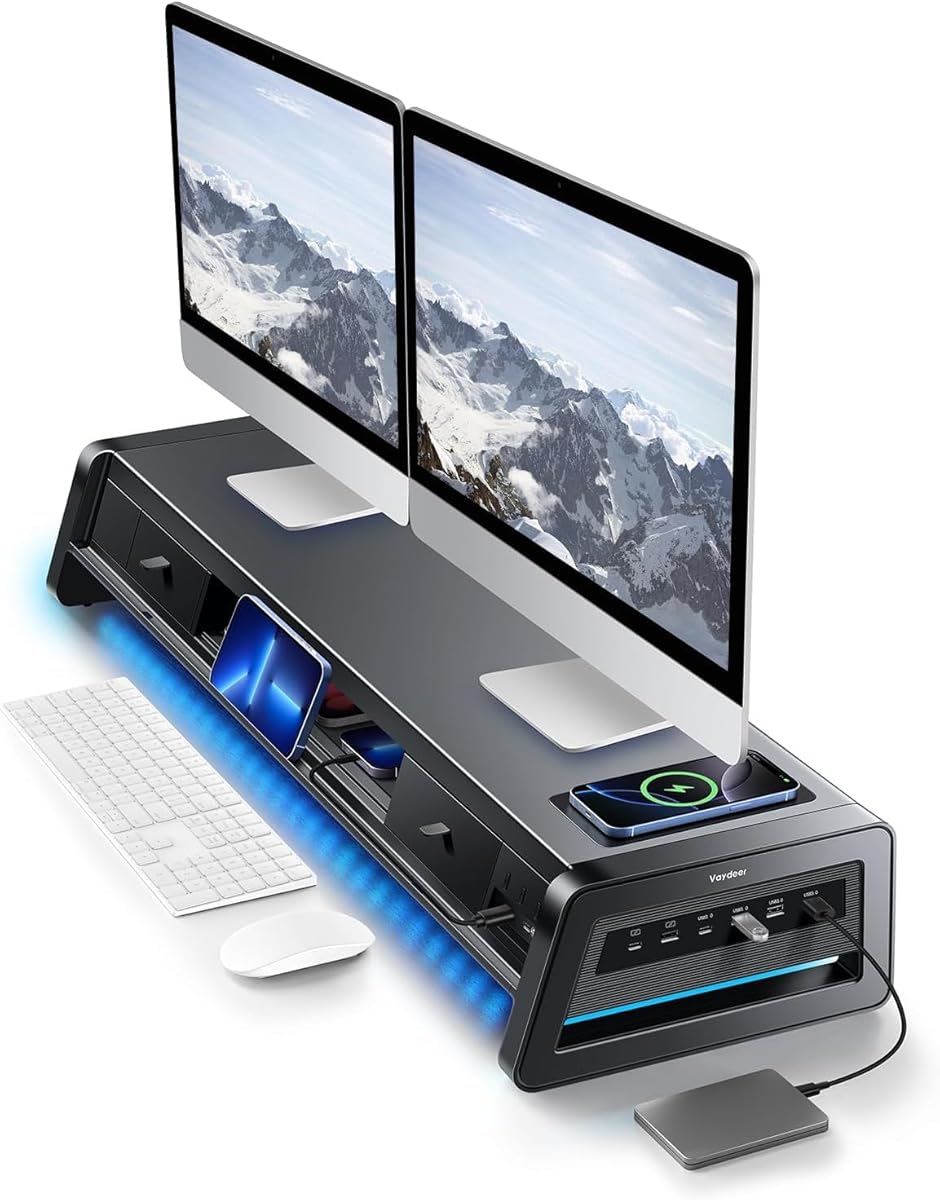
The Vaydeer All-in-One Dual Monitor Stand Riser stands out as a premium option with its extensive connectivity and storage features. Rated 4.5, it is designed to be a comprehensive workspace solution that goes beyond simple monitor support.
We may earn a commission when you buy through this link, at no additional cost to you.
Its eight USB ports and wireless charging pad ensure all your devices stay powered and connected without needing separate hubs. The two-tier storage with drawers keeps your essentials organized, while the LED light strip adds a stylish touch to your workspace.
The higher price point is justified by the additional features and robust construction, but it may not be necessary for those with basic needs. The requirement for a power source to utilize the USB and lighting features is a consideration for desk setup.
This stand is perfect for tech enthusiasts and professionals who value connectivity and modern aesthetics. If you want a single device that handles charging, storage, and lighting alongside your monitors, the Vaydeer is a standout premium choice.
With eight USB ports and wireless charging, you can power and connect multiple devices directly from your monitor stand.
The built-in LED light strip provides soft illumination that enhances visual comfort and adds a stylish modern touch.
We may earn a commission when you buy through this link, at no additional cost to you.
The Simple Trending Dual Monitor Stand Riser is designed with gamers and heavy users in mind, offering robust support and cooling features. With a 4.7 rating, it provides a stable platform for dual monitors and other gaming peripherals.
We may earn a commission when you buy through this link, at no additional cost to you.
The mesh cooling design helps prevent overheating by increasing airflow around your devices, which is crucial for extended gaming sessions. The inclusion of a large 32-inch mouse pad adds convenience, ensuring you have ample space for smooth mouse movement.
While the steel legs are sturdy, they might scratch your desk surface if not placed carefully despite the suction cups. The mouse pad is functional but its quality may vary compared to standalone options, though it is sufficient for general use.
This stand is ideal for gamers who need stability and extra space for keyboards and consoles. If you want a durable stand that supports heavy equipment and includes a mouse pad, the Simple Trending is a top choice for gaming setups.
The metal mesh platform with ventilation holes increases airflow to keep your devices cool during extended use.
With a load capacity of up to 100 lbs, this stand can handle dual monitors, printers, or full gaming setups without wobbling.
We may earn a commission when you buy through this link, at no additional cost to you.
The Simple Trending 38 Inch Monitor Stand offers a robust wood design that provides reliable support for large devices. With a 4.7 rating, it is crafted from high-quality wood boards that ensure durability and a classic look.
We may earn a commission when you buy through this link, at no additional cost to you.
The wide 38-inch surface is spacious enough for gaming keyboards and consoles side by side, making it ideal for multi-device setups. The 0.5-inch thick wood construction provides strong, reliable support that does not bend or shake over time.
Wood surfaces may require occasional maintenance to protect against scratches or moisture, which is a consideration for long-term use. Additionally, the stand focuses on stability rather than extra storage, which might be a limitation for those needing desk organization.
This stand is suitable for users who prefer a natural wood aesthetic and need a wide platform. If you want a stable, wide stand that supports large devices and is easy to assemble, the Simple Trending is a solid option.
The top surface measures 38 by 10.25 inches, offering enough space for keyboards and consoles side by side.
Non-slip suction cups at the bottom keep the stand firmly in place on any desk to prevent wobbling or sliding.
We may earn a commission when you buy through this link, at no additional cost to you.
The BONTEC Dual Monitor Stand Riser is designed with flexibility in mind, featuring swivel shelves that suit corner setups. With a 4.6 rating, it provides a practical solution for organizing a workspace with unique spatial requirements.
We may earn a commission when you buy through this link, at no additional cost to you.
The swivel side shelves support straight, angled, or corner layouts, making it versatile for various desk configurations. Built-in features like a phone stand slot and cable management opening help keep your devices and wires neatly arranged and accessible.
The wood finish may be prone to chipping if not handled carefully, which could affect the aesthetic over time. Assembly might be slightly tricky for some users, but the included screws and instructions should guide you through the process.
This stand is ideal for users who need a flexible design for non-standard desk layouts. If you want a stand that can adapt to corners and includes useful organization features, the BONTEC is a practical choice.
The swivel side shelves support straight, angled, or corner layouts, making it a flexible option for unique desks.
The cable management opening helps keep your wires neatly arranged, improving both organization and safety on the desk.
We may earn a commission when you buy through this link, at no additional cost to you.
The YAOHUOO Dual Monitor Stand offers a large 39-inch surface that accommodates wide setups and multiple devices comfortably. With a 4.6 rating, it provides a sturdy platform designed to support dual monitors and other heavy electronics.
We may earn a commission when you buy through this link, at no additional cost to you.
The steel leg structure ensures exceptional stability, and the 100-pound capacity means it can handle even heavy equipment without shaking. Non-slip pads on the legs protect your desk surface from scratches, keeping your workspace safe and secure.
Assembly may take slightly longer than expected, so allow ample time to put it together correctly. The wood finish should be treated with care to maintain its appearance, especially in high-traffic or humid environments.
This stand is perfect for users who need extra width for their monitors and peripherals. If you want a large, stable platform that supports heavy devices, the YAOHUOO is a reliable and practical option.
The 39-inch length provides ample space for multiple monitors, laptops, or other devices to work together efficiently.
Heavy-duty steel footing ensures the stand is stable and does not collapse or shake during normal use.
We may earn a commission when you buy through this link, at no additional cost to you.
The Fenge Dual Monitor Stand Riser combines a large surface area with organized storage solutions to keep your desk tidy. With a 4.5 rating, it is built with a mix of MDF and metal to provide durability and a modern look.
We may earn a commission when you buy through this link, at no additional cost to you.
Its two semi-transparent frosted acrylic drawers offer a neat way to store small items, while the open compartment helps organize wires quickly. The 42.5-inch length ensures ample space for dual monitors, and the enhanced stability beam adds extra support.
The drawers may not be deep enough for larger items, limiting what you can store inside. Additionally, the weight capacity may vary depending on how the stand is used, so check the specific load distribution for your setup.
This stand is suitable for users who value organized storage and a large workspace. If you want a stand with drawers and ample length to keep everything in place, the Fenge is a functional and stylish option.
Two semi-transparent frosted acrylic drawers keep your workspace organized and allow you to see stored items easily.
High-quality thickened MDF panels and heavy-duty steel footing ensure the stand is sturdy and resistant to scratches.
We may earn a commission when you buy through this link, at no additional cost to you.
The Simple Trending Monitor Stand with Drawer offers a compact and efficient solution for dual monitor setups. With a 4.5 rating, it is designed to maximize desk space while providing essential storage for small office items.
We may earn a commission when you buy through this link, at no additional cost to you.
The hidden drawer allows you to store pens, sticky notes, and chargers out of sight, while two side holders keep writing tools within reach. The sturdy metal frame ensures stability, and the tool-free assembly means you can set it up quickly.
The pen holders are somewhat small, which may limit what you can store inside. The fixed height is sufficient for many users, but those needing adjustable viewing might find it limiting depending on their setup.
This stand is ideal for users who want a clutter-free desk with easy access to essentials. If you need a stable, no-assembly stand with hidden storage, the Simple Trending is a practical and affordable choice.
The hidden drawer stores small supplies out of sight, ensuring your desk remains tidy and organized at all times.
Clear instructions and included tools mean you can assemble this stand in minutes without needing any extra equipment.
We may earn a commission when you buy through this link, at no additional cost to you.
Choosing the right dual monitor stand riser for desk requires evaluating several key factors to ensure it meets your ergonomic and organizational needs effectively.
The primary purpose of a monitor stand is to elevate your screens to eye level to reduce neck and eye strain. Look for stands that offer a height that allows you to view your monitor without looking down or craning your neck. Some models also offer adjustable length or angle features which can further customize your viewing experience for better posture.
Prioritize stands that lift monitors to a comfortable eye level to protect your posture during long work sessions.
Build quality determines the stability and longevity of the stand. Common materials include metal, wood, and composite blends. Metal stands are often sturdy and durable, while wood stands may offer a classic aesthetic. Ensure the stand has a strong load-bearing capacity to support your monitors without wobbling or bending.
Select materials that provide a sturdy and reliable base to handle your equipment securely without shaking.
Many stands now include drawers, pen holders, or open compartments to keep your desk organized. Consider what you need to store such as keyboards, mice, or office supplies. Additional features like cable management openings can help keep wires tidy and reduce clutter on your workspace.
Choose stands with storage options that match your desk clutter reduction and organization needs effectively.
Measure your available desk space before purchasing to ensure the stand fits comfortably. Check the width to ensure it can accommodate your monitors side by side without extending too far. The depth should allow for keyboard clearance underneath. Some stands are adjustable in length to fit various desk sizes.
Ensure the dimensions align with your desk size and monitor setup to avoid overcrowding your workspace.
Assembly time and complexity vary between products. Some stands require simple tool-free assembly while others may take minutes. Check if tools are included. If you want immediate setup, look for models that require no assembly or come with pre-drilled holes for fast installation.
Opt for simple assembly options to save time and effort when setting up your new desk stand.
Stability is crucial especially if you type heavily or have multiple monitors. Look for stands with anti-slip pads, suction cups, or wide bases that prevent sliding. A stable stand ensures your equipment remains secure and safe during daily use without any wobbling.
Verify that the stand has non-slip features to ensure it stays firmly in place on your desk surface.
Premium models may offer USB ports, wireless charging pads, or LED lights. These features add functionality beyond simple support but often increase the price. Consider whether you need these extras or if a standard stand meets your requirements. Ensure the stand supports the necessary connectivity for your devices.
Evaluate if extra tech features are worth the investment based on your specific needs and budget constraints.
Monitor stands range in price from budget-friendly to premium. Determine your budget and weigh the features against the cost. Higher-priced models often offer better durability and extra features, but budget options can still provide excellent ergonomic support and storage. Read reviews to ensure value for money.
Balance cost with features to find a stand that offers good long-term value for your workspace needs.
Proper assembly is key to stability. Follow the provided instructions carefully to ensure all parts are secure. If tools are needed, use them appropriately to avoid stripping screws. For stands with adjustable features, adjust them to fit your monitors snugly before use.
Position your monitors evenly on the stand to distribute weight. This prevents the stand from tipping or bowing. Place heavier items like speakers on the stand itself rather than on top of monitors. Keep your workspace clean to avoid dust buildup.
Clean the surface regularly with a soft cloth and mild cleaner. Avoid harsh chemicals that could damage the finish. Check anti-slip pads periodically to ensure they are functioning. For metal stands, wipe off fingerprints. Wooden stands should be kept away from excessive moisture.
The main benefit is ergonomic improvement. By raising your monitors to eye level, you reduce neck and back strain during long work hours. It also frees up desk space underneath for keyboards and accessories, helping to organize your workspace efficiently.
Some models require simple assembly while others are ready to use right out of the box. Most stands come with instructions and necessary tools. Assembly time varies from minutes to none depending on the design. Check product details to confirm what is included.
Most stands are designed to fit standard monitor sizes but you should check dimensions. Look for adjustable width options if your monitors are wide. Ensure the stand can hold the weight of your screens. Review product specs to confirm compatibility before purchasing.
Weight capacity varies by model and material. Many stands can support up to 100 lbs or more. Always check the product specifications for the exact capacity. Distribute weight evenly to maintain stability and prevent the stand from bending.
Yes, many stands include drawers, shelves, or compartments for office supplies. This helps keep your desk tidy and items within reach. Some models also offer cable management to reduce wire clutter. Storage options vary so choose based on your needs.
Yes, premium models offer features such as USB ports, wireless charging pads, and LED lighting. These can keep your devices connected and charged easily. Such features add value if you need integrated tech. Check product details to find the right model.
Metal stands are durable and sturdy while wood stands offer a classic look. Composite materials are also common for budget options. Consider your aesthetic preference and the weight you need to support. Each material has different care requirements.
The top picks in this guide cover a range of needs from basic ergonomic lift to advanced all-in-one features. The gianotter model offers instant setup and storage. The Spacrea is a great budget choice. Vaydeer leads in premium connectivity.
When selecting a stand, prioritize stability and ergonomic height to protect your health. Consider storage needs and material durability for long-term value. Whether you choose metal or wood, ensure it fits your desk dimensions and monitor weight.
Prices and availability may change, so check the latest deals before buying. Investing in a quality stand can transform your workspace comfort. Choose a model that aligns with your goals for productivity and organization today.