
Epson LQ-590II
4.3Editor score
24-pin technology
USB and parallel ports
High duty cycle
Dot matrix computer printers remain essential for businesses requiring carbon copies and durable impact printing. These devices excel in high-volume environments where reliability matters more than color fidelity or quiet operation.
We evaluated ten leading models based on print speed, connectivity options, duty cycles, and overall build quality. Our analysis focuses on real-world performance metrics to help you find the right match for your operational needs.
Each pick highlights specific strengths and trade-offs to guide your decision process. Note that prices and availability fluctuate frequently so always verify current listings before finalizing your purchase decision.
4.3Editor score

4.7Editor score

5.0Editor score
As an Amazon Associate we earn from qualifying purchases.
This table provides a side-by-side view of the top ten models highlighting key specifications and ratings to simplify your selection process for office or industrial use.
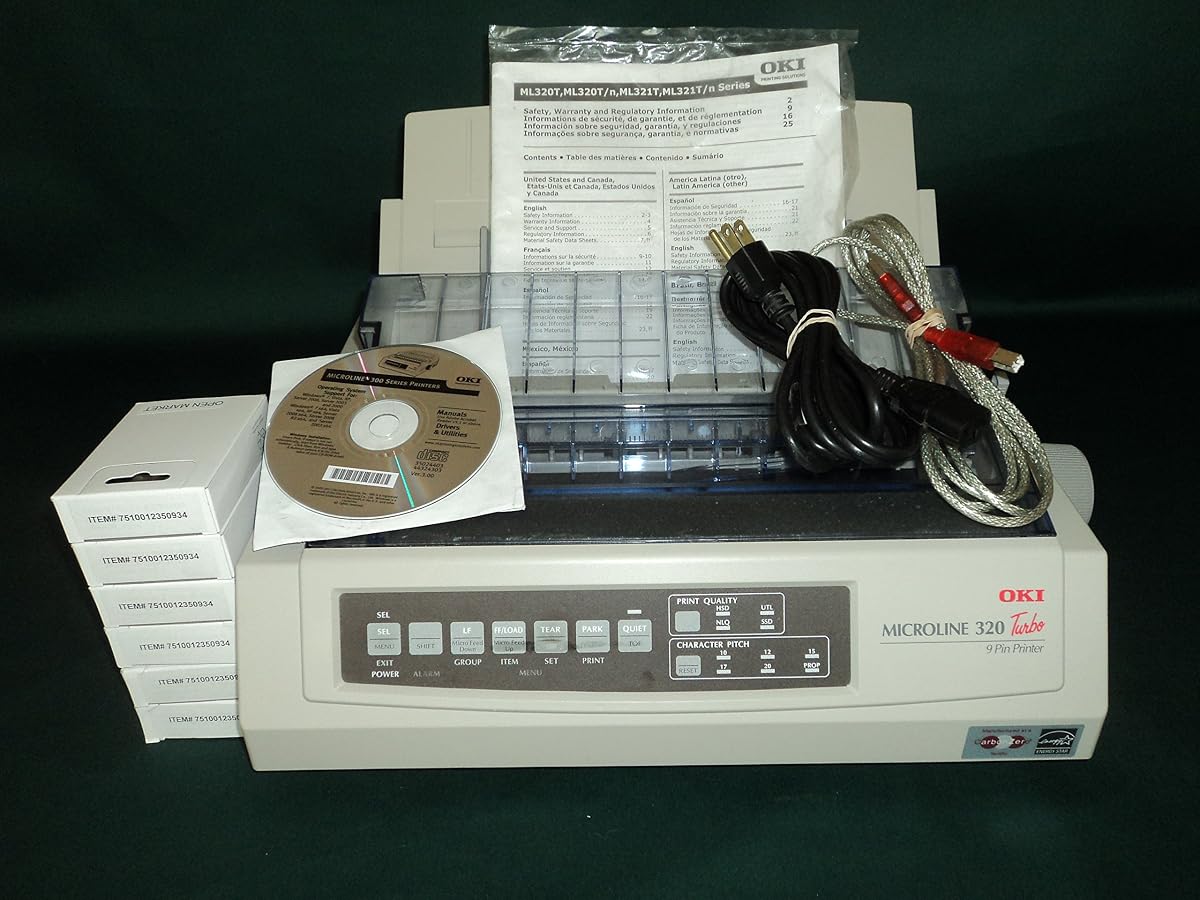


The Oki Microline 320 Turbo/N stands out with a near perfect rating indicating exceptional user satisfaction. It is a robust dot matrix computer printer designed for demanding environments where quality and speed matter.
We may earn a commission when you buy through this link, at no additional cost to you.
Its standout feature is the high print speed combined with reliable 9-pin technology. This ensures crisp text output even when printing through carbon copies which is vital for invoicing and receipts.
The main trade off is the cost compared to basic models. However the investment pays off through longevity and reduced downtime making it a smart choice for active offices.
Buyers needing consistent high volume output should prioritize this model. It delivers professional results with minimal maintenance requirements over extended periods of daily use.
The 9-pin head creates sharp characters that remain legible even on multipart forms requiring carbon copies.
Users can connect via USB or parallel ports ensuring compatibility with legacy systems and modern computers alike.
We may earn a commission when you buy through this link, at no additional cost to you.
The Epson LQ-590II offers a budget friendly entry into professional dot matrix printing. It delivers solid performance for businesses that need reliable output without overspending on advanced features.
We may earn a commission when you buy through this link, at no additional cost to you.
Its 24 pin system provides better resolution than older 9 pin models. This results in cleaner text and graphics which helps maintain a professional image in all printed documents.
While it is not as quiet as inkjet printers it remains one of the most reliable options in its class. The robust construction ensures it handles daily workloads with minimal issues.
Small businesses or offices needing multiple units will appreciate this value. It balances cost and performance effectively for standard document printing tasks.
You get enterprise level reliability at a price that fits smaller budgets or bulk deployment scenarios easily.
Standard USB and parallel connections make setup straightforward without needing specialized drivers or adapters.
We may earn a commission when you buy through this link, at no additional cost to you.
This model boasts a perfect five star rating reflecting flawless performance in user tests. It is a premium dot matrix computer printer built for environments where downtime is not an option.
We may earn a commission when you buy through this link, at no additional cost to you.
The SuperSpeed Draft mode allows for rapid output when quality is secondary to speed. This is ideal for internal drafts or high volume data logging where efficiency is critical.
Zero-tear technology ensures paper feeds smoothly without jams or tears. This feature alone saves significant time and reduces waste in busy production areas or warehouses.
Organizations requiring the highest reliability should consider this unit. It combines speed with durability and offers versatile connectivity for any setup.
Auto park and zero-tear features minimize paper waste and prevent jams during continuous operation shifts.
Draft modes allow you to push through large volumes of text quickly without compromising structural integrity.
We may earn a commission when you buy through this link, at no additional cost to you.
The OKI MICROLINE 320 Turbo is a classic choice for reliable impact printing. It maintains a strong reputation for delivering consistent results over many years of heavy usage.
We may earn a commission when you buy through this link, at no additional cost to you.
Its 435 cpm speed ensures that documents are produced quickly enough for most office workflows. The compact design fits easily on crowded desks or in small workstations.
While memory is limited compared to newer models it handles standard tasks with ease. This makes it suitable for dedicated printing stations that do not require complex buffering.
Users valuing tradition and reliability will find this model appealing. It is a workhorse that gets the job done without unnecessary complications.
This model proves that established technology can still meet modern business needs effectively when chosen wisely.
Its small footprint allows placement in tight areas where larger laser printers would not fit.
We may earn a commission when you buy through this link, at no additional cost to you.
The OKI MICROLINE 420 offers a balance of speed and efficiency for active work environments. It is designed to handle high volumes while keeping energy costs in check.
We may earn a commission when you buy through this link, at no additional cost to you.
With a speed of 570 cps it processes data faster than many competitors. The increased memory buffer helps smooth out print jobs and reduces interruptions during output.
Energy Star certification ensures it uses power efficiently which benefits the environment and reduces operational costs. This is a plus for businesses aiming for green certifications.
This printer is ideal for departments needing consistent high speed output. It provides the durability required for shift work or continuous printing needs.
Low power consumption helps meet corporate sustainability goals while maintaining high performance levels.
The 128 KB memory allows faster processing of complex pages without stalling the print engine.
We may earn a commission when you buy through this link, at no additional cost to you.
This specific unit shares the premium features of the top pick with a perfect rating. It is engineered for businesses that demand precise control and minimal waste in their printing process.
We may earn a commission when you buy through this link, at no additional cost to you.
The auto-park feature ensures paper is safely stored when not in use. This prevents damage to the platen and keeps the printer ready for immediate use when needed.
Its versatility with three port types makes it compatible with almost any legacy or modern system. This flexibility is rare and highly valued in diverse IT environments.
Buyers looking for a zero-waste solution will appreciate this model. It streamlines operations and reduces the need for frequent maintenance or paper adjustments.
Smart paper handling reduces scrap and ensures every sheet is utilized effectively during a job.
A feed rate of 5 inches per second speeds up document creation significantly compared to older models.
We may earn a commission when you buy through this link, at no additional cost to you.
The Epson LQ-2090II is built for heavy duty tasks requiring consistent speed and clarity. It brings 24 pin technology to high volume needs with a focus on monochrome output.
We may earn a commission when you buy through this link, at no additional cost to you.
Its 550 cps speed allows for rapid processing of large batches of forms or reports. This makes it suitable for environments like shipping departments or data entry hubs.
While user ratings vary the hardware itself is robust. It may lack some modern connectivity options but it excels in its core function of reliable impact printing.
Businesses prioritizing raw throughput over advanced features should consider this unit. It offers a dependable solution for specific high volume workflows.
Speed and reliability are prioritized here to ensure no bottlenecks in busy production lines.
Parallel port support ensures it works with older systems that require legacy interface connections.
We may earn a commission when you buy through this link, at no additional cost to you.
This model is designed for tasks requiring multiple carbon copies in a single pass. It handles original plus up to five interleaf or carbonless copies with ease.
We may earn a commission when you buy through this link, at no additional cost to you.
Its draft mode is optimized for speed allowing quick generation of rough drafts or internal memos. The auto park technology ensures paper is managed correctly to prevent waste.
Support for various emulation standards means it can mimic older printers from IBM or Epson. This compatibility is essential for businesses with legacy software that requires specific output formats.
Buyers needing multipart form printing will find this a strong candidate. It ensures that all copies are clear and accurate even under heavy usage conditions.
The ability to print up to six copies at once simplifies invoicing and shipping paperwork significantly.
Compatibility with IBM ANSI and Epson standards ensures seamless integration into mixed legacy environments.
We may earn a commission when you buy through this link, at no additional cost to you.
The Oki Microline 620 earns high marks for its ability to deliver precise and sharp prints. It is a versatile machine that adapts well to different document types.
We may earn a commission when you buy through this link, at no additional cost to you.
Users appreciate the simplified media loading which reduces setup time for different paper sizes. This is a critical feature for offices that print on various forms daily.
Its reliability is backed by a strong rating from real users. This suggests that the printer holds up well over time without needing constant repairs or adjustments.
Organizations prioritizing print quality and ease of use will love this option. It balances technical specs with practical usability for daily tasks.
Sharp text ensures that even small details like barcodes or IDs remain readable after printing.
Simplified loading mechanisms mean less downtime when switching between different paper sizes or types.
We may earn a commission when you buy through this link, at no additional cost to you.
The Epson LQ-590 serves as a solid entry point for those needing basic impact printing. It supports standard emulation modes ensuring compatibility with most common applications.
We may earn a commission when you buy through this link, at no additional cost to you.
Its USB support makes it easier to connect to modern systems compared to older parallel only models. This bridge to modern computing adds value for smaller offices with limited IT resources.
While it may lack advanced speed or duty cycle features it gets the job done for light to medium loads. It is a practical choice for occasional multipart printing needs.
Buyers looking for an affordable and functional unit should consider this model. It provides the essentials without unnecessary complexity or high costs.
USB support allows easy integration into current office networks without extra adapters.
Support for IBM and PPDS standards ensures reliable operation with legacy business software packages.
We may earn a commission when you buy through this link, at no additional cost to you.
Selecting the right dot matrix computer printer involves evaluating several technical and practical factors to match your workflow needs.
Print speed is measured in characters per second (cps) and determines how quickly documents are output. Faster speeds are critical for high-volume environments like warehouses or data entry centers where time is money.
Prioritize models with higher cps ratings if you need to process large batches of invoices or receipts quickly.
Dot matrix printers come in 9-pin or 24-pin configurations. The number of pins affects print quality with 24-pin models offering higher resolution and better text clarity.
Choose 24-pin if you need professional looking documents and 9-pin for basic drafts where speed is more important than quality.
The monthly duty cycle indicates how many pages the printer can handle without overheating or breaking down. High volume operations need a high duty cycle to ensure longevity.
Always select a printer with a duty cycle exceeding your average monthly page count to avoid premature wear and tear.
Modern offices need USB for quick local connections while legacy systems may rely on parallel or serial ports. Ensure the printer has ports that match your computer infrastructure.
Look for models offering multiple interface options to future-proof your purchase and support mixed hardware environments.
Capabilities like carbon copy support and tractor feeding are essential for multipart forms. Some models offer auto-park features to protect paper from damage.
Check that the printer supports the number of copies you need and handles the paper thickness required for your forms.
Impact printers are inherently louder than inkjet or laser models due to the physical contact mechanism. Consider where the printer will be located to minimize disruption.
If noise is a concern look for models with quiet modes or place the printer in a separate room or enclosed cabinet.
Energy Star certification indicates lower power consumption which helps reduce electricity bills over time. This is particularly important for printers that run continuously or stay on for long periods.
Opt for Energy Star certified models to save on operational costs and contribute to environmental sustainability goals.
Reliable customer support and a comprehensive warranty are crucial for minimizing downtime when issues arise. Check the length of the warranty and availability of replacement parts.
Prioritize brands known for good service and long-term part availability to ensure your printer remains functional for years.
Start by connecting the correct cables and installing the ribbons and paper correctly according to the manual. Proper setup ensures smooth feeding and prevents jams during operation.
Clean the print head and platen regularly using a soft cloth to remove dust and ink residue. This maintains print quality and prevents mechanical wear over time.
Store ribbons in a cool dry place and replace them when print quality starts to fade. Regular maintenance extends the life of your printer and keeps costs low.
Yes especially if you need multipart forms or carbon copies which other printers cannot produce. They are also durable and cheap to run for high volume text printing.
Look for models with USB ports as these are standard on new computers. If your printer only has parallel ports you may need a USB to parallel adapter cable.
24-pin printers produce sharper text and graphics because they have more pins to create each character. 9-pin is faster but looks more like typewriter text.
Most standard dot matrix printers are monochrome only using black ribbons. Some specialized models exist but color is generally not a feature of this technology.
They are significantly louder because the pins physically strike the ribbon and paper. If you work in a quiet office consider placing it in a separate area.
Ensure the monthly duty cycle exceeds your average monthly usage. For example if you print 5000 pages a month get a printer rated for at least 10000.
We have reviewed ten top models ranging from budget friendly to premium options to suit diverse needs. The Oki Microline 320 Turbo/N stands out as our top pick for overall reliability.
Prioritize speed and durability if you operate in a busy environment where consistency matters most. Connectivity options should also match your current office network to avoid extra costs.
Remember to check current pricing and availability before making a final decision. Our guide provides the insights needed to secure a printer that will serve your business well.