Discover the top Document Scanner for iPhone 18 options. We compare speed, portability, and software features to help you choose the best mobile scanner for
As an Amazon Associate we earn from qualifying purchases. We may earn a commission when you buy through links on this page, at no additional cost to you. Read our affiliate disclosure.As an Amazon Associate we earn from qualifying purchases.Purchases through our links may earn us a commission, at no extra cost to you. Read our affiliate disclosure.
Finding a reliable Document Scanner for iPhone 18 is essential for modern professionals who need to digitize paperwork on the go. Whether you are managing receipts or contracts, the right tool ensures your documents are saved clearly and securely without cluttering your desk.
We evaluated ten top-rated scanners based on speed, portability, and compatibility with mobile workflows. Our comparison highlights devices that offer seamless integration with cloud services and high-quality output suitable for both personal and business use cases.
Each pick below showcases specific strengths like wireless connectivity or OCR capabilities to match different user priorities. Please note that prices and availability can change frequently, so check the latest details before making your final purchasing decision.
Top 3 Picks for Best Document Scanner for iPhone 18
Best Budget
Portable Document Scanner – 900DPI Handheld Portable Scanner Image Scanner Scanning Wand A4 Colour Photo Mobile Scanners Handy Scan, JPG/PDF Format, with 16G SD Card (Blue)
Top 10 Best Document Scanner for iPhone 18 in 2026 Compared
This side-by-side comparison highlights key specifications across all ten selected models to help you quickly identify the device that fits your specific scanning requirements and budget constraints effectively.
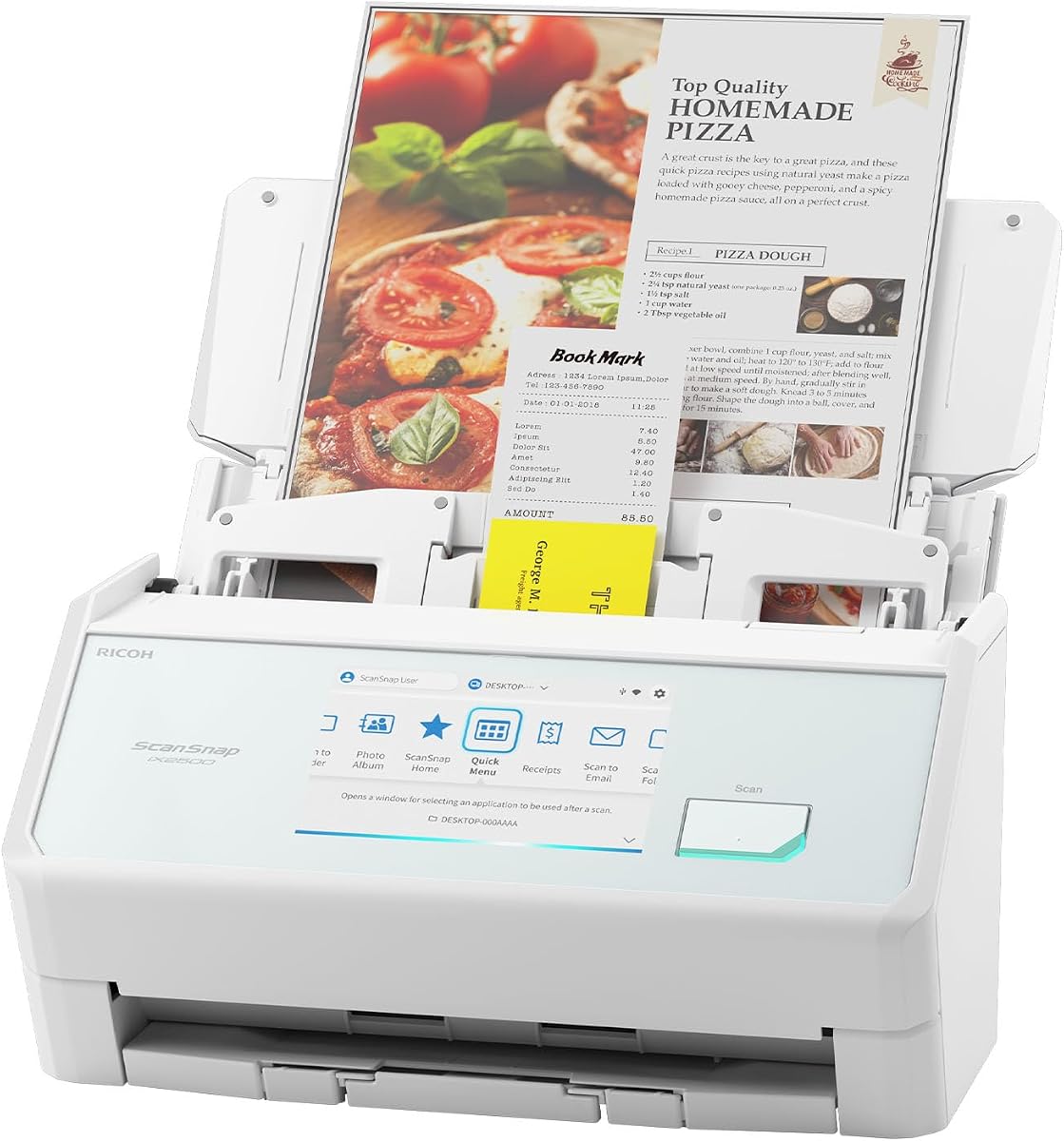
The ScanSnap iX2500 stands out as a powerhouse for users needing high volume scanning with minimal effort. Its rating reflects consistent performance in automating document workflows efficiently across multiple devices.
Pros
Extremely fast scanning speed
Large document capacity
Seamless cloud integration
Intuitive touchscreen control
Cons
Higher price point
Requires desktop software for full use
We may earn a commission when you buy through this link, at no additional cost to you.
Key strengths include its blazing 45ppm speed and the ability to handle up to 100 sheets without reloading. The Wi-Fi 6 connectivity ensures stable transfers to mobile devices or cloud storage without needing a computer.
While it is more expensive than compact options, the time saved on manual feeding and organization justifies the investment for heavy users. The touchscreen allows quick profile selection which simplifies complex tasks.
Professionals managing large paper archives or frequent business travelers will find this scanner indispensable. It offers the most robust combination of speed and smart features available today.
Efficient Workflow Automation
Customizable profiles on the touchscreen let you send scans directly to your preferred cloud apps or folders instantly.
Robust Connectivity
Built-in Wi-Fi 6 provides a secure and fast wireless link that keeps your mobile device synchronized with your digital files.
This handheld option provides an accessible entry point for those who need basic scanning without a large financial commitment. It is rated well for its simplicity and utility in casual environments.
Pros
Affordable entry price
Portable handheld design
Flexible storage options
No software installation needed
Cons
Manual scanning effort
Lower automation features
We may earn a commission when you buy through this link, at no additional cost to you.
The device supports high resolution scans up to 900DPI and stores files directly on an SD card. This makes it ideal for travel where connecting to a computer or Wi-Fi network might not be possible.
Manual operation requires steady hands to move the scanner across the page which can be slower than automatic feeders. However the low cost makes it a good backup for occasional document needs.
Students or casual users looking to digitize occasional pages will appreciate this straightforward tool. It balances cost and functionality for light duty tasks effectively.
Self Contained Storage
Saving directly to a micro SD card allows you to move files to your iPhone later without needing a computer intermediary.
Simple Operation
Plug and play functionality means you can start scanning immediately after inserting batteries and choosing your resolution.
The Epson Workforce ES-50 offers a premium compact experience with excellent portability and professional grade output quality. Its high rating confirms its reliability for business users on the move.
Pros
Ultra light portable design
Quick single sheet scan
Full OCR functionality
No external power needed
Cons
Single sheet feed only
Requires cable connection
We may earn a commission when you buy through this link, at no additional cost to you.
It scans a single page in just 5.5 seconds and includes Nuance OCR to create searchable PDFs. This feature is crucial for converting paper documents into editable and searchable digital assets easily.
The device is USB powered so it does not require batteries which is great for consistent use but limits true untethered mobility. It is best for users who can plug into a laptop or power bank.
Anyone needing a reliable tool for receipts and contracts while traveling should consider this model. It combines speed with powerful software features in a tiny form factor.
Searchable Digital Files
Included Nuance OCR software turns scanned text into editable formats like Word and Excel for better document management.
Extreme Portability
Lightweight and compact enough to slip into a bag it is designed for on-the-go professionals who need quick access.
The Brother DS-640 delivers strong performance for its size with consistent speed for both color and black and white documents. Users rate it highly for its reliability and ease of use in office settings.
Pros
Fast color scanning
Lightweight build
Free desktop app
Multi destination scan
Cons
Micro USB cable required
No automatic duplex
We may earn a commission when you buy through this link, at no additional cost to you.
It scans at up to 16 pages per minute and can send files to cloud services or email directly via the iPrint and Scan app. The free software suite includes OCR which adds value to the purchase.
While it is compact it relies on a USB connection for power which might limit flexibility compared to battery powered alternatives. Still it is a robust choice for frequent scanning tasks.
Office workers who need a fast and affordable scanner for daily paperwork will find this device suitable. It balances speed and features well for general professional use.
Versatile Software
The included app allows you to choose scan destinations like network folders or email accounts with minimal configuration steps.
Consistent Speed
Color and black and white scanning happen at the same pace ensuring your workflow is not slowed down by color documents.
This scanner stands apart by offering a camera based approach that captures pages instantly without a feeder. It is rated well for those who need to scan bound documents or books frequently.
Pros
Scans book pages easily
Extremely fast capture
High resolution images
Portable stand design
Cons
Not for A4 only
Manual page turning
We may earn a commission when you buy through this link, at no additional cost to you.
The patented flattening technology corrects curved page distortions automatically making it ideal for books. It can scan an A4 page in about one second which is faster than many feeder scanners.
Users must flip pages manually which can be tedious for large batches compared to automatic feeders. However for digitizing books or thin materials it is unmatched in convenience and quality.
Researchers or students needing to digitize textbooks will appreciate this specialized function. It bridges the gap between traditional scanners and document cameras effectively.
Book Friendly Design
Patented software automatically corrects curve distortion so your scanned book pages look flat and professional.
Rapid Capture
With one second per page speed you can digitize whole chapters in minutes rather than hours.
The Brother DS-740D improves on the 640 model by adding duplex scanning which captures both sides of a page in one pass. This feature boosts efficiency significantly for double sided contracts.
Pros
True duplex scanning
Compact footprint
Strong color support
Free OCR software
Cons
Single sheet feed
USB dependency
We may earn a commission when you buy through this link, at no additional cost to you.
Its desk saving design reduces the footprint making it suitable for small workspaces. The software suite includes tools to enhance text and correct color which improves final document readability.
While it requires USB power it remains compact enough for a bag. The automatic color detection ensures accurate reproduction without manual adjustments every time.
Business users dealing with two sided documents daily will benefit from the duplex capability. It offers a solid balance of efficiency and reliability for office environments.
Space Saving Design
The DSD feature cuts the space needed to use the device allowing it to fit easily on crowded desks.
Dual Side Efficiency
Scanning both sides in a single pass halves the time required to digitize multi page documents completely.
The Canon imageFORMULA R10 is designed for users who want a simple and efficient portable scanner. Its rating highlights its ease of setup and reliable performance for daily document tasks.
Pros
Automatic feeder
Easy setup
Duplex capability
Energy star certified
Cons
Slower than competitors
Requires software install
We may earn a commission when you buy through this link, at no additional cost to you.
It includes a 20 sheet feeder which allows you to load multiple pages at once and scans both sides automatically. The built-in software requires no installation which speeds up initial usage.
While its speed is slightly lower than some rivals the 20 sheet capacity helps maintain workflow. It is a practical choice for general office work where bulk scanning is needed.
Teams needing a straightforward and compact solution for digitizing stacks of paper should consider this model. It offers dependable performance with minimal fuss.
Simple Start
Built-in software removes the need for separate installation so you can start scanning immediately after plugging in.
Efficient Feeding
A 20 sheet auto feeder lets you process small batches quickly without constant reloading during your tasks.
This scanner excels at capturing high resolution images and documents with 4800 dpi optical clarity. Users appreciate it for preserving fine details in photos and important text documents.
Pros
High resolution output
Photo scanning quality
Easy restore tools
Compact footprint
Cons
Slower scan times
Manual flatbed use
We may earn a commission when you buy through this link, at no additional cost to you.
It includes Easy Photo Fix technology to restore color in faded items and OCR for creating editable documents. The high rise lid allows scanning of books or albums without closing the glass.
Manual flatbed operation means it is not suited for high volume scanning but quality is superior. It takes about 10 seconds to scan a letter size page which is acceptable for quality work.
Archivists or those needing to preserve family photos and detailed docs will find it valuable. It bridges document scanning with photo restoration capabilities effectively.
Photo Restoration
Easy Photo Fix technology lets you restore faded colors in old photos with just one click for better preservation.
Detail Focus
The 4800 dpi resolution captures text and images with extreme clarity perfect for archival or detailed work.
The Epson Workforce ES-60W offers true wireless scanning allowing you to send files directly from your iPhone. It is highly rated for its mobility and speed in modern mobile workflows.
Pros
Wireless mobile scan
Fast page speed
Battery flexibility
Automatic feeding
Cons
Battery life varies
Wireless setup needed
We may earn a commission when you buy through this link, at no additional cost to you.
It scans a page in about 4 seconds and can switch between battery and USB power automatically. This flexibility makes it ideal for users who want to go fully wireless without carrying cables.
Wireless connectivity can sometimes require initial setup or depend on network conditions. However the convenience of scanning directly to a phone outweighs these minor hurdles for many users.
Mobile workers needing to scan receipts and documents on the fly will benefit most from this device. It offers the best mix of speed and wireless freedom in its class.
Cable Free Work
Wireless scanning lets you send files directly to your iPhone or cloud without needing a laptop nearby.
Power Flexibility
Automatic switching between battery and USB ensures you keep working even if one power source runs out.
This silver handheld scanner provides a practical budget solution for basic document digitization needs. It shares the same core features as the blue version but offers a different color option.
Pros
Very affordable price
Portable form factor
Storage on device
Quick setup
Cons
Manual scanning action
Basic features
We may earn a commission when you buy through this link, at no additional cost to you.
It supports up to 32GB SD cards and scans up to 900DPI which is sufficient for text and standard photos. The manual operation keeps the design simple and cost effective for casual use.
Scanning requires you to move the wand steadily across the page which takes more time than automatic feeders. It is best suited for occasional tasks rather than daily heavy workloads.
Individuals looking for an economical tool to capture text while traveling will find it useful. It is a reliable backup option for simple scanning jobs.
Budget Friendly
Its affordable price point makes it an accessible choice for users who need basic scanning without a high investment.
Travel Ready
Compact and lightweight design ensures it fits easily in any bag so you can digitize documents anywhere.
We may earn a commission when you buy through this link, at no additional cost to you.
Buying Guide – How to Choose the Best Document Scanner for iPhone 18
Selecting the right scanner depends on understanding your specific needs regarding portability, speed, and connectivity options. This guide outlines the key factors to consider before making a purchase.
Connectivity Options
Consider whether you need a wired USB scanner or a wireless device that connects via Wi-Fi. Wireless models offer more flexibility for mobile use but may require setup.
Wireless models offer better mobility while wired devices ensure stable connections without battery concerns.
Scanning Speed
Speed is critical if you process large volumes of paper daily. Look for models that can scan at least 10 pages per minute to maintain productivity.
Higher speeds reduce wait times and improve workflow efficiency for busy users.
Paper Handling
Automatic feeders allow you to scan multiple pages at once which saves time compared to single sheet options. Check the maximum stack size to ensure it fits your needs.
Automatic feeders handle batches while single sheet models suit occasional receipts.
OCR Capabilities
Optical Character Recognition converts scanned images into editable text which is essential for document management. Ensure the scanner includes OCR software or supports compatible apps.
OCR software enables searching and editing text within your scanned files easily.
Portability
If you travel often choose a lightweight model that fits in a bag. Battery powered devices eliminate the need for a wall outlet during mobile work.
Lightweight battery devices allow for true mobile use without power cables.
Software Ecosystem
The included software should support your workflow such as cloud storage integration or email sending. Compatibility with your iOS device is crucial for a seamless experience.
Compatible software simplifies saving and organizing your digital documents instantly.
Image Quality
Resolution matters if you scan photos or detailed graphics. Aim for at least 300 DPI for text and higher for images to ensure clarity.
Higher resolution preserves details for images and small text legibility.
Budget Constraints
Prices vary significantly based on features like duplex scanning or wireless connectivity. Determine your minimum requirements to find the best value within your range.
Balance needed features against cost to avoid overpaying for unnecessary options.
How to Use and Care for Your Document Scanner for iPhone 18
To get started connect the scanner to your device using the recommended cable or Wi-Fi network. Install any necessary drivers or apps from the manufacturers website to ensure full functionality.
Always clean the glass or rollers regularly with a soft cloth to prevent dust or marks on your scans. Avoid using harsh chemicals that might damage the sensitive optical components over time.
Store your scanner in a cool dry place when not in use to protect it from environmental damage. If it uses batteries replace them periodically to avoid leakage that could harm the internal circuits.
Frequently Asked Questions
Can I use these scanners directly with my iPhone 18?
Most modern scanners offer direct connectivity via Wi-Fi or USB OTG. Check the product specifications to ensure native support for iOS apps before purchasing. Wireless models typically have dedicated apps for seamless file transfer.
What is the difference between feeder and flatbed scanners?
Feeder scanners automate multi page document scanning while flatbeds require you to place each page manually. Flatbeds are better for photos or bound books but slower for regular paperwork.
Do these scanners work with cloud storage services?
Many include built-in support for popular services like Google Drive or Dropbox. This allows you to save scans directly to the cloud without moving files manually on your computer.
How do I convert scanned images to editable text?
Use the Optical Character Recognition software included with the scanner. This tool processes the image to extract text which you can then edit in Word or similar applications.
Are these scanners compatible with Mac and Windows?
The top models support both operating systems with standard drivers. Always verify the latest software compatibility on the manufacturers site to ensure it meets your specific OS requirements.
What resolution do I need for scanning contracts?
A resolution of 300 DPI is generally sufficient for clear text documents. Higher resolutions are necessary if you plan to enlarge images or scan fine details or graphics.
How often should I clean the scanner?
Clean the glass and rollers after every few weeks of regular use. Frequent cleaning prevents smudges and ensures consistent image quality across your scans.
Can I scan double sided documents automatically?
Duplex scanners can scan both sides of a page in one pass without flipping. Look for duplex features if you handle two sided contracts or forms frequently.
Final Thoughts on Choosing the Best Document Scanner for iPhone 18
We have reviewed ten excellent options ranging from compact handhelds to high speed automatic feeders. The top picks highlight the best value and performance for different usage scenarios.
Prioritize connectivity and speed if you work frequently on the go. For home office use consider models with larger feeders to handle bulk documents efficiently.
Check current prices and availability before buying as these can fluctuate regularly. Ensuring the device matches your specific workflow needs will provide the best long term results.