
Surface Docking Station Triple Displays
4.8Editor score
Triple display HDMI and VGA support
72W power supply included
SD and TF card slots
This guide compares the top 10 docking stations for Surface Pro devices to help you choose the right connectivity solution for your productivity needs.
Finding the right docking station for your Surface Pro is essential for turning a tablet into a full desktop workstation. A quality dock expands your connectivity options allowing you to connect multiple monitors peripherals and storage devices without clutter.
We evaluated ten leading models based on port selection build quality and compatibility with the Surface ecosystem. Our analysis covers Thunderbolt options traditional Surface Connect docks and versatile hubs designed for modern hybrid work environments.
Each pick highlights key strengths ideal use cases and real world performance characteristics. While prices may fluctuate over time these selections represent the most reliable choices available for expanding your Surface Pro capabilities today.
4.8Editor score

4.4Editor score

4.5Editor score
The following table provides a side by side overview of the ten top rated docking stations. It highlights key specifications and features to help you quickly identify the model that best fits your workflow requirements.




The Microsoft Surface Thunderbolt 4 Docking Station stands out as the top choice for users demanding maximum performance. With a 4.4 rating it delivers lightning fast connectivity that transforms your Surface Pro into a powerful desktop hub effortlessly.
We may earn a commission when you buy through this link, at no additional cost to you.
Its Thunderbolt 4 ports enable rapid data transfers and support up to two 4K monitors for stunning visuals. The inclusion of multiple USB-C and USB-A ports along with a 2.5G Ethernet connection ensures all your peripherals stay connected without lag.
While it comes at a premium price the build quality and sustainability features justify the cost. The use of recycled ocean-bound plastic and tactile port indicators shows attention to detail that enhances everyday usability significantly.
Professionals who need reliable high-speed connections should prioritize this dock. It offers the best blend of speed sustainability and compatibility for serious Surface Pro users looking to elevate their workstation setup today.
Experience data transfer speeds that far exceed standard USB-C connections for seamless workflow efficiency.
Made with 20% recycled ocean-bound plastic reducing environmental impact without compromising performance.
We may earn a commission when you buy through this link, at no additional cost to you.
The Microsoft Surface Dock offers a reliable and straightforward solution for expanding your Surface Pro connectivity. Rated 4.5 stars it remains a popular choice for users who prioritize simplicity and broad compatibility over cutting-edge speed.
We may earn a commission when you buy through this link, at no additional cost to you.
With two Mini DisplayPorts and four USB 3.0 ports it allows you to connect essential peripherals easily. The magnetic Surface Connect cable ensures a stable attachment while the external power supply keeps your device charged.
This dock works well with older Surface models making it versatile for mixed environments. However the Mini DisplayPort standard may limit resolution options compared to newer HDMI or USB-C video outputs available today.
For budget conscious users seeking a dependable connection the Surface Dock is a solid investment. It transforms your tablet into a desktop setup without unnecessary complexity or driver issues.
Transform your Surface into a desktop PC instantly with a simple magnetic cable connection.
Supports a wide range of older Surface devices ensuring longevity in mixed device environments.
We may earn a commission when you buy through this link, at no additional cost to you.
This Surface Docking Station provides an affordable entry point for users needing multiple display support. With a 4.1 rating it delivers solid value for those who want to connect three screens without breaking the bank.
We may earn a commission when you buy through this link, at no additional cost to you.
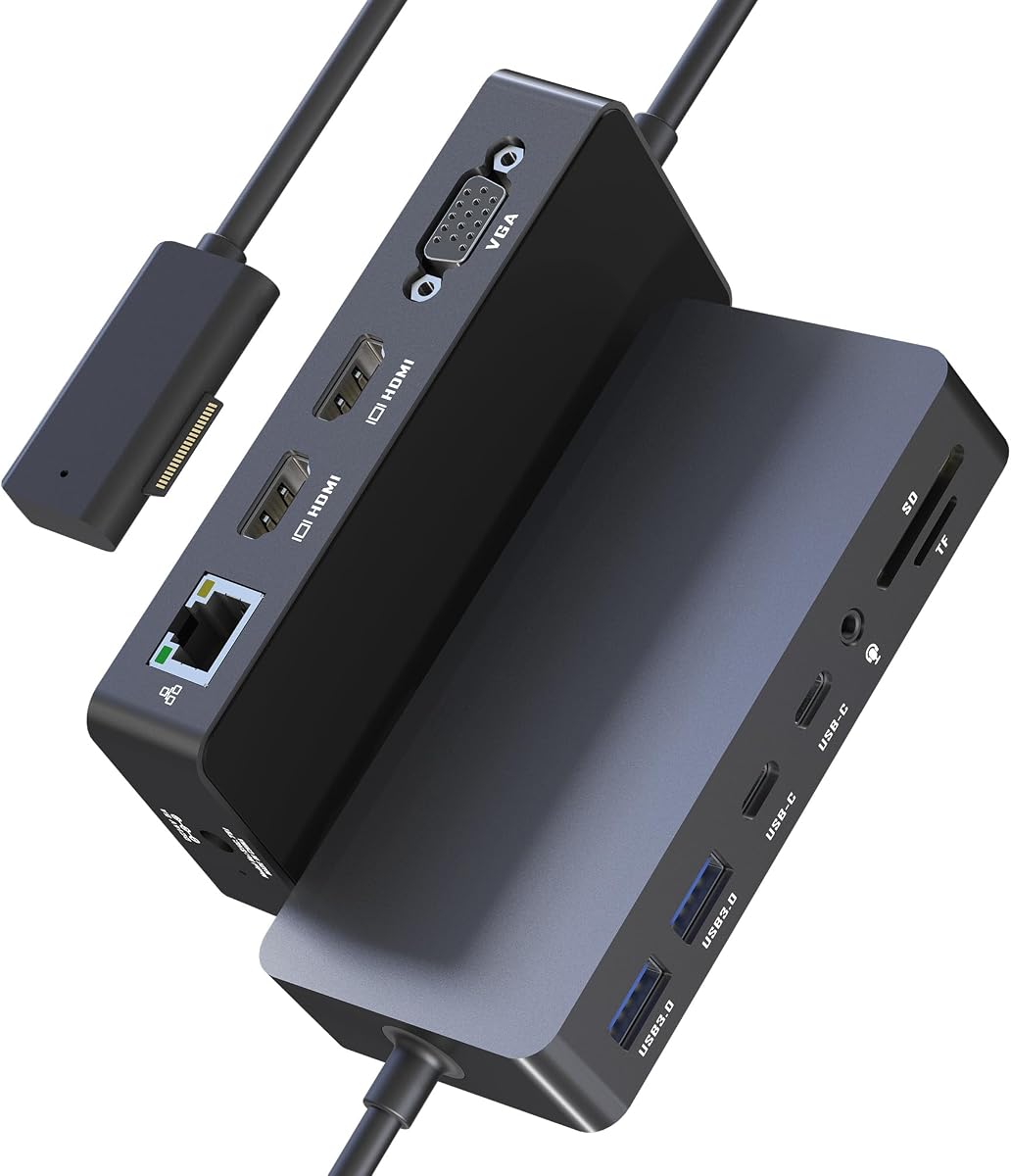
Equipped with two HDMI ports and a VGA port it supports triple display setups for enhanced productivity. The inclusion of a power adapter and SD card slot makes it a complete package for everyday tasks.
The dock works with a wide range of Surface Pro and Laptop models ensuring broad usability. While the Ethernet speed is standard and VGA is older technology it fulfills basic needs effectively for many users.
Budget buyers looking for triple monitor capabilities will find this dock appealing. It offers essential connectivity features in a compact design that simplifies your desk setup immediately.
Boost efficiency by extending your workspace across three monitors with HDMI and VGA ports.
Transfer photos directly from SD and TF cards without needing additional adapters or readers.
We may earn a commission when you buy through this link, at no additional cost to you.
This Surface Docking Station boasts an impressive 4.8 rating reflecting high user satisfaction with its performance. It provides a robust solution for mobile professionals who need reliable connectivity on the go.
We may earn a commission when you buy through this link, at no additional cost to you.
With a 72W power supply it can charge your device while running multiple peripherals simultaneously. The combination of HDMI and VGA ports allows for flexible display configurations tailored to your workspace.
Modern USB-C ports ensure fast data transfers while maintaining compatibility with older VGA monitors. This versatility makes it an excellent choice for hybrid work environments where different devices must coexist seamlessly.
Users seeking a balance between cost and performance should consider this dock. It delivers essential features with high reliability making it a dependable choice for daily professional use.
Keep your Surface charged while powering multiple peripherals without needing extra adapters.
Support modern HDMI displays and legacy VGA monitors for maximum flexibility.
We may earn a commission when you buy through this link, at no additional cost to you.
This 12-in-1 Surface Docking Station delivers impressive visual performance with dual 4K HDMI support. Rated 4.2 it offers a compact solution for users wanting high resolution without bulky equipment.
We may earn a commission when you buy through this link, at no additional cost to you.
The 72W power adapter ensures your device stays charged during intensive tasks. Integrated SD and TF card slots provide quick access to media files without extra dongles.
While the VGA port is limited to 1080P the HDMI outputs allow for crystal clear visuals on modern displays. The design is small enough to travel easily yet powerful enough for desktop work.
Remote workers needing high quality video and fast charging will appreciate this dock. It simplifies your setup while maintaining professional display standards for meetings and creative work.
Enjoy sharp detailed visuals on dual 4K monitors for an immersive workspace experience.
Compact size fits easily in bags for professionals working from multiple locations daily.
We may earn a commission when you buy through this link, at no additional cost to you.
The Microsoft Surface Dock 2 represents the next generation of docking technology for Surface devices. With a 4.5 rating it offers superior performance and flexibility for users who demand high-speed connectivity.
We may earn a commission when you buy through this link, at no additional cost to you.
Its 199W power supply ensures your laptop and peripherals run smoothly without draining the battery. The dual 4K at 60Hz support enables smooth video playback and professional design work.
Four USB-C ports provide ample connectivity for modern devices while the longer cable allows flexible desk placement. This dock is designed for power users who need robust performance for daily operations.
If you seek the ultimate Surface ecosystem experience this dock is worth the investment. It delivers premium features that transform your Surface into a fully capable desktop workstation.
Support smooth fluid visuals on dual 4K displays for professional design and media work.
A 199W supply provides enough power to run heavy workloads without performance throttling.
We may earn a commission when you buy through this link, at no additional cost to you.
This Surface Dock 2 variant offers exceptional versatility with its USB-C and Surface Connect options. Rated 4.8 it stands out for its ability to handle high demand creative workflows efficiently.
We may earn a commission when you buy through this link, at no additional cost to you.
The 199W power supply and dual 4K at 60Hz support make it ideal for video editors and designers. Ethernet connectivity ensures stable internet for large file transfers during remote work.
Security features like the Kensington lock support add peace of mind in shared office spaces. Compatibility with a wide range of Surface devices ensures long term usability across different models.
Creative professionals needing reliable high-bandwidth connections will find this dock invaluable. It provides the robust infrastructure required for intensive multimedia production tasks daily.
Kensington lock compatibility secures your device in open office environments effectively.
Gigabit Ethernet ensures fast stable internet for large cloud uploads and video calls.
We may earn a commission when you buy through this link, at no additional cost to you.
This Thunderbolt 4 Docking Station delivers high refresh rate video support for smooth visuals. Rated 4.3 it offers a comprehensive port selection that eliminates the need for multiple adapters.
We may earn a commission when you buy through this link, at no additional cost to you.
With 100W DC charging capability it powers your Surface and connected devices simultaneously. The Gigabit Ethernet port ensures stable internet speeds for uninterrupted streaming and conferencing.
Integrated card slots allow rapid photo transfers for photographers and designers. The compact design minimizes desk clutter while maximizing connectivity options for professional workflows.
Users needing fast data and high refresh displays will appreciate this model. It provides a seamless transition from tablet to desktop with advanced video capabilities.
60Hz dual 4K support ensures smooth visuals for video editing and dynamic content.
Rapid file transfers via USB-C and card slots keep creative workflows moving efficiently.
We may earn a commission when you buy through this link, at no additional cost to you.
This Renewed Surface Dock 2 offers premium performance at a more accessible price point. Rated 4.7 it provides confidence in durability and functionality for budget mindful buyers.
We may earn a commission when you buy through this link, at no additional cost to you.
The included 199W power supply and USB-C cable ensure you can start using it immediately. Thermal management features help maintain consistent performance during long work sessions without overheating.
Rigorously tested for durability this dock meets strict quality standards for resale. The one-year limited hardware warranty provides additional security for your purchase decision today.
Buyers seeking reliable high-end features without full retail costs will find this option attractive. It delivers the same power and connectivity as the new model with added value.
Rigorously tested to ensure consistent performance and reliability for professional use.
Get premium features like 199W power and 4K support at a reduced price.
We may earn a commission when you buy through this link, at no additional cost to you.
This Surface Dock offers a balanced all-purpose solution for general connectivity needs. Rated 4.2 it provides reliable performance for daily office tasks and home use.
We may earn a commission when you buy through this link, at no additional cost to you.
The 90W power supply ensures consistent charging while connecting peripherals. With four USB 3.0 ports you can connect multiple devices simultaneously without speed bottlenecks.
Gigabit Ethernet support ensures fast network speeds for efficient file transfers. The compact design keeps your workspace tidy while maintaining essential desktop functionality.
Users looking for a straightforward and reliable dock will find this model sufficient. It delivers stable performance for everyday productivity without unnecessary complexity.
A 90W supply keeps your device powered while running multiple accessories efficiently.
Four USB 3.0 ports support a wide range of devices for easy expansion.
We may earn a commission when you buy through this link, at no additional cost to you.
Choosing the right docking station depends on understanding your specific connectivity and performance requirements. This guide breaks down the critical factors to consider before purchasing.
Evaluate the number and type of ports you need for your peripherals. Look for USB-C and USB-A ports along with video outputs like HDMI or Mini DisplayPort depending on your monitors.
Ensure the dock has enough ports to connect all your devices without needing extra hubs.
Check the supported resolution and refresh rates for external monitors. Some docks support dual 4K displays while others are limited to 1080P or single 4K outputs.
Select a dock that matches your monitor capabilities for optimal visual performance.
The power supply wattage must be sufficient to charge your Surface while running connected devices. Higher wattage docks ensure your laptop stays charged during intensive tasks.
Choose a dock with at least 65W to 100W output for reliable power delivery.
Fast data transfer speeds are essential for moving large files quickly. Look for USB-C or Thunderbolt ports that support high bandwidth like 10Gbps or 40Gbps.
Prioritize speed if you work with large media files or external drives daily.
A Gigabit Ethernet port provides a stable and fast network connection. This is important for video conferencing and large downloads where Wi-Fi may be unreliable.
Ensure the dock includes an Ethernet port if wired internet is critical for your work.
Confirm that the dock is compatible with your specific Surface model and connector type. Some use Surface Connect while others use USB-C or Thunderbolt.
Choose a dock that matches your device's port to avoid adapter complications.
High quality materials and thermal management features extend the dock's lifespan. Look for models with proven reliability and robust construction.
Investing in a durable dock ensures long-term performance and value.
Check the warranty terms and customer support options provided by the manufacturer. A longer warranty indicates confidence in product quality and reliability.
Select a dock with adequate support coverage to protect your investment.
Start by connecting the power supply to the dock and plugging it into a wall outlet. Ensure the power adapter is compatible with your device requirements before attaching cables.
Connect your external monitors and peripherals to the appropriate ports on the dock. Finally plug your Surface Pro into the dock using the included cable to complete the setup.
Keep the dock in a well-ventilated area to prevent overheating during extended use. Periodically check all cables and connections to maintain optimal performance and safety.
The Microsoft Surface Thunderbolt 4 Docking Station is highly recommended for its speed and features. It offers excellent connectivity with Thunderbolt 4 and supports multiple high-resolution monitors for professional use.
Not all docks are compatible. You must choose one that matches your device's connector like Surface Connect or USB-C. Check your model specifications before purchasing to ensure fit.
Most modern docking stations include power delivery to charge your laptop. Look for models with sufficient wattage like 100W to ensure your device stays charged while in use.
Depending on the model a dock can support up to three displays. Dual 4K setups are common for premium docks while budget options may support two 1080P monitors.
Yes Ethernet provides a more stable and faster connection for large data transfers. It is ideal for video conferencing and reducing latency during critical work sessions.
Refer to the user manual that comes with your dock for specific cable requirements. Most docks include the necessary cables but additional adapters may be needed for older monitors.
A minimum of one year warranty is standard for most docks. Some premium models offer longer coverage which provides added security against defects and issues.
Yes compact docks are available designed for portability. Look for lightweight models with essential ports to keep your workspace flexible on the go.
We have explored ten top rated docking stations offering a range of connectivity options and performance levels. From budget friendly triple display options to premium Thunderbolt solutions there is a dock for every user.
Prioritize features that matter most to your workflow such as video quality power delivery and port variety. A well chosen dock can significantly boost your productivity and transform your Surface into a desktop workstation.
Prices and availability may change over time so check current listings before making your final decision. We hope this guide helps you select the right docking station for your needs.