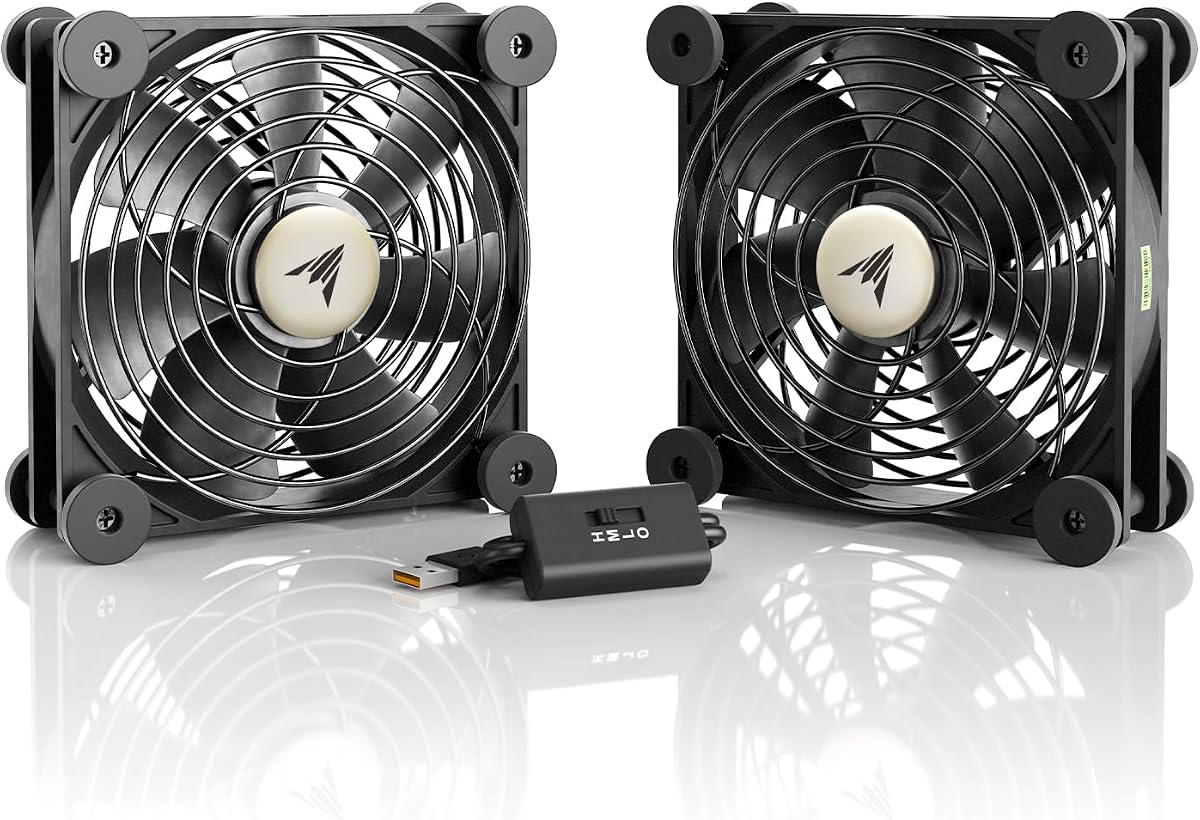
AC IN MULTIFAN S7
4.7Editor score
USB powered operation
Ultra quiet design
Speed controller included
Flexible mounting options
AV receivers generate significant heat during operation which can lead to performance issues or shortened lifespans. Proper ventilation is essential to maintain optimal performance. Choosing the right cooling fan ensures your equipment runs smoothly and quietly without adding noise to your home theater environment.
We evaluated ten distinct cooling solutions based on noise levels, airflow capacity, installation ease, and compatibility with standard AV cabinets. Our analysis focused on models that offer reliable thermal management without compromising the aesthetic or acoustic integrity of your entertainment center setup.
Each selection includes detailed specifications and user feedback to help you make an informed decision. Please note that product availability and pricing may fluctuate over time. Always verify current details on the retailer site before purchasing to ensure you get the best value for your needs.
4.7Editor score

4.8Editor score

4.4Editor score
As an Amazon Associate we earn from qualifying purchases.
The following table provides a side-by-side comparison of all ten selected cooling fans. Each entry highlights key specifications to help you quickly identify the model that best fits your specific AV receiver and cabinet requirements.
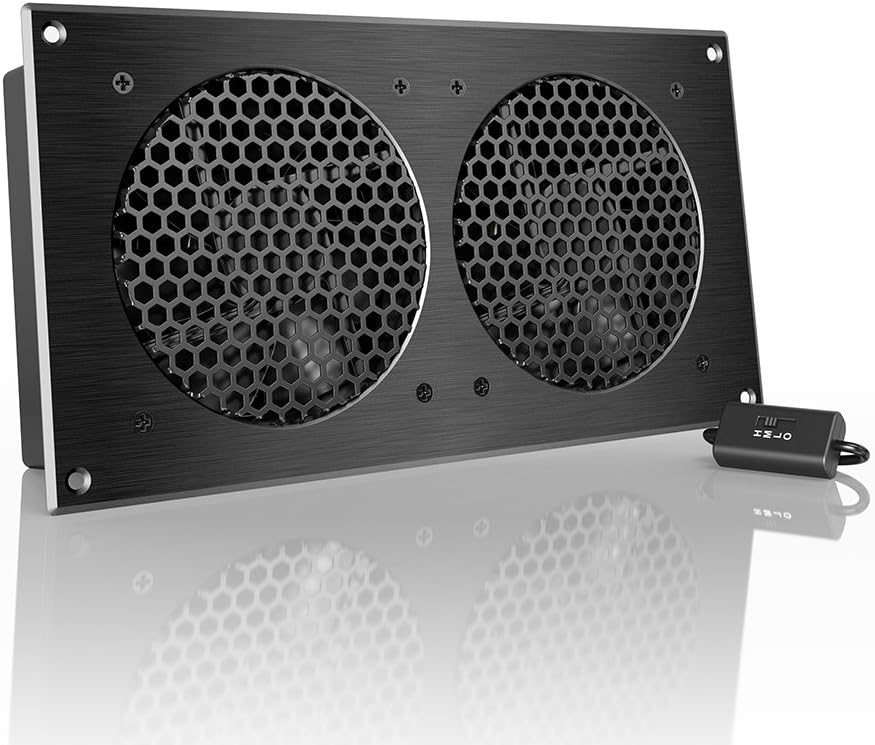


The AC IN AIRCOM S7 stands out as a top choice for AV receiver cooling due to its exceptional balance of performance and silence. With a 4.8 star rating from users, this system delivers reliable thermal management without adding audible noise to your listening environment.
We may earn a commission when you buy through this link, at no additional cost to you.
Its dual ball bearing fans are PWM controlled to minimize noise while maximizing airflow. The top exhaust design is ideal for units where heat rises and needs to be directed away from surrounding components. Users appreciate the ability to set specific thermal triggers for automated operation.
While it requires an AC outlet rather than USB power, this ensures consistent performance regardless of connected device ports. The only trade-off is the fixed exhaust direction which may not suit every cabinet layout. However, the high airflow compensates for this limitation.
For those seeking a dependable and quiet cooling solution for high-end AV receivers, this model is highly recommended. It offers peace of mind against overheating while maintaining the acoustic purity of your audio system during extended viewing sessions.
The PWM controlled motors and dual ball bearings work together to keep noise levels near inaudible during normal operation.
Thermal trigger modes allow the fan to activate only when heat levels reach a specific threshold saving energy and reducing noise.
We may earn a commission when you buy through this link, at no additional cost to you.
The AC IN MULTIFAN S7 offers an affordable entry point for those needing reliable cooling without a large investment. Rated 4.7 stars, it provides dual 120mm fans that deliver consistent airflow while maintaining a whisper quiet profile suitable for home theaters.
We may earn a commission when you buy through this link, at no additional cost to you.
Powered via USB, it draws power directly from your receiver or a wall adapter making setup incredibly simple. The included speed controller lets you adjust airflow to suit your specific noise tolerance. Dual ball bearings ensure a long lifespan of over 67,000 hours.
While it lacks the raw power of larger AC units, it is sufficient for most standard AV receivers in ventilated cabinets. The main limitation is dependency on a USB port which may be limited on older models. However, extension cables can solve this easily.
For budget conscious shoppers who value simplicity and quiet operation this fan is an excellent choice. It protects your equipment from heat without complicating your setup or breaking the bank.
Dual ball bearings are engineered to last over 67,000 hours ensuring the fan remains reliable for many years of daily use.
USB power allows you to draw energy from the receiver itself or any standard wall charger without needing a dedicated outlet.
We may earn a commission when you buy through this link, at no additional cost to you.
Noctua is known for premium cooling solutions and the NV-FS2 delivers exceptional quality for AV equipment. Rated 4.4 stars, it features their award-winning NF-A12x25 fan which offers superior airflow efficiency and quiet operation unmatched by standard options.
We may earn a commission when you buy through this link, at no additional cost to you.
The set includes silicone gaskets and pads to reduce vibrations which is crucial for maintaining audio clarity during playback. You get a full mounting kit allowing placement underneath or on top of devices. An AC power supply ensures you do not rely on device USB ports.
The main drawback is the cost which is significantly higher than basic fans. It is also more complex to install than plug-and-play USB options. However, for enthusiasts who want the best possible cooling and noise isolation this is a worthwhile investment.
If you own high-end components and demand the quietest and most efficient cooling this set is ideal. It provides professional grade thermal management that matches the quality of your premium AV equipment.
Extra soft silicone gaskets isolate the fan from surfaces preventing mechanical noise from transferring to your audio system.
The NF-A12x25 fan uses advanced aerodynamics to move more air at lower speeds ensuring silence and efficiency.
We may earn a commission when you buy through this link, at no additional cost to you.
The 120mm AC Computer Fan offers a straightforward solution for cooling receivers that need dedicated power. Rated 4.7 stars, it plugs directly into a wall outlet eliminating the need for USB ports or adapters. The brushless motor ensures long-term reliability and quiet performance.
We may earn a commission when you buy through this link, at no additional cost to you.
It includes an in-line speed controller that allows you to dial the fan RPM to your preference. This is useful for balancing cooling needs with noise tolerance during movie watching. The fan runs so quietly it often goes unnoticed even at higher speeds.
The main trade-off is the lack of specialized mounting hardware compared to cabinet-specific models. You may need to use zip ties or adhesive for stable placement. However the slim profile fits into tight spaces easily where bulkier fans cannot.
For users needing a simple plug and play cooling solution this fan is a solid choice. It provides reliable airflow without wiring complexity making it easy to integrate into any home theater setup.
Plug directly into a standard outlet so you do not drain power from your receiver or other connected electronics.
The speed controller dial lets you increase or decrease fan speed to match ambient room temperature and cooling needs.
We may earn a commission when you buy through this link, at no additional cost to you.
This Cabinet Cooling Fan is designed for users who cannot or do not want to modify their furniture permanently. Rated 4.0 stars, it fits into existing door gaps and vents hot air out of enclosed spaces without tools or drilling. This protects your cabinet and furniture integrity.
We may earn a commission when you buy through this link, at no additional cost to you.
It is powered by USB 5V so you can connect it to your receiver or a wall adapter. The speed controller allows you to adjust airflow based on your cooling needs or noise preferences. It is ideal for tight spaces where standard fans will not fit.
The main limitation is that it relies on existing door gaps which may not be present in all cabinets. Also, the airflow is lower than larger models which may not suffice for high-heat receivers. However, it is excellent for moderate cooling requirements.
If you have a closed media cabinet and want to avoid drilling this fan is a practical solution. It provides necessary ventilation to prevent overheating while keeping your furniture intact.
The gap mounting design means no tools are required to install this keeps your expensive furniture looking perfect.
By placing the fan in the door gap it actively exhausts hot air from inside the cabinet to prevent heat buildup.
We may earn a commission when you buy through this link, at no additional cost to you.
This Door Fan provides a simple way to add ventilation without drilling holes in your media cabinet. Rated 4.4 stars, it mounts securely using existing gaps to protect your furniture while improving airflow significantly. The slim design fits well in narrow consoles where bulkier units fail.
We may earn a commission when you buy through this link, at no additional cost to you.
Powered by USB it connects easily to computers adapters or electronic devices. It delivers efficient airflow with low noise helping to reduce heat around receivers and networking gear. Users appreciate the straightforward setup that does not require tools or professional help.
While it relies on existing gaps which may not exist in every cabinet it is a great option for retro fitting ventilation. The airflow is moderate so it works best for receivers that do not generate excessive heat. Still it is effective for general cooling.
For renters or those unwilling to modify furniture this fan is a smart choice. It keeps equipment cool and safe without compromising the look of your home theater setup.
The ultra-slim design ensures it fits into narrow cabinets and tight spaces where standard fans cannot be installed.
USB power means you can plug it into any available port on your devices without needing extra power cables.
We may earn a commission when you buy through this link, at no additional cost to you.
This Cabinet Cooling Fan is designed to fit snugly against inner edges utilizing existing gaps to exhaust air. Rated 4.2 stars, it allows tool free installation in under 60 seconds. This makes it ideal for anyone who values their furniture integrity and wants quick setup.
We may earn a commission when you buy through this link, at no additional cost to you.
Engineered for home theater environments it remains virtually silent while protecting electronics from overheating. The slim profile excels where standard fans fail fitting into media consoles and server cabinets with limited clearance. It effectively pulls heat away from receivers and game consoles.
The main constraint is that it needs a door gap or ventilation slot to function correctly. If your cabinet is fully sealed this will not work without modification. However for most media cabinets it provides a high-efficiency cooling path without drill bits.
For those looking for a non-invasive cooling solution this fan is an excellent option. It keeps your gear performing at peak levels without requiring permanent changes to your furniture.
Specialized design uses existing door gaps to create an efficient path for hot air to escape the cabinet.
The fan is engineered to be whisper quiet so it does not distract from your movie or gaming experience.
We may earn a commission when you buy through this link, at no additional cost to you.
The Noctua NV-FS2 offers a premium multi-purpose fan set suitable for various electronic devices. Rated 4.4 stars, it uses the NF-A12x25 fan which combines superior ventilation efficiency with outstanding quietness. It is perfect for placing under or on top of equipment with ventilation holes.
We may earn a commission when you buy through this link, at no additional cost to you.
The kit includes NV-MPG1 gaskets and NV-MPP1 pads made from extra-soft silicone to reduce vibrations. This ensures optimal acoustics in both intake and exhaust applications. It also comes with an NA-FC1 controller to adjust fan speed from max performance to near-silent operation.
Because it is a premium brand the price is higher than basic options. It might be overkill for simple cooling needs but offers peace of mind for high-end setups. The AC power supply ensures you do not rely on limited USB ports on your devices.
For those seeking a versatile and high quality cooling kit this is a great choice. It provides professional grade performance that can be adapted to different devices beyond just AV receivers.
Silicone gaskets offset design to ensure the fan does not transfer mechanical noise to the device it is cooling.
Includes an AC supply with adaptors for EU US and UK sockets so you can use it directly from the mains.
We may earn a commission when you buy through this link, at no additional cost to you.
The Wathai 140mm set provides two fans for effective cooling of multiple devices or larger spaces. Rated 4.3 stars, it delivers 57 CFM airflow with low noise of only 18 dBA. It is ideal for cooling electronics like routers, consoles, and AV receivers quietly.
We may earn a commission when you buy through this link, at no additional cost to you.
Each fan features a three-speed controller allowing customization of airflow levels. You can set them to low for silent operation or high for maximum cooling power. It is USB compatible with PCs and consoles making setup easy without extra wiring.
One limitation is that it uses sleeve bearings which are less durable than ball bearings over time. Also, using two fans requires two USB ports which may not be available on all receivers. However, daisy-chaining helps mitigate this connectivity issue.
For users needing flexible cooling options for multiple devices this set is a solid choice. It provides reliable airflow and speed control at an affordable price point.
Two 140mm fans work together to move more air than a single unit helping cool multiple devices simultaneously.
The three speed settings let you choose the perfect balance between cooling power and noise for your needs.
We may earn a commission when you buy through this link, at no additional cost to you.
The GDSTIME 240mm fan uses dual 120mm units to provide wide area cooling for your equipment. Rated 4.3 stars, it features a multi-speed controller allowing you to set optimal noise and airflow levels. The low setting runs near silent making it suitable for living rooms.
We may earn a commission when you buy through this link, at no additional cost to you.
It is USB powered and includes an extension cable with an inline switch for added convenience. This means you can place the fan further away while keeping control close to your seat. The hydraulic bearing motor ensures long-lasting performance for 24/7 operation.
The main limitation is the wide 240mm form factor which may not fit in narrow cabinets. It works best on top of or under receivers where width is not a constraint. For smaller setups a 120mm model might be more practical.
For those needing wide coverage cooling for larger setups this fan is a great choice. It balances airflow and noise effectively to keep your gear cool without disturbing your media experience.
Includes a USB extension cable with inline switch so you can control speed from a convenient location.
Durable hydraulic bearing motors ensure the fan runs smoothly for long periods without wear.
We may earn a commission when you buy through this link, at no additional cost to you.
Choosing the right cooling fan for your AV receiver involves evaluating several key factors to ensure compatibility and efficiency. This section breaks down what to look for when selecting a model that fits your specific setup and needs.
For home theaters, the fan noise should not interfere with your audio experience. Look for models with low dBA ratings (ideally under 25) and PWM controls. This ensures the cooling system is inaudible even during quiet scenes in movies.
Prioritize fans explicitly labeled ultra-quiet or with PWM control for best results.
Airflow measured in CFM indicates how much air the fan moves. Higher CFM helps dissipate heat from power amplifiers or high-output receivers faster. Ensure the airflow rating meets the thermal load of your specific device.
Check CFM ratings in specifications to match your receiver's heat generation.
Fans may be powered by USB or AC outlets. USB fans are easier to integrate without needing extra outlets but rely on the receiver port. AC fans ensure consistent power but require a wall socket nearby.
Choose USB for simplicity or AC for independent operation.
Consider how the fan installs in your cabinet. Options include top exhaust, under device, door gap, or side mount. The mounting style should suit your cabinet space and airflow path to move hot air effectively.
Select a mounting style that fits your cabinet space and airflow path.
Adjustable speed controllers let you balance cooling power with noise levels. You can run the fan slow for silence or fast for heat spikes. This flexibility helps adapt to changing room temperatures and usage scenarios.
Look for models with speed controllers for better adaptability.
Measure your available space carefully before buying. Fans range from slim 120mm units to wide 240mm sets. Ensure the dimensions fit without blocking vents or touching sensitive components on your receiver.
Measure your space before buying to ensure a proper fit.
Fans with ball bearings generally last longer than sleeve bearings. If you plan to run the fan 24/7, investing in higher durability ensures you will not need to replace it soon. This is important for long-term cost efficiency.
Invest in fans with ball bearings for long-term reliability.
No-drill or tool-free installation options are valuable for renters or those who dislike modifying furniture. These models use existing gaps or adhesive to stay secure without permanent changes. This preserves the aesthetics of your entertainment center.
Prioritize tool-free or no-drill options for non-destructive installation.
Install the fan in a position that allows unobstructed airflow. For top exhaust fans, place them directly on top of the receiver. For cabinet fans, ensure the intake and exhaust path is not blocked by shelves or wires to maximize cooling efficiency.
Regularly clean the fan blades and filters using compressed air or a soft brush. Dust accumulation can block airflow and cause the fan to work harder or become noisy. Aim to clean your cooling system every three to six months depending on your environment.
Keep the fan dry and away from liquids to prevent electrical damage. Avoid placing it where water spills might occur. Check cables and power adapters periodically for signs of wear to ensure safe long-term operation.
While many modern receivers have internal fans, external cooling can extend their lifespan and improve performance. This is especially true if you use enclosed cabinets with limited ventilation. External fans help dissipate heat faster preventing thermal throttling during long listening sessions.
High quality cooling fans are designed to be ultra-quiet often with noise levels under 20 dBA. At these levels the fan is inaudible during normal audio playback. Always check the noise rating in specifications to ensure it will not distract from your movies or music.
Most modern AV receivers have USB ports you can use to power fans. However, ensure the receiver supplies enough current. If the port is weak or absent, use a USB wall adapter. This allows you to power the fan without relying on the receiver's internal power.
Unplug the fan and use compressed air to blow dust out of the blades and grill. You can also use a soft brush to remove stubborn debris. Do not use water or liquid cleaners as moisture can damage electrical components. Clean every few months for best performance.
Ball bearings generally last longer and handle higher temperatures than sleeve bearings. They are more durable for continuous operation which makes them better for AV cooling. Sleeve bearings are cheaper but may wear out faster under constant daily use.
Not necessarily. Many fans use no-drill gap mounting or adhesive brackets to fit into existing cabinet openings. These options preserve your furniture while still providing effective cooling. Always check the installation method before buying to avoid unwanted modifications.
For most standard receivers, a 120mm fan is sufficient. For high heat or large receivers, consider dual fans or 140mm to 240mm models. Measure your available space to ensure the size fits. Proper airflow is more important than raw size.
We have explored ten top cooling fans ranging from affordable USB options to premium AC units. Each model offers unique features to suit different budgets and installation needs. The AC IN AIRCOM S7 leads with its balanced performance and quiet operation.
Prioritize noise levels and airflow capacity when making your decision. Ensure the mounting style fits your cabinet to maintain a clean look. Choosing the right fan protects your receiver from heat and maintains audio quality.
Always check current pricing and availability before purchasing as these factors fluctuate. Verify compatibility with your specific receiver model to ensure a smooth setup. This investment helps your system run reliably for years to come.