
Gwolves Skoll Mini SK-S Black
4.4Editor score
50 gram ultralight weight
3389 sensor reliability
Ergonomic honeycomb design
This guide compares the top claw grip gaming mice for small hands to help you find the perfect fit for comfort and performance in every gaming session.
Finding the right claw grip gaming mouse for small hands can be challenging since ergonomics vary wildly between models. This guide helps you identify mice designed to support your natural grip style without causing strain during long sessions.
We evaluated ten top-rated options based on sensor performance, build quality, weight distribution, and ergonomic design. Our analysis focuses on how each mouse supports claw users with smaller palms and fingers for precise control.
Each pick highlights key strengths and trade-offs to help you decide based on your specific needs. Prices and availability change frequently so check current listings before making your final purchase decision today.
4.4Editor score

4.6Editor score

4.3Editor score
The following table provides a quick side-by-side overview of all ten models evaluated in this guide. Compare key specifications at a glance to narrow down which mouse fits your hand size and gaming style best.


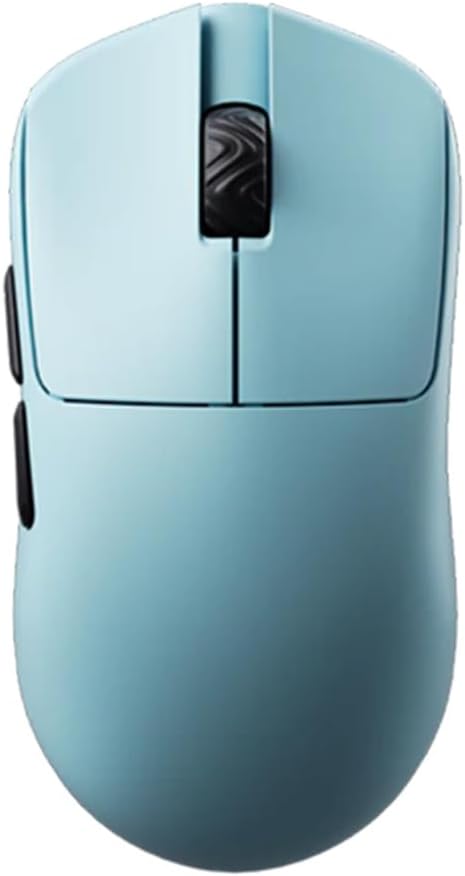

The Lamzu Atlantis Mini Champion Edition stands out as the top choice for claw grip users with small hands. Its rating reflects strong performance in precision and comfort during extended gaming sessions.
We may earn a commission when you buy through this link, at no additional cost to you.
This mouse features a 30000 DPI PAW3950 sensor and dust-proof encoder for reliable tracking. The optical switches offer quick response and tactile feedback without wear over time.
While the price is higher than average, the build quality and wireless performance justify the investment. The symmetrical design ensures finger comfort without cramps even after hours of use.
Ideal for competitive gamers seeking premium wireless reliability in a small form factor. Choose this if you value sensor accuracy and lightweight comfort above all else.
The PAW3950 sensor delivers accurate tracking and low latency for competitive play.
Symmetrical hourglass design prevents finger cramps and supports claw grip naturally.
We may earn a commission when you buy through this link, at no additional cost to you.
The Gwolves Skoll Mini offers exceptional value for claw grip gamers on a budget. With a strong rating and lightweight design it delivers comfort without breaking the bank.
We may earn a commission when you buy through this link, at no additional cost to you.
Weighing just 50 grams this mouse reduces wrist strain effectively. The 3389 sensor provides consistent tracking and PTFE skates ensure smooth movement across surfaces.
The honeycomb shell keeps weight minimal but may trap dust requiring regular cleaning. Despite this trade-off it remains one of the most accessible ultralight options available.
Perfect for casual and semi-competitive players needing an ergonomic wired mouse. Select this model for affordable precision and comfort in small-handed setups.
Budget-friendly pricing combines with 50 gram weight for accessible ergonomic performance.
PTFE skates ensure low friction for fluid cursor control during games.
We may earn a commission when you buy through this link, at no additional cost to you.
The Bloody V7 Ergonomic is a classic claw grip option suited for macro-heavy workflows. It features robust software support and a reliable build for demanding tasks.
We may earn a commission when you buy through this link, at no additional cost to you.
Its eight programmable buttons allow complex scripting and automation. The adjustable report rate offers flexibility for different responsiveness needs across gaming and work.
While DPI and weight lag behind newer models the rubberized grip provides stability and comfort. This mouse prioritizes function over lightweight aesthetics for specialized users.
Ideal for streamers or workers requiring extensive macro capabilities. Choose this if macro flexibility and durable build outweigh sensor specs.
Advanced software supports detailed scripting for productivity and gaming macros.
Rubberized coating ensures consistent grip and reduces slippage over time.
We may earn a commission when you buy through this link, at no additional cost to you.
The Pulsar X3 LHD Crazylight redefines lightweight gaming with its 43 gram frame. This premium model delivers elite performance in a uniquely ergonomic hybrid shape.
We may earn a commission when you buy through this link, at no additional cost to you.
Featuring the XS-1 sensor and optical switches it ensures speed and reliability. The DOT skates enhance glide and precision on various surfaces for competitive accuracy.
Although priced at a premium its durability and speed justify the cost for enthusiasts. The hybrid design offers comfort whether you rest palm or fingers during sessions.
Best for left-handed gamers or those prioritizing featherlight performance. Select this mouse for high-speed accuracy and innovative build quality.
At 43 grams it reduces fatigue and increases movement speed significantly.
Optical switches minimize accidental double clicks for consistent input.
We may earn a commission when you buy through this link, at no additional cost to you.
The Pulsar X2H mini Wireless offers solid performance for claw users needing cable freedom. It balances weight and wireless reliability with a strong Nordic MCU backend.
We may earn a commission when you buy through this link, at no additional cost to you.
Its PAW3395 sensor tracks accurately at 26000 DPI. The optical switches and dust-proof encoder ensure consistent clicks even during intense gaming periods.
Battery life is exceptional at 100 hours reducing charging frequency. The elevated rear hump adds stability for aggressive claw grips effectively.
Ideal for gamers seeking reliable wireless in a small form factor. Pick this for balanced performance without needing a wired connection.
Up to 100 hours ensures uninterrupted gameplay between charges.
Nordic MCU provides fast processing and precise battery status readings.
We may earn a commission when you buy through this link, at no additional cost to you.
The Corsair IRONCLAW Wireless SE is designed for larger hands seeking ergonomic support. While not optimized for small hands it offers unmatched battery life and features.
We may earn a commission when you buy through this link, at no additional cost to you.
With 26K DPI and ten programmable buttons it handles complex tasks efficiently. iCUE software provides deep customization for macros and lighting preferences.
Battery life exceeds many competitors with 285 hours on 2.4GHz. The asymmetric shape may feel oversized for smaller palms but offers palm comfort.
Best suited for users prioritizing customization over compact ergonomics. Consider if your hand size accommodates its larger chassis comfortably.
Long runtime allows extended usage without frequent recharging needs.
Ten buttons and software support allow tailored gaming profiles.
We may earn a commission when you buy through this link, at no additional cost to you.
The V8 Gaming Mouse brings ultra-light performance with its 36 gram frame. It is ideal for claw and fingertip grip styles requiring maximum speed.
We may earn a commission when you buy through this link, at no additional cost to you.
Powered by PAW3950 sensor and Kailh optical switches it ensures quick precise responses. The web-based driver allows adjustments without traditional software installation.
Symmetrical shape fits multiple hand sizes comfortably. The Nordic MCU supports efficient processing for responsive wireless gameplay.
Great for competitive players who prefer minimal weight and balanced shape. Choose this for lightweight agility and straightforward configuration options.
Browser-based settings adjustment simplifies setup without extra software.
Balanced design supports both claw and fingertip grip styles well.
We may earn a commission when you buy through this link, at no additional cost to you.
The Pulsar X2H Wireless combines ergonomic stability with wireless precision. Its narrow waist supports claw grip effectively for accurate control.
We may earn a commission when you buy through this link, at no additional cost to you.
Optical switches and direct wheel clicks provide consistent tactile feedback. The Nordic MCU ensures long battery life and stable connectivity during sessions.
While robust it may feel large compared to mini models. However the comfort during extended use is significant for many users.
Ideal for players prioritizing ergonomic shape and reliable wireless. Select if you prefer a secure hold over compact size.
Narrow waist offers stability and support for claw grip users.
Nordic MCU ensures low latency and responsive input performance.
We may earn a commission when you buy through this link, at no additional cost to you.
The V6 Gaming Mouse delivers a sleek seamless design without holes. Its 40 gram weight reduces fatigue while maintaining precise control for claw users.
We may earn a commission when you buy through this link, at no additional cost to you.
Concave buttons naturally fit fingers for clear positioning and better control. The PAW3950 sensor ensures stable tracking and low latency during competitive play.
Symmetrical shape adapts well to different hand sizes. The web driver keeps configuration simple and accessible across devices.
Best for gamers who prefer clean aesthetics and ergonomic buttons. Choose this for reliable performance and comfortable tactile feedback.
Ergonomic concave shape improves finger positioning and click consistency.
No-hole design reduces dust ingress and simplifies cleaning.
We may earn a commission when you buy through this link, at no additional cost to you.
The BenQ Zowie S2-C is a professional choice designed specifically for small hands. It offers plug-and-play simplicity without driver software.
We may earn a commission when you buy through this link, at no additional cost to you.
Its symmetrical shape works with palm and claw grips for comfort. The paracord cable reduces drag for smoother movement across surfaces.
Matte black finish ensures consistent grip during intense gaming. Sensor settings adjust via hardware DPI buttons for quick customization.
Ideal for pros or minimalists who value reliability. Pick this for dependable wired performance and ergonomic design.
No driver installation needed reduces setup time for users.
Flexible cable minimizes drag for fluid movement during games.
We may earn a commission when you buy through this link, at no additional cost to you.
Choosing the right claw grip mouse requires attention to ergonomics sensor performance and weight. This section explains the key factors to consider.
The mouse shell must accommodate small hands with a hump that supports fingers without forcing palm contact. Symmetrical or hybrid designs often work best for claw users.
Prioritize models with curved tops to prevent finger fatigue during long sessions.
A high-quality optical sensor ensures accurate tracking and low latency. Look for PAW3395 or PAW3950 sensors for competitive performance and consistent DPI accuracy.
Higher DPI allows precise aiming but adjust sensitivity to your hand motion.
Lightweight designs reduce wrist strain and enable faster movements. Aim for 50 grams or less if you use claw grip frequently.
Ensure the build uses durable materials like reinforced shells to withstand daily use.
Optical switches offer faster response and longer life than mechanical alternatives. This ensures consistent clicks without accidental double tapping.
Choose optical switches for reliability during competitive or rapid input tasks.
Wireless mice with Nordic MCUs provide lag-free performance comparable to wired models. For wired options check for paracord cables to minimize drag.
Verify polling rates of 1000Hz or higher for minimal input delay.
Claw grip users need mice that support arching fingers while keeping palms elevated. Avoid overly flat or asymmetrical shapes meant for palm grips.
Test the mouse physically or review dimensions to ensure it matches your hand size.
Look for dust-proof encoders and strong wheel mechanisms to avoid long-term issues. A one-year warranty or more adds security for expensive hardware.
Invest in mice from reputable brands with proven track records for reliability.
Some models require drivers for macros and lighting. Others support web-based or driverless setups for simpler configuration.
Decide if you need advanced customization or prefer plug-and-play simplicity.
Position the mouse so your fingertips rest on the buttons while your palm lightly touches the rear hump. This prevents strain and improves control.
Clean the shell regularly with a dry cloth to remove dust and oils that reduce grip. Avoid liquids near the sensor or switches.
Update firmware and drivers when available to maintain performance. Store the mouse in a cool dry place when not in use.
A claw grip mouse should have a hump or curved top that supports arched fingers without resting the palm. Symmetrical or hybrid designs typically fit small hands best.
Yes lightweight mice reduce wrist strain and allow quicker movements essential for claw users. Aim for models under 50 grams for best performance.
Optical switches provide faster response and longer durability than mechanical switches. They reduce accidental double clicks which is vital during intense gameplay.
Most large ergonomic models may cause discomfort for small hands. Choose mice explicitly labeled mini or small size for better ergonomic fit.
High-quality sensors like PAW3395 ensure accurate tracking and low latency. This is critical for fast-paced FPS games requiring precise cursor movements.
Wireless with modern Nordic MCUs offers lag-free performance. However wired paracord cables provide consistent power if weight is a major concern.
DPI settings vary by preference but 800 to 3200 is common for claw users. Adjust based on your screen resolution and hand movement style.
This guide highlights top models balancing ergonomics performance and comfort for small-handed claw users. The Lamzu Atlantis Mini and Gwolves Skoll Mini offer outstanding value and precision.
Focus on ergonomic shape sensor quality and weight when deciding. These factors directly influence comfort and performance during extended gaming sessions.
Always verify current pricing and availability before purchasing. Small variations in features may change your best choice based on new product releases.