
GOLDENMATE 2000VA/1600W Lithium UPS Battery Backup & Surge Protector, White
4.4Editor score
LiFePO4 Battery Technology
2000VA Pure Sine Wave
Integrated Battery Management System
Discover the top battery backup for workstation PC options comparing capacity waveform type and reliability to protect your critical data from power outages.
Protecting your workstation from power fluctuations is essential for maintaining productivity and data integrity. A reliable battery backup ensures your systems stay online during outages preventing unsaved work loss and hardware damage from surges.
We evaluated ten leading UPS models based on performance ratings and features suitable for professional workstations. Our analysis considers waveform quality outlet configuration and warranty coverage to help you find the right power protection solution.
Each selection highlights key specifications and real-world performance metrics to guide your decision. Keep in mind that product availability and pricing may vary over time so verify current details before purchasing your ideal backup system.
4.4Editor score

4.5Editor score

4.7Editor score
This side-by-side comparison highlights the key specifications and features of each selected battery backup model to help you evaluate capacity waveform types and protection levels.




The CyberPower CP1500PFCLCD stands out as a top choice for workstation protection with its true PFC Sinewave output ensuring compatibility with modern power supplies. It holds a strong 4.5 rating from users who appreciate its robust build and reliable performance during outages.
We may earn a commission when you buy through this link, at no additional cost to you.
Its 1500VA capacity supports demanding workstation setups while the 12 outlets provide ample space for monitors and peripherals. The color LCD panel offers real-time monitoring of battery life and load conditions helping you manage power efficiently.
While the price is higher than entry-level models the investment is justified by the extended warranty and equipment guarantee. The weight and size may be a consideration for smaller desks but the protection benefits outweigh these trade-offs.
This UPS is ideal for professionals who need guaranteed power quality for critical workstations. Its combination of high capacity and detailed monitoring makes it a reliable partner for maintaining uptime.
The PFC Sinewave output ensures smooth power delivery compatible with active PFC power supplies found in modern workstations.
The color LCD display provides immediate alerts and detailed battery status helping you anticipate issues before they cause downtime.
We may earn a commission when you buy through this link, at no additional cost to you.
The CyberPower CP1500AVRLCD3 delivers solid performance for workstations needing reliable battery backup power. With a 4.5 rating it is trusted by users for safeguarding critical equipment during unexpected power fluctuations.
We may earn a commission when you buy through this link, at no additional cost to you.
Its 1500VA rating supports substantial loads while the simulated sine wave provides adequate power for most conventional setups. The color LCD panel keeps you informed about battery health and runtime estimates.
While it lacks true sine wave output the AVR feature helps correct voltage fluctuations without draining the battery. This balances cost and protection well for users who do not require premium waveform quality.
Choose this model for versatile protection with ample outlets and clear monitoring. It suits general office workstations where budget efficiency meets dependable uptime requirements.
With 12 outlets you can connect multiple peripherals and devices ensuring comprehensive protection for your entire workstation setup.
The multifunction color LCD panel displays detailed battery and power conditions keeping you informed about system readiness.
We may earn a commission when you buy through this link, at no additional cost to you.
The CyberPower EC850LCD introduces eco-conscious features with its ECO mode that shuts off power to peripherals when the computer is idle. It earns a 4.4 rating for efficiency and reliable protection for smaller workstations.
We may earn a commission when you buy through this link, at no additional cost to you.
This model balances power savings with safety offering six backup outlets and six surge-only outlets. The LCD panel provides clear status updates ensuring you are aware of power conditions at all times.
ECO mode reduces energy consumption which can lower costs over time. However the 850VA capacity is better suited for lighter loads compared to higher capacity models in this roundup.
Ideal for users prioritizing energy efficiency this UPS offers solid protection with smart power management features. It works well for standard office setups where saving energy is a key goal.
The ECO mode automatically cuts power to connected peripherals when the main device is off reducing unnecessary energy usage.
The multifunction LCD panel provides immediate detailed information on battery and power conditions for easy monitoring.
We may earn a commission when you buy through this link, at no additional cost to you.
The CyberPower CP1000PFCLCD offers a compact solution with true PFC Sine Wave output for sensitive workstation equipment. It has a 4.2 rating reflecting its reliability for moderate power needs and space-saving design.
We may earn a commission when you buy through this link, at no additional cost to you.
Its 1000VA capacity is sufficient for single monitor setups while the 10 outlets provide room for essential devices. The color LCD panel ensures you can monitor power conditions at a glance.
While the outlet count is lower than some models the true sine wave output ensures compatibility with high-end power supplies. The compact footprint makes it ideal for limited desk spaces.
Select this model for smaller workstations needing reliable power quality without occupying too much space. It balances performance and footprint effectively for personal office environments.
The compact form factor fits easily into tight desk spaces while still delivering essential power protection.
PFC Sine Wave output ensures compatibility with active power supplies protecting sensitive electronics from power quality issues.
We may earn a commission when you buy through this link, at no additional cost to you.
The CyberPower AVRG900LCD earns a high 4.6 rating for its dependable performance and added data line protection features. It serves as a budget-friendly option for basic workstation protection needs.
We may earn a commission when you buy through this link, at no additional cost to you.
Its 900VA capacity supports standard office equipment while the 12 outlets accommodate multiple devices. The data line protection adds a layer of security against surges in communication lines.
Simulated sine wave output works well for conventional power supplies but may not suit all advanced workstations. The AVR feature helps maintain stable voltage without unnecessary battery discharge.
This model is suitable for users seeking essential protection with strong ratings and value. It fits well in home offices where data and power safety are priorities.
Built-in data line protection prevents power surges from damaging connected network and telephone equipment.
Automatic Voltage Regulation corrects minor fluctuations ensuring consistent power without draining the battery prematurely.
We may earn a commission when you buy through this link, at no additional cost to you.
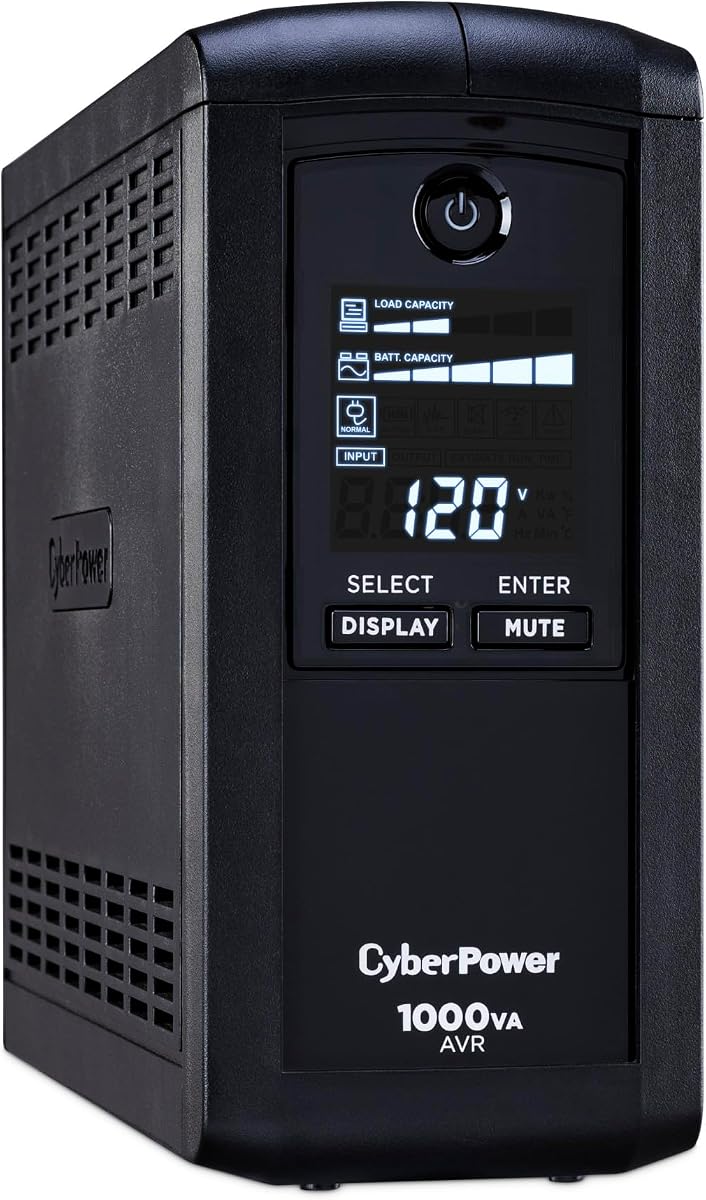
The CyberPower CP1000AVRLCD provides reliable protection with a 1000VA capacity and clear LCD status reporting. It holds a 4.5 rating indicating user satisfaction with its performance during power events.
We may earn a commission when you buy through this link, at no additional cost to you.
Nine outlets offer flexibility for connecting multiple devices while the LCD panel provides estimated runtime and load capacity details. AVR helps maintain power stability during minor grid fluctuations.
While it uses simulated sine wave it remains suitable for many conventional workstation configurations. The connected equipment guarantee offers added peace of mind for critical hardware.
Choose this UPS for balanced performance and monitoring capabilities. It is a practical choice for general office workstations needing consistent power backup.
The multifunction LCD panel displays estimated runtime and load capacity helping you manage power usage during outages.
Automatic Voltage Regulation reduces battery usage during minor fluctuations extending the overall lifespan of the internal battery.
We may earn a commission when you buy through this link, at no additional cost to you.
The GOLDENMATE 2000VA stands out with its LiFePO4 battery technology offering over ten years of lifespan. It has a 4.4 rating reflecting strong performance and value for long-term power protection.
We may earn a commission when you buy through this link, at no additional cost to you.
Its 2000VA pure sine wave output supports demanding workstations while the 8 outlets provide ample connectivity. The USB charging ports add convenience for mobile devices during outages.
The lithium battery reduces long-term replacement costs and maintenance needs. However the unit is heavier than lead-acid models which may impact mobility and placement options.
Ideal for users seeking a long-life solution this UPS combines capacity and advanced battery tech. It suits professional environments where reliability and reduced maintenance are valued.
LiFePO4 battery technology ensures over 3000 charge cycles and ten years of reliable performance without frequent replacements.
Pure sine wave output ensures compatibility with sensitive workstation electronics providing clean and stable power.
We may earn a commission when you buy through this link, at no additional cost to you.
The CyberPower ST900U offers a slim profile design suitable for tight spaces while maintaining essential protection features. It has a 4.5 rating for reliability and efficiency in basic power backup scenarios.
We may earn a commission when you buy through this link, at no additional cost to you.
Its 900VA capacity handles moderate loads and the 12 outlets include wide spacing for larger plugs. GREENPOWER design reduces overall power consumption improving efficiency during standby.
As a standby UPS it switches to battery during outages but may not handle sensitive equipment as smoothly as line-interactive models. It remains a solid choice for general office use.
This model is perfect for users prioritizing space efficiency and cost. It provides reliable backup for standard workstations without occupying excessive desk real estate.
The slim design allows placement in tight spots while still delivering essential battery backup protection for critical devices.
High efficiency design reduces power consumption during normal operation lowering electricity usage over time.
We may earn a commission when you buy through this link, at no additional cost to you.
The CyberPower CP850AVRLCD provides essential protection with a compact footprint and clear LCD monitoring. It earns a 4.5 rating for dependable performance in entry-level workstation environments.
We may earn a commission when you buy through this link, at no additional cost to you.
Its 850VA capacity suits basic single-computer setups while nine outlets allow peripheral connections. The LCD panel displays runtime and battery status helping you track power availability.
While lower capacity limits use for high-end workstations it remains effective for standard tasks. AVR helps correct voltage fluctuations protecting your system from minor power issues.
Select this for simple backup needs where space and budget are key. It offers reliable protection for everyday workstation use without unnecessary complexity.
A small footprint fits easily in constrained spaces while still delivering essential battery backup protection for critical devices.
The multifunction LCD panel provides detailed battery and power conditions for easy management and monitoring.
We may earn a commission when you buy through this link, at no additional cost to you.
The CyberPower BRG1500AVRLCD2 earns the highest 4.7 rating and a five-year warranty for premium power protection. It is designed for professionals needing robust features and extended support.
We may earn a commission when you buy through this link, at no additional cost to you.
Its 1500VA capacity supports heavy workstation loads and the color LCD offers detailed monitoring. Remote management compatibility allows networked power control when paired with optional cards.
The extended warranty and equipment guarantee provide long-term value and reliability. However the optional management cards add to the total cost if you need networked features.
Ideal for demanding environments this model offers top-tier performance and support. It suits mission-critical workstations where reliability and long-term service are paramount.
A five-year warranty covers both the unit and battery offering long-term protection and peace of mind for critical systems.
Optional management cards enable remote monitoring and control ideal for IT environments requiring centralized power oversight.
We may earn a commission when you buy through this link, at no additional cost to you.
Selecting the right battery backup requires evaluating capacity waveform and features that match your workstation needs.
Power capacity measured in VA and watts determines how much load the UPS can support during an outage. Ensure the VA rating exceeds your workstation total wattage to maintain sufficient runtime.
Choose a UPS with capacity that allows safe shutdown or continued operation for your critical needs.
Pure sine wave outputs are required for active PFC power supplies to ensure compatibility and prevent damage. Simulated sine wave works for conventional supplies but may cause issues with some workstations.
Verify your power supply requirements before selecting a sine wave type to avoid compatibility problems.
Lithium batteries offer longer life and faster charging than traditional lead-acid types but may cost more upfront. Consider total cost of ownership including replacement frequency when evaluating battery chemistry.
Opt for models with long life batteries to reduce maintenance and replacement needs over time.
Sufficient outlets ensure you can connect all essential devices without using extra extension strips. Check the ratio of battery backup to surge-only outlets based on your peripheral needs.
Choose a unit with enough outlets and spacing to accommodate your workstation setup comfortably.
LCD panels provide real-time data on battery health and load which helps manage power during outages. Color displays often show alerts and detailed status compared to basic indicators.
Prioritize clear monitoring features to maintain awareness of power conditions and battery status.
A longer warranty period often indicates higher product reliability and manufacturer confidence in the unit. Connected equipment guarantees protect your hardware from damage caused by power failures.
Check warranty terms and connected equipment coverage to ensure long-term protection for your investment.
AVR corrects minor power fluctuations without draining the battery extending battery life during brownouts. This feature maintains stable voltage without switching to battery mode unnecessarily.
Look for AVR functionality to enhance battery longevity and protect equipment from voltage issues.
Free software allows automatic shutdown during outages preventing data loss when you are away. Networked management options are valuable for multi-system environments requiring centralized control.
Ensure the UPS includes compatible software for safe shutdown and remote monitoring if needed.
Connect your workstation and peripherals to the battery backup outlets immediately after setup. Ensure all devices are securely plugged in and the UPS is powered on to begin charging the battery.
Test the system periodically by unplugging the power cord to verify it switches to battery mode. This ensures your UPS functions correctly when you need it most during unexpected outages.
Avoid placing the UPS in direct sunlight or humid areas to extend its lifespan. Regularly clean the exterior vents to prevent dust buildup that could cause overheating during operation.
Determine your total wattage by checking your power supply and peripheral specs. Choose a UPS with VA rating at least 25 percent higher than your total wattage to ensure safe shutdown and sufficient runtime.
Yes for modern workstations with active PFC power supplies pure sine wave is recommended. Simulated sine wave can cause noise or shutdowns in high-end systems requiring clean power output.
Runtime depends on the load and battery capacity. Basic models may last 10 minutes while higher capacity units can extend up to 30 minutes allowing safe shutdowns and continued work.
Yes connecting your monitor ensures display continuity during outages. Ensure the combined load of PC and monitor does not exceed the UPS total wattage capacity for safe operation.
Yes most UPS units include surge protection that diverts excess voltage away from connected devices. Always check the joule rating to ensure adequate protection for your sensitive electronics.
Monitor battery status via the LCD panel or software for low battery warnings. Replace the battery every 3 to 5 years or when runtime decreases significantly to maintain protection.
The top selections provide diverse options ranging from energy-efficient models to high-capacity premium systems. Choose based on your capacity needs and budget to find the right balance for your workstation.
Prioritize features like pure sine wave and AVR if you run advanced systems. Ensure your selection includes adequate outlets and monitoring tools to manage power effectively.
Verify current product availability and specifications before purchasing since offerings may change. Investing in a reliable battery backup protects your data and hardware from power-related disruptions.