
ASRock DeskMini X300 2.5G Series 1.92L Mini PC Barebone Kit
4.2Editor score
AM4 socket support
Triple display outputs
Compact 1.92L size
Explore top barebone PCs with AMD processors comparing performance cooling and expandability for gaming and work in this comprehensive expert guide.
Finding the right barebone PC with AMD processors means balancing power and flexibility. These units offer strong Ryzen chips and expandable slots for RAM and storage without the extra cost of pre-installed components.
We evaluated ten real models based on their CPU capabilities connection ports cooling systems and real-world use cases. This list covers compact desktops NAS-ready systems and gaming-focused kits for different needs.
Each pick shows key specs pros and cons to help you choose quickly. Remember that availability and terms change over time so check current listings before finalizing your order.
4.2Editor score

4.0Editor score

3.1Editor score
This side-by-side comparison highlights key specs and unique traits across all ten AMD barebone mini PCs to help you pick the right fit for your workflow and budget.





The AOOSTAR MACO is a high-end barebone mini PC that pairs an AMD Ryzen 7 PRO 8845HS with Radeon 780M graphics. It rates solid among enthusiast setups for its powerful CPU and advanced connectivity options.
We may earn a commission when you buy through this link, at no additional cost to you.
Its standout trait is the OCuLink port which allows external GPU connections with lower latency than USB4. The chassis uses recycled aluminum and a vapor chamber cooler for efficient heat management under load.
You must add DDR5 RAM and M.2 NVMe storage yourself but the dual slots offer flexible expansion up to 128GB RAM and 16TB storage. Fingerprint unlock adds security while dual 2.5G LAN supports redundant networks.
Power users who want desktop performance in a compact frame should choose this model. It suits gamers and content creators needing fast AI rendering and multi-threaded workloads without building a tower.
OCuLink provides 64Gbps bandwidth directly to PCIe lanes allowing external GPUs like RTX 4070 to work with near-native performance.
The 100 percent recycled aluminum chassis and VC heat spreader reduce carbon impact while keeping fan noise low during heavy tasks.
We may earn a commission when you buy through this link, at no additional cost to you.
The AOOSTAR GEM12+ is a versatile barebone mini PC built around the AMD Ryzen 7 PRO 8845HS. It stands out for its quad 4K display capability and strong external GPU support via OCuLink.
We may earn a commission when you buy through this link, at no additional cost to you.
Its vapor chamber cooling keeps temperatures stable during long gaming or editing sessions. You can choose between Silent Balanced or Performance BIOS modes to match your noise or speed preference.
Like most barebones it needs DDR5 RAM and M.2 NVMe drives installed separately. The dual M.2 slots allow up to 8TB storage for media and game libraries.
Users who need multiple screens or plan to add a desktop GPU will value this model. It balances compact size with serious connectivity and thermal performance for home or office use.
With HDMI2.1 DP1.4 and dual USB4 ports this unit can drive four independent 4K displays for high-resolution workflows.
Its VAT power-saving design reduces energy use by 5 to 20 percent compared to standard mini PC architectures.
We may earn a commission when you buy through this link, at no additional cost to you.
The AOOSTAR GEM12+ PRO shares most specs with the GEM12+ but adds fingerprint unlock for faster secure access. It remains a strong barebone option for hybrid gaming and office tasks.
We may earn a commission when you buy through this link, at no additional cost to you.
Its vapor chamber cooling system manages heat well during long sessions. The OCuLink port allows external GPU connections with minimal performance loss for graphics-heavy workflows.
Dual DDR5 SO-DIMM slots and two M.2 NVMe slots offer flexible memory and storage upgrades. You must buy RAM drives and Windows separately to complete the system.
Security-focused users who want a compact desktop with external GPU support will appreciate this model. It delivers balanced performance for work creative tasks and casual gaming.
Built-in fingerprint recognition bypasses complex passwords and grants instant access to your desktop environment.
Dedicated software lets you monitor CPU GPU and RAM stats or set custom backgrounds on the front panel.
We may earn a commission when you buy through this link, at no additional cost to you.
The ASRock DeskMeet X300 is a barebone mini PC designed for users who want full desktop PCIe expansion. It supports AMD AM4 socket CPUs up to Ryzen 5000 and includes a 500W power supply.
We may earn a commission when you buy through this link, at no additional cost to you.
Its 3.0 x16 slot lets you add full-size graphics cards or capture devices unlike many mini PCs with only external ports. Dual M.2 slots and SATA options allow versatile storage layouts.
This unit is larger at 8 liters but still compact compared to towers. You need to provide DDR4 memory Ryzen CPU and drives separately before first boot.
Enthusiasts who need internal GPU upgrades or legacy D-Sub VGA will find this model ideal. It offers desktop flexibility in a smaller footprint with solid build quality.
A full PCIe 3.0 x16 slot accepts standard graphics cards for gaming or compute without external docks.
Support for Ryzen 2000 through 5000 G-Series lets you choose CPUs based on budget or wattage needs.
We may earn a commission when you buy through this link, at no additional cost to you.
The MINISFORUM X1 Lite-255 is a cost-effective barebone mini PC powered by the AMD Ryzen 7 255. It delivers strong multi-threaded performance and includes OCuLink support for external graphics.
We may earn a commission when you buy through this link, at no additional cost to you.
Its Wi-Fi 6e and 2.5G LAN ensure fast reliable networking for large file transfers or online gaming. Triple display outputs let you set up triple monitors for multitasking.
This unit ships without DDR5 RAM or M.2 NVMe drives but offers dual slots each supporting up to 4TB SSDs. The chassis uses PCM phase-change fans for efficient cooling.
Budget buyers who want modern specs without paying premium prices should consider this model. It works well for office work home media or light gaming after basic setup.
OCuLink support lets you attach compatible external GPU docks for better graphics performance when needed.
HDMI 2.1 USB4 and DP1.4 ports can each drive 4K outputs allowing a wide multi-monitor setup.
We may earn a commission when you buy through this link, at no additional cost to you.
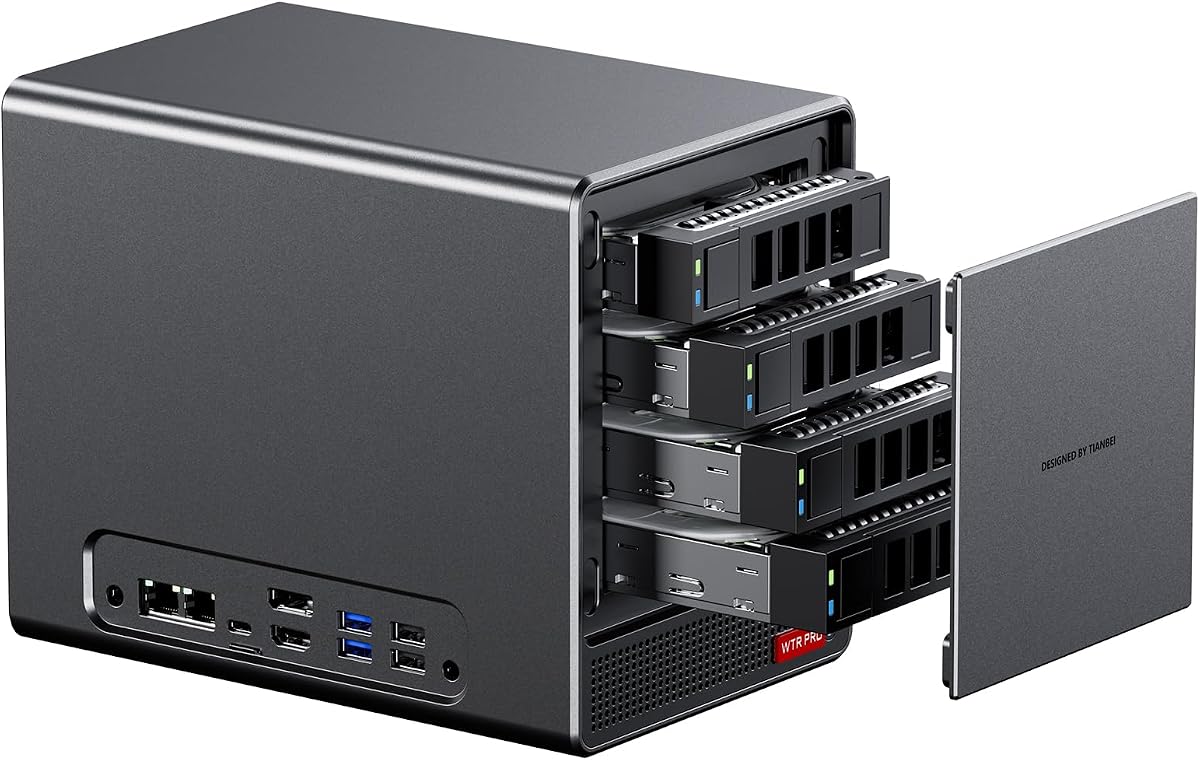
The AOOSTAR WTR PRO is a barebone NAS-ready mini PC with an AMD Ryzen 7 5825U and four 3.5-inch drive bays. It supports up to 88TB total storage and runs efficiently on low power.
We may earn a commission when you buy through this link, at no additional cost to you.
Its through-wall construction and 12cm fan keep noise low during 24/7 use. Dual 2.5G LAN ports offer fast network links or redundancy for file servers.
You must install DDR4 memory and M.2 NVMe drives separately. The chassis supports SATA and NVMe drives for flexible storage layouts and RAID configurations.
Home users who want a quiet reliable file server or media center should choose this model. It balances expandability with energy efficiency and silent operation.
Four 3.5-inch bays and two M.2 NVMe slots allow up to 88TB combined storage for large archives.
Its low power draw of 15 to 25 watts makes it practical for continuous uptime without high electricity costs.
We may earn a commission when you buy through this link, at no additional cost to you.
The ASRock DeskMini X300 is a compact barebone mini PC built around AMD AM4 socket CPUs. It is one of the smallest units available with triple display support and modern 2.5G LAN.
We may earn a commission when you buy through this link, at no additional cost to you.
Its 1.92-liter chassis fits easily in tight spaces. You can install DDR4 memory up to 128GB and two M.2 NVMe drives for fast storage.
This kit lacks CPU memory and storage so you must buy them separately. The M.2 Key-E slot allows Wi-Fi module addition for wireless connectivity.
Users needing an ultra-small office or media PC with strong AM4 compatibility should pick this model. It offers solid performance in the smallest footprint.
At 1.92 liters this mini PC fits behind monitors or in small cabinets without sacrificing core features.
Triple display support via HDMI DisplayPort and VGA lets you connect three screens for wider workflows.
We may earn a commission when you buy through this link, at no additional cost to you.
The ASUS ExpertCenter PN54 is a premium barebone mini PC with AMD Ryzen AI 300 Series processors and Wi-Fi 7. It is the thinnest unit on this list at 0.6 liters.
We may earn a commission when you buy through this link, at no additional cost to you.
Its XDNA2 NPU boosts AI tasks by up to 5 times over previous models. Four 4K display outputs and dual 2.5G LANs provide versatile connectivity.
This system ships without memory or storage but uses toolless design for easy upgrades. It supports DDR5 RAM and M.2 drives for full customization.
Professionals who need the fastest AI performance and latest wireless standards should choose this model. It suits business agents and high-end desktop replacements.
The XDNA2 NPU delivers up to 50 TOPS for accelerated local AI tasks and inference workloads.
Wi-Fi 7 and Bluetooth 5.4 ensure future-proof connectivity and low latency for modern networks.
We may earn a commission when you buy through this link, at no additional cost to you.
The AOOSTAR WTR PRO 4+2 Bay NAS Mini PC is a barebone unit optimized for storage and server tasks. It uses an AMD Ryzen 7 5825U and offers six drive bays for up to 96TB total capacity.
We may earn a commission when you buy through this link, at no additional cost to you.
Its silent cooling system and dustproof design suit long-duration server use. Dual 2.5G LAN ports allow fast network access or link aggregation for file transfers.
You must install DDR4 memory and storage drives separately. The chassis supports SATA and NVMe drives with multiple RAID options for data safety.
Users who need large home storage or virtualization should consider this model. It combines expandability with quiet operation and multi-display productivity.
Four 3.5-inch bays plus two M.2 slots let you reach 96TB for backups media or server data.
VT-X and VT-D support plus flexible OS options enable running virtual machines or soft routers.
We may earn a commission when you buy through this link, at no additional cost to you.
The ASUS ExpertCenter PN54-S1 is a compact barebone mini PC with AMD Ryzen 200 Series processors and Wi-Fi 7. It uses a slim 34mm chassis for sleek setups with efficient cooling.
We may earn a commission when you buy through this link, at no additional cost to you.
Toolless design lets you upgrade memory or storage without tools. Four 4K display outputs and dual 2.5G LAN provide strong connectivity for office or light media use.
This model ships without memory or storage so you must buy components separately. It suits workstations needing modern wireless and thin form factors.
Business users who want a compact reliable system with easy access should choose this model. It balances size and performance for daily office workflows.
Toolless case design allows fast memory or storage swaps without opening screws or tools.
The 34mm profile lets this unit slide behind monitors or into tight desk spaces.
We may earn a commission when you buy through this link, at no additional cost to you.
Choosing the right AMD barebone PC requires checking CPU generation memory type storage slots ports and cooling design to match your workload and setup space.
Look for Ryzen 7000 or 8000 series for modern AI performance and PCIe 4.0 support. Eight cores are ideal for multitasking video editing or virtualization.
Newer generations give better efficiency and longer software support. Match core count to your typical workload to avoid over or under buying.
Check if slots support DDR5 and how many M.2 NVMe slots are available. Many barebones allow 128GB RAM and 16TB total storage.
Ensure enough slots for your needs before purchase. More slots mean faster upgrades and less need to swap drives.
OCuLink ports offer lower latency than USB4 for external GPUs. Some units support Thunderbolt 4 instead. Verify power requirements and compatibility with your planned GPU dock.
OCuLink usually needs the PC to power off before plugging in. Plan your eGPU layout accordingly for best results.
Count HDMI DisplayPort and USB4 outputs to match monitor count. Most models support dual or triple 4K setups and some offer four.
Verify refresh rate and color depth support for your work. Higher refresh rates matter for gaming and design tasks.
Vapor chamber or dual-fan designs keep thermal throttling down under load. Quiet operation helps in office or home media use.
Check for large fans and ventilation holes. Better cooling means sustained performance over time.
Dual 2.5G LAN ports provide fast wired links or redundancy. Look for Wi-Fi 6E or Wi-Fi 7 if wireless is needed.
USB counts and types affect peripheral needs. Ensure enough USB4 or USB3.2 ports for external drives and docks.
Some barebones include a 500W PSU allowing internal PCIe cards. Others use external 120W adapters. Choose based on internal expansion needs.
External adapters save space but may limit power. Internal PSUs are better for desktop-class GPU add-ons.
Compact 1.92L models fit anywhere while larger 8L units allow full PCIe expansion. VESA mounts save desk space.
Match size to your shelf or monitor setup. Larger cases dissipate heat better but take more room.
First install compatible DDR4 or DDR5 SO-DIMM modules in the provided slots. Push down firmly until clips lock and confirm BIOS recognizes memory.
Second add one or two M.2 NVMe SSDs using the included screws. Align the notch with the slot and secure with the standoff before booting.
Third connect displays via HDMI or DisplayPort for best stability. For external GPU use OCuLink or USB4 depending on your model and adapter.
No they ship without any OS installed. You must provide a Windows or Linux license and install it yourself using a USB installer or network boot.
Most use DDR5 SO-DIMM up to 5600MHz for Ryzen 7000/8000 series. Older AM4 models support DDR4 up to 3200MHz. Verify exact specs before buying modules.
Only models with PCIe 3.0 x16 slots like ASRock DeskMeet accept internal GPUs. Others rely on OCuLink or USB4 external docks for graphics upgrades.
No OCuLink usually requires powering off the unit before plugging or unplugging the dock. Check your manual for safe connection steps.
Yes several ASUS PN54 models feature Wi-Fi 7 and Bluetooth 5.4. Most other units use Wi-Fi 6 or 6E depending on release date and chipset.
Most barebones allow two M.2 NVMe slots. NAS models add 3.5-inch SATA bays for up to six drives total. Confirm bay count before buying drives.
These ten AMD barebone PCs cover gaming office NAS and AI workloads with strong CPU performance and flexible expansion.
Prioritize OCuLink support if you need external graphics and vapor chamber cooling for quiet high-load use.
Check current availability and warranty terms before ordering since models and stock change regularly.