
Creality Ender 3 V3 SE
3.8Editor score
CR Touch auto leveling
250mm/s print speed
Sprite direct extruder
This guide compares the top auto bed leveling 3D printers for beginners, evaluating speed, build quality, and ease of use to help you choose the right model
Starting your journey into 3D printing can feel overwhelming with so many options available. Finding a machine that simplifies the setup process is crucial for new users who want to focus on creativity rather than calibration. Auto bed leveling technology ensures that the first layer adheres perfectly every time, reducing frustration and failed prints significantly.
We have carefully selected ten models that excel in automation and user friendliness. Each printer in this list offers distinct advantages whether you need speed, precision, or multi color capabilities. Our analysis focuses on real world performance and features that matter most to those just starting out in the hobby.
Every pick includes detailed breakdowns of specifications and practical benefits for daily use. You will find honest assessments of strengths and potential trade offs to help you decide. Remember that prices and availability change frequently so check current listings before making your final purchase decision today.
3.8Editor score

4.3Editor score

4.3Editor score
This side by side comparison highlights the key differences between the top ten models to help you make an informed decision based on your specific needs.


The FLASHFORGE Adventurer 5M stands out as a top choice for beginners seeking speed and reliability. With a rating of 4.3 stars it delivers consistent performance that impresses new users. The standout feature is its fully automatic leveling system which ensures every print starts perfectly.
We may earn a commission when you buy through this link, at no additional cost to you.
Its Core XY motion system allows for acceleration up to 20000 mm/s squared making it one of the fastest printers available. The direct extruder handles various filaments smoothly while the 280 degree nozzle supports high temperature materials. Vibration compensation reduces ghosting effects for sharper details.
While the build volume is standard at 220x220x220mm this limits larger projects. It is an open frame design meaning ventilation is necessary for certain filaments. These trade offs are acceptable given the speed and ease of use it provides for daily printing tasks.
We recommend this printer for anyone wanting to minimize setup time and maximize print output. It balances cost and performance effectively making it ideal for home makers and hobbyists. The robust design ensures long term reliability without requiring constant maintenance or adjustments.
The one click leveling calibrates the bed automatically so you skip manual adjustments entirely.
Accelerate from zero to 600mm/s in just 0.025 seconds for rapid project completion.
We may earn a commission when you buy through this link, at no additional cost to you.
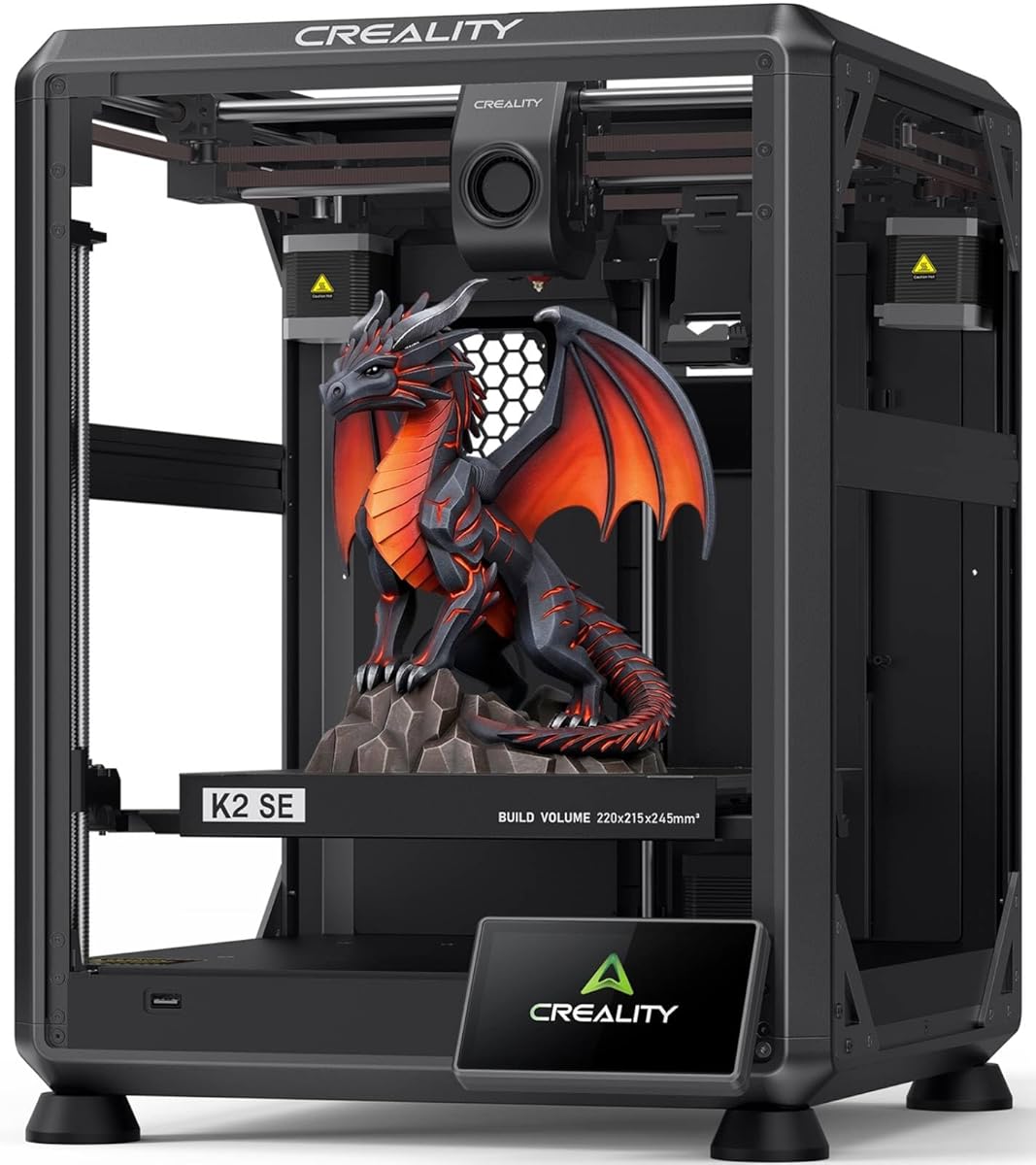
The Creality K2 SE offers a solid foundation for beginners who plan to grow their capabilities. It features a robust metal build that ensures stability during high speed printing. The auto leveling system simplifies the initial setup significantly for new users.
We may earn a commission when you buy through this link, at no additional cost to you.
Its CoreXY motion system paired with input shaping reduces ringing and resonance for better surface quality. The direct drive extruder supports precise filament control and quick nozzle swaps minimize downtime. Compatibility with the CFS system allows for future multi color expansion.
Some users may find the initial configuration requires patience before optimal results. The multi color system is an extra cost which adds to the total investment. These factors are manageable for those who value long term flexibility and performance.
This printer is best suited for learners who want a machine that can evolve with their skills. The large build volume supports various project sizes while the metal frame ensures durability. Consider this if you plan to upgrade functionality over time.
Unlock advanced multi color printing by adding the compatible CFS system later.
Die cast aluminum frame minimizes flex during rapid movement for accurate parts.
We may earn a commission when you buy through this link, at no additional cost to you.
The E-Leveler 2 is a specialized tool designed to simplify bed leveling on manual printers. It provides visual feedback through an LED light that helps you adjust the bed accurately. This is useful for beginners who own older models without auto leveling.
We may earn a commission when you buy through this link, at no additional cost to you.
Its improved design includes a stronger battery holder and simplified nozzle target for easier use. The balancing end cap functions as legs to ensure stability during the leveling process. It works with most manually adjustable print beds except resin or delta types.
This tool is not a printer itself so it complements existing hardware rather than replacing it. Users still need to manually tweak screws based on the LED feedback. It requires patience but delivers accurate results for a fraction of the cost of a new printer.
We suggest this for budget conscious makers who already have a printer needing calibration help. It reduces the frustration of failed first layers by providing reliable feedback. Ensure your printer is compatible before purchasing this specific tool.
The LED light gives immediate visual cues while you adjust the bed knobs.
Designed to work with most printers featuring manually adjustable beds.
We may earn a commission when you buy through this link, at no additional cost to you.
The FLASHFORGE AD5M combines precision with speed through its advanced auto calibration. It measures nozzle to build plate distance accurately to set offsets without manual intervention. This ensures flawless first layers consistently for various print materials.
We may earn a commission when you buy through this link, at no additional cost to you.
Its all metal CoreXY motion structure provides stability during high speed operations. The quick release nozzle system allows you to switch sizes in just seconds. You can choose from 0.25 to 0.8mm diameters to suit your project needs.
While it offers great precision the build volume is standard which may limit large models. As an open frame printer it requires a well ventilated environment for safety. These considerations are minor compared to the reliability and control it offers.
This model is ideal for users who prioritize accuracy and ease of maintenance. The Orca flashforge slicer enhances workflow with network monitoring and batch transmission. It serves both beginners and experts looking for a stress free creative tool.
One click leveling automatically measures offsets for a perfect first layer.
Tool free nozzle swaps happen in as little as three seconds.
We may earn a commission when you buy through this link, at no additional cost to you.
The QIDI Q2 redefines the standard for professional grade home printing. It features a 65C heated chamber and 370C nozzle that unlock high performance filaments. This makes it suitable for engineering parts and functional prototypes alike.
We may earn a commission when you buy through this link, at no additional cost to you.
Its nozzle acts as a leveling sensor for unmatched first layer accuracy. The upgraded 1.5GT belt reduces vibration artifacts for ultra smooth surfaces. AI camera monitoring and power loss recovery ensure reliable results every time.
The advanced materials and chamber increase the cost significantly compared to basic models. It requires careful placement due to filtration needs and heat management. These trade offs are worth it for those needing professional quality prints.
We recommend this for serious hobbyists or educators needing versatility and reliability. The triple filtration system keeps air quality safe for indoor use. It is a powerful choice for anyone ready to invest in top tier performance.
Unlock PPS-CF and other high temp materials with the 370C nozzle.
Nozzle sensor leveling ensures precision unaffected by bed surface variations.
We may earn a commission when you buy through this link, at no additional cost to you.
The FLASHFORGE 5M Pro delivers fast and quiet performance ideal for shared spaces. It includes a low speed silent mode that ensures uninterrupted focus during work. The automatic calibration system ensures a flawless first layer every time.
We may earn a commission when you buy through this link, at no additional cost to you.
Its closed structure with dual filtration optimizes air quality for home or classroom use. The 280C extruder supports a wide range of materials including TPU and ASA. Remote monitoring via the Flash Maker APP adds convenience for management.
The premium features come at a higher cost than standard models. The build size remains standard which may limit large scale projects. These are minor compromises given the focus on user comfort and air safety.
This printer is best for users who need quiet operation and air safety. It supports teaching and bonding activities effectively while maintaining high standards. Choose this if noise and air quality are top priorities for your environment.
Enjoy silent mode for uninterrupted focus during work or study sessions.
Dual filtration blocks 99 percent of particulate matter and VOCs.
We may earn a commission when you buy through this link, at no additional cost to you.
The Creality Ender 3 V3 SE offers excellent value for beginners on a budget. It features CR Touch auto leveling to ensure reliable first layers without manual tweaks. The Sprite direct extruder provides smooth feeding for various filament types.
We may earn a commission when you buy through this link, at no additional cost to you.
Its dual Z axis lead screws reduce wobbling for consistent alignment over time. Assembly is simple with just three steps to complete within twenty minutes. Auto filament loading simplifies material changes for a seamless workflow.
The print speed is lower than premium models which extends project times. It lacks advanced features like heated chambers or multi color support. These trade offs are acceptable for those prioritizing cost and ease of use.
We recommend this for first time buyers seeking a capable entry level printer. It balances performance and affordability to help you start printing quickly. Support is available through Creality for any questions during your journey.
Assembly takes just twenty minutes with three simple steps for rapid start.
The Sprite extruder ensures smooth feeding for PLA TPU and PETG.
We may earn a commission when you buy through this link, at no additional cost to you.
The Creality CR Touch kit adds auto leveling capabilities to compatible older printers. It performs multi point detection to build a virtual plane for accurate compensation. This is an effective solution for updating existing setups without buying new hardware.
We may earn a commission when you buy through this link, at no additional cost to you.
The kit includes mounting brackets and nozzles for straightforward installation. You will need to download and install specific firmware for it to function. Always verify your motherboard version before purchasing to ensure compatibility.
This tool is specific to certain printer models so not universal across all brands. Firmware updates can be daunting for those less tech savvy. However the cost savings compared to a new printer are significant for upgrades.
We suggest this for owners of Ender series printers wanting better accuracy. It extends the life of your current machine with reliable auto leveling. Confirm your board details to avoid compatibility issues during installation.
Multi point detection builds a virtual plane to calculate tilt automatically.
Add auto leveling to your existing printer for a fraction of new cost.
We may earn a commission when you buy through this link, at no additional cost to you.
The FLASHFORGE AD5X enables vibrant multi color prints with up to four colors simultaneously. Its Intelligent Filament System manages spools automatically reducing downtime for users. This allows you to focus on creative designs without worrying about interruptions.
We may earn a commission when you buy through this link, at no additional cost to you.
High speed performance reaches 600mm/s while maintaining quality through the CoreXY structure. Auto leveling ensures perfect first layers for all materials used in multi color projects. The design minimizes vibrations for accurate and smooth prints.
The multi color capability adds complexity and cost compared to single extruder models. Beginners might find the system challenging to configure initially. These are acceptable for those needing artistic variety and functional versatility.
We recommend this for artists and designers wanting colorful models without manual swaps. It supports flexible TPU printing for a wide range of applications. Choose this if multi color output is a priority for your creative workflow.
IFS automatically detects and refills filament for uninterrupted multi color prints.
Create visually stunning models with up to four colors in a single print.
We may earn a commission when you buy through this link, at no additional cost to you.
The Creality Ender 3 V3 SE is designed specifically for a seamless start to 3D printing. CR Touch auto leveling and automatic Z offset calibration simplify the setup process significantly. This reduces manual adjustments and ensures reliable first layers for users.
We may earn a commission when you buy through this link, at no additional cost to you.
It features a proven Sprite direct drive extruder for smooth and consistent feeding. Dual synchronized Z axis lead screws reduce vibration for accurate layer alignment. The 32-bit silent mainboard ensures a comfortable quiet operation experience.
This model prioritizes simplicity over advanced features which may limit customization. The build plate is flexible but requires proper bending to remove prints safely. These factors are acceptable for those seeking straightforward and reliable performance.
We suggest this for absolute beginners who want a printer ready to use quickly. It delivers fast performance without complex setup hurdles. Focus on simplicity and ease of use for your first 3D printer choice.
Assembly and calibration are designed for fast and straightforward completion.
Silent mainboard reduces operating noise for a better user experience.
We may earn a commission when you buy through this link, at no additional cost to you.
Selecting the right 3D printer requires understanding key factors that affect your printing experience and results. This guide breaks down the essential elements to consider before making your investment.
Auto leveling is critical for beginners to avoid failed prints caused by an uneven bed. Look for one click systems that measure offsets automatically using a sensor. This feature saves time and ensures consistent first layers without manual tweaking.
Prioritize printers with proven sensors like CR Touch or proprietary systems for reliability.
Faster printers complete projects more quickly but may compromise quality if not well calibrated. High acceleration rates allow the nozzle to change direction rapidly without losing precision. For beginners a balance around 250mm to 600mm per second is ideal.
Ensure the printer includes vibration compensation to maintain quality at higher speeds.
The build volume determines the maximum size of objects you can print in one go. Standard sizes like 220mm cubes suit most hobby projects while larger ones support functional parts. Choose a size that matches the typical projects you plan to create.
Consider future needs to avoid outgrowing the printer too quickly after purchase.
Direct drive extruders push filament directly into the nozzle which is better for flexible materials. Bowden systems use a tube but may struggle with flexible filaments like TPU. Beginners benefit from direct drive as it handles a wider range of materials effectively.
Look for quick swap options to easily change nozzle sizes for different detail levels.
Check the maximum nozzle temperature to ensure it supports the filaments you want to use. Standard PLA and PETG are easy while ABS requires higher temps and a heated chamber. Multi material support adds versatility but increases complexity and cost.
Start with PLA and upgrade only if specific project requirements demand advanced materials.
Quiet operation is important if you plan to print in shared living spaces. Look for silent motherboards and enclosed designs to reduce sound and odors. Filtration systems help keep air quality safe especially when using materials like ABS.
Safety features like power loss recovery prevent wasted time during long prints.
Beginner friendly printers arrive preassembled to reduce the initial hurdle of construction. Tools should be minimal and assembly steps should be clear in the manual. A quick start guide with a touchscreen interface simplifies calibration significantly.
Choose models with community support and online tutorials for easier troubleshooting.
Set a realistic budget that balances cost with necessary features for your goals. Cheaper printers might lack critical quality controls while expensive ones offer overkill. Focus on value by prioritizing reliability and ease of use over marginal speed gains.
Always check current prices and consider bundles that include essential accessories.
Begin by placing your printer on a stable flat surface away from direct sunlight or drafts. This ensures consistent calibration results and prevents warping during prints. Ensure proper ventilation is available especially if using enclosed models for air safety.
Perform regular maintenance by cleaning the build plate and checking nozzle alignment. Replace worn nozzles as needed to maintain consistent extrusion quality. Keep the firmware updated to access the latest features and performance improvements.
Use high quality filament and store it properly to prevent moisture absorption. Dry your filaments before printing if you notice issues with surface finish. Proper storage and handling will extend the life of both your printer and your prints.
Auto leveling handles the Z offset and bed mapping but may still require minor adjustments depending on the printer. Most modern systems allow you to save offsets so manual steps are rare after initial setup. It significantly reduces calibration effort for daily printing.
PLA is the easiest material to use due to low warping and simple temperature settings. It comes in many colors and is forgiving for new printers learning the basics. Once comfortable you can explore PETG for added durability and flexibility.
Nozzles typically last for several hundred hours of printing depending on the material used. Abrasive filaments like carbon fiber require hardened steel nozzles more often. Check for clogs or inconsistent extrusion to know when a replacement is needed.
While some printers have monitoring features it is best to be present for the first layer. Fire safety and proper adhesion are critical during initial stages. Once the print is stable you can use remote monitoring features if available.
Check that the build plate is clean and the Z offset is saved correctly. Sometimes temperature settings need adjustment based on the specific filament brand. Re-run the calibration process to ensure the sensor reads bed height accurately.
Closed printers offer better temperature stability and safety for advanced materials like ABS. However they cost more and require ventilation for air quality. Beginners often start well with open frame printers using PLA to keep things simple.
We have explored ten top options that simplify the printing process for newcomers. The FLASHFORGE Adventurer 5M leads in speed and precision while the Creality Ender 3 V3 SE offers affordability. Each model provides unique features to match different project needs and budgets.
Prioritize reliability and ease of use over marginal speed gains when choosing. Look for strong support networks and active communities for troubleshooting tips. Investing in quality hardware ensures a smoother journey into 3D printing.
Prices and availability change often so verify current listings before purchasing. Remember to check compatibility with any accessories you plan to add later. With the right printer you can focus on creativity and bring your ideas to life.