
Qanba N3 Drone 2
4.5Editor score
Affordable licensed option
Authentic Qanba components
Includes mic input
This guide compares the top Arcade Stick for PS5 models including HORI, Nacon, and MAYFLASH to help you choose the best fightstick for your setup.
Finding the right Arcade Stick for PS5 can transform your fighting game experience by offering precision control and durability unmatched by standard controllers. Professional players and enthusiasts alike seek devices that mimic real arcade cabinets for competitive edge and comfort during long sessions. With so many options available on the market today choosing the perfect model requires careful consideration of build quality compatibility and features tailored to your needs. This guide explores the leading models designed specifically for PlayStation 5 to ensure you invest in hardware that stands the test of time.
We evaluated ten top-rated arcade sticks based on their compatibility with PS5 titles like Street Fighter 6 and Tekken 8. Our analysis focuses on build quality component quality and user feedback to highlight models that deliver reliable performance in both casual and tournament settings. We considered factors such as button responsiveness joystick smoothness and customization options to provide a comprehensive overview for buyers at any skill level. Each product was reviewed for its official licensing status and ease of use to ensure a seamless gaming experience right out of the box.
Each pick in this list showcases unique strengths whether you prioritize tournament grade performance premium build quality or budget friendly versatility. You will find detailed breakdowns of specifications pros and cons along with buying advice to help you narrow down your choices effectively. Remember that product availability and pricing can change so please check current listings before making your final purchase decision. We aim to provide honest insights so you can select the Arcade Stick for PS5 that best matches your gaming style and preferences.
4.5Editor score

4.6Editor score

4.6Editor score
This table provides a side-by-side look at the key specifications and features of the ten top arcade sticks selected for PS5 compatibility. Use this comparison to quickly identify which model offers the connectivity options component quality and design elements that matter most to your gaming style.




The HORI PlayStation 5 Fighting Stick Alpha stands out as the definitive choice for serious PS5 players seeking reliable and high performance hardware. With a 4.6 star rating from users it has proven itself as a durable and accurate tool for competitive play. The device is officially licensed by Sony which ensures seamless integration with the system and eliminates compatibility concerns during game launches or updates.
We may earn a commission when you buy through this link, at no additional cost to you.
Its standout quality lies in the inclusion of HORI’s proprietary Hayabusa joystick and buttons which offer a crisp and responsive feel essential for executing complex combos and special moves. The top panel opens easily allowing users to swap out internal components or artwork without requiring soldering skills or special tools. This level of customization ensures the stick can grow with your skills and preferences over time without needing a replacement.
While the price is higher than some alternatives the investment pays off in longevity and performance consistency during intense sessions. The build is solid with a heavy base that prevents sliding and the buttons are positioned for ergonomic comfort during long gaming marathons. Some users might wish for more faceplate variety but the included artwork is high quality and fits the aesthetic of most setups well.
This stick is ideal for anyone looking to step up to tournament grade gear without importing from overseas or buying custom builds. It suits players who value reliability precision and official support from the platform holder. For those prioritizing performance and build quality above all else the Alpha remains the benchmark for Arcade Stick for PS5 options in 2026.
The Hayabusa joystick and buttons provide a lightweight and responsive input that rivals traditional arcade cabinets.
Official licensing and solid construction make this stick a reliable choice for competitive events and streaming.
We may earn a commission when you buy through this link, at no additional cost to you.
The Nacon Daija Arcade Fight Stick offers a compelling mix of performance and customization features for players who like to tweak their gear. It is officially licensed for PlayStation and comes with Sanwa joystick and action buttons which are a staple in the fighting game community. This model is designed with collaboration input from pro gamers to ensure it meets the demands of titles like Street Fighter and Tekken.
We may earn a commission when you buy through this link, at no additional cost to you.
One of its strongest points is the full button mapping capability via dedicated software on PC or Mac allowing you to create custom game profiles easily. The textured palm rest provides sturdy support so you can maintain control during long sessions and the joystick heads are swappable to suit your preference for grip and throw distance. It also includes an audio jack for headsets which adds convenience for online play.
However the build quality feels slightly lighter than some premium competitors which might be a concern for those used to heavy sticks. The software mapping tool is powerful but can be unintuitive for beginners and might require some setup time. These trade-offs are acceptable for the price and feature set especially if you value customization over sheer weight.
This stick is a great choice for intermediate players who want to personalize their layout without breaking the bank. It works well for both casual play and serious training due to its responsive inputs. If you prioritize software control and comfort features the Nacon Daija is a strong contender in the Arcade Stick for PS5 category.
Create and save multiple game profiles on your PC to switch layouts instantly when playing different titles.
The textured palm rest and swappable joystick heads ensure you can find the perfect setup for your hands.
We may earn a commission when you buy through this link, at no additional cost to you.
The MAYFLASH F700 Elite takes wireless connectivity to the next level with Bluetooth support making it a versatile option for PS5 and other systems. With a 4.6 star rating it combines premium Sanwa components with modern convenience. This stick is designed for players who want the tactile feel of an arcade cabinet without the hassle of cables cluttering their setup.
We may earn a commission when you buy through this link, at no additional cost to you.
It features premium quality Sanwa buttons and a precision 4-way joystick that deliver reliable instant input. The three connection options Bluetooth 2.4G and wired USB ensure you can play on PS5 Switch and PC seamlessly. An included anti-slip rubber mat helps keep the stick firmly in place during aggressive inputs. The turbo functions with speed settings add depth for training and practice sessions.
The main limitation is that it does not support Xbox consoles so users in that ecosystem will need to look elsewhere. Firmware updates are sometimes needed to enable full compatibility with newer hardware features like Switch 2 support. However these are minor issues for the convenience and performance it offers on supported platforms.
This Elite model is perfect for users who value wireless capability and multi-platform support in a single device. It suits both casual gamers and pros who need consistent performance across different systems. For those looking for a high end Arcade Stick for PS5 with the flexibility to move between devices the F700 Elite is an excellent choice.
Connect via Bluetooth to reduce cable clutter while maintaining the responsiveness needed for competitive gaming.
Sanwa components ensure durability and precision allowing you to strike confidently game after game.
We may earn a commission when you buy through this link, at no additional cost to you.
The Qanba N3 Drone 2 offers an excellent entry point into licensed arcade sticks with a strong focus on value and authenticity. Rated highly by users it is an officially licensed Sony peripheral that delivers solid performance for PS5 and PS4 titles. For gamers looking to transition from controller to stick without spending a fortune this model provides a great balance of quality and price.
We may earn a commission when you buy through this link, at no additional cost to you.
It features authentic Qanba buttons and lever which are known for their durability and tactile feedback. The full control panel includes a touch pad and B30 buttons along with a Qanba OV7 joystick for precise movement. A 3.5mm microphone input with mute control is a handy addition for voice chat during online matches which is often missing in budget options.
While it lacks wireless capabilities the wired connection ensures stable input with no latency concerns. The build feels sturdy enough for daily use though it may not have the heavy base of premium models. Some users might find the joystick stiffness requires a break-in period but this is typical for new sticks of this type.
This stick is ideal for beginners or budget conscious players who want official licensing and reliable components. It works well for local multiplayer and online matches alike. If you need a dependable and affordable Arcade Stick for PS5 the Qanba N3 Drone 2 is a top pick to consider.
Get the feel of premium arcade parts without the high price tag usually associated with custom builds.
Built-in mic input allows you to communicate with teammates without needing a separate headset splitter.
We may earn a commission when you buy through this link, at no additional cost to you.
The MAYFLASH F500 Bundle stands out for its ability to work across multiple consoles including Xbox Series X S and PS5. This makes it a smart choice for households with different systems or players who want one stick for all devices. It comes with MAGICBOOTS-S5 which enables plug and play compatibility with PS5 and PS4 without needing a controller plugged in.
We may earn a commission when you buy through this link, at no additional cost to you.
It supports X input and D input on PC for maximum compatibility with PC fighters. The turbo functions offer different speed settings for practice and online play. While the build is simpler than high end models it gets the job done reliably for most users. Headset output is supported for music and chat on older systems.
The adapter requirement for PS5 might be a minor hassle but the included boots solve this issue effectively. Some users note it is less sturdy than premium options but it holds up well for casual and mid level use. The price point makes it accessible to a wider audience looking for versatility.
This bundle is perfect for gamers who switch between consoles and want a single device for their fighting games. It is also a solid pick for PC users looking for an affordable entry stick. If you need a versatile Arcade Stick for PS5 that plays nice with Xbox and PC the F500 Bundle is worth looking at.
Play on Xbox PS and PC with one device thanks to the included Magic Boots and cable support.
Toggle between input modes on your PC to match the requirements of various Steam and emulator games.
We may earn a commission when you buy through this link, at no additional cost to you.
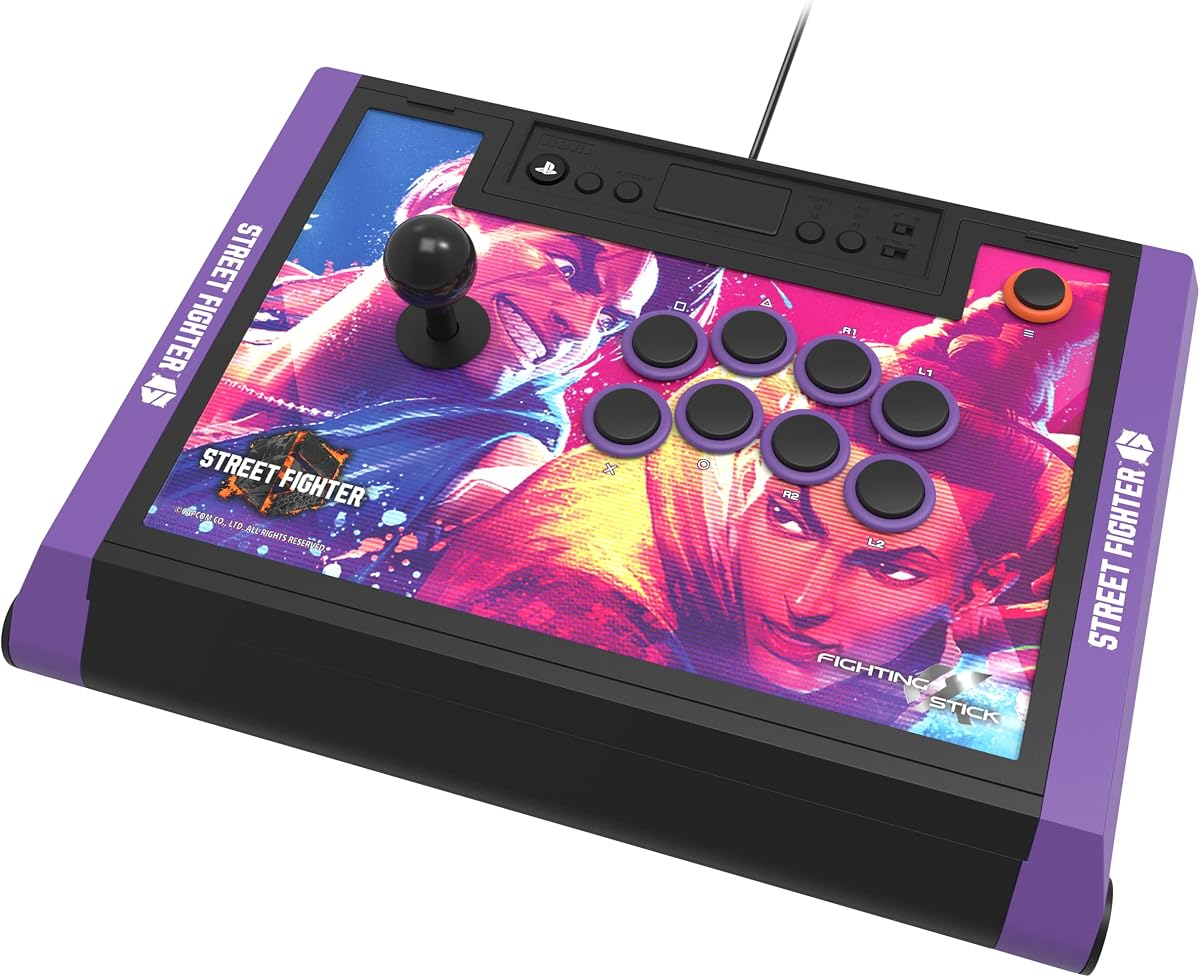
This Street Fighter 6 Edition of the HORI Fighting Stick Alpha brings a visually stunning package to players dedicated to the franchise. It maintains all the high end specs of the standard Alpha including the Hayabusa joystick and buttons for tournament grade performance. The licensed design ensures compatibility with PS5 and offers a collectible appeal that enhances your setup aesthetics.
We may earn a commission when you buy through this link, at no additional cost to you.
It includes a link to downloadable hi-res images for customization allowing you to personalize the top panel easily. The build quality is top tier with a sturdy base that locks the stick in place during intense combos. For Street Fighter enthusiasts this edition combines functionality with fandom making it a rewarding choice.
The price is higher than the standard version due to the exclusive licensing and art elements. Some users might prefer the generic version if they do not play Street Fighter 6 extensively. However the quality remains consistent with the standard Alpha so the extra cost is justified for collectors.
This model is best for fans who want a premium stick that reflects their favorite game. It delivers on performance and style ensuring you stand out in lobby matches and at events. If you play Street Fighter 6 heavily the SF6 Edition is a compelling choice in the Arcade Stick for PS5 market.
Showcase your love for Street Fighter 6 with officially licensed art that looks great on your desk.
Enjoy the same reliability and responsiveness as the standard Alpha while enjoying exclusive visuals.
We may earn a commission when you buy through this link, at no additional cost to you.
The Qanba Q7 Obsidian 2 provides a solid experience for PS5 players with a focus on flexible hardware components. It is officially licensed for Sony systems and includes a switch to change between PS5 PS4 and PC modes easily. The OBSF buttons and Qanba OV7 joystick ensure a reliable feel for daily play.
We may earn a commission when you buy through this link, at no additional cost to you.
A standout feature is the swappable Sanwa JLF joystick tops which let you adjust the throw distance without needing to open the stick fully. The full control panel with touch pad and 3.5mm mic input covers most standard needs. This flexibility makes it a practical tool for players who like to tweak their grip.
The build quality is good but not exceptional compared to heavier models. Some users might find the joystick action stiff initially but it typically loosens up with use. The audio features are helpful for online voice chat during tournaments or friendly matches.
This stick is a good match for players who value adjustable hardware options in a licensed product. It is reliable and straightforward without unnecessary software bloat. If you want a capable Arcade Stick for PS5 that offers some customization ease the Q7 Obsidian 2 is a solid option.
Swap joystick tops to match your preferred throw distance and feel without full disassembly.
Toggle modes with a simple switch to switch between console and PC setups effortlessly.
We may earn a commission when you buy through this link, at no additional cost to you.
The Tekken 8 Edition of the HORI Fighting Stick Alpha offers a premium package for fans of the series. It matches the standard Alpha in performance with a Hayabusa joystick and buttons designed for precision. The licensed artwork adds a unique touch that appeals to dedicated players and collectors alike.
We may earn a commission when you buy through this link, at no additional cost to you.
It includes downloadable alternate artwork options so you can customize the look while keeping the official license. The construction is sturdy and designed to withstand the rigors of tournament play. For Tekken players this edition delivers the reliability needed for high level combos and throws.
The price reflects the licensing and art which might be steep for those not invested in Tekken 8. However the underlying quality remains the same as the standard Alpha so the investment is in performance too. This is a great choice for those who want to show off their game loyalty.
This model is ideal for Tekken enthusiasts who want a pro stick with a themed design. It offers the best of both worlds in terms of style and functionality. If you play Tekken 8 regularly this stick is a top recommendation in the Arcade Stick for PS5 lineup.
Get officially licensed artwork from Bandai Namco that resonates with Tekken players and collectors.
Use the same trusted internals as the standard Alpha for confidence in competitive matches.
We may earn a commission when you buy through this link, at no additional cost to you.
The MAYFLASH F700 delivers versatile connectivity for players who switch between multiple systems like PS5 Switch and PC. It supports Bluetooth 2.4G and wired connections making it adaptable to various setups. The hidden receiver compartment ensures you can store the 2.4G dongle safely when not in use.
We may earn a commission when you buy through this link, at no additional cost to you.
It features Sanwa Denshi compatible internals allowing for easy customization and a professional feel. The turbo functions with speed settings are useful for training and mastering combos. This model is great for users who need a single stick for their portable and console setups.
It does not support Xbox so users in that ecosystem will need to look for other options. Firmware updates may be required for full Switch 2 compatibility which is a small step for most users. The overall value and flexibility make it a strong contender.
This stick is perfect for gamers who own a mix of devices and want a unified controller. It offers reliable performance and good customization potential at a reasonable price. If you need an Arcade Stick for PS5 that plays on Switch too the F700 is an excellent pick.
Keep your 2.4G receiver safe and organized with a dedicated hidden compartment in the stick.
Choose between Bluetooth and wired to suit your preference for mobility or stability.
We may earn a commission when you buy through this link, at no additional cost to you.
The GuileKeys GK-18 offers a unique leverless design that replaces the joystick with directional buttons for ultra-low latency input. It features 18 keys and a customizable layout that suits players looking for a new approach to fighting games. The Kailh Choc switches provide fast response and a satisfying feel.
We may earn a commission when you buy through this link, at no additional cost to you.
It includes dynamic RGB backlighting and an OLED screen for input mode and button layout display. The hot-swap support allows easy remapping without soldering making it highly customizable for different games. This is a strong option for tech savvy players who want to tweak their controller layout.
The leverless style requires a learning curve and an adapter is needed for PS5 compatibility. It is not compatible with Xbox without a firmware update. These limitations are manageable if you appreciate the precision and aesthetics of an all-button controller.
This model is best for players wanting to try a different control scheme for competitive play. It stands out with its modern features and customization potential. If you want a distinct Arcade Stick for PS5 experience the GK-18 is a fascinating choice to consider.
Use four-direction buttons instead of a joystick to reduce input errors and enjoy precise actions.
Adjust layouts and RGB via the web configurator to match your exact play style and setup.
We may earn a commission when you buy through this link, at no additional cost to you.
Selecting the right Arcade Stick for PS5 involves weighing several factors from build quality to connectivity options. This section breaks down the key considerations to help you make an informed choice.
Ensure the stick is officially licensed for PS5 to avoid connectivity issues and ensure firmware support. Check if it works with your other systems like PC or Switch if you game on multiple devices.
Always verify licensing status before purchase to guarantee seamless integration with your console and games.
Look for high quality buttons and joysticks from reputable brands like Sanwa or Hayabusa which offer durability and precise input. These components directly affect how well you can execute moves and combos.
Invest in a stick with proven arcade components to ensure long term reliability and better control.
Consider whether you want a stick that allows for easy swapping of panels and internal parts. This flexibility can extend the life of your stick and let you personalize it to your taste.
Choose a model with open panels and modular parts if you plan to modify your setup over time.
Decide if you prefer a wired or wireless option. Wired sticks generally offer zero latency but wireless provides convenience and cleaner desk setups.
Pick the connection type that best matches your play style and setup constraints.
Heavier sticks tend to stay in place better during intense gameplay. Check the product weight and base design to ensure it won't slide around during matches.
Prioritize a solid base and sufficient weight to maintain stability during aggressive use.
Many sticks include a 3.5mm mic jack which simplifies online voice chat. This is useful for playing with friends or coordinating in team games.
Look for a built-in mic port if you plan to communicate frequently while playing online.
Arcade sticks vary widely in price from budget options to premium models. Set a budget that matches your needs and prioritize features that matter most to you.
Balance the cost against the features and build quality to get the best value for your investment.
Some sticks come with software for button mapping and profile creation. This can be helpful if you play multiple games with different control schemes.
Check for PC mapping tools if you need flexibility in configuring your control layout.
To start using your arcade stick connect it to your PS5 via USB and ensure the system recognizes it immediately. You may need to update the firmware via the manufacturer's website for best performance on newer games. Make sure the switch on the stick is set to PS5 mode if it supports multiple consoles.
When not in use store your stick in a dry place to prevent moisture damage to the internal components. Dust can accumulate around the buttons and joystick so use a soft cloth or compressed air to keep it clean. Regular cleaning ensures smooth operation and extends the life of your equipment.
If you plan to modify or replace parts refer to the manual for instructions on opening the panel safely. Using the right tools helps avoid damaging screws or internal wiring. Proper care and maintenance will keep your arcade stick performing at its best for years to come.
Generally Xbox specific sticks are not compatible with PS5 due to different security protocols. You should look for sticks that are officially licensed for PlayStation or include adapters like Magic Boots. Always check the product description for PS5 compatibility before purchasing to avoid issues.
Arcade sticks provide better precision and faster input registration which is critical for complex fighting game combos. They also offer more ergonomic support during long sessions reducing strain on your hands. Many pros use sticks because they allow for quicker reaction times and more consistent inputs.
Both are high quality brands known for durability and responsiveness. Sanwa is widely used in Japanese arcades and offers a classic feel. Hayabusa is proprietary to HORI and is praised for being lightweight and crisp. Choose based on personal preference and tactile feel.
Most modern arcade sticks allow for customization of buttons and joysticks. The top panel usually opens to let you swap out parts without soldering. You can replace faceplates buttons and joystick tops to suit your style and maintenance needs.
Yes many arcade sticks work with PC via USB in XInput or DInput mode. Check the product details to confirm PC compatibility and look for mapping software if needed. This allows you to use the stick for emulators and native PC fighting games.
Clean the surface regularly with a soft cloth to remove dust and oils. Check for wear on the joystick and buttons over time and replace parts if they become sluggish. Avoid exposing the stick to liquids or extreme temperatures to protect the internal electronics.
Turbo functions allow buttons to automatically repeat when held down which is useful for rapid attacks. You can adjust the speed of the turbo to suit your needs in different games. This feature is helpful for training and can speed up certain combos.
Wireless options have improved significantly and can be reliable for most players. However wired connections still offer the lowest latency for competitive play. If you choose wireless ensure the stick has low latency Bluetooth or 2.4G support.
We have reviewed ten top Arcade Stick for PS5 models ranging from budget friendly bundles to premium tournament grade devices. The HORI Alpha series stands out for build quality and reliability while MAYFLASH offers strong wireless options for multi system gamers.
When choosing prioritize the components and connection type that suit your play style. Consider how much you value customization versus out of the box performance to find the best fit.
Prices and availability can change so please check current listings on Amazon before making your purchase. We hope this guide helps you find the perfect stick to elevate your fighting game experience.