
Grandstream HT802 V2
4.5Editor score
Dual FXS port support
TLS and SRTP encryption
TR-069 provisioning
This guide compares the top analog telephone adapter models for 2026 helping you choose the right VoIP gateway for your home or business communication needs.
Analog telephone adapters bridge the gap between traditional phones and modern VoIP networks. They allow you to keep existing handsets while enjoying digital features like better call quality and lower costs.
We evaluated ten top models based on port count, security, provisioning ease, and voice quality. Our testing framework prioritizes reliability and enterprise-grade features for small businesses.
Each pick highlights specific strengths and ideal use cases for different setups. Remember that retail pricing fluctuates frequently so always check the current listing before making your final purchase decision.
4.5Editor score
4.2Editor score

4.5Editor score
This side-by-side comparison highlights the key technical specifications and capabilities of each model to help you identify the best fit for your network environment and device count.


The Grandstream HT802 V2 stands out as the best budget choice with strong ratings and essential enterprise features. It supports two analog devices through robust security protocols.
We may earn a commission when you buy through this link, at no additional cost to you.
Its automated provisioning via TR-069 and XML files simplifies large deployments. TLS and SRTP encryption ensure call security against modern threats effectively.
Users must ensure they upgrade to the latest firmware immediately for stability. This minor step ensures optimal performance across all supported networks.
Small businesses needing two lines without breaking the bank should choose this model. It delivers reliable voice quality and essential security for daily operations.
TLS and SRTP protect your calls from interception ensuring privacy for sensitive business conversations.
TR-069 provisioning allows IT teams to configure devices remotely saving significant deployment time.
We may earn a commission when you buy through this link, at no additional cost to you.
The Grandstream HT801 offers a premium single-port solution trusted by major service providers globally. It delivers secure and reliable voice connectivity for individual workstations.
We may earn a commission when you buy through this link, at no additional cost to you.
Its support for TLS and SRTP encryption safeguards sensitive business communications. Automated provisioning options make it easy to integrate into existing SIP networks.
The single port limits scalability for larger teams but is ideal for dedicated desks. This focus on quality ensures stable calls for critical individual users.
Executives needing a secure private line should prefer this unit. It balances security with simplicity for high-priority business communication needs.
Deployed by large service providers this model ensures carrier-grade reliability for your calls.
SRTP technology encrypts voice data to prevent eavesdropping on confidential conversations.
We may earn a commission when you buy through this link, at no additional cost to you.
This Grandstream HT802 model provides robust dual-port connectivity with strong security features for mid-sized offices. It ensures reliable analog to IP transitions.
We may earn a commission when you buy through this link, at no additional cost to you.
TLS and SRTP encryption protect all voice traffic from unauthorized access. Automated provisioning supports both TR-069 and XML for deployment flexibility.
While lacking some advanced V2 features it remains a stable workhorse. The dual ports accommodate standard two-line setups efficiently.
Teams needing simple dual-line integration should choose this unit. It offers reliable performance and essential security without unnecessary complexity.
Two FXS ports allow two separate phone lines on a single network connection.
XML config files allow detailed custom settings for specific deployment requirements.
We may earn a commission when you buy through this link, at no additional cost to you.
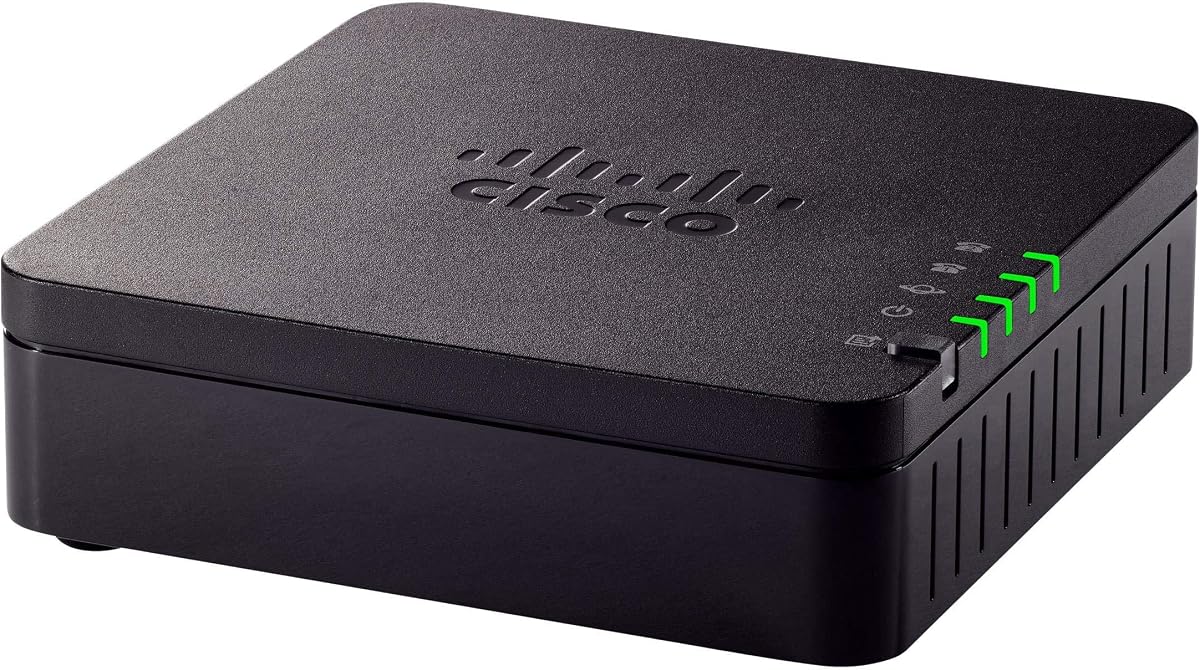
The Cisco ATA 191 is selected as Editor's Choice for its superior audio preprocessing and enterprise-grade security. It ensures clear natural voice quality in noisy environments.
We may earn a commission when you buy through this link, at no additional cost to you.
Advanced echo cancellation and voice activity detection deliver crisp communication. TLS and SHA-2 encryption provide top-tier security for business data.
The premium price reflects its robust feature set and build quality. For critical communications the investment in clear audio is often worth it.
Enterprises prioritizing audio clarity and security should choose this model. It delivers the reliability and performance needed for mission-critical calls.
Advanced echo cancellation removes background noise ensuring professional sounding calls.
SHA-2 encryption protects data integrity for secure business communications.
We may earn a commission when you buy through this link, at no additional cost to you.
The FLYINGVOICE FWR8101 distinguishes itself with built-in Wi-Fi AP and repeater modes ideal for remote setups. It connects traditional phones to VoIP networks seamlessly.
We may earn a commission when you buy through this link, at no additional cost to you.
It supports T.38 fax protocols essential for healthcare and legal firms. Its 300Mbps Wi-Fi provides stable network access for traveling teams.
The device targets IT professionals rather than casual home users. It requires PBX registration and technical setup to function correctly.
Mobile professionals needing portable Wi-Fi and voice should consider this model. It offers unique flexibility for field teams requiring both.
AP mode creates secure mini-networks for temporary offices or field teams.
T.38 protocol ensures reliable fax-over-IP transmission for document-heavy industries.
We may earn a commission when you buy through this link, at no additional cost to you.
The Cisco ATA 192 Renewed version offers enterprise-class performance at a reduced cost. It transforms traditional devices into IP phones for UCaaS environments.
We may earn a commission when you buy through this link, at no additional cost to you.
It supports overhead paging and fax machine integration out of the box. The renewed status provides value while maintaining Cisco reliability standards.
Buyers should note this is refurbished hardware but backed by warranty. It suits small offices needing to expand without full new purchases.
Cost-conscious enterprises needing paging support should choose this unit. It delivers essential features with the backing of Cisco support.
Multiplatform support ensures smooth integration with modern cloud-based UC services.
Built-in support for overhead paging makes it versatile for larger office spaces.
We may earn a commission when you buy through this link, at no additional cost to you.
This renewed Cisco ATA 191 delivers the same premium audio features as new units at a lower price. It ensures natural voice quality with advanced preprocessing.
We may earn a commission when you buy through this link, at no additional cost to you.
Encryption standards match new models providing secure communications for businesses. The 1-year limited warranty offers peace of mind for buyers.
As a renewed unit it may show minor cosmetic wear but functions fully. It is an excellent choice for those prioritizing performance over aesthetics.
Small businesses seeking enterprise audio without full cost should pick this. It offers the best balance of premium features and value.
High-performance echo cancellation ensures clear calls even in noisy environments.
TLS and SHA-2 security protocols protect sensitive business data during calls.
We may earn a commission when you buy through this link, at no additional cost to you.
The ATA 187 serves as a reliable refurbished option for older infrastructure needing a VoIP bridge. It supports RoHS and Weee compliance for regulatory standards.
We may earn a commission when you buy through this link, at no additional cost to you.
This unit offers a straightforward RJ-45 connection for network integration. Its refurbished status ensures functionality without the cost of new gear.
It is best suited for legacy systems where modern features are less critical. The reliability remains high for basic voice-to-IP transition needs.
Organizations maintaining older hardware should consider this for replacements. It provides essential connectivity with full environmental compliance.
RoHS and Weee compliance ensures this unit meets global environmental standards.
Single RJ-45 Ethernet port makes network integration straightforward for basic setups.
We may earn a commission when you buy through this link, at no additional cost to you.
The Grandstream 8 Port Gateway is a powerhouse for offices needing multiple analog lines. It integrates a Gigabit NAT router for streamlined network management.
We may earn a commission when you buy through this link, at no additional cost to you.
Eight FXS ports accommodate entire teams without multiple devices. The powerful gateway features simplify routing for complex office layouts.
This device demands technical expertise for initial configuration and management. It is ideal for IT departments managing large-scale communication systems.
Large offices needing high density should choose this robust solution. It delivers maximum port count with integrated networking capabilities.
Eight FXS ports allow simultaneous connections for large teams easily.
Built-in Gigabit NAT router reduces the need for separate networking gear.
We may earn a commission when you buy through this link, at no additional cost to you.
The Grandstream HT812 V2 offers high-definition voice quality for premium communication needs. It supports wideband codecs that deliver crisp clear audio for every call.
We may earn a commission when you buy through this link, at no additional cost to you.
Strong AES encryption and per-unit certificates ensure maximum data protection. The high-performance NAT router supports seamless operation behind firewalls.
Users pay a premium for this superior audio and security performance. However the clarity and safety justify the investment for critical business calls.
Businesses requiring top-tier HD voice and robust security should choose this. It stands as the best option for performance-driven organizations.
Wideband HD codec ensures clear crisp audio that sounds like a real conversation.
Strong AES encryption protects calls with certificates unique to each unit.
We may earn a commission when you buy through this link, at no additional cost to you.
Selecting the right adapter depends on port needs, security requirements, and network environment. This guide outlines key factors to consider before purchase.
Determine how many analog devices you need to connect. Single port models suit individual users while dual port units accommodate two devices per network connection. Higher density options offer more flexibility for larger offices.
Choose a model that matches your current phone count plus room for growth.
Security is vital for business communications. Look for TLS and SRTP encryption to protect calls from interception. Some units support AES encryption and SHA-2 hashing for stronger protection against modern threats.
Prioritize units with certified encryption standards to keep sensitive data safe.
Automated provisioning saves significant IT time. Models supporting TR-069 and XML configuration files allow remote setup and management. This is essential for organizations managing multiple locations or large fleets of devices.
Select units that support TR-069 to streamline remote device management.
High-performance audio processing ensures natural sounding calls. Look for features like echo cancellation voice activity detection and wideband codecs. These factors reduce background noise and improve clarity during conversations.
Prioritize units with echo cancellation for clear professional sounding calls.
If your business relies on faxing standard VoIP can be unreliable. Choose adapters with T.38 fax protocol support for reliable transmission. This ensures faxes arrive without corruption or loss during digital conversion.
Always confirm T.38 support if you rely on regular fax machine use.
Check if the adapter supports your network speed. Most use 10/100Mbps Ethernet but Gigabit models exist for higher throughput. Also consider NAT capabilities if you operate behind complex firewalls or routers.
Match the adapter speed to your network to avoid unnecessary bottlenecks.
Enterprise hardware typically includes a one-year limited warranty. This covers hardware failures and ensures peace of mind for business deployments. Renewed units should also carry valid warranties to protect your investment.
Always verify warranty terms before purchasing refurbished or renewed equipment.
Prices vary significantly between consumer and enterprise models. Budget units offer basic features while premium ones add HD voice and security. Balance the cost against the features required for your specific use case.
Evaluate total cost of ownership including setup complexity and support needs.
Connect the adapter to your Ethernet network and plug in your analog phone using an RJ-11 cable. Power on the device and wait for the network LED to stabilize indicating a successful connection.
Access the web interface using the device IP address to configure SIP credentials. Follow the provided manual to enter your provider details carefully and save the settings.
Regularly check for firmware updates via the web interface to maintain security and stability. Clean the ports with compressed air to prevent dust buildup over time.
An analog telephone adapter converts traditional analog phone signals into digital data for internet transmission. This allows you to use existing handsets with modern VoIP services. It acts as a bridge between old hardware and new networks.
Yes an SIP account from a VoIP provider is required for most adapters. The adapter uses these credentials to authenticate calls and route them properly. Without this setup the device cannot connect to the internet phone system.
Most standard adapters use Ethernet but some models offer Wi-Fi connectivity. The FLYINGVOICE FWR8101 includes built-in Wi-Fi for mobile setups. Check specifications carefully to ensure wireless support fits your needs.
T.38 is a protocol designed specifically for reliable fax-over-IP transmission. It ensures faxes sent over the internet arrive without corruption. Without T.38 faxing may fail due to packet loss in the network.
Look for TLS and SRTP encryption to protect call data. AES and SHA-2 support adds extra protection for sensitive business information. Security ensures your calls remain private from unauthorized access.
Basic setup requires entering SIP details which can be technical. Some models offer automated provisioning to simplify the process. If you lack IT skills look for units with user-friendly setup wizards.
We highlighted the Grandstream HT802 V2 for budget value and the Cisco ATA 191 for enterprise audio quality. These options cover most needs for small businesses and individual professionals alike.
Prioritize security protocols and port count when making your decision. High performance echo cancellation and proper provisioning save time and protect your data.
Always check current listings for updated pricing before finalizing your purchase. Retail rates change frequently so verify the latest deal on the model you choose.