
HP Smart Tank 5003
4.1Editor score
Up to 3 years ink
Mess-free refill system
Cartridge-free design
Discover the top AI printers for home and office. This guide compares ten leading models with smart features to optimize your printing workflow and save ink.
AI printers are transforming how we handle daily document tasks. These devices use intelligent software to manage layouts, optimize ink usage, and ensure high-quality results without constant user intervention.
We compared ten top-rated models based on speed, connectivity, and smart features. Our analysis highlights devices that offer reliable performance for home offices and creative projects alike.
Each pick shows key specs and ideal use cases. Keep in mind that availability and offers may change. Always check the latest details before making your final decision today.
4.1Editor score

3.9Editor score

4.7Editor score
This side-by-side comparison highlights the core capabilities of each selected printer. Review the specs to find the model that aligns with your specific printing needs and budget.



The HP OfficeJet Pro 8125 stands out as a top choice for home offices needing professional output. It holds a strong rating and excels with AI tools that refine document formatting before printing. This ensures your pages look polished without manual adjustments.
We may earn a commission when you buy through this link, at no additional cost to you.
Its standout strength lies in the AI formatting features which strip unnecessary web elements to save paper. Users also benefit from fast dual-band Wi-Fi that resolves connection issues automatically. The device includes a generous trial of Instant Ink to keep you stocked.
While the printer performs well, the reliance on proprietary cartridges can drive up long-term costs. Some users may find the input tray capacity limited for heavy duty tasks. However, these trade-offs are acceptable for its speed and smart connectivity.
This model is ideal for professionals who need reliable color documents quickly. If you prioritize smart features and consistent quality over low ink costs, this is the recommended pick for your workspace.
HP AI automatically detects and removes unwanted content from web pages to ensure clean layouts.
Dual-band Wi-Fi with auto-diagnostic tools keeps your printer connected without interruption.
We may earn a commission when you buy through this link, at no additional cost to you.
The HP Smart Tank 5003 offers exceptional value for budget-conscious buyers needing high-volume output. It includes enough ink for up to three years right out of the box. This makes it a smart long-term investment for any household.
We may earn a commission when you buy through this link, at no additional cost to you.
Its key strength is the mess-free refill system that lets you plug ink bottles directly into the tank. This eliminates cartridge waste and lowers costs significantly. Users also enjoy wireless printing and reliable AI capabilities for formatting tasks.
The printer does print slower than premium models and lacks a large touchscreen. However, the cost savings on ink far outweigh these minor inconveniences. It remains a top choice for families printing frequently.
Buy this if you want to avoid ongoing cartridge expenses. It is perfect for home users who prioritize savings and simplicity over advanced office features.
Receive up to three years of ink included to save money on replacements for years.
Mess-free refill system allows you to replenish ink without spills or complex steps.
We may earn a commission when you buy through this link, at no additional cost to you.
The Bambu Lab P2S Combo delivers high-end performance for 3D printing enthusiasts. It holds a stellar rating and utilizes AI to detect failures during prints. This ensures professional-grade results with minimal waste or reprints required.
We may earn a commission when you buy through this link, at no additional cost to you.
Its standout feature is the multi-color AMS 2 Pro system which enables seamless complex designs. The printer sets up in just fifteen minutes and uses adaptive airflow for perfect layer cooling. Users can rely on its speed and precision for any project.
This device is expensive and specialized compared to standard office printers. It may not suit those needing basic text documents. However, for creative work, its capabilities are unmatched in the current market.
Choose this if you need advanced 3D printing with smart oversight. It is ideal for makers and professionals requiring speed and high quality.
AI failure detection monitors prints in real-time to prevent wasted material and time.
The AMS 2 Pro supports up to four colors for intricate and vibrant 3D models.
We may earn a commission when you buy through this link, at no additional cost to you.
The HP Envy 6155 is designed for home users needing reliable photo and document printing. It holds a strong rating and features P3 technology for true-to-screen colors. This ensures your printed photos match what you see on your display.
We may earn a commission when you buy through this link, at no additional cost to you.
Its key strengths include an intuitive touchscreen and wireless connectivity that resolves issues automatically. The device also includes a trial of Instant Ink to manage your supply easily. AI tools help optimize layouts to prevent paper waste.
The printer is slower than office models and lacks a fax feature. However, its compact design and color accuracy make it ideal for personal projects. The price point fits most home budgets comfortably.
This model is best for households prioritizing photo quality and simplicity. If you need occasional printing with great results, this is the right fit.
HP P3 technology ensures printed photos match the vibrant colors seen on your screen.
AI removes unwanted web content to prevent wasted pages and awkward layouts.
We may earn a commission when you buy through this link, at no additional cost to you.
The HP OfficeJet Pro 9135 is built for professional environments requiring speed and security. It holds a solid rating and features a large touchscreen for easy navigation. This makes daily tasks like faxing and scanning straightforward for any team.
We may earn a commission when you buy through this link, at no additional cost to you.
Its strengths include fast printing speeds and advanced Wolf Pro Security to protect your data. The automatic document feeder handles multi-page scans efficiently. AI tools ensure your documents print cleanly without errors.
The higher price may be a barrier for small home offices. However, the speed and security features justify the investment. It is a robust choice for businesses needing reliability.
This model is best for offices prioritizing document security and speed. If you need fax capabilities and high volume, this is the top recommendation.
HP Wolf Pro Security protects your network from cyber threats and keeps data safe.
Prints up to 25 pages per minute to keep your workflow moving quickly.
We may earn a commission when you buy through this link, at no additional cost to you.
The HP Smart Tank 7603 is a powerhouse for home offices needing high-volume ink at low cost. It comes with enough ink for up to three years. This makes it an affordable long-term solution for busy households.
We may earn a commission when you buy through this link, at no additional cost to you.
Its main advantage is the mess-free refill system that keeps printing costs down significantly. The device also includes a fax function and borderless printing capabilities. AI tools help optimize your documents for better quality output.
The printer is larger than other models and may take up more desk space. Scan speeds are also average for this price point. Still, the ink savings are a major benefit for frequent users.
Choose this if you need fax and high volume without cartridge costs. It is best for home offices balancing budget and functionality.
Save money on ink with a refillable tank system that eliminates cartridge purchases.
Built-in fax capabilities allow you to send documents without separate machines.
We may earn a commission when you buy through this link, at no additional cost to you.
The HP OfficeJet Pro 8139 is an excellent choice for home offices needing one year of ink included. It holds a strong rating and supports high-volume document printing. This extended trial offers substantial savings right from the start.
We may earn a commission when you buy through this link, at no additional cost to you.
Its strengths include fast color printing and reliable dual-band Wi-Fi connectivity. The ADF handles multi-page scanning efficiently for busy professionals. AI tools ensure your web pages print cleanly without errors.
The printer may not suit large offices needing very high paper capacity. Also, it blocks third-party cartridges. Despite this, the one-year trial makes it a great value pick.
This model is best for users wanting long ink supply without extra cost. If you need fax and scanning, this is a solid recommendation.
Receive one year of Instant Ink trial to manage supply without monthly fees.
AI automatically removes unwanted content to optimize your printed documents.
We may earn a commission when you buy through this link, at no additional cost to you.
The HP Smart Tank 7603 supports high-volume printing without breaking the bank. It includes enough ink for up to three years out of the box. This makes it a cost-effective solution for any busy home office.
We may earn a commission when you buy through this link, at no additional cost to you.
Its key features are the mess-free refill system and borderless printing for creative work. The magic touch panel allows easy operation and faxing. AI capabilities help keep your documents formatted correctly.
Speed is average and controls are basic compared to premium models. However, the ink savings and reliability are unmatched. It is ideal for budget-conscious users needing fax capabilities.
Choose this if you need low cost and high volume. It is the best option for home offices focused on savings.
Print up to 8,000 color pages before needing to replenish your ink supply.
Refill ink easily without squeezing bottles or worrying about spills on your desk.
We may earn a commission when you buy through this link, at no additional cost to you.
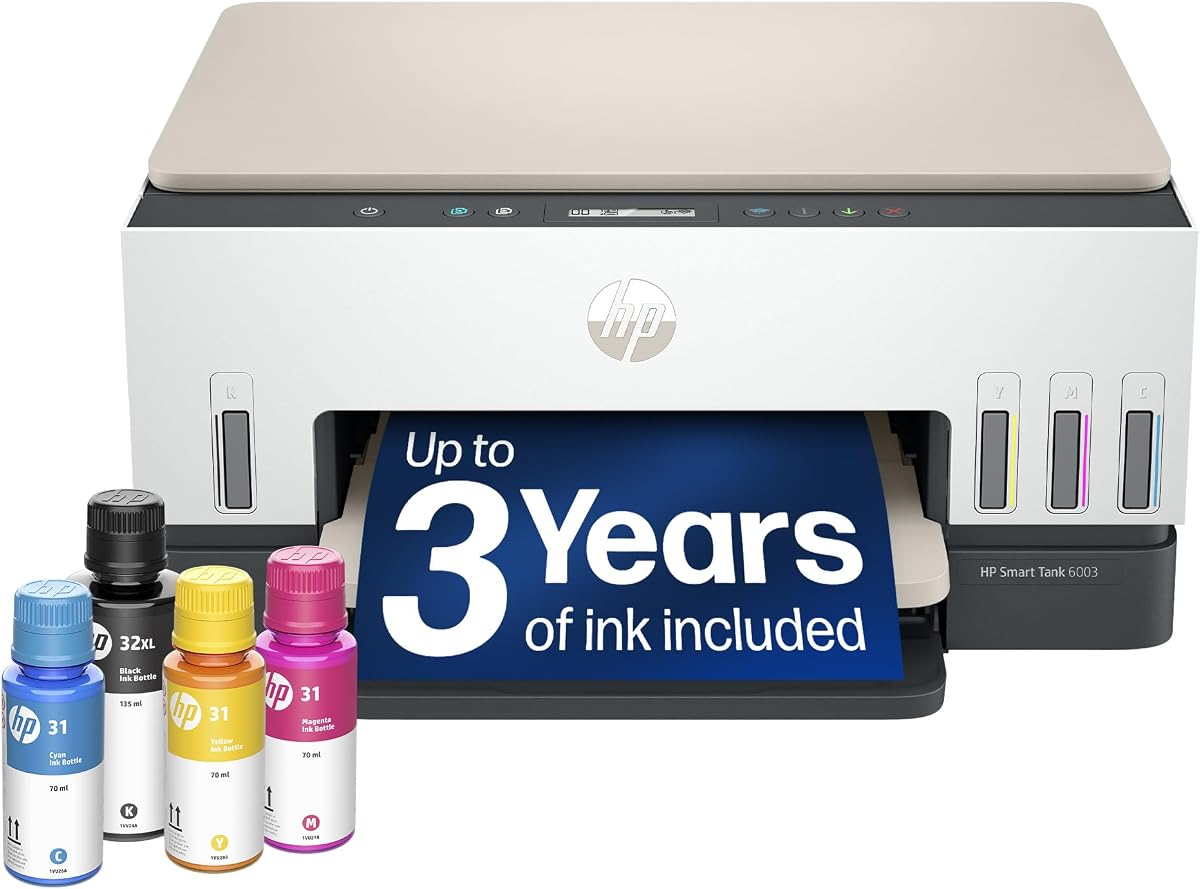
The HP Smart Tank 6003 is a reliable option for home users needing high-volume output. It includes enough ink for up to three years. This ensures low printing costs over time without complex maintenance steps.
We may earn a commission when you buy through this link, at no additional cost to you.
Its strengths are the mess-free refill system and borderless printing for home projects. Wireless connectivity keeps it easy to use from any device. The compact design fits easily into small home offices.
It lacks fax capabilities and is slower than office models. However, for personal use, the value is excellent. It is perfect for families needing frequent color prints.
This model is best for home users prioritizing savings and simplicity. If you do not need fax, this is a great fit.
Get up to three years of ink included to manage printing costs effectively.
Replenish ink with an easy-access system that prevents spills and mess.
We may earn a commission when you buy through this link, at no additional cost to you.
The Liene PixCut S1 is perfect for DIY enthusiasts needing custom stickers and labels. It holds a strong rating and features precise AI auto-cutting. This allows you to create professional results quickly without separate machines.
We may earn a commission when you buy through this link, at no additional cost to you.
Its key strengths are the thermal dye-sublimation technology and AI image extraction. Prints are vibrant and durable with a waterproof laminate. The app offers thousands of free templates and styles for instant creativity.
The printer is specialized for small formats and not for standard documents. This limits general office use. However, for crafters, the quality and ease of use are unmatched.
Choose this if you want to make custom gifts and stickers. It is best for creatives needing AI-assisted design and cutting.
AI automatically recognizes and extracts subjects from photos for perfect sticker edges.
Four-layer thermal dye-sublimation ensures stickers are waterproof and scratch-resistant.
We may earn a commission when you buy through this link, at no additional cost to you.
Selecting the right AI printer requires evaluating specific features to match your needs.
Consider how many pages you need weekly. High-volume users benefit from faster speeds and larger paper trays to minimize interruptions during busy workflows.
Match the printer's pages per minute rating to your workload to ensure efficiency.
Look at the cost per page and whether the printer uses cartridges or tanks. Tank systems often provide lower long-term costs for frequent printing compared to standard cartridges.
Prioritize models with refillable ink to keep operational expenses low.
Advanced AI can optimize layouts and remove unwanted content from web pages. These features reduce paper waste and ensure professional results without manual editing before printing.
Select a device with proven AI formatting tools to streamline your document preparation.
Reliable Wi-Fi is essential for modern homes. Look for dual-band support and automatic error resolution to maintain a stable connection for printing from any device.
Ensure the printer supports mobile apps for convenient wireless printing.
An automatic document feeder helps scan and copy multi-page documents quickly. This is vital for offices handling frequent paperwork without manual page turning.
Choose a model with an ADF if you regularly process multi-page files.
Business printers should include robust security to protect sensitive data. Look for features like firewall protection and automatic updates to prevent cyber threats.
Prioritize security to keep your network and documents safe.
Measure your workspace to ensure the device fits comfortably. Some high-volume models are larger and may require dedicated desk space.
Select a size that fits your available area.
Some models offer ink subscription services that deliver supplies automatically. Evaluate if these subscriptions align with your budget or if you prefer traditional purchasing.
Choose based on your preference for convenience versus control.
First, set up your printer on a stable surface and connect it to your network via Wi-Fi. Download the manufacturer's app to enable mobile printing and smart AI features effectively.
Regularly update firmware to ensure security features and performance remain optimal. Use genuine ink cartridges to avoid clogs and maintain print quality consistently over time.
Clean print heads periodically using the maintenance menu. Avoid using cleaning products that might damage the external casing or internal components during these routines.
AI printers use intelligent software to automate formatting and optimize settings. They can remove unnecessary content from web pages and reduce waste automatically.
Ink tanks generally offer lower cost per page and higher volume. They are ideal for households printing frequent documents and photos regularly.
Yes, most models feature dual-band Wi-Fi and mobile apps. This allows you to print directly from smartphones and laptops without cables.
AI detects and removes ads or menus from web pages. This ensures only essential content prints, reducing wasted sheets and ink usage.
Look for printers with firewall protection and firmware updates. These features help protect your network from unauthorized access.
Run head cleaning weekly if printing frequently. Update firmware monthly to keep features secure and efficient.
Not all models include fax. Check specifications if you need this for sending documents directly from the machine.
Some brands block non-original chips. Check manufacturer policies to avoid voiding warranties or blocking cartridges.
We reviewed ten top models offering AI capabilities for various needs. From budget tanks to premium 3D machines, there is a device for every scenario.
Prioritize ink costs and smart features to find the best value. Security and connectivity are key factors for modern home offices.
Always check current prices and availability before buying. Deals may change frequently so verify the latest offers today.