
Thermalright 5 Pack TL-C12C-S CPU Fan
4.7Editor score
High Performance PWM Speed Control
S-FDB Bearing Quiet Operation
Soft ARGB Lighting Effects
This guide compares the top addressable RGB fans for PC builds, evaluating airflow, noise levels, lighting effects, and pricing to help you choose the right
Addressable RGB fans have become essential for modern PC builds, combining efficient cooling with stunning visual customization. These fans allow users to sync lighting effects across the system for a cohesive and immersive aesthetic experience.
We evaluated ten top-rated models based on performance, noise levels, and lighting features. Each product was analyzed for airflow capacity, bearing quality, and ease of integration with standard motherboard controls and software.
Each pick highlights key strengths and potential limitations to guide your decision. Note that product availability and pricing can change frequently, so verify current details before finalizing your purchase decision.
4.7Editor score

4.7Editor score
4.8Editor score
The following comparison table provides a side-by-side overview of the ten selected addressable RGB fans. Each entry details critical specifications to assist in evaluating performance and fit for your specific build requirements.




The Thermalright 5 Pack TL-C12C-S represents an exceptional value proposition for builders seeking high-performance cooling without breaking the bank. With a robust rating of 4.7 stars, this pack delivers consistent performance across five units making it ideal for full case upgrades or multiple radiator setups.
We may earn a commission when you buy through this link, at no additional cost to you.
This fan excels in thermal management while maintaining near-silent operation under normal load. The S-FDB bearings effectively minimize vibration and noise allowing the fan to run smoothly even at maximum speeds. The soft ARGB lighting provides a visually appealing effect that complements the cooler and case aesthetics without being overly harsh.
While highly effective, users should note the cable length may require careful planning in compact chassis. Additionally, full lighting control requires a motherboard with compatible ARGB ports. These are minor trade-offs given the significant savings compared to premium alternatives.
This pack is best suited for budget-conscious enthusiasts who need reliable cooling and attractive lighting. We recommend it for anyone building a new system or upgrading older fans with a focus on value and performance balance.
With 66.17CFM airflow and 1.53mm H2O static pressure, these fans handle both case intake and radiator exhaust tasks efficiently ensuring stable temperatures under load.
The S-FDB bearing technology reduces wear and tear over time significantly extending the fan service life while maintaining quiet operation throughout years of daily use.
We may earn a commission when you buy through this link, at no additional cost to you.
The ARCTIC P12 Pro A-RGB stands out as a powerful premium fan designed for users who prioritize raw cooling performance and precision control. Its 4.7-star rating reflects its success in delivering consistent airflow even against dense radiator resistance making it a top choice for liquid cooling loops.
We may earn a commission when you buy through this link, at no additional cost to you.
Its redesigned rotor blades and Fluid Dynamic Bearing work together to minimize noise and vibration across all speed settings. The fan can adjust from under 5 percent PWM to a peak of 3000 RPM offering unmatched flexibility for fine-tuning system thermals and acoustics.
Although it offers exceptional performance it does not include an integrated lighting controller which may require extra purchases for full RGB control. Additionally users may need to adjust PWM curves carefully to avoid excessive noise at maximum speeds.
This fan is ideal for advanced builders and liquid cooling enthusiasts seeking maximum thermal efficiency. We highly recommend it for systems where maintaining low temperatures is critical and precise fan control is desired.
The fan penetrates dense radiators and narrow panels effectively ensuring reliable cooling for high-performance CPUs and GPUs without thermal throttling during intense workloads.
High-precision measurement and automatic balancing ensure minimal gaps leading to quieter more efficient and longer-lasting performance compared to standard mass-market cooling fans.
We may earn a commission when you buy through this link, at no additional cost to you.
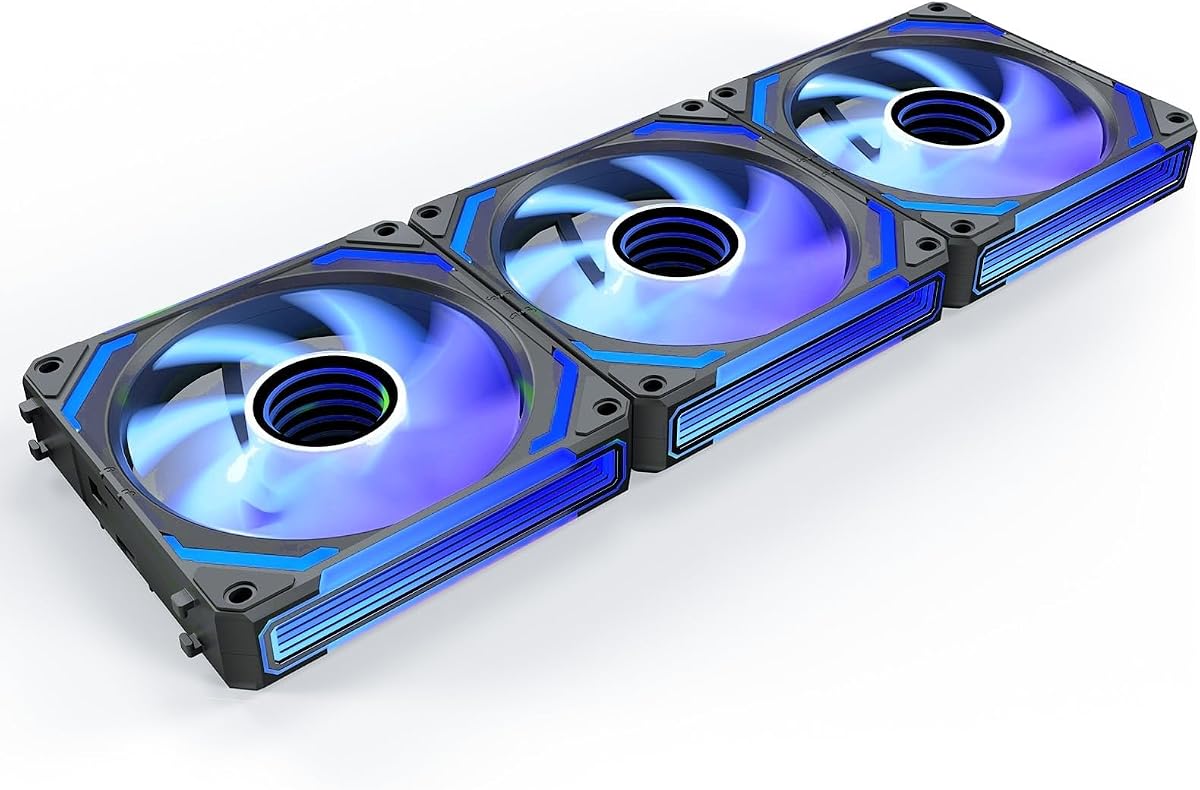
The AsiaHorse COSMIQ 120mm Case Fan 3 Pack delivers a premium visual and thermal experience ideal for modders and users seeking high-end aesthetics. With an impressive 4.8 rating it features unique infinity mirror lighting and advanced daisy chain connectivity that simplifies installation significantly.
We may earn a commission when you buy through this link, at no additional cost to you.
This set includes a dedicated controller and supports music sync effects creating dynamic lighting that reacts to game audio or ambient sounds. The fluid dynamic bearing ensures ultra-quiet operation even at full 2000 RPM speed making it suitable for daily desktop and gaming scenarios.
While it offers top-tier features the price is higher than standard options and the design may not fit ultra-compact chassis. Users also need to account for the included controller placement within the case cable management area.
These fans are perfect for builds prioritizing visual impact alongside strong cooling. We recommend them for enthusiasts who value custom RGB effects and clean cable routing in their system design.
The infinity mirror design creates a high-end visual atmosphere turning ordinary systems into beautiful desktop landscapes while maintaining efficient heat dissipation performance.
The interlocking daisy chain connection reduces redundant cables keeping the interior tidy and improving internal air circulation efficiency during extended gaming sessions.
We may earn a commission when you buy through this link, at no additional cost to you.
The CORSAIR RS120 ARGB Triple Pack delivers a streamlined connection experience and strong cooling performance suitable for modern motherboard ecosystems. Rated at 4.6 stars it features unique AirGuide technology that directs airflow precisely to hot components reducing thermal buildup during heavy usage.
We may earn a commission when you buy through this link, at no additional cost to you.
Each fan uses a magnetic dome bearing to lower noise and increase durability over time. The daisy-chain system allows three fans to run from one PWM and one ARGB connector simplifying the wiring process significantly for clean system builds.
Although powerful the lighting relies on motherboard control which requires a compatible header. Users without such headers may need an additional hub or controller to fully utilize the ARGB features.
This pack is well-suited for users seeking organized cable management and effective radiator cooling. We recommend it for builds using compatible motherboards and prioritizing clean system interiors.
Anti-vortex vanes push air directly toward hot components concentrating cooling exactly where it is needed most for better overall system thermal stability.
This bearing type ensures smoother rotation and less friction leading to quieter operation and extended service life compared to standard sleeve bearing fans.
We may earn a commission when you buy through this link, at no additional cost to you.
The Thermaltake CT120 EX ARGB Sync uses an innovative magnetic connection design that speeds up installation and improves cable management. With a 4.6 rating it delivers reliable cooling and vivid lighting effects controlled through standard motherboard software for synchronized visual setups.
We may earn a commission when you buy through this link, at no additional cost to you.
Its MagForce 2.0 system allows multiple fans to connect via a single cable per group reducing clutter and simplifying routing inside the case. The optimized hydraulic bearing ensures silent operation while the anti-vibration mounting system minimizes rattling at high speeds.
The magnetic alignment can sometimes be tricky during installation if the fan frame is not perfectly flush. Additionally lighting effects depend heavily on having compatible sync software running on the host machine.
These fans are recommended for users who prioritize ease of installation and clean internal aesthetics. We suggest them for cases with clear panel visibility and standard motherboard RGB headers.
The magnetic connection design greatly reduces redundant cables keeping the chassis interior tidy and improving internal air circulation efficiency during extended gaming sessions.
Optimized hydraulic bearings provide smooth quiet operation reducing noise interference even during long gaming sessions or intensive workstation workloads.
We may earn a commission when you buy through this link, at no additional cost to you.
This six-pack ARGB PWM fan set offers a unique forward-reverse combo designed to optimize airflow while maintaining visual consistency throughout the case. With a 4.4 rating it includes four forward and two reverse fans making it ideal for modern cases requiring side or bottom intake options.
We may earn a commission when you buy through this link, at no additional cost to you.
Each fan features 28 ultra-bright ARGB LEDs delivering vivid even illumination that syncs via the included controller or motherboard software. The HDB bearings maintain quiet operation at load while the PWM control adjusts speeds based on system temperature feedback automatically.
The controller hub adds some complexity during setup and requires additional power connections for full operation. Reverse blades may not provide the same visual impact as standard ones depending on installation orientation.
This kit is best for builders needing a complete fan replacement set with consistent aesthetics. We recommend it for cases supporting reverse intake mounts and users wanting balanced lighting across all zones.
The reverse blades maintain lighting visibility when installed at bottom or side intake creating an efficient intake-exhaust cycle that enhances visual consistency and cooling performance.
PWM intelligent control automatically adjusts speed based on CPU or case temperature delivering strong cooling under load and near-silent operation at idle.
We may earn a commission when you buy through this link, at no additional cost to you.
The Thermalright TL-C12C-S X3 offers a compact and affordable solution for three-fan cooling needs with performance matching the larger five-pack option. Rated at 4.6 stars it provides reliable cooling and quiet operation making it suitable for standard case upgrades and smaller builds.
We may earn a commission when you buy through this link, at no additional cost to you.
This model features the same high-performance S-FDB bearings and ARGB lighting modes as its sibling ensuring consistent color effects and smooth rotation. The PWM interface allows automatic speed adjustment based on temperature delivering efficient cooling without manual intervention.
It has slightly shorter cables compared to other models which may complicate installation in larger cases. Additionally the lighting effects are controlled through motherboard settings which may require configuration time.
This pack is ideal for users needing a small number of fans without sacrificing quality. We recommend it for budget builds or partial case upgrades where space is moderate.
The 66.17CFM airflow ensures improved cooling performance allowing the fan to work as a case fan or with a CPU cooler efficiently removing heat.
High-brightness LED atomizing blades reflect light softly matching the cooler and case perfectly for a seamless aesthetic integration.
We may earn a commission when you buy through this link, at no additional cost to you.
The Thermalright TL-C12C-S X5 provides a comprehensive five-fan pack ideal for complete case replacement or large multi-fan setups. With a strong 4.7 rating it delivers high performance airflow and silent operation while supporting full ARGB lighting integration through standard motherboard ports.
We may earn a commission when you buy through this link, at no additional cost to you.
Intelligent temperature control automatically adjusts fan speeds via PWM ensuring quiet operation at idle and maximum cooling when needed. The S-FDB bearings maintain longevity and reduce vibration for a smoother user experience over time.
Users may face minor cable management challenges due to variable lengths and require compatible motherboard support for full lighting effects. These are minor considerations compared to the overall value.
This pack is perfect for full system upgrades or new builds needing multiple fans. We recommend it for users prioritizing cooling efficiency and quiet operation across their entire chassis.
The cooling fan automatically sets variable speed based on temperature removing the need for manual adjustments and ensuring optimal performance under all load conditions.
With 66.17CFM airflow it effectively removes dry heat from the case and high CPU temperatures allowing for maximum cooling efficiency during gaming sessions.
We may earn a commission when you buy through this link, at no additional cost to you.
The Thermaltake CT120 ARGB Sync dual pack is an excellent entry point for users looking to add lighting and airflow to specific case zones. With a 4.6 rating it features a refined 7-blade design that balances airflow and pressure for radiator or case mounting.
We may earn a commission when you buy through this link, at no additional cost to you.
Each fan includes 9 addressable LEDs and supports daisy-chain wiring reducing the number of ports required. The hydraulic bearing ensures smooth operation while the anti-vibration mounting system minimizes noise and vibration during continuous use.
The 2-fan pack is suitable for small upgrades but does not cover full case needs. Additionally syncing lights may require external controllers depending on motherboard configuration.
This pack is best for targeted upgrades or dual-radiator setups. We recommend it for users seeking quality performance and vibrant lighting without large upfront investments.
The 7-blade design optimizes both CFM and air pressure ensuring better airflow distribution through dense fins or mesh panels for improved cooling efficiency.
The daisy-chain design requires fewer cables and ports simplifying installation and leaving more room for other devices inside the chassis.
We may earn a commission when you buy through this link, at no additional cost to you.
The Thermaltake LE120 ARGB PWM 3-pack offers a straightforward solution with a bundled splitter for quick installation. Its strong 4.8 rating reflects reliable airflow performance and vivid lighting that syncs smoothly via standard motherboard controls.
We may earn a commission when you buy through this link, at no additional cost to you.
Each fan provides 66.1 CFM airflow and 9 addressable LEDs allowing customizable color patterns. The 5V 3-pin connector and daisy chain ARGB cables make wiring simple and leave room for other devices inside the case.
The included splitter is convenient but limits manual fan speed control without additional software. Also maximum speed is fixed at 1500 RPM which may suit most but not high-thermal builds.
This set is ideal for quick upgrades or budget-conscious builders needing multiple fans. We recommend it for users prioritizing ease of setup and consistent RGB effects across a few fans.
The LE120 ARGB Sync PWM 3-Pack includes a 3-way PWM Splitter for quick and easy installation saving time during initial system setup.
With 66.1 CFM airflow and stable hydraulic bearings it delivers steady cooling and low noise suitable for standard case and radiator setups.
We may earn a commission when you buy through this link, at no additional cost to you.
Choosing the right addressable RGB fans requires evaluating airflow, noise levels, connector types, and lighting compatibility to match your specific build needs.
Airflow measured in CFM determines how much air the fan can move for general case cooling, while static pressure measured in mm-H2O shows how well it pushes through dense radiators or filters. High static pressure fans are best for radiators and intake positions with filters whereas high airflow fans suit unobstructed case exhaust.
Prioritize static pressure if using radiators or dense filters and airflow for open case mounting.
Noise levels typically range from 20 to 30 decibels with most premium models staying under 26 dB. Bearings such as Fluid Dynamic (FDB) or S-FDB reduce friction and vibration significantly increasing fan lifespan and reducing rattling compared to sleeve bearings.
Check noise specs and choose advanced bearing types for long-term silent operation.
PWM fans use 4-pin connectors for precise speed control via motherboard software allowing automatic temperature-based adjustments. ARGB fans require 5V 3-pin connectors; older 12V RGB headers will not work and may damage the fan if mismatched.
Confirm motherboard supports 5V ARGB headers before purchasing for full lighting control.
Daisy-chain designs allow multiple fans to share a single PWM and ARGB connector simplifying cable management significantly. This feature reduces clutter and makes installation cleaner especially for multi-fan radiator or case setups.
Look for products explicitly supporting daisy-chain connections to minimize cable needs.
Modern fans offer 16.8 million colors with multiple effects like breathing, pulse, or music sync. Some units include independent controllers or music sync modules enhancing visual customization beyond standard motherboard software.
Choose models with built-in controllers if you want independent lighting without extra hubs.
Most fans are standard 120mm size but thickness varies. Standard thickness is 25mm though some thicker fans might interfere with tight radiators or adjacent components. Always verify clearance inside your case.
Measure radiator and case clearance before buying to ensure proper fit.
Fans often come in packs of two three five or six offering better value than single units. Consider how many you need for intake exhaust and radiators before buying separate packs.
Select packs matching your required fan count to reduce installation time and cost.
Full lighting synchronization may require specific software or controllers depending on the brand and motherboard. Some packs include hubs or controllers while others rely solely on motherboard integration.
Check if extra controllers or software are necessary for your lighting setup.
Install fans securely using screws or rubber mounts to prevent vibration rattling during high-speed operation and ensure the orientation matches airflow direction for intake or exhaust placement.
Connect the PWM cable to a CPU or system fan header on the motherboard and plug the ARGB cable into a 5V 3-pin header to enable speed and lighting control via system software.
Clean dust from blades regularly using compressed air and avoid spinning fans by hand during cleaning to prevent bearing damage and maintain smooth quiet performance over time.
Mixing brands is possible but lighting effects may not sync perfectly unless all fans support the same protocol. It is best to use fans from the same series or manufacturer to ensure consistent visual performance and reduce troubleshooting complexity.
PWM fans use a 4-pin connector for precise speed control through pulse width modulation while DC fans use 3-pin voltage regulation. PWM offers better efficiency and quieter low-speed operation for most modern systems.
If your motherboard has a 5V ARGB header you may control fans directly via software. Without this header or for independent effects you need a separate ARGB controller or hub to manage the lights.
Reverse fans have blades that spin opposite standard fans to provide intake from side or bottom without blocking lighting. Install them using standard screws but ensure airflow direction matches your case intake requirements for optimal cooling.
Yes high-quality ARGB fans often feature advanced bearings optimized blades that reduce noise compared to standard units. Proper mounting without touching case panels further minimizes vibration noise.
Standard RGB lighting may work but ARGB requires 5V 3-pin support. Older boards may need adapters or controllers to enable full lighting functionality safely.
The top picks for Addressable RGB Fans balance cooling performance visual appeal and ease of installation. Whether you prioritize budget efficiency or premium features these options cover the needs of most PC builders.
When selecting fans focus on airflow requirements noise levels and lighting compatibility to ensure they fit your build properly. Matching these factors prevents wasted spending and ensures long-term satisfaction.
Always verify current availability and pricing as product details can change quickly. Checking these details before purchase guarantees you get the best value and performance for your system.