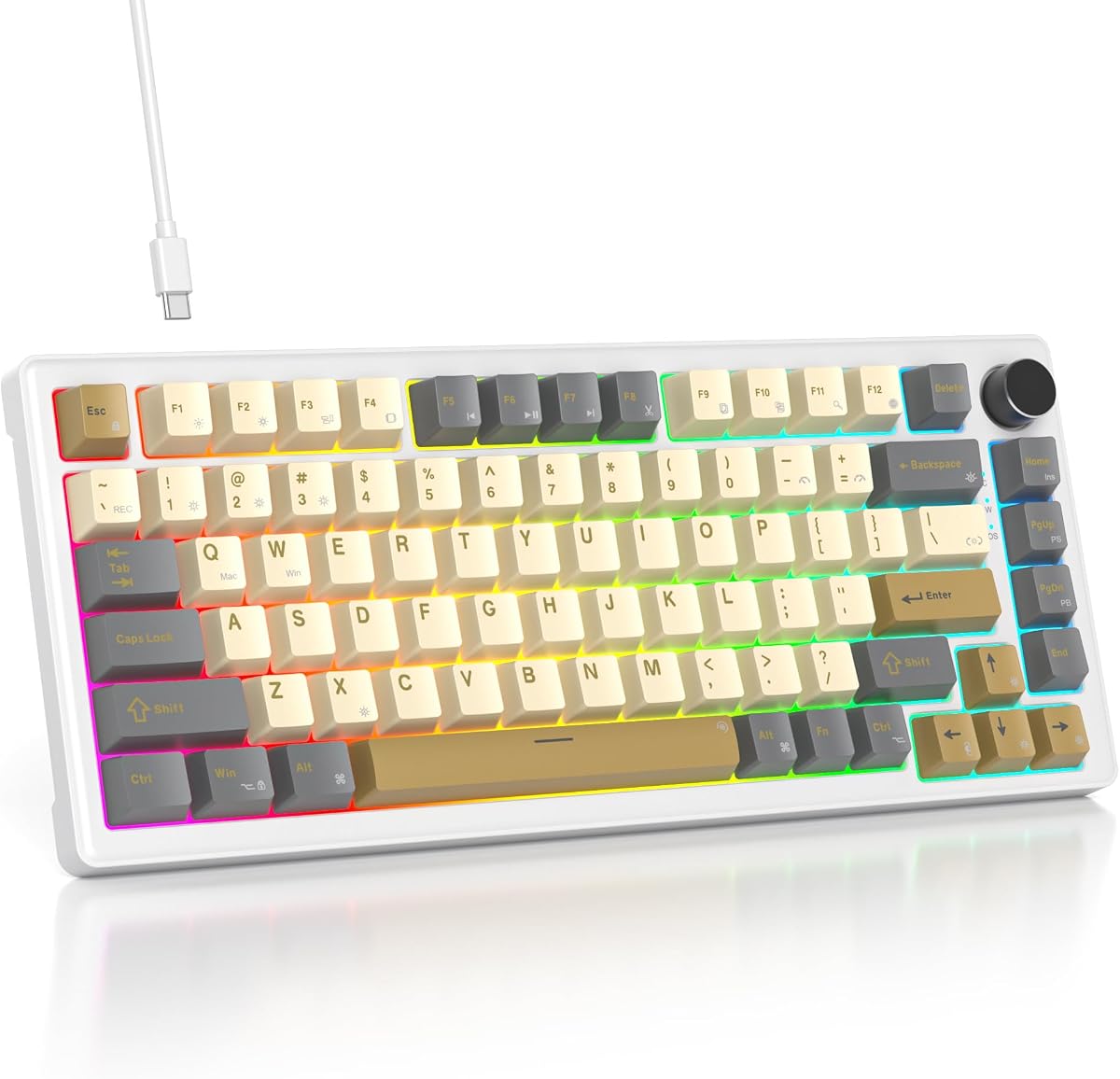
75% Retro Mechanical Keyboard Gasket
4.6Editor score
Gasket mount design
Pre-lubed linear switches
Compact 75 percent layout
This guide compares the top 75 percent mechanical keyboards for gaming and work, evaluating features, build quality, and performance to help you choose the
Finding the right typing surface can transform your daily workflow or gaming session. A 75 percent mechanical keyboard offers a compact layout that preserves essential keys while saving valuable desk space for mouse movement and ergonomic comfort.
We evaluated ten distinct models based on switch quality, connectivity options, build stability, and customization potential. Our analysis focuses on real-world usability, acoustic performance, and the versatility each board offers for different user preferences.
Each selection highlights unique strengths from budget-friendly options to premium wireless designs. You will see detailed breakdowns of features and trade-offs. Please note that availability and costs may vary over time, so check current listings before purchasing.
4.6Editor score

4.6Editor score

4.6Editor score
The following table provides a side-by-side overview of the ten selected mechanical keyboards. Each entry highlights core specifications such as connection type, switch compatibility, layout details, and unique features to help you identify the right fit for your setup.


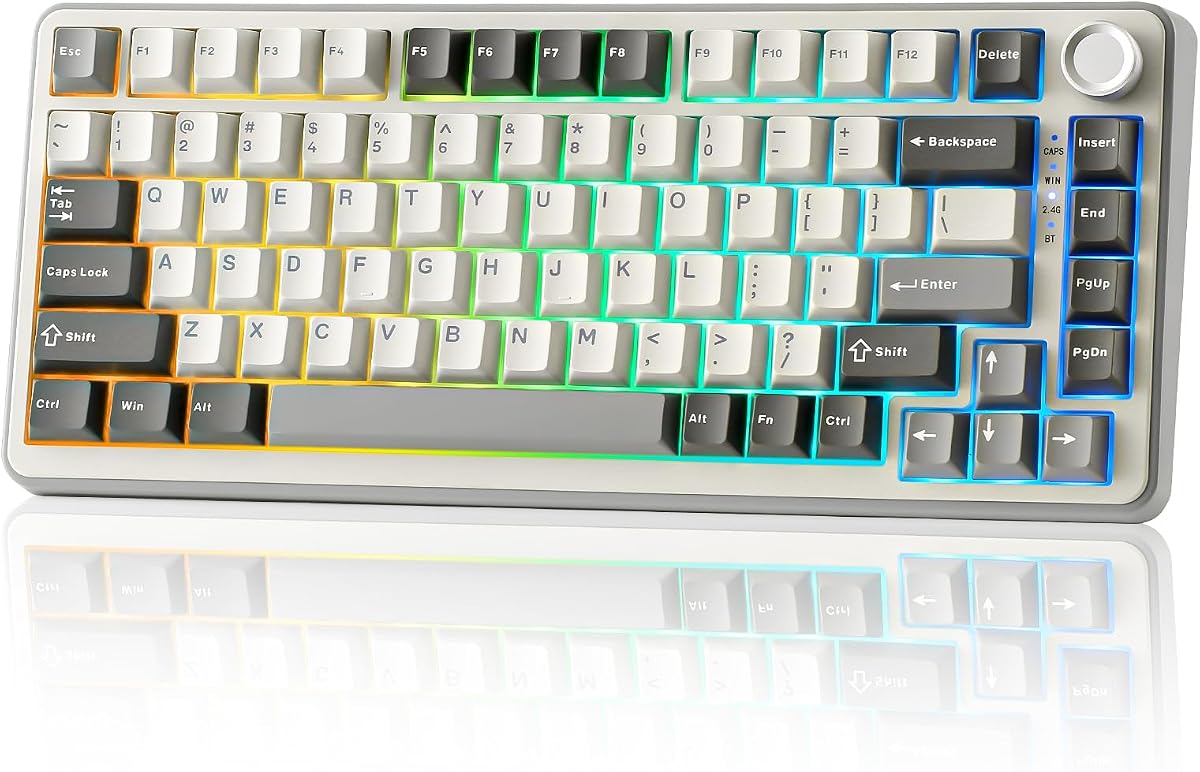


The AULA F75 Pro stands out as a top-tier option for those seeking a balance of performance and versatility. It delivers a creamy typing experience with excellent acoustic damping and supports multiple connection methods for seamless device switching.
We may earn a commission when you buy through this link, at no additional cost to you.
Its hot-swappable design allows users to personalize switches without soldering, while the five-layer filling reduces unwanted noise. The RGB lighting offers extensive customization, and the multi-function knob adds convenient control over media and brightness.
While the driver software is limited to Windows and the keyboard carries some weight, these trade-offs are minor compared to the overall build quality. The side-printed PBT keycaps resist wear and maintain a premium feel over time.
This model is ideal for gamers and professionals who value a compact footprint without sacrificing functionality. It provides a reliable platform for both daily typing and intensive gaming sessions with consistent performance.
Advanced internal padding and PCB slotting minimize hollow sounds and wobble, ensuring a solid, satisfying keystroke every time.
Support for Bluetooth, 2.4GHz wireless, and USB-C allows easy switching between up to five devices for flexible workflows.
We may earn a commission when you buy through this link, at no additional cost to you.
The RK ROYAL KLUDGE R75 offers a compelling entry into the 75 percent mechanical keyboard market. It combines a gasket mount design with smooth linear switches to deliver a quiet and enjoyable typing experience at an accessible price.
We may earn a commission when you buy through this link, at no additional cost to you.
Users can customize their setup with hot-swappable sockets and enjoy consistent backlighting across multiple modes. The metal volume knob provides tactile control, and the triple-mode connection ensures compatibility with various devices including tablets and phones.
While it lacks south-facing LEDs and the software is less robust, the hardware quality remains impressive. The keycaps resist shine and the build feels solid enough for daily heavy use without compromising on aesthetics.
This keyboard is perfect for budget-conscious users who do not want to sacrifice build quality or typing feel. It serves as an excellent primary or secondary board for workspaces needing reliable performance.
The gasket structure adds cushioning and flexibility, making long typing sessions more comfortable by reducing hand fatigue.
Pre-lubed cream switches offer a silky linear stroke that minimizes noise while maintaining consistent actuation for precision.
We may earn a commission when you buy through this link, at no additional cost to you.
The AULA S75 PRO elevates the 75 percent category with its integrated LCD screen and premium construction. It offers a distinct interface for monitoring system stats and customizing settings, alongside the creamy typing feel found in other models.
We may earn a commission when you buy through this link, at no additional cost to you.
Its hot-swappable design and robust battery life make it suitable for extended wireless use. The side-engraved PBT keycaps provide a unique aesthetic while ensuring durability, and the RGB lighting supports dynamic effects for immersive setups.
Although the software requires Windows and the cost is higher, the additional features justify the investment for enthusiasts. The screen and knob combo provides quick access to functions without needing extra software or physical buttons.
This model is ideal for users who want a high-end feature set in a compact form. It balances gaming performance with daily usability, making it a strong choice for those seeking a standout desk accessory.
The screen displays real-time system data and custom GIFs, adding a personalized visual layer to your keyboard experience.
Integrated silicone pads and five layers of filling reduce resonance, delivering a solid thocky sound with every keystroke.
We may earn a commission when you buy through this link, at no additional cost to you.
This retro-styled keyboard brings a gasket mount design to a budget-friendly package. It focuses on a creamy typing experience with pre-lubed linear switches that reduce noise and improve consistency for both gaming and writing tasks.
We may earn a commission when you buy through this link, at no additional cost to you.
The hot-swap PCB allows for easy customization, and the RGB lighting includes music rhythm effects for dynamic visuals. Macro support enables complex shortcuts, enhancing productivity without needing external software for basic remapping.
While it is wired only, the connection remains stable and responsive. The design prioritizes functionality and acoustic quality, offering a satisfying user experience that rivals more expensive options in terms of core performance.
Ideal for those who prefer a stable connection and value build quality over wireless features. It is a strong candidate for anyone looking to upgrade their desk setup without breaking the bank.
Pre-lubed white jade switches deliver a smooth linear action that minimizes noise while maintaining consistent actuation.
Programmable keys allow complex actions and shortcuts to be mapped directly, streamlining workflows and gaming inputs.
We may earn a commission when you buy through this link, at no additional cost to you.
The MageGee 75% Mechanical Keyboard focuses on simplicity and essential performance. It features linear red switches that offer fast actuation with minimal resistance, making it suitable for rapid gaming inputs and general typing tasks.
We may earn a commission when you buy through this link, at no additional cost to you.
Blue LED backlighting provides clear visibility in low-light environments with multiple modes controlled via hardware shortcuts. The board supports full anti-ghosting ensuring that complex key combinations register accurately during intense gaming sessions.
While it lacks software customization and advanced features, it offers a reliable entry point for users new to mechanical keyboards. The metal construction ensures durability, and the compact layout saves desk space effectively.
This model is best for users who want a straightforward and budget-friendly mechanical experience. It delivers consistent performance for gaming and work without the complexity of driver software or wireless connectivity.
Linear red switches provide a smooth stroke with minimal resistance for fast and consistent actuation during use.
The metal panel adds structural rigidity, ensuring the board stays stable even during aggressive keystrokes or movement.
We may earn a commission when you buy through this link, at no additional cost to you.
This keyboard emphasizes stability and customization with its gasket-mounted design and hot-swap capabilities. The sound-absorbing pads reduce noise significantly, providing a quiet and comfortable typing experience ideal for shared environments.
We may earn a commission when you buy through this link, at no additional cost to you.
The PBT keycaps resist wear and maintain texture over time, while the RGB lighting offers vibrant customization options. Full key anti-ghosting ensures accurate inputs during gaming, making it a solid choice for performance-focused users.
While it is wired only and lacks advanced software, the hardware performance remains high. The compact layout saves space, and the hot-swap feature allows easy changes to suit different typing preferences without soldering.
Ideal for enthusiasts who want to customize their keyboard setup easily. It offers a reliable and quiet platform for both work and gaming with a focus on core mechanical quality.
Integrated sound-absorbing pads reduce hollow noises and vibration, creating a quieter and more satisfying typing environment.
Hot-swap sockets allow users to change switches without soldering, enabling easy customization of the typing feel.
We may earn a commission when you buy through this link, at no additional cost to you.
The YUNZII B75 PRO delivers a premium wireless experience with a gasket mount design that ensures smooth and quiet typing. It supports three connection modes and features a large battery to keep users productive for extended periods.
We may earn a commission when you buy through this link, at no additional cost to you.
Hot-swappable sockets allow customization of switches, while the cocoa cream linear switches offer a satisfying tactile and acoustic experience. The RGB backlighting is programmable and the layout retains essential keys for efficient use.
While software is optimized for Windows, the hardware performs well across multiple systems. The design focuses on reducing vibration and noise, making it a strong choice for those seeking a high-quality wireless option.
This keyboard is ideal for users who want a reliable wireless experience without sacrificing tactile quality. It balances performance and connectivity to meet the needs of both gamers and professionals.
The gasket mount provides cushioning and flexibility, resulting in a stable and quiet typing experience for daily use.
A 4000mAh battery ensures extended wireless usage, reducing the need for frequent recharges during work or gaming.
We may earn a commission when you buy through this link, at no additional cost to you.
The Keychron K2 offers a robust solution for Mac users needing a compact mechanical keyboard. Its Super Red switches deliver linear responsiveness, while the layout includes dedicated Mac function keys and compatible keycaps for seamless integration.
We may earn a commission when you buy through this link, at no additional cost to you.
With Bluetooth 5.1 and a wired USB-C option, it ensures stable connectivity across devices. The white LED backlight provides clear visibility, and the battery life supports extended use without frequent recharges.
While it lacks RGB lighting and switch customization, the reliability and Mac compatibility are standout features. The build quality is sturdy, and the typing feel is consistent, making it a practical choice for professionals.
This keyboard is best for users in the Apple ecosystem who value compatibility and reliability. It provides a solid mechanical experience with essential features for daily productivity and light gaming.
Dedicated Mac function keys and included keycaps ensure seamless compatibility with macOS systems and workflows.
A large battery capacity supports extended typing sessions, reducing the need for frequent recharges during use.
We may earn a commission when you buy through this link, at no additional cost to you.
The Newmen GM326 provides an affordable entry into the 75 percent mechanical space. It features a multi-function knob for volume control and hot-swap sockets for easy switch customization. The rainbow LED backlight adds visual appeal without requiring complex software.
We may earn a commission when you buy through this link, at no additional cost to you.
Anti-ghosting ensures reliable inputs during gaming, and the compact design saves desk space effectively. The ABS keycaps are functional, though less durable than PBT alternatives, making this a good choice for beginners.
While build quality is basic and materials are standard, the feature set is impressive for the price. It offers essential functionality for casual gamers and users looking for a compact mechanical experience.
Ideal for those seeking a simple, budget-friendly mechanical keyboard. It delivers solid performance for everyday tasks and gaming without the need for advanced customization.
The volume knob allows quick adjustments without leaving the keyboard, streamlining media control during use.
Hot-swappable sockets allow users to change switches easily, enabling customization of the typing feel.
We may earn a commission when you buy through this link, at no additional cost to you.
The Womier SK80 stands out with its integrated color multimedia display that can show custom GIFs and system info. The gasket mount provides a soft and responsive typing feel, while the RGB lighting offers extensive customization options.
We may earn a commission when you buy through this link, at no additional cost to you.
Music syncing mode creates rhythmic lighting patterns, enhancing the visual experience. Macro and image settings are managed via software, providing deep customization for users willing to invest time in setup and configuration.
While the driver is Windows-only and the setup may be complex, the hardware is robust and feature-rich. The screen adds a unique layer of personalization, and the typing feel is stable and satisfying.
This model is ideal for users who want a customizable and visually dynamic keyboard. It balances gaming performance with advanced visual features for those seeking a standout setup.
The multimedia display allows custom GIFs and status info, adding a personalized visual layer to the keyboard.
Music syncing mode creates rhythmic lighting patterns that respond to audio, enhancing immersion during gaming.
We may earn a commission when you buy through this link, at no additional cost to you.
Selecting a mechanical keyboard requires evaluating several key factors to ensure it meets your specific needs. This guide outlines the essential considerations to help you find the ideal 75 percent model.
Switches define the keyboard's tactile and acoustic profile. Linear switches offer smooth actuation with minimal resistance, ideal for gaming. Tactile switches provide a physical bump for feedback, while clicky switches include a loud auditory click. Consider your preference for noise and feedback before choosing a specific switch model.
Decide between wired, Bluetooth, and 2.4GHz wireless based on your usage. Wired connections ensure zero latency, which is crucial for competitive gaming. Wireless offers freedom from cables and works well for office tasks or multi-device setups. Always check battery life and charging methods for wireless models.
A 75 percent layout retains essential function and arrow keys while keeping a compact footprint. This balance is ideal for users who need shortcuts but want to save desk space. Ensure the keyboard includes a numpad alternative if your workflow requires numeric input frequently.
High-quality materials improve stability and longevity. Look for boards with metal plates or reinforced frames to reduce flex. PBT keycaps resist oil and shine better than ABS. Gasket mounts and sound-absorbing pads enhance comfort and reduce unwanted noise during typing.
Hot-swap sockets allow you to change switches without soldering, offering future flexibility. Software support enables macro programming and lighting customization. If you plan to mod your keyboard, check compatibility with 3-pin or 5-pin switches to ensure a smooth experience.
Backlighting improves visibility in low-light environments. RGB options allow personalization with multiple colors and effects. South-facing LEDs often improve keycap compatibility and reduce light bleed. If you prefer a minimalist look, consider models with single-color LED options.
Ensure the keyboard works with your operating system. Some drivers are Windows-only, which limits functionality for Mac users. Check if the keyboard supports macOS layouts out of the box. Driver software should allow remapping and macro programming for enhanced utility.
Prices vary based on features like wireless support, premium switches, and RGB quality. Determine a budget and prioritize features that matter most to you. Sometimes paying more for build quality and hot-swap options offers better long-term value than cheaper alternatives.
To get the most out of your new keyboard, take time to learn the function layers and key shortcuts. Many models include dedicated media keys and macro functions that can improve efficiency once you master them.
Keep your keyboard clean by regularly brushing dust from keycaps and using compressed air to remove debris. For deeper cleaning, remove keycaps with a puller and wipe them down to prevent oil buildup and maintain a fresh feel.
If your keyboard is wireless, charge it before heavy use and avoid leaving the battery completely depleted for long periods. Proper storage in a dry environment will extend the lifespan of internal components and the battery.
Yes, they are excellent for gaming due to their compact size. This layout preserves arrow keys and function layers while freeing up space for mouse movement. Most gaming models also feature low latency and anti-ghosting capabilities to ensure accurate inputs.
Wired keyboards offer consistent zero-latency performance perfect for competitive gaming. Wireless models provide cable freedom and work well for multi-device setups. Modern 2.4GHz wireless connections have minimized input lag, making them reliable for most gaming and work tasks.
Many modern models support hot-swap sockets that let you change switches without soldering. Always verify that the board supports 3-pin or 5-pin switches before purchasing. This feature allows you to customize your typing feel as preferences change over time.
Most 75 percent keyboards are compatible with Mac via USB or Bluetooth. Some brands include dedicated Mac keycaps and layouts to support macOS function keys properly. Always check the product details for specific macOS software support before purchasing.
Use a keycap puller to remove individual caps and wash them with warm soapy water. Allow them to dry completely before reinstalling. For the body, use compressed air or a soft brush to remove dust and debris from the PCB and switch housings.
A gasket mount uses flexible pads instead of screws to mount the PCB to the case. This design reduces typing noise and provides a softer feel. It is popular for creating a smooth and consistent experience across all keypresses.
RGB lights add visual appeal but are not essential for performance. Many users prefer single-color backlighting for a cleaner look. Some high-end models offer customizable RGB that syncs with music or software events for immersive effects.
Most quality mechanical switches are rated for 50 million to 80 million keystrokes. This lifespan far exceeds standard membrane keyboards. With proper maintenance and care, a good mechanical keyboard can serve you effectively for many years.
The ten keyboards reviewed here represent the best options for 75 percent layouts in 2026. From budget-friendly wired models to feature-rich wireless boards, there is a choice for every user need and preference.
Prioritize your most important features such as wireless connectivity, switch type, or software support before making a decision. A well-chosen keyboard will improve productivity and comfort for both gaming and professional work environments.
Remember that availability and pricing may change over time so verify current listings before purchasing. Take the time to read recent reviews to ensure the model remains reliable and worth the investment for your specific use case.