
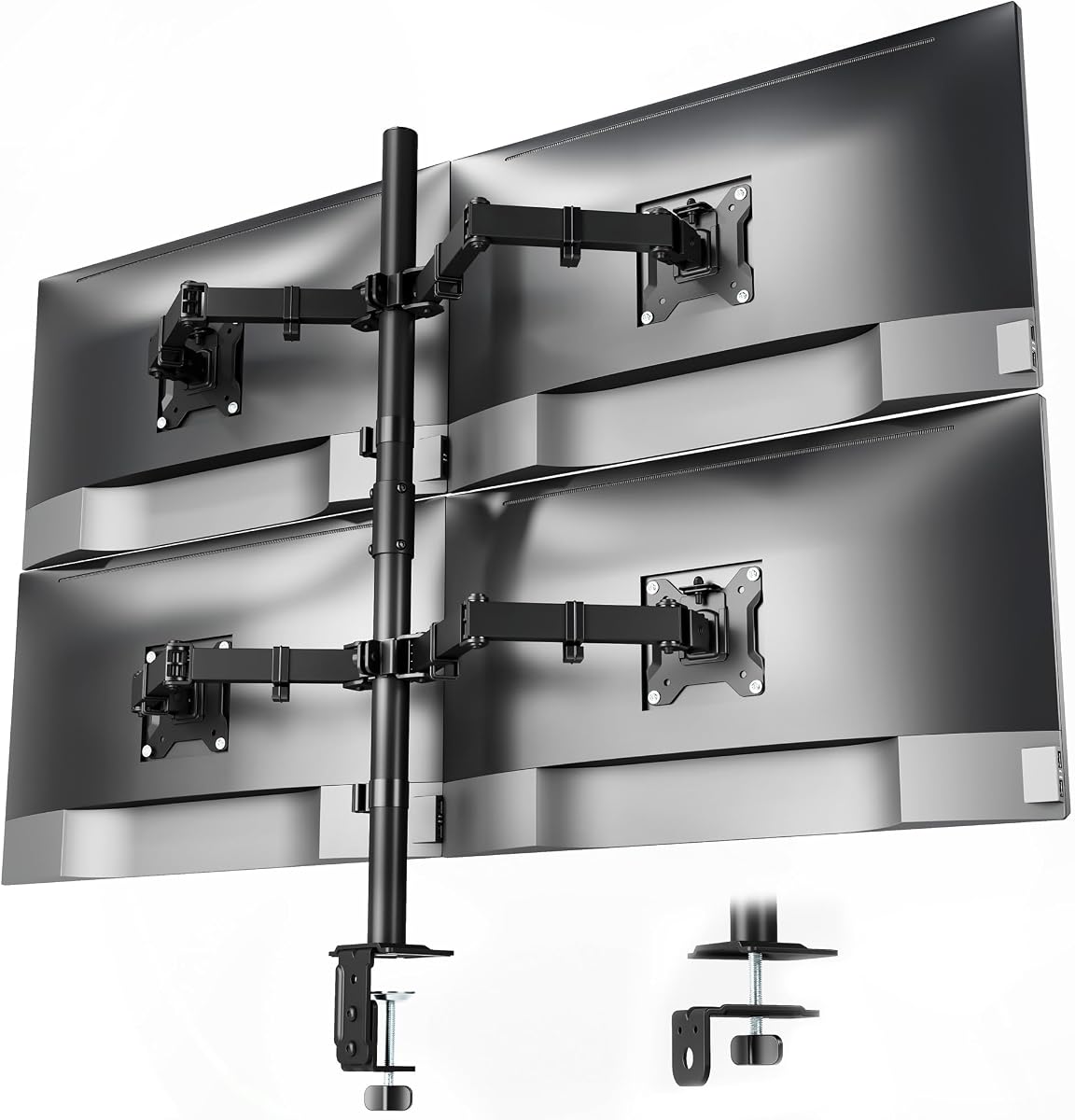
PUTORSEN Quad Monitor Mount for 49'' Top and 27'' Screens on Lower
4.5Editor score
Top slot for 49 inch
Gas spring extension
Three-section arm design
Finding the right 4 monitor mount with adjustable arms can transform your workspace into a highly efficient and ergonomic environment. Whether you are a trader, programmer, or creative professional, having multiple screens organized neatly is essential for productivity and comfort during long work sessions.
We have carefully analyzed the most popular quad monitor solutions available today based on build quality, adjustment range, and compatibility with various screen sizes. Our selection process focused on models that offer sturdy support, easy installation, and the flexibility to adapt to different desk setups without compromising stability.
Each pick in this guide highlights unique strengths and potential trade-offs so you can make an informed decision that fits your specific needs. Keep in mind that availability and features may change over time, so always verify the latest specifications before finalizing your purchase decision for your desk.
4.5Editor score

4.5Editor score

4.5Editor score
As an Amazon Associate we earn from qualifying purchases.
This side-by-side comparison breaks down the key specifications and features of every top-rated quad monitor mount to help you quickly identify which model offers the best value and performance for your specific desk setup and screen requirements.


The VIVO Pneumatic Arm Quad Ultrawide Monitor Mount stands out as a top-tier solution for professionals needing to manage multiple large displays. With a 4.5 rating and robust construction, it offers the flexibility to handle screens up to 49 inches on the top arm while maintaining stability.
We may earn a commission when you buy through this link, at no additional cost to you.
This model excels in its ability to support heavy loads without sagging, thanks to its high-capacity tilt joints and premium cast aluminum arms. The pneumatic system allows you to adjust the height effortlessly, ensuring your screens are always at the perfect ergonomic level for viewing.
While the price is higher than standard models, the investment pays off in durability and the unique ability to accommodate mixed ultrawide setups. The trade-off is primarily cost and the space required to install such a large structure on your workstation.
This mount is ideal for power users, traders, or anyone who needs to organize a serious multi-screen command center. If you value premium materials and advanced adjustment features, this VIVO model is the clear choice for a professional setup.
The top arm is specifically designed to hold a single 49 inch screen securely while the lower arms handle standard 28 inch displays below.
Unlike spring mechanisms, the pneumatic arms provide consistent resistance so moving screens feels smooth and effortless every time you adjust them.
We may earn a commission when you buy through this link, at no additional cost to you.
The PUTORSEN Quad Monitor Mount is engineered for those who need to combine a massive ultrawide display with standard monitors below. It carries a 4.5 rating and features a unique layout that prioritizes the top screen for critical data while keeping lower screens accessible for reference.
We may earn a commission when you buy through this link, at no additional cost to you.
Its advanced three-section arm design distributes weight evenly to prevent sagging, and the gas spring system ensures smooth positioning. The ability to remove segments gives you control over the extension distance, allowing for a tighter fit against the wall if needed.
Users might find the assembly process slightly more involved than basic mounts due to the multiple parts and heavy top arm. However, the resulting stability and flexibility for mixed-size setups make this a worthy consideration for advanced workstations.
This mount is perfect for financial traders or designers who rely on a primary ultrawide screen and secondary monitors for multitasking. Its robust build and adjustable segments make it a premium choice for complex display configurations.
The ability to remove one segment from the arm allows you to reduce the extension for a more compact and stable setup.
Included C-clamp and grommet base options ensure you can install this heavy-duty mount on a wide variety of desk thicknesses securely.
We may earn a commission when you buy through this link, at no additional cost to you.
The WALI Stacked 4 Monitor Mount is a fantastic entry-level option for anyone looking to organize four screens without breaking the bank. With a 4.5 rating, it offers a sturdy steel frame that holds up to 22 lbs per arm, making it suitable for standard office monitors.
We may earn a commission when you buy through this link, at no additional cost to you.
This model focuses on simplicity and functionality, featuring integrated cable management to keep your desk tidy. The arms offer tilt, swivel, and rotation to help you find comfortable viewing angles, though it lacks the premium pneumatic adjustment found in higher-end models.
The main trade-off is the screen size limit, as it supports up to 27 inches rather than larger ultrawides. Additionally, manual adjustment requires a bit more effort than spring-loaded systems, but the stability is excellent for the price.
This mount is ideal for general office workers or students who need a clean desk setup with standard-sized monitors. If you want a reliable and affordable solution to declutter your workspace, this WALI option delivers great value.
By elevating monitors off the desk surface, this mount frees up valuable space for your keyboard, documents, or other work essentials.
Built-in cable clips hide wires along the arms to reduce visual clutter and maintain a professional appearance on your workstation.
We may earn a commission when you buy through this link, at no additional cost to you.
The monTEK Quad Monitor Stand is a solid choice for users with a range of monitor sizes from 17 to 32 inches. It boasts a 4.5 rating and features a modern design that keeps wires tidy and screens securely in place without sagging over time.
We may earn a commission when you buy through this link, at no additional cost to you.
Key strengths include the quick-release VESA plates which simplify installation and removal, and the full range of motion that includes 45 degrees of tilt for glare reduction. The advanced joint design ensures that your displays remain level even after frequent adjustments.
While it does not offer pneumatic height adjustment, the mechanical system is robust enough for standard office use. The main consideration is that it is designed for standard flat screens rather than heavy ultrawides, so check your monitor specs before buying.
This stand is perfect for general office use or gaming setups where standard-sized monitors are used. If you value ease of installation and clean cable management without premium features, this monTEK model provides a reliable solution.
Supporting screens from 17 to 32 inches allows you to mix different sizes while keeping them all supported by one unified base.
The wide tilt range helps reduce glare from overhead lighting and allows you to find the perfect angle for long viewing sessions.
We may earn a commission when you buy through this link, at no additional cost to you.
The MOUNT PRO 4 Monitor Mount stands out with an extra tall pole that offers practical height flexibility for various seating positions. With a 4.5 rating, it supports up to 17.6 lbs per arm and allows you to adjust the viewing height to suit your comfort needs.
We may earn a commission when you buy through this link, at no additional cost to you.
This mount offers a full range of motion including tilt and swivel, ensuring that you can orient screens horizontally or vertically as needed. The included cable clips help keep wires organized, maintaining a neat appearance on your desk throughout the day.
While the weight capacity is moderate compared to heavy-duty models, it is sufficient for most standard flat and curved screens. The trade-off is a more basic aesthetic and lower load limit, which might not suit very large ultrawide displays.
This mount is great for users who need height flexibility or want to support both sitting and standing desk positions. If you are looking for a straightforward and adjustable solution for standard monitors, the MOUNT PRO offers good value.
With a reach of 31.7 inches, this mount allows for better eye alignment whether you are sitting or standing at your workstation.
The 360 degree rotation capability lets you switch effortlessly between landscape and portrait modes for different types of work.
We may earn a commission when you buy through this link, at no additional cost to you.
The MOUNTUP Quad Monitor Stand delivers a strong balance of features and affordability for multi-monitor setups. With a 4.5 rating, it uses a solid base to support four arms and includes cable organizers to keep your desk tidy and professional.
We may earn a commission when you buy through this link, at no additional cost to you.
Features like the quick-release VESA plate simplify the installation process, making it easy to attach monitors in under 20 minutes. The mount allows for full 360 degree rotation and tilt to help you find the ideal ergonomic position for your screens.
Users should note that height adjustment is manual rather than pneumatic which can be a slight inconvenience when reconfiguring your setup. However, the stability and included customer service support provide peace of mind for long-term use.
This stand is suitable for home office users or teams needing a reliable quad setup without premium pricing. If you value ease of use and organized cables, the MOUNTUP model is a highly recommended choice.
A single base supports all four monitor arms which reduces clutter at the desk edge and improves overall stability for the setup.
Comprehensive instructions and clear labeling allow most users to complete the setup in less than 20 minutes without issues.
We may earn a commission when you buy through this link, at no additional cost to you.
The VIVO Quad Pneumatic Monitor Mount combines sturdy construction with pneumatic assistance to make screen adjustments feel effortless. Rated at 4.4 stars, it uses dual springs to counterbalance monitor weight so you can reposition screens with minimal effort.
We may earn a commission when you buy through this link, at no additional cost to you.
The steel and aluminum support ensures durability while the drill-free C-clamp mounting secures the stand quickly without damaging your desk. It supports standard 17 to 32 inch screens and includes cable clips to maintain a clean workspace.
While the center bracket is fixed and only the side arms move pneumatically, the system is efficient for typical office layouts. The trade-off is a slightly smaller extension compared to full articulation models, but the stability is impressive.
This mount is ideal for users who want the convenience of pneumatic lift without spending on a premium ultrawide system. If you need smooth movement and strong support for standard screens, this VIVO option is worth considering.
The two pneumatic arms provide a smooth transition when moving screens up or down which reduces wear on the joints.
The heavy-duty C-clamp secures to desks up to 3.25 inches thick so you can mount this without drilling holes in your furniture.
We may earn a commission when you buy through this link, at no additional cost to you.
The Pholiten Quad Monitor Arm is designed to save desk space while keeping screens organized and accessible. With a 4.4 rating, it features gas spring technology that allows for smooth positioning and fits most 32 inch screens securely.
We may earn a commission when you buy through this link, at no additional cost to you.
The arm design allows forward and backward movement along with significant tilt so you can adjust the viewing angle easily. The installation process is straightforward with included C-clamps or grommet options to secure the mount to your desk.
Users looking to mount very heavy ultrawides might find the weight limit of 10kg per arm restrictive. However, for standard flat monitors, the stability and space-saving design make it an excellent choice for smaller work areas.
This arm is perfect for those who need a tidy desk without a bulky base. If you value flexibility and a smaller footprint while maintaining ergonomic comfort, the Pholiten mount is a strong contender.
The mount sits on the back of the table lifting screens off the surface to maximize usable desk area.
Adjustable height and position allow the stand to be customized to your specific ergonomic needs for comfort.
We may earn a commission when you buy through this link, at no additional cost to you.
The WALI Quad Monitor Desk Mount is a highly rated versatile option that supports a wide range of screen sizes and weights. With a 4.6 rating, it holds up to 22 lbs per arm and offers a generous height pole for flexible positioning.
We may earn a commission when you buy through this link, at no additional cost to you.
Its double stage locking system allows you to mount securely on both C-clamp and grommet bases while the built-in cable management keeps wires hidden. The 360 degree rotation feature enables easy switching between landscape and portrait orientations.
While it lacks advanced pneumatic features, the sturdy build and high weight capacity make it reliable for demanding environments. The trade-off is a more manual adjustment process which may require some effort during initial setup.
This mount is ideal for users needing a sturdy solution for larger screens up to 32 inches. If you prioritize weight capacity and flexibility without high costs, the WALI model delivers strong performance.
Each arm supports up to 22 lbs ensuring that heavier monitors remain stable without sagging over time.
The locking system adapts to different desk thicknesses to secure the mount firmly in place for safety.
We may earn a commission when you buy through this link, at no additional cost to you.
The VIVO Quad Monitor 13 to 32 inch Mount is designed to help home office users reclaim valuable desk space with a clean setup. With a 4.3 rating, it supports standard monitors up to 32 inches and features a longer upper bracket for flexible alignment.
We may earn a commission when you buy through this link, at no additional cost to you.
The drill-free C-clamp secures to your desk quickly and the included cable clips keep wires organized for a professional look. It provides full rotation and swivel options so you can find the ideal viewing angle for each screen easily.
While the tilt range is somewhat limited to 15 degrees the robust build ensures stability for daily tasks. The trade-off is less tilt flexibility which might matter for some glare conditions but the overall utility is high.
This mount is perfect for home offices where space is at a premium and you need to keep screens off the desk. If you want a reliable and easy-to-install solution for standard monitors, this VIVO stand is a good fit.
The extended top arm allows your top monitor to angle downward and align with lower monitors for better viewing.
The heavy-duty C-clamp secures to surfaces up to 3.94 inches thick without the need for permanent installation.
We may earn a commission when you buy through this link, at no additional cost to you.
Selecting the right quad monitor mount requires understanding key factors that impact ergonomics, stability, and compatibility with your specific hardware.
Always check the maximum screen size and weight limits per arm to ensure your monitors will fit securely. Some mounts support up to 27 inches while others handle 49 inch ultrawides so match these specs to your hardware.
Verify that your monitors exceed the VESA mounting pattern requirements before purchasing to avoid compatibility issues during installation.
Decide between C-clamp and grommet mounting based on your desk structure and thickness. C-clamps work on most desks while grommet mounts are better for desks with pre-drilled holes.
Ensure the mount supports your desk thickness and offers padding to prevent surface damage during use.
Look for mounts offering tilt, swivel, and rotation to allow you to position screens ergonomically. Pneumatic or gas spring systems offer smoother height adjustments compared to manual mechanical setups.
Consider how much freedom you need to move screens up and down depending on your seating preferences and tasks.
Steel and aluminum constructions provide better stability and longevity for heavier loads. Higher end models often use cast aluminum for added strength and scratch resistance.
Choose a model that feels solid and does not sag when monitors are adjusted frequently during the day.
Integrated cable clips and channels keep wires organized and out of sight for a cleaner workspace. This reduces clutter and minimizes the risk of accidentally pulling cables when moving monitors.
Check if the mount includes clips or guides so you can hide wires along the arms effectively.
Quick release VESA plates simplify attaching and detaching monitors making installation much faster. Look for clear instructions and all necessary hardware included in the package.
Complex setups may require two people or tools so review assembly requirements before buying if you want a simple process.
Consider how much physical space the mount occupies on your desk edge especially if you have a smaller workspace. Some models are more compact than others and affect your available writing area.
Ensure the base and mounting hardware do not interfere with your keyboard or other daily work tools.
Raising monitors to eye level reduces strain on your neck and back during long work sessions. A good mount allows fine-tuning of position to suit your sitting or standing height.
Prioritize features like height adjustment and tilt to achieve the best posture for health and comfort.
Begin by securing the base firmly to your desk using the provided clamp or grommet option ensuring it is stable before attaching monitors.
Attach the monitors to the VESA plates and connect all cables before lifting the setup into position to avoid stress on the wires.
Regularly check tension adjustments and tighten screws if you notice any sagging or movement that may affect stability over time.
Most mounts in this guide support standard VESA patterns of 75x75mm and 100x100mm. Some models also offer adapters or specific slots for larger patterns but always verify your monitor's hole spacing before buying to ensure compatibility with your specific hardware.
Yes many of these mounts support curved screens as long as the weight and size stay within the stated limits. Always check the product description for curved screen compatibility since some models have specific weight reductions for curved displays to ensure stability.
To prevent sagging ensure the mount is rated for your monitor's weight and that the tension is adjusted correctly during setup. Some models allow you to increase tension for heavier loads or decrease it for lighter ones to achieve a balance.
Many quad mounts are compatible with standing desks but you must ensure the clamp or grommet base fits your desk thickness and height adjustments are flexible enough for different positions. Always check desk thickness specs before purchasing.
Most models include clear instructions and all hardware needed for installation within 20 minutes. Quick release VESA plates and labeled parts simplify the process though some heavier setups might benefit from a second person to hold the monitor while attaching.
Some mounts like the PUTORSEN allow mixed sizes with different capacities for each arm. However standard models usually require all screens to match the same weight and size limits so review the specs carefully if you plan to mix monitors.
We hope this guide helps you find the perfect quad monitor mount to improve your workspace efficiency and comfort. Each option offers unique strengths so consider your screen size and budget before making your final decision for your desk setup.
Prioritize models that offer the best balance of stability and adjustability for your daily tasks. Ergonomic features like height adjustment and cable management can make a significant difference in your productivity and long-term comfort while working.
Always verify the latest availability and specs before purchasing to ensure you get the best value. Prices and stock can change quickly so checking current listings will help you secure the right monitor mount for your professional needs.