
UBIQUITI UniFi Aggregation Switch Pro
4.7Editor score
28x 10G SFP+ ports
4x 25G SFP28 aggregation
760Gbps switching capacity
This guide compares the top 25GbE switches with SFP28 ports for enterprise networking. We review key features, performance, and management tools to help you
Modern data centers demand high-speed connectivity to handle growing workloads efficiently. 25GbE switches with SFP28 ports offer a balanced upgrade path from 10G to 100G, providing cost-effective bandwidth for servers and storage systems.
We evaluated ten leading models based on port configuration, switching capacity, and management features. Our analysis focuses on reliability, scalability, and suitability for various environments ranging from small offices to large enterprise clusters.
Each pick highlights specific strengths like Layer 3 routing, low latency, or PoE support. Prices vary by vendor and availability, so check current listings for the best deals before making your final purchase decision today.
4.7Editor score

4.5Editor score

4.4Editor score
The following table provides a side-by-side comparison of all ten selected switches. We highlight key specifications to help you quickly identify the model that best fits your specific networking requirements and budget constraints.





The QNAP QSW-M7230 stands out as a top choice for high-performance environments requiring mixed 10G and 25G connectivity. With a rating reflecting strong enterprise performance, it delivers non-blocking throughput essential for AI and storage clusters.
We may earn a commission when you buy through this link, at no additional cost to you.
Its design prioritizes lossless network performance through Priority Flow Control and Explicit Congestion Notification. This makes it exceptionally reliable for RoCEv2 traffic, ensuring minimal packet loss during heavy data transfers across your infrastructure.
While the management features are powerful, they require some familiarity with Layer 3 Lite concepts like static routing and VLAN segmentation. However, the web GUI is intuitive enough for most IT admins to configure quickly without extensive CLI knowledge.
This switch is best suited for organizations migrating from 10G to higher speeds while maintaining existing copper cabling for servers. Its ability to bridge optical backbones with copper setups ensures a cost-effective path for growing businesses.
Purpose-built for AI clustering and large-scale NAS deployments, this switch handles intensive virtualization workloads like VMware ESXi and Hyper-V with low latency.
Engineered specifically for ToR data center layouts, it provides the physical density and airflow needed for server rooms requiring high-bandwidth connections.
We may earn a commission when you buy through this link, at no additional cost to you.
The TRENDnet TEG-S50284 is a highly rated option for those needing multi-gigabit speeds without a full 10G overhaul. It excels in providing 2.5G speeds over existing copper cabling, making it a practical choice for budget-conscious upgrades.
We may earn a commission when you buy through this link, at no additional cost to you.
Its standout feature is the compliance with NDAA and TAA regulations, which is critical for government contractors and specific enterprise security requirements. Combined with a lifetime warranty, it offers long-term peace of mind for critical infrastructure.
While it lacks native 25G SFP28 ports for direct server connections, the four 10G SFP+ uplinks provide sufficient aggregation for many SMB environments. The smart fans adjust speed based on cooling needs to reduce noise and energy usage.
This switch is ideal for small to medium businesses expanding their network capacity gradually. If you need 25G specifically, this might not be the primary choice, but it serves as a solid access layer for multi-gigabit clients.
With NDAA and TAA compliance, this switch meets strict government standards, allowing secure planning and installation for public sector projects in the U.S. and Canada.
Smart fans automatically adjust speed based on thermal needs, saving energy and reducing noise in office environments without compromising cooling performance.
We may earn a commission when you buy through this link, at no additional cost to you.
This renewed Cisco Nexus switch offers a high-density solution for data centers needing 48 ports of 25GbE connectivity. It brings enterprise-grade reliability at a lower price point, making it attractive for labs or smaller clusters with tight budgets.
We may earn a commission when you buy through this link, at no additional cost to you.
The 48 SFP28 ports provide massive parallelism for servers requiring 25G uplinks, while the QSFP+ uplinks offer flexibility for 40G or 100G aggregation. This configuration is perfect for top-of-rack deployments where port density is paramount.
As a renewed product, it undergoes professional inspection and testing by qualified vendors. While accessories may be generic, the core functionality is guaranteed to match the original specifications, ensuring you get performance close to a new unit.
Buyers should note this is a physical switch without advanced software features like VXLAN or ACI integration in this specific listing. It serves best as a straightforward Layer 2 or simple Layer 3 aggregation point for high-speed server racks.
This pre-owned product is professionally inspected, tested, and cleaned, offering significant savings while maintaining core hardware functionality and reliability standards.
With 48 fixed 25GbE ports, it delivers exceptional port density for high-performance computing and storage area networks requiring extensive parallel connectivity.
We may earn a commission when you buy through this link, at no additional cost to you.
The Mikrotik CRS520 is a powerhouse for network engineers who need granular control over traffic and routing. Its powerful quad-core CPU and 4GB of RAM allow it to handle complex routing tables and firewall rules with ease.
We may earn a commission when you buy through this link, at no additional cost to you.
The port configuration is unique, offering a mix of speeds including 2.5G, 25G, and 100G capabilities. This flexibility supports diverse connectivity needs, allowing you to connect legacy devices alongside high-speed servers on a single chassis.
Mikrotik RouterOS is known for its depth, offering features that rival much more expensive enterprise gear. However, this power comes with a steeper learning curve compared to simpler web-based switches, requiring some CLI familiarity.
If you need a high-performance switch that can also act as a router or firewall, this model is a strong candidate. It is best suited for professionals who appreciate customizable networking over out-of-the-box simplicity.
Equipped with a powerful quad-core ARM CPU running at 2 GHz, this switch handles heavy routing loads and complex traffic analysis without bottlenecks.
With 4GB of DDR4 RAM, the system supports large routing tables and simultaneous connections, ensuring stable performance even under high traffic conditions.
We may earn a commission when you buy through this link, at no additional cost to you.
The Ubiquiti UniFi Aggregation Switch Pro delivers exceptional value for organizations already invested in the UniFi ecosystem. It combines high-speed aggregation with intuitive management tools that simplify complex network tasks significantly.
We may earn a commission when you buy through this link, at no additional cost to you.
Its 28 ports of 10G SFP+ and 4 ports of 25G SFP28 provide a robust foundation for backbone connectivity. The Layer 3 features enable efficient routing between VLANs without needing a dedicated router for traffic segmentation.
Management is handled through the powerful UniFi Network web application and mobile app, allowing remote configuration and monitoring. A small touchscreen on the device provides quick visual insights into system status and connection health.
This switch is ideal for businesses seeking a unified, easy-to-manage solution for their core network. While the SFP28 ports lack mixed speed modes in 25G configuration, the overall performance and management depth make it a top-tier choice.
Control and monitor the switch from anywhere using the intuitive UniFi Network web application or mobile app, streamlining deployment and troubleshooting workflows.
With 760Gbps switching capacity, it enhances network performance by creating high-bandwidth aggregation links for core infrastructure and data center environments.
We may earn a commission when you buy through this link, at no additional cost to you.
The Dell EMC PowerSwitch N3224P-ON is designed for environments requiring both high-speed connectivity and significant power delivery. Its PoE++ capability allows it to power high-demand devices while maintaining robust data throughput.
We may earn a commission when you buy through this link, at no additional cost to you.
With 4 ports of 25Gb SFP28 and 2 ports of 100Gb QSFP28, it offers a modern uplink configuration suitable for high-performance computing. The modular design allows for easier maintenance and upgrades as network needs evolve.
This switch supports three layers of networking, providing advanced management features for complex IT infrastructures. The rack-mountable form factor ensures it fits standard server cabinets without requiring additional space or mounting hardware.
Consider this model if your deployment involves PoE-powered endpoints like high-end access points or cameras alongside 25G servers. The power consumption is notable, but the trade-off is acceptable for the functionality and delivery capabilities it provides.
Supports PoE++ to deliver higher power to devices over Ethernet cables, ideal for powering high-performance endpoints and cameras without separate power supplies.
Designed with a modular architecture, this switch allows for flexible expansion and component replacement, extending its lifespan and adapting to changing needs.
We may earn a commission when you buy through this link, at no additional cost to you.
The TRENDnet TEG-3284WS provides a balanced mix of smart features and ease of use for small businesses. Its web smart management simplifies configuration, making advanced networking accessible without heavy reliance on complex enterprise software.
We may earn a commission when you buy through this link, at no additional cost to you.
With 24 ports of 2.5G and 4 uplinks of 10G, it supports modern multi-gigabit devices while remaining compatible with older cabling. The Hive Enabled Cloud Service allows remote management and diagnosis, which is ideal for distributed teams.
While user feedback reflects some limitations in advanced features, the lifetime warranty and TAA compliance offer significant reassurance for buyers. The interface includes VLANs, QoS, and ACLs, covering most typical SMB requirements effectively.
This switch is recommended for organizations that need reliable management without the overhead of a dedicated network team. If cloud monitoring and easy setup are priorities, this model provides a straightforward solution for multi-gigabit networks.
Remotely manage and diagnose the switch via TRENDnet's cloud service, allowing flexible oversight for distributed networks or IT admins managing multiple locations.
The easy-to-use web-based GUI simplifies switch configuration and offers essential management features like VLAN and QoS for flexible network integration.
We may earn a commission when you buy through this link, at no additional cost to you.
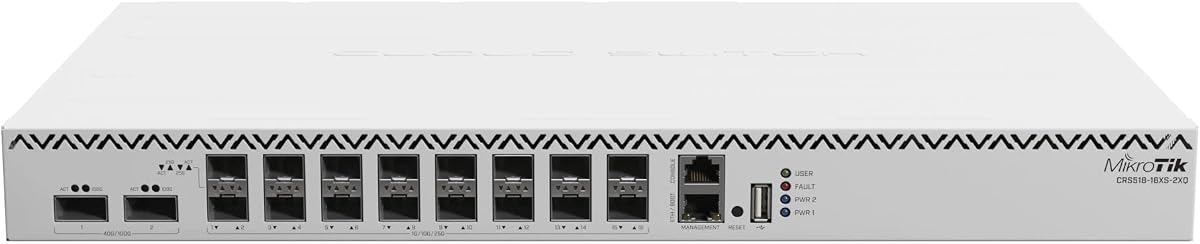
The MikroTik CRS518 is a compact powerhouse offering 16 ports of 25G SFP28 connectivity in a small footprint. It is an excellent choice for labs or small data centers needing density without consuming large amounts of rack space.
We may earn a commission when you buy through this link, at no additional cost to you.
Despite its smaller CPU, it handles switching tasks efficiently thanks to dedicated hardware acceleration. The 2x QSFP28 uplinks support 40G or 100G connections, allowing flexible aggregation to higher-speed core networks.
MikroTik's RouterOS provides extensive configuration options for those willing to invest time in learning the system. This flexibility ensures that the switch can adapt to changing network needs without requiring hardware replacement.
Ideal for technical users who value port density and flexibility, this switch offers a cost-effective way to deploy 25G speeds. Just be prepared for a more hands-on setup process compared to plug-and-play consumer gear.
Designed to be compact, this switch fits into tight rack spaces while providing 16 SFP28 ports, making it perfect for dense server room layouts.
With 16 25G ports and 2 high-speed uplinks, it supports varied connectivity needs, making it a versatile choice for growing networks.
We may earn a commission when you buy through this link, at no additional cost to you.
The Cisco N9K-C93180YC-EX renewed switch offers a high-performance option for data centers focused on automation and virtualization. Its NX-OS system provides consistent administration capabilities for managing large-scale environments effectively.
We may earn a commission when you buy through this link, at no additional cost to you.
With 48 ports of 25G and 6 ports of 100G, it delivers maximum flexibility for demanding applications. The VXLAN support enables efficient network virtualization, allowing scalable and highly available networks that are easy to manage.
The cut-through switching architecture minimizes latency to under 1 microsecond, which is crucial for high-performance computing and big data processing. Hot-swappable power supplies ensure high availability, keeping your network running 24/7.
This model is an ideal choice for organizations needing enterprise-grade automation and scalability without buying new hardware. While it is renewed, the performance and features match a new unit, making it a strong value proposition.
Supports Cisco ACI to simplify deployment and management of virtual networks, reducing overhead and streamlining operations for modern data centers.
With less than 1 microsecond latency, this switch uses cut-through architecture to ensure seamless operations for high-performance computing tasks.
We may earn a commission when you buy through this link, at no additional cost to you.
The D-Link DGS-1210-28 is a budget-friendly option for those needing managed features without high-speed fiber optics. It offers 24 Gigabit ports and 4 combo SFP ports, making it versatile for small businesses upgrading from basic hubs.
We may earn a commission when you buy through this link, at no additional cost to you.
Compliance with NDAA standards ensures it meets strict regulatory requirements for security and government projects. The fanless design ensures silent operation, which is a significant benefit for office environments where noise reduction matters.
While it does not support native 25G speeds, it provides essential Layer 2+ features like VLANs and QoS for traffic management. This makes it suitable for managing traffic flow even if raw bandwidth per port is limited.
Ideal for small offices or surveillance networks, this switch is a solid entry point into managed networking. Its lifetime warranty adds confidence to the purchase, ensuring long-term support for your infrastructure needs.
With ONVIF support, it streamlines the deployment of IP surveillance networks by optimizing video traffic and automatically detecting compliant devices.
A fanless design allows for silent running and reduced power consumption, making it ideal for quiet office spaces and sensitive environments.
We may earn a commission when you buy through this link, at no additional cost to you.
Selecting the right switch involves balancing speed, port count, and management capabilities. This guide outlines the critical factors to consider when evaluating 25GbE switches with SFP28 ports.
Ensure the switch offers enough SFP28 ports to connect all your servers directly. Higher density reduces the need for additional aggregation layers, simplifying your cabling and improving overall network efficiency.
Look for at least 4 or 8 SFP28 ports for uplinks to ensure you have enough bandwidth headroom for future expansion.
Switching capacity determines the total amount of data the switch can process simultaneously. For 25G environments, a minimum capacity of 200Gbps is recommended to prevent bottlenecks during peak traffic times.
Always verify the total switching capacity matches your projected network load to maintain high performance under stress.
Low latency is crucial for real-time applications like high-frequency trading or AI training clusters. Switches with cut-through architecture deliver lower latency compared to store-and-forward models.
Prioritize models with low latency specifications if your workloads depend on rapid data processing and minimal delay.
Layer 3 features allow the switch to handle routing between VLANs, reducing the need for a separate router. Look for support for static routing and DHCP snooping for secure network segmentation.
If you need internal routing, choose a switch with explicit Layer 3 Lite or full Layer 3 capabilities.
Management interfaces vary from simple web GUIs to complex CLI environments. Select a user interface that matches your team's expertise, whether it is a visual dashboard or a command-line interface.
Ensure the management interface supports your preferred remote access and monitoring tools for easier administration.
High-density 25G switches generate significant heat. Check if the unit uses active fans or passive cooling to match your server room environment. Hot-swappable power supplies are essential for high availability.
Consider power consumption and cooling requirements to maintain optimal operating temperatures and energy efficiency.
Government and security-sensitive projects often require NDAA compliance. Ensure the switch meets relevant security standards if you are working with federal contracts or regulated data.
Verify that the switch supports advanced security features like Access Control Lists and port security for robust protection.
Prices vary significantly based on features and brand. Balance the upfront cost with long-term benefits like warranty coverage and support options to ensure value over time.
Always review the warranty terms to ensure you have protection against hardware defects and technical support needs.
Begin by configuring your VLANs and static routes through the web interface or CLI before connecting servers. Ensure your optical transceivers match the port speed of 25G to avoid compatibility issues or link failures.
Regularly check for firmware updates to maintain security patches and performance improvements. Keeping the switch software current helps prevent vulnerabilities and ensures compatibility with new network standards.
Monitor environmental conditions to prevent overheating. If the switch uses active cooling, clean dust from vents periodically to maintain airflow and reduce the risk of hardware degradation over time.
SFP28 ports typically support 25Gbps speeds and are used for server connections, while QSFP28 ports support 100Gbps and are used for uplinks. The physical form factor and pin configuration differ significantly between the two types.
Yes, you generally need OM3 or OM4 fiber optic cables or Direct Attach Copper (DAC) cables rated for 25G speeds. Standard Cat6 copper cabling is not sufficient for 25Gbps data transmission.
Most SFP28 ports are backward compatible and can accept 10G SFP+ transceivers. However, the link will operate at 10G speed, so ensure your switch configuration allows for mixed speeds if needed.
Layer 3 Lite provides essential routing features like static routing and VLAN support without the full complexity of enterprise routing protocols. It is sufficient for small to medium networks needing basic inter-VLAN routing.
Yes, reputable vendors thoroughly test and clean renewed switches to meet original specifications. They often come with warranties that provide peace of mind for production use in data centers and offices.
Use centralized management software provided by the vendor or a third-party network monitoring tool. These tools allow you to configure, update, and monitor all your switches from a single dashboard.
High-speed data processing generates significant heat. Proper cooling ensures the switch operates within safe temperature limits, preventing thermal throttling and extending the lifespan of the internal components.
Look for ports that support 25Gbps throughput and are compatible with both copper DAC cables and optical transceivers. Ensure the port supports auto-negotiation if you plan to use mixed speeds.
Choosing the right 25GbE switch depends on your specific bandwidth needs, management preferences, and budget constraints. Whether you need high-density access layers or powerful aggregation points, there is a suitable option in this list.
Prioritize switches that offer the necessary Layer 3 features and cooling mechanisms for your environment. Reliability and long-term support are just as important as raw speed when planning a robust network infrastructure.
Always verify current prices and availability before purchasing, as hardware costs can fluctuate. We recommend checking the latest reviews to ensure you are making the most informed decision for your business needs.