
Eyoyo 3.5 Portable Digital Video Magnifier
4.6Editor score
Up to 25X zoom magnification
8 adjustable high-contrast color modes
AV output for larger display connection
This guide compares the top digital magnifiers for low vision, evaluating zoom range, color modes, battery life, and portability to help users find the ideal
Living with low vision can make everyday tasks like reading menus, labels, or books incredibly challenging. Digital magnifiers offer a powerful solution by electronically enlarging text and images, restoring independence and confidence to users with visual impairments.
We have carefully evaluated ten leading digital magnifiers based on critical factors such as magnification range, screen quality, ease of use, and portability. Our goal is to provide a comprehensive comparison that highlights the strengths and weaknesses of each device.
Each pick in this guide showcases specific features tailored to different needs, from budget-friendly options to premium models with advanced OCR. Please note that product availability and pricing can change frequently, so checking the latest details is recommended before purchasing.
4.6Editor score
4.0Editor score

4.4Editor score
This side-by-side comparison summarizes the key specifications of all ten products, helping you quickly identify which device offers the right balance of magnification, screen size, and features for your specific needs.


The Eyoyo 3.5 Portable Digital Video Magnifier stands out as an accessible entry point for users needing visual assistance. With a strong 4.6 rating, it delivers reliable performance for reading tasks without requiring a significant financial investment.
We may earn a commission when you buy through this link, at no additional cost to you.
Its key strength lies in its versatility. The device offers up to 25X magnification, allowing users to zoom in on text effectively. Additionally, it features 8 adjustable color modes, which can be tailored to reduce eye strain and improve contrast for various visual impairments.
While the 3.5-inch screen is compact, it remains effective for short reading sessions. Users might find they need to move the device more frequently compared to larger screens, but its portability makes it excellent for carrying in a bag during outings.
This magnifier is ideal for individuals seeking a budget-friendly tool for daily reading. Whether at home or traveling, it provides a practical solution for enhancing visibility of text and images with ease.
Its small size and foldable bracket allow users to easily transport it anywhere, making it perfect for grocery shopping or reading outside the home.
The inclusion of multiple color modes ensures that users can find a setting that maximizes their specific visual needs, enhancing readability significantly.
We may earn a commission when you buy through this link, at no additional cost to you.
This Digital Magnifier 5 Inch model provides a robust combination of screen size and usability. Its 5-inch screen offers a more comfortable viewing area for extended reading sessions compared to smaller handheld units.
We may earn a commission when you buy through this link, at no additional cost to you.
The simplified button design is particularly beneficial for elderly users or those with limited dexterity. By removing redundant controls, the device streamlines the process of adjusting magnification and color settings to reduce cognitive load.
However, some users have noted variability in performance consistency. While it offers a high zoom range and multiple color modes, the overall user experience depends heavily on individual expectations and specific vision requirements.
This device is well-suited for users who need a larger screen for better visibility. Its ability to connect to a TV also makes it versatile for shared viewing or for those who prefer working with a bigger display.
The simplified button layout ensures that users can operate the device efficiently without needing to navigate complex menus or settings.
With 26 color modes and an auto-focus feature, this magnifier provides tailored viewing conditions that can adapt to different lighting environments.
We may earn a commission when you buy through this link, at no additional cost to you.
This Portable Digital Video Magnifier for Visually Impaired is designed with user comfort as a primary focus. Its 5-inch screen delivers crisp visuals, making text easier to read for individuals with macular degeneration or other low vision conditions.
We may earn a commission when you buy through this link, at no additional cost to you.
The foldable handle is a standout feature, allowing the device to rest flat on a surface without requiring constant holding. This reduces hand fatigue and encourages longer reading sessions. The device also remembers user preferences, simplifying daily use.
While the performance is strong, the price point places it in a higher tier. Users should consider whether the added ergonomic benefits justify the cost compared to similar models with fewer physical adjustments.
Ideal for home use, this magnifier provides a comfortable reading experience. Its high-resolution display ensures that text remains sharp even at higher magnification levels, which is critical for detailed tasks.
The ergonomic handle and bracket design minimize physical strain, making it easier for users to focus on reading without discomfort.
By saving preferred settings automatically, the device eliminates the need for repetitive adjustments, ensuring a seamless user experience every time.
We may earn a commission when you buy through this link, at no additional cost to you.
The 5 Inch Low Vision Aids model focuses on straightforward functionality. Its primary appeal lies in the simplified button layout, which is designed specifically for elderly users or children with amblyopia who need an uncomplicated device.
We may earn a commission when you buy through this link, at no additional cost to you.
With a 5-inch HD screen and auto-focus technology, it delivers clear images for reading books or menus. The device also supports connectivity to a TV, allowing users to view content on a larger display for better visibility.
Although the device includes memory capabilities to remember user settings, some reviews suggest inconsistent performance. This indicates that individual experience may vary based on usage patterns and expectations of image processing quality.
This product is best for those prioritizing simplicity over advanced features. If the primary goal is quick and easy access to magnification without complex navigation, this model serves that purpose well.
The removal of redundant buttons ensures that users can quickly adjust settings without confusion, making the device highly accessible for all ages.
From shopping at the grocery store to reading detailed menus, the device supports a wide range of daily activities where text clarity is essential.
We may earn a commission when you buy through this link, at no additional cost to you.
The VEVOR Portable Digital Magnifier offers unique versatility with its dual lens system. This feature allows users to switch between near and far focus, which is particularly useful for viewing both text and distant signs without moving the device.
We may earn a commission when you buy through this link, at no additional cost to you.
It supports a high zoom range of up to 48X, which is among the highest in its category. Additionally, the inclusion of both HDMI and AV outputs provides flexibility for connecting to various display types for shared viewing or larger screens.
Despite these technical advantages, user feedback suggests that the interface might not be as intuitive as competitors. The combination of many features can lead to a steeper learning curve for those accustomed to simpler devices.
This magnifier is suitable for users needing extreme zoom options and dual-purpose functionality. Its connectivity options make it a strong choice for those who need to project content to a TV or monitor frequently.
The ability to switch between near and far lenses without moving the device offers distinct convenience for users navigating different environments.
With up to 48X magnification, this device can handle detailed tasks that require significant enlargement of text or small objects.
We may earn a commission when you buy through this link, at no additional cost to you.
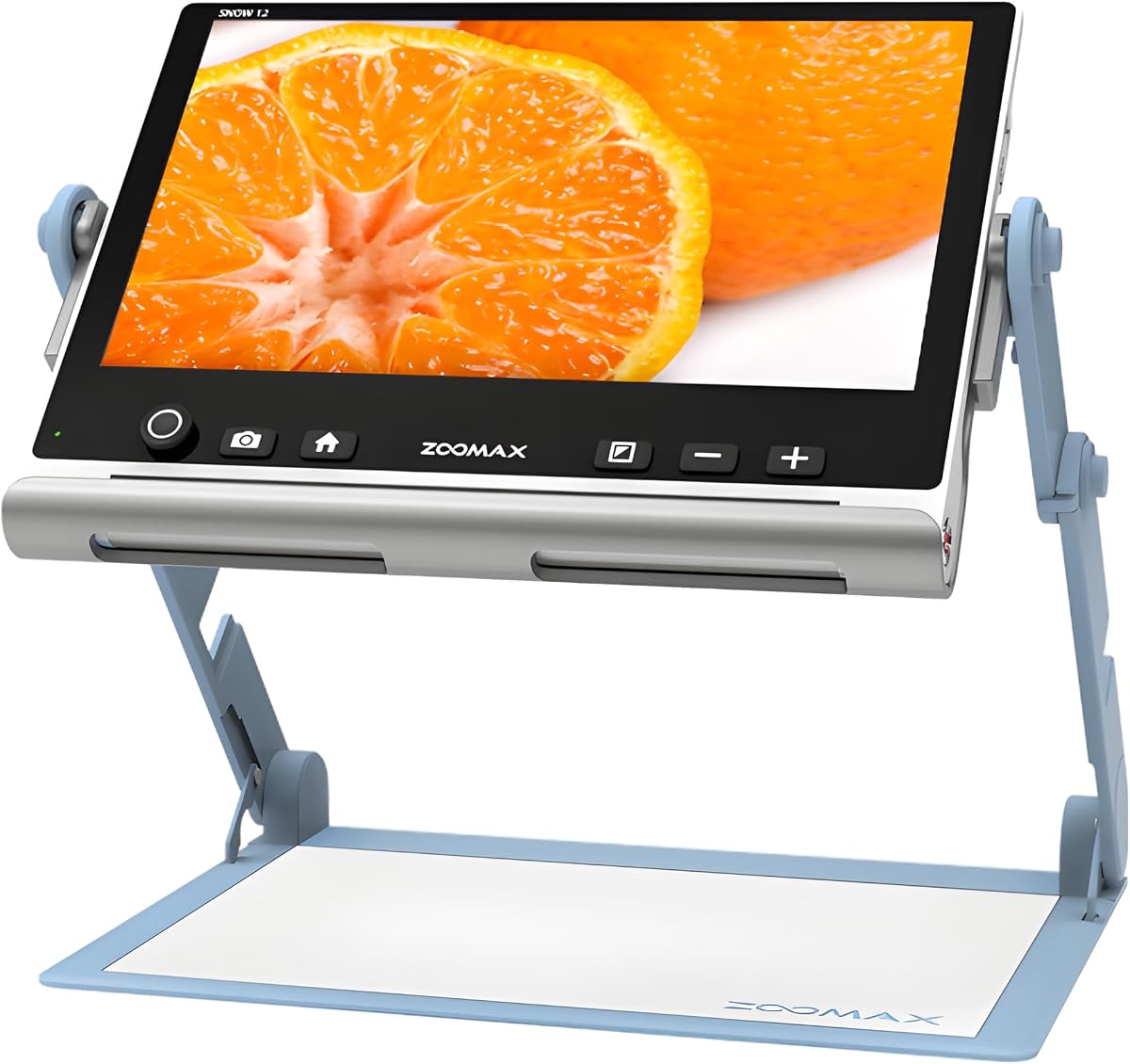
The Snow 12 Inch Foldable Portable Video Magnifier by Zoomax stands out due to its advanced text-to-speech capabilities. This device not only magnifies text but also reads it aloud, offering a unique multimodal approach to accessibility for users with low vision.
We may earn a commission when you buy through this link, at no additional cost to you.
Its 12-inch HD display provides ample space for reading, which is a significant upgrade from smaller handheld models. The foldable stand ensures stability and flexibility for different viewing angles, making it comfortable for extended use at home or in the office.
While the device is powerful, its higher price reflects the premium technology inside. Users should weigh the value of the OCR and speech features against their specific needs to determine if this level of functionality is necessary.
This magnifier is perfect for individuals who benefit from auditory feedback alongside visual magnification. Whether reading documents or books, the ability to convert text to speech adds an extra layer of independence and accessibility.
Optical character recognition transforms printed text into digital formats that can be read aloud, enhancing productivity and accessibility for users with visual challenges.
With support for over 20 languages, this device serves a diverse range of users, ensuring that non-native speakers can also benefit from its text-to-speech capabilities.
We may earn a commission when you buy through this link, at no additional cost to you.
The Eyoyo 5 Portable Digital Video Magnifier is engineered with endurance in mind. With a 4500mAh battery, it offers over 4 hours of continuous operation, making it a reliable choice for users who need to read for extended periods without frequent recharging.
We may earn a commission when you buy through this link, at no additional cost to you.
Its foldable handle ensures a comfortable grip and easy storage. The device supports photo capture and playback, allowing users to save important images for later review. This feature is particularly useful for recipes or labels that need to be referenced later.
While the 5-inch screen is standard, the clarity is sufficient for most reading tasks. The inclusion of 17 color modes allows users to customize the display to reduce eye strain and improve contrast based on their visual preferences.
This model is ideal for users who prioritize battery reliability and ease of use. It provides a balanced mix of functionality and performance that meets the daily needs of individuals with low vision.
The robust battery ensures that users can rely on the device throughout the day without interruption, supporting consistent access to visual aids.
By allowing users to save and play back images, the device adds a functional layer of utility that goes beyond simple magnification.
We may earn a commission when you buy through this link, at no additional cost to you.
This Portable Digital Video Magnifier is designed with accessibility as a core principle. The prominent buttons are easy to press, making it suitable for elderly users or those with limited motor control who need a straightforward interface.
We may earn a commission when you buy through this link, at no additional cost to you.
It features a 5-inch HD screen that restores true-to-life colors and details. The device also supports installation for both left and right-handed users, ensuring that everyone can find a comfortable grip and angle for reading.
Although the specifications are similar to other models, the focus on ergonomic design makes it a compelling choice. The ability to connect to a TV further extends its utility for users who prefer a larger display area.
This device is best for users who need a tactile, easy-to-operate magnifier. Its design minimizes frustration and maximizes comfort during daily reading activities.
The large, easy-to-press buttons ensure that users with limited dexterity can navigate the device without difficulty, enhancing overall usability.
By accommodating both left and right-handed usage, the device ensures comfort for a wider range of users, making it versatile for home use.
We may earn a commission when you buy through this link, at no additional cost to you.
The Eschenbach SmartLux Digital Portable Magnifier represents a premium offering in the category. Known for quality optics, this device delivers crisp HD video magnification that is reliable and clear for users who demand performance.
We may earn a commission when you buy through this link, at no additional cost to you.
It includes image capture functionality, allowing users to save important details for later reference. The device comes with a Liberty cleaning cloth, ensuring that the optics remain clear and usable over time, which is vital for maintaining performance.
While the price is high, the build quality and specific magnification levels justify the investment for many users. It offers a refined experience that prioritizes clarity and ease of use above basic features.
This model is best for those seeking a reliable, high-end tool for daily visual tasks. Its reputation and included accessories make it a comprehensive solution for serious low vision needs.
The HD video technology ensures that text and images remain sharp, providing a superior viewing experience compared to lower-end alternatives.
Including a cleaning cloth ensures that users can maintain the device effectively, protecting their investment and ensuring long-term usability.
We may earn a commission when you buy through this link, at no additional cost to you.
This 5.0 Inch Digital Magnifier is designed to handle tasks that require extreme zoom. With a range up to 48X, it allows users to inspect fine details that might be invisible with standard magnification devices.
We may earn a commission when you buy through this link, at no additional cost to you.
The device features a foldable handle and simplified buttons, making it easy to hold and operate. It also supports external battery power, ensuring that users can use the device for extended periods without worrying about running out of charge quickly.
While it excels at zoom, it is not recommended for reading long novels due to potential eye fatigue. However, for specific tasks like reading labels or maps, it provides the necessary clarity and detail.
This magnifier is best for users who need high-powered zoom for specific daily tasks. Its combination of portability and extreme magnification makes it a valuable tool for on-the-go visual assistance.
The ability to reach up to 48X magnification makes this device ideal for inspecting very small text or objects that are difficult to see otherwise.
Its lightweight design ensures that users can carry it easily, making it a practical solution for reading tasks in different environments.
We may earn a commission when you buy through this link, at no additional cost to you.
Selecting the right digital magnifier requires understanding your specific visual needs and how you plan to use the device in your daily life.
Magnification range determines how much the device can enlarge text. Most models offer between 2X and 48X. Choose a higher range if you need to inspect very fine details, but ensure it remains usable for general reading.
Look for a range that balances detail with usability. Too much zoom can limit your field of view, making reading slower.
Screen size affects comfort during extended use. 5-inch screens are standard for handhelds, while desktop units may be larger. High resolution ensures text remains sharp even when magnified.
Prioritize a screen size that you can hold comfortably without fatigue. High resolution is essential to avoid blurring or pixelation.
Different users benefit from different color modes. High-contrast settings like white on black or yellow on blue can reduce eye strain. A model with multiple modes allows you to find the best setting for your specific needs.
Ensure the device offers enough color options to adapt to various lighting conditions and personal preferences for comfort.
If you need to use the device outside your home, portability is key. Look for lightweight designs with foldable handles or stands. A device that is easy to carry ensures you can access visual aid anywhere.
Consider the weight and physical design. A handle that fits your grip well makes a significant difference in usability.
Battery life determines how long you can use the device without recharging. Look for models that offer several hours of continuous operation. Some units support external batteries or have long-lasting internal cells.
If you travel often, ensure the battery capacity meets your usage needs to avoid interruptions.
Connectivity options like HDMI or AV outputs allow you to connect the magnifier to a TV or monitor. This is useful for larger displays or shared viewing. Some models also support memory cards for saving images.
Check if the device supports outputs you need for a more versatile viewing experience.
For elderly users or those with limited dexterity, simplified button layouts are crucial. Avoid models with complex menus if simplicity is a priority. Some devices remember settings to reduce the need for constant adjustment.
Choose a device with an intuitive interface that matches your technical comfort level.
Features like OCR, text-to-speech, or image capture add value. OCR allows you to convert printed text to digital formats, while speech functions help those who prefer auditory feedback.
Consider these features if you need more than just visual magnification for your daily tasks.
To use your magnifier effectively, start by placing it on a flat surface or holding it firmly in your hand. Adjust the distance between the lens and the object until the text is clear and sharp.
A digital magnifier is an electronic device that uses a camera and screen to enlarge text and images. It helps people with low vision read more easily by providing clear, magnified visuals with customizable contrast.
Yes, digital magnifiers are specifically designed to assist individuals with macular degeneration. They offer high contrast and zoom levels that can help users read text and see details that would otherwise be blurry or unclear.
Battery life varies by model but typically ranges from 3 to 6 hours on a single charge. It is advisable to check the specific battery specifications and consider carrying a portable charger for extended use.
Many digital magnifiers come with AV or HDMI outputs that allow you to connect them to a television or monitor. This feature enables a larger display, which can be more comfortable for extended reading or viewing sessions.
Yes, many models are designed to be portable and lightweight. They often feature foldable stands or handles, making them easy to carry in a bag for use outside the home or while traveling.
Color modes allow users to change the contrast and color scheme of the display. Options like white on black or yellow on blue help reduce eye strain and improve readability for different visual impairments.
Many modern digital magnifiers support image capture functionality. This allows users to take photos of text or objects for later review, which is useful for saving recipes, labels, or important documents.
Digital magnifiers offer adjustable magnification and contrast, which traditional glasses cannot. While glasses are convenient for general use, digital magnifiers provide more power and customization for significant low vision needs.
In summary, digital magnifiers offer vital tools for improving visibility and independence. The top picks, including the Eyoyo Budget option and the Zoomax Snow model, cover a wide range of needs and budgets.
Prioritize factors like screen size, battery life, and ease of use based on your daily routine. Whether you need a simple device for grocery shopping or a high-powered tool for detailed work, there is a suitable option available.