
Thermalright Trofeo Vision
4.3Editor score
9.16-inch wide LCD
Real-time hardware monitoring
TRCC software included
Compact stylish build
Adding an LCD screen to your PC case transforms a standard build into a futuristic workstation. These displays show real-time stats like CPU temperatures and fan speeds while adding unique visual flair.
We compared ten leading models based on resolution, software features, mounting options, and overall value. Each product offers distinct advantages for different case styles and user preferences.
Our picks highlight the best options for budget builders, enthusiasts, and professionals. Keep in mind that availability and pricing may change over time.
4.3Editor score

4.4Editor score

4.5Editor score
As an Amazon Associate we earn from qualifying purchases.
The following table provides a side-by-side overview of the top ten LCD screens available for PC cases. We highlight key specifications and unique features to help you make an informed decision quickly.




The Lian Li SM088X stands out as the top choice for builders seeking both functionality and aesthetics. With an 8.8-inch universal screen and a robust software suite, it delivers a polished experience.
We may earn a commission when you buy through this link, at no additional cost to you.
Its L-Connect 3 software allows deep customization, letting users upload personal videos and sync ARGB lighting with the rest of the system. The USB-powered design ensures it operates without hogging GPU ports.
While the mounting instructions require attention to screw selection, the flexible bracket supports various angles for optimal visibility. The diffused lighting enhances the build without being overly aggressive.
Ideal for gamers and workstation users who want a cohesive look, this screen is a premium addition. We recommend it for anyone ready to invest in a high-quality display.
L-Connect 3 provides intuitive control over themes and hardware stats, making setup straightforward for most users.
Adjustable brackets and adhesive pads ensure the screen fits securely on fan frames or flat panels.
We may earn a commission when you buy through this link, at no additional cost to you.
The darkFlash V92 offers exceptional value with its ultra-wide 9.2-inch display. It provides bright visuals and sharp details suitable for monitoring system data inside the case.
We may earn a commission when you buy through this link, at no additional cost to you.
Its Station Space software is free and supports various widgets like weather and stock updates. The USB-C or 9-pin connection keeps setup simple without needing extra video cables.
However, the software needs to run continuously to function, which may use minor resources. Additionally, it only supports Windows systems, excluding macOS users.
For budget-conscious builders on Windows, this screen delivers reliable performance. It is a solid choice for those wanting a wide display without breaking the bank.
The slim aluminum body and included mounting bracket make installation easy without extra accessories.
Users can choose from preset themes or create custom layouts to match their build aesthetic.
We may earn a commission when you buy through this link, at no additional cost to you.
The WOWNOVA 8 Inch screen impresses with its ability to function as an extended desktop screen. This feature sets it apart from standard sensor panels, offering greater versatility.
We may earn a commission when you buy through this link, at no additional cost to you.
It supports dynamic video themes and allows users to drag elements to create custom layouts. The single cable connection simplifies installation while ensuring all functions work smoothly.
Though the software is proprietary, it is frequently updated with new themes. The eye protection features also make it comfortable for extended viewing sessions.
Enthusiasts looking for unique functionality should consider this model. Its premium features justify the cost for those seeking more than basic monitoring.
Switching to desktop mode allows the screen to act as a true secondary monitor for various tasks.
Support for videos and animated themes brings life to your case interior beyond static stats.
We may earn a commission when you buy through this link, at no additional cost to you.
The wisecoco 12.6 Inch bar screen offers the largest viewing area in our comparison. Designed specifically for the Hyte Y60, it fits perfectly into the case panel.
We may earn a commission when you buy through this link, at no additional cost to you.
Unlike most other screens, it includes built-in speakers and uses HDMI input. This allows it to function as a traditional monitor with external devices like game consoles.
However, the HDMI requirement means it may not work with internal headers alone. The size is also substantial, which might not suit compact builds.
Gamers and media enthusiasts will appreciate the extra features. This screen is ideal for those who want a multimedia experience within their PC case.
Built-in speakers and HDMI support enable the screen to play audio and video from external sources.
The dedicated bracket ensures a secure and aesthetic fit for Hyte Y60 case owners.
We may earn a commission when you buy through this link, at no additional cost to you.
The Hosyond 8.8 Inch screen is a versatile option with its capacitive touchscreen. It can connect to various systems including Raspberry Pi and Windows PCs.
We may earn a commission when you buy through this link, at no additional cost to you.
It operates without specific drivers, which simplifies setup. The low power draw makes it energy-efficient for long-term use.
However, it relies on third-party software like AIDA64 for monitoring, which might not be free. This could add complexity for some users.
Tech enthusiasts who need a multi-system display will find it useful. Its touchscreen capability adds an interactive element to PC monitoring.
Touch capability allows users to interact with displayed data directly without using a mouse.
Support for multiple operating systems ensures flexibility for diverse hardware setups.
We may earn a commission when you buy through this link, at no additional cost to you.
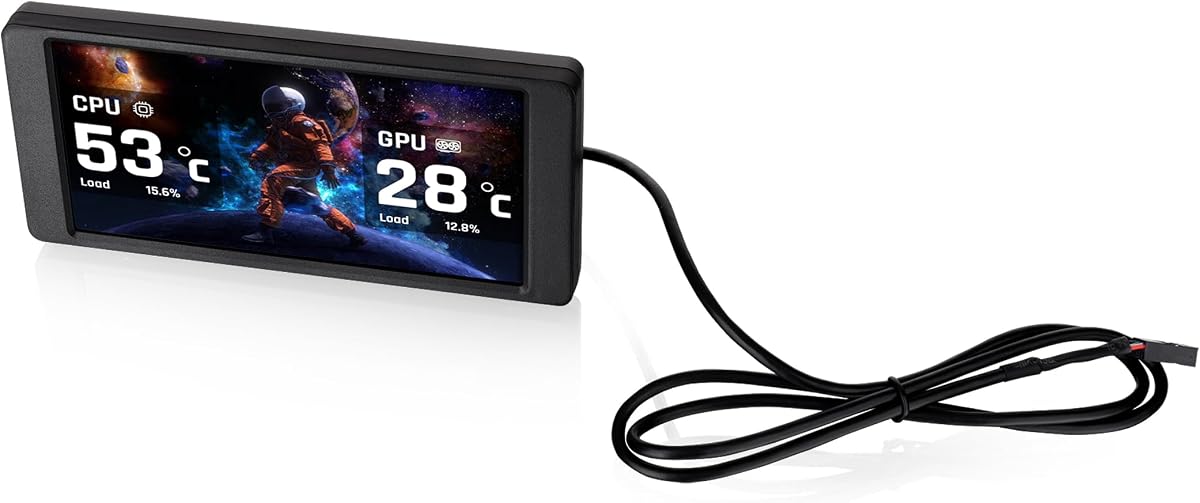
The Thermalright Trofeo Vision provides a straightforward and efficient monitoring solution. Its 9.16-inch screen delivers clear visuals suitable for real-time system tracking.
We may earn a commission when you buy through this link, at no additional cost to you.
The TRCC software supports preset themes and DIY options, giving users creative control. The USB-C connection makes it compatible with most modern Windows systems.
It lacks some of the advanced features found in higher-end models, such as RGB lighting. However, it remains functional and visually pleasing.
For builders seeking a clean and efficient display, this screen is a strong contender. It balances performance and ease of use effectively.
TRCC app simplifies the process of changing themes and monitoring parameters.
Hardware tracking includes CPU temps and fan speeds for quick system health checks.
We may earn a commission when you buy through this link, at no additional cost to you.
The Thermaltake 6.0 Inch kit enhances builds with its RGB ecosystem. It is designed for specific Thermaltake cases, offering a seamless integration.
We may earn a commission when you buy through this link, at no additional cost to you.
Its upgraded UI and real-time data support allow for detailed monitoring. Users can upload custom graphics to personalize the display.
However, compatibility is limited to specific chassis, which reduces its versatility. The software is less flexible than some competitors.
Owners of Thermaltake cases will benefit most from this kit. It provides a cohesive look and solid performance for branded builds.
Designed to work with existing Thermaltake RGB setups for a unified visual experience.
Supports multiple image formats allowing users to upload personalized backgrounds and animations.
We may earn a commission when you buy through this link, at no additional cost to you.
The GeeekPi 12.6 Inch model offers high resolution and multi-touch features. It is specifically designed for Hyte Y60 cases for a perfect fit.
We may earn a commission when you buy through this link, at no additional cost to you.
Its built-in speakers and tempered glass panel add functionality and protection. The high contrast ensures bright and consistent colors from any angle.
However, the large size might not fit all cases. Touch sensitivity can vary depending on software configurations.
For Y60 owners wanting touch capability, this is a great choice. It combines media and monitoring features in one device.
Tempered glass protects the screen while allowing for responsive multi-touch interactions.
Built-in speakers eliminate the need for external audio sources when playing media.
We may earn a commission when you buy through this link, at no additional cost to you.
The Thermalright TV 9.16 features a unique magnetic design for easy installation. It avoids the need for screws, making it convenient to mount or remove.
We may earn a commission when you buy through this link, at no additional cost to you.
Its resolution ensures sharp visuals, and the metal frame adds durability. The TRCC software allows for dynamic image switching.
While magnetic mounting is efficient, it may not be as secure as traditional screws in high-vibration environments.
This screen is ideal for modders who want quick access to the interior. It balances utility with ease of installation.
Magnetic suction simplifies the installation process without compromising stability in most cases.
Users can switch between images and videos to keep the display engaging.
We may earn a commission when you buy through this link, at no additional cost to you.
The Thermalright Trofeo 6.86 is a compact option for smaller setups. Its magnetic panel allows for flexible positioning on the case.
We may earn a commission when you buy through this link, at no additional cost to you.
It supports DIY themes and is compatible with CPU liquid coolers. This versatility makes it adaptable to different hardware configurations.
However, the smaller resolution and screen size may limit detail. It is best suited for simple monitoring needs.
For those prioritizing size and affordability, this screen is a practical choice. It provides essential features without bulk.
The magnetic screen can be paired with specific water coolers or mounted on case panels.
A compact footprint ensures it fits even in space-constrained enclosures.
We may earn a commission when you buy through this link, at no additional cost to you.
Selecting the right LCD screen involves considering size, resolution, mounting, and software compatibility. These factors ensure the display enhances your build rather than complicates it.
Size ranges from 6 to 12 inches. Larger screens offer better visibility but may not fit all cases. Resolution impacts sharpness, with 1920×480 being common for wide screens.
Choose a size that fits your case panel and a resolution that provides clear text for system stats.
Some screens use proprietary software like L-Connect or TRCC, while others support third-party tools like AIDA64. Check if the software is free and supports your operating system.
Ensure the software is user-friendly and offers the customization options you desire for themes and data display.
Mounting brackets vary widely. Some screens use screws, while others use magnets or adhesive pads. Consider the case design and ease of installation.
A secure mounting method ensures the screen stays in place during transport or cleaning.
Connections include USB-C, 9-pin headers, HDMI, and micro USB. USB-C and 9-pin are common for internal power and data without using GPU ports.
Select a connection type that matches your motherboard and power supply capabilities for a clean setup.
Features like touch capability, RGB lighting, and built-in speakers add functionality. Decide if these are essential for your use case.
Extra features often come at a higher price, so weigh them against your needs.
Build quality affects durability. Aluminum bodies and tempered glass provide protection. Check reviews for long-term reliability and display stability.
High-quality materials ensure the screen withstands heat and physical contact over time.
Most screens are low power, but some may require additional adapters. Verify if the included cable provides sufficient power.
Efficient power usage ensures no strain on your PSU or system performance.
Prices vary significantly based on features and brand. Entry-level options focus on basic monitoring, while premium models offer extensive customization.
Set a budget and prioritize features that matter most to your build goals.
Install the screen according to the manual, ensuring all connectors are secure. Use compatible software to customize themes and data settings.
Clean the display with a soft, dry cloth to avoid scratching. Avoid using harsh chemicals that may damage the screen coating.
Keep the area around the screen free from obstructions to ensure proper ventilation. Check connections periodically to prevent loose contacts.
Most screens do not impact GPU performance because they use USB or motherboard headers instead of video ports. Some models may use minimal CPU resources for software but are generally negligible.
Most dedicated PC case screens are designed for Windows. While some hardware might connect, software support is often limited to Windows operating systems.
Many screens are powered directly through USB or motherboard headers, eliminating the need for external power supplies. Always check the product specifications for power requirements.
Many models support custom video uploads through their proprietary software. This allows you to personalize the display with animated themes or clips.
Compatibility depends on the mounting system and size. Some screens are tailored for specific cases like Hyte Y60, while others offer universal mounting brackets.
Some screens can function as secondary displays with USB or HDMI connections. However, many are optimized for system monitoring rather than full desktop use.
Our top picks include the Lian Li SM088X for overall excellence, the darkFlash V92 for budget value, and the WOWNOVA 8 Inch for premium features.
Prioritize software support and mounting compatibility to ensure the screen integrates well with your build. Consider if you need touch or video features.
Prices and availability change frequently, so verify current offers before purchasing. The right screen can transform your PC into a unique visual centerpiece.