
Redragon K512 RGB Membrane Gaming Keyboard, 6 Macro Keys & Easy Media Wheel
4.5Editor score
Six Onboard Macro Keys
No Software Required for Macros
Affordable Gaming Design
Discover the top keyboards with macro keys for 2026. We compare features, performance, and value to help you choose the perfect device for gaming or productivit
Finding the right input device can transform your workflow. Keyboards with macro keys allow you to automate complex tasks with a single press. This guide explores models that balance speed, comfort, and customization for every user.
We evaluated ten top-rated models based on build quality, software support, and macro functionality. Each entry offers unique advantages for gamers, streamers, and professionals seeking efficiency. Our goal is to highlight the most reliable options available today.
Each pick below showcases distinct strengths and ideal use cases. Whether you need dedicated keys or programmable layers, there is a fit for your setup. Please note that availability and pricing may change over time.
4.5Editor score

4.1Editor score
4.3Editor score
The following table provides a side-by-side comparison of all ten models. It highlights key specifications to help you differentiate between similar options quickly.


The VSD K1 Pro stands out as a unique hybrid tool for enthusiasts. It merges a compact mechanical keyboard with a built-in streaming deck interface. Its rating reflects a solid experience for users who need advanced control.
We may earn a commission when you buy through this link, at no additional cost to you.
Its standout feature is the integrated streaming deck functionality via VSD Craf software. You can assign actions to LCD keys and knobs, creating a custom command center. This allows for complex macro chains and real-time display updates without cluttering your desk.
Users should note that full functionality depends on installing software. While on-board macros work independently, the LCD features need a wired connection and setup. This might be a hurdle for plug-and-play seekers.
This model is ideal for streamers and power users who value versatility. If you want to merge typing and command control in one device, it offers a compelling solution. Consider your need for customization before purchasing.
The LCD keys allow visual feedback for different macro pages, making it easy to switch modes on the fly.
Hot swappable sockets let you change switches without soldering, allowing you to tailor the typing feel to your preference.
We may earn a commission when you buy through this link, at no additional cost to you.
The Redragon K512 offers an accessible entry into macro keyboards. With six dedicated macro keys, it simplifies command execution immediately. Its high rating suggests strong value for the price.
We may earn a commission when you buy through this link, at no additional cost to you.
Key strengths include onboard macro recording that needs no drivers. You can record combos on the fly, which is perfect for quick setups. The media wheel adds convenience for volume control during tasks.
Trade-offs involve the membrane mechanism which lacks the tactile punch of mechanical keys. It is durable but may not satisfy purists. For casual users, however, the performance is sufficient.
This keyboard suits budget-conscious buyers or secondary setups. If you prioritize function and cost over feel, it delivers. It is a reliable tool for students or casual gamers.
Record macros directly on the keyboard keys without installing any drivers, making it instantly usable for gaming or work.
The dedicated media wheel allows quick volume adjustments, enhancing usability during long sessions without leaving your app.
We may earn a commission when you buy through this link, at no additional cost to you.
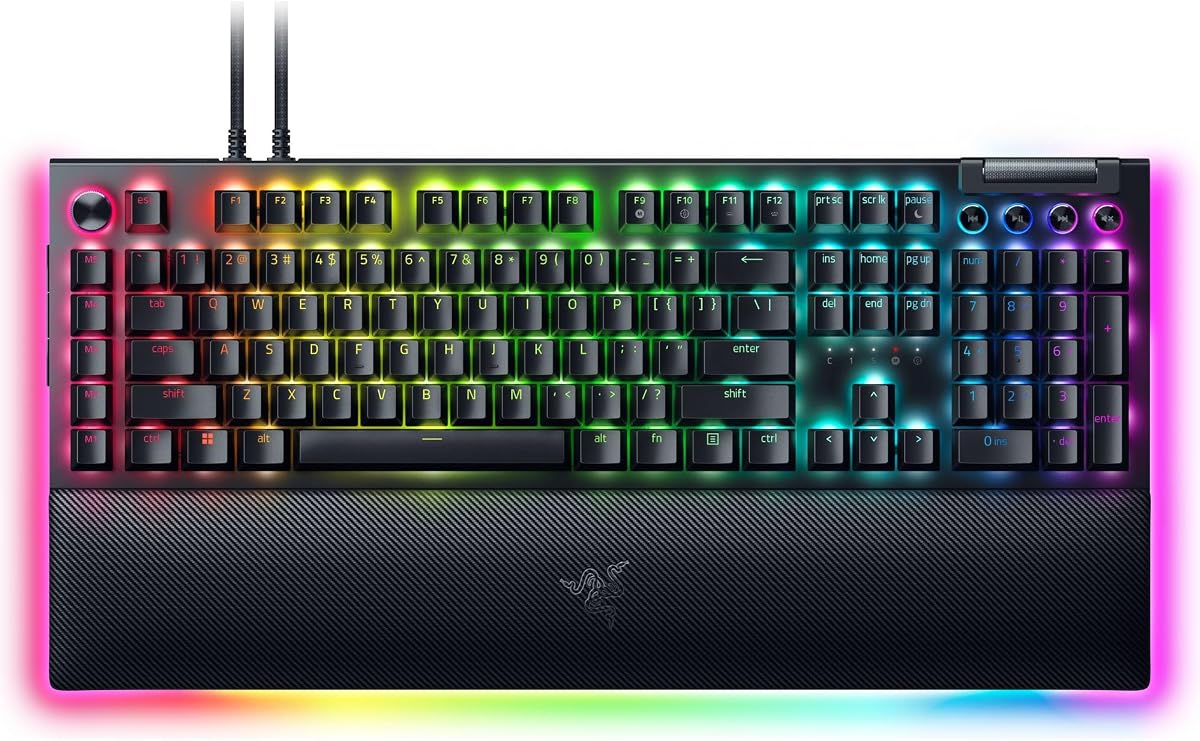
The Razer BlackWidow V4 Pro is a flagship choice for enthusiasts. It combines tactile switches with extensive macro capabilities. Its design emphasizes immersion and control.
We may earn a commission when you buy through this link, at no additional cost to you.
Strengths include a command dial for custom functions and eight macro keys. The wrist rest features underglow lighting for extra visual appeal. Software support via Synapse allows deep customization of profiles.
Users may find the price high compared to alternatives. The size is also substantial, requiring ample desk space. However, the build quality justifies the cost for many.
This model is best for those seeking top-tier performance. If you want a commanding desk presence and extensive features, it fits. It serves well for high-end gaming or professional workflows.
The programmable dial adds an extra dimension to macro control, letting you assign functions like zoom or volume with a single component.
A plush leatherette wrist rest with underglow ensures comfort during long sessions while adding to the overall aesthetic setup.
We may earn a commission when you buy through this link, at no additional cost to you.
The Redragon K580 blends mechanical feel with practical macro tools. It offers five dedicated keys for quick access to commands. The build ensures reliability for daily use.
We may earn a commission when you buy through this link, at no additional cost to you.
Its hot swappable sockets are a highlight for customization. You can change switches without soldering. The onboard macro recording allows instant setup without drivers. This is ideal for gamers needing speed.
While feature-rich, it lacks advanced software integration. The focus is on direct hardware control. Some users might miss cloud syncing or complex profiles.
This keyboard works well for gamers who want mechanical input. If you prefer hardware simplicity and durability, it is a strong choice. It balances cost and function effectively.
Swap switches easily with the upgraded socket design, allowing you to customize the sound and feel without technical skills.
Five dedicated macro keys let you save complex combos directly, making game sequences easy to execute instantly.
We may earn a commission when you buy through this link, at no additional cost to you.
The Redragon K550 offers exceptional macro capacity with twelve G keys. It targets users needing extensive command mapping. The aluminum plate adds a premium touch to a budget build.
We may earn a commission when you buy through this link, at no additional cost to you.
Key benefits include a USB pass-through for easy device chaining. The custom switches offer clear tactile feedback. Onboard programming simplifies setup for quick actions.
However, the clicky sound may not suit quiet environments. Software is optional which limits deep customization. Users should consider their noise tolerance before buying.
This model suits those needing many macro commands. If you manage complex workflows or game combos, it provides options. It is a practical choice for heavy typists.
Twelve onboard macro keys allow extensive command mapping, ideal for complex productivity tasks or gaming sequences.
A built-in USB pass-through port reduces cable clutter by letting you connect a mouse directly to the keyboard.
We may earn a commission when you buy through this link, at no additional cost to you.
The Razer BlackWidow V4 X delivers speed and simplicity. Linear switches ensure rapid-fire inputs without noise. Its macro keys add utility for streamers and gamers.
We may earn a commission when you buy through this link, at no additional cost to you.
Strengths include Chroma RGB lighting that syncs with games. The build minimizes noise with internal foam. Six macro keys provide quick access to common commands.
Users should note that advanced features rely on Synapse software. Onboard memory is limited. This may be a constraint if you use multiple devices without sync.
This keyboard fits gamers prioritizing speed and feel. If you want a fast and reliable mechanical board with macros, it works well. Consider your sync needs before deciding.
Linear switches with zero reset distance allow for rapid inputs, ideal for competitive gaming scenarios where timing matters.
Chroma RGB lighting offers over sixteen million colors, enabling sync with games for an immersive visual experience.
We may earn a commission when you buy through this link, at no additional cost to you.
The Razer BlackWidow V4 offers a refined experience with linear switches. It provides six macro keys for versatile setups. The roller adds a unique control touch for media.
We may earn a commission when you buy through this link, at no additional cost to you.
Key features include a plush magnetic wrist rest for comfort. Underglow lighting enhances the desk setup visually. The roller allows precise volume or brightness adjustments.
Comparison with the V4 X shows minor differences in price and extras. Users seeking underglow may prefer this model. It is a solid option for aesthetic setups.
This keyboard suits those wanting a complete Razer ecosystem. If you value comfort and visual flair, it meets needs. It is a good mid range premium choice.
A multi-function roller provides easy access to volume and brightness, adding convenience beyond standard key commands.
A magnetic plush leatherette wrist rest offers secure support, reducing strain during extended work or gaming sessions.
We may earn a commission when you buy through this link, at no additional cost to you.
The Redragon K618 PRO brings macros to a wireless environment. It features twenty onboard macro keys without software. This offers freedom from cables while maintaining productivity.
We may earn a commission when you buy through this link, at no additional cost to you.
Strengths include tri-mode connectivity for seamless device switching. The low profile design reduces travel distance for quick inputs. A dedicated macro zone allows fast access to commands.
Users need to manage battery charging for wireless use. Low profile switches feel different from standard mechanical ones. This might require an adjustment period for new users.
This keyboard is great for mobile users or clean setups. If you need macros without wires, it delivers well. Consider your desk space and cable preferences.
Tri-mode connectivity allows switching between USB Bluetooth and wireless dongle, letting you use one keyboard across multiple devices.
A twenty key macro zone lets you record combos directly on the keyboard, enhancing productivity without software installation.
We may earn a commission when you buy through this link, at no additional cost to you.
The Logitech G213 provides a reliable tool for daily tasks. It offers media controls that double as macro triggers in some contexts. Its spill resistance adds durability.
We may earn a commission when you buy through this link, at no additional cost to you.
Key strengths include G Hub software for deeper customization. The full-size layout supports productivity and media control. Integrated palm rests ensure comfort during typing.
However, macro programming is less direct than dedicated keys. Users must rely on software for complex tasks. This may not suit those needing immediate hardware macros.
This keyboard suits office users needing basic automation. If you value brand reliability and media ease, it works well. It is a practical tool for general computing.
Dedicated media keys let you control playback and volume instantly, keeping you in the flow during work or entertainment.
A spill resistant design protects against accidents, ensuring the device remains functional even after minor liquid spills.
We may earn a commission when you buy through this link, at no additional cost to you.
The Redragon K512 serves as an entry point for macros. It simplifies setup with hardware macros. Users can start recording immediately without software.
We may earn a commission when you buy through this link, at no additional cost to you.
Strengths include a media wheel for quick adjustments. The anti ghosting ensures reliable inputs during games. Its design fits well in budget-conscious setups.
Trade-offs involve the membrane feel which may lack feedback. Advanced features are limited compared to higher-end models. However, it meets basic needs effectively.
This keyboard is ideal for students or secondary use. If you need quick macro access without complexity, it helps. It balances utility and cost for beginners.
Hardware macros allow instant recording, making it easy to set up commands without any software installation.
Anti ghosting technology ensures multiple keys register simultaneously, preventing missed inputs during intense gaming or typing.
We may earn a commission when you buy through this link, at no additional cost to you.
Selecting the right macro keyboard depends on your specific workflow needs. This guide outlines key factors to help you make an informed decision.
Look for keyboards with dedicated macro keys if you need quick access to commands. Onboard memory allows you to save profiles without software, which is useful for multi-device setups.
Check if the model offers hardware recording or requires drivers. Hardware macros save time and ensure functionality across different operating systems.
Mechanical switches offer tactile feedback and durability. They are ideal for long sessions. Membrane switches are quieter and often cheaper but may feel less responsive.
Consider hot swappable options if you want to customize the feel later. This adds longevity and personalization to your setup.
Some keyboards rely on software for macro programming. Ensure the software is compatible with your OS. Look for cloud storage if you switch between machines frequently.
If you prefer independence, choose models with onboard programming. This removes dependency on drivers and ensures your macros work anywhere.
Wired connections provide the lowest latency for gaming. Wireless options offer cleaner desks and flexibility. Tri-mode connectivity can be a bonus for multi-device workflows.
Decide based on your need for mobility versus performance. A wireless unit may need charging which adds a maintenance task.
A sturdy frame and good keycaps ensure the keyboard lasts. Padded wrist rests help prevent fatigue during long typing sessions. Spill resistance adds a layer of safety.
Check the dimensions to ensure it fits your desk. A compact layout saves space while a full-size provides more number keys and macros.
RGB lighting can help identify macro keys. Custom layers with icons improve usability. Some models offer LCD screens for deeper customization.
Evaluate how much visual feedback you need. More customization often means more complex setup, so balance features with usability.
Price varies widely between entry and premium models. Determine how many macros you need and if extra features like LCDs are worth the cost.
Higher price does not always mean better macros. Focus on the core features you use daily to maximize value.
Ensure the keyboard works with your operating system. Some software may be Windows-only, while hardware macros work universally. Mac users should verify driver support.
Universal compatibility ensures you can use the device across different environments without losing macro functionality.
Start by installing any required software to access advanced features. This usually lets you assign macros to specific keys or layers.
Practice recording your most frequent commands to build a library. Use simple sequences first before moving to complex multi-step actions.
Clean the keyboard regularly with compressed air to maintain switch life. Avoid liquid spills by using a protective cover or keeping drinks away.
A macro key is a dedicated button or key that triggers a recorded sequence of actions. This allows you to perform complex tasks with a single press. It is useful for gaming combos or productivity shortcuts.
Not all macro keyboards require software. Some offer onboard memory that stores macros directly on the device. Others need software for full customization. Check the specs before buying to ensure compatibility with your workflow.
Yes, macro keys are excellent for productivity. They can automate repetitive text entry or application launching. This saves time during data entry or design workflows.
Modern wireless macro keyboards are reliable. They use low-latency protocols that minimize lag. Ensure you have a stable battery source to maintain connectivity.
Onboard macros are stored on the keyboard itself, allowing use without a PC. Software macros rely on a program installed on your system. Onboard options are better for multi-device portability.
To reset macro settings, look for a dedicated reset key or software option. Some models allow you to delete profiles through a key combination. Consult the manual for specific instructions.
Mechanical keyboards offer better durability and feedback. They are generally preferred for gaming and heavy typing. Membrane is quieter and cheaper but may lack tactile clarity.
The models discussed offer various levels of macro customization to suit different needs. From the versatile VSD K1 Pro to the affordable Redragon options, there is a fit for every user.
Prioritize hardware macros if you need independence from software. If visual feedback is important, consider models with LCD screens or RGB layers.
Remember to verify current availability and pricing before purchasing. These devices continue to evolve, so staying updated ensures you get the best value.