
TCL 55 T7 4K QLED Google TV
4.3Editor score
144Hz Refresh Rate
QLED Quantum Dot Color
HDMI eARC Support
Finding the right gaming TV for PS5 and Xbox means looking beyond resolution. You need fast refresh rates, low input lag, and accurate colors to truly enjoy next-gen gameplay without motion blur or screen tearing.
We evaluated ten current models based on panel technology, HDMI 2.1 support, variable refresh rate, and smart platform integration. Our comparison focuses on how each TV handles high frame rate gaming alongside streaming and movie watching.
Each pick includes detailed specs, pros and cons, and who it serves best. Prices and availability change often, so check current listings before buying. Use this guide to match your budget and room setup with the right display.
4.3Editor score

4.3Editor score
4.4Editor score
As an Amazon Associate we earn from qualifying purchases.
This side-by-side comparison summarizes key gaming capabilities for all ten models. Use it to quickly spot differences in refresh rates, HDMI port versions, HDR formats, and smart platforms before you decide.




The TCL 55 T7 offers one of the most affordable ways to get 144Hz refresh rates on a 55-inch screen. It scores a 4.3 rating from users who value color and motion performance. Its QLED panel and HDMI 2.1-like features make it ideal for budget-conscious PS5 and Xbox gamers.
We may earn a commission when you buy through this link, at no additional cost to you.
This TV uses Quantum Dot technology to cover nearly the entire DCI-P3 color space. The 144Hz panel refresh rate helps minimize blur during fast-paced action. Google TV provides easy streaming access and voice control via Alexa or Google Assistant.
While local dimming is basic compared to MiniLED rivals, the motion rate and MEMC insertion keep sports smooth. Audio is clear but benefits from a soundbar. HDMI eARC ensures you can route lossless audio externally if needed.
Buy this if you want solid next-gen console support without spending premium prices. It suits bright rooms with decent color and motion handling. Check current pricing as sales often lower the cost further.
The 144Hz refresh and MEMC reduce motion blur so competitive shooters and racing games feel responsive and sharp.
Quantum Dot tech delivers rich reds and greens, while Dolby Vision and HDR10+ ensure movies and games show accurate highlights.
We may earn a commission when you buy through this link, at no additional cost to you.
The iFFALCON 55 U85 earns our Editor's Choice for balancing premium gaming features with a competitive price. Users rate it 4.3 for its silky MiniLED picture and flexible HDMI options. It shines for households needing multiple consoles and streaming boxes connected at once.
We may earn a commission when you buy through this link, at no additional cost to you.
It packs four HDMI 2.1 ports, allowing two 4K 144Hz devices to run simultaneously without compromise. Variable refresh rate goes up to 240Hz and FreeSync Premium Pro cuts tearing. Local dimming delivers deep blacks and vivid neon scenes in games like Cyberpunk.
Brightness reaches 1000 nits peak, helping HDR content pop even in lit rooms. Dolby Vision IQ auto-adjusts based on ambient light. Audio passes 50W with Dolby Atmos but a soundbar improves immersion during cinematic titles.
Choose this TV if you need full HDMI 2.1 coverage and high performance without flagship prices. It fits well in living rooms and offices alike. Check availability for any firmware updates that tweak game mode latency.
Four HDMI 2.1 ports let you connect PS5, Xbox, and gaming PC simultaneously without needing a splitter or switch.
Dolby Vision Gaming optimizes tone mapping instantly while VRR reduces screen tearing during frame rate spikes.
We may earn a commission when you buy through this link, at no additional cost to you.
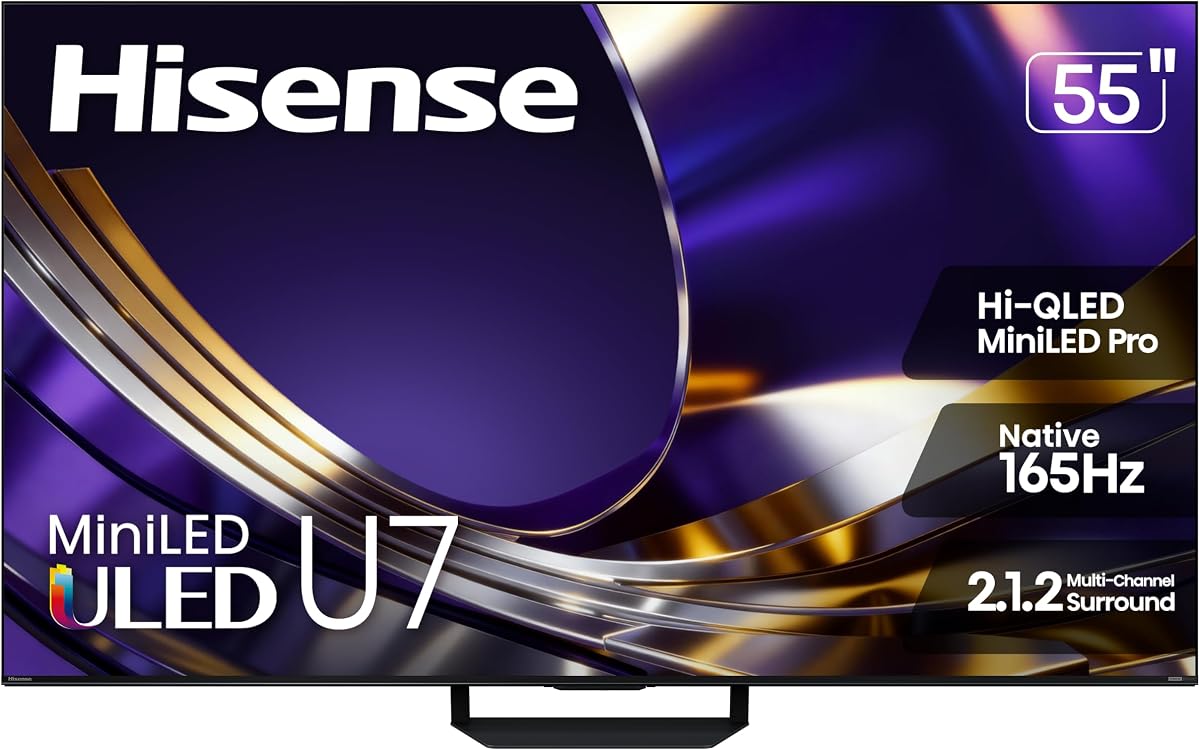
The Hisense 55 U7 SG is our Best Premium pick for its 165Hz panel and 3000 nits peak brightness. Users rate it 4.4 for stunning clarity and contrast. It stands out for serious gamers who demand top-tier motion handling and HDR performance.
We may earn a commission when you buy through this link, at no additional cost to you.
Thousands of MiniLED zones give precise brightness control. The anti-Reflection layer cuts glare in bright rooms so you never lose shadow detail. VRR extends to 330Hz and the Hi-QLED engine ensures accurate skin tones and vibrant game environments.
Audio includes 2.1.2 channels for immersive sound but a dedicated soundbar still adds depth to cinematic HDR tracks. Google TV integrates streaming with voice control and the AI engine adapts picture settings to content automatically.
Invest in this if you want reference-grade gaming quality and plan to watch HDR movies frequently. Its specs exceed most rivals at this size. Confirm stock levels and warranty terms before purchase.
The 165Hz native rate delivers buttery smooth motion in competitive shooters and racing games where every frame counts.
Dual-layer treatment minimizes reflections so daylight gaming stays clear without needing heavy ambient light dimming.
We may earn a commission when you buy through this link, at no additional cost to you.
The Hisense 55 U6 SF Pro delivers MiniLED contrast at a mid-tier price. It earns a 4.3 rating for picture depth and glare resistance. Its native 144Hz rate and Fire TV platform make it a practical choice for streaming gamers.
We may earn a commission when you buy through this link, at no additional cost to you.
Hundreds of local dimming zones enhance black levels and HDR highlights. The anti-reflection coating keeps images clean during daytime play. Dolby Vision IQ adapts settings automatically while the built-in subwoofer adds bass impact to explosions.
Input lag is low in game mode though HDMI 2.1 features are less comprehensive than premium rivals. Fire TV simplifies app access and voice search works well with Alexa. Overall picture fidelity remains strong for both games and films.
Select this if you want MiniLED quality without flagship pricing. It suits smaller rooms or secondary gaming setups. Check HDMI 2.1 port count against your console needs before buying.
MiniLED zones provide deep shadows and bright highlights so HDR games look vivid without blooming around text or UI.
The subwoofer delivers noticeable bass for a TV of this size though external speakers still improve overall soundstage.
We may earn a commission when you buy through this link, at no additional cost to you.
The Samsung 55 M70H combines Mini LED contrast with Samsung's Gaming Hub for cloud and console access. Users rate it 4.3 for its sleek design and free content options. It stands out for smart TV features alongside solid motion handling.
We may earn a commission when you buy through this link, at no additional cost to you.
The Gaming Hub aggregates titles from multiple services so you can switch without launching separate apps. Mini LED dimming gives strong contrast while Motion X Celerator keeps sports and games fluid at 120Hz. Color Booster ensures vibrant greens for outdoor scenes.
Brightness and local zones improve HDR performance though HDMI 2.1 options are fewer than competitors. Tizen OS runs smoothly and offers many apps. Free channels make up for smaller premium streaming selections.
Pick this if you value cloud gaming integration and a clean UI. It works well for casual gamers and families. Review the HDMI port details if you plan to connect multiple consoles.
The Gaming Hub lets you play games without a console by streaming via compatible services directly on the TV.
Soccer Mode enhances motion clarity and green shades so field details stay sharp during live match broadcasts.
We may earn a commission when you buy through this link, at no additional cost to you.
The Sony 55 BRAVIA 3 II delivers Sony's renowned XR processing for lifelike color and clarity. Rated 4.1, it excels in upscaling and game optimization. Its auto HDR tone mapping benefits PS5 titles needing precise exposure.
We may earn a commission when you buy through this link, at no additional cost to you.
HDMI 2.1 supports 4K 120Hz VRR and ALLM. The AI engine adjusts scenes in real time so games and movies look consistent. X-Balanced speakers improve dialogue clarity even at higher volumes. The flush bezels blend into dark rooms.
Brightness is moderate compared to MiniLED rivals so HDR peak effects differ. Google TV with Gemini adds conversational search. Overall motion handling suits most genres though competitive gamers might prefer 144Hz panels.
Choose this for film-quality visuals and PS5-specific features. It works best in controlled lighting. Compare against other Sony models for the best fit.
Game Menu centralizes settings like brightness and VRR so you can tweak options without leaving gameplay screens.
The XR processor analyzes each frame to restore detail and reduce noise so dark scenes stay clean and sharp.
We may earn a commission when you buy through this link, at no additional cost to you.
The Roku 55 Select Series offers easy setup and QLED color for a budget price. Rated 4.4, it's praised for simplicity and reliability. While not built for hardcore gaming, it handles casual play and streaming well.
We may earn a commission when you buy through this link, at no additional cost to you.
Roku OS provides a clean home screen and quick app launches. The QLED screen improves color accuracy over standard LCDs. Voice control on the remote helps find content fast. Free live TV channels add value without extra subscriptions.
Refresh rate is limited to standard 60Hz so motion during games may blur. Still, brightness and HDR support are adequate for most rooms. Sound output is clear for speech though bass is modest.
Buy this for a no-fuss streaming TV that also handles casual gaming. It suits guest rooms or entry-level setups. Verify refresh rate details if you play competitive titles.
The interface and remote are designed so anyone can find shows and games without navigating complex menus.
Built-in free live TV gives news and entertainment without extra monthly fees keeping ongoing costs low.
We may earn a commission when you buy through this link, at no additional cost to you.
The TCL 65 QM6K brings Mini LED brightness to a 65 inch panel. Rated 4.3, it suits large rooms needing immersive visuals. Its QD-Mini LED tech boosts contrast and color volume for HDR content and sports.
We may earn a commission when you buy through this link, at no additional cost to you.
Brightness reaches high levels so highlights pop even in daylight. The 144Hz rate and motion rate 480 keep action scenes sharp. Onkyo audio supports Dolby Atmos but external sound still improves depth. Google TV adds voice control and streaming.
Local dimming reduces haloing around bright objects. Still, viewing angles are narrower than IPS panels. Overall, it balances performance and size for the price. Check wall-mount compatibility before installation.
Choose this if you want a big-screen gaming experience without OLED costs. It works well for family viewing rooms. Measure your space to confirm fit.
Mini LEDs plus Quantum Dots provide brighter images and richer colors than standard edge-lit LED panels.
High motion rate and native refresh reduce blur during sports so fast movements stay defined and sharp.
We may earn a commission when you buy through this link, at no additional cost to you.
The Samsung 50 U8000H fits small rooms with solid 4K upscaling. Rated 4.2, it handles casual gaming and streaming well. Its Crystal Processor improves color accuracy and clarity for both games and shows.
We may earn a commission when you buy through this link, at no additional cost to you.
Motion X Celerator keeps movement smooth at 60Hz. Color Booster enhances saturation for outdoor scenes and team uniforms. Tizen OS offers many apps and a responsive UI. The slim profile blends into tight spaces.
Gaming performance is adequate but lacks advanced 120Hz features. HDR support is basic so peak brightness is limited. Still, for a 50 inch entry model it delivers good value and simplicity.
Select this for compact spaces or budget setups. It works well for console users prioritizing size over refresh rate. Compare prices for similar 43 and 50 inch models.
The Crystal Processor upgrades lower resolution content so classic shows and sports look cleaner on 4K screens.
Color Booster intensifies hues making grass and sky tones more vivid without oversaturating the image.
We may earn a commission when you buy through this link, at no additional cost to you.
The Hisense 55 E6 QF brings Fire TV integration and basic motion improvements. Rated 4.0, it's suitable for budget buyers wanting a smart display. Its Game Mode Plus helps reduce input lag for casual play.
We may earn a commission when you buy through this link, at no additional cost to you.
Hi-QLED color ensures vibrant scenes while Dolby Vision and Atmos support HDR streaming. The AI light sensor adjusts brightness to room light automatically. Motion rate 120 keeps sports visible though competitive titles may benefit from higher rates.
Local dimming is simple so shadow detail varies. Overall it offers reliable performance at entry levels. Check HDMI ports if you need multiple console connections. Voice remote works well with Alexa.
Buy this for a cost-effective smart TV that supports gaming basics. It fits well in bedrooms or living rooms. Confirm software updates for ongoing performance.
The AI sensor adjusts screen light to match your room so content stays visible without eye strain.
Surround sound processing adds depth to dialogue and effects improving overall immersion for movies.
We may earn a commission when you buy through this link, at no additional cost to you.
Selecting the right gaming TV involves balancing refresh rates, HDMI ports, HDR, and budget. This section breaks down each factor so you can compare models confidently.
A higher refresh rate like 120Hz or 144Hz reduces motion blur during fast gameplay. Look for native refresh rates rather than interpolated motion to keep competitive play accurate.
Higher refresh rates improve responsiveness and smoothness for competitive games and racing titles.
HDMI 2.1 enables 4K 120Hz, VRR, and ALLM. Ensure at least one port supports these features. More ports help when connecting consoles, PCs, and audio systems together.
Check the exact HDMI 2.1 count since some TVs label all ports as 2.1 but limit bandwidth.
Variable Refresh Rate syncs the TV refresh with console output to prevent tearing. ALLM switches the TV to game mode automatically when a console is detected.
These features reduce latency and keep visuals smooth across different frame rates.
HDR10, Dolby Vision, and HDR10+ provide richer color and contrast. Higher peak brightness helps HDR highlights stand out in lit rooms.
Dolby Vision offers dynamic metadata that adjusts brightness scene by scene for better detail.
MiniLED and OLED provide deeper blacks and better contrast. Local dimming zones improve shadow detail but too few zones cause haloing around bright objects.
MiniLED offers better brightness while OLED excels in contrast for dark rooms.
Google TV, Fire TV, and Tizen each have different app stores and voice assistants. Check if the system supports screen mirroring and gaming services.
Choose a platform you already use for seamless streaming and remote control.
Most gaming TVs lack deep bass so plan for a soundbar. Check for Dolby Atmos passthrough and HDMI eARC support to route high-quality audio.
Built-in audio works for basic use but external speakers enhance cinematic games.
Anti-reflection coatings improve clarity in bright rooms. IPS panels offer wider viewing angles while VA panels deliver higher contrast but narrower views.
Choose anti-glare if you play during daylight hours without blackout curtains.
Set the HDMI input to Enhanced Format or 2.1 in your TV settings to enable full bandwidth for PS5 and Xbox. Use Game Mode to disable motion smoothing and reduce latency.
Keep firmware updated to access new features and fixes. Calibrate picture settings for gaming using Game presets or manual adjustments to match room lighting.
Clean the screen with a microfiber cloth and avoid harsh chemicals. Ensure proper ventilation so the TV does not overheat during long gaming sessions.
Yes HDMI to unlock 4K 120Hz VRR and ALLM. Without HDMI 2.1 you will be limited to 4K 60Hz. Check port specifications carefully.
120Hz is the minimum for next-gen titles. 144Hz offers extra headroom for PC gaming and smoother motion. Higher rates improve responsiveness.
MiniLED delivers strong peak brightness and local dimming for vivid HDR. It suits bright rooms better than OLED. Ensure enough zones for contrast.
Enable Game Mode and turn off motion smoothing or image processing. Use HDMI Enhanced Format and connect directly to the console.
Not all. Some support G-Sync but not FreeSync or vice versa. Check VRR compatibility for Xbox or PS5 depending on your console.
Yes if the TV has enough HDMI 2.1 ports. Otherwise use HDMI splitters or accept 60Hz limits on secondary ports. Plan your setup accordingly.
Google TV and Fire TV offer broad streaming and cloud gaming apps. Choose based on your preferred ecosystem and voice assistant. Check game app support.
Yes especially with HDR support and accurate color. Motion smoothing helps sports but can distort film frame rates. Use a Cinema or Film mode for best results.
Our top three picks cover budget, all-rounder, and premium needs. The iFFALCON 55 U85 offers exceptional HDMI 2.1 flexibility while the Hisense 55 U7 SG leads in brightness and motion.
Prioritize refresh rate and HDMI 2.1 count if you play competitive titles. For families balancing movies and games, MiniLED and HDR performance matter most.
Prices shift often so verify current specs before buying. Check warranty terms and return policies to ensure satisfaction with your new gaming TV.