
Corded Landline Phone for Seniors
4.2Editor score
Photo dialing buttons
110dB loud ringer
No battery required
This guide compares the top captioned telephone models for hearing impaired users, evaluating features like real-time captions, volume control, and ease of use
Captioned telephones offer a unique solution for individuals with hearing loss by displaying real-time text captions of phone conversations. This technology bridges the gap between auditory and visual communication, ensuring no important words are missed during calls with family or professionals.
We evaluated ten leading captioned telephone models based on user feedback, feature sets, and accessibility ratings. Our comparison covers everything from large touchscreens to amplified sound systems, helping you find the device that best matches your specific hearing and mobility needs.
Each selection highlights key capabilities such as internet connectivity requirements, button sizes, and additional safety features like SOS buttons. Please note that product availability and pricing can change frequently, so verify current details before making your final purchase decision today.
4.2Editor score

4.3Editor score
4.5Editor score
This side-by-side comparison outlines the core specifications and capabilities of each model to simplify your decision-making process regarding accessibility and functionality.


The Hamilton CapTel 2400iSPNBT stands out as a top choice for those needing captioned telephone services. With a 4.3 rating, users appreciate the large touchscreen that displays real-time captions clearly.
We may earn a commission when you buy through this link, at no additional cost to you.
This device turns everyday phone calls into confident conversations by allowing users to listen and read simultaneously. The captions are accurate and appear instantly, ensuring no words are missed during important discussions.
While the reliance on high-speed internet is a requirement, the quality of service justifies the setup. Users note that the caption accuracy is high, making it reliable for daily communication needs.
This phone is ideal for seniors or individuals with hearing loss who prefer visual confirmation of spoken words. The combination of sound amplification and text captions makes it a comprehensive solution.
The live captions update as you speak, ensuring you never miss a crucial detail in conversation.
The interface guides you through basic settings, making it easy to get started immediately.
We may earn a commission when you buy through this link, at no additional cost to you.
This landline phone is designed specifically for seniors who need simplicity and reliability. With a 4.2 rating, it offers photo dialing that helps users with memory impairments connect with family easily.
We may earn a commission when you buy through this link, at no additional cost to you.
The device features big picture buttons that allow one-click dialing. The SOS button can be programmed for emergencies, adding a layer of safety for those living alone.
It operates without batteries, relying solely on the phone line, which ensures it works during power outages. The loud ringer and visual alerts prevent missed calls in noisy environments.
While it lacks captioning capabilities, its robust design makes it a perfect budget-friendly choice for basic communication. It is ideal for those who prioritize ease of use over advanced digital features.
Photo dialing removes the need to memorize numbers, reducing anxiety during calls.
The RJ11 line power ensures connectivity remains even during electrical outages.
We may earn a commission when you buy through this link, at no additional cost to you.
The VTech SN5147 combines the reliability of a corded base with the mobility of a cordless handset. This hybrid system is perfect for seniors who need to move around while staying connected.
We may earn a commission when you buy through this link, at no additional cost to you.
Its 90dB extra-loud ringer ensures that calls are not missed even in noisy home environments. The visual indicators complement the audio alerts for complete awareness.
The device includes a digital answering machine with remote access, adding convenience. The call blocker feature helps reduce nuisance calls, which is a common concern for seniors.
While the cordless handset requires charging, the flexibility it offers is significant. This phone is a strong contender for those wanting a balance between traditional and modern features.
The cordless handset allows freedom to move while answering calls from anywhere.
Smart call blocking keeps unwanted robocalls away from your family line.
We may earn a commission when you buy through this link, at no additional cost to you.
This home telephone allows users to answer, dial, and hang up using only their voice. It is a unique solution for those with mobility or vision difficulties that make traditional phone use hard.
We may earn a commission when you buy through this link, at no additional cost to you.
The device is always on and ready to respond to voice commands. This constant readiness ensures that help is available without searching for buttons or screens.
It connects via the home phone line, ensuring standard call quality. The voice-only operation reduces physical strain, making it accessible for those with severe limitations.
While it is still a niche product, its ability to simplify calls significantly is impressive. It is a great option for users who need maximum accessibility in daily routines.
Speak clearly to initiate calls, removing the physical need for dialing buttons.
We may earn a commission when you buy through this link, at no additional cost to you.
This landline phone is designed for elderly users who require amplified sound and large keys. With a 4.2 rating, it offers up to 40dB amplification to help those with hearing impairments.
We may earn a commission when you buy through this link, at no additional cost to you.
The picture buttons can store favorite contacts, making it easy to reach loved ones without memorizing numbers. This feature is crucial for those with memory loss or cognitive challenges.
The memory protection ensures that stored numbers remain safe even if the phone is unplugged. This reliability is important for consistent family communication over time.
It is a straightforward device that focuses on the basics of amplification and simplicity. For those who need clarity and reliability without complexity, this is a solid choice.
The adjustable volume ensures conversations are clear even with significant hearing loss.
Picture buttons make identifying contacts instant, reducing confusion for users.
We may earn a commission when you buy through this link, at no additional cost to you.
The FLYINGVOICE FIP12WP is a VoIP phone designed for seniors with dementia or Alzheimer's. It features customizable image keys that allow family photos to be used for dialing.
We may earn a commission when you buy through this link, at no additional cost to you.
With a perfect 5 rating, users praise its ability to bring familiarity to communication. The 110dB amplified sound ensures that calls are heard clearly even in loud settings.
The dedicated HELP key offers instant access to emergency assistance, adding peace of mind. Visual red lights alert users to incoming calls, serving those with hearing loss.
It is important to note this requires a VoIP service rather than a standard line. For internet-connected households, it offers a modern and accessible way to stay connected.
Seeing a face instead of numbers helps those with cognitive decline make calls easily.
The one-touch help key provides immediate access to caregivers or emergency contacts.
We may earn a commission when you buy through this link, at no additional cost to you.
The Serene Innovations High Definition Amplified Phone is designed for performance and clarity. It focuses on delivering high-quality audio that makes listening easier for those with hearing needs.
We may earn a commission when you buy through this link, at no additional cost to you.
Users appreciate the amplified sound that comes through the handset with clarity. This design helps reduce the need for excessive volume adjustments during daily calls.
While it has a lower rating compared to others, its core promise of audio quality remains intact. It is a good option for those prioritizing sound fidelity over other smart features.
The build quality is solid, and the phone is straightforward to use. For users who want a reliable amplifier without complex add-ons, this device serves its purpose well.
High definition audio ensures every word comes through with crisp clarity.
We may earn a commission when you buy through this link, at no additional cost to you.
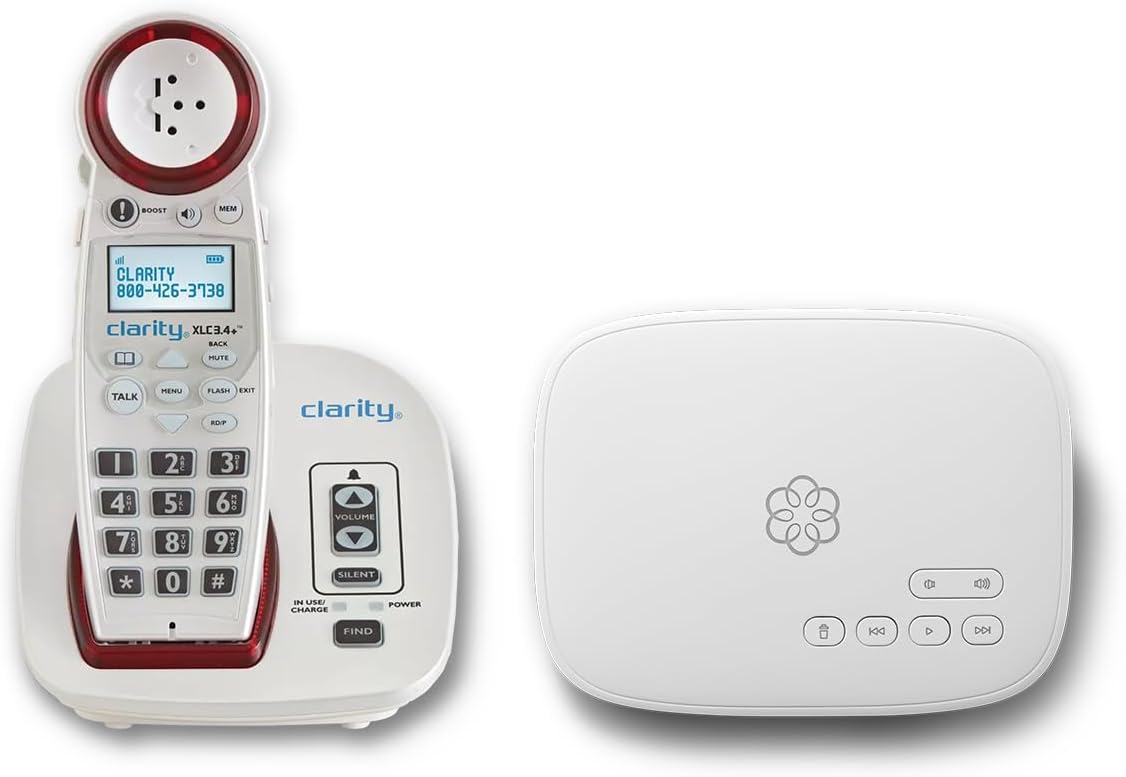
This bundle combines the Ooma Telo service with an amplified cordless phone, creating a premium solution for households. It offers unlimited nationwide calling and 24/7 concierge support for setup.
We may earn a commission when you buy through this link, at no additional cost to you.
With a 4.5 rating, users value the reliable service and the ability to block robocalls effectively. The visual ringer ensures that even in quiet environments, calls are noticed.
The Clarity phone included in the bundle is hearing aid compatible and features a talking keypad. This integration simplifies the setup process for those needing advanced audio features.
While it requires a subscription fee, the cost per call is very low. This makes it a premium choice for those wanting a full-service telephone system with modern features.
You can make as many calls as needed without worrying about extra charges.
Professional support is always available to help resolve any setup issues.
We may earn a commission when you buy through this link, at no additional cost to you.
The Voice Dialer Phone is an all-in-one device that allows users to make calls using voice commands. It offers a unique way to interact with a phone for those with limited mobility.
We may earn a commission when you buy through this link, at no additional cost to you.
It includes features like talking Caller ID and visual ringer alerts to assist those with hearing loss. The system stores voice-activated names for quick access.
However, the product has a low rating, which suggests potential issues with reliability or user experience. It may be worth considering other options if ease of use is a top priority.
Despite the mixed reviews, the concept of voice dialing without touching buttons is valuable. It remains a niche tool for those who can navigate its specific command system.
Speak the name of the person you want to call and the phone handles the rest.
We may earn a commission when you buy through this link, at no additional cost to you.
This landline phone focuses on memory assistance with its photo memory keys. It allows seniors to press a photo to dial instantly, which is ideal for those with cognitive impairments.
We may earn a commission when you buy through this link, at no additional cost to you.
With a 4.2 rating, users highlight the ease of connecting with family. The 110dB ringer ensures that alerts are loud enough to be heard across the house.
The hands-free feature allows users to talk without holding the handset, reducing physical strain. This is particularly helpful for those with arthritis or limited hand mobility.
It is a simple and reliable device for basic communication needs. While it lacks some modern features, its core function of simplifying calls is well executed.
Store up to 9 contacts with photos for instant access without searching.
Use the speaker to talk freely without needing to grip the phone.
We may earn a commission when you buy through this link, at no additional cost to you.
Selecting the right telephone involves evaluating specific needs related to hearing loss, vision, and cognitive function. This guide helps you understand the essential factors to consider.
Real-time captioning requires a stable internet connection. Ensure your home has high-speed internet before choosing a model that depends on it for functionality.
Verify if your location supports the captioning service provided by the manufacturer.
Look for phones with adjustable volume amplification up to 40dB or more. This ensures conversations are audible even with significant hearing loss.
Check that both the receiver and ringer volumes are adjustable for comfort.
Large, high-contrast buttons are essential for users with low vision or arthritis. Avoid small, cramped layouts that lead to misdials.
A clear layout helps users dial quickly without frustration or confusion.
Flashing lights and visual ringer alerts help those who might miss audio cues. These features ensure you never miss a call during noisy times.
Consider models with bright LED alerts for better visibility in different lighting.
Hands-free calling allows users to answer calls without holding the handset. This is helpful for those with mobility issues or weak grip strength.
Voice commands can further simplify the process of dialing for advanced users.
Speed dial and memory features reduce the effort needed to connect with family. Look for photo dialing if memory loss is a concern.
Simple setup steps ensure the phone can be programmed easily by anyone.
Emergency SOS buttons add a layer of security for seniors living alone. Ensure these buttons can be programmed to call specific numbers.
Some models include call blocking to protect against unwanted robocalls.
Decide between corded landline and VoIP options based on your home setup. Traditional lines work during power outages while VoIP offers modern features.
Confirm that the phone is compatible with your existing phone service provider.
Start by connecting the telephone to your internet or phone line securely. Follow the setup guide to ensure the device recognizes your connection type.
Program your favorite contacts and adjust the volume to your preferred level. Test the device by making a call to verify all features work properly.
Keep the device in a well-ventilated area away from direct sunlight to prolong its life. Dust the buttons and screen regularly to maintain sensitivity and clarity.
Standard corded landline models typically work during power outages because they draw power from the phone line. However, models requiring internet or VoIP may stop working if the modem loses power.
The devices themselves usually require a purchase, but the captioning service is often free for eligible users in the US. You may need to register and provide proof of hearing loss.
Most modern captioned telephones are designed to be hearing aid compatible. Look for models with T-coil support or amplified sound to ensure clear audio with your aids.
A stable high-speed internet connection is usually required for real-time captioning services. Ensure your Wi-Fi or wired connection meets the minimum speed requirements listed by the manufacturer.
Most models allow you to assign a contact to a specific button by pressing a setup sequence and selecting the number. Consult your manual for the exact steps to assign photos.
Many advanced models and service bundles include robocall blocking features. These systems automatically screen incoming calls and block unwanted numbers before they reach you.
While the device might have a one-time cost, many captioning services are provided at no monthly cost for eligible users. However, premium service bundles may require a subscription.
Use a soft, slightly damp cloth to gently wipe the screen. Avoid harsh chemicals or abrasive materials that could scratch the surface or damage the touch sensitivity.
Choosing the right telephone depends on your specific needs for hearing, vision, and mobility. The models reviewed here offer a range of options from budget-friendly to premium service bundles.
Prioritize features like large buttons, visual alerts, and clear audio to ensure a satisfying user experience. Remember that safety features like SOS buttons can provide extra peace of mind.
Prices and availability can change quickly, so always check the current details before purchasing. We hope this guide helps you find the perfect device to stay connected with your loved ones.