
ASUNCELL A1465 A1406 Battery for MacBook Air 11 Inch Early 2015
4.3Editor score
High capacity 5100mAh
CE FCC RoHS certified
30 day money return
When your aging MacBook Pro loses its ability to hold a charge, finding the right A1175 battery replacement becomes essential. A high-quality cell restores performance, ensures safety, and extends the life of your trusted laptop without needing a full upgrade to newer hardware.
We have carefully analyzed market offerings to compare safety certifications, cell quality, and customer support. Our list covers ten distinct options ranging from budget-friendly upgrades to premium alternatives, ensuring you find a match that fits your specific model year and usage needs.
Each pick highlights key specifications like voltage, capacity, and warranty terms so you can make an informed decision. Please note that prices fluctuate frequently, so checking the current listing details before purchasing is always recommended to secure the best available deal for your needs.
4.3Editor score

4.3Editor score
4.3Editor score
As an Amazon Associate we earn from qualifying purchases.
The following table provides a side-by-side comparison of all ten products reviewed in this guide. It details key specifications and compatibility information to help you quickly identify which battery aligns best with your specific MacBook model and power requirements.


This battery stands out as a top choice for users needing a reliable power source for their 15-inch MacBook Pro. With a rating of 4.3 stars, it balances cost and performance effectively for the 2006 to 2008 model years.
We may earn a commission when you buy through this link, at no additional cost to you.
The 5800mAh capacity ensures you get extended usage time between charges. Its Grade A cells provide consistent voltage, while built-in protection against overheating and short circuits keeps your device safe during daily operation.
While it is designed specifically for older models, this ensures a precise fit without the need for modification. Some users might need to reset the System Management Controller to recognize the new battery fully.
It is an ideal pick for students or professionals holding onto older hardware. The combination of safety features and warranty coverage makes it a trustworthy upgrade to keep your legacy machine running smoothly.
The high 5800mAh rating allows for longer working sessions without needing to plug into a power outlet constantly.
Multi-layer protection mechanisms guard against overcharging and heat buildup to prevent potential damage to your laptop.
We may earn a commission when you buy through this link, at no additional cost to you.
SOLICE offers a compelling option for those seeking affordability without compromising on essential power specs. It matches the 5800mAh capacity of top rivals while maintaining a competitive price point for budget-conscious buyers.
We may earn a commission when you buy through this link, at no additional cost to you.
Certification by CE, FCC, and RoHS ensures that the battery meets rigorous international safety and environmental standards. This adds a layer of trust regarding its construction and long-term reliability in daily use.
The included compatibility list is extensive, covering many part numbers and model variants. However, users should double-check their specific model identifier before ordering to ensure a perfect fit without any ambiguity.
If you need a dependable replacement at a lower cost, this product delivers strong performance. The warranty support adds peace of mind, making it a smart choice for extending laptop life affordably.
Certifications like CE and FCC indicate that the battery has passed strict safety tests for consumer electronics use.
The 10.8V output ensures stable power delivery to your MacBook Pro for consistent performance during tasks.
We may earn a commission when you buy through this link, at no additional cost to you.
This product focuses on modernizing older hardware with upgraded internal chip technology. It aims to offer better longevity and efficiency through advanced circuitry compared to standard older replacements.
We may earn a commission when you buy through this link, at no additional cost to you.
The promise of over 500 recharge cycles suggests a robust lifecycle for the battery. This is a significant selling point for users who plan to keep their devices for several more years without needing another swap.
While the capacity is slightly lower at 4200mAh, the trade-off is often worth it for the efficiency gains provided by the upgraded chip. Users report fewer voltage spikes and smoother charging behavior with this model.
Ideal for tech enthusiasts who value the latest in battery management, this pick ensures your device runs safely. The support team is ready to assist quickly if any issues arise during your usage period.
The upgraded chip manages power flow more efficiently to maximize the battery lifespan and reduce heat.
Supporting over 500 recharge cycles means the battery can endure frequent plug-unplug cycles without degrading fast.
We may earn a commission when you buy through this link, at no additional cost to you.
For owners of the 12-inch MacBook Retina, this battery provides a powerful alternative to older options. It boasts an impressive 1500+ recharge cycle rating which significantly exceeds typical replacement expectations for this device.
We may earn a commission when you buy through this link, at no additional cost to you.
The included installation kit makes the DIY process much easier by providing necessary screwdrivers and adhesive. This helps users avoid extra costs or trips to a repair shop just to get the new battery fitted properly.
Though it is not compatible with the A1175 models, its precision for 2015 to 2017 Retinas is excellent. The UL certification ensures that the materials used are safe and stable even under high-density usage scenarios.
Choose this if you own a 12-inch Retina MacBook and want a reliable, easy-to-install upgrade. The longevity of the cells means you will not need to worry about replacement for many years to come.
The tool-included kit removes the hassle of finding specific screwdrivers needed for opening the MacBook casing safely.
With 1500+ recharge cycles, this battery lasts roughly twice as long as standard lithium-ion alternatives in this category.
We may earn a commission when you buy through this link, at no additional cost to you.
Futurebatt focuses heavily on customer support, offering 24-hour email assistance for any issues. This level of service ensures that buyers are never left waiting if they encounter problems with their order or installation.
We may earn a commission when you buy through this link, at no additional cost to you.
The use of Grade A cells ensures that the battery charges quickly and uses power efficiently. This helps maintain your laptop's speed and responsiveness even when running on battery power for extended periods of time.
It fits well with the 2015 to 2017 MacBook models, providing a solid alternative to OEM parts. The 12-month replacement warranty gives added assurance that the product is durable and reliable over time.
This option is perfect for those who prioritize post-purchase support and quality materials. The friendly service team makes the buying experience smooth, reducing anxiety about compatibility or product defects.
Email support available 24 hours a day ensures help is always just a message away whenever you need it.
Grade A cells are selected for their high purity and consistent performance characteristics compared to standard alternatives.
We may earn a commission when you buy through this link, at no additional cost to you.
iFixit is a well-known name in the repair community, offering high-quality replacement parts. This battery targets the 15-inch Retina models with a substantial 76 Wh capacity to ensure all-day performance.
We may earn a commission when you buy through this link, at no additional cost to you.
It includes the necessary adhesive for securing the battery inside the chassis, which is critical for modern laptops that use glue instead of screws. This detail simplifies the process significantly for anyone attempting a DIY repair.
The price is higher than generic options, but the brand reputation and warranty often justify the extra cost. It provides peace of mind for professionals who rely on their machines daily for critical work tasks.
Choose this if you need a reliable source for parts that match your laptop's design precisely. The brand's commitment to repairability makes it a go-to for tech-savvy users and repair shops alike.
With 76 Wh capacity, this battery delivers enough power to handle intensive tasks without frequent recharging.
The included adhesive ensures the battery stays firmly in place to avoid movement or damage during transport.
We may earn a commission when you buy through this link, at no additional cost to you.
This Fix Kit from iFixit provides everything you need for a successful repair job on 13-inch Touch Bar models. It includes all necessary tools and adhesive to make the process straightforward and accessible for DIYers.
We may earn a commission when you buy through this link, at no additional cost to you.
The battery is tested to ensure a capacity greater than 4090 mAh, offering reliable runtime for typical usage. This verification step helps buyers trust that the product meets the expected standards before installation begins.
While it carries a premium price tag, the convenience of having a complete kit saves time and effort. It is especially useful for those who do not own specialized screwdrivers or tools for opening modern MacBook cases.
Select this if you want a hassle-free repair experience without sourcing tools separately. The comprehensive package ensures you have all components ready, making the upgrade process quick and efficient.
The kit arrives with every tool and adhesive needed to replace the battery without any extra purchases.
Capacity testing guarantees that the battery delivers the stated power levels for consistent daily usage.
We may earn a commission when you buy through this link, at no additional cost to you.
This model emphasizes security with a solid one-year warranty that covers defects and performance issues. It is designed for the 13-inch Touch Bar series, ensuring compatibility with the latest features of that era.
We may earn a commission when you buy through this link, at no additional cost to you.
The adhesive included helps secure the battery safely, preventing shifting that could damage internal components. This attention to installation details ensures the laptop remains sturdy and safe after the repair is complete.
Although it is specific to certain models, its quality is consistent with iFixit's reputation for reliable parts. The 4090 mAh rating provides sufficient energy for standard workloads like browsing and document editing.
Opt for this if you need a dependable battery backed by strong warranty protection. The brand reliability makes it a safe choice for restoring your MacBook to full working condition quickly.
The one-year warranty covers potential defects, giving buyers confidence in the long-term reliability of the part.
Proper adhesive ensures the battery stays put to avoid physical damage to the device during normal movement.
We may earn a commission when you buy through this link, at no additional cost to you.
ASUNCELL offers a great solution for MacBook Air 11-inch users needing a reliable power boost. The 5100mAh capacity is excellent for this model, providing longer usage than many older stock batteries.
We may earn a commission when you buy through this link, at no additional cost to you.
Strict adherence to manufacturing standards ensures this battery matches original specs closely. Compliance with FCC and RoHS standards also ensures it is safe and environmentally friendly for daily use.
The built-in circuit protection prevents damage from overcharging or short circuits. This safeguards both the battery and the laptop, ensuring that your investment remains secure during regular operation.
Ideal for Air users, this replacement restores mobility without needing to upgrade hardware. It is a practical choice for keeping older lightweight machines in circulation longer with better power performance.
RoHS certification confirms the battery meets strict rules on the use of hazardous materials in electronic products.
Matching original standards means your laptop operates as expected without voltage mismatches or instability.
We may earn a commission when you buy through this link, at no additional cost to you.
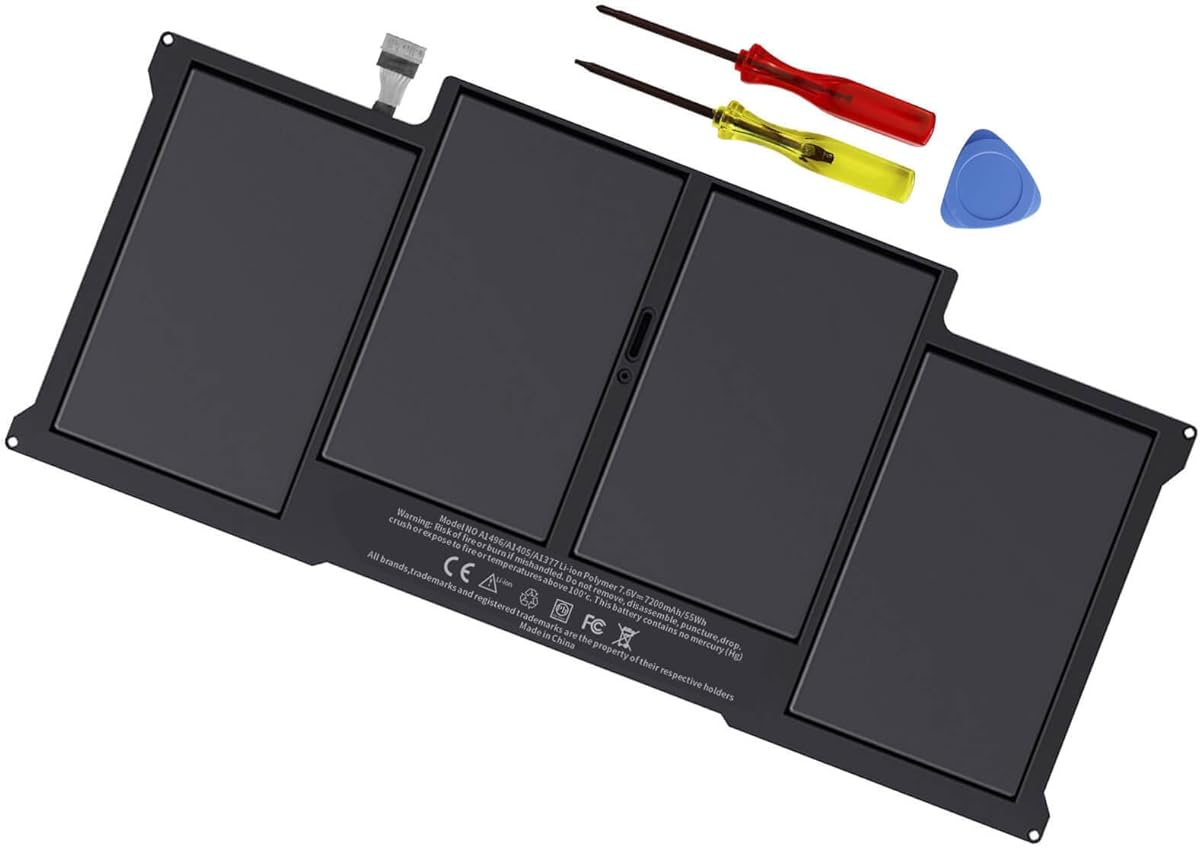
This replacement stands out for its impressive 7200mAh capacity, which is among the highest in its class. It offers exceptional runtime for 13-inch MacBook Air users, keeping them powered throughout the day.
We may earn a commission when you buy through this link, at no additional cost to you.
The package includes a user manual and tools to guide you through the installation process easily. This makes it approachable even for those who may not have experience with laptop repairs before.
With a 60-day return policy, there is plenty of time to ensure the battery works correctly after installation. Combined with UL certification, it provides a safe and flexible option for buyers.
Choose this if you need maximum runtime from your Air model without upgrading the device. The high capacity and included support make it a highly recommended pick for daily users.
The 7200mAh capacity delivers extended hours of use, perfect for travel or long work sessions away from outlets.
Included tools and clear instructions simplify the physical replacement, reducing the risk of errors during setup.
We may earn a commission when you buy through this link, at no additional cost to you.
Selecting the right battery involves checking multiple factors to ensure safety and compatibility with your specific device model.
Always verify the part number and model year of your MacBook before purchasing a battery. Mismatched models may not fit physically or function correctly even if they look similar.
Check your System Information settings to confirm the exact model identifier and EMC number.
Higher mAh ratings generally translate to longer usage times between charges. Look for capacities that match or exceed the original specifications of your device.
Capacity matters most if you travel often or work without access to power outlets.
Look for batteries that are certified by organizations like UL, CE, or RoHS to ensure they meet strict safety standards.
Certified batteries reduce risks related to overheating, overcharging, or electrical hazards.
A good warranty offers protection against defects or early failure of the battery cell.
Many reliable options provide at least 12 months of coverage for peace of mind.
Voltage must match the original battery to ensure the laptop recognizes the power source correctly.
Mismatched voltage can cause boot errors or damage to the device logic board.
Access to responsive support can help resolve issues quickly if the battery arrives defective or fails to install.
Email support and clear return policies are signs of a trustworthy seller.
Check if tools or adhesive are included since older MacBooks may require specific screws or glue for the battery.
Missing tools can complicate the process and increase repair costs significantly.
Balance the price with the features offered such as warranty and capacity to determine the best value.
Avoid choosing the cheapest option if it lacks basic safety features or compatibility guarantees.
Before installation, back up your data to ensure no information is lost during the hardware change.
Keep the laptop charged to at least 50 percent before starting the physical replacement process.
Avoid exposing the battery to extreme temperatures or moisture while storing or using it.
Check your MacBook model year and part number in System Information to compare against the sellers compatibility list. Look for model codes like A1175, A1260, or MA348 to confirm exact matches.
Yes, if you follow instructions and use proper tools. Ensure you disconnect the internal battery carefully and ground yourself to prevent static damage to internal components.
Most high-quality replacements offer 300 to 500 recharge cycles before significant degradation occurs. Proper care and avoiding extreme temperatures can extend this lifespan further.
Reset the System Management Controller (SMC) to clear any old battery data. Sometimes a simple software reset allows the system to detect the new hardware.
Ideally yes, to reduce the risk of short circuits. However, many installers prefer to power the device while keeping the battery connected until the new one is ready.
Reputable sellers test cells and adhere to certifications like UL or RoHS. Check product details for specific safety claims and certifications to verify quality.
Yes, most systems allow usage during charging. However, frequent switching between charge and discharge might generate more heat and affect overall cycle life.
Use the System Information tool in macOS to view the battery status and cycle count. This helps you monitor performance over time and plan for future upgrades.
We have reviewed ten reliable options that vary by model support and capacity features to help you find the perfect match.
Prioritize safety certifications and warranty terms to ensure you get a durable part that keeps your MacBook secure during use.
Remember to check current pricing and availability regularly since market offers may change frequently over time.