
ASRock 970A-G/3.1
4.2Editor score
Supports AM3+ CPUs
Includes USB 3.1 ports
M.2 slot included
This guide compares the top Asrock AM3 Motherboard options for 2026, highlighting features, specs, and value to help you choose the right AMD socket board.
Finding the right Asrock AM3 Motherboard means balancing performance, connectivity, and long term stability. You need a board that supports your AMD processor well while offering reliable power delivery and modern ports for your workflow.
We evaluated ten top models based on chipset capability, expansion options, and user feedback. This list covers everything from budget friendly builds to high end enthusiast boards designed for serious multitasking and legacy AMD support.
Each pick highlights key strengths like overclocking support or storage speed. Prices and availability change often, so verify current details before buying. Use this guide to match the right board to your specific needs today.
4.2Editor score

4.3Editor score

5.0Editor score
This side by side table lets you quickly compare the core specifications of all ten selected boards to find the exact match for your build requirements.




The ASRock 760GM-HDV stands out as a dependable choice for budget builders needing AM3+ support. It has a strong rating for stability and handles most Phenom II and Athlon II processors well.
We may earn a commission when you buy through this link, at no additional cost to you.
Its standout qualities include support for up to 125W CPUs and AMD Overdrive with ACC features. This allows users to fine tune clock speeds for better performance without complex software.
While it lacks USB 3.0 and modern storage options like M.2, its core functionality remains robust for everyday computing. The trade-off is acceptable for users who prioritize CPU support over peripheral speed.
Buyers seeking a reliable upgrade path for legacy AMD systems should consider this model. It offers solid value and performance for office work or light gaming setups.
The board ensures stable power delivery even under load, which is critical for older multi core AMD processors.
The MicroATX layout fits well in smaller cases while maintaining essential connectivity options for standard peripherals.
We may earn a commission when you buy through this link, at no additional cost to you.
The ASRock 970A-G/3.1 offers an impressive array of modern features for its price point. It bridges the gap between legacy AMD platforms and newer connectivity needs effectively.
We may earn a commission when you buy through this link, at no additional cost to you.
Key strengths include the inclusion of USB 3.1 ports and an M.2 slot, which are rare on older AM3 boards. This adds significant value for users wanting faster storage and modern peripheral connectivity.
However, the PCIe slots run at 2.0 speeds, which limits high end GPU bandwidth. Still, for mid-range graphics cards this board delivers excellent performance and flexibility.
This model is ideal for builders on a tight budget who still want future proofing via M.2 and USB 3.1. It balances cost and features better than most competitors.
Adding USB 3.1 and M.2 to an AM3 board extends its usability significantly for modern peripherals.
With multiple PCIe slots and high RAM capacity, this board supports multi GPU setups and large memory configs.
We may earn a commission when you buy through this link, at no additional cost to you.
The ASRock 970M PRO3 delivers robust performance in a compact MicroATX package. It is designed for users who want full AM3+ compatibility without the bulk of an ATX board.
We may earn a commission when you buy through this link, at no additional cost to you.
Its key strengths lie in its full SATA3 support and Quad CrossFireX capability, making it suitable for multi GPU configurations in smaller cases. The USB 3.0 ports also add necessary modern connectivity.
One trade-off is the limited number of rear USB ports compared to larger boards. For users with few peripherals, this is a minor inconvenience that does not impact core performance.
If you need a small form factor system with high performance potential, this board is a strong candidate. It balances size and capability well for specific build types.
The board supports multiple graphics cards while keeping the overall system footprint small and manageable.
Full SATA3 support ensures that modern SSDs can run at full speeds without bottlenecks on this platform.
We may earn a commission when you buy through this link, at no additional cost to you.
The ASRock 970 EXTREME3 is a solid ATX board for users needing reliable legacy AM3+ performance. It focuses on stable power and data transfer options for older systems.
We may earn a commission when you buy through this link, at no additional cost to you.
Its strengths include RAID support and an eSATA3 port which is uncommon in many boards today. This makes it a good choice for users needing extra external storage connections.
The main trade-off is its higher price relative to more modern feature sets. Users may find better value in boards with USB 3.1 or M.2 support for similar cost.
This board suits those upgrading an existing AM3+ system who need reliable performance and specific connectivity like eSATA. It is a solid choice for specific niche requirements.
RAID support and eSATA make this board versatile for users managing multiple drives or external storage arrays.
The power phases ensure stable performance even with high TDP processors, which is essential for reliability.
We may earn a commission when you buy through this link, at no additional cost to you.
The ASRock 960GM-VGS3 FX is a straightforward MicroATX board for basic AM3+ builds. It emphasizes stability and compact design over advanced expansion features.
We may earn a commission when you buy through this link, at no additional cost to you.
Its strengths include solid capacitors for longevity and X-Boost software for memory tuning. The audio codec is also robust, providing decent sound without needing a separate card.
Users should note the lack of USB 3.0 which limits modern peripheral speeds. For basic desktops this is less critical but impacts overall versatility.
If you need a simple budget friendly board for office tasks or media playback this model is a safe choice. It prioritizes stability and compact design.
Solid capacitors reduce the risk of failure over time, ensuring the board remains reliable for years.
The 5.1 channel audio codec supports surround sound which is useful for home theater PC setups.
We may earn a commission when you buy through this link, at no additional cost to you.
The ASRock 880GXH/USB3 provides integrated graphics for users who do not need a dedicated GPU. It is a practical option for light workloads or budget systems.
We may earn a commission when you buy through this link, at no additional cost to you.
Key strengths include HDMI and DVI ports along with Hybrid CrossFireX support. This allows for better graphics performance than standard integrated solutions for basic tasks.
The main trade-off is limited performance for gaming or heavy processing tasks. It is best suited for office work or media consumption where high end graphics are not required.
This board is suitable for budget builds where a dedicated GPU is not an option. It provides essential features and connectivity at a low price point.
Integrated graphics support full HD 1080p playback making it ideal for home theater PC setups without extra cards.
USB 3.0 support ensures that even older systems can connect to modern external storage at decent speeds.
We may earn a commission when you buy through this link, at no additional cost to you.
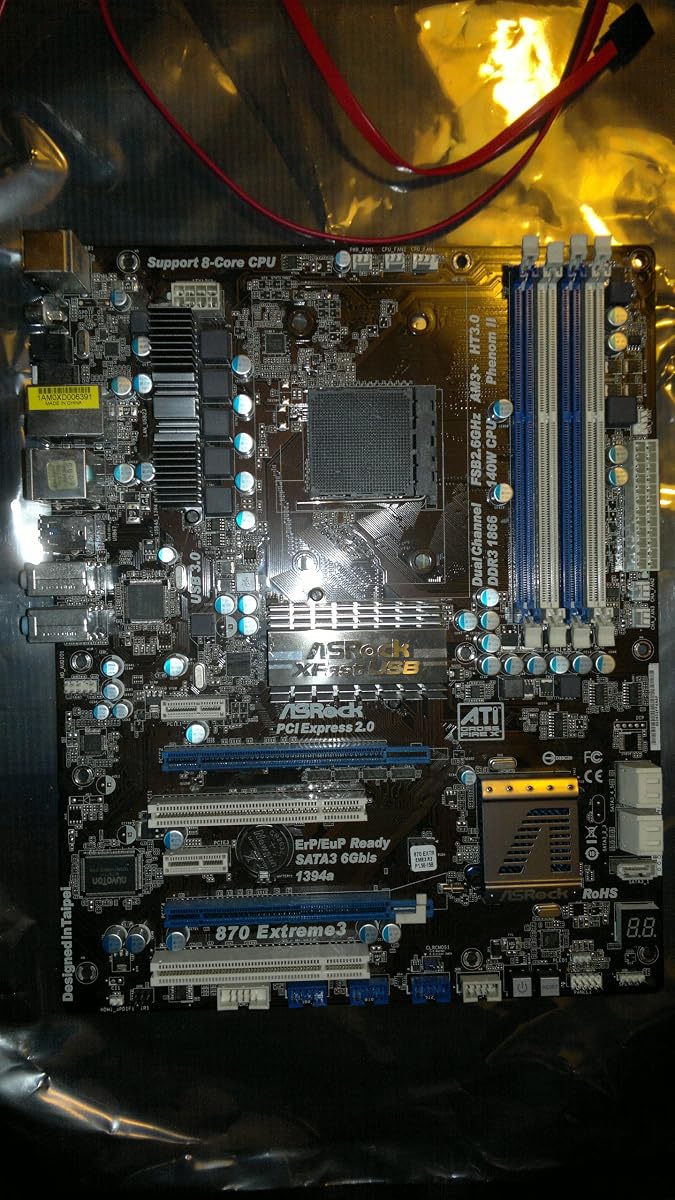
The ASRock 870 EXTREME3 R2.0 is a solid mid-range option for AM3+ users needing multi GPU support. It balances performance and connectivity for older high end builds.
We may earn a commission when you buy through this link, at no additional cost to you.
Its strengths include Quad CrossFireX capability and FireWire ports which are still useful for legacy audio or video devices. The audio codec is also robust for the price.
The trade-off is that FireWire is largely obsolete for modern setups. Users needing modern connectivity may find better value elsewhere but this board serves specific legacy needs.
For enthusiasts needing multi GPU setups without PCIe 3.0 this board delivers reliability. It supports high RAM capacity and stable power for older high performance systems.
FireWire ports remain a critical feature for users working with older audio interfaces or video capture cards.
Quad CrossFireX support allows users to scale graphics performance using multiple GPUs effectively.
We may earn a commission when you buy through this link, at no additional cost to you.
The ASRock 990FX EXTREME3 uses a high end chipset to support intense AMD workloads. It is designed for users needing maximum stability and multi GPU support.
We may earn a commission when you buy through this link, at no additional cost to you.
Its key strengths include THX TruStudio Pro audio and support for Quad CrossFireX and SLI configurations. This makes it versatile for gaming or specialized high performance tasks.
The trade-off is high power draw and older connectivity standards like lack of M.2. Users must weigh the benefits of the chipset against modern storage needs.
Buyers seeking the best AM3+ chipset performance should consider this model. It provides a solid foundation for legacy high end systems with strong GPU options.
Support for up to 140W CPUs ensures that even the most demanding legacy processors run stably.
THX TruStudio Pro enhances sound quality, making this board a great choice for audiophiles.
We may earn a commission when you buy through this link, at no additional cost to you.
The ASRock 970DE3/U3S3 offers a balanced mix of older stability and new storage features. It supports SATA3 and USB3.0 which are essential for modern peripherals.
We may earn a commission when you buy through this link, at no additional cost to you.
Its strengths include reliable RAID support and a good amount of USB ports for connectivity. The serial port is also useful for legacy industrial or scientific applications.
The trade-off is the older chipset which limits expansion potential compared to newer boards. Users needing multiple PCIe slots might find this limiting for multi GPU builds.
This board is ideal for users needing SATA3 and USB3.0 without the cost of high end models. It provides practical features for everyday computing.
The inclusion of a serial port ensures compatibility with specialized equipment that does not use USB.
SATA3 support allows for faster SSDs even if the CPU is from an older generation.
We may earn a commission when you buy through this link, at no additional cost to you.
The ASRock 890FX Deluxe4 is the top pick for high end AM3 builds needing maximum performance. It offers excellent reliability and robust connectivity options.
We may earn a commission when you buy through this link, at no additional cost to you.
Its strengths include the 890FX chipset and full SATA3 USB3.0 support. This makes it ideal for users needing fast storage and multi GPU capabilities on legacy platforms.
The trade-off is the higher price which may not suit budget builders. However, the reliability and performance justify the cost for demanding workloads.
For those seeking the best AM3 experience with solid modern connectivity this board is unmatched. It delivers stable performance for high end legacy systems.
The 890FX chipset delivers the best performance for AM3 sockets ensuring smooth handling of multi core tasks.
Quad CrossFireX support ensures that users can scale graphics performance effectively without bottlenecks.
We may earn a commission when you buy through this link, at no additional cost to you.
Choosing the right board requires understanding chipset features and socket compatibility. This guide helps you focus on what matters most for your specific build goals.
Ensure the board supports your specific AM3 or AM3+ CPU. Some boards are optimized for newer Phenom II models while others are better for legacy Athlon processors. Always check the CPU support list before buying.
Match the socket type exactly to avoid physical incompatibility or BIOS issues.
Chipsets like 990FX and 890FX offer higher performance and better multi GPU support. Lower end chipsets like 760G or 880G are sufficient for standard desktop use without advanced features.
Choose a chipset that aligns with your performance expectations and budget.
Look for USB 3.0 or 3.1 ports if you need fast external data transfer. SATA3 support is essential for modern SSDs while legacy SATA2 may slow down performance significantly.
Verify the number of USB ports matches your peripheral needs to avoid adapter clutter.
Check the number of PCIe x16 slots if you plan to use multiple graphics cards. Boards with fewer slots may limit your ability to scale GPU performance later.
Ensure the board has enough expansion slots for your future expansion needs.
Higher capacity boards support up to 64GB while others cap at 16GB. Decide how much memory you need now and in the future before selecting.
Select a board that meets your maximum memory requirements to avoid upgrading later.
MicroATX boards fit smaller cases but offer fewer slots. ATX boards are larger and usually provide more connectivity and better cooling solutions.
Choose a size that matches your case to ensure proper fit and airflow.
High TDP CPUs need robust power phases for stable performance. Boards with solid capacitors and good VRM design prevent throttling during heavy workloads.
Verify power specs to ensure your processor runs efficiently under load.
Balance the cost against the features offered. Older boards may be cheaper but lack modern ports like M.2 or USB 3.1.
Evaluate if you need premium features or if a basic model suffices for your needs.
Start by installing the CPU carefully to avoid bending pins. Align the triangle marker on the CPU with the socket marker and lower the lever gently.
Apply thermal paste evenly on the CPU before mounting the cooler. Ensure the cooler is screwed down tightly to prevent overheating during heavy usage.
Regularly update BIOS firmware for better CPU compatibility and stability. Keep the board free of dust using compressed air to maintain optimal cooling and longevity.
Yes, most AM3+ motherboards are backward compatible with AM3 processors. Always verify the specific CPU support list for your board model to ensure full functionality.
Most boards support SATA2 which works with SATA SSDs but at reduced speeds. Look for SATA3 ports if available to get the full speed of modern SSDs.
These boards use DDR3 memory. Check the maximum supported speed and capacity to ensure you select the right RAM modules for your build.
Some boards support CrossFireX or SLI but require specific chipsets and enough PCIe slots. Always check the motherboard specifications for GPU support before purchasing.
Most AM3 boards do not have TPM 2.0 or secure boot support required for Windows 11. You may need to run Windows 10 or use workarounds to install Windows 11.
Download the latest BIOS file from the manufacturer site and use the built-in flash utility. Keep the system powered during the update to prevent corruption.
Most legacy AM3 boards do not include built-in Wi-Fi. You will likely need a PCIe or USB adapter if you require wireless connectivity.
Most boards support up to 125W to 140W TDP processors. Check your specific model specifications to ensure compatibility with high power CPUs.
These ten boards offer solid options for legacy AMD builds ranging from budget to premium. Each provides unique features to match different performance and connectivity needs.
Prioritize chipset capabilities and modern ports like SATA3 and USB3.0 for better usability. A well chosen board can extend the life of your existing hardware significantly.
Verify availability and current details before purchase since prices and stock change often. This guide aims to simplify your selection process for a reliable system.