
Mac Book Pro Charger – 100W USB C Charger Fast
4.5Editor score
Includes AC adapter and power cord
Supports M1 to M5 chip models
Built-in cooling system for safety
Discover the top 100W Chargers for MacBook Pro compared by experts. This guide reviews performance, safety, and compatibility for M series and USB-C devices.
Finding the right power source for your laptop is essential for productivity. A reliable charger ensures your device stays ready for work anywhere. We review ten top models offering fast charging and safety features.
We compared these chargers based on output power, build quality, and user ratings. Each product was evaluated for compatibility with M series chips and USB-C laptops. Our analysis highlights speed, portability, and protection technologies.
Each pick shows key specifications and real-world performance details. We include pros and cons to help you decide quickly. Prices may vary so check current offers before purchasing your next adapter.
4.5Editor score

4.6Editor score

4.7Editor score
The following table compares all ten selected chargers side by side. Look at specs like power output, included cables, and safety features to find the perfect match for your needs.


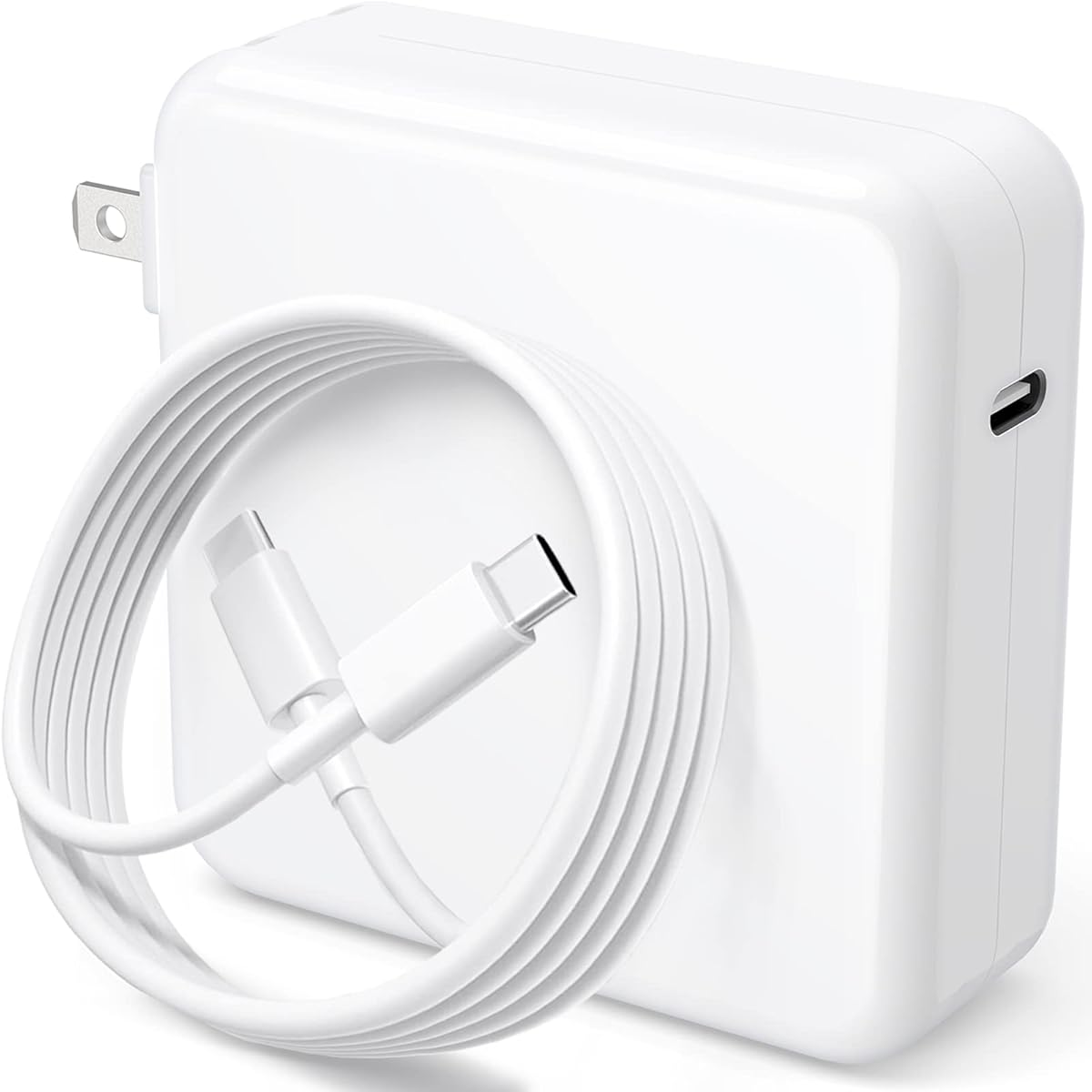

This charger offers full-speed charging for MacBook Pro and Air models. It supports M1 through M5 chips and includes a 6.6ft cord. Users appreciate the built-in cooling system and comprehensive safety features.
We may earn a commission when you buy through this link, at no additional cost to you.
The charger delivers 20V at 4.7A for fast power delivery. It identifies devices automatically to provide optimal current. Safety features include protection against short circuit and overheating to ensure reliability.
While efficient, the cooling system might produce some sound at full load. The design is functional but lacks premium aesthetics. However, for the price point these trade-offs are acceptable.
Ideal for budget-conscious users who need reliable power. It fits well in office or home setups. We recommend it for anyone needing a versatile USB-C charger today.
Works flawlessly with various USB-C laptops and phones for broad utility.
Built-in IC chip technology safeguards devices from electrical issues.
We may earn a commission when you buy through this link, at no additional cost to you.
This compact charger uses PowerIQ 3.0 for fast charging across devices. It folds easily for travel and maintains a small footprint. The ActiveShield technology ensures safety through continuous temperature monitoring.
We may earn a commission when you buy through this link, at no additional cost to you.
Users can charge their 16-inch MacBook Pro to full in 80 minutes. The foldable plug prevents damage in bags and saves space. It works seamlessly with phones and laptops alike.
The 5ft cable is shorter than some competitors offer. The price is higher than generic brands. However the build quality and warranty justify the investment.
Perfect for travelers and professionals on the go. It balances power and portability well. We recommend this as a top pick for daily use.
Exclusive technology provides 24/7 temperature monitoring for connected devices.
Foldable plug and compact size make it easy to take anywhere.
We may earn a commission when you buy through this link, at no additional cost to you.
This charger boasts 96% efficiency for stable power delivery. It uses PD 3.0 technology to outperform lower wattage adapters. The 6.6ft cable ensures flexibility in various settings.
We may earn a commission when you buy through this link, at no additional cost to you.
It fully charges a 16-inch MacBook Pro in about 90 minutes. Safety features include overcurrent and overvoltage protection with flame-retardant casing. It detects devices to adjust power automatically.
The build relies on basic plastic which may feel less premium. There is no dedicated cable storage. These aspects do not affect performance significantly though.
Ideal for those seeking high efficiency at a low price. It works well with all USB-C laptops. We recommend it for cost-effective reliable charging.
Delivers fast and stable power delivery up to 96% efficient.
Smart chip offers comprehensive protection against overcurrent and short circuits.
We may earn a commission when you buy through this link, at no additional cost to you.
This tiny charger packs a 100W power punch. It features durable matte prongs that lock in place securely. ActiveShield 2.0 monitors temperature millions of times a day.
We may earn a commission when you buy through this link, at no additional cost to you.
It charges 14-inch MacBook Pro to 50% in just 27 minutes. The design is small enough to fit in a pocket. It offers freedom to charge on the move easily.
Some boxes may not include the cable so check details. The cost is higher than standard chargers. However the portability is unmatched for travelers.
Great for minimalists needing maximum power in small size. We recommend it for daily commutes. It delivers performance without bulk.
Size like AirPods Pro with serious power punch for portability.
Intelligently monitors temperature to adjust power output safely.
We may earn a commission when you buy through this link, at no additional cost to you.
This adapter replaces original 96W and 87W adapters perfectly. It uses smart chips to allocate optimal wattage for devices. The included 6.6ft E-Mark cable supports high power safely.
We may earn a commission when you buy through this link, at no additional cost to you.
It charges 16-inch laptop from 0% to 50% in 30 minutes. The foldable plug ensures portability for business trips. It protects against over-voltage and short-circuiting continuously.
The housing design is basic and functional. No extra accessories like sleeves are included. However the utility and protection are strong for the price.
Ideal for business professionals needing reliable replacements. We recommend it for office setups. It ensures uninterrupted workflow effectively.
Automatically identifies device and allocates exact optimal wattage.
Compact profile with foldable plug makes it portable for trips.
We may earn a commission when you buy through this link, at no additional cost to you.
This charger offers 118W output for robust power delivery. It maintains 96% efficiency for stable energy inflow. Compatible with various USB-C devices beyond Apple ecosystem.
We may earn a commission when you buy through this link, at no additional cost to you.
It fully charges 16-inch MacBook Pro in about 1 hour 25 mins. Auto identification handles conversion of charging power automatically. Smart chip ensures recovery from issues.
It is slightly bulkier than standard 100W adapters. The price point is higher but justified by wattage. It offers extra power headroom for demanding tasks.
Ideal for users needing extra wattage for tasks. We recommend it for heavy workloads. It ensures stable power under stress.
118W output provides stable energy inflow for charging.
Smart chip safeguards against over-current and over-voltage.
We may earn a commission when you buy through this link, at no additional cost to you.
This model uses advanced GaN technology for efficiency. It delivers 20V at 5A for rapid charging. The included cable supports high power data syncing speeds.
We may earn a commission when you buy through this link, at no additional cost to you.
It prevents overheating with built-in cooling systems at full output. Smart chip protects against overload and short circuit. Data syncing is available at 480Mbps for versatility.
The cable might be heavy due to shielding. The design is standard without unique features. However the GaN tech ensures compact high power.
Ideal for those wanting latest tech in charger. We recommend it for USB-C devices. It balances power and size well.
Adopts most advanced technology for efficiency and protection.
Supports faster charging speeds and data syncing up to 480Mbps.
We may earn a commission when you buy through this link, at no additional cost to you.
This charger delivers 120W for high efficiency charging. It uses dynamic systems to keep Battery Capacity to 97%. The foldable design ensures protection from scratches.
We may earn a commission when you buy through this link, at no additional cost to you.
It fully charges laptops in 1 hour 20 minutes. The cable passes 20000+ bending tests for durability. It reduces battery aging with intelligent charging routines.
It has a lower user rating than others. The cable is not detachable for storage. However the battery health features are compelling.
Ideal for those prioritizing battery longevity. We recommend it for daily use. It helps keep battery health effectively.
Built-in systems keep Maximum Battery Capacity to 97%.
Cable passes BW-TC17 test and 20000+ bending tests.
We may earn a commission when you buy through this link, at no additional cost to you.
This premium charger delivers 160W total output for multiple devices. It features 5-ports including 4 USB-C and 1 USB-A. The rotatable touch display shows real-time power status.
We may earn a commission when you buy through this link, at no additional cost to you.
It supports up to 140W on single ports for laptops. The intelligent system allocates power for desktop clutter. It folds for travel saving luggage space.
It is heavier than single-port chargers. The higher cost reflects premium features. However the convenience of multi-device charging is unmatched.
Ideal for power users with many devices. We recommend it for office desks. It offers maximum efficiency and convenience.
5-In-1 block enables simultaneous charging for laptop and phone.
Rotatable touch control displays wattage and temperature status.
We may earn a commission when you buy through this link, at no additional cost to you.
This compact charger supports up to 100W on single port. It includes 3 USB-C and 1 USB-A ports for flexibility. Dynamic Sensors monitor temperature for safety.
We may earn a commission when you buy through this link, at no additional cost to you.
It fits in palm without quality sacrifice. It charges MacBook Air M3 to 55% in 30 minutes. Foldable plug ensures travel ready design.
Dell and Lenovo may not reach full speed due to protocols. Cable sold separately requires additional purchase. However for Apple ecosystem it performs well.
Ideal for travelers needing multiple ports. We recommend it for business trips. It combines power with small size.
3 USB-C and 1 USB-A ports provide fast charging all at once.
GaN chip and foldable plug make it suitable for travel.
We may earn a commission when you buy through this link, at no additional cost to you.
Choosing a charger involves more than checking wattage. Consider build quality, safety features, and portability to ensure you get value.
Look for chargers that support at least 100W output to ensure fast charging. Higher wattage ensures your device charges even during heavy use. It also means the charger is versatile for other USB-C devices. This ensures your device gets enough power at all times.
Always check that the charger can output 20V at 5A.
Safety is vital to protect your expensive laptop and charger. Look for features like short circuit protection, overvoltage, and overheating prevention. Many chargers use smart chips to monitor temperature. This ensures your device is safe from electrical hazards.
Prioritize chargers with built-in safety systems for long-term use.
The included cable should be long enough to reach your desk comfortably. A 6.6ft cable offers flexibility compared to shorter 5ft options. Check for E-Mark certification to ensure it supports high power. Good cables reduce the need for buying extras.
Ensure the cable supports 5A current for fast charging.
If you travel often, choose a charger with a foldable plug. A compact design fits easily in a bag without bulk. GaN technology often allows smaller sizes for same power. This makes carrying the charger effortless daily.
Foldable plugs are essential for travelers to save space.
Ensure the charger works with your specific MacBook Pro or Air model. Most USB-C chargers work with M1 to M5 chips. Compatibility also extends to phones and tablets for universal use. This reduces the number of bricks you need.
Verify compatibility with M series chips before purchasing.
Reputable brands often offer better quality control and support. Look for warranties of 12 months or more for peace of mind. Good brands provide responsive customer service if issues arise. This ensures reliability over years of usage.
Choose established brands with solid customer support.
Durable materials like flame-retardant casing protect against heat. Metal or high-quality plastic lasts longer in daily use. Check for robust construction to withstand drops or bumps. This ensures longevity and consistent performance.
Prioritize durable materials for daily wear and tear.
Some chargers offer digital displays or multiple ports. While not always necessary, they add convenience for desktop setups. Multi-port chargers reduce clutter by charging multiple devices. Assess if these extras justify the extra cost.
Consider multi-port options if you need to charge multiple devices.
Always plug the charger into a surge protector or reliable outlet to ensure stable power delivery. Connect the USB-C cable to the charger first before plugging it into your MacBook Pro. This sequence helps prevent electrical spikes during connection.
Place the charger in a well-ventilated area during use to avoid overheating. Do not cover it with blankets or place it on soft surfaces like beds. Good airflow allows the internal cooling system to work effectively.
Regularly inspect the cable for any signs of wear or fraying before use. If damage is found, replace the cable immediately to prevent electrical issues. Keep the charger away from water or moisture to ensure safety.
Yes, a 100W charger is safe for any MacBook Air model. The charger will automatically detect your device and supply the required power. It will not force extra power into the battery. This ensures safety and optimal charging.
Some chargers come with a cable included but others do not. Check the product details to see what is in the box. If not included, buy a certified 5A USB-C cable for best results. This ensures you get full charging speed.
Slow charging can happen if the charger is overloaded or hot. Using the charger in a hot environment may slow down the process. Also, using your Mac heavily while charging reduces net speed. Let it charge while resting for best results.
Most 100W USB-C chargers are compatible with iPhone models. You just need a USB-C to Lightning or USB-C cable. The charger will adjust power to suit your phone needs. This allows universal use across devices.
GaN chargers use gallium nitride to deliver power more efficiently. They are smaller and lighter than silicon counterparts. This makes them better for travel and portable use. Both provide safe charging for devices.
There is no fixed time but inspect it regularly for wear. If you notice fraying or heating issues, replace it immediately. With care, most chargers last several years. Check cables often as they wear out first.
Yes, most 100W chargers work with non-Apple USB-C laptops. They support universal PD protocols for devices like Dell or HP. Ensure the laptop supports fast charging protocols. This allows cross-device power flexibility.
It is generally safe but it is better to unplug when unused. Modern chargers have safety features to prevent idle issues. However, unplugging saves energy and prevents wear. This extends the lifespan of the unit.
We have reviewed ten top 100W chargers to help you find the perfect fit. The Anker Compact Foldable stands out for portability and reliability. Budget options like the JEIBAO model deliver efficiency at low cost. Premium picks like the UGREEN Nexode offer advanced multi-device power.
When selecting a charger, prioritize safety technology and compatibility with your Mac model. If travel is important choose a model with a foldable plug. For office use, a multi-port charger may provide the best value. Balance your needs with the features available.
Prices for these chargers change often so always check current offers before buying. Ensure the product page confirms all specs and cables included. We hope this guide helps you power your MacBook Pro efficiently and safely.