
Vaydeer Vertical Laptop Stand Holder Organizer
4.6Editor score
3 in 1 vertical design
Adjustable width for various thicknesses
Lightweight ABS plastic construction
Finding the right laptop rack for desk can transform your workspace from cluttered to efficient. A good rack elevates your device to eye level, improves airflow, and frees up valuable surface area for other essentials.
We compared ten top-rated models based on stability, material quality, adjustability, and compatibility. Our analysis covers vertical stands, under-desk mounts, and ergonomic risers to help you choose the perfect fit for your setup.
Each pick highlights specific strengths and ideal use cases to guide your decision. Please note that prices and availability can change frequently, so check current listings before purchasing to ensure you get the best value.
4.6Editor score

4.8Editor score

4.6Editor score
As an Amazon Associate we earn from qualifying purchases.
This side-by-side comparison evaluates all ten selected laptop racks for desk to help you find the ideal solution for your specific workspace needs and device types.





The OMOTON Dual Vertical Desk Laptop Stand Holder stands out as the top choice for users needing to organize multiple devices efficiently. With a high customer rating, this aluminum stand offers a sleek solution that keeps laptops elevated and accessible without cluttering your workspace.
We may earn a commission when you buy through this link, at no additional cost to you.
Its dual dock design allows you to store two laptops simultaneously, making it ideal for power users or shared workspaces. The adjustable width mechanism accommodates devices ranging from thin ultrabooks to thicker gaming laptops, ensuring a snug fit for various models including MacBook, Samsung, and Microsoft Surface.
While the stand does not offer height adjustment beyond its fixed dock position, the stability provided by the wide base and non-slip silicone pads compensates well. The sandblasted aluminum finish not only looks premium but also resists scratches, maintaining its appearance over time with daily use.
We recommend this stand for anyone looking to maximize vertical space and keep their desk tidy. It is particularly suitable for users who own multiple laptops or need quick access to devices while working on an external monitor setup.
The dual dock design frees up valuable horizontal desk space by stacking devices vertically in a secure manner.
Made from anodized aluminum with a sandblasted finish that matches MacBook aesthetics and resists daily wear.
We may earn a commission when you buy through this link, at no additional cost to you.
The NODOCA 2-Slot Laptop Storage offers a unique side-mounted solution that keeps your main desk area clear. Designed to attach to the side of your desk, this vertical stand holds laptops and includes a handy hook for accessories like headphones or controllers.
We may earn a commission when you buy through this link, at no additional cost to you.
Constructed from high-strength carbon steel, this stand provides robust support for a wide range of laptop models. The adjustable slot size ensures compatibility with various thicknesses, while the silicone protective pad prevents any scratches to your device during storage.
One limitation is the installation requirement, which needs a desk depth greater than 5cm and thickness less than 6cm. However, once installed, it offers a sturdy and space-saving option that keeps your laptop within reach without occupying valuable writing space.
This product is ideal for users with limited desk surface area who want a dedicated vertical storage spot. The added accessory hook makes it a versatile choice for gamers or professionals who use multiple peripherals daily.
Mounting on the side of the desk keeps the main surface free for work while keeping laptops organized vertically.
The included hook at the bottom allows you to hang headphones or controllers, adding extra organizational value.
We may earn a commission when you buy through this link, at no additional cost to you.
The BYMECOST No Drill Under Desk Laptop Mount provides a discreet way to add storage without cluttering your desk surface. This metal tray clips onto the edge of your desk, creating a hidden shelf for laptops, accessories, or other electronic devices.
We may earn a commission when you buy through this link, at no additional cost to you.
Made from high-quality metal with a powder-coated body, this mount is durable and supports up to 44lbs. The hollow structure helps with air permeability and dust reduction, while three openings assist in routing charging cables neatly out of sight.
Installation is straightforward as it requires no drilling, making it a safe choice for renters or those who dislike permanent modifications. However, ensure your table does not have crossbars and meets the minimum width requirements to avoid fit issues.
This option is perfect for users wanting to maximize desk space by utilizing the area underneath. It is especially useful for standing desks or workstations where keeping the top surface minimal is a priority.
Clipping under the desk keeps devices out of sight and frees up the main workspace for other tasks.
Three openings help route charging cables and keep cords organized under the desk for a cleaner look.
We may earn a commission when you buy through this link, at no additional cost to you.
The Adjustable Laptop Stand for Desk is a cost-effective solution that prioritizes ergonomics and portability. This metal riser allows you to adjust the height and angle to reduce neck strain and improve posture during long working sessions.
We may earn a commission when you buy through this link, at no additional cost to you.
Built from sturdy metal with ventilation holes on top, it supports up to 17.6 lbs while promoting airflow to keep your laptop cool. The foldable design makes it easy to slip into a backpack for business travel or remote work.
While it offers great value, the stability can vary depending on how much the height is extended. Users should ensure the non-skid pads are properly engaged to prevent sliding on smooth desk surfaces.
Ideal for budget-conscious buyers who need an ergonomic boost without breaking the bank. This stand works well for home office setups where occasional repositioning or portability is required.
Adjusting the height and angle helps reduce fatigue by raising your screen closer to eye level comfortably.
The foldable structure allows you to store it easily in a bag for travel or different workspaces.
We may earn a commission when you buy through this link, at no additional cost to you.
The LOXP Adjustable Laptop Stand introduces a unique rotating base that allows you to turn your laptop to any angle. This feature is particularly useful for collaborative workspaces where sharing your screen with a colleague is common.
We may earn a commission when you buy through this link, at no additional cost to you.
Constructed from one-piece fiber metal, this stand offers enhanced stability and durability compared to standard aluminum options. The ergonomic design lets you adjust height to eye level, reducing physical strain while working on various tasks.
The foldable design adds convenience for travelers, though it supports laptops up to 16 inches only. The non-slip silicone pads ensure your device stays secure during rotation, preventing accidental slips on the desk surface.
This stand is best suited for users who need flexibility in screen orientation and portability. It combines the benefits of a solid base with the freedom to rotate your laptop for better interaction.
The 360-degree rotation allows you to quickly share your screen or adjust angles without lifting the laptop.
Made of one-piece fiber metal which provides better durability and stability than ordinary aluminum alloy stands.
We may earn a commission when you buy through this link, at no additional cost to you.
The BESIGN LS03 Aluminum Laptop Stand is praised for its premium aluminum construction and ergonomic lift. By raising your laptop 6 inches, it aligns the screen closer to eye level, helping to reduce neck and shoulder pain during extended use.
We may earn a commission when you buy through this link, at no additional cost to you.
The detachable design makes assembly easy in just three steps, and the stand can be folded flat to save space when not needed. The open aluminum structure ensures good ventilation to prevent overheating, keeping your device running cool.
While it lacks height adjustment, the fixed angle provides a stable and solid platform that does not wobble. Rubber pads on the holders keep your laptop secure and protect it from scratches on the metal surface.
This stand is a reliable choice for those who value quality materials and ease of storage. It works well for home office environments where a sleek, stable platform is preferred over adjustable complexity.
Lifting the laptop by 6 inches helps align the screen to a better viewing level to improve posture.
Assembling it in 3 steps and folding flat makes it easy to store in a drawer when not in use.
We may earn a commission when you buy through this link, at no additional cost to you.
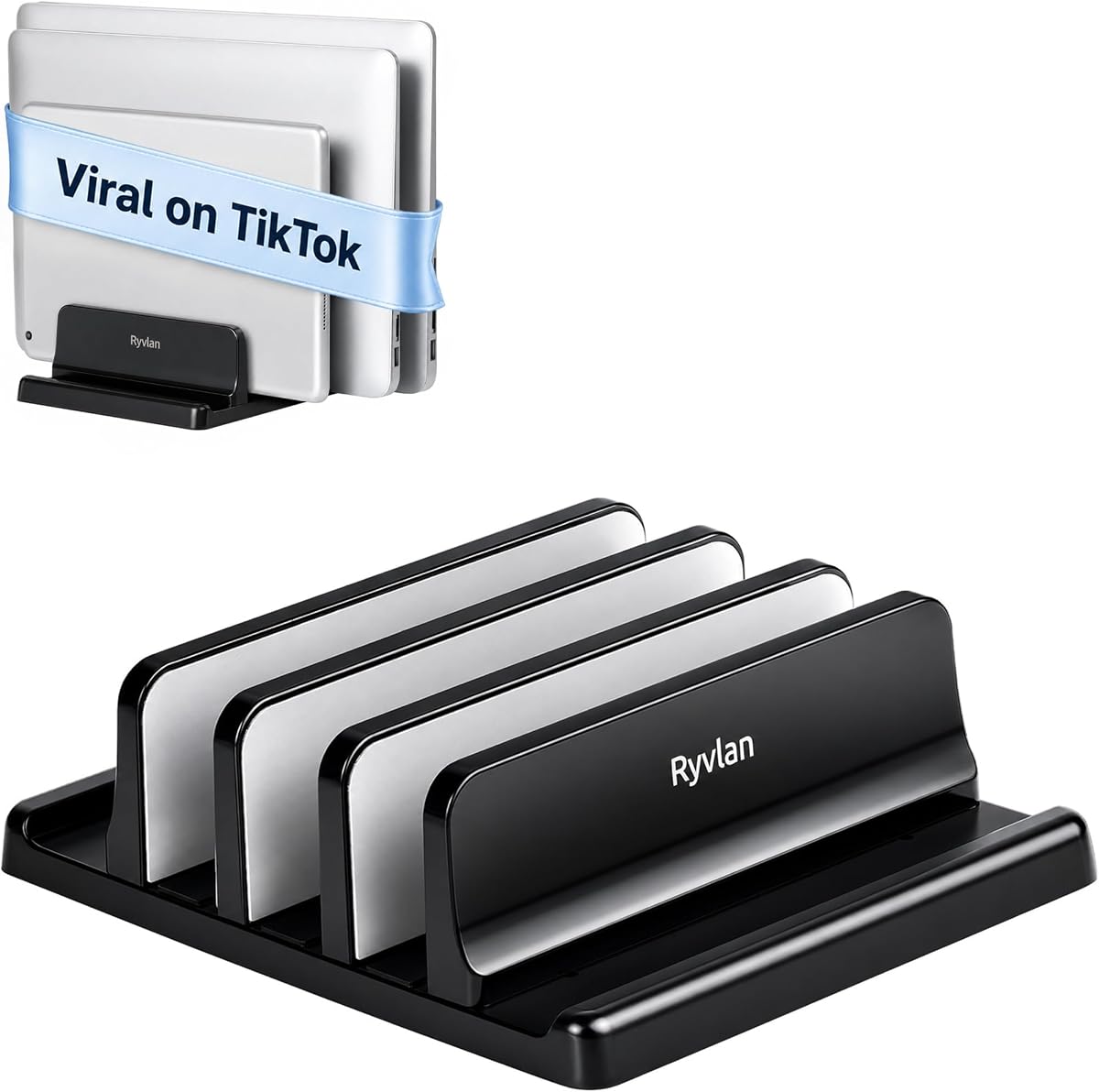
The Ryvlan Vertical Laptop Stand offers an impressive capacity with slots for three laptops and two tablets or phones. This multi-device organizer is perfect for power users who need to keep multiple gadgets tidy and accessible in one place.
We may earn a commission when you buy through this link, at no additional cost to you.
Each slot adjusts individually to fit various thicknesses from 0.47 to 1.2 inches. The impact-resistant ABS material ensures durability, while silicone padding on all six walls protects devices from scratches and keeps the stand from sliding.
The footprint is compact at roughly 7.3 by 5.9 inches, making it suitable for smaller desks. However, because it is made of plastic, it may feel lighter than metal options, though it is weighted enough to stay put on a smooth surface.
Ideal for classrooms or shared workstations where organizing multiple devices is a priority. This stand helps clear the desk completely by stacking everything vertically in a minimalist and functional design.
Holds three laptops plus two tablets or phones at once to clear the whole desk surface.
Every slot adjusts from 0.47 to 1.2 inches so both thin and thick machines sit snug without wobble.
We may earn a commission when you buy through this link, at no additional cost to you.
The Vaydeer Vertical Laptop Stand Holder Organizer is a space-saving solution that cradles one laptop vertically along with a phone or iPad. This 3 in 1 design helps build a neat and organized space on your desk quickly.
We may earn a commission when you buy through this link, at no additional cost to you.
Adjustable width accommodates laptops from 0.55 to 1.69 inches thick using an included Allen wrench. Made of high-quality ABS plastic, it is lightweight yet stable, ensuring your laptop does not fall down during use.
The surface is polished repeatedly for a smooth feel, and soft silicone mats protect the device from scratches. However, plastic may not offer the same longevity as metal stands, but it remains a solid choice for casual users.
This stand is ideal for those seeking an affordable and simple way to organize their desk. It works well for personal home offices where keeping items tidy is more important than heavy-duty industrial strength.
Cradle up one laptop and phone or iPad vertically at the same time to keep the desk neat.
Adjustable for laptop width with thickness from 0.55 inch to 1.69 inches using the included wrench.
We may earn a commission when you buy through this link, at no additional cost to you.
The Elestoria 5-Slot Vertical Laptop Stand is built for heavy-duty needs with the capacity to dock up to four laptops and a tablet. Its premium aluminum finish and solid base provide a stable and stylish way to organize multiple devices.
We may earn a commission when you buy through this link, at no additional cost to you.
Each slot features tool-free adjustment screws to secure devices ranging from 12mm to 38mm thickness. This flexibility makes it suitable for gaming laptops and MacBooks alike, offering security that standard holders lack.
The closed design helps protect devices from spills and improves cooling with 360-degree airflow. Polished edges and soft padding prevent scratches and slipping, ensuring safety for expensive tech on your desk.
This stand is recommended for professionals with multiple devices who need a robust organizational solution. The higher cost reflects its heavy-duty build and advanced features for managing a complex tech ecosystem.
Dock up to 4 laptops and one tablet or mobile device in a single vertical stand.
Adjustable width fits most laptops and MacBooks from 0.5 to 1.5 inches thick easily.
We may earn a commission when you buy through this link, at no additional cost to you.
The WALI Computer Monitor Stand provides a large metal shelf capable of supporting laptops, monitors, and printers up to 44 lbs. It offers an ergonomic raise to reduce stress on your neck and back while working.
We may earn a commission when you buy through this link, at no additional cost to you.
Three height positions allow you to find a comfortable viewing angle. The platform includes vented holes to prevent overheating, and the open space underneath creates storage for keyboards and notebooks to reduce clutter.
Rubber pads prevent slipping or damage to your work surface, ensuring stability during use. While it functions as a horizontal riser rather than a vertical stand, it offers excellent utility for heavy devices and multi-monitor setups.
Ideal for users needing a strong and versatile platform for their monitor and laptop. This stand helps elevate your entire workstation comfortably and keeps essentials organized underneath for easy access.
Large 14.6 by 9.3 inch metal shelf that fits most flat screen displays, laptops, and printers.
Open space beneath the stand for storing keyboards, notebooks and other desk accessories to reduce desktop clutter.
We may earn a commission when you buy through this link, at no additional cost to you.
Choosing the right laptop rack for desk involves considering material, size, adjustability, and stability to ensure a safe and ergonomic setup for your workspace.
Material plays a key role in durability and aesthetics. Aluminum alloys offer premium looks and strength but come at a higher price point, while ABS plastic is lighter and more budget-friendly but may feel less stable under heavy loads.
Look for materials that feel solid and do not wobble easily, as this ensures your expensive laptop remains secure during use.
Adjustable stands let you customize height and angle to match your ergonomic needs. Vertical racks often have adjustable width slots to fit different laptop thicknesses, while risers may offer multiple height positions for better viewing comfort.
Prioritize models with smooth adjustment mechanisms that lock securely in place to avoid accidental shifts while typing.
Stability is critical to prevent laptops from tipping or sliding. Check the weight capacity rating and ensure the base is wide enough to support your device plus any accessories without tipping over.
Heavier materials like steel or thick aluminum generally provide better stability than lightweight plastic options.
If you work in multiple locations, portability is essential. Foldable and detachable designs allow you to slip the stand into a backpack easily, making it ideal for travelers or remote workers.
Look for compact dimensions and lightweight construction to ensure it does not add unnecessary bulk to your bag.
Proper airflow helps prevent your laptop from overheating during intensive tasks. Stands with open designs or ventilation holes promote air circulation around the device, keeping it cooler during long sessions.
Closed or solid platforms may trap heat, so opt for open structures if your laptop runs hot frequently.
Some stands mount under the desk or on the side, requiring specific installation steps. Ensure you understand if drilling is needed or if it clips on easily without damaging your furniture.
Renters should prefer clamp or screw-less options to avoid permanent changes to their workspace.
Consider how many devices you need to store. Single slot stands are simple, while multi-slot options support multiple laptops, tablets, or phones simultaneously for better organization.
Check the width and thickness limits to ensure your specific laptop model fits securely within the designated slots.
Protective mats and silicone padding prevent scratches on your laptop and desk surface. Ensure the contact points are covered with soft materials to protect your device from abrasion.
Rubber pads on the base keep the stand from sliding across your desk and reduce vibration noise while using.
Place the rack on a flat stable surface and ensure all protective pads are engaged to prevent slipping before loading your device.
Regularly clean the stand with a soft cloth to remove dust and debris that could accumulate in slots or hinges over time.
Avoid placing heavy accessories like monitors on stands not rated for high weight to prevent damage to the structure or your devices.
Most racks support laptops ranging from 10 to 17 inches. Always check the manufacturer specifications to ensure your specific model fits securely within the width and thickness limits provided.
Vertical stands are primarily for storage and do not support typing. For typing, you need an angled riser that elevates your laptop while allowing access to the keyboard comfortably.
Some stands come fully assembled while others require minor setup like attaching feet or adjusting slots. Check product details for assembly time and tools needed before purchasing.
Yes, most racks are compatible with MacBook Air and Pro models. Look for silicone padding to protect the aluminum finish from scratches during daily use.
A stand usually supports one laptop for ergonomic use, while a rack may hold multiple devices or provide under-desk storage for better organization and space saving.
Metal stands should have silicone mats or padding to protect your device. Ensure these pads are in place and not worn out to prevent any scratches on your laptop shell.
We have reviewed ten top laptop racks for desk that cater to different needs ranging from single-device ergonomic risers to multi-slot organizers for power users.
Prioritize stability and material quality to ensure long-term use while considering portability if you travel often or need to store the stand away easily.
Keep in mind that prices and stock levels change regularly so verify current availability and specifications before making your final purchase decision today.