
Lenovo V-Series V15 Business Laptop
4.2Editor score
AMD Ryzen 7 Processor
40GB RAM Capacity
1TB SSD Storage
Finding a reliable laptop with a dedicated numeric keypad is essential for professionals who handle data entry, accounting, or spreadsheet work daily. These devices streamline workflow by offering physical number keys that boost accuracy and speed compared to using the main keyboard row. Selecting the right model requires balancing screen real estate, processing power, and portability to suit your specific business needs.
We have evaluated ten distinct models available in the current market to identify the most capable options for various user profiles. Our analysis focuses on key specifications including processor speed, memory capacity, storage type, and the physical layout of the keyboard to ensure the numpad is functional. Each product was scrutinized for build quality, connectivity options, and overall value to provide a trustworthy recommendation for your next purchase.
Each selection in this list highlights a unique strength, whether it is exceptional budget value, premium performance, or a large screen for multitasking. You will find detailed breakdowns of features, pros, cons, and specific use cases to guide your decision-making process effectively. Please note that product availability and pricing can fluctuate frequently, so verify current details before finalizing your order to ensure you get the best deal available.
4.2Editor score

4.8Editor score

4.5Editor score
As an Amazon Associate we earn from qualifying purchases.
This side-by-side comparison breaks down the key specifications of each laptop to help you quickly identify the model that fits your workflow requirements and budget constraints effectively.




The HP 255 G10 stands out as a top performer for business professionals needing a reliable machine without breaking the bank. Its high user rating reflects consistent satisfaction with its speed and reliability for daily tasks like spreadsheet work and data entry. The inclusion of a numeric keypad ensures that number-heavy workflows remain efficient and accurate throughout the workday.
We may earn a commission when you buy through this link, at no additional cost to you.
This laptop is powered by an AMD Ryzen 3 7330U processor which handles multitasking with ease. The 16GB of RAM allows you to keep multiple browser tabs and applications open without slowdowns. Connectivity is robust with USB-C, USB-A, and HDMI ports ensuring you can connect all necessary peripherals and external displays easily.
While the battery life is decent it may not last a full workday without a charger in hand. The build uses durable plastic which keeps weight low but lacks the premium feel of metal chassis models. These trade-offs are acceptable given the competitive pricing and strong performance it delivers for standard business use.
If you need a practical laptop for accounting or office work this model is a strong recommendation. It balances cost and capability well making it accessible for small businesses or individual users. The dedicated numpad makes it especially useful for roles requiring frequent numerical input and data processing.
Windows 11 Pro comes preloaded with security features and remote desktop tools that help manage enterprise-level workflows efficiently.
The narrow bezel design maximizes screen real estate providing a wide viewing area that reduces eye strain during long sessions.
We may earn a commission when you buy through this link, at no additional cost to you.
The Lenovo V-Series V15 delivers premium performance with a massive 40GB of RAM that supports heavy multitasking and large data sets. It is designed for professionals who need to run virtual machines or complex analysis software alongside standard office applications. The numeric keypad is clearly integrated into the keyboard layout ensuring quick access for financial calculations.
We may earn a commission when you buy through this link, at no additional cost to you.
Powered by an AMD Ryzen 7 5825U processor this laptop offers significant processing power for demanding workloads. The 1TB SSD provides ample space for files and ensures fast boot times and quick application launches. An RJ45 port is included which is rare on modern laptops but essential for stable wired network connections.
The higher price reflects the superior memory and storage specifications that few competitors match at this size. The chassis is slightly heavier making it less ideal for frequent travel compared to ultra-thin models. However for a stationary desktop replacement or office use the performance and connectivity advantages are substantial.
This device is ideal for power users who prioritize raw speed and memory capacity over portability. It handles large Excel files and database tasks with impressive ease. If you need a laptop that acts like a desktop workstation the V-Series V15 is a compelling choice.
The inclusion of an Ethernet port ensures reliable network speeds which is critical for secure file transfers and VoIP calls.
With 40GB of RAM you can run dozens of applications simultaneously without any noticeable lag or system freezes.
We may earn a commission when you buy through this link, at no additional cost to you.
This laptop offers exceptional value for users who need a basic machine with a numeric keypad without spending a fortune. It is well-suited for students or remote workers who handle standard documents and web-based applications. The large battery capacity ensures you can work away from a power source for extended periods comfortably.
We may earn a commission when you buy through this link, at no additional cost to you.
Powered by an AMD processor it provides sufficient speed for everyday tasks like browsing and word processing. The 256GB SSD is expandable allowing you to increase storage as your file needs grow over time. The dedicated numeric keypad helps streamline data entry tasks that would otherwise be tedious on a standard layout.
While it lacks the high RAM of premium models it handles typical office workloads efficiently. The display is bright enough for indoor use though it may struggle in very bright environments. The lightweight body makes it easy to slip into a backpack for daily commuting or travel.
If you are looking for an affordable entry point into laptops with a numpad this model is a great start. It balances essential features with a low cost effectively. It is a practical choice for those who need reliability and portability on a tight budget.
The 10000mAh battery provides hours of extra usage compared to standard laptop batteries for longer unplugged sessions.
You can upgrade the storage to 1TB easily ensuring you have enough space for growing collections of files.
We may earn a commission when you buy through this link, at no additional cost to you.
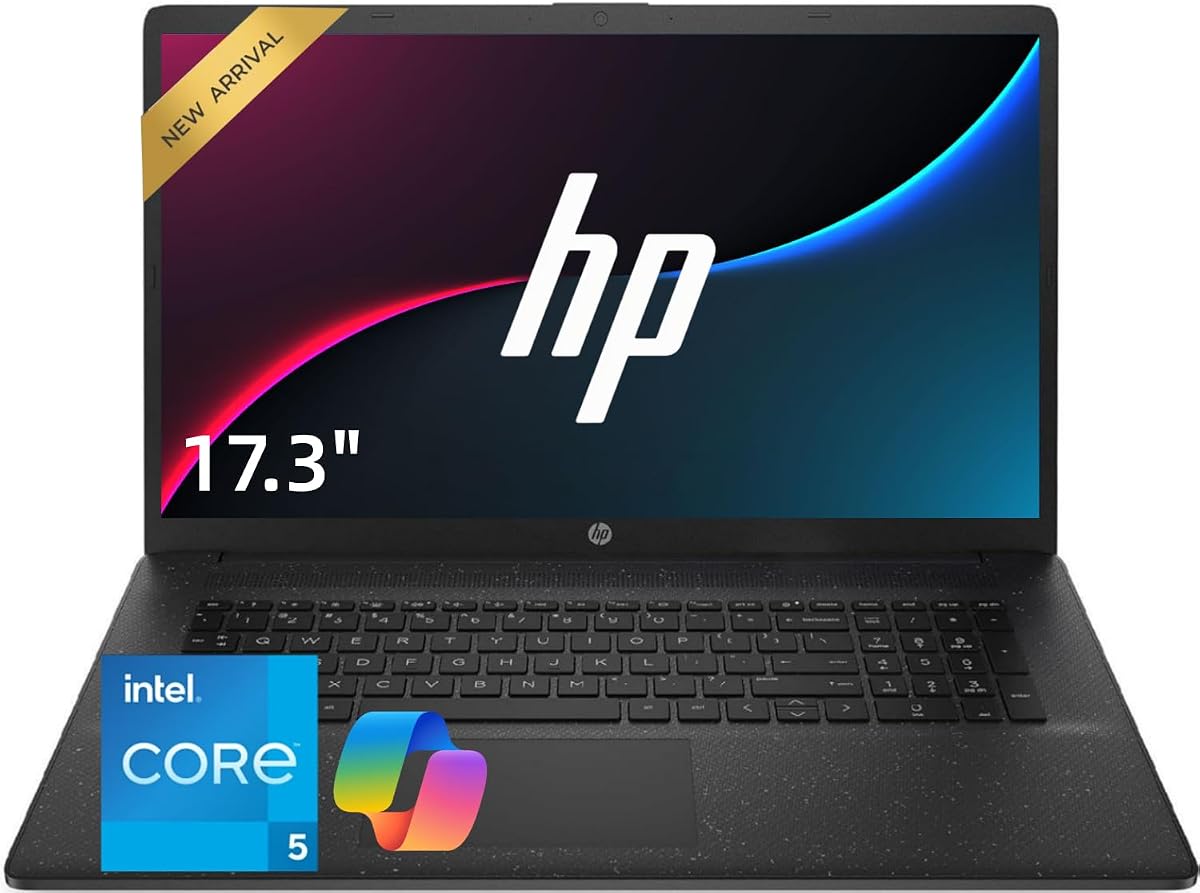
The HP 17.3 Business Laptop focuses on providing a spacious workspace for users who prioritize screen real estate. The large display makes it easier to view multiple windows side-by-side which is helpful for complex spreadsheet work. A full-size keyboard with a numeric keypad ensures comfortable typing during long data entry sessions.
We may earn a commission when you buy through this link, at no additional cost to you.
It features an Intel Core 5 processor that delivers smooth performance for multitasking and general productivity tasks. The 32GB of RAM supports heavy usage allowing you to switch between applications without waiting for them to load. Storage is generous with a 1TB SSD ensuring you have plenty of room for documents and media.
The size of the laptop means it is less portable than 15-inch models making it best suited for a desktop setup. While it lacks a verified user rating yet the specs suggest it is built for robust daily use. The larger form factor provides better cooling and potential for longer sustained performance under load.
If you work primarily from a desk this laptop offers a desktop-like experience in a portable form. It is ideal for accountants or analysts who need to see more data on the screen at once. The combination of size and performance makes it a strong candidate for home office setups.
The 17.3 inch screen reduces the need for constant scrolling making document review and data analysis much more efficient.
Wi-Fi 6 ensures faster wireless speeds and better stability for video conferencing and cloud-based tasks.
We may earn a commission when you buy through this link, at no additional cost to you.
The Lenovo 16-inch model brings modern DDR5 memory to the mid-range market offering superior speed for data transfer. It is a solid choice for professionals who need a balance of performance and portability. The numeric keypad is included ensuring that accounting and data entry tasks remain efficient throughout the day.
We may earn a commission when you buy through this link, at no additional cost to you.
An Intel i5 processor provides reliable performance for standard office applications and web browsing. The 24GB of DDR5 RAM helps future-proof the system against increasingly demanding software updates. Privacy features like a camera shutter add an extra layer of security for those working remotely or in public spaces.
While it is not as powerful as top-tier models it handles daily workflows with ease. The 16-inch screen offers a good balance between viewability and portability for travel. However battery life is average meaning you may need to carry a charger for long trips.
This laptop is well-suited for users who want modern technology without the highest price tag. It is a reliable workhorse for students and small business owners. If you value privacy features and faster RAM speeds this model is a smart investment.
The physical privacy shutter on the camera allows you to block the lens when not in use protecting your privacy.
DDR5 memory offers faster data speeds which improves overall system responsiveness and multitasking efficiency.
We may earn a commission when you buy through this link, at no additional cost to you.
This HP 17.3 model is designed to serve as a powerful home office station with ample screen space. The large display allows for comfortable multitasking and reduces eye strain during long work sessions. A numeric keypad is present on the keyboard facilitating accurate data entry for business tasks.
We may earn a commission when you buy through this link, at no additional cost to you.
It is equipped with an Intel Core 5 processor and 32GB of RAM which supports heavy multitasking and complex applications. The inclusion of a privacy shutter on the webcam enhances security for video calls without software interference. The 1TB SSD ensures quick access to files and rapid system boot times.
The size and weight make it less suitable for frequent travel but perfect for a desk setup. While it has no official rating yet the specs align with high productivity needs. The combination of memory and storage is well-suited for running multiple virtual machines or large databases.
If you need a laptop that doubles as a desktop replacement this model is highly recommended. It offers the screen space and processing power for serious productivity work. For home office users who prioritize performance and screen size it is a strong choice.
The 17.3 inch display provides enough workspace to replace a second monitor for many users saving desk space.
The physical camera shutter ensures your privacy is protected by hardware which is more secure than software blocks.
We may earn a commission when you buy through this link, at no additional cost to you.
This HP laptop is notable for its long battery life making it suitable for users on the go. It features a Ryzen 5 processor that provides efficient performance for daily tasks. The numeric keypad is part of a full-size keyboard ensuring comfortable input for spreadsheets and documents.
We may earn a commission when you buy through this link, at no additional cost to you.
The 17.3 inch screen offers a vibrant viewing experience with clear colors and sharp details. Windows 11 is preloaded along with Office 365 for Web providing essential productivity tools right out of the box. The 512GB SSD gives you enough space for work files and some media without needing external storage.
While it is slightly heavier than 15-inch laptops the battery performance offsets the weight for travel. The browser-based Office suite is convenient but may lack some advanced features of the desktop app. For general business use and presentations this setup is highly capable and convenient.
It is a good choice for professionals who need reliability and mobility without sacrificing screen size. The long battery ensures you can work through meetings without hunting for an outlet. If you prioritize endurance this model is a reliable companion.
Office 365 for Web allows you to access your documents from any browser ensuring flexibility across devices.
The optimized battery management extends usage time significantly compared to standard laptop configurations.
We may earn a commission when you buy through this link, at no additional cost to you.
This lightweight laptop is designed for portability and essential tasks with a numeric keypad included. It weighs only 3.3 pounds making it easy to carry in a backpack for daily commutes. The privacy switch on the camera ensures you can disable the webcam physically for peace of mind.
We may earn a commission when you buy through this link, at no additional cost to you.
Powered by an AMD processor it handles web browsing and word processing efficiently. The storage is expandable to 1TB giving you flexibility to grow your data capacity later. The numeric keypad makes it easier to handle invoices or financial data without switching modes.
The design is slim and sleek fitting well into small spaces or crowded work areas. It lacks high-end specs but offers value for the price. If you need a basic portable machine for writing and data entry this model is a practical solution.
It is ideal for students or casual users who need a numpad but do not want a heavy device. The long battery life supports full work days without interruption. For lightweight workloads it is a trustworthy option.
A physical camera switch gives you hardware-level control over your privacy which is more secure than software options.
Expandable storage means you can upgrade later if your needs grow beyond the initial 256GB limit.
We may earn a commission when you buy through this link, at no additional cost to you.
The S7HI is an entry-level option that offers basic computing power at a low price point. It is lightweight and easy to transport making it suitable for students or light home use. While it does not explicitly advertise a numpad it includes a full keyboard layout that is functional for most tasks.
We may earn a commission when you buy through this link, at no additional cost to you.
It runs on an Intel 5205U processor which handles basic web browsing and document editing. The 6GB of RAM is sufficient for light multitasking but may struggle with heavy applications. Storage is limited at 128GB but an expansion slot allows you to add more space as needed.
The device includes a Windows 11 Pro license which provides additional security and management features. For basic tasks this laptop is functional and reliable. It is a good choice for those who need a simple machine for emails and web apps.
If you are on a tight budget and need a laptop for writing and research this fits the bill. Just be aware that heavy multitasking may slow it down. It is a solid option for occasional use.
An SD card reader and storage expansion slot allow you to manage files easily without relying on cloud services.
Windows 11 Pro offers enhanced security features useful for managing business documents and protecting data.
We may earn a commission when you buy through this link, at no additional cost to you.
This HP flagship model offers impressive memory and storage for a compact 15.6-inch device. It features a numeric keypad which is essential for data entry and financial tasks. The high user rating suggests that buyers find it reliable for daily business use.
We may earn a commission when you buy through this link, at no additional cost to you.
Powered by an Intel i3 processor it may be entry-level but the 32GB of RAM boosts multitasking ability significantly. A 1TB NVMe SSD ensures you have plenty of storage and fast read/write speeds. Fast charge technology allows you to get back to work quickly if the battery runs low.
While the base processor is not the fastest the high RAM compensates for many common workloads. It is well built and includes essential connectivity like HDMI and Bluetooth. For users who need storage and memory over raw CPU speed it is a strong contender.
It is a good fit for professionals who need to keep many files locally and run multiple apps. The inclusion of a numpad makes it versatile for accounting roles. If you want reliability and storage capacity this model is worth considering.
With 32GB of RAM you can run multiple heavy applications without experiencing performance drops or slowdowns.
Fast charging ensures you can quickly top up the battery during breaks to maintain productivity all day.
We may earn a commission when you buy through this link, at no additional cost to you.
Choosing the right laptop with a numeric keypad involves balancing performance needs with portability and budget.
Screen size affects how much information you can view at once which is critical for spreadsheet work. Larger screens like 17.3 inches offer more workspace but add weight while 15-inch models provide a balance of comfort and portability. Always look for a Full HD resolution to ensure text and numbers are clear and easy to read over long periods.
Choose a screen size that fits your workspace and travel habits to maximize productivity.
The processor determines how fast the laptop can handle tasks and multiple applications. For data entry and basic office work a mid-range processor is sufficient but consider higher specs for complex calculations. Memory is equally important so aim for at least 16GB of RAM to ensure smooth multitasking.
Prioritize a processor and RAM combination that supports your specific workload requirements.
Solid State Drives offer faster boot times and data access compared to traditional hard drives. A capacity of 512GB is a good starting point but consider 1TB if you store large files locally. Ensure the storage is expandable via additional slots or cloud options for future growth.
Select a fast SSD with enough capacity to store all your active project files efficiently.
A physical numeric keypad is essential for accurate data entry and financial calculations. Check that the keys are well-spaced and responsive to prevent typing errors. Some compact laptops omit the numpad so verify the keyboard layout before purchasing.
Ensure the numpad is fully integrated into the keyboard for comfortable and accurate input.
Having the right ports allows you to connect external monitors and peripherals easily. Look for USB-C for charging and data transfer along with HDMI for video output. An Ethernet port can be useful for stable internet connections in office environments.
Verify that the laptop has the necessary ports to connect your essential office equipment.
If you work away from a desk often battery life is a critical factor to consider. Look for models with large battery capacities to support a full day of use without recharging. Battery life varies by usage so check reviews for real-world performance estimates.
Choose a battery life that matches your daily travel and work habits.
Windows 11 provides robust features for business productivity including improved window management. Ensure the operating system includes security features needed for your business or data privacy needs. Some models offer upgrades or licenses that enhance your ability to manage files securely.
Select an operating system that supports your workflow and security requirements effectively.
A durable build ensures your laptop lasts through daily wear and tear. Look for reinforced corners and sturdy hinges especially if you travel frequently. While metal chassis are more robust plastic can still be reliable for light office use.
Opt for a build quality that matches your portability needs and usage intensity.
Keep the numeric keypad clean by wiping it with a soft microfiber cloth to prevent dust from interfering with key presses. Use compressed air occasionally to remove debris from between the keys to maintain responsiveness and prevent mechanical issues.
Adjust the brightness of your display to match your lighting conditions to reduce eye strain during long data entry sessions. Consider using blue light filters in the evening to maintain comfortable viewing hours after work.
Protect your investment by using a laptop sleeve or bag that accommodates the extra width of a numeric keypad model. Avoid placing heavy items on the laptop screen when closed to prevent pressure damage to the display or keypad.
No not all 15.6 inch laptops include a numeric keypad as some prioritize slim design over input options. You must verify the keyboard layout specifically when selecting a laptop to ensure it has a dedicated numpad for data entry.
Yes a physical numeric keypad provides tactile feedback and speed that software calculators cannot match. For professionals doing accounting or data entry physical keys reduce errors and increase workflow efficiency significantly.
At least 16GB of RAM is recommended to handle large spreadsheets and multiple applications smoothly. While 8GB may suffice for basic tasks 16GB ensures you won't face slowdowns during complex calculations or multitasking.
Many models offer an extra slot for storage expansion but some ultrabooks have soldered storage. Check the specific product specs for upgrade options before purchasing if you anticipate needing more storage space in the future.
Most of these business laptops are optimized for office work and do not have powerful dedicated graphics. They can handle casual games but are not designed for high-performance gaming or graphics-intensive applications.
Yes Windows 11 works seamlessly with Excel allowing the numpad to be used effectively for data entry. The operating system supports all common keyboard shortcuts and navigation keys needed for advanced spreadsheet management.
A 17.3 inch screen provides enough room to view multiple columns or spreadsheets without constant scrolling. This larger workspace increases productivity by reducing the need to switch between windows frequently.
Some models include Microsoft Office 365 for web while others may require separate installation. Always check the product description for included software to know what productivity tools are available out of the box.
This guide has highlighted ten strong contenders in the market each offering unique strengths for different needs. Whether you choose the value of the HP 255 G10 or the premium performance of the Lenovo V-Series V15 you are selecting a device built to support accurate and efficient work.
When making your final decision prioritize the balance of screen size memory and storage that matches your daily tasks. A dedicated numeric keypad is essential for accuracy so ensure the model you choose includes this feature for your workflow.
Remember that prices and availability can change so verify the current details before purchasing to ensure you get the best deal. Investing in the right laptop will improve your productivity and accuracy for years of business work.