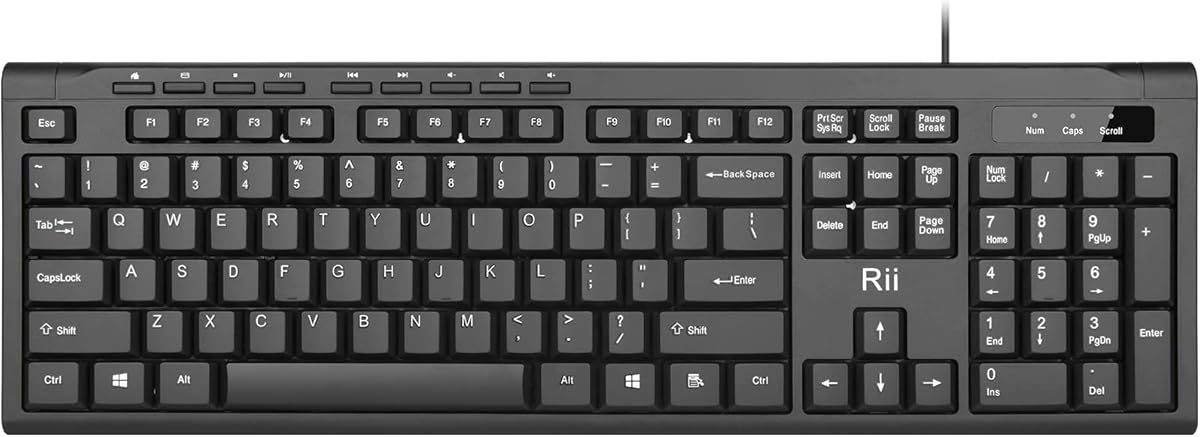
Rii RK907
4.5Editor score
Plug-and-play USB connection
Low-profile quiet keys
Splash resistant design
This guide compares ten top-rated lightweight keyboard options for portability, performance, and comfort across work and gaming scenarios.
Finding the right lightweight keyboard can transform your daily computing experience by reducing bulk and enhancing portability. Whether you travel frequently or simply want a sleeker desk setup, these devices offer essential functionality without the weight of traditional models.
We evaluated ten leading models based on build quality, connection stability, battery life, and typing comfort. Each product was selected for its ability to deliver reliable performance while maintaining a compact form factor suitable for various environments and user needs.
Each pick highlights key strengths and potential trade-offs to help you make an informed decision. Keep in mind that availability and specific features may vary over time so checking current listings before purchasing is always recommended.
4.5Editor score

4.4Editor score

4.3Editor score
This side-by-side comparison outlines the core specifications and unique features of each selected model to help you identify the best fit for your specific workflow and mobility requirements.



The GEODMAER 65% Keyboard delivers a compact wired experience ideal for users prioritizing desk space. With a 4.3 rating it balances affordability with functional design features like anti-ghosting and backlighting.
We may earn a commission when you buy through this link, at no additional cost to you.
Its detachable Type-C cable ensures a stable connection with low latency for responsive typing. The UV-coated keycaps resist fading over time while the mechanical-feel membrane provides satisfying feedback without the cost of true switches.
While it lacks wireless flexibility the fixed connection eliminates battery concerns and input lag. The 26-key conflict-free design ensures smooth multi-key presses during intense sessions.
This model suits gamers and office workers needing a quiet portable setup. It stands out as a reliable budget choice for those who value stability and space efficiency over premium features.
The 65% layout removes the numpad to free up room for mouse movement while keeping essential navigation keys.
Multiple backlight modes including breathing and steady light let you adjust visibility to match your environment.
We may earn a commission when you buy through this link, at no additional cost to you.
The Logitech Pebble Keys 2 K380s is a standout wireless keyboard known for its slim profile and reliable Bluetooth connectivity. It earns a solid 4.3 rating for its ability to simplify multi-device workflows effortlessly.
We may earn a commission when you buy through this link, at no additional cost to you.
Its Easy-Switch buttons allow instant transitions between up to three devices across Windows macOS and ChromeOS. The scooped round keycaps mimic a laptop experience offering comfort during extended typing sessions.
Though it relies on standard batteries the three-year life span reduces maintenance needs significantly. The use of recycled plastic also aligns with eco-conscious design preferences.
Ideal for students and remote workers this keyboard blends style with functionality. Its lack of backlight is a minor trade-off for its portability and battery endurance.
Switch between your laptop tablet and phone with a single press to maintain productivity without reconnecting.
Made with recycled plastic the keyboard reduces environmental impact while maintaining durability and a premium feel.
We may earn a commission when you buy through this link, at no additional cost to you.
The Arteck 2.4G Wireless Keyboard offers a full-size layout with a robust stainless steel build. Rated at 4.4 it provides a reliable wireless solution for users who need traditional keyboard functionality without sacrificing portability.
We may earn a commission when you buy through this link, at no additional cost to you.
Its nano USB receiver ensures stable connectivity up to thirty feet while the rechargeable battery lasts up to six months per charge. The low-profile keys deliver a quiet comfortable typing experience.
While it uses a wireless dongle rather than Bluetooth it remains simple to set up across various systems. The steel construction adds a premium feel though it slightly increases the overall weight.
This keyboard suits home offices and desktop users wanting a clean wireless setup. It excels in balancing professional aesthetics with practical features like a numpad and long battery life.
The stainless steel material provides a sturdy heavy-duty feel that enhances durability and aesthetic appeal.
A built-in lithium battery charges via USB and offers extended usage time between charges.
We may earn a commission when you buy through this link, at no additional cost to you.
The ProtoArc XK01 delivers a rare full-size typing experience in a foldable design. With a 4.3 rating it caters to travelers who refuse to compromise on key count or comfort while on the move.
We may earn a commission when you buy through this link, at no additional cost to you.
Its tri-fold aluminum hinges withstand over ten thousand folds ensuring long-term durability. The Bluetooth 5.1 connection allows seamless switching between devices while the quiet scissor switches suit shared environments.
Though larger than ultra-compact models it folds neatly for transport. The USB-C rechargeable battery offers up to 150 days of standby time making it ready whenever needed.
This keyboard is ideal for business travelers and writers needing desktop comfort on the go. It justifies its premium positioning with robust construction and versatile connectivity options.
One hundred and five keys including a numpad provide a full layout typically reserved for stationary desktop setups.
Internal aluminum hinges ensure the keyboard remains sturdy despite frequent folding and unfolding during travel.
We may earn a commission when you buy through this link, at no additional cost to you.
The TECKNET 2.4G Wireless Keyboard is designed for convenience with its compact size and media hotkeys. Rated at 4.4 it offers a practical solution for casual typing and entertainment control.
We may earn a commission when you buy through this link, at no additional cost to you.
Its chocolate keycap design provides smooth quiet typing while the dedicated media keys simplify volume and playback adjustments. The USB receiver ensures a stable connection without pairing steps.
Running on AAA batteries it offers up to twelve months of life depending on usage. While not rechargeable the long interval between changes adds to its low-maintenance appeal.
Best suited for living rooms or quick setups this keyboard prioritizes ease of use. Its affordability and functional layout make it a strong contender for budget-conscious buyers.
Dedicated keys allow quick access to volume and media functions enhancing entertainment workflows.
Simply insert the receiver and start typing without complicated software or pairing processes.
We may earn a commission when you buy through this link, at no additional cost to you.
The Rii RK907 is a budget-friendly wired keyboard known for its slim profile and quiet typing. With a 4.5 rating it delivers essential functionality for users who need a reliable compact input device.
We may earn a commission when you buy through this link, at no additional cost to you.
Its low-profile keys reduce noise and improve comfort during long sessions while the splash-resistant design adds durability. The simple USB connection ensures instant compatibility with most systems.
Though it lacks advanced features like backlighting or wireless connectivity it excels in core performance. The build quality remains solid despite the low price point.
This model is perfect for secondary setups or tight budgets. It proves that affordable keyboards can still provide a comfortable and durable typing experience.
Low-profile keys minimize noise making it suitable for quiet offices or shared workspaces.
The design protects against accidental spills extending the lifespan of the keyboard in casual environments.
We may earn a commission when you buy through this link, at no additional cost to you.
The Logitech MX Keys Mini combines minimalist design with premium features like smart backlighting and multi-device flow. Rated 4.4 it stands out for its ability to adapt to lighting conditions automatically.
We may earn a commission when you buy through this link, at no additional cost to you.
Its keys are shaped for fingertips enhancing comfort during typing. The rechargeable battery lasts up to ten days with backlighting or five months without. Bluetooth pairing allows seamless switching across devices.
While pricier than other models the build quality and intelligent features justify the cost. The included Flow software enables clipboard sharing between computers for enhanced productivity.
Ideal for professionals this keyboard balances aesthetics with utility. It offers a top-tier typing experience for those who value innovation and design precision.
Sensors detect hand proximity to turn on backlight automatically adjusting brightness to ambient light.
Flow technology lets you move text and files between computers effortlessly using one keyboard.
We may earn a commission when you buy through this link, at no additional cost to you.
The ProtoArc XK04 is tailored for mobile users with its foldable design and integrated PU leather cover. A 4.4 rating highlights its effectiveness as a portable typing solution for phones and tablets.
We may earn a commission when you buy through this link, at no additional cost to you.
Its compact layout saves space on airplane trays or cafe tables while Bluetooth 5.1 ensures a strong connection. The auto-sleep mode preserves battery for up to 150 days.
Though not ideal for marathon typing sessions it bridges the gap between touchscreens and physical keys. The cover adds protection while enhancing the premium look.
This model fits travelers who want reliable text input on the go. It offers a balanced mix of portability and protection for mobile devices.
The built-in PU leather cover shields the keys from scratches during transport.
Key spacing is optimized for quick messaging and notes on smaller screens.
We may earn a commission when you buy through this link, at no additional cost to you.
The Arteck Stainless Ultra Slim Keyboard features a sleek steel body with a rechargeable battery. Rated 4.4 it combines durability with a lightweight form suitable for daily portable use.
We may earn a commission when you buy through this link, at no additional cost to you.
Its thin profile makes it easy to slip into bags while the full-size key spacing ensures comfortable typing. The USB receiver maintains stable connectivity across multiple devices.
Though it uses a wireless dongle rather than Bluetooth it remains simple to use. The six-month battery life reduces the need for frequent charging.
This keyboard is ideal for users seeking a sturdy portable option. It balances premium build quality with practical wireless convenience.
The stainless steel material adds a professional look and robust resistance to wear.
A rechargeable battery offers months of usage per charge for reduced waste.
We may earn a commission when you buy through this link, at no additional cost to you.
The Logitech K400 Plus is a wireless keyboard designed for home theater control. With a 4.4 rating it integrates a touchpad for seamless navigation without needing a separate mouse.
We may earn a commission when you buy through this link, at no additional cost to you.
Its layout prioritizes media functions with dedicated keys for volume and navigation. The Unifying receiver connects to up to six Logitech devices for clutter-free setups.
While not meant for heavy typing it excels at controlling streaming services. The spill-resistant build ensures durability in casual living room settings.
Best for media centers this keyboard simplifies PC-connected TV use. It offers a practical all-in-one solution for entertainment control.
Combining keyboard and touchpad reduces device clutter on your media setup.
Up to thirty-three feet of wireless range allows operation from a sofa.
We may earn a commission when you buy through this link, at no additional cost to you.
Selecting the right lightweight keyboard requires evaluating several technical and ergonomic factors to match your specific usage patterns.
Wireless keyboards offer mobility but require battery management and may introduce latency. Wired options provide stable connections but limit portability due to cables.
Choose Bluetooth for multi-device flexibility or wired for gaming stability.
Compact layouts save space but may reduce typing speed due to key spacing. Full-size models offer traditional comfort but increase bulk.
Match the layout to your typical workspace size.
Rechargeable batteries reduce waste but require periodic charging. Disposable options may last longer between changes but increase cost over time.
Prioritize rechargeable models for eco-friendly usage.
Stainless steel adds durability but weight while plastic keeps things light. Consider trade-offs based on mobility needs.
Select sturdy materials for long-term use.
Low-profile keys reduce noise but may limit tactile feedback. Ergonomic shapes help maintain natural hand positions during typing.
Test key feel before committing to a model.
Ensure the keyboard supports your OS and supports required function keys. Multi-device switching is useful across Windows and macOS.
Check system requirements to avoid feature limitations.
Splash resistance and robust hinges increase longevity in travel settings. Look for reinforced construction if you move often.
Invest in durable components for frequent transport.
Premium models offer smart features while budget options cover basic needs. Set a limit based on required functionality.
Balance cost with long-term value needs.
Begin by pairing your wireless keyboard via Bluetooth or inserting the USB receiver for wired models. Ensure your device settings allow input permissions before typing.
Clean the surface regularly with a soft dry cloth to prevent dust accumulation. Avoid liquid cleaners directly on keys to maintain internal electronics.
Store foldable models in protective cases when traveling to prevent hinge damage. Keep batteries charged and monitor indicator lights for power status.
Yes many models use reinforced plastics or steel for longevity. Regular care ensures years of reliable performance.
Many support Bluetooth pairing for switching between devices. Check product specs for multi-device functionality.
Bluetooth-compatible models connect easily to phones and tablets. Some include layouts optimized for mobile typing.
Most modern wireless keyboards include USB-C rechargeable batteries. This reduces waste compared to disposable alternatives.
Battery life ranges from months on disposable units to years with power-saving features. Rechargeables vary based on usage habits.
Most work plug-and-play via USB or Bluetooth. Some premium models offer customization software for extra features.
The best lightweight keyboard depends on your balance of mobility typing needs and connectivity preferences. Premium options offer smart features while budget models provide reliable simplicity.
Prioritize build quality and battery life if you travel often. For stationary work focus on comfort and key layout.
Always verify current compatibility and features before purchasing as models may evolve. This guide provides a solid starting point for finding your ideal device.