
MAJORITY DVD Player
4.1Editor score
Region Free Compatibility
1080P HDMI Video
Compact Mini Design
Included HDMI Cable
Discover the top DVD Player with HDMI for TV options for 2026. This guide compares region-free players, upscaling, and connectivity to find the best fit for
Finding a reliable DVD Player with HDMI for TV ensures your classic discs look sharp on modern screens. These devices bridge the gap between older media and high-definition displays, offering convenience and nostalgia without compromising on visual quality or ease of use.
We evaluated ten top-rated models based on picture quality, region compatibility, connectivity options, and user feedback. Each product was analyzed for its ability to upscale standard definition content to Full HD and its support for various disc and USB media formats.
Each pick highlights unique strengths like compact design, universal playback, or premium audio features. Keep in mind that availability and pricing fluctuate often, so verify current details before making your final decision to ensure you get the best value available today.
4.1Editor score

4.4Editor score

4.3Editor score
This side-by-side comparison helps you quickly identify which DVD Player with HDMI for TV model meets your specific needs. We have organized key specifications including region support, output resolution, and connectivity options for easy reference.




The MEGATEK Region-Free DVD Player stands out as the top choice for those seeking a versatile DVD Player with HDMI for TV. With a 4.4 rating, it delivers crisp visuals through its 1080p upscaling technology while supporting discs from every region without error codes.
We may earn a commission when you buy through this link, at no additional cost to you.
Its multi-format compatibility extends beyond standard DVDs to include CD-RWs, MP3s, and JPEGs via USB up to 128GB. The metal housing ensures better cooling and lower noise compared to plastic alternatives, making it a reliable addition to any home theater setup.
While it cannot play Blu-ray discs, the advanced error correction handles scratched discs well. The only minor limitation is USB format support, but this is standard for budget-friendly devices and rarely impacts typical media playback needs.
Ideal for collectors of international films or families needing a simple plug-and-play solution, this player balances performance and price effectively. We recommend it for anyone prioritizing region-free access and sharp HD output on modern televisions.
You can play discs from any country without switching settings, making it perfect for imported media collections.
The metal chassis provides durability and efficient heat dissipation, ensuring long-lasting performance during extended viewing sessions.
We may earn a commission when you buy through this link, at no additional cost to you.
Sony's DVPSR510H offers a straightforward solution for domestic DVD collections with its robust 1080P upscaling and HDMI output. It holds a 4.4 rating, reflecting its reliability and ease of use for standard region users seeking quality video output.
We may earn a commission when you buy through this link, at no additional cost to you.
The Energy Star certification means it consumes minimal power in standby mode, appealing to eco-conscious buyers. Its slim design fits neatly into entertainment centers while delivering smooth playback of supported disc formats like DVD and CD.
However, the lack of USB support means you cannot play digital files directly from flash drives. Additionally, the Region 1 lock restricts international disc playback, which may be a dealbreaker for those with foreign media libraries.
This model is best suited for households with existing region-aligned collections that prioritize brand trust and energy efficiency. It remains a solid choice for basic high-definition DVD playback without extra media features.
With less than 0.5 watts standby consumption, this player helps reduce electricity costs over time.
Users can resume playback from multiple discs easily, enhancing convenience for varied media sessions.
We may earn a commission when you buy through this link, at no additional cost to you.
For those needing Blu-ray capability alongside DVD playback, the Sony BDP-S1700U is a top-tier choice. This device handles Full HD 1080p video flawlessly and includes a super quick start mode for instant access to your media library.
We may earn a commission when you buy through this link, at no additional cost to you.
Its user-friendly interface simplifies navigation, making it accessible even for less tech-savvy users. The included HDMI cable ensures you can connect immediately to modern TVs for optimal digital audio and video transmission.
While the price is higher than standard DVD players, the ability to play Blu-ray discs justifies the investment for movie enthusiasts. The region lock is a consideration for those with international media, but domestic users will find it excellent.
Choose this model if you want a future-proof setup that supports high-definition Blu-ray discs in addition to standard DVDs. It delivers superior performance for a complete home theater experience.
Boots up in less than a second, saving time between discs and providing a seamless viewing experience.
Supports Full HD Blu-ray discs for the highest quality video playback available on physical media.
We may earn a commission when you buy through this link, at no additional cost to you.
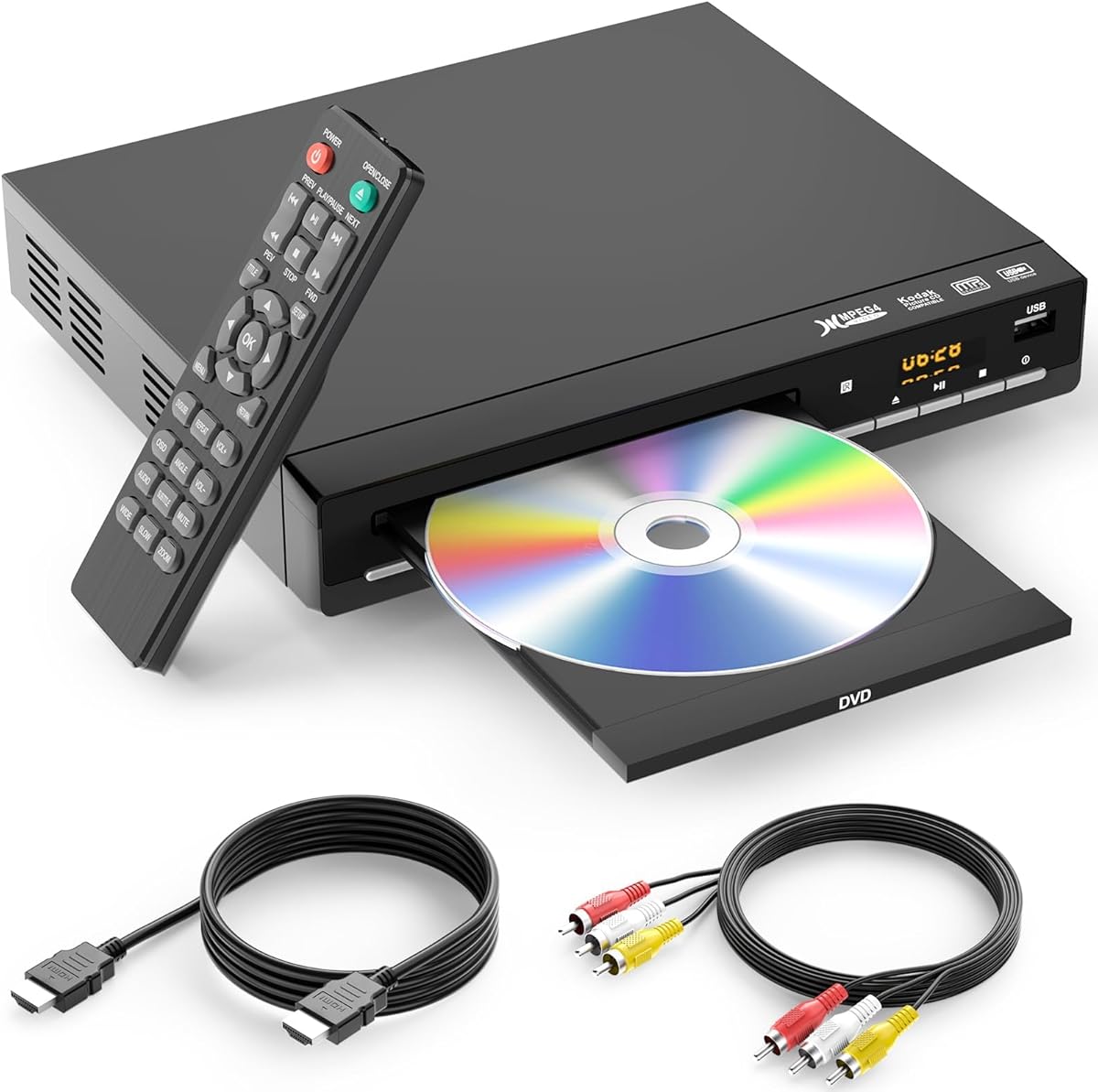
The MAJORITY DVD Player delivers exceptional value with region-free capabilities and 1080P HDMI output at a budget-friendly price. Its mini design makes it easy to fit in small spaces, perfect for dorms or guest rooms where space is limited.
We may earn a commission when you buy through this link, at no additional cost to you.
Coming with all necessary cables ensures you can set up quickly without extra purchases. The LCD display provides clear feedback during playback, and the remote control covers essential functions like zoom and slow motion for better control.
While the build is plastic rather than metal, it remains reliable for typical usage. The main trade-off is slightly fewer advanced features compared to premium models, but it meets the core needs of a basic HDMI DVD player effectively.
This is the ideal pick for cost-conscious buyers who still want region-free access and HD output. It is a practical choice for casual viewing without breaking the bank.
The box includes HDMI and RCA cables plus a remote, so you have everything needed for immediate setup.
With dimensions under 10 inches, this player fits neatly on shelves or behind TVs without clutter.
We may earn a commission when you buy through this link, at no additional cost to you.
Philips brings reliability and all-region playback to your home theater with this versatile DVD player. It enhances audio with Dolby decoding and simplifies viewing with a dedicated Screen Fit button to fill your TV screen completely.
We may earn a commission when you buy through this link, at no additional cost to you.
The USB media link allows easy playback of digital files from drives, adding flexibility beyond optical discs. Its compact size and simple interface make it accessible for elderly users or those who prefer straightforward controls.
While it focuses on standard definition upscaling to 1080P, it cannot play Blu-ray discs. This limitation is acceptable for pure DVD collections, but Blu-ray enthusiasts may need to look elsewhere for high-definition disc support.
Ideal for households needing a straightforward, universal player with good audio features, this model fits well into existing home stereo systems. It balances ease of use with essential connectivity options effectively.
One press adjusts the picture to fill the screen, correcting letterboxing without manual zoom adjustments.
Built-in Dolby decoding provides immersive sound quality, enhancing the overall movie experience on standard TVs.
We may earn a commission when you buy through this link, at no additional cost to you.
This generic model offers strong value with a 12-month warranty and support for all regions and formats. Its imported movement ensures fast reading and error correction, making it durable for frequent use and handling various disc types.
We may earn a commission when you buy through this link, at no additional cost to you.
The anti-shock function ensures smooth playback even if the device is moved slightly during use. With 1080P video support and multi-format compatibility including JPEG and MP3, it covers most entertainment needs efficiently.
The primary trade-off is brand recognition, but the warranty and support team help mitigate risk. It performs similarly to established brands at a lower price point, making it a smart choice for budget buyers.
Choose this if you want reliable region-free performance with peace of mind from the included warranty. It is a solid performer for families looking for long-term value.
High-quality internal movement ensures quick disc loading and minimizes delays between plays.
A 12-month warranty plus 24-hour support provides reliable backup in case of manufacturing defects.
We may earn a commission when you buy through this link, at no additional cost to you.
ELECTCOM PRO offers a 3-year warranty that exceeds many competitors, ensuring long-term reliability for your investment. This region-free player handles international discs effortlessly and connects easily to smart TVs via HDMI for digital quality.
We may earn a commission when you buy through this link, at no additional cost to you.
The compact size makes it ideal for tight media cabinets or travel setups in RVs. It supports MP3, JPEG, and VCD formats, offering versatile playback options for mixed media collections without needing extra equipment.
While YUV cables are not included, HDMI remains the standard for most modern TVs. The anti-shock technology ensures stable playback, protecting the laser mechanism during typical household vibrations or movements.
This model is perfect for those who prioritize warranty protection and international compatibility. It provides peace of mind with robust support and flexible connectivity options for any TV setup.
A 3-year warranty and lifetime technical support offer exceptional protection against defects and issues.
Regions 0 to 6 are supported, allowing seamless playback of imported and local discs alike.
We may earn a commission when you buy through this link, at no additional cost to you.
The DESOBRY Mini Player is incredibly small yet packs powerful features like 1080P upscaling and breakpoint memory. Its lightweight build makes it perfect for portable setups, while the remote ensures easy control for kids and elderly users.
We may earn a commission when you buy through this link, at no additional cost to you.
Breakpoint memory allows you to resume playback exactly where you left off, which is great for interrupted viewing. It supports USB and TF cards up to 32GB, offering flexibility for digital photos and music files alongside discs.
While it lacks MP4 support, it handles most common formats well. The noise cancellation ensures quiet operation, making it suitable for bedrooms where silence during playback is appreciated over loud machinery noise.
Select this for small spaces or portable use where size matters most without sacrificing HD output. It is a practical, efficient solution for those needing a discreet player.
Automatically saves your place in a movie so you can resume later without searching.
At 6.1 inches wide, it fits easily into pockets or small shelves for maximum portability.
We may earn a commission when you buy through this link, at no additional cost to you.
Panasonic stands out for audio quality with Dolby Digital sound and a high 90dB signal-to-noise ratio. This model ensures that the audio experience matches the visual quality, delivering immersive sound for movies and music.
We may earn a commission when you buy through this link, at no additional cost to you.
The 1080p upscaling improves standard definition DVDs significantly, while USB connections allow you to play content from external drives. It is a strong choice for audiophiles who value clear, distortion-free audio.
Like many premium models, it locks to region 1 and lacks some advanced menu options. However, the focus remains on delivering excellent performance for standard content rather than broad compatibility.
Choose this if you prioritize sound fidelity alongside video clarity. It is ideal for home theater setups where audio performance is as important as the visual display.
Delivers multi-channel surround sound from DVDs, enhancing the movie experience significantly.
View content from USB memory devices, expanding media options beyond physical discs.
We may earn a commission when you buy through this link, at no additional cost to you.
This all-region player focuses on ease of use with a 10-meter remote range and intuitive controls. It supports various disc formats and allows for slow playback and subtitle adjustments, making it suitable for learning languages or detailed viewing.
We may earn a commission when you buy through this link, at no additional cost to you.
The durable plastic design ensures stable operation, and the copy function lets you move CDs to USB for easy access. Its bright contrast ensures cinema-quality visuals on standard TVs, satisfying most entertainment needs.
While it lacks CPRM support, it covers most standard media types. The remote includes memory playback and loop functions, which are helpful for repetitive tasks or focused study sessions.
Ideal for elderly users or those seeking simple functionality, this model offers reliability without complex features. It is a straightforward choice for daily household entertainment.
Operates up to 10 meters, allowing control from anywhere in the room without line of sight.
Manage subtitle visibility and playback loops for better content interaction and study use.
We may earn a commission when you buy through this link, at no additional cost to you.
Selecting the right DVD Player with HDMI for TV involves considering several key factors to ensure optimal performance and value.
Region compatibility determines which discs your player can read. Players marked as 'Region Free' or 'Multi-Region' can play discs from anywhere, which is vital if you own imported movies.
Look for Region Free or 0-6 support if you need flexibility; otherwise, check your local region code matches the player.
Upscaling converts standard DVDs to higher resolutions like 1080p to suit modern HDTVs. Better upscaling improves sharpness and reduces pixelation on large screens.
Choose players offering 1080p HDMI output to ensure your DVDs look clear and detailed on high-definition displays.
HDMI ports are essential for connecting to modern TVs easily. Additional inputs like USB allow you to play digital media files without burning discs.
Ensure the unit includes HDMI output and USB ports if you want to play digital files or connect to older AV receivers.
Build quality affects durability and noise levels. Metal housings dissipate heat better and prevent warping, while plastic models may be lighter but less robust.
Opt for metal or sturdy plastic construction to ensure reliability over long periods of use.
A good remote should offer intuitive navigation and essential controls like zoom and slow motion. Some remotes have backlighting or long ranges for convenience.
Check if the remote supports key features you need like subtitle control or playback resume functions.
Audio features like Dolby decoding enhance sound quality. Ensure the player supports digital audio output if you plan to use external speakers.
Prioritize models with Dolby decoder chips if sound immersion is a priority for your viewing experience.
Warranties provide peace of mind against manufacturing defects. Longer warranties like 3-year coverage indicate manufacturer confidence.
Verify the warranty period and customer support options before purchasing to protect your investment.
Price varies based on features like Blu-ray support and build materials. Budget models often lack advanced features but serve basic needs well.
Compare features against the cost to find a model that balances functionality with your budget constraints.
Connect the HDMI cable from the player to an HDMI port on your TV, then switch the TV input to the matching source. If using an older TV, use the RCA cables and select the AV input.
Insert a disc gently into the tray and wait for it to load. Use the remote to navigate menus and control playback. Keep the remote batteries fresh for consistent operation.
Clean discs with a soft cloth from the center out to avoid scratches. Dust the player regularly to prevent overheating and keep the lens clean for optimal reading performance.
Most players in this list are standard DVD players and do not support Blu-ray discs. Only specific models like the Sony BDP-S1700U are designed to handle Blu-ray media. Check the product title carefully for 'Blu-ray' to confirm capability.
Region-free means the player can read DVDs from any geographic region, such as Region 1 or 2. Standard players are often locked to a specific region to enforce copyright laws. If you import movies, a region-free unit is essential.
Yes, most modern players allow you to play MP3, JPEG, and other media files from USB drives. Ensure your drive is formatted correctly, typically FAT32, for compatibility with the device.
Error codes often indicate a scratched disc or region mismatch. Try cleaning the disc or checking if your player supports the disc's region. If the issue persists, a factory reset may help resolve the error.
Use an HDMI cable to connect the player to the TV for the best quality. If the TV lacks HDMI, use RCA cables and set the input source to AV. Ensure the player is set to HDMI output mode.
Many products include an HDMI cable in the box, so check the package details before purchasing. If it is not included, you can buy a standard HDMI cable at most electronics stores.
We have highlighted top picks like the MEGATEK Region-Free Player and the Sony BDP-S1700U to suit various needs from budget to premium users. These models offer reliable performance and clear video output for modern TVs.
Prioritize region compatibility and 1080p upscaling to ensure your DVDs look their best on high-definition screens. Select a model that fits your specific media habits and TV setup requirements.
Prices and stock change frequently so always verify current listings before purchasing. Check the latest reviews and warranty details to ensure you make the most informed decision today.