
NGTeco Standalone Time Clock
4.3Editor score
Zero setup hassle operation
USB drive data export
500 user profile support
Compare the top biometric fingerprint scanner time clock systems for small businesses. This guide reviews features, security, and ease of use to help you
Finding a reliable way to track employee hours is essential for any growing business. Modern biometric systems reduce errors and prevent buddy punching effectively.
We analyzed ten top-rated fingerprint scanners and time clocks based on user feedback, security features, and reporting capabilities to find the best options.
Each pick highlights unique strengths like cloud access or standalone use. Note that product availability and pricing may change over time without prior notice.
4.3Editor score

4.1Editor score

4.7Editor score
This side-by-side comparison highlights the key capabilities of each device so you can quickly identify the system that fits your workforce needs and budget.

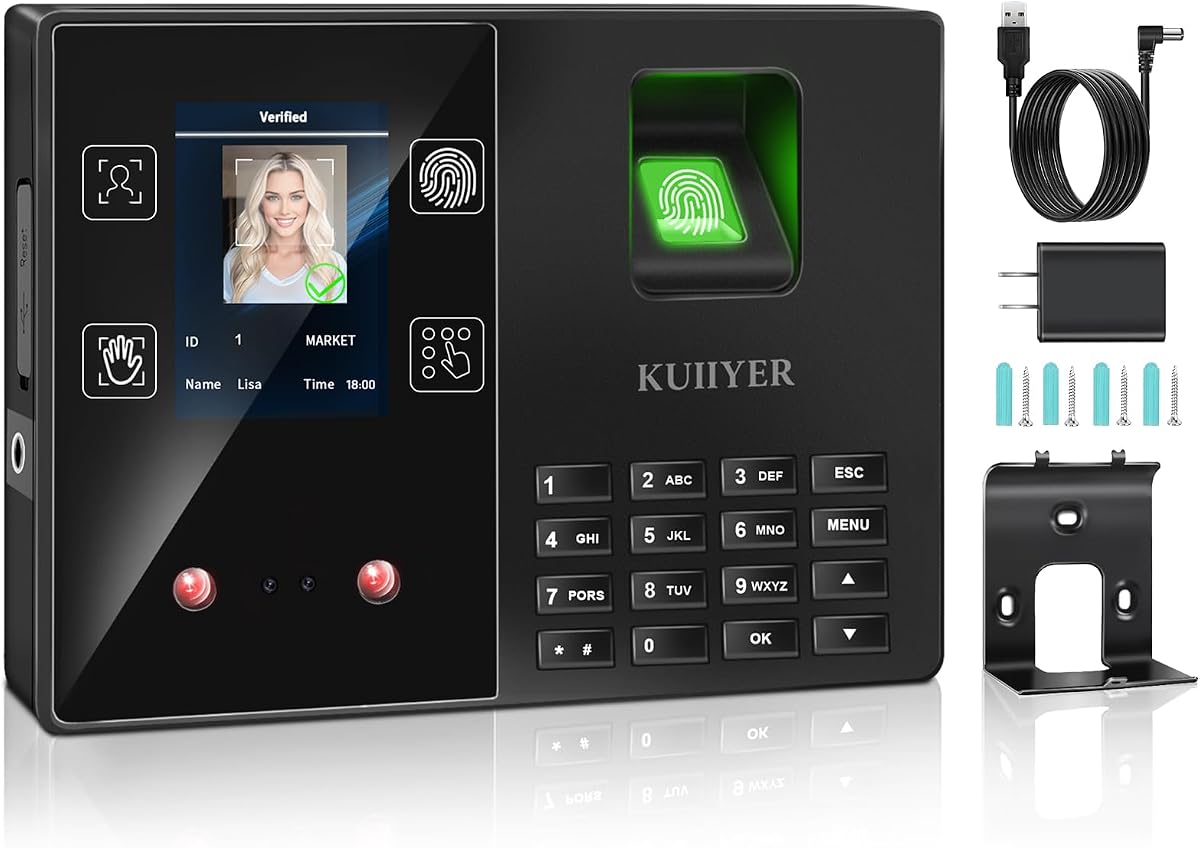


This biometric time clock stands out with its extensive array of authentication options including face palm and fingerprint scanning. It offers a robust solution for businesses seeking high security and detailed online reporting capabilities.
We may earn a commission when you buy through this link, at no additional cost to you.
The system eliminates time theft by requiring unique biological markers for clocking in. Managers can access real-time online reports and automated alerts for late punches or overtime directly from the web.
While the device is powerful, it does require a subscription after a free trial which adds to ongoing costs. Also initial setup involves connecting to a network which may take some technical effort.
For small businesses needing flexible and secure time tracking with remote access, this unit is highly recommended. It effectively balances advanced features with user-friendly management tools.
Using multiple biometric options like face and palm scanning ensures accurate identification and reduces buddy punching significantly.
Automated alerts and real-time online reporting help free up valuable time for business owners to focus on growth.
We may earn a commission when you buy through this link, at no additional cost to you.
This standalone time clock offers a no-fuss approach to tracking attendance without needing internet or complex software installations. It is ideal for businesses that prefer keeping data locally and want instant Excel reports.
We may earn a commission when you buy through this link, at no additional cost to you.
The device supports up to five hundred user profiles and fifty thousand punch records making it scalable for growing teams. Data export via USB ensures payroll integration is quick and straightforward.
It lacks cloud access which might be a downside for remote managers needing instant updates. However internal backup systems preserve data during power outages ensuring no lost records.
For organizations prioritizing simplicity and cost-effectiveness over cloud features this model delivers reliable performance. It is a solid choice for small businesses wanting a hassle-free setup.
Get started in minutes with no WiFi or complex software required for a quick and efficient deployment process.
Ditch wasteful paper cards and printer ribbons with a digital system that delivers precise and instant records.
We may earn a commission when you buy through this link, at no additional cost to you.
This high-rated time clock delivers fast reliable fingerprint recognition and convenient app control for modern workforce management. Its detailed scheduling features make it suitable for businesses with complex shift patterns.
We may earn a commission when you buy through this link, at no additional cost to you.
Employees can clock in within half a second using the advanced sensor even with wet or dry fingerprints. The mobile app allows managers to edit attendance records easily ensuring accuracy before payroll processing.
Some advanced features may require specific network configurations which can limit flexibility in disconnected environments. However data protection during power failures ensures records remain intact during disruptions.
For companies seeking speed and mobile flexibility this device offers a premium experience. It balances quick clock-ins with robust administrative tools effectively.
Advanced sensor authenticates wet dry fingerprints in half a second delivering quick secure clock-ins twenty four seven.
Align tracked hours with any payroll cycle and export timesheets via email or USB for error free processing.
We may earn a commission when you buy through this link, at no additional cost to you.
The uAttend JR2000 offers a cloud-based approach to time tracking enabling managers to view attendance data from any device. It simplifies payroll tasks with automated data handling and comprehensive reporting tools.
We may earn a commission when you buy through this link, at no additional cost to you.
Real-time access provides flexibility to monitor attendance trends and labor costs remotely. The intuitive interface ensures easy setup for teams of all technical levels while automatic backups secure employee records.
Reliance on internet connectivity means service interruptions could affect clock-in availability. Additionally ongoing subscription costs may be a consideration for budget-conscious businesses.
For businesses prioritizing remote management and automated payroll integration this system delivers strong value. Its cloud features make it adaptable to modern work environments.
View track and manage employee attendance in real-time from any device providing flexibility and control wherever you are.
Keep employee data secure and available with automatic cloud backups providing peace of mind and reliable access.
We may earn a commission when you buy through this link, at no additional cost to you.
This time clock supports face fingerprint palm and PIN recognition offering versatile options for different workforce needs. It stands out for its high capacity and absence of monthly fees making it attractive for larger teams.
We may earn a commission when you buy through this link, at no additional cost to you.
The device identifies users in under a second using advanced infrared cameras that work even in dim light. Multi-language support and voice announcements enhance usability across diverse employee groups.
Users should note that a USB flash drive is not included which is required for data exports. Also limited network integration means remote management is not possible.
For businesses needing high capacity without recurring costs this model provides a practical solution. It is efficient for offices or factories with many employees.
Supports face fingerprint palm and PIN identification with high capacity to meet various business needs effectively.
Avoid subscription costs with an offline time clock that offers accurate calculations and data security.
We may earn a commission when you buy through this link, at no additional cost to you.
This USB device serves as a compact biometric scanner that connects directly to a computer for secure user verification. It is designed for businesses that already have attendance software and want to add fingerprint security.
We may earn a commission when you buy through this link, at no additional cost to you.
The lightweight design allows convenient placement on office desktops for portable access control. Its compatibility with most attendance software makes it adaptable to existing workflows.
Because it relies on a host computer it is not suitable for standalone use. Power to the connected machine is required for operation which may limit flexibility.
For offices seeking to upgrade to fingerprint verification without replacing existing systems this device is a simple choice. It enhances security with minimal setup.
A play USB interface allows easy connection with computers for quick setup and reliable operation.
The lightweight design makes it convenient for office desktop use and portable access control needs.
We may earn a commission when you buy through this link, at no additional cost to you.
This standalone unit allows secure attendance tracking without internet access keeping data local via USB transfers. It includes RFID cards in addition to fingerprint scanning for flexible clock-in options.
We may earn a commission when you buy through this link, at no additional cost to you.
The device automates hour calculations reducing manual entry errors and paperwork. Multi-language support enhances usability for diverse teams while the step-by-step tutorial aids quick setup.
Lack of cloud connectivity means remote access is not possible. However for businesses prioritizing privacy this local approach is beneficial.
For workplaces wanting simple and private time tracking with flexible card use this model works well. It delivers reliable standalone performance.
Designed with privacy in mind the device requires no internet or network setup ensuring data stays local.
Ready to use out of the box without complicated network setup or software installation.
We may earn a commission when you buy through this link, at no additional cost to you.
This cloud-connected device offers remote access and real-time punch data through a free management app. It supports customizable shifts and bank-grade data security making it suitable for diverse workforces.
We may earn a commission when you buy through this link, at no additional cost to you.
The device captures offline punches and syncs them automatically once network is restored preventing data loss. Multi-language support allows easy usage across global teams.
Advanced employee features require a separate subscription which may increase costs for larger teams. Also reliable performance depends on consistent internet connectivity.
For small businesses needing free core cloud features and shift flexibility this clock is a strong option. It balances accessibility with security effectively.
Access real-time punch data from anywhere with the free management app and automatic report generation.
Powered by AWS US servers with end-to-end encryption to keep sensitive workforce records protected.
We may earn a commission when you buy through this link, at no additional cost to you.
Designed for simplicity this time clock tracks hours automatically without needing internet or software installations. It is an affordable solution for small businesses needing secure local attendance records.
We may earn a commission when you buy through this link, at no additional cost to you.
Setup takes under ten minutes with the provided video guide. The device exports records via USB ensuring data stays private under user control.
Basic reporting limits advanced analytics but is sufficient for small teams. Lack of cloud connectivity means no remote access to data.
For businesses wanting a no-fuss and affordable tracking system this model is ideal. It provides essential features with ease of use.
Keep your data private and fully under your control without network setup required.
Stop calculating hours by hand with automatic totals that help reduce payroll errors.
We may earn a commission when you buy through this link, at no additional cost to you.
This cloud time clock delivers stable connectivity with dual-band WiFi support for uninterrupted performance. It allows managers to monitor attendance via mobile app ensuring flexibility for remote operations.
We may earn a commission when you buy through this link, at no additional cost to you.
Configurable overtime rules and automatic reports simplify payroll calculations significantly. A built-in battery backup ensures continuous tracking during unexpected power outages.
Reliance on internet connectivity may limit use in areas with poor service. Also some features require a separate subscription for full access.
For businesses needing reliable connectivity and flexible scheduling this model offers robust features. It is a strong cloud option for growing teams.
Manage your small business attendance effortlessly from anywhere with an intuitive mobile app and web portal.
Equipped with both 2.4GHz and 5GHz WiFi delivering fast stable connectivity for uninterrupted performance.
We may earn a commission when you buy through this link, at no additional cost to you.
Selecting the right time clock involves evaluating security, connectivity, reporting, and budget. Consider these factors to ensure the system meets your workforce needs.
Look for devices that offer multiple biometric options like fingerprint palm face or PIN codes. Diverse authentication reduces risks of fraud and ensures compatibility with employee preferences.
Choose systems with at least two reliable methods to enhance accuracy and convenience.
Decide between standalone models requiring USB transfers and cloud-connected devices offering remote access. Cloud systems provide real-time data but rely on internet stability.
Match connectivity needs to your management style and office infrastructure.
Check the maximum number of users and punch records the device supports. Growing businesses need scalable systems to avoid frequent upgrades.
Ensure the unit can handle your current and future team size comfortably.
Efficient payroll requires tools that allow easy export of attendance data to Excel or payroll software. Look for automated reports and customizable shift tracking.
Prioritize systems with flexible export options to reduce manual work.
Secure devices should include backups for power outages and encrypted data storage. Protecting employee records is vital for compliance and privacy.
Select units with reliable backup systems and encryption standards.
Consider initial purchase price plus any subscription fees for cloud services. Some systems offer free core features while others charge monthly.
Calculate total cost of ownership to avoid unexpected expenses.
Reliable vendor support helps resolve setup or technical issues quickly. Check warranty length and availability of US-based service centers.
Choose brands offering strong warranties and accessible support teams.
Intuitive displays and simple menus make clock-ins faster for employees. Look for multilingual support if your workforce is diverse.
Prioritize systems with clear interfaces to minimize training time.
Begin by enrolling each employee's biometric data carefully following the device instructions to ensure accurate recognition. Provide clear guidance on how to position fingers or faces for scanning.
Regularly clean the sensor surface with a soft dry cloth to remove dirt or moisture that may affect performance. Avoid using harsh chemicals that could damage the device.
Back up attendance records periodically via USB or cloud export to prevent data loss. Keep firmware updated and check for software patches provided by the manufacturer.
It is a device that records employee work hours using unique biological traits like fingerprints instead of paper cards. This reduces errors and prevents buddy punching effectively.
Not all systems need internet. Some standalone models work offline and export data via USB. Cloud-based units require connectivity for remote access and real-time reports.
Yes many modern units support fingerprint face palm and PIN codes. This flexibility allows employees to choose their preferred clock-in method securely.
Most devices allow export to CSV or Excel files via USB drive or cloud portal. These files integrate easily with payroll software for automated processing.
Quality devices include backup batteries or internal memory to retain data. Attendance records remain saved and can be synced once power is restored.
Standalone models usually have no fees. Cloud services may offer free core features with optional paid plans for advanced reporting or remote access.
Use a soft dry cloth to wipe the sensor gently. Avoid liquid cleaners or rough materials that could damage the sensitive scanning surface.
Most systems provide step-by-step guides or video tutorials. Initial setup involves enrolling users and connecting to power or networks which typically takes minutes.
This guide highlighted top options ranging from standalone units to cloud-connected systems. Each offers unique strengths depending on your business size and management needs.
Prioritize features like security reliability and ease of use. Consider whether remote access or local storage better fits your operational workflow.
Before purchasing check current availability and confirm compatibility with your existing systems. Selecting the right clock helps streamline payroll and improve workforce efficiency.