Lonely Binary 8×8 Matrix Pack
4.7Editor score
MAX7219 driver with SPI
3-color variety pack included
3D printed enclosures
This guide compares the top LCD dot matrix modules for embedded displays, evaluating resolution, contrast, connectivity, and driver compatibility for diverse
LCD dot matrix modules remain essential for embedded systems requiring clear text or graphics. They offer reliable output for industrial panels, hobby projects, and consumer devices needing durable visual feedback without complex screens.
We evaluated ten models based on resolution, backlight quality, driver support, and physical dimensions. Our analysis focuses on usability with common microcontrollers like Arduino and ESP32 to ensure practical relevance for builders.
Each pick highlights distinct strengths from compact character displays to graphic panels. Prices fluctuate frequently so verify current listings before purchasing. These selections represent the most consistent performers available for general engineering and maker needs.
4.7Editor score

4.1Editor score

4.5Editor score
The following table provides a side-by-side overview of specifications, interface types, and physical dimensions for each selected module to help identify the right fit for your project requirements.




The Ximimark 12864 module stands out as a reliable choice for graphic displays. With a 4.1 rating it balances cost and performance effectively for general embedded projects.
We may earn a commission when you buy through this link, at no additional cost to you.
Its integrated potentiometer simplifies contrast adjustment without needing external circuits. The dimmable backlight ensures readability in various lighting conditions which is crucial for handheld devices.
While the viewing angles are not as wide as IPS panels the blue backlight offers excellent contrast in low light environments. Soldering headers adds minor setup time but ensures secure connections.
This module is ideal for hobbyists needing a full graphic interface without RGB costs. Its compatibility with standard libraries makes it a strong recommendation for beginners.
The onboard potentiometer allows quick visual calibration during prototyping saving time on software calibration routines.
Dimmable backlighting extends battery life in portable projects by reducing current draw when full brightness is unnecessary.
We may earn a commission when you buy through this link, at no additional cost to you.
This generic 12864 module delivers solid performance at a competitive price point. Its high contrast and wide viewing angles make text and graphics readable from multiple positions.
We may earn a commission when you buy through this link, at no additional cost to you.
The inclusion of pre-installed headers reduces assembly time significantly compared to bare modules. It works seamlessly with popular boards like the Mega 2560 and Nano.
While it lacks unique features beyond standard operation the brightness levels are sufficient for indoor use. The lack of specific branding means quality can vary slightly between batches.
Buyers looking for a straightforward graphic display without premium features will find this model sufficient. It serves well for industrial panels where viewing angle matters.
Pre-installed headers eliminate the need for initial soldering allowing immediate connection to breadboards or custom PCBs.
Support for multiple microcontroller types ensures flexibility when switching between different development boards for the same project.
We may earn a commission when you buy through this link, at no additional cost to you.
This two-pack of 1602 modules offers excellent value for projects needing multiple text displays. The blue backlight provides clear character visibility in both dark and lit environments.
We may earn a commission when you buy through this link, at no additional cost to you.
Operating within a broad temperature range from -20 to 70 degrees Celsius ensures reliability in diverse conditions. The compact size allows fitting into tight spaces on small PCBs.
Since these are character displays they cannot show graphics which limits their use to data readouts. However the standard parallel interface simplifies connection for beginners.
Ideal for sensor monitors or status panels where only text is required. Buying two units at once reduces shipping costs for larger batches.
Receiving two modules in one package allows for redundant displays or multi-device setups without extra shipping fees.
The extended temperature range supports outdoor or industrial applications where extreme heat or cold might occur.
We may earn a commission when you buy through this link, at no additional cost to you.
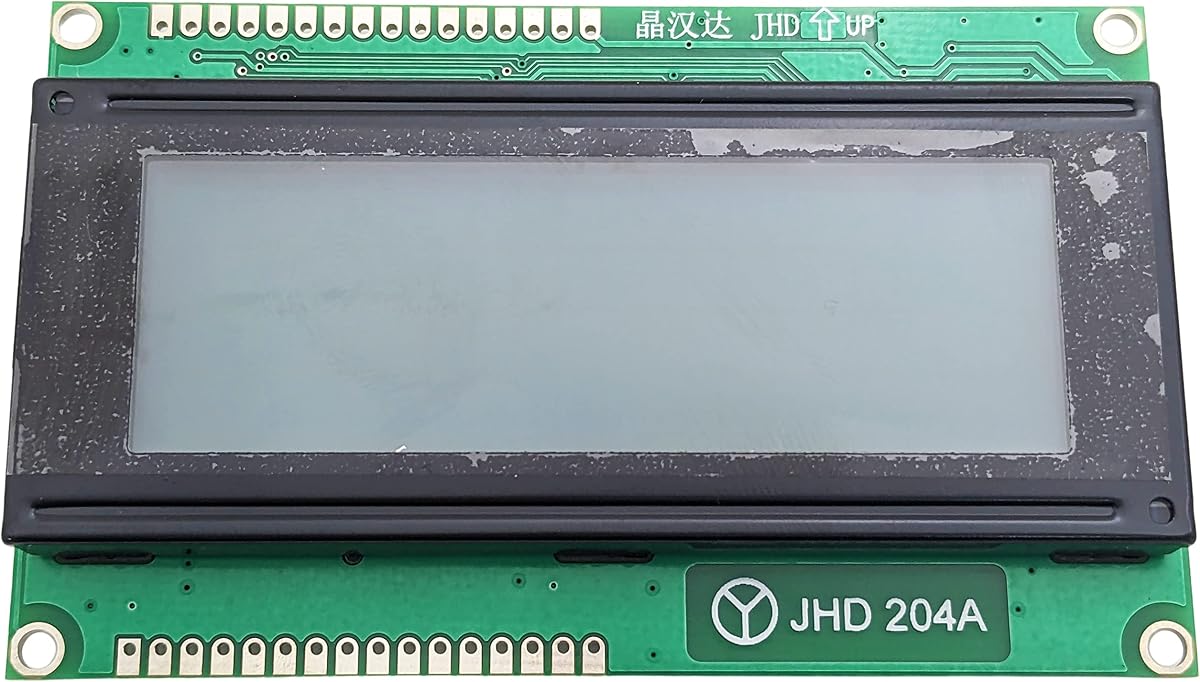
The 20×4 format offers significantly more text space than standard 1602 units making it suitable for complex data. It comes with an integrated driver reducing external circuitry needs.
We may earn a commission when you buy through this link, at no additional cost to you.
The reflective gray display relies on ambient light which can be advantageous in sunlit environments but requires sufficient lighting for clarity. Its physical dimensions fit well into enclosures.
While it lacks a built-in backlight this simplifies power management for low consumption applications. Users should ensure adequate illumination or add an external light source.
This module is best for control panels requiring extensive status messages. The integrated controller streamlines wiring and setup for custom interfaces.
Four lines with twenty characters each allow detailed information display without needing complex scrolling logic.
The included driver chip handles data processing allowing the microcontroller to send simple text commands directly.
We may earn a commission when you buy through this link, at no additional cost to you.
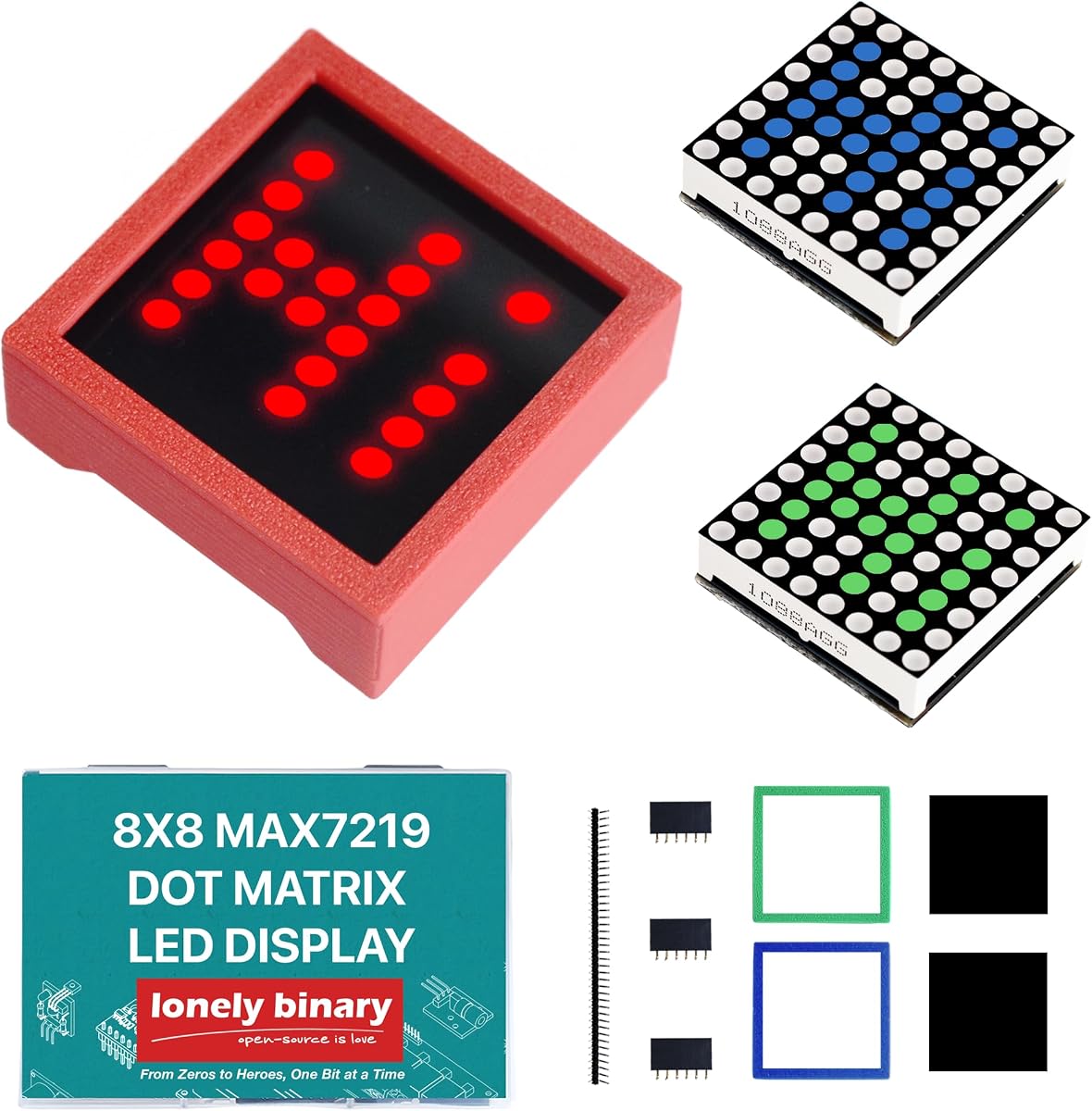
This three-pack offers distinct red green and blue displays providing visual variety for projects. The MAX7219 driver simplifies control via SPI making it accessible for ESP32 users.
We may earn a commission when you buy through this link, at no additional cost to you.
Enclosures are included which protects the boards and adds a professional finish without custom machining. Each module can be controlled independently or chained together.
While individual modules are fixed color they can be combined for multi-color effects. The brightness levels are software adjustable which helps manage power consumption.
An excellent choice for scrolling text or simple games. The inclusion of cases makes it ready for immediate display in desktop builds.
3D printed enclosures give the modules a finished look suitable for public displays or permanent installations.
Daisy-chain support allows building wider displays without complex wiring logic by simply connecting output to input.
We may earn a commission when you buy through this link, at no additional cost to you.
This HiLetgo module is a staple in many maker projects due to its reliability and broad library support. It operates efficiently at 5V which matches most logic levels.
We may earn a commission when you buy through this link, at no additional cost to you.
The common cathode design ensures compatibility with standard drivers and libraries used across the Arduino ecosystem. LEDs are bright enough for indoor applications.
While it lacks extra features like enclosures its robust build quality stands up to frequent handling. Mounting holes allow secure installation in custom enclosures.
Best suited for simple visual feedback like alarms or status indicators. Its standard size makes it easy to integrate into PCB designs.
The MAX7219 chip handles multiplexing internally freeing the microcontroller to manage logic without display timing.
Extensive library support means most Arduino and ESP32 examples work out of the box with minimal modification.
We may earn a commission when you buy through this link, at no additional cost to you.
This module is optimized for numerical readouts like clocks or counters. The 8-digit layout provides enough space for standard timestamps or large values.
We may earn a commission when you buy through this link, at no additional cost to you.
It supports BCD decoding which simplifies programming by allowing direct digit values instead of complex bit patterns. The SPI connection reduces pin usage on microcontrollers.
A test mode is available for verifying all segments before final integration. The low power shutdown feature is useful for battery powered devices.
Perfect for projects requiring precise numeric data display. The compact form factor fits well on narrow panels where space is limited.
BCD decoding allows passing integer values directly to the display reducing the need for string conversion code.
The low power shutdown mode ensures minimal current draw when the display is not needed active.
We may earn a commission when you buy through this link, at no additional cost to you.
The SunFounder LCD2004 provides ample space for complex data readouts. Its white on blue color scheme offers high contrast which is easier on the eyes than white on black.
We may earn a commission when you buy through this link, at no additional cost to you.
Built with quality components it maintains stable performance over time. The integrated potentiometer ensures consistent contrast adjustment without needing external components.
It requires 5V power which aligns with most standard microcontroller outputs. The viewing area is large enough for detailed menus or long status lines.
Ideal for industrial or advanced hobby projects needing extensive text. The high brightness ensures readability even in moderately lit rooms.
The white on blue theme reduces glare and improves legibility compared to older dark background models.
Onboard potentiometer ensures that calibration is retained even after power cycles without needing re-adjustment.
We may earn a commission when you buy through this link, at no additional cost to you.
These 32×8 modules offer a wider canvas for scrolling text or large pixel art. They maintain the same quality and driver simplicity as the smaller 8×8 versions.
We may earn a commission when you buy through this link, at no additional cost to you.
Enclosures are included ensuring a professional appearance for wide banners. Chaining allows expansion to even larger widths if needed.
The SPI connection simplifies wiring compared to parallel interfaces. Brightness control allows fine-tuning for different viewing distances.
Great for message tickers or scoreboard displays. The variety pack supports color-coded information without needing custom manufacturing.
Connecting modules horizontally creates custom wide banners for large text displays without complex driver logic.
Included enclosures make it suitable for permanent installations where exposed PCBs might look unprofessional.
We may earn a commission when you buy through this link, at no additional cost to you.
This two-pack offers excellent value for projects needing dual displays. The slim profile makes it easy to fit into tight enclosures or panels.
We may earn a commission when you buy through this link, at no additional cost to you.
Pre-drilled mounting holes allow secure installation without custom brackets. The standard 5-pin interface ensures compatibility with almost all driver libraries.
Operating at 5V it aligns with standard logic levels requiring no voltage conversion. Brightness is software adjustable for power savings.
Perfect for multi-device setups like clock and temp readouts. The compact design maximizes space efficiency in crowded panels.
The slim 13mm profile allows mounting close to other components without protruding into the enclosure.
Pre-drilled holes simplify securing the module to panels or custom housings without additional mounting hardware.
We may earn a commission when you buy through this link, at no additional cost to you.
Selecting the right display module involves evaluating resolution, interface type, and compatibility. This guide outlines key factors to consider.
Choose between character and graphic displays based on whether you need text or images. Graphic modules like 128×64 support icons while 1602 units are for text.
Higher resolution allows more complex visuals but requires more pins and processing power.
Parallel interfaces are common for LCDs but consume many GPIO pins. SPI based LED modules like MAX7219 reduce pin count and simplify wiring.
Selecting the right protocol ensures compatibility with your microcontroller's pinout.
Most modules operate at 5V which matches standard Arduino boards. Check if your board outputs 5V logic or 3.3V to avoid damage.
Matching voltage requirements prevents hardware issues and ensures stable performance.
Blue backlight offers good contrast in low light while white on blue provides better readability in bright conditions. Adjustable contrast potentiometers simplify calibration.
Consider ambient lighting conditions to select the best visibility option.
Modules with integrated drivers like MAX7219 or built-in LCD controllers reduce external circuitry. Check if libraries are available for your chosen framework.
Integrated drivers save time and reduce potential wiring errors.
Measure the available space in your enclosure to ensure fit. Some modules are slim while others have taller profiles.
Accurate dimension checks prevent fitment issues during final assembly.
For large displays check if daisy-chaining is supported. Modules with standard pins allow easy chaining for wider banners.
Expansion capabilities provide flexibility for future project growth.
Look for boards with solid PCBs and robust soldering. Industrial temperature ranges ensure stability in harsh environments.
Higher quality components improve longevity and reliability.
Connect the module to your microcontroller using the specified interface. Ensure power supply matches the module's voltage requirements to prevent damage.
Install appropriate drivers or libraries on your development environment. Use examples to verify connections before writing custom display logic.
Avoid direct sunlight for reflective displays to prevent glare. Store unused modules in anti-static bags to prevent electrical damage.
Character modules display only text in fixed layouts like 16×2. Graphic modules support custom pixels allowing images and complex shapes.
Most LCDs use a potentiometer for contrast. LED modules often support software brightness control via the driver chip.
Yes, modules with SPI controllers like MAX7219 support chaining via DIN and DOUT pins to expand width.
Arduino, ESP32, and Raspberry Pi Pico work with most modules. Ensure logic voltage matches for stable operation.
Incorrect contrast or timing settings often cause this. Adjust the potentiometer or update library initialization code.
LCDs draw low power while LEDs draw more. Use low power modes to save energy in portable projects.
Use pre-drilled holes or adhesive tape. Enclosures provide the best protection for permanent installations.
Standard LCDs may fade in sunlight. Choose high brightness models or enclosures with anti-glare glass for outdoor applications.
The Ximimark 12864 and Lonely Binary sets offer excellent performance for graphic and LED needs respectively.
Prioritize compatibility with your microcontroller and required display resolution when making a selection.
Always check current listings for the latest pricing and stock availability before purchasing.