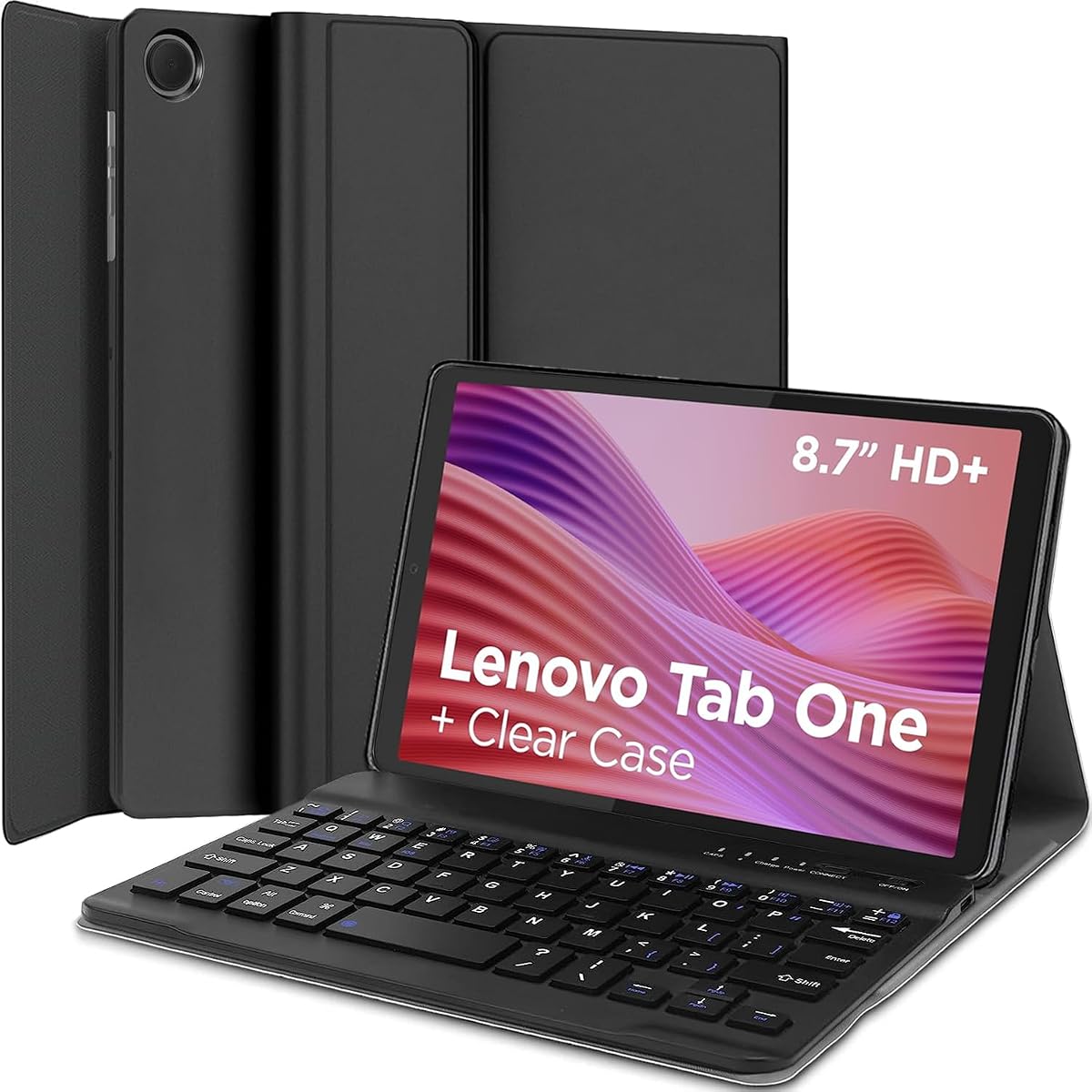
Case with Keyboard for Lenovo Tab One 8.7 Inch
5.0Editor score
Magnetically detachable keyboard
Long lasting battery life
Real hard laptop style keys
Finding the right keyboard for your Lenovo Tab One transforms it into a portable workstation. We evaluated ten top-rated cases and standalone keyboards to help you choose the perfect match for your needs.
Our team analyzed compatibility, build quality, typing experience, and battery life across various models. This list covers magnetic detachables, folio covers with trackpads, and slim Bluetooth options for every workflow.
Each pick highlights specific strengths like backlighting, trackpad support, or premium materials. Please note that prices fluctuate frequently, so verify current deals before making your final purchase decision.
5.0Editor score

4.8Editor score

4.5Editor score
As an Amazon Associate we earn from qualifying purchases.
This side-by-side comparison details the unique features and specifications of each reviewed product to help you identify the best fit for your specific usage scenarios.


This case leads our list with a strong 4.8 rating and robust features. It offers a full keyboard experience with detachable flexibility and multiple backlight options.
We may earn a commission when you buy through this link, at no additional cost to you.
The premium PU leather provides excellent protection against drops and dust. The 7 color backlight allows you to work in low light without straining your eyes.
While the lack of a trackpad is a trade-off, the magnetic detachment lets you use the keyboard independently. This design supports various typing angles comfortably.
Buyers seeking a versatile keyboard case will find this model ideal. It balances price and features effectively for daily typing tasks on the Lenovo Tab One.
The 7 color backlight with 3 brightness levels ensures visibility in any environment.
Premium PU leather and rubber-lined interiors safeguard your tablet from physical damage.
We may earn a commission when you buy through this link, at no additional cost to you.
With a perfect 5.0 rating, this budget pick delivers exceptional value. It uses hard ABS keys for a tactile typing experience superior to soft silicone alternatives.
We may earn a commission when you buy through this link, at no additional cost to you.
The wood grain case adds aesthetic appeal while protecting your device. Its battery lasts up to 100 hours, reducing charging frequency significantly.
Although it lacks backlighting, the clear key legends help typing in moderate light. The magnetic attachment ensures stable typing without slipping.
Ideal for cost-conscious buyers needing reliable productivity, this case excels. It transforms your tablet into a lightweight laptop efficiently.
Hard ABS material keys ensure faster typing with fewer errors compared to touchscreens.
Auto sleep mode and 100 hour runtime make it perfect for extended travel.
We may earn a commission when you buy through this link, at no additional cost to you.
This pack stands out with a spacious trackpad and pogo pin connectivity. It eliminates Bluetooth pairing by using direct physical connectors for data and power.
We may earn a commission when you buy through this link, at no additional cost to you.
The 1.5mm key travel provides a comfortable ergonomic typing feel. Sixteen shortcut keys enhance multitasking capabilities for users needing speed.
Note that compatibility is critical here as it targets the Idea Tab Pro. Verify your exact model before purchasing to ensure proper fit.
Users prioritizing a true laptop experience should consider this pack. The trackpad adds significant value for navigation without touching the screen.
Pogo pin connectors allow instant data and power without pairing or charging.
Large responsive trackpad supports intuitive gestures for smooth content navigation.
We may earn a commission when you buy through this link, at no additional cost to you.
A versatile standalone keyboard, this model connects to Android, iOS, and Windows devices. It simplifies workflows for users managing multiple devices daily.
We may earn a commission when you buy through this link, at no additional cost to you.
The slim profile and 1.3mm travel ensure comfort during long typing sessions. Bluetooth and USB-C options offer flexibility for various setup needs.
While it lacks a case, its portability is unmatched. You carry it easily in any bag for typing on the go.
This keyboard suits tech-savvy users juggling devices. It provides a reliable typing surface across platforms efficiently.
Effortlessly switch between up to 3 devices for seamless multitasking workflows.
Choose between Bluetooth or USB-C to ensure reliable connection anywhere.
We may earn a commission when you buy through this link, at no additional cost to you.
Designed for the 11-inch Tab, this case includes a tempered glass screen protector. It offers robust protection against scratches and collisions.
We may earn a commission when you buy through this link, at no additional cost to you.
The 7 color backlight allows you to customize your lighting. Combined with the detachable design, it provides flexibility for different viewing angles.
The 9H hardness glass ensures clarity without affecting touch sensitivity. Premium PU leather adds durability to the build.
Buyers with the 11-inch model will find this comprehensive. It addresses both typing and screen protection needs simultaneously.
Included 9H tempered glass prevents scratches and maintains optical clarity.
Removable wireless keyboard transforms the case into a laptop in seconds.
We may earn a commission when you buy through this link, at no additional cost to you.
This option combines a keyboard with an integrated multi-touch trackpad. It is designed to mimic a full laptop setup for the Tab One.
We may earn a commission when you buy through this link, at no additional cost to you.
The 3-zone backlighting allows for customized lighting across the keyboard. The trackpad supports gestures for easy navigation on Android systems.
While features are strong, user ratings suggest potential compatibility nuances. Verify your device model carefully before purchase.
Users wanting a true laptop feel with touch navigation will appreciate this. It offers a comprehensive solution in a single case.
Multi-touch trackpad supports Android gestures for efficient scrolling and clicking.
3-zone backlighting lets you highlight specific areas for better visibility.
We may earn a commission when you buy through this link, at no additional cost to you.
This premium case features modern Type-C charging for the keyboard. It ensures easy power management without needing specialized cables.
We may earn a commission when you buy through this link, at no additional cost to you.
The slim design makes it highly portable for daily use. Full access to ports means you can charge your tablet simultaneously.
Premium leather offers a refined look and feel. The magnetic attachment provides stability while allowing quick detachment.
Buyers valuing modern connectivity and style will prefer this choice. It balances portability with robust build quality effectively.
Type-C charging offers a universal and convenient power solution for the keyboard.
High-quality PU leather provides a sophisticated look and durable protection.
We may earn a commission when you buy through this link, at no additional cost to you.
This bundle includes a wireless mouse and keyboard case for maximum productivity. The mouse adds precise control that complements the touchscreen well.
We may earn a commission when you buy through this link, at no additional cost to you.
The pen slot keeps your stylus secure and accessible. Combined with the backlight, it creates a complete workspace for the 11-inch tablet.
Adjustable angles support various modes from typing to watching videos. The protection ensures your device stays safe during transport.
Ideal for creative users needing multiple input tools, this set stands out. It consolidates essential peripherals into one easy-to-carry package.
Includes a wireless mouse for precise navigation and efficient multitasking.
Built-in pen slot ensures your stylus is always ready and secure.
We may earn a commission when you buy through this link, at no additional cost to you.
This standalone keyboard is ultra-slim and ideal for travel. It connects quickly via Bluetooth 3.0 for instant typing support.
We may earn a commission when you buy through this link, at no additional cost to you.
The 7 color LED backlight adds personalization. It suits users who prefer separate components over a bundled case.
A dedicated power switch helps conserve energy during downtime. Its small size makes it easy to store in any bag.
Those who already own a protective case will benefit from this add-on. It provides typing flexibility without adding bulk to your setup.
Bluetooth 3.0 ensures fast and stable connection without complex setup.
Dedicated power switch extends battery life during idle periods.
We may earn a commission when you buy through this link, at no additional cost to you.
The thinnest option on our list, this keyboard measures just 3/16 inch. It prioritizes portability above all else for users on the go.
We may earn a commission when you buy through this link, at no additional cost to you.
Chiclet-style keys provide a comfortable and familiar typing experience. The lightweight design ensures it adds minimal weight to your travel kit.
Though it lacks backlighting, its efficiency is notable. It pairs quickly and maintains a stable connection for basic typing.
Ideal for minimalists who need a typing tool, this fits the bill. It keeps your setup clean and portable without sacrificing core functionality.
3/16 inch thickness makes it the easiest to carry in any bag.
Chiclet-style keys offer a tactile and responsive typing feel.
We may earn a commission when you buy through this link, at no additional cost to you.
Selecting the right keyboard involves considering compatibility, build type, and specific features like trackpads or backlighting.
Always confirm your model number before purchasing. The Tab One and Idea Tab have distinct sizes and mounting points. Mismatched cases may not lock securely or protect your device properly.
Decide between detachable magnetic or standalone Bluetooth options. Magnetic cases integrate seamlessly with the tablet's case. Standalone units offer more flexibility across devices but require separate storage.
Check key travel distance and material. ABS hard keys provide better feedback than silicone membranes. Look for ergonomic designs that reduce finger strain during long typing sessions.
Backlights are essential for low-light typing. Options range from single color to multi-zone RGB. Consider battery impact since backlighting drains power faster than standard use.
Cases should offer full coverage for the screen and back. PU leather and TPU layers add durability. Ensure cutouts align with ports and cameras for uninterrupted charging.
Look for rechargeable batteries with long runtimes. Models offering 90+ hours reduce charging frequency. Check charging methods like USB-C for modern convenience.
Trackpads and mice add precision. If you prefer gesture navigation, choose a model with an integrated trackpad. Pen slots are useful for stylus users to keep tools accessible.
Slim designs suit travelers better. If you move frequently, prioritize lightweight materials. Detachable keyboards let you remove weight when using the tablet as a media player.
Pair your keyboard via Bluetooth or magnetic connection according to the instructions. Ensure the tablet is set to detect external input devices correctly.
Clean the keyboard regularly with a soft cloth to prevent dust buildup. Avoid liquids near the connection points to prevent short circuits.
Store your device in a cool dry place when not in use. Turn off the keyboard to extend battery life and prevent accidental key presses.
No, these keyboards are designed for specific models like the Tab One TB305FU or Idea Tab 11 inch. Always check your model number before buying to ensure a perfect fit.
Yes, the detachable designs allow you to type with the tablet secured in the protective case. Some models even let you adjust viewing angles while typing.
Most models use micro USB or USB-C cables. Plug the keyboard into a power source for 2-3 hours to charge it fully for extended usage.
Many options offer 3 brightness levels or multiple colors. You can usually cycle through these settings using dedicated function keys on the keyboard.
Models with integrated trackpads support multi-touch gestures like swiping and zooming. Standard keyboards do not support gestures unless paired with a separate mouse.
Restart the Bluetooth on your tablet and unpair the device. Reconnect the keyboard by pressing the pairing button again to establish a fresh link.
Mechanical or hard key keyboards are generally quieter than membrane ones. However, all keyboards produce some sound; check reviews for noise levels if this is a priority.
Standalone Bluetooth keyboards often support multiple devices. However, cases are specific to the tablet size. Verify multi-device support in the product specs.
Our top pick balances features and value with the Backlit Keyboard Case for Lenovo Tab One. It delivers versatility and strong protection for daily use.
Prioritize compatibility and battery life to ensure smooth daily operations. A keyboard that lasts long and fits correctly makes your tablet truly useful.
Prices vary by retailer and time of year. Check current offers before purchasing to get the best deal on your chosen accessory.