
Sonnet Breakaway Box 850 T5
4.5Editor score
Built-in Thunderbolt 5 dock
850W high power capacity
Triple wide GPU support
This guide compares the top ten Egpu Enclosures available in October 2026 for performance, compatibility, and value to help you choose the right external
External graphics processing units have transformed portable computing by allowing laptops to connect to powerful desktop GPUs. This upgrade is essential for gamers and creators who need desktop-level performance without sacrificing mobility. Choosing the right enclosure involves balancing bandwidth, power delivery, and physical fit for your specific hardware needs.
We evaluated ten leading enclosures based on their Thunderbolt generation support, power supply capacity, and overall build quality. Each product was analyzed for compatibility with modern laptops, support for large graphics cards, and additional docking features. Our goal is to provide a clear overview of what each option brings to the table.
Every pick includes detailed specifications, pros and cons, and real-world use cases to guide your decision. Prices fluctuate frequently due to market demand and inventory changes so checking current listings is advised. We cover everything from budget-friendly options to premium solutions designed for professional workflows and high-end gaming.
4.5Editor score

4.0Editor score
5.0Editor score
The following table provides a side-by-side comparison of all ten enclosures reviewed in this guide. It highlights key specifications including power supply wattage, supported bandwidth, and unique features to help you quickly identify the best fit for your system.


The Razer Core X V2 stands out as a top choice for modern external graphics setups with its Thunderbolt 5 support. It delivers up to 80 Gbps bandwidth which is essential for high-end gaming and professional workloads. The enclosure is built to handle large cards and includes a robust cooling system.
We may earn a commission when you buy through this link, at no additional cost to you.
Its modular design allows you to choose any ATX power supply and GPU up to four slots wide. This flexibility ensures the unit remains relevant as hardware evolves. The included Thunderbolt 5 cable simplifies connection and supports 140W power delivery to your laptop.
While the enclosure itself is solid, remember that the GPU and PSU are not included which adds to the cost. Also it does not support Mac devices with M1 or later chips so verify compatibility before buying. These trade-offs are acceptable for the performance and flexibility offered.
Buy this if you want a premium enclosure that supports the latest high-performance GPUs and Thunderbolt 5 speeds. It is ideal for gamers and creators who need desktop-level power and a clean single-cable connection to their laptop.
The ultra-fast 80 Gbps bandwidth ensures smooth performance with demanding creative apps and AAA games without bottlenecks.
Easy tool-free installation with thumbscrews lets you swap GPUs or power supplies without specialized tools or hassle.
We may earn a commission when you buy through this link, at no additional cost to you.
The Sonnet Breakaway Box 850 T5 offers near-desktop GPU power with its high-capacity power supply and Thunderbolt 5 interface. It delivers 80 Gbps bi-directional bandwidth that accelerates GPU-accelerated workflows significantly. The unit comes with a built-in dock that expands your connectivity options.
We may earn a commission when you buy through this link, at no additional cost to you.
Its 850W power supply meets the demands of today's and tomorrow's power-hungry graphics cards. The enclosure supports triple wide cards from NVIDIA and AMD which is rare in compact units. A variable-speed fan ensures quiet yet effective cooling under heavy loads.
The premium price reflects the included high-wattage supply and extra ports like Ethernet and USB-A. It focuses on Windows 11 laptops which may limit compatibility for other systems. These constraints are minor compared to the robust performance and docking features provided.
Choose this if you need maximum power and connectivity in one package without buying separate accessories. It suits professional users who require reliable GPU acceleration for editing rendering and visual effects on Windows systems.
Includes peripheral Thunderbolt 5 port USB-A ports and Gigabit Ethernet for a complete desktop replacement experience.
Supercharge AI-driven applications and creative workflows with massively increased processing power and efficiency.
We may earn a commission when you buy through this link, at no additional cost to you.
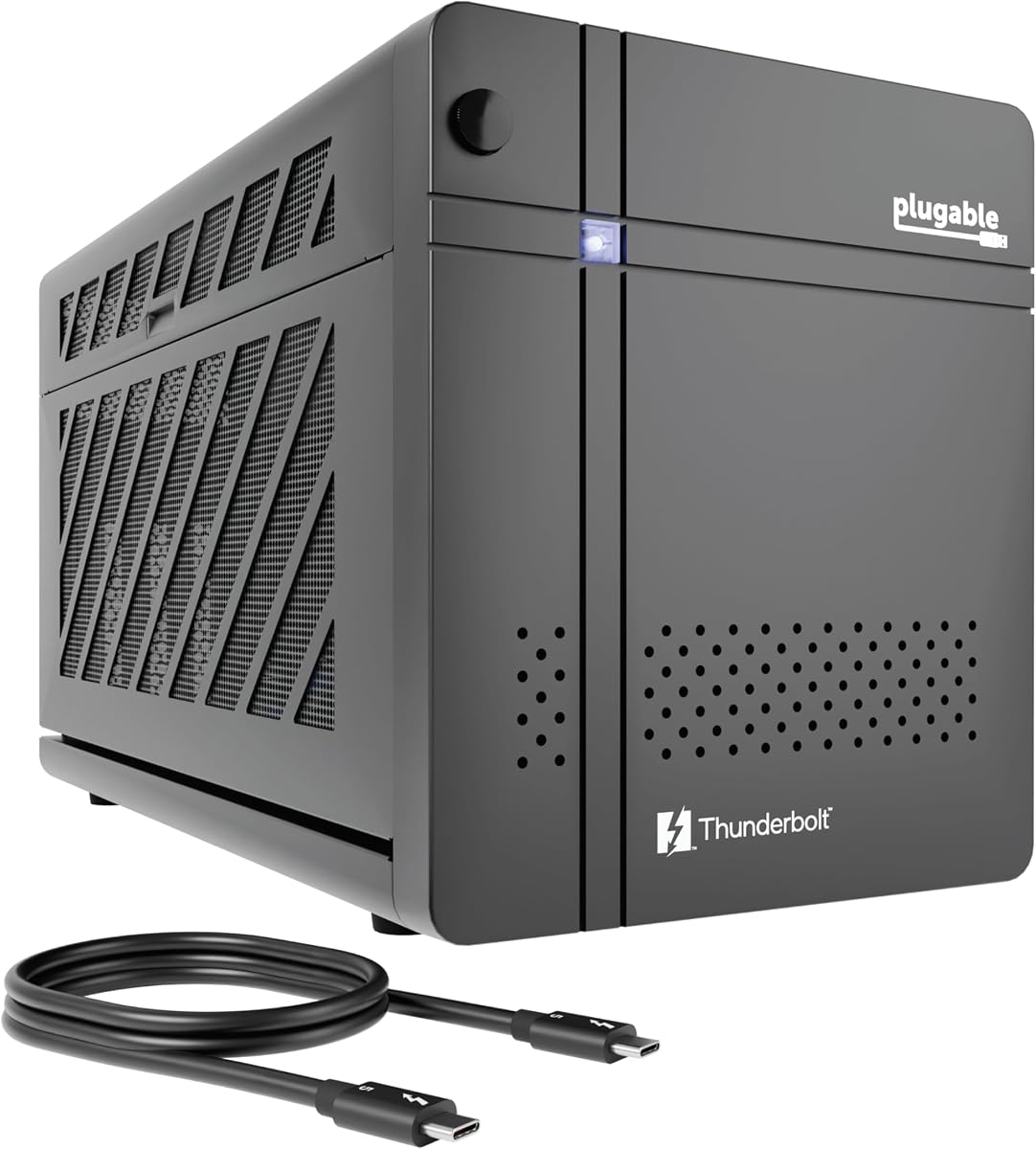
The Plugable Thunderbolt 5 AI eGPU Enclosure is designed for users who prioritize privacy and control over their data. It supports running local AI models with an air gap ensuring sensitive prompts never leave your perimeter. The unit includes an 850W power supply and 80 Gbps bandwidth.
We may earn a commission when you buy through this link, at no additional cost to you.
Its modular performance scales with your workflow offering features like 2.5Gbps Ethernet and downstream Thunderbolt 5 ports. The dedicated 600W to the GPU leverages Thunderbolt 5 speeds for double the bandwidth of Thunderbolt 4. Lifetime support from a North American team adds reliability to the purchase.
This enclosure does not work with macOS Linux or ChromeOS which limits its audience to Windows users focused on AI. The price reflects the included PSU and specialized AI features. For the target use case these trade-offs are acceptable given the privacy benefits.
Buy this if you need a secure high-performance enclosure for offline AI work on Windows. It is perfect for developers and privacy-conscious users who want local model hosting without cloud risks or subscription fees.
Resolve innovation versus privacy by running models locally with no cloud risks or subscription fees ever.
80Gbps Thunderbolt 5 speeds offer double the bandwidth of Thunderbolt 4 for efficient data transfer.
We may earn a commission when you buy through this link, at no additional cost to you.
This External GPU Enclosure offers a complete kit that includes everything needed for immediate setup. It comes with a 240W power supply Thunderbolt 4 cable and a custom carrying case. The anodized aluminum shell provides robust protection while maintaining a lightweight profile for travel.
We may earn a commission when you buy through this link, at no additional cost to you.
It supports most NVIDIA and AMD graphics cards within specific dimensions up to 8.07 inches long. The unit features Thunderbolt ports with PD charging to keep your laptop powered during use. It works with Windows and Linux making it versatile for different operating systems.
The carrying case makes it ideal for portable use though the power supply limits it to lower-end GPUs. It does not support Thunderbolt 5 which may affect future performance gains. For portable tasks these limitations are reasonable given the all-in-one convenience.
Choose this if you need a ready-to-go portable solution for light gaming or editing on the road. It fits well with NUCs and laptops that support Thunderbolt 4 or USB4 interfaces and value ease of transport.
Lightweight robust anodized aluminum shell combines portability with premium protection for mobile use.
Includes enclosure power supply cable and carrying case for instant plug and play setup.
We may earn a commission when you buy through this link, at no additional cost to you.
The ANQ-L336 Mini eGPU Enclosure offers excellent performance for gaming AI training and rendering on a compact chassis. It features a certified JHL7440 controller that ensures stable data transfer across Thunderbolt and USB4 connections. The unit supports multiple power supply types for flexibility.
We may earn a commission when you buy through this link, at no additional cost to you.
Its compatibility extends to Windows Linux and macOS which broadens its appeal significantly. The 85W PD fast charging works well with handheld gaming consoles to enable turbo modes. It also acts as a hub allowing attachment of external devices when needed.
The power supply is sold separately which requires additional purchase and planning before setup. Limited support for newer RTX 50-series cards means compatibility may vary for cutting-edge GPUs. For most users these constraints are acceptable given the broad OS support.
Buy this if you need a versatile dock that supports multiple systems and handheld consoles. It is ideal for users who want a hub-like experience with GPU expansion across Windows Linux and Mac environments.
Compatible with NUCs laptops and gaming machines featuring USB4 or Thunderbolt interfaces across major OSes.
Supports ATX SFX FLEX and DC power supplies letting you choose the best fit for your setup.
We may earn a commission when you buy through this link, at no additional cost to you.
The VK-Y900 eGPU Enclosure future-proofs your setup for desktop-level gaming and professional rendering with wide GPU support. It uses an official Intel controller module for stable data transfer and includes high-grade PCB construction. The dual Thunderbolt ports allow for both data and power delivery in one cable.
We may earn a commission when you buy through this link, at no additional cost to you.
It is specially optimized for handhelds like ROG Ally X enabling turbo modes via PD charging. The unit supports various NVIDIA and AMD series which ensures longevity. It also offers specialized assistance for connectivity and driver issues to smooth out setup.
The power supply is not included which adds to the initial cost and setup steps. AI deep learning capabilities are strictly limited to TinyGPU applications which restricts broad development use. These trade-offs are acceptable for the stable connectivity and broad hardware support.
Choose this if you want a reliable enclosure that supports a wide range of graphics cards and handhelds. It suits laptop users who value single-cable solutions and future-proofing for upcoming GPU generations.
Wide support for latest RTX and Radeon series ensures your setup stays relevant for years to come.
Charge your laptop at 85W while using the external GPU keeping your workspace clean and efficient.
We may earn a commission when you buy through this link, at no additional cost to you.
The Sonnet Breakaway Box 750ex connects high-performance GPU cards to Mac and Windows systems via Thunderbolt 3. It cuts application task times by enabling GPU acceleration for editing rendering and color grading workflows. The enclosure includes a 750W power supply for robust performance.
We may earn a commission when you buy through this link, at no additional cost to you.
It supports many of the latest GPU cards including NVIDIA and AMD pro models. The 750ex model adds four USB ports and an Ethernet port for expanded connectivity. This makes it a versatile hub for professional workstations needing wired network access.
The Thunderbolt 3 interface limits bandwidth to 20 Gbps which is slower than newer Thunderbolt 5 models. M1 Macs are not compatible which excludes a large segment of current Mac users. For those with older Macs or PCs these limitations are manageable.
Buy this if you need a reliable proven enclosure for Mac or Windows workstations needing Ethernet and USB ports. It suits professionals who prioritize stability and high power capacity over the latest bandwidth specs.
GPU acceleration significantly improves rendering and color grading performance for professional workflows.
Includes four USB Type A ports and an Ethernet port for a complete desktop connection suite.
We may earn a commission when you buy through this link, at no additional cost to you.
This Mini eGPU Enclosure offers an affordable entry point for expanding graphics power on NUCs and laptops. It uses an officially certified JHL7440 controller module for stable and efficient expansion experiences. The unit supports various power supply types to fit different budgets.
We may earn a commission when you buy through this link, at no additional cost to you.
It includes both a USB-A port and a second TB3 port allowing users to attach downstream devices. The compact design makes it easy to store or transport when not in use. However it requires some knowledge of compatibility settings for optimal performance.
The power supply is not included which means you must buy one separately. DIY knowledge may be needed for driver and hardware compatibility checks. For budget-conscious users these are reasonable compromises for the expansion capabilities provided.
Choose this if you want a basic low-cost solution for GPU expansion with flexible power options. It suits users who already have power supplies and value compact design and additional USB connectivity.
Certified controller module ensures stable data transfer while dual ports allow hub functionality.
Verify USB4 or Thunderbolt support before purchasing to ensure your hardware is compatible.
We may earn a commission when you buy through this link, at no additional cost to you.
The MINISFORUM DEG2 eGPU Dock offers dual-link interfaces supporting both USB4 V2 and OCuLink for ultimate flexibility. It allows instant switching between docking mode and pure GPU performance via a hardware switch. A built-in M.2 NVMe slot stores AI models and files directly on the dock.
We may earn a commission when you buy through this link, at no additional cost to you.
Its 80Gbps Thunderbolt 5 compatibility ensures enhanced signal stability with a built-in re-drive booster. This minimizes latency during high-bandwidth tasks like LLM inference or 8K rendering. The unit features automatic power-on synchronization with the host for a seamless experience.
The presence of an M.2 slot may limit space for larger GPUs depending on installation. The dual-mode switching adds complexity for users who prefer simple setups. These trade-offs are acceptable given the storage and bandwidth advantages it provides.
Buy this if you want dual connectivity options and onboard storage for AI or large project files. It suits power users who need low latency and flexible connection modes for diverse workflows.
Dual-link interfaces support transfer speeds up to 80Gbps with instant switching modes via hardware.
Direct storage of AI models and files on the dock maintains synchronized workspace and GPU performance.
We may earn a commission when you buy through this link, at no additional cost to you.
This External eGPU Enclosure offers a complete kit that includes everything needed for immediate setup on a budget. It comes with a 240W power supply Thunderbolt 4 cable and a custom carrying case. The anodized aluminum shell provides robust protection while maintaining a lightweight profile for travel.
We may earn a commission when you buy through this link, at no additional cost to you.
It supports most NVIDIA and AMD graphics cards within specific dimensions up to 8.07 inches long. The unit features Thunderbolt ports with PD charging to keep your laptop powered during use. It works with Windows and Linux making it versatile for different operating systems.
The carrying case makes it ideal for portable use though the power supply limits it to lower-end GPUs. It does not support Thunderbolt 5 which may affect future performance gains. For portable tasks these limitations are reasonable given the all-in-one convenience.
Choose this if you need a ready-to-go portable solution for light gaming or editing on the road. It fits well with NUCs and laptops that support Thunderbolt 4 or USB4 interfaces and value ease of transport.
Includes enclosure power supply cable and carrying case for instant plug and play setup.
Lightweight robust anodized aluminum shell combines portability with premium protection for mobile use.
We may earn a commission when you buy through this link, at no additional cost to you.
Selecting the right external graphics enclosure requires understanding key factors that impact performance and compatibility.
Thunderbolt 5 offers up to 80 Gbps bandwidth compared to 40 Gbps on Thunderbolt 4 or 20 Gbps on Thunderbolt 3. Higher bandwidth ensures your GPU runs at full speed without bottlenecks during gaming or rendering tasks. Always check your laptop supports the Thunderbolt version the enclosure uses.
Look for Thunderbolt 5 or USB4 V2 support for future-proof performance and maximum GPU utilization.
Graphics cards vary widely in power draw so ensure the enclosure includes a PSU or supports one with sufficient wattage. High-end cards may require 750W or more while low-end cards need less. A higher wattage PSU protects against power limitations and allows for GPU upgrades.
Choose an enclosure with at least 850W PSU or flexible ATX support for maximum card compatibility.
Enclosures have physical limits on GPU length height and slot width. Large triple-slot cards may not fit inside compact units. Measure your intended GPU dimensions before buying to avoid return hassles and verify the enclosure supports wide cards.
Check the maximum slot width and length specifications to ensure your chosen GPU will fit physically.
Some enclosures work only with Windows while others support macOS and Linux. Mac M1+ chips often have limited support for external GPUs. Always verify compatibility with your specific laptop model and operating system before purchasing.
Ensure the product explicitly supports your OS and CPU generation to avoid driver or connectivity issues.
Some enclosures include extra USB ports Ethernet and display outputs acting as a full dock. These features reduce cable clutter and provide better connectivity options. Decide if you need a full dock or just a GPU pass-through.
Look for Thunderbolt docking features if you want to connect peripherals without extra hubs.
Active cooling fans help manage heat during prolonged usage preventing throttling. Steel chassis offer better durability than thin aluminum but may be heavier. Check fan noise levels and cooling capacity for your workload intensity.
Select a unit with active cooling and robust chassis for stable performance under load.
Some kits include carrying cases cables and power supplies while others sell them separately. Warranty length and support quality vary by brand so consider long-term reliability. A complete kit reduces extra costs and setup time.
Prioritize bundles that include necessary cables and case for convenience and value.
Prices range widely from budget-friendly kits to premium docks with high wattage. Determine if you need Thunderbolt 5 speeds or if older versions suffice for your tasks. Compare total costs including required GPU and PSU purchases.
Balance performance needs with your budget to find the most cost-effective solution available.
Connect your laptop to the enclosure using the included Thunderbolt or USB4 cable to enable data and power transfer. Ensure your laptop recognizes the external display and GPU driver before launching applications. This single-cable setup simplifies docking and reduces clutter.
Install the latest GPU drivers for your card and enable external GPU mode in system settings. For Mac users this may require enabling external GPU support in graphics preferences or using compatibility tools. Verify the GPU is active through system monitor tools.
Keep the enclosure on a flat hard surface to allow airflow for the internal cooling fan. Dust the vents regularly to prevent overheating during prolonged use. Always power down the GPU before unplugging to avoid driver conflicts or data corruption.
Not all laptops support external GPUs as it depends on Thunderbolt 3 or 4 or USB4 connectivity. Check your laptop specifications or device manager to confirm compatible ports before buying. Older laptops without these ports will not work with standard eGPU enclosures.
You can use most desktop NVIDIA and AMD cards provided they fit inside the enclosure physically. Check length height and slot width limits plus power requirements before selecting a GPU. Some cards may need adapters or extra power cables to function.
Yes an eGPU boosts graphics performance for gaming rendering and creative tasks significantly. It offloads GPU-intensive work to the external card freeing up system resources. However expect some performance loss compared to a desktop due to bandwidth limitations.
Thunderbolt 5 offers the best performance with 80 Gbps bandwidth reducing bottlenecks for high-end GPUs. It is future-proof for upcoming graphics cards and AI workloads requiring massive throughput. Older versions are acceptable for mid-range cards but limit maximum performance.
Yes you must install the latest GPU drivers for the external card to work properly. Some systems require enabling external GPU support in BIOS or graphics settings first. Keeping drivers updated ensures stability and access to new features.
Mac support depends on model and chip M1 and later chips often lack eGPU support entirely. macOS supports some Thunderbolt 3 GPUs but compatibility is limited. Always verify Mac compatibility on product specs before purchasing for Apple devices.
Many enclosures come with a power supply but others require you to supply an ATX SFX unit. Check if the product includes a PSU and if it matches your GPU power requirements. A separate PSU adds cost but allows customization and upgrades.
Most enclosures include HDMI DisplayPort or Thunderbolt video outputs for monitors. Connect your display directly to the enclosure and set it as the primary display in settings. This ensures the external GPU renders the content for best performance.
We reviewed ten top external GPU enclosures ranging from Thunderbolt 5 powerhouses to affordable portable kits. The Razer Core X V2 Sonnet Breakaway Box 850 T5 and Plugable TB5 AI offer standout performance and unique features for different needs.
Prioritize Thunderbolt bandwidth power supply capacity and physical fit for your GPU when making a decision. Ensure compatibility with your laptop and operating system to avoid costly mistakes and frustration during setup.
Prices for enclosures and GPUs change often so check current listings before finalizing your purchase. Compare total kit costs including power and carrying accessories to ensure you get the best value available today.